 Problems? See this thread at archive.org.
The next big AMD driver update is here: http://forum.notebookreview.com/gam...ew-amd-ati-radeon-ccc-12-11-beta1-driver.html
-
-
How many and which type of places for hard drives are in R3 and R4 chassis? Can be possible mount 15mm hard drive like Western Digital Green WD20NPVT 2TB IntelliPower 8MB Cache 2.5" SATA 3.0Gb/s ?
Newegg.com - Western Digital Green WD20NPVT 2TB IntelliPower 8MB Cache 2.5" SATA 3.0Gb/s Internal Notebook Hard Drive -Bare Drive
And still didn't answered. For owner R4 with 7970M, can you measure consumption at idle and load?
Thank you for reply. -
I tried to fit a WD 1TB 15mm hard drive in the R3, and it wouldn't fit. Only if you mount it without the caddy.
-
IIRC, all m17xs can only take the standard 2.5" x 9.5mm high notebook drives. If you go with the optical bay hard drive caddy you can put a 12.5mm high drive in there. But 12.5mm tall would probably be the limit at the moment.
2nd HDD or SSD Caddy for Alienware M15x (replaces optical drive) [OBHD-SATA12-SATA-NF] - $43.00 : NewmodeUS, Hard Drive Caddys for Notebooks -
there are thicker drives out there? Jeez...
-
megszalott and radji, thank you for your opinion. Thinking about mSata har drive for boot@system ( Crucial M4 128GB mSATA) and two 9.5mm 1TB hdds. Hope is not problem equip AW M17x R4.
-
I think the msata is not sata III which may slow down the performance, i know the other normal size HDD spaces in the R4 are SATA III, maybe not the mSATA, see if anyone can confirm?
-
Always understood the msata port to be sata 2. A limitation of the chipset. I did see one guy that built a 3 drive raid 0 array and he said that the array was slowed down to sata 2. I don't think that this makes much difference with an ssd though. I had an ssd in my r3 running at sata 2. Fixed it only to find that in use there was hardly any difference - maybe 2 seconds on win load?
-
Agreed, my DESKTOP (not laptop) was only slower by a second or two when limited down to SATA II. Still faster than 4x 500GB 7500RPM HDDs lol!
P.S. Anyone here have 4 RAM slots instead of 2 RAM slots on their AW? I was wondering as I've got 3d model AND had the non 3D model, both of them with only 2 ram slots. -
I believe they all have 4 slots. The other two are under the KB.
-
I am currently on shipped BIOS A08.test with my M17xR4 with HD7970M.
Should I upgrade to A09 before I also apply CCC (catalyst) 12.11?
Can someone confirm for me the best way to upgrade CCC to 12.11 is to remove shipped version of CCC, reboot, run ccleaner, reboot, install CCC 12.11, reboot?
Hoping this will sort my enduro issues, from reading todays posts things look promising!
Thanks -
Correct. gokou - see this link: Documentation
-
Once again, you are the MAN Micky! I'm soo excited as I'll probably aim for more RAM sticks now!!
I don't think there's much a difference in A09 from A08, A few people have said different cooling profiles compared to the much older Bios updates and the addition of UEFI.
Thank you for the documentation BatBoy! I will probably go 4x8GB shopping now!
-
yeah, crucial makes some great SSDs altogether
OCZ I can't say too much for, but so far... Both the drives I've purchased (one sandforce based and one Indilinx based) have been good to me heh. -
I kind of want to remove the optical drive to try make the laptop lighter but feels like too much trouble. I guess it won't shave much weight off anyways.
-
Just upgraded from 12.8 to 12.11. I am so happy with the performance of my 7970M!
-
Why did you remove the mark? I thought that was a good boost.
-
You mean the stats? Well I guessed it was quite inappropriate to place them in this thread? But meh, here they are
AMD Radeon HD 7970M video card benchmark result - Intel Core i7-3610QM Processor,Alienware M17xR4 score: P6458 3DMarks <-- 12.11 Stock Clocks
AMD Radeon HD 7970M video card benchmark result - Intel Core i7-3610QM Processor,Alienware M17xR4 score: P5764 3DMarks <--12.8 Stock Clocks
No BSODs, No Crashes at all.
I overclocked my 7970M using MSiAfterburner. Here's the result.
AMD Radeon HD 7970M video card benchmark result - Intel Core i7-3610QM Processor,Alienware M17xR4 score: P7176 3DMarks -
hey guys!
I have been using driver version 12.6 for along time on my 6970m. For awhile its been asking me to update to 12.9 but every time I did that I would get a blue screen and forced to restore. Today 12.10 became available in the auto updater!
Anyone have a good driver link for 12.10/newer or is it okay to just update from the program?
Any help would be greatly appreciated -
-
Kinda curious here. Getting ready to install A09. Does Enduro need to be turned on before doing the update? Can Enduro be togged on and off after the update is installed? I want to be sure because I have seen that it might not be possible to go back once that is done due to changes in the way the EFI works.
-
I see so many. Need a pro to chime in on the one to get
-
Jeez, a lot of ATI fans in here
I'm a HUGE Nvidia fan myself, luckily I was shipped a 680m
-
Not particularly a fan, just 7970M offers a similar performance and much cheaper than 680M. Plus, 680M's stock was low for quite a while. It's still low, I think...
Anyone here using a mech keyboard, I may ask? -
If I had a desk, I'd be using a mech keyboard in a heartbeat. Love the Corsair K90.
-
Guys, i have a question here....well, in regards of welcoming the long waited windows 8, i want to do some upgrade with my r4. I want to upgrade the ram, switch the wireless card to 6250 from 2230, and upgrade bios to the latest bios,
however, i don't really understand how to flash the bios, can anybody who has done it give me a clue??because i heard this is very crucial because i could brick my system if i did it incorrectly. Many thankss
Sent from my Transformer Prime TF201 using Tapatalk 2 -
Have you tried other keyboard than the Corsair? I heard many positive feedback about the CM Quick Fire. Ducky, Filco and Leopold are all good mech keyboard. And they have been around there way before Razer came up with their BW.
Razer just release their Ouroboros, without multicolor. Anyone wanna guess when they are gonna update it with multicolor??? LOL @ milking.
When you download the BIOS firmware, it is a exe file that will run from your Windows. It's indeed crucial because you can potentially brick it. What I generally do is restart the laptop and run the BIOS update ONLY. Not running other programs is safer, I think.
P/S: If there is no feature on A09 or A08 that you WANT, then you don't need to update it. Save the trouble of potential bricking the mobo. -
One you go MECH. You never go BECK
HAHA!
I have two Mechanical's btw, BOTH Razer though. So both blue switches. I love them both!
Razer Blackwidow
and Razer Blackwidow Tournament Edition for portability!
-
Hi everyone and most delighted since it is my first post here
I bought a M17x R4 a few weeks agos, to be more specific a 680M GTX/HD 4000, i73610QM, 1 SSD 64Go + 1 To, Non stereoscopic 1080p @60Hz screen model, and I have HUGE issues of many types, I really need help to know if my M17x has factory issues or if it's only Dell/Nvidia drivers related.
Basically the issue involves screen display, external or integrated one and it comes in 2 forms :
- HUGE stuttering in every games. I tried absolutely everything (windows 7 clean install, every NVIDIA drivers clean released to date compatible with the M17x R4 even the las 310.xx one, BIOS update to 9.0, forcing v sync through Nvidia control panel /nvidia inspector/ 3D3 overrider) but still it remains.
Some games or playable, other not ,L4D2 for instance is completely unplayable with a mouse even if fraps shows a 60fps steady ... My benchmarks are normal, I somehow managed to solve the problem tweaking the nvidia control panels but it keeps coming back.
- Using HDMI for 1080p @60Hz and Stereo 3D in 1080p@24 or 720p@60 (external monitor : Asus VG278H 3D Vsion 2 Ready with ER emetter integrated 120hz)
When I am plugged through HDMI, the 680M won't show in the nvidia control panel in "configure multiple display", the only card that shows is the HD 4000. Since it is not 3D compatible, 3D stereo options are not available in Nvidia Control panel.
I tried Fn+F7 and somehow I managed to have the 680M appears in "configure multiple display" and enable the 3D in HDMI, but since I updated the BIOS in 9.0 it won't budge, I can't manage to run the desktop on my Asus with the 680M
Is there a way to force the desktop to run on the 680M ?
- Using Minidisplay to DVI dual Link adaptors in order to use 120hz + 3D Vision 2
With an Apple adaptor it only enables 1080p @60fps, 680M shows in "configure multiple display" section in Nvidia Control Panel and 3D options are available but 3D is broken, the monitor's 3D emetter won't turn on although 3D is recognized
With a Minidisplay to DVI Dual Link Active 120Hz adaptor approved by Nvidia, 1080p @120Hz is enabled and 3D works perfectly but ... the screen won't stop flipping between the Asus's screen and the Alienware's screen, as if Optimus was going mad not knowing on wich GPU it should stay. What pisses me off is that I managed to have some very quick catches at how the game were running and the stuttering was gone and 3D perfectly working at 1080p@120hz on L4D2 for instance
As of now It is as if my M17x was not working, I spend most of my time trying to tweak and fix it, in 2 weeks I must have played 2 hours max. I feel that Optimus is more a problem than anything especially when 120Hz and 3D are involved.
I have bought the monitor (pretty expensive one at 550 euros) especially because it was supposed to work with 3D vision 2 and 120Hz, and I don't know at this point if I should stay with this gamerig or not.
I NEVER EVER hhad such similar issues with any of my gamer laptops before that ( Asus 55VW and 53 GW) I tried to call Dell a lot of times, they can't help me
What do you think? Is there any fix you have in mind ? Other members with similar hardware have same problems ?
Any help would be more than welcome, I am turning wacko
Thanks in advance -
A month ago, I was at Fry's just randomly checking out mech keyboards. Razer was the first I looked at. I ended up typing on a bunch of them and greatly preferred the tactile feel of the K90. Something about the way they keys pressed, clicked, and felt seemed most right to me. I was able to type fastest and smoothest on it compared to the others. I also like its look.
-
After a long and epic battle(mostly with redirecting user profile to HDD), finally finished installing win8 pro, AHCI and UEFI boot. Hits login menu in 15 seconds after hitting power button.
-
ahhh.... No wonder It actually took a while for my 680m to come home, but once it came home, there was really NO OTHER game (on the normal playlist) that could bring it down
Bios flashing is easy, just open it up and run the program It's an .exe executable so all you have to do is double click, while letting the program do its work!
As for Windows 8, I'd like to just give everyone a heads up, as this thing is pretty nice on OLDER systems. HOWEVER, drivers are still very scarce as Win 8 development is still in its early stages.
I've tested this thing on a netbook consisting of a 1st generation Intel atom @ 1.6Ghz, 2GB Ram, 160gb hdd @ 5400RPM, and integrated video card. It's VERY sleek, fast, and doesn't hog resources like Win7/XP, or well I SHOULD say it does, but doesn't really eat up as bad as the prior 2. So far I've ran I.E. with no problems, along with a few other functions. Since resolution is small (1024x768), you can't run I.E. from the start menu. Everything does indeed run a lot lot lot smoother than in Win 7 and XP when installed on that netbok, boot-up times were noticably faster, with maybe 15-20 seconds (I didn't count), it was fast enough that I was comfortable with full reboots and shutdowns/turnons.
Not running programs is safer, you think? You better be sure of it good sir! As potential programs in the background MIGHT corrupt the Bios uploading process and in return, bricking a system
You're right on the money with that, I wouldn't update a Bios if not needed, especially with my horrible experience with Dell's upgraded bioses in the XPS sector.
Noice! Is this with a SSD or a regular HDD? -
Samsung 830 SSD... -
I posted a cm code for 40 dollars off cm quick fire in the tech bargains thread. Not sure if its still valid or not. I use the cm quick fire rapid and like it. It's a nice small keyboard easily transported. Mech keyboards are the ssd of keyboards. Once you have one you won't go back.
-
You are saying exactly what I meant. I said not running OTHER programs is safer, which is the reason why I suggest a restart before flashing BIOS.
For some reasons, my local Fry's kinda sucks. I went to Fry's yesterday to get some thermal paste and they only have a few AS products and that's it. Quite disappointed.
I looked up K90's specs. It's red switches, the best for gaming because its lightest, so you will need less force to press the button, more flexibility. I'm not into keyboard design so my keyboard is just a plain, simple black board. It's 4 lbs though...
I think the CM was on sale for $50/60 a few weeks ago. At that price, it's quite difficult to pass. Too bad I already have my mind set on another keyboard. The CM actually is a very good entry mech keyboard.
The Razer BW line has a rare layout that it's impossible to replace the keycaps. A no go for me. Plus, it uses blue switch and it's just so annoying.
I do like the sleeve that BW Tournament came with. It's so nice. I was thinking of buying one just to get the sleeve and then sell the keyboard......
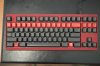
One of the thing I enjoy about the mech keyboard is you can replace the keycaps, if you guys don't know about it. Quite impressive I would say. Example is this Sanctuary keycaps set made from Diablo fonts.
-
I paid 51.00 shipped for mine. Here is a link to the linkI posted.
http://forum.notebookreview.com/notebook-tech-bargains/693749-40-dollars-off-4-coolermaster-mechanical-keyboard-models-valid-cm-store-only.html -
I went and updated to A09 today and posted a small response in a different thread regarding. See it --> http://forum.notebookreview.com/ali...-m17x-r4-a09-bios-released-2.html#post8909025
-
Probably will do a clean install of windows 7 and install 8 late tonight or tomorrow. Hope it goes smoothly
-
I was just reaffirming that you were definitely right on that, I hope you didnt' take it the wrong way
-
Hey guys,
I call up tech support and I was told by the rep that if i were to open up my alienware and install my new sdd (bought from amazon), my warranty will be void.
I have read on other comments that install the ssd does not void the alienware warranty. Does anyone have information on this? It would be great if it came from an official dell rep so that I can use it and quote for future reference when calling in to speak to the technician.
Thanks! -
You can open up your Alienware and even upgrade with 3rd party components, as long as you don't break any parts in the process your warranty won't be voided. However, it would be wise to keep the original parts in case your computer starts acting up because tech support will only troubleshoot a system with its original hardware configuration.
-
Thanks!
So meaning my warranty for the other parts will remain. However if I want to call for tech support, I will have to put back the original configurations for them to service it? -
Yes, when u want tech support to service your laptop, you'll need ot put back in the factory parts.
-
so should i remove the OS on the original hard drive?
Is there a way to install the OS on the ssd while also keeping the OS of the hdd. And choose to boot from the ssd? -
I did this with my setup. My system came with a 750GB regular hard drive and the mSATA. I installed my SSD in the second hard drive slot, changed the SATA mode to AHCI in the BIOS and told it to boot from the SSD (after telling it to boot from the Windows DVD to install a fresh copy of Windows on the SSD). Since I am just using the 750GB hard drive for media etc. I just kept all the original files in place and made new folders with all capital letters so I know which ones I added. If I ever really need more space I can delete the original Windows files but otherwise if I need to send it in for service, I can just remove my SSD and tell it to boot from the original 750GB hard drive. I also used the Intel Rapid Storage Utility to remove the mSATA from accelerating anything so I could use it for another drive letter as well, I have heard of some guys leaving it to accelerate the orginal hard drive but I don't think that does much for music and media files.
-
Hey thanks for the help. This is exactly what I'm looking for.
Can you explain more of this "changed the SATA mode to AHCI in the BIOS and told it to boot from the SSD (after telling it to boot from the Windows DVD to install a fresh copy of Windows on the SSD)". I dont really get this part. Mind doing a simple step by step instructions?
Thanks -
got windows 8 up and running smoothly, easiest OS migration I've ever had.
-
First thing, you can remove the HDD if you have to send your laptop to depot. So don't worry about it. HDD is actually the least I would have to worry about voiding my warranty or damaging my laptop.
Second, yes, you can keep both OS. When you turn on the laptop, press F2 and go to the Boot section. You should be able to change the Boot order. If the SSD is on bay 1, move the 2nd hard disk to the very top and your laptop will automatically boot from the SSD. -
So is there going to be any touchpad software update for enabling windows 8 gestures in near future for R4? Anyone heard any news on this?
-
Hello everyone
I ordered an alienware laptop m17x R4 and it will come on the 29th Oct. So i think i am almost an owner.
My m17x config is as follow:
i7-3630qm
gtx 675m
8GB RAM
500GB of Hard Drive
I know there are lots of better combinations that will top my config here, well too late to change now~
My question is, without any comparison with others, is my laptop good enough to play most of the games?
*OFFICIAL* Alienware M17x R3/R4 Owner's Lounge Thread
Discussion in 'Alienware 17 and M17x' started by katalin_2003, May 4, 2012.


