 Problems? See this thread at archive.org.
Sure, what can I help you with?
-
Why did Alienware stop making the M17x with the aluminum chassis, similar to what the M18x has now? If they still had that build quality, I'd probably get the M17x.
-
The M18x with dual GPU was introduced as an ultimate gaming laptop so they had to reposition the M17x. So you can think of the M17x in the middle, more portable less power than M18x but more power and less portable than M14x. It's just my guess.
-
Yeah I think the 17 was the spiritual succesor of the m15x... which was about as portable as the m17x currently is.
The m11x and m14x were all about portability. -
It's a shame they discontinued M11x. It used to be one of my favorite, until I find the R1 too slow.
-
I'm sure this has been asked before, but I'm too lazy to really look.
Has anyone tried anyone of these keyboard covers:
m17x r4 keyboard cover | eBay
Something to just keep it clean a bit longer when I'm just doing basic work. -
The M17x build quality is fantastic! I give it 11/10
-
Ewwwwwwwwwww
 don't get that, ruin the most beautiful keyboard ever made
-
Anybody here tried DC Universe Online
I tried it yesterday and damn I was impressed that game is awesome haha
-
It is my computer for school and with me doing all my busy work on it, it is a pain to make sure everything stays clean.
Sent from my SGH-T999 -
ummm, a n00b question!
can we use the hdmi in without booting the laptop, like my satellite tv's set top box has hdmi out so i would like to watch football (UEFA!) on my laptop...
i came to know that the hdmi in v1.3 , so no 3d
nevertheless, i really like my display, much clearer and 'better' colours than my 24" sony lcd
and
i have an alienware tactx mouse, i forgot how to configure its buttons and load profiles onto the mouse's memory so that i can switch mode via pressing the button on the bottom.
and when i when i turn off alienfx, it turns off the mouse too, isn't it only for the laptop? -
Are you sure no 3D output... that seems strange :S
Hmm as far as I know you can't use the HDMI-in without the laptop being on.
Don't know why turning off AlienFx would do that, try google it /: -
no, i mean, i cant use the 3d display when using hdmi in
i have a sony tx9 camera which has 3d, whenever i connect to my laptop(it is on) via hdmi in and try viewing 3d files, it says connect to 3d compatible display
but when download those *.mdo files and view it with nvidia 3d viewer, they just work fine
as for the tactx mouse, there is a 'sync' option under the tab where it says what to start first when command centre button is pressed.
i'll try unchecking that option to see if it works... -
with HDMI-in the machine must be running for it to work. Just the way it is designed.
-
Hi,
I might be able to help with the HDMI input, or more to the point help with why it will not do 3D. I apologise if you already know this stuff but...
The nvidia 3d works in a very different way to 3D TV and compatible devices. The end result of two images being transposed and delivered via the glasses to each eye is the same.
If the HDMI input is only 1.3 then it can never work as the signal to switch the connected device (the M17x in this case) is not there so it cannot detect or decode 3D as used by most 3D devices these days.
I did try on my R3 to use the HDMI-in with my XBox in 3D mode. All I saw was the same as if you watch a 3D TV program on a non-3D TV - two images split vertically, there is no hardware to decode this on the laptop - I was hoping the NV driver would do the work work but no, it's hardware to hardware.
Now, I do use a 3D TV with the HDMI out (1.4 cable) and the NV driver uses a component called 3D TVPlay that converts the signal into the split screen type so the TV recognises it and it switches to 3D.
HTH
-
thanks a lot to all of you!
i kinda figured it out later, as the 3D tvs have hardware decoder to recognize 3d input
but our m17x can only do it when run via windows, cant bypass it though
thank you all!
-
My guess is you never seen a M17x R1/ R2 ???
Hmm I don't think they change the keyboard design so it should fit, at least from the look of it. I'm in the market to look for one as I already have a TKL keyboard.
I found another one which is much more expensive
Original CooSkin TPU Keyboard Skin for Dell Alienware M17x R1 R2 R3 R4 M18x | eBay
From the feedback of the buyer, I can tell this one work for our M17x. Don't know about the $5 one though. -
I haven't of course the chassis is nice and probably stronger, but I REALLY like the R4 chassis... if anybody complains about the build quality they're just nuts
-
Agreed, by far one of the most durable chassis' i've ever seen on a laptop. Then again this laptop's made to withstand some heavy weight..... It makes my fiance's HP and my old XPS L702x look like 1lb workout weights LOL!
-
Hi, i was wondering if anybody has the tutorial for setting up uefi boot for windows 8??thankss
-
Just got my m17x the other day and was able to put windows 8 on it with fast boot and secure boot. Make sure you are running the a09 bios. Just wondering what your computer setup is might be easier to see if I can help you.
-
Hi guys
Just got my m17r4, and I can notice at amd7970 is not primar graphic adapter.Is it normal?
I have full hd, picture is nice and clear, but, just wondering should I switch to amd's graphic or leave it on intel gpu?
Thx -
Are you using legacy boot or uefi boot? I'm using A09 as well, just never tried using uefi before, i saw a person here who has done it and the windows boot like a madman with steroid, freaking fast.
My specs:
I7 3840qm
7970m ATI
16 GB RAM
256 GB samsung ssd
500gb hdd 7200rpm
I could only tell part of the set up, but not sure of how the complete installation is done
I just know; change ssd setup to ........
prepare thumb drive (still don't know which file to copy or how)
can anybody tell me??
Thaankss a lot
-
got mine a few weeks back ...
3720QM, 680M , 8GB RAM , 128GB SSD BootDisk mSATA , 1TB RAID0 array HDD for storage non 3D screen though .. simply loving it plays every game i throw at it .. downloaded my copy of w8 as well .. plannin on installing it to check it out
-
I'll try help you, I have similar setup except my GPU is the nvidia but it should be the same nonetheless. I think the easiest way to get UEFI to work is to do a clean install. (your upgrade original windows 7 has t obe installed under uefi to even work otherwise it will not support fast boot. So having backed up data, change your bios settings, you need to enable UEFI and DISABLE legacy support in the bios and change the hard drive mode from SATA/RAID to AHCI might have spelled that wrong. You can use windows 7 to create a windows 8 dvd (use the inbuilt iso burner) it creates the uefi folder so it can be seen when you boot under uefi. You should then be able to boot from the dvd and then install windows 8. after it has installed from the DVD and booted into windows 8, go into the bios again and you can switch on secure boot, fast boot should be enabled by itself. Then get all the drivers etc.
-
In the even that you can't get it to install from DVD, you can do it from a USB drive. Make sure it's formatted as FAT32, then copy the contents of the DVD/ISO to the flash drive.
-
thanks a lot masters i've got somewhere to start now..btw, this is what i found in other thread, it is said that i have to change the format of the boot drive to GPT(never heard of this format before)
http://forum.notebookreview.com/alienware-m17x/694535-m17x-r4-a09-uefi-help.html
Is it necessary and where can i change it?
Thanks -
I think MS has released a tool for transferring an image of Windows to USB. I know it works extremely well for W7. So I assume it will work for W8, too. You will need a USB with at least 4Gb.
-
With Enduro enable (graphics switching) it is normal. If you are having problems with Enduro, or just want to turn it off, go ahead.
-
Hey CryoBolt, if you ever decide to try that keyboard cover, please let me know how it works out
. I assume it gonna work but just how well it works in term of protecting the screen and such when you close the lid, then I have no idea.
-
If you're doing a clean install of Win8, it will format the drive for you as GPT.
My experience with Win8 was looking good... until I found that I could not modify fonts for icons and windows, nor icon spacing. This was a deal breaker for me. Were that not the case, my 512GB SSD had been formatted by the Preinstallation Environment to GPT. You have to delete the partitions that exist and let the tool do its thing. I also have a 2nd HDD that's NTFS. I was prepared to move all of my data from it and convert it to GPT. Apparently, it's a very easy process that's done via DISKPART.exe from the elevated command prompt. -
Hey, guys. Got a unit in production, so I'm not quite an owner yet, but I was hoping you guys can help me out. My last desktop pc had an ATI 9800 GT (the whole system fried some years ago), and I've been getting by on an Asus 1201N netbook for about four years now. So, the m17x is quite a jump, and I'm a bit out of the loop on some (a lot of things).
Specs:
3rd Generation Intel® Core™ i7-3630QM
GTX 680M
Windows® 7 Ultimate, 64bit
Memory: 16GB (4 X 4GB) Dual Channel DDR3 at 1600MHz
1TB RAID 0 (2x 500GB SATA 3B/s 7,200 RPM)
Creative Sound Blaster Recon3Di with THX TruStudio Pro Software
Wireless-N 2230 With Bluetooth 4.0
01) What will need updating right away out of the box? Probably everything, right? Will Windows Update install the latest GPU drivers? Should I get them elsewhere?
02) What OS settings will I need to tweak to get the best gaming performance?
03) Is the Logitech G500 a good gaming mouse? It's on sale for Black Friday. Could I do better?
04) For the following games, where is the best place to get patches? Are there any mods that really enhance the game?
- Sleeping Dogs
- The Witcher 2
- Dark Souls
- Skyrim
- Mass Effect I -
Your system will be in tip top shape right when you receive it. It will probably have all of the most updated hardware drivers available at the time of assembly. Our machines are custom made. Those bulk-produced machines that site around for 6mths, waiting to be sold, are the ones always in need of updates.
You may have let Windows Update do some work though.
Let the NVIDIA drivers tell you when there are updates. I hear it's important to start w/ the stock Dell drivers and update from there.
Out of the box, your 680m should chew up and spit out any of those games. For games that don't have internal settings for AA and post processing, you can right click from your desktop and open the NVIDIA Control Panel. Goto Manage 3D Settings. From there you can add specific game .exe's and tell the GPU how to treat the game. Certain games w/o internal AA can have FXAA enabled in this tool.
Mass Effect 1 and 2 are baby food for this GPU. At max settings all around, you'll still have great FPS. I don't know about the other games though. -
Thanks a lot. Appreciate it. :thumbsup:
-
Hey guys, haven't been on the forums for awhile, as I have been busy playing with my baby
haha anyways what I wanted to ask, how can u create a custom alienfx scheme that goes to the beat of music. I know there is a default etc. But for example, the song black and yellow, I want my keyboard to flash black and yellow etc. I do apologize if this has been asked but there are so many pages! Haha
Sent from my GT-I9300 using Tapatalk 2 -
Here's a thread with one of the ways.
http://forum.notebookreview.com/alienware-m14x/581718-lightfx-itunes.html -
Finally (after about a month of mucking about with Dell) I am a proud owner of my M17x R4
Pretty much standard apart from the the GPU which I opted for a GTX680m and the Wireless card being upgraded to a Killer.
Have to say going from the M11x to the M17x is a big step up, firstly the size.. its huge! lol
Not had chance to put her through her paces yet (waiting for MechWarrior Online to download) but I'm sure it will kick ! -
heh, i'm pretty sure it will kick too!! Isn't mechwarrior online really really really old gaming engine?
I'm kinda curious as I've always loved those gundam type games in solo mode.... hehe -
congrats on the new system!!
-
1) As far as I know you should be good to go by installing the latest Nvidia drivers from Geforce.com
2) Well I didn't have to do anything except turn power options to High Performance
3) Nothing beats the Razer Naga. If you can get any Razer mouse you'll be satisfied for the next couple years.
4) Google is your best bet you'll easily find stuff dno if it'll be very effective waiting for answers here
-
I've played a bit of the Hawken beta... It's better than I expected for a mech-type game... But not that great like, I'll never become a fan of the Mech genre
-
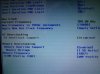
just found out a new option in the bios performance options called "GT Overclock"
it is disabled in mine
what is it for? and why is it unavailable?
any ideas?
-
The series itself is old ( I remember playing MechWarrior 2 on my 486!) but this new incarnation uses the Cry Engine 3.04, So the same engine Crysis 3 will be using.
MWO is F2P so pop over to www.MWOMercs.com and have a look about. -
I'm downloading it just because it's on Cry Engine hmm lets take a look
-
Just remember this game is in Open Beta and doesnt reprisent the full finishd product. For example it is still only DX9 ATM. The best looking map is River City IMO.
-
Yeah I don't mind doubt I'll become of fan of the mech genre anyways haha
I love being in betas tho... was in Primal Carnage beta, Warframe beta, Hawken beta, and something else don't remember looking forward to trying that tonight though
-
I was in it since the founders joined the closed beta. Was awesome then, tis awesome now!
I will be in my first alpha next year
-
lol... i played the mech warrior game.... about 2 minutes in i was already attacked and i didn't know how ot turn. I got so mad I just turned it off LMAO!
I didn't know how to turn meaning i can turn any direction and it still keeps going in one direction HAHA! -
What do you guys think of the build quality of the M17x R4 over the M18x R2, as well as the screen (120Hz). Is the screen package worth it? I don't care about 3D, but I heard gaming on the 120Hz is amazing.
-
From my understanding of the build quality, there is very little to no difference in feel etc. The weight of the m18x is heavier though, in terms of the gaming on the 120Hz, I can confirm it is better, I can't really explain it but you will notice the difference.
Sent from my HyperLight Jelly bean GT-I9300
*OFFICIAL* Alienware M17x R3/R4 Owner's Lounge Thread
Discussion in 'Alienware 17 and M17x' started by katalin_2003, May 4, 2012.


