Problems? See this thread at archive.org.
Will do. I'll post an unboxing and give my first impressions.
-
-
I tote mine around from time to time. As long as you have a good bag, the only real issue is the extra weight on your back. With AC adapter, you're talking about roughly 13 lbs or so. Considering the ability to "do it all" with a full on gaming rig, I can live with the extra heft, personally. However, if I know I'm going to be moving around a lot like at a tradeshow or something, I'll leave the M17x in the hotel and stick with my 14" Latitude or Galaxy Note 10, depending on my needs that day. If I were still in college, I'd take the M17x everywhere more than likely.
-
It will mostly stay in my house, in my room. I just like to lay with my laptops on me when I watch movies so I wanted to make sure this wasn't too big to the point where I couldn't do that. Also if I get on a plane which is maybe a handful of times a year I'd like it to last at least 2 movies before dieing. Or maybe 1 movie and half of another.
I just heard that the 3D screen doesn't support optimus though. Can someone please clarify how much battery life I will lose during normal application when not using optimus? If it is significant I have to cancel and change my order immediately. -
I'm still in college and at least 4 days a week I have to lug mine to school and back. I take the bus so yeah the walking amount is quite decent =). Just treat it as your free work out for a nice-looking back =)
-
I get around 2.5 hours normal usage, watching movies may be less as I haven't tried it but my card is locked in low power mode (75hz) when on battery so I wouldn't expect it to be much different. I see people with optimus saying 5 hours plus though.
If you need on-the-road frequently then the 120hz display is not a good idea, but for a pure gaming rig (on mains power), my vote
-
The 120Hz isn't always on, is it? I saw a video of how to enable it through the NVIDIA control panel.
I plan to take this laptop places and battery life is pretty important... -
Default is 120hz but you can drop it down in the windows CP or NV control panel, but I don't see any advantage with doing that, maybe it will draw less power. The Intel GPU draws far less power which is where you get the extra battery life.
the NV control panel allows you to set up 3D (2 x 60hz images interlaced) for each eye as well. -
Ah, yes, it was for enabling 3D... Hmm, I'm not sure if I want the 120Hz screen.
-
If your order is well on the way, just get it and check it out. You have at least a week to 'back' it if it does not 'fit'.
The 3D could be the decider - I love it!! -
With just the 60hz screen at times I do wish i had the 120hz screen and vice versa. Like mickyd says, if battery life is critical then getting the 60hz screen might help, I could get through about 4 hours of watching a video on the laptop maybe a bit more.
But if your laptop is on the way, then try it, if you don't like it then give it back. Unless you live somewhere that has a restocking fee or something. Me and mickyd are brits so we get the 14day moneyback guarantee with this type of stuff I think -
Yeah, dell tend to follow local 'distance selling' laws. The UK is actually only 7 working days for a 'no reason' return but dell currently do 14 days. I've used it in the past and they did try a restocking fee on me but I just said 'it's not working properly', fee waived
-
Micky how do you only get 2.5 hours from normal use? I found a thread comparing 3d to non 3d and the 3d seemed to be getting 3.5 on average while non 3d was getting 4 hours.
Is there a large noticeable difference in looks between the 120hz and the 60hz screens? I imagine there would be since there is a huge difference between 120,240, and 600hz TVs.
The main reason I am concerned is because when I go on a plane say 5x a year I want to be able to watch a full movie. Also when I take my laptop to class or maybe when it is winter or something and the power goes out (which happens pretty much every year) I want it to last in addition to the other laptops in my house so I'm not bored like crazy lol. -
guys i have a lil problem with my m17x since a last few weeks. whenever i switch on my laptop, after the alienware logo its plain black. the log in screen doesnt appear. i've to press the power button to keep it in sleep and when i click it to wake it up then only the log in screen shows up. im running on the latest nvidia drivers. i tried another version of drivers but the problem it still there.
any helps guys?
-
Well, I was going on my own (single) test and numbers given by non-3d users. I never use the battery so it's of no importance to me but I thought I'd just make sure the battery was good. Windows starts by saying I have just over 3 hours. By the time I got to two hours of just browsing and watching a few on-line vids, it had dropped to 35 mins remaining. Maybe it would have gone longer but I got bored and wanted to game. You simply can't game on battery on any model - not enough power to run the Dgpu at full speed!
As for the 120hz quality, without having them side-by-side it all apocryphal. I've seen people say it's much better. It is definitely a little darker in game mode as others have also commented. It may be to do with the lightboost 3D technology but it makes no difference in 3D or not. Just needs the in-game gamma tweeked up a little. You will see 120 FPS though in older games which HAS to be smoother. Tried HL2 last night at max settings with 120 FPS all the time! When a 60hz display is fed a frame rate higher than it's sync rate the problem of shearing sometimes occurs (I've seen this on overclocked desktops). You have to turn on V-sync to stop this and limit the frame rate to the maximum Hz of the Display.
I don't think it's that much better that you should compromise battery life if you need it (but this is my gaming rig, if I want to travel I use my latitude!) but if you try it out and find that it's too little for your needs just send it back. A pain but you get exactly what you want (at this price a must!) and you know the truth for your usage, not just others experiences
Oh, just remembered, when I tested the battery I didn't turn off the keyboard lights but don't know if this makes any significant difference?
High Hz TV's are a very different animal. They do not accept native signals at the Hz stated, what they do is use some internal trickery to fill in the gaps between the low frame rate of the signal received, producing a much smoother looking display. Eg. 3d TV at 1080i is only 24hz. Good enough to watch movies but when it comes to gaming it's useless. Way too much input lag apart from anything else. The TV is doing stuff to fill in the 'gaps' and this takes far to many miliseconds for good input response
Good luck with whatever you decide
-
You have been very helpful, Micky. Thank you.
-
You're very welcome
Let us know what you go for and how it works out. -
I got my new m17x yesterday. Audio sounds a little better (though it still misses something), and the rubbery covering around the screen bezel feels more rigid. Windows 8 is not terrible, but I can see Killer 1103 driver issues sprouting.
-
Well I have 1 week I think to return it if I don't like so I will see. My current hp only lasts around 2.5 hours at the lowest setting and at a balanced setting lasts around 1.5 hours so anything is an improvement. But of course if I lose 2 hours of battery life for a slightly better screen it may not be worth it. What I was wondering was if the colors or contrast or anything like that appear better on a 3d screen like they do with TVs.
Since this stuff is important to me because this is my secondary gaming rig not primary. Most of the time when I am using it, I will be watching movies or internet surfing. I will only game when I am at another house or somewhere else that requires me to be there all day and I can game. Otherwise I just use my desktop since it is way better. Also when I take it around the house I don't want to have to lug that powder cord everywhere with me either lol.
But since you were talking about FPS and sync rates I was wondering. On my desktop when I play WOW it runs at around 105 sometimes 120 FPS. If I ran WOW on a 60hz screen laptop would it then run at 60 FPS and if it was higher it would be less smooth? Based on what you said it seems the higher the sync rate the better? -
That is why I got mine with windows 7 pro. Windows 8 was made for a tablet not a laptop. Can you do a test on how long your battery life lasts under normal usage possibly not gaming? Also is your screen 3d or non 3d?
It is kind of ridiculous Dell sends us a laptop with issues like this though. -
hey guys, just got a m17xr3, i wondered if i can change the optical drive without a complete teardown? I still got a BD-5850H BD-Burner that i could put in there.
-
Only if the display can keep up. It would run at whatever the GPU can produce BUT the display will drop frames since it can only display 60 FPS. This is where shearing can occur. The higher the FPS (providing the display can cope) is always smoother
Most new games struggle for me to get above 30FPS on the higher settings
-
Laptop FPS is that slow? Even with the 680m? What desktop card is the 680m equivalent to? So in your opinion do you think I should keep the 120hz screen if the battery isn't terrible?
-
Only if I'm maxing out Max Payne 3 or Farcry 3. Just dropping a few of the more esoteric settings in Crysis 3 (or even dropping the resolution since most games are written at 720i res so I can't see any difference) and I see around 50 FPS. I only have a 675 and the 680 is a big step up!
If you don't like the 3D then IMO I wouldn't bother with a 120hz display. It is nicer but the extra cost/lack of battery life may be more of a downside for you. -
I got the 680m. I only got the 3d screen assuming it had better quality. I couldn't care less for 3d movies or 3d games. So does that mean I should call now and see if I can change it?
-
You won't be able to change it after it goes to production. Only cancel and start again. Check out the 3d gaming, you might be surprised - I was. Blew me away, even got a second pair of glasses for onlookers. Usual comment, 'how can you go back to normal gaming after seeing that! MP3 is awesome - it's way better than 3d tv or movies! Oh yeah, and crysis3 has it's own 3dTV driver that gives 50hz @1080i so it even looks great on a 3d tv
-
Hello, all.
TigerDirect has an AM17xR4 with 12GB memory, 750GB drive, 32GB SSD, AMD 7970M, etc... for $1699.00. It is marked down a couple hundred dollars... Seems like a pretty good deal... Thoughts on this one?
Alienware Laptops & Notebooks at TigerDirect.com -
seems like a decent deal if it comes with the 1080p display. If it doesn't I wouldn't go for it personally. The 1080p display is much much better than the 900p one.
-
Hi, you can always call dell with the same config and ask them for a better deal - can't hurt and I prefer to buy direct with such an expensive item. You might wait a bit longer for a BTO but you do get the chance to fine tune it
And check the warranty, make sure it's dell's complete care and for how long?
Good luck in your search. -
Helloo everyone! :hi2:
I proud to say that I am a new owner of a alienware m17x it arrived last Tuesday and I'm loving it! I've wasted so many hours this past week playing simcity
I do have ONE issue though; I have a ssd, and after looking up videos of various booting times of other m17x with ssd's, I've noticed that their comp's zoom by the alien boot screen (where it says intel and klipsch) and my laptop doesn't. It takes a significant amount of time to boot through that screen, it loads the whole bar but it doesn't load thru right away. Is there something wrong with my alienware or is it just something petty?? The whole boot time for my laptop is around 27 seconds.
It's really annoying me, how it stays in that screen for a good amnt of time
-
Hello and welcome to NBR!!
First off congrats on the new system!!! as to your problem, I always get a slowdown when I have external devices with a drive plugged in (phone, ipod, external HHD etc). It happens because the computer is checking to see what to boot from, and it has to check everything plugged in to continue I believe. Do you have anything plugged in that could be doing this? -
Thanks for the reply!!
And to answer that, no I don't have anything else plugged in, just the cable for the charger. If this could be anything, I do leave my simcity disk inside all the time. Could this be it?? Should I take out the disk everytime before shutting it down?
I'm a little nervous about the issue since I just got my laptop and I haven't dropped it or anything, I was thinking maybe something is wrong inside or something. -
I would test and see if not having the disk inside the machine speeds up the boot at all. Might be the issue or not im not sure.
-
It worked!
I took out the disk, and the next time it booted up, it zoomed by, with no lagging on the alien screen.
Problem solved, now to enjoy some gaming! This alienware is awesome!! :thumbsup: -
Gratz dude and glad it was an easy fix. now go frag some noobs!!
-
Hi all,
My cursor lags in games on Windows 8. Has anyone else had this problem? -
Just tried out Bioshock Infinite - seems it came out a day early according to the email I got! I thought this was going to be the game that prompted me to upgrade to a 680 but no, the FPS is awesome. At all maxed out settings I'm seeing between 40-70fps. Very pretty as well - now to actually check out the play - after 30 mins of tweeking and using the game benchmark (that averages 50FPS)
3D is very poor like FC3 but hey TR3 gave me my 3D fix
-
Help!! I have a 2 inch long scratch on my screen! Is there a way to fix this? Dell said repairing it costs 780€=1000$ !
Its not very deep but may be on the actual screen aswell.
https://www.dropbox.com/s/xj8ugbx3qx4oo67/DSC00651.JPG
(center of the screen) -
I just got battlefield 3 since it was on sale for only 20 bucks. Its not a bad game. But where can I view the FPS?
-
Use something like MSI afterburner and use the on screen display part of it to show FPS, temperatures, clocks and usage. It can even limit FPS as well (I limit mine to 60).
-
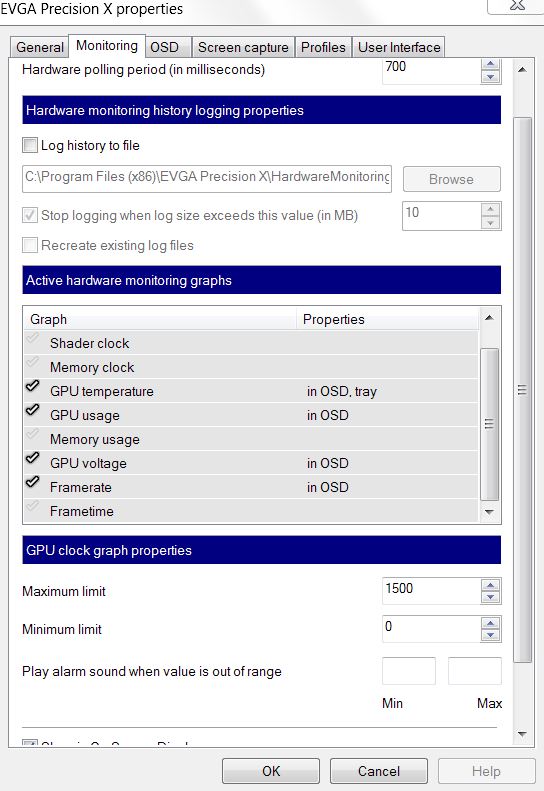
For simple FPS get Fraps. If you want temps and clocks as well I use msi afterburner or EVGA PrecisionX. Both have the same OSD that you can configure (and tweek your clock a little
-
Just go to BIOS and set your boot into primary or secondary hard drive and you should have no problem even when you forget to took out your CD before you turn on your laptop....
-
What is better msi afterburner or evga precisionX? When you say tweak the clock you mean I can overclock my computer a little? I don't need to do that I just want to see temperatures and FPS so I can compare later when the laptop comes.
-
I have used MSI afterburner and its pretty good, can be confusing but it has a lot of features. Either should be fine, both will be able to show your FPS and temps etc on the screen while you play.
Never used evga precisionx looks good though. -
Yeah the're both pretty much the same. They both use the same OSD engine. I just have both with diferent OSD settings
I don't use them for OC, NvidiaInspector is much better at that. -
Ok so which is the easiest to use?
-
I'd say the same, just a different looking interface. Just start it up, go into the taskbar icon for the on screen display server and decide what you want to see. Then run a game and it should be on-screen as you play. Minimise the main screen or set it to start minimised.
Edit: change that, you use the setting in the main interface to configure the OSDAttached Files:
-
-
What is the msi kombustor? Also what is the normal temperature for a graphics card under load during a game and just normally without a game?
-
That's EVGA Precision X. That page looks the same in MSI Afterburner though. Temps depend on the card. without a game mine runs 50~58 with the low fan controlling it. In a game I can see 71C if I overclock a little. I'm not concerned unless it goes much higher than that (which it hasn't)
-
I have WOW on now and I am at 56C. Though I don't see FPS anywhere
-
Have you ticked it in the screen I posted? It's at the bottom of the monitoring tab. You should see an overlay in-game with the item you selected displayed. If all you want is FPS while gaming then Fraps is a simple alternative
Edit: what config did you go for? Pop it in your sig file - makes it easier to help
*OFFICIAL* Alienware M17x R3/R4 Owner's Lounge Thread
Discussion in 'Alienware 17 and M17x' started by katalin_2003, May 4, 2012.