Problems? See this thread at archive.org.
I found the problem. My refresh rate was set at 1000 miliseconds instead of 100. I saw that 500 made it a little faster so I checked on my desktop what it was and it was set to 100 so I set the laptop to 100 now they are the same.
Now I think the dell tech messed up my volume control, mute, etc interface. When I click that button above the keypad it use to work now it doesn't. I think he accidentally uninstalled the driver for that so I'm calling them back for someone to help me install the driver again to fix that problem and then I am good.
I think the cursor problem I am having is when even a tiny bit of my palm touches the keypad which is a little ridiculous on alienwares part. On the Mac I can rub my palm all I want on that keypad the cursor won't move an inch. This laptop if I type with my right palm sitting high a bit and not really touching the pad then I don't have any problems.
-
Cool, it was the only thing I could think of for afterburner. I would guess there is some sort of overhead, so the lowest polling rate in msec while still giving you the data in good time is probably best.
For the touchpad, I've never had any problems, I wonder if it's a win8 thing since it has a bunch of other features like swipe and the driver is very new, or it is faulty? -
Do you have windows 8? I have 7 pro. And now they fixed my touch button problems so I guess everything is good now with it. I just have to be careful about my palm. I went in the alienfx system to lower the sensitivity as much as possible but my palm will still make it move if I touch it.
EDIT: I solved my own problem. I didn't have the palm sensitivity set to off on the alien application. I forgot to check apply. Now when I rub my palm on the touchpad it does't do anything so that should fix my cursor problem. -
I ran wow. It works fine on ultra everything at the highest setting. The fan come on pretty damn loud though on ultra.On high it was ok. The GPU was running at around 60 degrees. The FPS was 70-80. Not as good as my desktop that is 100-110 but not bad for a laptop either.
EDIT: The cursor problem is still happening though even with the touch pad not reacting to my palm. So I think it is a keyboard software problem. Even when typing this edit the line for typing would jump back to where the cursor is. -
Win 7, I thought you might have got 8 as standard.
That temp is pretty cool but I don't think WOW realy stretches it. My 675 (which will probably run a few C hotter) games around 68 and if I OC it slowly climbs. Two hours on bioshock just finished and the temp had got to 74C . Don't like it any hotter than that - amybe time for a clean out.
That jumping cursor sounds exactly like to one I saw recently - sorry I can't recall much about it, could even be a poor connection with the KB ribbon? -
I'm not sure. My girlfriend says it happens even on her macbook pro. According to her it happens on many laptops she has used. Personally on her macbook pro, my hp, or any other mac or laptop I have used I have never experienced this problem. It is very weird. Like right now as I am typing this there are no problems. It just happens really randomly and I'm starting to think maybe it is because I am hitting something or something like that since the keypad is not in the middle of the laptop and off to on side.
-
Shouldn't be the position. It's still central to the KB you just have a numpad making it look off-center. I'm at a loss but I really don't think it is you
-
Do you have the killer wireless card? i'm trying to figure out how to work this thing. When I am at my house I have no problems, but at another house it says the network device is disabled and shows my upload and download speeds at 0 and when I do the test and hit apply to apply the setting they stay at 0 but the internet is still working.
So I'm wondering how to optimize this thing to make my internet faster. Also yea this thing on my lap gets pretty hot. But the fans don't turn on. It hovers around 55C. -
On the RAID 0 not being set up properly, there seems to be quite a few systems shipped by Dell lately where they have not set up the RAID and drives correctly when shipped. It looks like yours wasn't set up correctly (not showing a single SSD) and for some of us here who ordered systems with an mSATA cache drive installed, they did not set up the cache drive properly.
I wish someone at Dell would check on this - it appears to be something systematically wrong where these machines are being set up. And they probably get away with it most of the time as most people never know their system's aren't set up correctly. -
Has anyone here found any way to get a deal on a warranty extension? I just have the standard one year warranty, and was thinking of using my $100 Dell eCard to purchase the extension, but it appears to be a couple of hundred dollars - that seems pretty high for a one year warranty that doesn't include accidental damage coverage.
-
So now when I plugged my headphones in the jack to listen, they don't work. So now once again I am on the phone with dell to fix another problem. I've been on the phone with them all day it seems.
-
I tried to find a deal. Soon enough, I returned my m17x to buy one with almost the same hardware and an extended warranty. Haggling for those is tough.
-
I do but TBH I hardly ever go into it. I did have an issue where I had my internet upgraded to fibre (4MBs to 30Mbs) and saw no increase. Spent ages with the ISP until I discovered that when you setup the killer card it takes the maximum speed obtained at the time for allocation to different internet access programs. Problem was that that maximum was my old line. Simply turned off application management and got full speed.
After that never went into it again.
I think the Killer is only useful for on-line gaming on a multi-user LAN or if you run multiple inet applications and want to prioritise them - like have a torrent take less bandwidth. -
Well, my original Estimated Delivery date was for tomorrow. Logged on, it's now in production. I bought it from the outlet, it's now showing a 4/8 EDD. Are they building a new system. I figured that if it was in the outlet, that it was "ready to ship". This not the case?
-
AFAIK, you're correct. Outlet are built (oten used) machines ready for shipment. Call them up and get a reason it's taking so long
-
What deal did you get?
-
So the headphone problem is fixed. Driver issue. This laptop has so many driver issues what the hell is wrong with dell? Yea when I was reading the help for the killer wireless it says that when you hook up to any new internet you need to do a test and apply those setting for the upload and download speeds otherwise the internet will run slow. So you are saying you turned off application management? How did you do that can you walk me through it?
-
Alienware M17x R4 Pre-Order Configuration Questions... Ask HERE
![[IMG]](images/storyImages/17.jpg)
![[IMG]](images/storyImages/18.jpg)
![[IMG]](images/storyImages/19.jpg)
![[IMG]](images/storyImages/20.jpg)
-
Good news re the other stuff. Here's a pic of where the setting is:
See the global option
-
I didn't buy an aftermarket warranty extension. I got a new m17x with two years of complete coverage.
-
My system arrives tomorrow! I'll record the unboxing and link it in my signature. Hope to have better luck this time around...
Edit: Guess the email I received was for something else. The system did not arrive.
-
I see. Ok I turned it off. so what does turning this off do exactly? Also does anyone use any software to monitor cpu temperature? I've noticed as many people warned when I put this laptop on my clothes or when I lay with it in bed the bottom of it gets very hot but the fans don't even turn on. So I guess it isn't hot enough that the fans turn on but still pretty hot. How can I avoid this happening and also what programs can I use to monitor the system so I can see how everything runs when it is running properly and if things start to get crazy.
-
From personal expeirence I just disable the application manager as it doesn't help out all that much with latency and such. More trouble than its worth, especially when I change networks several times a day and have to reconfigure every time.
HWINFO64 is what I used for monitoring all my temps and such. You can even set up custom fan table, though I wouldn't recommend this if you aren't experienced with how those things work. -
As bigtonyman says, it does not help much. From what I see it load balances internet apps so no single one can grab all the bandwidth.
I use MSI Afterburner to montitor my GPU temps. You can set it to be on-screen during gaming and even have a temp on your task bar. HWinfo can monitor the CPU as well as a lot of other stuff and if used in conjunction with afterburner you can have them all on-screen during gaming.
It will feel pretty hot underneath but it's probably OK as this is heat it is dissipating from the CPU/GPU. If it was overheating it will shut down or games will run VERY slowly. -
Which side is the GPU on the right? When I put it on a table it will cool down and drop to around 52C. When It is on my lap even with the air vents not blocked (probably that center one is somewhat blocked though) it will get really warm and the temperature will increase to around 55-57C. It isn't even enough for the fans to come on but that damn thing gets hot. So I was wondering if it was the GPU or CPU getting hot like that.
-
Hmm does seem weird. GPU is on the right, have you checked the GPU usage? are you playing on games? Do you have optimus/enduro enabled as well?
-
Further to DDDeniZZZ, have you tried a board under it when on your lap. Clothing could be simply affecting air flow - and these babies' do run hot. But if your not hearing the fans then you are very probably well within limits
The centre vent is for the VR's and everything will run a little warmer if there is no airflow there
-
I don't have optimus since I have the 3d screen. GPU usage is like 1 percent if that lol. I think it is because my clothes are somewhat obstructing the center vent. Actually right now it is GPU load 4 percent and the temp is 56C. Both fans on each side are normal and the center is warm. The right exhaust is warm as well on the back of the laptop.
No fan noise right now. I haven't played any games on this yet. I played wow for a little bit just to see if it would run on ultra and it was fine. But again I wouldn't play games on my lap. -
Is there like a lap cooling pad I could get so that I can have something between my clothes and the laptop that will at least have it a little higher so that my clothes do not block the center little vent.
-
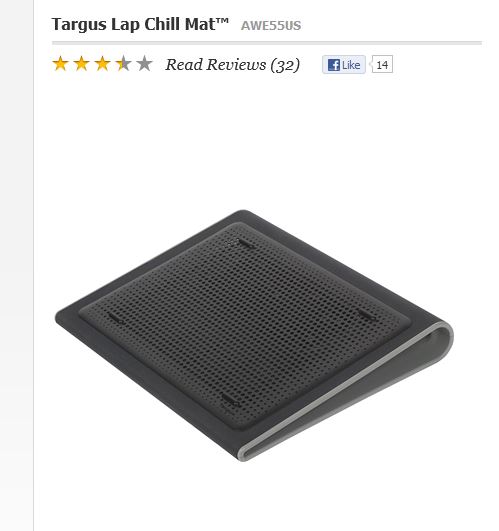
You'll probably see a lot of diferent ones but for simple moving onto lap and back the Targus 17" lap pad (that was an item you could order with the R3) works great. Nice soft comfortable underside and easily moves with the laptop in one go
This is what it looks like it : Targus Lap Chill Mat. The laptop us slightly wider than the pad but to me it looks better that way and is easy to pick up with the laptop. It's not as deficient as some but better than bottle tops! -
Do laptop GPUs naturally run hotter? Because now when I look at my desktop GPU tempt it is like 38C and the only time my laptop is close to that is the moment I turn it on it is running at like 42C but quickly will climb to 52C.
Also the link you gave me goes to a bag not a lap pad lol. -
Desktops have much more space for ventilation and bigger fans, laptops will always be hotter.
-
I thought so. This is my first gaming laptop so I am new to how everything works with. Before this I was using dell, hp, and macs. Though the dell I used freshman year of college seemed to run wow fine without fan problems or heat issues or anything like that. Though of course wow was not running on ultra, probably low or medium.
-
So when I put on WOW or battlefield 3 everything is ultra and set to 120hz refresh rate the GPU temp only gets to about 62-63C.
Something interesting happening that I don't know if it is a glitch or it is suppose to do this. When I went into BF3 which I downloaded from gamestop so it goes through origin client. When the game opens all the lights the alienfx turns off. Then when the loading is done it turns back on and goes to the mode where it just changes colors on its own. Then when I close the game everything turns off again and I have to reopen the alienfx control for my normal lights to go on again.
Does this happen to anyone else or is my alienfx glitching now?? -
Weird, I just checked it again and it is the lap pad???
Attached Files:
-
-
that is the alienfx that are cued to the game. There is a bunch of games out that support that, and I'm not sure how you turn it off. I personally haven't bothered as I think it looks kinda cool.
-
I see I just wanted to make sure it was normal and not glitching lol. -
This is what is on alienwares website when you configure a laptop http://www.newegg.com/Product/Product.aspx?Item=N82E16834997969
It is the targus hd3 that they now sell. -
Does anyone know what the optimal settings for virtual memory is? The dell representative said the system will never used more than 4GB so he set my min to 2Gb and max to 4GB and the performance of the laptop seems to have not changed at all but is this correct? It freed about 16GB of space on my laptop and when I did the same to my desktop it freed up around 25GB of space.
-
Yup seen that (and like it!). You can turn it off by right clicking the taskbar icon and uncheck enable 3rd party access.
-
Ah, that looks quite different, can't tell if it has a soft underside. I got mine off Amazon.
-
What I can say is that unless you are running multiple apps that exceed your total physical memory just turning it off altogether is OK. The amount used by 'auto' will be some sort of multiple of physical memory hence the difference.
I recently read an article on installing an SSD and they recommended turning it off as well. -
Well I don't want to turn it off completely. I just want to know if giving it 2-4GB to use is ok and won't negatively effect performance during anything I do. (Btw this is what was taking up all my storage on my desktop when we were trying to figure out why so much of my storage space was gone)
-
I would say that you can set as small as you like. You're not going to affect performance negatively, probably the other way around since it won't be managing virtual memory that is not used. If you did need it windows will report an 'out of memory' error when you are using an application. It's more still around because memory was expensive in the past and 2Gb or 4Gb systems were common. Once you get to 8Gb it's a waste of time - unless of course you're doing some heavy duty stuff - not gaming
At least the mystery of the missing space has been found! -
What was the name of the targus cooler you used? Also once again what was your review of it? And how and where did you use it?
-
So now apparently the blue ray isn't working lol. When I out a disk in it says the drive is not formatted for it so now dell is trying to fix that lol
-
I just had a look back at the receipt (Amazon) and it was called :Targus Lap Chill Mat 17-inch. The pic I posted looked like it but I'm wondering if it has been discontinued?
I wanted something that could be used to transfer the laptop from my desk to my lap in bed easily. Up to that point it was a piece of hardboard and some 'props' to raise the back.
Although not a pretty as some or probably efficient (only a couple of C drop but no climb when OC'ing) it was it's light weight, ease to move with the laptop, and the nice soft surface so I didn't need a pillow as well that I liked! I also tried a very cheap one but just not good on any aspect, size, noise, build, etc
-
hey guys, I have a rather strange questions about the m17x speakers: basically they're located directly below the palm rest, which is quite odd if you ask me. I just wanna know doesnt anyone here have an issue with this? such as when your gaming, you'll most likely be using the wasd keys with ur left arm and the mouse with right. This way, doesnt it feel the balance of the speakers is more to the right which is annoying?
-
I think the idea is that the sound is coming towards you and not indirect - but for gaming a headset is a must (for me), those fans just kill the ambience
-
Actually when I listen to movies I feel the majority of sound comes from the left since the touch bad is more left than right.
Also to those that have the 120hz screen or even the HD 60z screen when you guys watch movies like a blue ray or a DVD does the screen look very pixelated to you? I even set the trutheater to upscale the DVD and run on the smoothest setting but is still is crazy pixelated. Is this just because it is a laptop? Or maybe because the screen is so big it is easier to notice since laptops are up close in our faces?
*OFFICIAL* Alienware M17x R3/R4 Owner's Lounge Thread
Discussion in 'Alienware 17 and M17x' started by katalin_2003, May 4, 2012.