Problems? See this thread at archive.org.
I am pretty sure I installed the card correctly having followed dell's alienware documentation. I think this card might be made specifically for levono. Guess I have to return this to the seller. And thanks for the quick reply!
-
-
np Parisienne, let us know how it goes
-
For those interested, I have uploaded the Clevo GTX675M Vbios here:
http://www.2shared.com/file/Zt1Yz8bg/GTX675m.html
I've asked for Svet (cf. Svet tuner) to have a look and get the voltage mod available on his tuner also.
Wouldn't advise people to flash their 580M though but if we can find out that it's not risky at all, why not ! -
I am tempted Paul :O
-
Don't fry another card dude!
-
We should wait a bit, I've asked Svet to look if there was some major difference between my 580M Vbios and this 675M Vbios but I'm sure there ain't.
Patience.. -
Flash was successful. Bios detects a nvidia card. Just need the modded drivers.
-
awesome
-
Drivers installed and card detected as a 675M! Screenshot incoming...
![[IMG]](images/storyImages/6tc.png)
Thanks Paul! -
Nice job geo!! now I want a 580m
-
lol...this is fabulous. You're still throttling though, right?
-
Nah lol. My temps never get that high... 65C max at stock voltage.
There was like 4 warnings when I tried flashing, I just bypassed them all and voila. Works.
EDIT: The power throttle is still present! (P1 state)
But my card didn't throttle when I tested it on WEI + auto fan control is perfect.
-
its not gonna be superior to the 580m though during benches and stuff right as its the same card?
-
good to know. You're brave lol
So how is your new vid card?
Its 100% the same silicon...its the same card -
No problem mateys
Good it's working (what I expected though) might flash my 580M too !
Well done ! -
Not sure if this helps and I'm sure you tried this already, but just in case, I thought I would throw it out there. When I reformatted my computer to windows 7 ultimate and booted up, my ult. 6300 wouldn't work. I had to download the drivers using my other pc and then installed them off my flash drive and it found the card and worked.
-
Hi,
I have wanted a Alienware for a long time and now I have one... Really excited to finally own one...
But after reading 1000's of posts I'm not sure if I have done the right thing... I was just wondering if someone can advise me of how to get the best out of it. I'm not really into over clocking I just want it to play games with decent fps...
My spec is which is a dell refurb
I7 quad core 2860qm processor
12gigs 1600mhz ram
Gtx 580m graphics card
1920 x 1080 fhd led screen
256g Samsung 830 ssd
500g Samsung xt hard drive
Just wondering what the best video drivers are and other drivers I should remove or replace to get the best out of this laptop...
I have been reading about the throttling at 78c which is a bit worrying, and there now seems to be a fix for m18x, now I'm thinking should I return it and get an m18x...
From memory the m18x seems to look a lot bigger machine and to be honest the m17 is the perfect size for me... Just worried about the throttling...
Any advice will be very welcome, I'm in a bit of a dilemma. And after reading lots of posts over the last month and even more confused...
Kind regards
Ian -
hi Ian, that is a fantastic machine.
The throttle is a very real issue for many people with 580m's.
Most circumvent it by doing a repaste with a quality paste like Prolimatech PK-1 and applying the power throttling fix found on this forum.
For example Geocakes goes to 65c on load. This is after a repaste with PK-1. From that perspective, don't be scared about your purchase.
If you can't circumvent the throttle at all, even after these methods, dell will have to replace your card -
I would install some of your games and see how they run. If you get throttling or suttering contact dell and go from there. If, not your in the clear.
-
Hope Dell doesn't mess up my repairs, just want to get it over with having these issues. Hope they do a decent job replacing the GPU. Anyone got any experience in dell repairs? would like to know what I'm up against.
-
Interested in jumping from a 560m to a 580m does anyone know the part numbers and typical prices in the UK?
-
Experience IN or WITH? I've had then out a few times - as well as some parts-only calls, what country are you in?
-
Sorry, should've phrased it better. I mean experience with, like, did they ever replace stuff in your notebook and did that fix the problem, etc etc.
I'm from the Netherlands by the way. -
Hi, no prob just didn't want to post if you were looking for someone 'inside'.
I ask where because the support does vary by region, for the last 10 years I have used N + S American Dell support but recently I'm in the UK so can only speak from my experiences here with my M17x.
I've had on-site 3 times since Jan of this year, all were quick and painless. Last time they replaced my vid card and heatsink and it's running like a champ right now. Two HD failures, one I got them to send me just the disk, it arrived with a pre-paid return box for the old one. Second HD I had them come out to do it. Full Win reinstall and the guy even installed all the AW stuff I was told to expect to do myself, so top marks there. Basically not too happy with the problems but Dell do step up (or did for me).
-
Hmm that sounds good, shouldn't be too much of a problem for them to change my vid card then. How long did it take, a few hours?
-
Less than an hour, with the new heatsink already pasted and padded.
-
you just have to pay the $1200 for the 580m. The markup on parts from dell is crazy.
-
Hi guys, im totaly new to this forum and new to the pc gaming world too, noa a pc tool but never really got into the pc gaming until now. I have just got a m17xr3 and have been trying to upgrade the hdd's, but am struggling to get the system to run after a clean install. Followed the guide on here but still no luck, im replacing the oem 320gb with 2 x momentus xt 750gb and intending to run in RAID0. However when I set up the RAID and go n to clean install all works fine then after system restarts after updates If I try to turn on again after shutting down Im getting a HDD error and ist saying RAID not bootable? Any help would be great I have tried the step by step guide already, don't suppose theres any known compatability issues with these hdd's? Thanks for any responses to this post and apologies if this post should be elsewhere I've not quite worked this forum out yet :s lol
-
I ventured into my lappy yesterday and stripped 2 screws and then I stripped another one today because Dell used loctite. Why on earth would they use loctite on a computer thats meant to be opened and upgraded??
Sent from my SAMSUNG-SGH-I727 using Tapatalk 2 -
what screws did they use locktite on??
-
It might be all of them but I'm not completely sure. For sure the ones holding down the keyboard had it (I stripped 2 of those) and I stripped the one holding down the wireless card.
It's blue loctite, which apparently is the weakest, but still....why...?
Sent from my SAMSUNG-SGH-I727 using Tapatalk 2 -
man thats crazy, I would call dell and ask why they did that.
-
I have a couple things to say.
1. Would stripping those screws and/or subsequently replacing the stripped screws with non-Dell screws (which I did) void the warranty? I don't want to call them up and tell them something that will void my warranty...
2. The center control cover on the left-bottom side (to the left of the ctrl and shift keys) is lifted up a bit and I don't remember if it was like that before I worked on my laptop. I opened it back up and I can't seem to find any reason why it's lifted up so much...
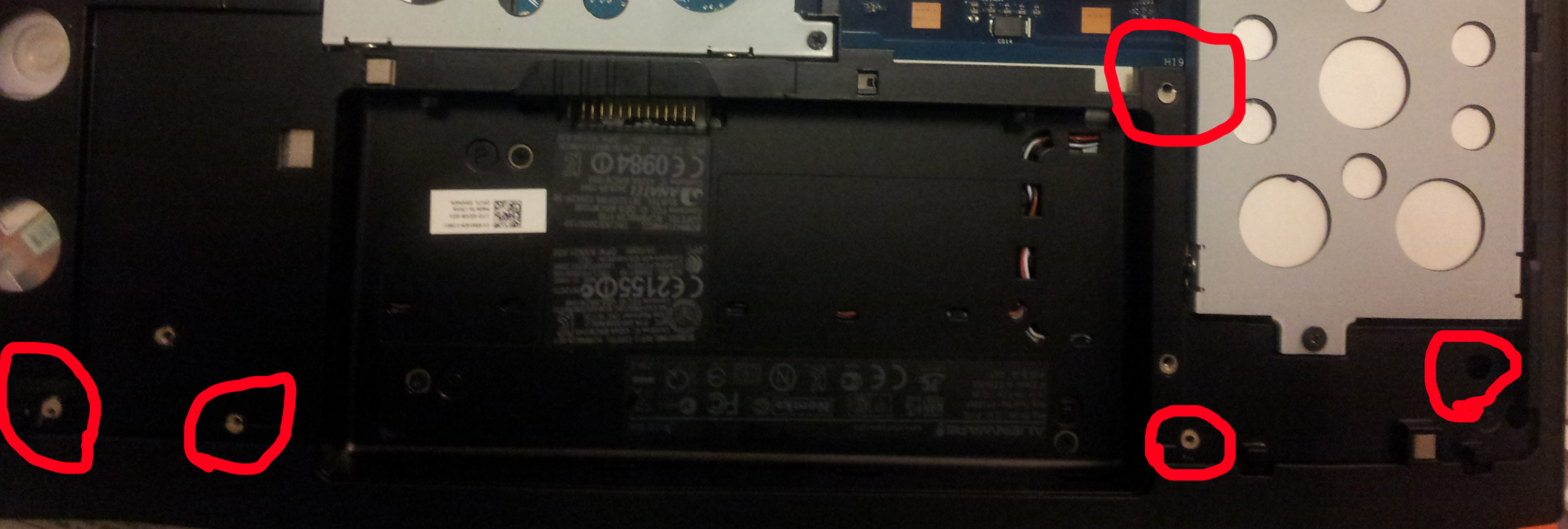
3. While I was in there, I noticed that I was missing a bunch of screws...I'm not sure if this is normal, or maybe the Dell repair guy (who came to replace my keyboard) didn't know what he was doing and left them out somehow...I wasn't there, but my dad said the repair guy said he hadn't worked on an Alienware in a while, so who knows? I attached a picture where I circled the spots with missing screws.
If this is a problem, should I contact Dell and tell them that it was probably their Dell tech that screwed it up?
4. I finished installing my Killer 1103 and I got the Atheros something ethernet driver and the Killer 1103 drivers from the Resource DVD and I can connect to the internet fine. Is there anything else I should do now?
5. Also, possibly unrelated, after the Killer 1103 install, I tried playing Skyrim on Ultra @ 1080p like I normally do, and it was ultra laggy (lame pun intended) and usually it's buttery-smooth. I tuned it down to medium @ 720p and then it ran mostly fine but every once in a while it would skip a tiny bit. Could this be at all related to the 1103?Attached Files:
-
-
Using loctite is a good idea, it acts as a threadlocker, if there was none you'd be complaining because the screws are loose.
A screw driver that is close enough in size isn't a good idea!
Get yourself a proper set of screwdrivers and use the perfect size next time.
Tell you what, I've been working on laptops and other electronic devices for many years now, threadlockers are used frequently and i can say props to the manufacturers that don't cheap out.
If you feel that a screw is giving you a hard time or you don't have a choice but to use a screwdriver that comes close in size (which is your case), prepare yourself an empty eye dropper with a solvent (acetone, gas etc.) and pour a little on the screw, it will moisturize the threadlocker.
Just be careful not to pour on plastic, painted or solvent sensible surfaces! -
Bad design imo, I've worked in many Dell laptops and the first time I ever stripped a screw was the other day when the HD caddy screw got striped. NO excessive or abnormal force was used. Just bad/cheap quality inside and out.
-
Can you post a photo of the screwdriver you used?
-
I personally haven't seen any locktite on any of my screws, but maybe I haven't been looking hard enough.
-
It was hard to get a good picture with my phone.
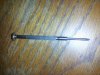
Sent from my SAMSUNG-SGH-I727 using Tapatalk 2 -
I have a similar set to that with like 4 different sizes of both Philips and flat heads. Works like a charm for taking just about any electronic device apart.
Sent from my Samsung Galaxy S2 using tapatalk 2 -
Hey guys. I am expecting my very 1st AW laptop today. It's M17xR3 from the outlet. I looked at this link and found all the useful info that will surely be helpful in the future.
http://forum.notebookreview.com/ali...ion-how-search-forum-read-before-posting.html
But I am looking for something like a "checklist" of things I have to do first once I receive my unit.
- Anything I should do initially to check if there is nothing wrong in the system?
- How do I check for dead-pixels?
- Or anything that will give me an idea if my unit is in great condition or not.
I know I will discover it along the way if my unit have a problem. I just want to know if there are things that you guys do initially from the 1st day.
I'm really excited already, haven't felt the same for my old units
Thanks. -
Yup, notice how the tip is too pointy. This causes the screw to strip because the tip doesn't fit properly in the screw's head.
Here i made a quick drawing, notice how on the left side the screwdriver fits but because it's too pointy, the screw's head will strip since you're forcing on a smaller surface.
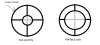
I would also recommend a screwdriver with a good grip, for your laptop, a real #1 Phillips screwdriver will do. -
Yeah it wasn't the best grip but it was the only screw driver I could find that fit right. What is the screwdriver I was using meant for?
So back to my original question(s), if I told Dell that I stripped some screws and replaced them with non-Dell screws, would that void my warranty or anything?
Sent from my SAMSUNG-SGH-I727 using Tapatalk 2 -
I'm pretty sure it won't void it.
-
K I hope so...
What about the missing screws? Are those a problem that needs to be addressed?
Sent from my SAMSUNG-SGH-I727 using Tapatalk 2 -
If you're missing any, hit the local computer shop and see if they have any of the same size or check e.bay, plenty screws out there. Even sorted by laptop model.
EDIT: i would contact the sellers of the last two listings and ask him if he can only give you the ones you need. Or just get the whole set, it's always a good idea to have some spares.
http://www.ebay.com/sch/i.html?_nkw=M17x+screws&_sacat=0&_odkw=M17x+R3+screws&_osacat=0&_from=R40 -
You should find similar screw in home depot. You can bring a sample and show it to the attendant.
-
yay! my alienware m17x r3 arrived today.
So far it seems okay, however... the top right touch panel control(volume, mute, play controls, wifi) are not working when i touch them?? Is that something i need to enable somewhere?? I'm confused... Please help -
But should I contact Dell and complain to them? I didn't lose those screws.
Sent from my SAMSUNG-SGH-I727 using Tapatalk 2 -
Depends on what is more convenient to you. I don't think you will spend $5 for some similar screw from Home Depot.
And I am not sure how Dell will react if you ask them to mail you some replacement screw lol.
-
they aren't touch bottons, you gotta pres them down to register. Not sure if you were just touching the buttons or actually pushing them down.
*OFFICIAL* M17x R3 Owner's Lounge Thread - Part 3
Discussion in 'Alienware 17 and M17x' started by katalin_2003, Dec 6, 2011.