 Problems? See this thread at archive.org.
For testing or a generic NVidia driver that has a modified INF : https://www.dropbox.com/sh/iyqfhqlv9mwrsoj/AAAcTbfbDAINxKcMFB6p2WAza?dl=0
just incase anyone looking for one without checking hardware ID's, this is still semi recent.
-
-
Hello good I have an alienware mx17r4 with a 980m graphics card and the video input does not emit signal I leave the screen in black someone has some solution thanks
-
you still having issues ?
I think I already helped you a month ago or something, but not sure.
Let me know. -
Hello good yes I still have problems I do not detect the hdmi input I plug in a console and I do not get the image when I used to go
Also I would like to know if tiens bios mod for the 980m that I go of the original bios and the seen site that with other bios works much better
As on this page, I can not download it
Https://www.techinferno.com/index.p...vbios-mods-900m-series-overclocking-versions/
Thank you -
HDMI-IN on m17x R4 does not work on Windows 8 or 10. Only works on Windows 7.
Mr. Fox likes this. -
-
Hello good to me also works with window 10 but of course I stop doing it
Porcierto where I can download Prema v2 VBIOS for 980m I can not find it anywhere
Thank you -
My stock vbios works best. It's not just a simple white book stock vbios, it's had work done to it, but is an official stock vbios.
Anytime someone flashes to other vbioses , in the end for the 980M - they also end up going back to the stock vbios we sent our cards with.
We have about 20 different vbioses, depending on the laptop intended for the card. All this testing and work has already been done for you guys.
We've had customers here and there and on other sites too test our vbioses against the others out there, and the conclusion was our stock vbios was better. It kept temps lower, while performance higher, and does not burn the card out and is compatible.
Before our vbioses were ready, you really had only a few alternatives, like Prema and SVL7 but that was at the end of 2014. It's the year 2017 now. It's been three years where the conclusion is - if your sent a card with the proper vbios for your system, you should not need to flash it again.
However, I do have tons vbioses I can share with you guys. Some might even fry your hardware in the long run, and turn the card dark colored from being overvolted and having too much heat.
If you want them, send me a PM.rjtnag likes this. -
Hello can you speak for private message thanks
-
sure, I'll start one with you.
-
Just FYI I have the Quadro M4000M in my machine and it works very well.
-
Oh nice !
anyone need driver : http://cloud.alezka.com:8080/385.41/Nomad likes this. -
What is this driver for?
-
Alienware and other laptops, modified driver, should work for all.
-
i guess i should be manually updating with the driver you are providing here huh?
-
you need a new driver ?
Did someone move this thread around ? Says Views = N/A and stuff... made it harder to find.
![[IMG]](images/storyImages/nkaILSZ.png)
Why do my thread show this ? Makes them look like junk.Last edited by a moderator: Nov 10, 2017cdoublejj likes this. -
Looks fine here, both logged in and as a visitor:
![[IMG]](images/storyImages/thread-views1ep8tn.png)
Try un- and resubscribing to the thread. -
ah thank you!
-
Hi Woodzstack,
have installed your M17xR4_05511028_9xxM_385.41_W10.zip on my MX17-R4 windows 10 pro.
says the driver installed without and errors. reboot and in the device manager the graphics card has stopped working.its running in optimi mode.
Bios Version - A13
Hardware ID - 13D8 - 05511028
O/S Build -V1607 14393.1914
C Drive running in GPT
Would love an unlocked bios so i can select the graphics card instead of the intel HD 4000.
Many thanks
WetwoodLast edited: Dec 8, 2017 -
did you disable DSE when installing the driver ? You would know because it would also warn you not to install and you would have had to click "install anyways" not to mention disabling DSE
-
Yep, came up the red box asking if i wanted to install anyway. installed succesful on reboot the device manager states the card isnt working.
-
Have tried DDU the drivers, then Disable Driver Enforcement reinstalling same situation.
Im current doing the windows 10 updates. it installed the 970M drivers version 353.82 from updates. but when it comes to using anything higher than 353 it fails like the pictures above?
If i set nvidia control panel to nvidia prefered and set the specific game to nvidia it never loads just infite loop. assume the driver doesnt actually work. all games by default load on the intel hd 4000.Last edited: Dec 8, 2017 -
http://downloads.eurocom.com/suppor...top/Alienware/M17xR4_05511028_970M_385.41.zip
or try one of these : http://184.162.171.47:8080/NVidia Drivers/
So legacy mode is disabled and you have both cards in device manager ?
Who did you buy the card from ? -
DaLing Tech is the company i purchased from. *Who suggested your forum post*
I also tried the first driver but it doesnt support the OS think that ones for windows 7.
trying the other suggested drivers.Last edited: Dec 9, 2017 -
Hey Woodzstack
installed 385.41 from your FTP.
Not really sure where to go from here. -
funny they sell you thier cards then throw you towards me for tech support LOL.. thats hilarious.
okay this is AW17 right ?
You have disabled DSE every time you installed the driver ?
If this is after the recent windows update you need the latest driver, the ones before 385 will not work with it.
go to your bios, and remove legacy from the boot, so that all you have is UEFI, and then start over, this way you will not be on the HD INTEL graphics which is screwing this all up. -
Also, finish your update and installing of other hardware. Videocard and sound are the last two things you should be installing.
Befor e them obvious start with chipsets and MEI and IRST and then cardreaders and LAN and WiFi and then AWCC and the OSD and airplane modes and fluff stuff then videocard then sound. -
Hi Woodzstack,
even with UEFI enabled no legacy, the intel card is still their, do you think i should remove the new card and start again? windows fully updated. -
OK Downloading, latest drivers 388.59 64bit Windows 10.
alot of mixed information going around somepeople say you dont need to modify the drivers some people say you do? -
I have downgraded Bios to A11 - going to try and download / install the
[FPT]-M17x_R4_BIOS_A11_-_[unlocked]V2.zip from the tech inferno forums. -
Hi Woods, so got it working. installed the alienware screen overlay application. Fn + F7 do you want to run dedicated graphics YES, rebooted.. working!
They have reverted back to 355 drivers so going to try your drivers now.
So it seems soon as i install anything higher it just fails, my original information was
13D8 05511028
but now its registering as
13D8 05801028
OK so anything above the 355 driver is a no go. just fails not sure what im doing wrong.Last edited: Dec 11, 2017woodzstack and Vasudev like this. -
the modified INF's have added specific hardware ID's so the new one needs to be added.
M17X-R4 right ? Try this from my Partners : http://downloads.eurocom.com/suppor...Alienware/M17xR4_05801028_9xxM_382.05_W10.zip -
Hi! I have an AW17R1 Ranger with 120Hz screen and using A14 BIOS. Until yesterday I was using gtx780m. Yesterday I received my ebay GTX980M 8GB and installed and I get black screen with 8 beeps when booting without a screen in HDMI. After booting Win10 x64 installed the drivers by itself and I also downloaded and installed the latest nvidia drivers which installed without issue. If after booting I disconnect the cable everything works fine. Is there something I can do to boot without an external monitor? More info on what I have done is here: http://forum.notebookreview.com/threads/alienware-17-r5-r1-bios-unlocked.802440/page-5
Any feedback is welcome,
Gregory -
What vbios does your 980M have, where (which vendor) did you buy it from (It was not from me), have you contacted the seller for support ?
-
Hello good aguein can you tell me where to download this bios that in the link does not let me download it M17x_R4_BIOS_A11 [unlocked] V2. I have the v1 version. What difference and improvements are there?
Enviado desde mi iPhone utilizando Tapatalk -
To change my charger why is failing I have the 240w it makes up for me to buy the 330w my configuration is an i7-3840 and 980m. Thank you
Enviado desde mi iPhone utilizando Tapatalk -
The 240W should be fine, and your bios is fine too. Where do you see a link for a v2 ?
-
you need to have techinferno account I guess... for me the link works directly clicking on it.
-
Hello, can you tell me about Dropbox or similar?
Enviado desde mi iPhone utilizando Tapatalk -
What would you like to know about drop box ? I am not by any means one of thier employee's or anything, lol.
Or are you asking me to link you a drop box link or how to create an account or are you asking what is drop box ?
There might be some older links from years ago at the beginning of this thread, I stopped maintaining them shortly after Pascal videocards became a the norm. -
Hi there
Could you read my thread and advise me please as I'm losing my mind.
http://forum.notebookreview.com/threads/going-to-upgrade-7970m-to-980m-on-m17x-r4-980m-7970m.814883/
If I use these steps would I successfully install the card?
I understand that I have to use SG mode.
Now I know now I have to change MBR to GPT... (silly me )
)
Is it better to install Win10 from scratch without 980M inside, install all drivers and then after disabling DES put in the card and install video drivers. which driver if my card is
ID 13D7 05511028 ??? Is this one 385.41 from Eurocom would work ok?
When I bought it it was supposed to be non gsync I'm not sure it is... I just want to have it running no OC planned.. -
changing to GPT just causes less headaches in the long run but it shouldn't stop you from using your card.
your just using a 980M , on a AW17 I am guessing, by the hardware ID you gave i.e 055X1028...
do you see your hardware ID in the device manager ? is that where you got it from ?
if so, then you should just disable DSE and run a modified driver as admin and your good to go.
you mean this driver on the FTP ? http://downloads.eurocom.com/suppor...Alienware/M17xR4_05511028_9xxM_385.41_W10.zip
yeah should work fine. You can just drop those INF's into a newer driver and should work too. -
Got it from device manager 980m was 13D7 05511028, and currently my 7970m is 6800 05511028
It;s definitely m17x R4 :|)
That;s the one I tried, I also tried directly from nvidia 353.62 and aftre modding inf it was recognized but installation failed.
I tried 391.35 without any modification and driver (actually the whole setup with physics and the rest) have installed but after restart there was code 43 in device manager.
After installing 358.41 from eurocom it has failed during drivers only installation and then code 43 in device manager.
So my plan now is to do a clean Win10 install on GPT instead MBR (with or without 980M?) And then disable DSE from your tutorial (before I just changed in system properties->hardware->device installation setting to NoLast edited: Apr 14, 2018 -
Hi
I have installed everything from the scratch. Followed instructions from the first post.
Set up as SG, boot options as per instructions, bios A11 unlocked.
Then primarily SSD drive-> removed all partitions and MBR changed to GPT.
Secondary HDD MBR changed to GPT.
Then installed Win 10 Pro with 980m installed already because when it was out there was a problem with starting windows in SG mode (black and red stripes on screen).
All drivers, patches, and AWCC and AWOS apps installed.
The 980m is recognized as 13D7 05511028 - the same as before.
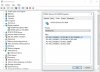
Now then I tried to install 358.41 drivers from Eurocom ( http://downloads.eurocom.com/suppor...Alienware/M17xR4_05511028_9xxM_385.41_W10.zip)
The card was detected but on the installation summary was the driver failed.
I also tried 395135 from nvidia. I didn't modify anything and the installation was smooth. Driver installed successfully. But after restart again Code 43.
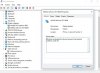
So in summary the effect after all work is the same. 980m not working properly with Code 43.
Where to go from there?
Thanks for help -
Are you disabling DSE ? Does a windows pop up asking you to trust this installer/install anyways half way through he install ?
-
Now I've tried to install the drivers again. I run DDU in Safe Mode just in case. I'm have disabled DSE just before installation and they failed again, There was no pop up about trusted installer .
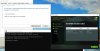
Anything I can do?
Should I try to run PEG mode again? But most likely it will brick it again... -
if no pop up about trusted installed comes up then DSE was not disabled.
It only lasts a single boot, some times same NVidia drivers will let you think the driver is installed properly and then you will get a code 43 will not start, but usually it will just fail to see compatible hardware.
find me on Discord, I will guide you, just PM me once we share the server : https://discord.gg/7RQEHJaPapusan likes this. -
disable DSE by going through the startup options and selecting the 7th one etc...
Also, meet me on discord and I can guide you with a driver in real time afterwards. -
Sounds great. I'll try this evening. My time zone is UTC 0.
The first time I tried to switch of DSE in startup I couldn't leave recovery mode so had to reinstall Win 10 again... .
.
Sent from my Nexus 5X using Tapatalk
Windows 10 and nVidia 980M GTX upgrades for Alienware (M17X-R4, without Optimus: Working Great!)
Discussion in 'Alienware 17 and M17x' started by woodzstack, Jun 10, 2015.


