 Problems? See this thread at archive.org.
Actually it was a black screen the whole time, I couldn't see the bios or anything. I already have the load legacy ram as enabled
-
-
did you do your custom overclocking or did you choose the built in profile OC Level 1?
Also, when overclocking, please ensure that you change the memory timing from Automatic to the actual speed rating of your RAM manually as sometimes when you overclock the RAM may get a bit overclocked as well causing issues.Papusan likes this. -
They were all at stock, no overclocking at all. The overclocking feature in bios was disabled. just rolled back to A09, seems to have fixed the issue.
Edit: rolling back the bios has fixed the random black screen when turning it on, but now, I just Uninstalled the nvidia graphics drivers, and when I login to windows it just freezes 10 seconds later. Is there any way to fix this? Thanks -
i started prime 95 for the lulz on mine 4710mq while fans were off (was just web browsing) within 10sec i got thermal shutdown cause fan didnt ramp up on time xD is it possible to go from 40C to 100C in less then 10sec? XD
sorry for offtopicbumbo2 likes this. -
yup its possible! ... and its really sucks

-
The only way for and avoid this is to apply Liquid Ultra thermal grease. When you switch to this paste temperature does not increase as fast as the fan ranks and start cooling.
-
I hope everyone is doing well. I have been away from the party for a while. Is A10 worth downloading?
-
Dell continues to deliver useless fan and overclocking profile in all New bios to their Alienware 17 and 18.
-
No harm done, but no discernible benefit... at least not with Extreme CPU. I cannot really see anything different than A09. You still have to manually dial things in for your Extreme CPU using XTU to get meaningful performance.
It might be useful moving down the food chain with MQ processors, but I have no way of knowing that for sure. -
I think that explains for me. I will stay with A05. Despite the limitations of Haswell, why can we not get better fan profiles?
-
From bios A7 you have at least the opportunity for and control all the fans manually with Hwinfo64 as well and run all the fans at max speed. :thumbsup:BlackjackCZ likes this.
-
is there a a10 unlocked bios out yet?
-
-
Nor shall there ever be unless Alienware decides to take the high road, treating us righteously by ditching their Secure Flash crap so we can unlock it.
-
Is there no one who has tried and create a mod bios? Is it impossible?
-
People have tried, but secure flash won't let the machine accept the modified bioses
-
everything is possible and doable, nobody had enough will passion and want or balls to organize unlocked bios on the chip and resolder it to their own system to have the results, most people just complain and whine instead of taking action
-
hopw i can only still manipulate fans 1 & 2 (GPU) the cpu fan isnt touchable from what ive seen, although im a bit behind the times these days. Im on A09 and no cpu fan adjustment, what if anything, am i missing?papusan likes this.
-
Use Mr Fox's Guide: HWiNFO64 Setup Steps - Imgur :thumbsup:
-
All I can say is, "Shame on Alienware" for producing filth like that on an enthusiast machine. That's essentially an act of domestic violence against their most loyal customers. UltraGSM, svl7 did this on his new AW17. He has an unlocked BIOS and a BIOS chip mounted in a socket (that replaced the chip soldered directly to the mobo) which he can swap out whenever he wants to. I think the problem is fear and inexperience, more than lack of desire.UltraGSM, Ashtrix, papusan and 1 other person like this.
-
I have to totally agree with your Brother Fox.. I can solder and have done it before but never went around replacing chips and I wouldn't risk it with a £1000 machine...
-
well, if you can actually solder so well then there should be no concern over what machine costs. If there is a wish and ability - ones will should take over and make it all happen. otherwise if an ingredient is missing on this formula, it aint gonna happen. Simple as that
-
I would do it, but I don't have any SMD soldering tools or experience. If I did and I was good at it, it would already be done. I haven't found anyone close to where I live that knows how or has the tools.
If you have the tools and the skill, there is no reason to care about the warranty or the cost of the machine. If you ever need a mobo replacement or have to send it to the depot, just slap the original chip back on the mobo and you're ready to move forward with the repair process.UltraGSM likes this. -
When svl7 got an unlocked bios. Did he get fixed the broken fan profile on his alienware 17?
-
He unlocked it himself. The fan tables are in the EC and that is really tricky and proprietary. I doubt he was able to change that.
-
Had Dell opened up the fan profile with an updated bios, then I could edit any of the fan speeds inside Hwinfo. Hwinfo64 provides a CPU fan speed of only 4600 rpm, while the real rate is 5200 rpm on Alienware 17. It is noticeable that the fan moves more air at 5200 rpm when you can only control cpu fan in hwinfo64. There are actually 13% higher fan speed this is talking about .. Dell destroys some of the joy I have with my laptop with and deliver a crippled bios. When Dell opened up for control of fans with bios A10 should they opened up all possibilities for controlling the fan speed .. Dell knows perfectly well that we who choose such a gaming laptop using such software as Hwinfo64 to control the fans at a higher speed than standard. I am quite sure that it would have been less complaints from customers who have heat issues on their Alienware laptops. A correct fan profile would camouflaged high heat on hardware. A reduced cpu temperature of about 10 degrees, would that complaints on hot issues of hardware that needs to be fixed much less.
-
Oh, you're missing the point, Brother papusan. They did that because they love us all so very much. They are sparing us from terrible fan noise. Don't be mad at them... instead, blame all the crybabies that spew diarrhea into their diapers and vomit baby formula all over themselves if they can hear the fans running.
-
They are saving us from terrible fan noise. WHAT .. .. Perverse reasoning of Dell's engineers ..HaHa
NO !! WHAT IS THE PURPOSE OF ALLOWING fan starts 15 SEK AFTER THE TEMPERATURE HAS EXTENDED TO MAYBE 65 DEGREES? Cpu fan starts when the temperature has gone down to 35-40 degrees .. Which fan noise reduces then? The fan is noisy just as much although it starts at the right time as it does when the temperature has already gone down. sick reasoning :laugh: -
Probably not the engineers as much as the "marketing team" that doesn't know anything about engineering. They decide what they want, pretend customers want the same thing and leave the rest up to the engineers.
-
Advertise that Alienware laptops are a very silent gaming laptop, as if it is a tiny computer .. With fans who are underclocked (I want the whole laptop overclocked). LOL
Is it a good thing that Dell uses their hard earned money and send their technicians home to their customers to fix heatsink, fan and thermal grease due to a quiet running fan on a hot laptop? Marketing team should have been fired .. They give bad advice to the engineers. HAHAAshtrix likes this. -
-
I'm assuming this firmware isn't for the M18xR2 because it says this isn't for my system. Is there one someone could point me to for that laptop?
papusan likes this. -
Drivers for Alienware 18R2. Product Support | Dell US
Press drivers & downloads
You can also search With your service tag on Support Dell: http://www.dell.com/support/home/us/en/19/Products/laptop/alienware_laptopsLast edited: Dec 9, 2014 -
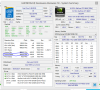
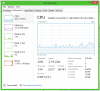
Hello, I am not sure if my Alienware 18 is running faster than the stock speed. I updated to A10 and turned on OC1. My Task Manager shows that I am stuck at 2.79Ghz. I've tried everything to get this to change. However, I downloaded HWiNFO64 and I think it may be running at 3.6GHz. Is that what the "uncore status" means that I've circled in the image? Thanks in advance.
-
The max speed shown in Win 8 task manager is the base speed of the CPU, and nothing else. Doesn't show your overclocks, or any turbo boost. For example, see below:
![[IMG]](images/storyImages/Screenshot1229.jpg)
-
Thanks for replying. In your image, you show a 2.7GHz processor running at 3.46GHz. That is how my Alienware 14 Task Manager works as well, but on my Alienware 18 it does not seem to update. I was not referring to the "maximum speed" at the bottom right, but the "speed" at the bottom left. That said, can you tell me from the image I posted of HWiNFO if my processor is running in the 3.x GHz range?
Also if anyone could suggest any changes from that screenshot like settings for my RAM or GPUs that would be awesome. I am not experienced at overclocking at all. I don't want to go overkill, just reasonable, safe adjustments.papusan likes this. -
Windows 8.1 is buggy. Showing much weird numbers. My overclocked [email protected] appear as 2.73ghz. Under System (properties) says: i7-4930mx @ 3GHz 2.10ghz. While my standard clock speed is 3.2GHz + turbo = 4.2ghz in cpu-z and hwinfo64.
Thanks to Microsoft
Edit: rswfire You can download CPU-Z which is also very accurate from guru3.comLast edited: Dec 9, 2014rbatts likes this. -
The 3.46 I see is because my base clock is not 100. It's 99.something and thus I actually get something like 3460 MHz or so. But yes, Win 8.1 doesn't know everything too well. That being said, 3D mark screws up with these turbo clocks too. I've seen 2.5GHz base clock extreme CPUs and stuff. It's weird.
-
OC1 PROFILE ON A I7-4810MQ 1X40, 2X39, 3X38, 4X38 http://na.alienwarearena.com/news/a...otential-of-intel-s-core-i7-laptop-processors
Have you overclocked processor correctly, then there will be correct in all sorts Benc tests. Everything at full Pupp.
RSWFIRE: CPU-Z 1.70 downloadLast edited: Dec 9, 2014 -
That's because Alienware's BIOS is all screwed up and Extreme CPUs only run at 2.5GHz using factory BIOS settings. ...that's right... the BIOS settings are so utterly borked from the factory that the CPUs refuse to even run at stock Intel clock speeds.
Windows captures that screwed up clock speed data and reports it to the benchmark software.rbatts likes this. -
Heh. You know, I've been starting to feel like Alienware machines are like "elbow grease required" machines on the software side, and Clevo are the "elbow grease required" machines on the hardware side, for optimal system performance. FN + 1 = max fans for clevo (where AW has to mess with fan tables via HWiNFO64 with unlocked BIOS) and can use Win 7 with UEFI... then on AW side the cooling is absolute top notch (at least once you get the fans working) whereas on a clevo you'd have to lap heatsinks or use foil tape mods or various other things and with the SLI model with 980Ms, the best performance requires you to use the P370EM CPU and slave GPU heatsink (as the CPU will get the extra cooling it needs, and the 980Ms are cool enough for the slave to take the hit), and the AWs are plug and play for basically all GPUs as far back as 280M to 880M (and with 980Ms if you count UEFI/Win 8) etc, where clevos'll need a BIOS that Prema, a non-clevo employee (as far as I know) would have to make, etc etc.
If only there was that perfect laptop huh. -
Somebody needs to marry these two companies and fire a bunch of losers, hire some firmware hackers like svl7 and Prema to replace those lousy bums, so we can have at least one or two decent extreme machines worthy of our hard earned wages. Alienware aesthetics, build quality and cooling with Clevo specs would be something from a fairy tale. Ain't never gonna happen, but it never hurts to dream about what could be if things were as they should be.
-
I hear ya right there. Why do you think I wanna keep this shell for as long as it'll be upgradable? I'm probably never gonna get to, but I would like to get a 4930MX, the EM heatsinks and two 980Ms (or 1080Ms or whatever full GM204 is) and keep these things with fully lapped heatsinks and CLU for thermal paste. 4.3-4.5GHz daily clocks (depends on how far this 330W brick will go) and some DDR3 2133MHz or faster RAM. Would be nice and cool and powerful, exactly what I need.rbatts likes this.
-
No... it is not possible to flash an unlocked BIOS to the AW18 and this will not change.
The reason why UEFI firmware is no longer able to be unlocked [more accurately cannot flash unlocked] is because Microsoft has a contract stipulation [requirement] they will not issue Windows certification to OEMs (starting with Windows 8) unless they provide secure boot via digitally signed firmware, and whether you like it or not, that stipulation is there to protect you and your device.
- If it were somehow possible to order an AW18 with a *nix OS instead, a consumer may have a case to request an unlocked bios, however that would depend on the wording in Dell's contract with Microsoft, something that could only be obtained via a subpoena after a civil case is filed. (In other words, not likely)
- slv7 wrote a beautiful explanation on TechInferno about this very issue
Last edited: Sep 10, 2015 -
Is it possible to run RAM at higher speeds than the CPU is compatible with? All the i7-49xx only list 1600 as the max compatible RAM speed. I know you modify the RAM speed in the BIOS, but wouldn't raising it to a higher clock speed than the CPU lists as compatible cause issues?
-
I believe the use of Thaiphoon burner is required to modify the hardware SPD ROM on each RAM stick to force it to run at higher speed. Ivy bridge supports 2133, how can haswell support less?Mr. Fox likes this.
-
I had to look up a spec about my processor earlier and only glanced at the specs, but Intel only lists 1333/1600 as the max RAM clock speed supported, which is what prompted the question.
-
-
I am running my memory at 2133 in the M18xR1, M18xR2 and AW18. I am running it at 2400 in my Clevo P570WM. The concept of "not supported" only means they don't care if it works or not, haven't tested it and won't help if you have problems doing it.
A lot of "not supported" stuff works great and presents no issues. Other examples of "not supported" include running my 2920XM and 3920XM and 4930MX at 4.9GHz and combining two 330W AC adapters to handle extreme performance power demands; whereas the manufacturer contemplated something far more sedate and provided only marginally adequate 330W AC adapter for us to have to try to get by with. The beauty of all this is fact that their support is totally irrelevant and unnecessary, as long as they don't dare to attempt to have control over what we do. -
And even more examples of "not supported":
quad channel memory on P570WM
780Ms in M18x R1
900M in any legacy alienware
900M in old clevo models
Not throttling during Linpack on a mobile CPUMr. Fox likes this.
Alienware 18 BIOS A10
Discussion in 'Alienware 18 and M18x' started by Spartan@HIDevolution, Oct 9, 2014.


