 Problems? See this thread at archive.org.
Finally!!! Alienware M18x R2 with Dual 980M SLI
Here are some basic steps to upgrade Alienware M18x R2 to Dual 980M SLI successfully. This configuration only tested Windows 8 or 8.1, it will not work with Windows 7.
1. Before replacing card, go to system Bios (keep your old graphics card inside system or not any graphics card installed). Then click on Boot tab, UEFI = Enabled, Legacy ROM = Disabled. F10 to save bios and Exit. After then turn off system.
2. install Single or Dual 980M.
3. Now system will post. You will get text on screen something like, Checking devices, can not find boot device press any key to restart.
4. You will need to create bootable UEFI windows 8.1 installation USB flash drive.
Rufus is a small utility that creates bootable USB flash drive for Windows 7 or 8. What makes Rufus different is that it offers 3 different partition scheme to target the system type, such as those UEFI based computers. You can make a bootable drive that can directly boot off on a UEFI computer without turning the Secure Boot off. It’s free
1. Plug in USB flash drive,
2. Launch the program. Since it’s portable, you can simply just download and run it.
3. Check the option “Create a bootable disk using: ISO Image“, and click the icon next to it to pick up the ISO image file.
4. Select “GPT partition scheme for UEFI computer“.
Before you click Start button, check to make sure the settings are selected to similar like Figure

5. Click Start, and dont stare (it will only take few min). take out USB drive when done.
5. Connect USB flash drive to system and press power button, now you will able to Install windows 8.1.
6. That's all you need to do you to do.
I do specially thanks to @godfafa for procedure. @Mr. Fox Actually your suggestion about UEFI was correct, if we did more research on it then we can able to achieve it early. Also credit goes to @j95, @svl7, @Prema, @Cloudfire(specially to keeping struggle Alive
I will update more when i get time to do.
Drivers
Check below link for modded Nvidia driver INF V344.75.
344.75 nvdmi
Gaming
Crysis 3 @ very high settings, AA = TXAA med. (2xT 1) and AF = 16x. Around 59 - 84 fps
Assassin's Creed Unity at Ultra settings, AA = MSAA-4x, 60 - 78 fps.
Battlefield 4, Ultra Settings
Benchmarks
3dMark primary tests,
Fire Strike: Score 13255, GPU 18735, Physics 10615, Combined 4700
Sky Diver: Score 29593, GPU 53782, Physics 10211, Combined 19395
Cloud Gate: Score 26604, GPU 94531, Physics 7569
Ice Storm: Score 156462, GPU 363563, Physics 52263
Generic VGA video card benchmark result - Intel Core i7-3940XM,Alienware M18xR2

Heaven 4.0 benchmark, Preset = Extreme

3DMark 11
Graphics Score: 24584 || Physics Score: 9470 || Combined Scor: 8525
http://www.3dmark.com/3dm11/9100903

GPU comparison at stock between 780m SLI, 880M SLI, R9 M290X SLI and 980M SLI
3DMark11 720p Performance GPU comparison at stock between 780m SLI, 880M SLI, R9 M290X SLI and 980M SLI.

*Notebookcheck review data of 780m SLI, 880M SLI and R9 M290X SLI for reference.
Known issue
None
Dual 330W PSU mod.


Random Pictures
After almost waitin for 2 weeks today i got 2 x 980M yeahh i was so happy today afternoon.
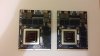
-
You are experiencing the same as godfata and the gang from Techinferno. Both R2 and AW just doesn't want to cooperate with the new Maxwell cards. Argh so frustrating. Can you access BIOS btw?
One thing I'm curious about is whether using GT72 980M vbios would help. Probably not but it could be worth a try. Just make sure both have the same VRAM amount and I take no responsibility for a bricked cardPeter likes this. -
I propose we add (work in progress) to the thread title so people don't get heart attacks. Even though I don't own an Alienware nor have any plans for upgrading my Clevo, I still got excited and then was hugely let down lol.
deadsmiley, Takaezo, Rotary Heart and 1 other person like this. -
Actually i dont know details about current bios version on these cards. But i believe that both are Clevo cards. Honestly dont wann blindly flash bios without knowin its current version and got NO Warranty on these cards. I dont know after turnin ON system it wont let me to inside bios, just black screen and annoyin beeps.
-
im sorry about thread title, i thought someone could help me out.
-
This is so weird.
What is stopping it from booting???? Does it check for some secret code inside the Dell vbios and only proceed once that is found? Does it go over the vbios and if it finds Optimus there it refuse to go further because M18 doesn't support Optimus?
I just wish Prema, SVL or anyone else with knowledge of these things could help us out :/ -
Might be some low level code in the vBIOS that checks certain I/O requirements that the R1/R2 are failingCloudfire likes this.
-
I know it has just spoiled by evenin Basically when i press power button, after few seconds screen stays black and annoyin 8 beeps. I tried one card at a time, both and with SLI cable. i think it does go to vbios, cosz 8 beeps are related to graphics card.
-
yeah m18x system wont recognise this graphics card. I think if we could edit graphics card ID as 780m, hence it may detect by system.
-
8 beeps is what Dell calls LCD failure. What it really is, is the inability of the M18x to initialize the 980M to drive the display.
-
Yeah it is. i just reinstalled my old n spontaneous gold Dual 7970M. Ah my friend is here now, he got Clevo system with dual 880M SLI. I'm goin to test 980m cards on his system.
-
Could it be as easy as comparing hex/code from Dell 780M vbios with hex/code from Clevo 780M vbios and figuring out what is the code that's missing on the Clevo 980M vbios that locks the AW18/M18x from booting?
Or is it just too time demanding with thousands of line of code? -
Whath just replaced dual 880m with dual 980M on my M8s Clevo system and it boot up without any issue, even no need to reinstall drivers.

-
I think if some one good at editin bios then it wont be tough task. As programmer need to compare both vbios and edit hardware id. I dont think there is large amount of code need to modify.
-
It is not that easy, if it was the resellers would of done it by now.
-
Why can't our Alienware's be this easy to upgrade?
I mean, its almost down to Asus in upgrade-ability. Sure it got MXM port but what is the point with that if it can't work as plug and play like the rest of OEMs? :/
You have most likely many people owning Alienware machines that buy these Maxwell cards from resellers from eBay that write "Alienware/Clevo GTX 980M". They go home and try to upgrade and is met with the block like you are seeing now. Thinking the system can't be upgraded, sell the notebook and buy a new one from Alienware with these GPUs. More profit for Alienware. Almost like they put this annoying code check just because of that.
Alienware doesn't even sell Dell GPUs that would work to people and many doesnt know you can reflash Clevo cards to Dell with the right vbios...
Maybe that's what SVL does? Add code that let it bypass the compability check?
Maybe you are right. Maybe the resellers (Eurocom/HID) are clueless
-
I don't think it's something Dell has done, I've got a Clevo card in my Alienware, and mine's an 'old' Alienware like the M18xR2 where I have bypassed Optimus completely (just running off the NVidia GPU via BIOS settings). I think it's something NVidia have done with the vBIOS on the new Maxwell cards, maybe to make them vendor specific, or maybe Clevo just want their cards to be used on Clevo's for whatever reason and have put restrictions on their vBIOS.Cloudfire likes this.
-
Mate, this is what johnkiss posted at TechInferno
n the m18x r2.
1 start with pulling all gpus and booting to an unlocked bios.
2: set graphics to SG.
3 Shut down laptop.
4: installed master gpu only.
5 try to boot from there.Cloudfire and Robbo99999 like this. -
You could be right Robbo. I don't know, just guessing.
There was a guy earlier that said GTX 780M was the same with no go and they had to wait to Dell 780M and suddenly it worked just like plug and play.
MSI and Clevo machines have all been successfully upgraded with Eurocom (Clevo) 980M which makes me wonder.
Awesome. Try it Peter and report back
-
Yeah, that is the weird part (didn't know that) - the fact it works on MSI but not Alienware - kind of removes the idea that the Clevo vBIOS has been designed to be vendor specific.
-
Thanks for update PAO.
lol i really wanted to try it out but i was doin this whole day. And my stupid mate playin Crysis 3 with 980ms. Actually i dont think this trick will work cosz when i installed 980ms in Aw R2 system i did switch graphics to intel before taking off AMD as i gone through all posts of guy from Techinferno. -
I feel your pain man. It must suck to have all that power just laying on the table and not being able to use it.
Have you tried unlocked BIOS like johnksss suggested though?
No you could still be right. I haven't seen the GT70 upgrade myself just heard about it.
But MSI are usually very universal with GPUs (like it should be)
-
How many fps is he getting for dual 980m on Crysis 3?
-
Not yet, Actually the main point is R2 must boot from graphics card, i mean even if it boot through igpu then also system must restart to switch output from graphics card. so i think there is requirement to edit vbios.
ah around 88 to 97 fps all maximum settings @1080p -
What's his AA?
-
At the moment, my system got A11 official bios. Im goin to flash A10 unlock bios tomorrow and see how it goes. Im just scared to takin more risk cosz this cards got no warranty.
-
TXAA 2xt. Now im goin to take out my cards i cant watch him anymore
Cloudfire likes this.
-
I bought my my cards from Eurocom. Yes it cost a little more but they put the 570WM vbios on the cards and sent me everything, even stuff I didn't need like 2 new HS 2 fans etc. It was great I just P&P; didn't even have to update the BIOS. They sent me the nvcvi inf file so I can download drivers from Nvidias website. Peter I really hope you get this straightened out, but once you do you're going to love these cards especially when someone comes out with a modified vbios.
-
Thanks Darkshadow, yeah these cards are smashin, double performance compare to my dual 7970m. It just dont work with Alienwares. I just love Alienware built quality and design. Otherwise Dual 980m with desktop CPU would be great deal. Yes these cards needs updated vBios to work with Alienware.
-
Been without a gaming PC for a month so far. Stuck on IGP.
Patiently waiting for Alienware with 980M SLi, if I can hold my patience, it'll be 4x the performance of 6990M Crossfire.
I will stand strong. I will stand steady.
My will shall not be broken.Robbo99999 likes this. -
lol it will be massive improvement over 6990m. i just got one request, when you get Aw with dual 980ms please share vBios
-
The P570WM is plug and play by the way, no vbios changes have been made.
That will come as we work behind the scenes to unlock it
-
-
Just get a Clevo lol.. I don't think Alienware will release anything soon...Prema likes this. -
Well single 980m works on Aw m17x R4 or Aw 17 with Optimus enabled. At the moment 980m wont work without Optimus on Alienware systems.
-
Hey Peter, have you tried the unlocked BIOS with one card? Did it boot properly with the Clevo vbios?
-
I just went through your post at Techinferno, I did't try it yet. i think it may work cosz system will boot from iGPU but it is not solution for 18 SLI systems. im just trin to edit vbios but it is new job and take time.
Cloudfire likes this. -
It may try to boot from iGPU but since it doesnt find it maybe it goes to the dGPUs instead? Going past the vbios check Alienware machines got?
Anyway, if you can find a way to find the secret code inside the Dell vbios or are able to edit the vbios to make it work, huge kudos to you man. Let us know asap if you find out anything
Peter likes this. -
Well that's issue, if it goes to dGPU, system dont recognise 980m video card. Let's consider even if this trick works, then what next...
-
Does it have to recognise what video card it really is? The guy who got Clevo 980M to work with M17x had the GPUs shown as "GFX" in the BIOS with Optimus on. He had to do the INF trick to download drivers from Nvidia and after that it was recognized as GTX 980M.
Im not sure but I think the point with the BIOS thingy johnksss suggested is to tell the Clevo vbios you have Optimus which may result in a handshake and it may boot like it did with Clevo 980M and M17x with Optimus enabled. Since M18x machines doesnt have IGP it goes right through to the dGPU instead which it can because vbios with Optimus have both functions for IGP and dGPU. Or it may crash if it cant find IGP perhaps? I have no idea.
You have to ask johnksss about his plan further if it does work. I`m not sure either -
If system boot into windows then mod. driver can be installed as per graphics card hardware ID. Yes with his tweak 18 work as Optimus but only single card. We already have working Aw 17 with 980m, but here we got to deal with Dual 980ms. Damn vbios is just 180Kb and editin required about 1 - 3Kb lalalal
-
Well I hope you succeed finding out what needs to be changed in the vbios. Just be careful so that you dont do anything that will result in a brick
-
Brick word just scares me now, my Aw r2 got no warranty left , no warranty on Dual 980ms. Anyway is there anyway we can bypass dGPU check at start up?
-
Yo, my name(?) is godfafa not godfata ...
You like mata? (if you know him) LOL -
I've just done what Johnksss has suggested.
It does work. It's making m18x R2 like a single GPU with optimus.
But you know man. We dont like optimus
I'd rather keep 780m sli on my 18x R2 for gaming than a single 980m.Cloudfire likes this. -
Going to test clevo 980m in alienware m17x R4, m18x R2, AW17 - Page 27
Come here and share your experience.
I am still working on this. And will for 3months.
After that, I will give up.
Right now, I am testing mod VBIOSes.
Not successful yet, but some progress. -
Thanks for update Godfafa, i appreciate your efforts. Thanks fro confirming, as Johnksss trick works with single card. you got new Vbios? i checked my cards vBios and both are V12.
-
So, It will boot to windows and show both gpus correct? igpu and 980M listed in device manager?
Again, this has nothing to do with optimus since you can't switch nore use the dedicated gpu to do anything other than just sit there. Unless this has changed since adding a 980M.
This is more of a safety feature/backup feature. And also to see if the alienware will show the card as a 980M or install a diver.
This is also for when you brick flash the card you can now recover it. You will also need the correct flasher for this if you don't already have it. You can't just use any flasher when trying to flash unsigned vbios code. Also the unlocked shows far more about mux than a locked one. This is another reason why the machine needs to be taken apart just in case you can't get it back on. You may need to blind flash or remove parts and do many resets. (worse case scenario) -
Now what?
-
It was a success
You have now run one card?
What can be shown in the Device Manager?
Do 3DMark11 test, to see the result GraficScore
We will know if there is a slowdown
Aw m18x R2 Dual 980m SLI upgrade!!
Discussion in 'Alienware 18 and M18x' started by Peter, Nov 12, 2014.


