 Problems? See this thread at archive.org.
You're going to need the second brick and convertor box. You'll be easily pushing into the 300W neighborhood with only a +135 offset and a stock vBIOS. Just one 980M with 4.5GHz CPU overclock and a respectable GPU overclock draws over 300W.
Yes, very much like Haswell in that respect. Unlike Haswell, thermals are not an issue with 980M. It runs cooler than 780M in spite of much higher stock clock speeds.
-
-
And what about stock modded vBIOS 980Ms? 1127/5000, would that be fine with an OC'd MX? Or would I be better off grabbing the 4910MQ and keeping it at 4.3GHz since it uses much less power/voltage than the MX ones seem to use?
I'll be dead honest. A 4.2GHz daily CPU clock and stock 980Ms would suit me fine for my "take-this-around" setup; I would only want higher clocks for streaming and such while at home where the dual PSU would make sense.
If I can't achieve 4.2 with MX and stock 980Ms on a single brick (for if I take it around with me) but I can with a MQ chip, I might simply hunt for the MQ chip instead. -
hey Mr. Fox, this throttling issue, only fixed by a hard reset? if so my xps m2010 got T7600G and when oc the CPU it throttles and i spoke with unclewebb its likely something in bios with current/voltage adjustment for w/e reason its choking once oc'ed. so in this case maybe it is the vbios needs to be revised.Mr. Fox likes this.
-
Thanks Mr Fox.
I will hold on the 980ms until this is corrected. Sounds like i wont only be spending 1500$ but also getting bunch of headaches.
Ill pass on it till there is a fix (if there ever is).Mr. Fox likes this. -
That has not worked, but I have blind flashed 3 times in the past week and that always temporarily cures the throttle. vBIOS has been tweaked, tweaked and more tweaked. I lost track, but between mikecacho, my own tweaks, svl7, Prema and Johnksss tweak, I bet I flashed more than 20 different firmware revisions in the past 10 days. Prema, bless his soul, even modified the system BIOS in an effort to change the way the video drivers interact with ACPI. I puckered my cheeks, crossed my fingers and flashed it. Luckily, nothing bricked, but it did not change any random throttling behavior.
- Disassemble machine and remove GPU(s)
- Blind flash A03
- Blind flash A08 unlocked
- Set BIOS correctly so it will boot without beeps with Maxwell
- Put GPU(s) back in
- Reassemble laptop
- Lather, rinse, repeat as necessary
Blind flashing put the BIOS in PEG/Legacy by default and 980M (single or SLI) will not boot that way. You get no POST with 8 beeps unless you use pure UEFI or (with one GPU) SG/Optimus mode with Legacy. One GPU will work with A03 in SG mode, but SLI will not and you still have to have the GPUs removed to set SG mode. You cannot go from A03 to A09 or later without making a pit-stop at A08 first. After A09 Alienware the BIOS already needs to have NVRAM storage for BIOS settings and A08 introduces that. (This is not something good or desirable as it introduces problems, but it is apparently required for UEFI.)
Every time I would get the machine stable and free from throttling (with about 5 hours of collaboration from Brother Johnksss), doing anything significant to disturb functionality, such as adding the second GPU for SLI or removing them to change BIOS settings, would re-introduce throttling problems immediately. -
So in other words, if I'm just looking to get a bit more performance, not overclocking, not benching. Just simply gaming, 980's isn't the way to go?
-
If you've got an alienware, we can't guarantee 100% usage. If you've got a clevo, go right ahead.
Also, prema made the EM series work with 900M, apparently. So now the whole clevo line from PxxxHM to PxxxSM-A can use maxwell.reborn2003 and Ashtrix like this. -
That is also a loaded question and the answer depends on what you are comparing it to. A single 980M is a performance downgrade to 680M SLI and 780M SLI, slightly better than 7970M CrossFire. It doesn't really become a particularly relevant option or offer any value to M18xR1/R2/18 owners with 680M/780M SLI as a single GPU option.
-
Anyway Mr. Fox, what about this last question so I can plan an upgrade path? Last bit of me trying to make sure, XD.
-
Finally got Fedex to deliver my 980ms. I will begin my odessay with the install in the morning. Right now I have to fill out forms to get back the monies I wasted for next day delivery. Cards didn't arrive until 4:40pm. Should've been here by 10:30am, lying fedex guy said he was at my door at 10:04am. I must have went deaf at that exact moment .
reborn2003 and Zero989 like this. -
Wondering how it will run in the 18 with an XM and 330W limit. I don't think you'll have much room for GPU OC, but that isn't THAT important. I hope it doesn't throttle like crazy along the M18x R2.
-
I have a M18x R2 with Dual 680m.
So yeah a single 980m doesn't improve anything. But dual 980m SLI is twice as fast as a dual 680m setup.
I'm just seeing a lot of negative stuff about it , seems like its impossible to use "normaly" -
If you want 980M SLI wait to see if svl7, Prema and Johnksss can fix it for Alienware upgrades to work correctly. There is a chance that it is a driver issue, but that's anyone's guess at this point. I am guessing it can't be fixed, so Clevo is your solution if you want 980M SLI. That's what I wish I had done. $700+ per GPU is too much money for an upgrade that malfunctions.
I am tickled pink with how powerful one 980M is. It is pretty amazing. I think I may have found a point of stability with one 980M in my R2, (will know if it lasts a few more days,) but one GPU is never enough horsepower to make me happy even when it is a really great one. Once you get the taste of SLI and CrossFire, it really hard to settle for less.reborn2003 and Ashtrix like this. -
Heard the GT80 Titan is using a 350W power brick. So if the port is compatible with the 18, maybe try to use it?
edit: after looking closely at the GT80 power port, it is not compatible. -
I keep hearing 350W but the KitGuru guy says 330W, it looks like the same Delta 330W Alienware uses.Last edited: Jan 7, 2015
-
It looks like it fits the Clevos.
-
I would be surprised if it were not the 330W delta brick.
-
I would be, too Brother Meaker. It needs to be at least that. I am pulling 325W with a single 980M with a big overclock/overvolt. If they used a lower capacity AC adapter, it would not be able to handle much of an overclock at all. Stock vBIOS with +135/200 with a single 980M pulls about 230W in my R2.
-
They are using the same Samsung PLS display you find on the AW18 on GT80 as well.
Its an interesting machine, but its just too ugly in my opinion. Plus it only have 2 fans and 3 components to cool off. -
My 1st quick run with my newly installed GTX 980M's :thumbsup: - Alienware 18
NVIDIA GeForce GTX 980M video card benchmark result - Intel Core i7-4800MQ,Alienware 01W2J2
Got them running thanks to Mr Fox's desktop modded GPU driver.Cloudfire, Zero989 and Robbo99999 like this. -
Not bad. Glad to see it didn't shut down because of the 330W limit.

I wouldn't mind see the wattage pull in Far Cry 4 or Crysis 3.
-
Awesome man. Cograts with a sick beastly machine!
Have you any problems with the fan on one of the GPUs or are both running? Any throttling? How is the temps?reborn2003 likes this. -
It's ugly as hell. Warranty is void if one breaks anything as well. And they will be the law on those decisions.Cloudfire likes this.
-
Yup no shutdown yet. However I'm running everything still on stock clocks - CPU and GPUs. I've been playing a few games FIFA 15, COD Ghosts and COD AW. Games run great so far!
I did have some initial trouble getting GPU drivers to even install. The screen would keep going black/blank with the back light still on. I eventually used Mr. Fox's Desktop Modded GPU driver and it installed. So keeping it running with these for now.
Thanks man! Man the temps are amazing on these GPU's. Max temp while gaming so far was like 65 degs C lol
Unfortunately the fans don't run auto. They throttle like crazy due to this of course.
So trying to customise HWINFO however I'm only able to get 2 speeds atm. Either 1700RPM or 3500RPM.
I can't set any other speed inbetween for some reason. This is quite annoying because I really don't need the fan speeds to be 3500RPM when gaming. Maybe top out at 3000RPM or something like that so the fans aren't too loud.
Just the start of things for now though. Heaps of tweaking and playing around with when I have more time I reckon. I'm sure gonna love catching up on gaming too. Haven't played much games for around 1 year now.
I'll need to do more testing to see if I'm getting throttling though when running the fans maxed out.
I'm sure liking the performance of these. If only Alienware had gone one more round with SLi! -
Whaaat? No fans run automatically? Oh man, that sucks to know. Then I will need to use HWInfo too most likely with GTX 970Ms. Maybe I`m lucky and its just 980Ms that have troubles with the fans
Anyhow, how are the temps with 1700RPM? I reckon its a very quiet mode?
And 65C was with 3500RPM probably? -
Yeh I know right. Major bummer!
Well the CPU and left primary GPU fans run auto. However it doesn't seem to run well enough on the GPU in my opinion. So better to control it using HWinfo for now.
Also yes it is very quiet when running 1700RPM. I even managed to run a full 3d mark 11 run on just 1700RPM GPU fan speed and 1800RPM CPU lol haha. Same 3d Mark 11 score.
Also yes the 65 Degs C was with 3500RPM.
It will be interesting to see how your 970Ms interact with the Alienware 18. :thumbsup:Cloudfire likes this. -
Can you reboot the machine a few times? curious to see if it starts getting a permanent throttle like Mr. Fox's M18x R2.
I wonder if will be possible to get the difference the BIOS'.Last edited: Jan 8, 2015 -
I see. Then you have the same problems as the other people here. 1 fan works, the second doesnt work resulting in throttling unless you use HWInfo.
If you have the time to test, Im curious about what temps you get with 1700RPM on benchmarks and perhaps gaming.
I will of course report back with the results from my 970Ms -
Yup I've restarted several times and shutdown a few times as well. If going by just running 3d mark 11 so far - then its so far so good.
Rebooted and ran the bench again - seems to be around the same stock score as the last few times - NVIDIA GeForce GTX 980M video card benchmark result - Intel Core i7-4800MQ,Alienware 01W2J2
I have to have hwinfo running though for the fans of course. Will do more testing tomorrow.
Running 3d mark 11 without hwinfo and 2nd GPU fan not running I get this - http://www.3dmark.com/3dm11/9251209
Sure thing will do Champ! Will have to wait till tomorrow though. Gotta get some shut eye now.Last edited: Jan 8, 2015 -
I thought I'd post these here too. Standard clocks on 347.09 desktop drivers. No throttling but these drivers don't let you overclock either. I guess they are good gaming drivers as of now.
 reborn2003, Cloudfire, Zero989 and 2 others like this.
 -
Did you try to shut it down overnight and retry some benchmarks? The overnight shutdowns usually cause the throttling from what I read.
-
Just a quick test after having the 18 shutdown for the past 7hrs or so - a quick run before work.
NVIDIA GeForce GTX 980M video card benchmark result - Intel Core i7-4800MQ,Alienware 01W2J2
The score seems to match or is close enough to my normal stock score. Not too sure if this means anything in terms of throttling or not. Happy to do more tests if possible.
Any other ways for throttling testing? I'll give it a go after work today. ThanksTBoneSan likes this. -
Morning time here, just did a test for you
NVIDIA GeForce GTX 980M video card benchmark result - Intel Core i7-3920XM Processor Extreme Edition,Alienware M18xR2
It's fine. But you should know the caveat with these drivers is they are unable to overclock. They are fine if you just want to game.reborn2003 likes this. -
So far that's what i know from Mr. Fox.
-
Having Throttlestop on can cause issues. For 347.09 drivers the core will not throttle but the memory will kick down. I switched TS off and re-installed 347.09 and things are great again. But 347.09 doesn't allow overclocking using EVGA.
-
would disconnecting the battery make a difference? as in it's only running on mains.
-
If the battery is fully charged it would have no impact and the system will regulate draw from the battery depending on load too.
-
thats pain in the , i'd prob just leave the palm rest piece off whenever i do tests like that, but in this case it doesnt look like throttle is going away. throttling for GPU i assume? it wouldnt make sense to have CPU throttle. also saw AW's new revision only for 15" and 17" looks like they may have given up on renewing 18" with 980m SLI, or even continue 18" laptop in general. next one I buy maybe GT80 from MSI. -
just wondering cos if it affects the ability of battery boost 2.0 to work and therefore cause the 900M GPUs to not throttle. i know i don't have much to go on.
-
This is how it looks like after installing cards in to the machine
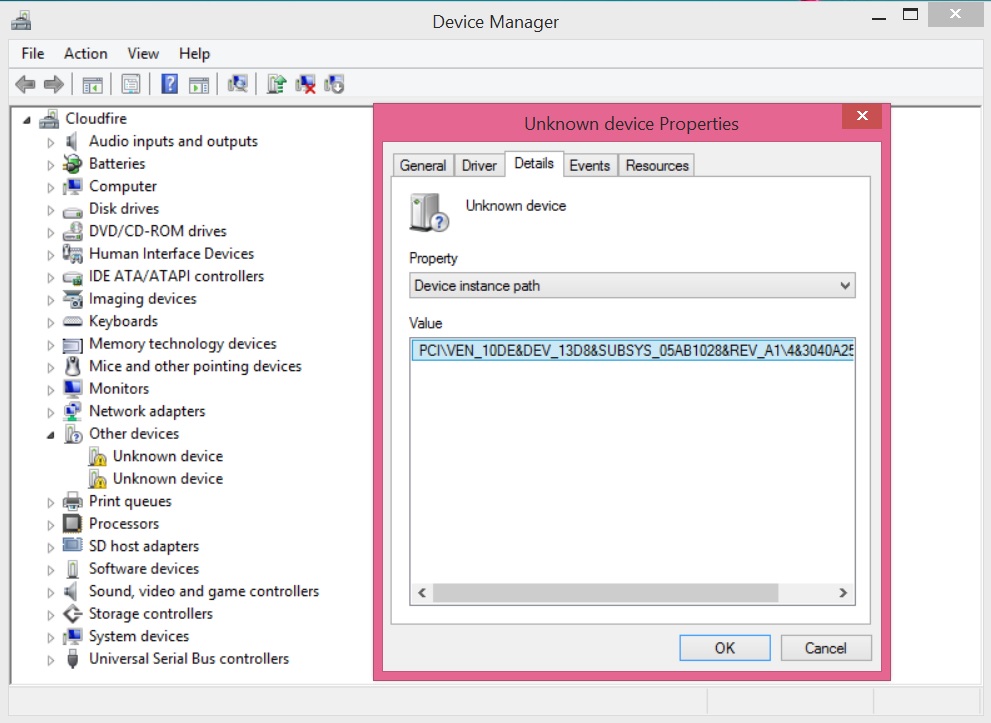
No biggie, download drivers from Geforce.com of your liking. Unzip the exe. with 7-zip. Go in to the unzipped folder. Locate "nvdmi.inf". Open it with notepad or whatever. Locate 119F, replace all of those with 13D8 (13D7 for 980M). Then replace all 780M (119F) with 970M (13D8). Save and exit. Run installer and it will identify your card.
Not quite. The installer runs but it fails. Why? Because lovely Win 8 64bit only install signed programs. Meaning any mod (like the inf mod we just did), it refuse to install it.
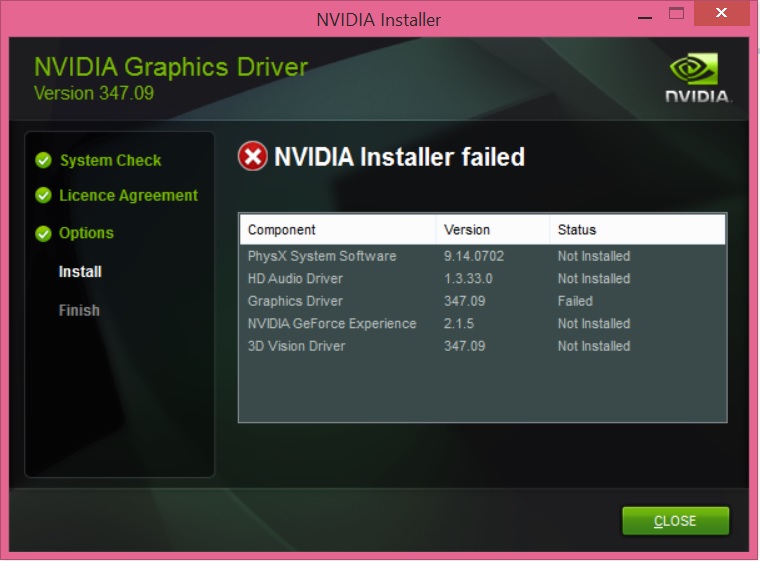
Disable signed driver enforcements within Windows 8.1. Basically clicking through a ton of options because Microshaft likes to hide stuff.
Whoila
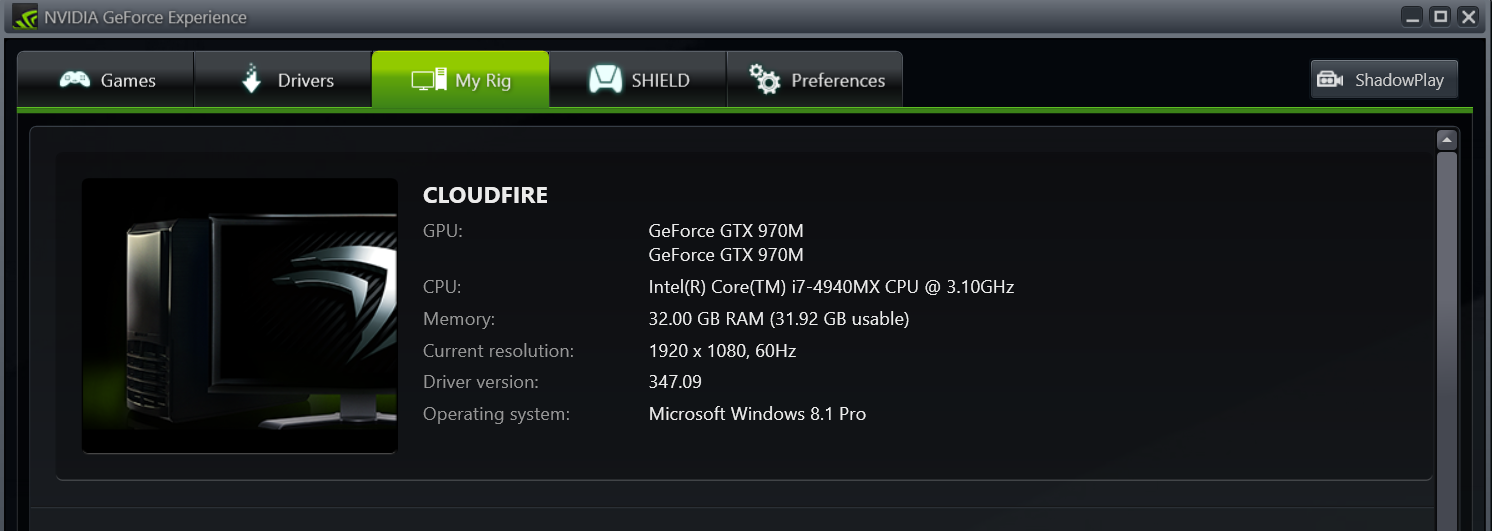
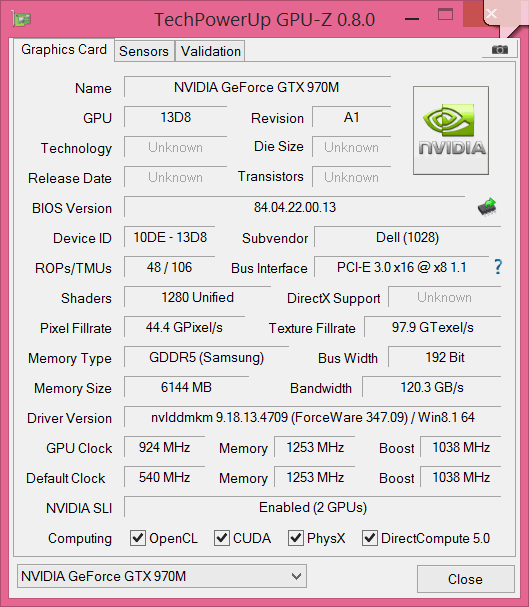 reborn2003, Ashtrix and Robbo99999 like this.
 -
Have you tested them out yet? Interesting that it works when modding the driver to use the 780M install sections, I wonder if it would be better to use the install sections that are specific to Maxwell cards, although nvdmi won't have Maxwell sections yet as that is a Dell inf - no Maxwell in Dell yet. Maybe you'd get better performance identifying the Maxwell sections within nvdmi when Dell includes them in their laptops, and then referencing those for install. (I've noticed that different cards within the inf are listed under different install sections). Just a theory! Although, if you test your setup in benchmarks against other 970M sli results & they turn out to be the same, then I guess it doesn't matter! How are they performing?
-
Nah, all cards listed within the inf get the same drivers with the same features. Its just that the program can run some extra features on a Maxwell card with the same driver if its identify one I think.
I found 970M in the same driver too, its just within a different INF for another OEM.
Will test tomorrow. Got no more time today. Will report back
-
Why are there different install sections for different cards then? I assumed it would be so the driver could be installed in a certain way for a certain card to optimise performance. Something I've noticed regarding different cards within the same architecture and on the same laptop model.
EDIT: this is what I'm talking about, see the following taken from the latest nvdmi.inf, these are strings all for M17xR4 (0551), all referencing different sections depending on the model of GPU which must be related to the install somehow:
%NVIDIA_DEV.0FD4.0551.1028% = Section100 =>660M
%NVIDIA_DEV.11A0.0551.1028% = Section234 =>680M
%NVIDIA_DEV.1212.0551.1028% = Section033 =>675M
%NVIDIA_DEV.0FD4.0551.1028% = Section101 =>660M
%NVIDIA_DEV.11A0.0551.1028% = Section235 =>680M
%NVIDIA_DEV.1212.0551.1028% = Section268 =>675M
%NVIDIA_DEV.0FD4.0551.1028% = Section102
%NVIDIA_DEV.11A0.0551.1028% = Section236
%NVIDIA_DEV.1212.0551.1028% = Section269
NVIDIA_DEV. 0FD4.0551.1028 = "NVIDIA GeForce GTX 660M "
NVIDIA_DEV. 11A0.0551.1028 = "NVIDIA GeForce GTX 680M "
NVIDIA_DEV. 1212.0551.1028 = "NVIDIA GeForce GTX 675M "
So, that's why I think it would be good to find the Maxwell install sections. But Alienware doesn't have Maxwell yet, so that's not gonna happen just yet - thought you could use 860M sections for a second, but that's Kepler in Alienware.Last edited: Jan 12, 2015 -
I really have no idea. I can check and see if I have MFAA when I fire up a game. I dont think any other than Maxwell cards can use that. Or downsampling through Nvidia Experience
Robbo99999 likes this. -
Good idea. I'm not for sure on this either, it's just a conclusion I've come to when I've been modding my own inf files. It's got to be there for a reason. Will be good to see the results you get, and some overclocking, temperatures, scores, etc.
-
I checked. It seems that the GPUs are just sorted by PCI ID. 10DE-00xx, 10DE-10xx, 11xx, 12xx etc.
All the inf files does is just keep an registry of what GPUs and IDs that can install the driver I think -
I installed updates for Windows 8.1 today btw. 3.6GB worth of code which was needed to be downloaded and patched up. And I thought Win7 was bad lol
I also noticed that the CPU fan on this thing was a heck more active than my previous AW18 with 4800MQ. I found out why with Intel XTU.
Multiplier for 1 core was 44x. Seems like Dell have overclocked this thing since 4940MX have 40x. All of them (1 core, 2 core, 3+4 core) was overclocked by 400MHz from Intel`s specifications for this CPUpapusan likes this. -
How high has Dellienvare screwed up core voltage of your processor in oc profile? Surely 1.279v which is quite high.
-
I think you might have misunderstood, you can see by the strings I posted earlier that they reference particular Sections (e.g. Section100, Section 234, Section033), which are almost definitely related to the graphics driver install. If the modified inf served no purpose bar listing which GPUs were allowed to have the driver installed then it would just be a list of GPU ID's, and wouldn't contain any other info. Have a look at my previous post, you might have overlooked the fact that different install Sections are referenced for different cards on the same laptop. They're not just putting all that stuff in there for a laugh are they!
Have you tested your GPU's, interested to see how they're doing? -
Hello!
Can someone info will maybe Dell mxm980M? or all new AW 17 will full BGA? I see pics new AW 15 motherboard that full BGA
papusan likes this.
Aw m18x R2 Dual 980m SLI upgrade!!
Discussion in 'Alienware 18 and M18x' started by Peter, Nov 12, 2014.


