Problems? See this thread at archive.org.
Sorry for my noob question, this mod and flash will allow for 980m sli to work in m18xr2 and overclock the video cards without throttling issues?
Also, can we mod the drivers or we have to wait everyone a new driver comes out for someone else to mod it? I'm thinking on making the upgrade from my 780ms but keep on hearing is alot of headaches and alot of throttling issues. Do u happen to live near LA area?
-
He is still testing, but it seems to be much improved. He might be in bed sleeping right now, but we should see more test results tomorrow.
-
It would be nice to have people sorted with running the 980M cards, I know a lot of people will want to keep their current systems compared to the new ones.
Mr. Fox likes this. -
Using prema 1.1 vbios, J95's new inf for the 350.12 driver and msi afterburner for overclocking
Good news first
1. I sustained a 346 watt power draw in 3DMark11 (second test) with a 150/400 overclock when before I would get a major system throttle that would only reset upon a reboot.
2. Clocks were solid at 1276 the whole time, for some reason I didn't need to use nvinspector to edit P0 and P1 states
The bad
Something is still holding the cards back, card usage is just low when overclocked, I see high 90's on stock clocks and 60%-98% when overclocked (same issue that I have had before with 347.90)
This is my best 3dmark11 graphics score on stock clocks (347.90)
compared to a solid 150/400 overclock with the new driver/vbios
stock 350.12 score
Here is firestrike overclocked, the gpu score is ok but not great considering the OC, phyiscs is good but combined is rubbish.... combine test starts at 32fps but drops to 18..?
What frustrates me the most is one clean driver install which should be exactly the same as an other produces totally different results, the first time I installed the 350.12 drivers I had really bad p-state switching regardless of the setting I had in nvidiainspector, the 347.90 installation that followed didn't have state switching but just throttled to 1127Mhz after 3 seconds of the benchmark, now back on 350.12 clocks are holding but the card usage throttles.... for all I know overclocking might work fine on the next reinstall!? -
I've testing all day long by now:
All the info is located HERE under the user name "Miguel" as j95 was more active there.
My last post there:
What ever you need to test or try just tell me, I will try to satisfy your personal curiosity to fix this issue.![[IMG]](images/storyImages/chuncky.png)
I have reinstalled right now ".. (only nv_dispi.inf) -> GeForce 350.12 MOD (PEG) AW/900M Stock Throttling Removed (P1 switching) " and as expected no throttling from 1126 MHz (this mod is the most stable) but we can't go further than 1126 MHz
If we could have a different VBIOS to try, it will help us to know if the problem persist even if you force those clocks & voltage by flashing the cards. Is there any how we could try to mod Prema's vbios?
I would like to test something like:
P1 - Core 1300 MHz / Memory 2905 MHz @ 1.112 mV (stock voltage + 50 mV )
P0 - same clocks as P1.
I don't know how to do that or who can help on this. -
While it isn't completely fixed, I have to say that this is a really gigantic step in the right direction. I'm super glad to see it holding at least stock clock speeds and not dropping into P1 clocks or even lower performance states.
Side note... man, it's such a terrible shame how horrible the physics performance results are with Windows 8. It really ruins things. At those CPU clock speeds your Physics Test results should be over 11K, and it would be if you could run Windows 7. -
I still see issues with FPS being limited in the latest 3dmark if it's scaling the resolution in some cases, it's a bit odd. Have people tested how the 3dmarks react to windows 10, how does it sit?
-
I have not checked recently. I was testing Windows 10 early in the preview program, but I lost interest after a few months and stopped participating. But, to answer you question the performance was the same as Windows 8 in some areas, and worse in others. CPU performance was slightly worse, with Windows 8 falling in the middle between 7 and 10 on CPU performance. With 3DMark11, CPU performance weighs heavily in the overall score calculation, almost not at all in Fire Strike. FPS does seem limited for the M18xR2. It was for me also. I think it is correlating to some sort of power draw monitoring crap. While the throttling is much improved now, clock speeds dropped to stock values should not be happening. Whatever is causing that probably accounts for the loss in FPS.
-
Oh I was just saying you can run into it, especially with a non 1080p external monitor, I don't think that is what is happening here.
-
Not sure what I'm doing wrong at this stage but that is awesome!
What bios did you end up running? (edit: never mind, I see Mr. Fox is doing just as good with the same bios as myself)Last edited: Apr 30, 2015 -
This was with a stock vBIOS, +135/+400, and my own driver mod ( P18642). Trouble was, it was never consistent due to random throttling.
Seems like the consistency is where it should be now, which is awesome, but the scores could stand to improve.
980M SLI Benching
[parsehtml]<iframe class='imgur-album' width='100%' height="720" frameborder='0' src="//imgur.com/a/i2g8R/embed"></iframe>[/parsehtml]Last edited by a moderator: May 6, 2015kenny27 likes this. -
-
Is there any form we could have a modded Prema's vbios?
I would love to try with this current settings a vbios with:
P0-P1 matched but with higher voltage (both states with 1.112 V and P0-P1 core and memory clocks matched)
I'm hoping this will help, and we finally can see no throttling at all.
Right now is 100% stable but it always down shift to the lower P state. If we manage to find a way to force by firmware the clocks and voltage we want to run... I think problem is going to be over.
Also if there is a way to flash under full UEFI as it seems there is. It's going to be so much more accessible to everyone to fix the issue.
I'm almost 99% throttling problem is just driver related by now. Something telling the GPU to calm down. It's amazing the difference that exists just changing one driver to another.
I don't understand why in this world nvidia could do something like this. They have released the highest step forward that I am aware of talking about mobile performance and they just f*** it up. We have a common say here in Spain for this cases which is " No va nadie al volante" which means something like there is nobody on the wheel or no one is driving the car. It feels really apropiated seeing the circumstances.
I will love to see a nvidia's representative over here trying to explain this to us or just a press release with an explanation about it but I have lost the faith, almost 100% sure that's not gonna happen.
I'm not home today (I went to watch Avengers: Age of Ultron)
I'll be back tomorrow with more testing and gaming benchmark to satisfy everyone curiosity
Feel free to ask for whatever test you would like to see down here
-
Ok I will try again tonight
I think I must misunderstand the reason for editing the p-states then, I am watching the clocks while I benchmark and they are "stable" so as far as I can tell there is no switching, is there another issue that this fixes or is the msi afterburner OSD not giving accurate details?
Edit: read your post at TI, That is really odd both P-states need to be matched to get full utilization is this a fix you have implemented or damage control from what Nvidia have devised?Last edited: Apr 30, 2015 -
@[Nikos] AW power throttle is in system BIOS (kind of hard to flash a mod that gen), we just brake it by matching the fallback power target...the BIOS still 'thinks' it throttles successfully while in reality it doesn't.
Of course we can fix voltage and clocks and match P0/P1 via vBIOS, but every card is different so there is no one mod fits all solution.
Do you still experience any throttle in SLI with v1.1 vBIOS Mod and stock clocks (not overclock) without using NVIDIA Inspector at all to match P1/P0.
@kenny27 matching P1/P0 in NVIDIA Inspector is also essential to keep the utilization up during OC, not only clocks.
EDIT:
BTW: Got to play a bit with an AW17 R2...Dell must have a real control freak in charge of their (v)BIOS...its not looking too bad once we got rid of all that control-mess:
http://www.3dmark.com/fs/4710202
http://www.3dmark.com/3dm11/9754235Last edited: Apr 30, 2015 -
Yes, after what they TRIED to do with the M18xR2 BIOS (which @svl7 thankfully circumvented) and what they successfully did with the Alienware 17/18 BIOS, it has become clear that they are on a mission to screw us over with firmware lock-downs. That removes any shadow of doubt that they are control freaks. Gestapo-grade control freaks. Sometimes the truth is extremely painful. One thing is for dang sure, they ain't gettin' no mo money from me if that's how they roll. Homey don't play dat. That said, I know the graphics engineer... awesome dude. I think the firmware lock-downs are an edict from the ivory tower and not the work of the talented employees that are only doing what Der Führer requires.
@kenny27 - what's your GPU score and CPU score in 3DMark 11? If your GPUs are not throttling and your CPU is, your overall score is going to be really bad in 3DMark 11. Fire Strike more or less ignores horrible CPU performance and awards a nice looking score if the GPUs are working well. -
Something is very strange with the combined score in 3Dmark11 with Aw17R2... High physics score but all to low combined score..Last edited: May 1, 2015
-
I blame the BGA CPU, look at the results from same CPU on MSI etc, its very low across the board...
-
No throttling on stock clocks here (without Inspector) as far as I can tell
Firestike 3DMark11
I'm pretty sure my cpu is ok, its only clocked @4.3 and considering windows 8. 1
So I tried matching p-states but I have had no success and I am pretty sure I'm doing it right
![[IMG]](images/storyImages/zjypdy.jpg)
With these settings I get the same or worst scores in Firestrike and 3DMark11, and it is noticeable straight away, fps is lower but then I get these awesome fps spikes that compensate for the minor throttling
Here is an example with 3dmark11 (graphics only)
I have tried J95's card resetting tricks, the blck "applysettingspermenatlyonrestart" in the bios had no effect and once I had clean installed 344.75>rebooted>uninstalled >(without restart) I could not install 350.12 as the installer could not find "compatible hardware"............. -
Click apply defaults for both cards before making any clock changes, then only change the core and vRAM (match P1/P0) and repeat the test.
-
Uninstall v344.75 -> DDU/ "Clean and Restart", follow the instructions. Just skip BCLK settings when using v344.75 option.
-
Hey Guys. Is there still no option to flash 980m cards on a AW18? I would try that fix but without flashing opportunity it will be hard ^^
Thanks for Answers
-
I already tagged you in another post about this a day or two back. There may be a way you can. [ LINK]
-
Other Bga processors have lower physics scores in 3Dmark11 but higher combined scores.
-
Either way, they're just no good. No matter how you slice BGA, it's poopy-do.
Papusan likes this. -
Thank you Mr. Fox. Will try it. If i get it correctly, i must put the laptop to "Sleep Mode" or...?
Mr. Fox likes this. -
I'm not sure that English is that person's first language. I am guessing what he meant was "idle" and "unattended" because the flash process would not be running in the background if the computer was truly in sleep mode. You may want to reach out to him by PM to get clarification on it.
-
Going higher than this clocks is not working for me or I think so :S
Prema VBIOS:
![[IMG]](images/storyImages/VVpBXij.png)
NVinspector no overclock just both Pstates matched:
GTX 980M (0)
![[IMG]](images/storyImages/6xuzUJ2.png)
![[IMG]](images/storyImages/7csNruK.png)
GTX 980M (1)
![[IMG]](images/storyImages/VvHOHcH.png)
![[IMG]](images/storyImages/8MV96Kh.png)
Test with those settings (no throttling at all):
Test 2 (same clocks / +137.5 mV)
GTX 980M (0)
![[IMG]](images/storyImages/OUO7pca.png)
![[IMG]](images/storyImages/QEkPLgv.png)
GTX 980M (1)
![[IMG]](images/storyImages/eFYraw2.png)
![[IMG]](images/storyImages/sSaz86D.png)
Test with those settings (no throttling at all - voltage going down to 1.068):
Last edited: May 1, 2015 -
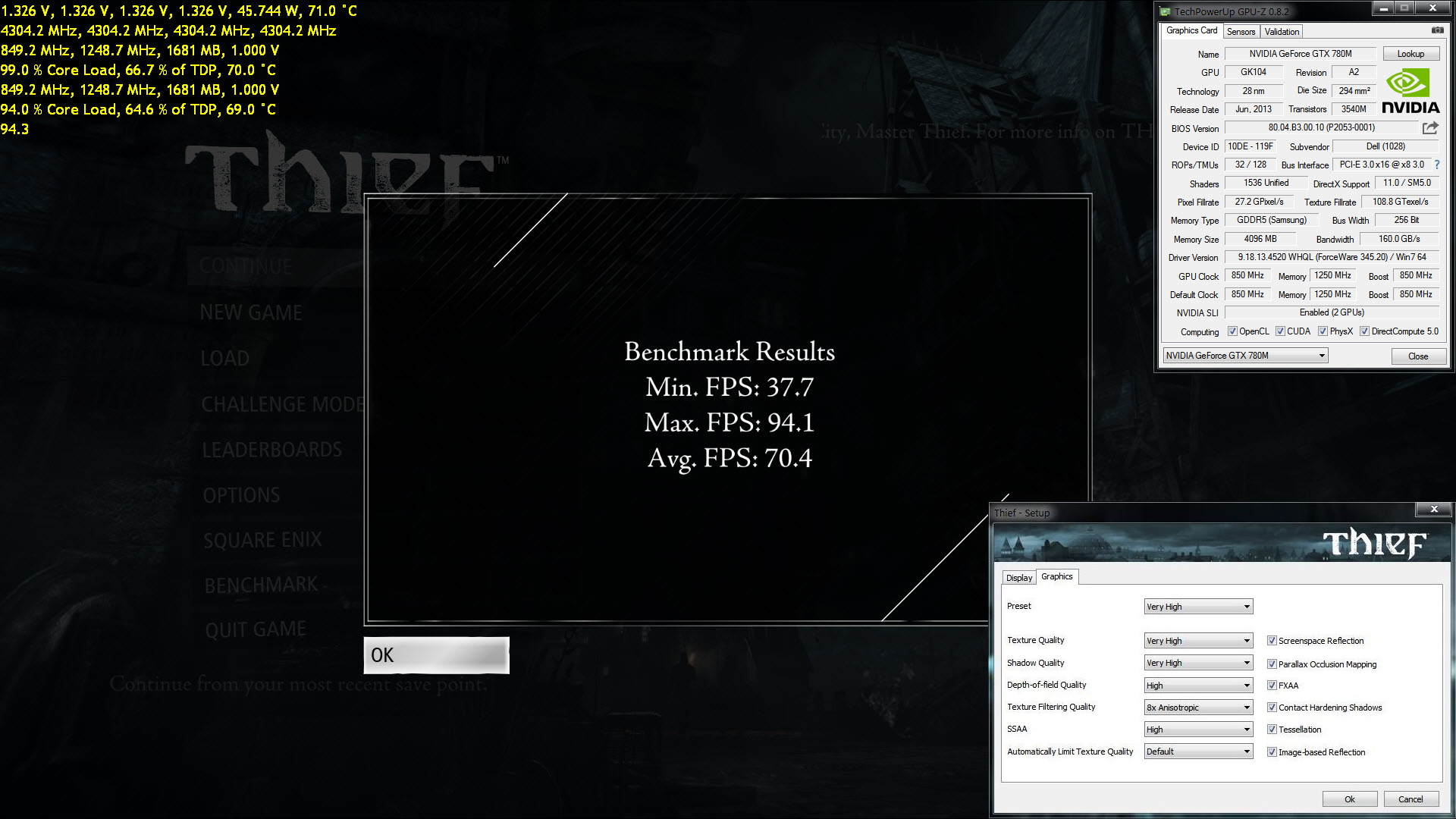
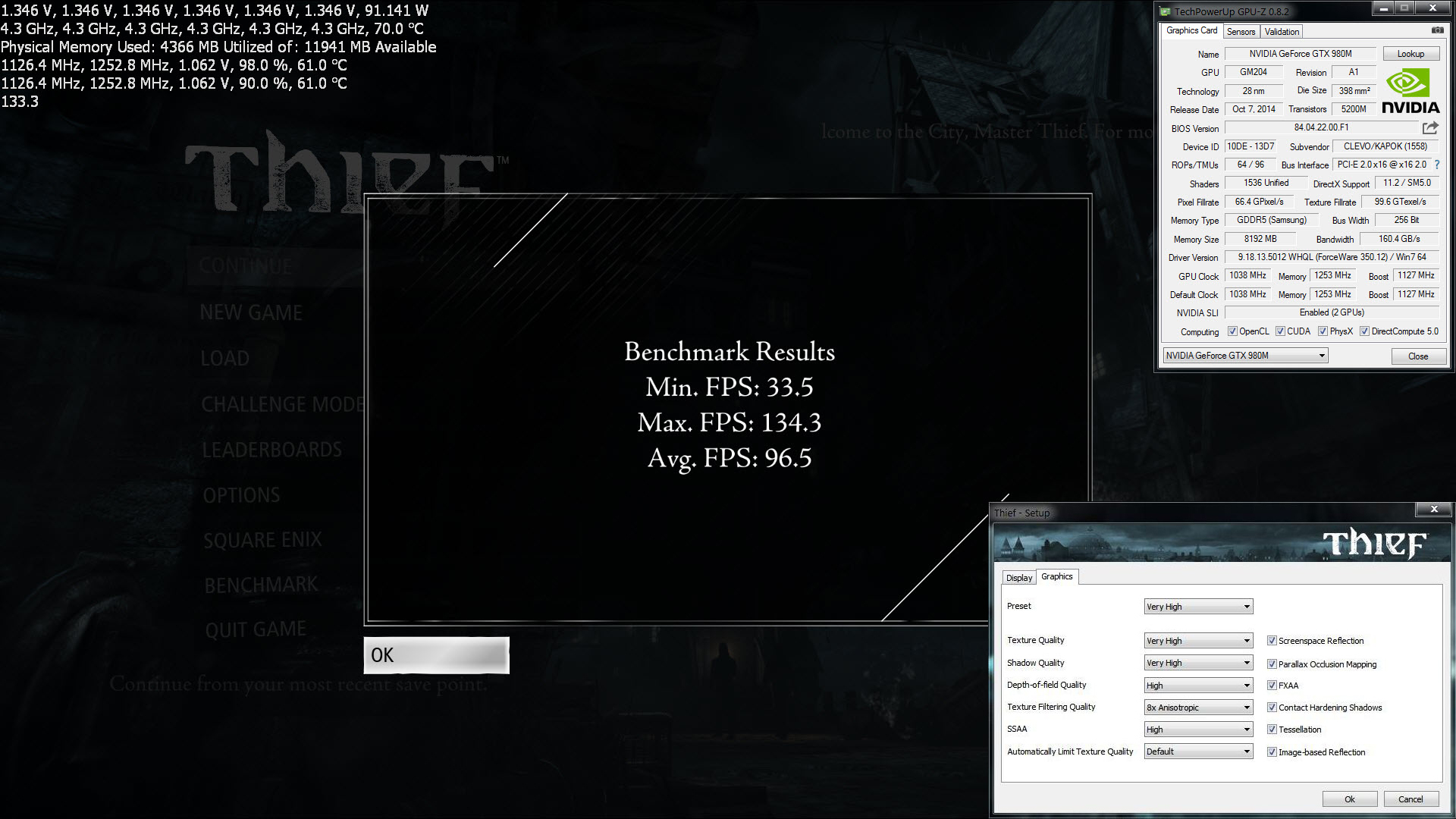
If you have the game, try Thief benchmark maxed out (1080p, no vSync, Very High preset) and see how the results compare to these. Both benchmarks are stock GPU, 4.3GHz on CPU.
Attached Files:
-
-
I'm doing some testing with nvinspector. Check my last post over yours, I'm updating it.Mr. Fox likes this.
-
-
No difference the clocks or voltage drops to 1126 MHz / 1.068 V
I tested this right now with same results:
![[IMG]](images/storyImages/mY8YytG.png)
![[IMG]](images/storyImages/yfl9dQJ.png)
![[IMG]](images/storyImages/uUd977l.png)
![[IMG]](images/storyImages/CvzLQAE.png)
-
I guess I do not understand what you mean. You show no core offset (stock clocks) on P0, so boost clock max is going to be 1126 on core. P1 is set correctly set for 1126 on core (stock boost clock), so if it is running 1126 when benching it is not dropping. It is working correctly in that scenario.
-
I meant voltage is always dropping to stock voltage 1.068 V instead of (1.068 V + 137.5 mV = 1.2 V).
-
Oh man, you don't need 1.200V at all. That's way too much voltage. For stock you don't need to change voltage. For 1260 to 1300 core clock, somewhere between 1.056V-1.075V should be enough.
Edit: Look at this screen shot. I am using @Prema 980M v1.1 vBIOS. My voltage at 1400 on core is not even that high... 1.137V is enough.Attached Files:
Last edited: May 1, 2015 -
-
Yeah I know is too much voltage, that is not my point the thing is that it doesn't matter which setting I try, the core clock or the voltage goes down to stock values always after 3 seconds. Check this video (is processing right now maybe is not available for a short time).
NVInspector settings for that video:
![[IMG]](images/storyImages/3obe82A.png)
![[IMG]](images/storyImages/4N25agX.png)
![[IMG]](images/storyImages/fDM4YsS.png)
![[IMG]](images/storyImages/YVrbxE6.png)
-
I don't see anything wrong in the video. The voltage dropping to stock... Yes, but your clocks are stock and they are holding steady. It is drawing the right voltage, based on what it needs. The question is, if you overclock, does it drop to the same level stock voltage and then your machine locks up from voltage too low?
I am uploading a video also. I will add it as soon as it is finished.
Please try this NVIDIA Inspect batch file. Just double-click on it and you won't even need to open NVIDIA Inspector. I used it in the video I will add when it is done.
Compare your GPU behavior to what I will show in that video to see how they compare. You will need your dual PSU mod for this. On my Clevo it's pulling about 540W.Attached Files:
[Nikos] likes this. -
-
OK, here's the video you can compare behavior with.
[parsehtml]<iframe width='1280' height="720" src="https://www.youtube.com/embed/2Lhp7lpABOw?rel=0" frameborder='0' allowfullscreen></iframe>[/parsehtml]Last edited by a moderator: May 6, 2015[Nikos] likes this. -
I'm uploading a video, benchmark done with your batch (edited to match my nvinspector path). No luck with OC it always goes down to 1126 MHz
NEW VIDEO - THIS ONE IS THE CORRECT WHO BELONGS TO YOUR SETTINGS:
I'm going to try with 344.75.Last edited by a moderator: May 6, 2015Mr. Fox likes this. -
OK. One more thing to check. Apply the batch file. Now, open NVIDIA Inspector. Look at the temperature target slider for P0 on both GPUs. If it is not slid all the way to the right already, do that and click "apply" to each GPU and test again. If that is not maxed out it can cause that to happen. I have a strange issue with my 980M cards where it sometimes moves all the way to the left for no reason I can identify.
-
It was maxed out already. With 344.75 (j95 modded version) throttling is back, but it tries to keep with the highest clocks it can but fails and goes down till 135 MHz.
-
3D Mark 11 - Mr.Fox's batch file - 344.75 J95 modded drivers.
Mr. Fox likes this. -
We already knew that older drivers were going to have problems. Only @j95 latest 350.12 fix works right. What the first video shows (horrible throttle) is how my 980M cards (single or SLI) almost always acted like unless I ran stock clocks and stock vBIOS, and even then sometimes it behaved that way.
If the NVIDIA Inspector temp target slider is maxed out with @j95's latest mod and @Prema's vBIOS v1.1 that might be the best we can hope for. It is still a massive improvement even though it still does not work 100% to hold beyond stock clocks.
980M is great to a point. I'm still pretty unhappy with mine even in the P570WM. If I try to overclock like @Santander or @johnksss are able to, my screen goes black and the system hard locks, so it's a beast but not the benching machine it should be if my 980M GPUs worked correctly. It does it with Prema's vBIOS and the svl7/johnksss vBIOS exactly the same, single or SLI, Windows 7 or 8, doesn't matter. Since I cannot overclock the crap out of it (the main reason I own it) I often don't even use it any more. Some days I really wish I had never bought 980M... much better than 780M for overclocked benchmarks scores (but, not nearly as much for gaming) and too frustrating that they don't work like I want them to. -
Maybe next generation will be the ones... hope they fix whatever is messing with our systems and let us be free or bench free.
The last thing I would like to test before accepting this is it. Is a custom VBIOs with P1 hardcoded @ 1300MHz / 2900 MHz / 1.112 v. But I do not know how to edit it. So if someone is able it will be so much appreciated. -
Maybe so... there's always at least a tiny ray of hope the next generation could be better. I am at the point now that I am losing interest the way everything is turning to crap in high performance laptops. There is a good chance I won't even try the next generation and either build a monster desktop or simply find a new hobby that doesn't involve computers and leave the broken hardware garbage for the kids to play with. They're really messing things up and it's too expensive when everything is either broken or trash, with locked down firmware and now pathetic parts being permanently welded to the mobo... really super disgusting. There is no way in hell I will spend money on a "high performance" system that has BGA or crippled firmware. Before I would buy some half-butted excuse for a high performance notebook, I'd rather use a cheap Inspiron or an Acer crapbook for $500 or less, lower my bar to the bottom on expectations, save thousands of dollars and toss it in a dumpster when I'm done with it.
Ashtrix, @tomX, Papusan and 1 other person like this. -
If I don't lose the faith is because of a communities like this one or techinferno. This place and more important the people that writes here are the motive for me staying here.
So, maybe next generation, svl7 or Prema or other genius could bring us back our lost fun. So, you have to be optimistic, here is plenty of talent. The easy step is to go for desktop's monster but what about the challenge of mobile platforms?
I would like to stay on this side. -
Me, too... but... the hill is getting steeper and having to fix everything that is shiny and new, and expensive, in order to make it finally work right is starting to get old. The victories make it worth the trouble, and we have had some good ones... but when we try and try, and it still remains broken or only partially working, I start to question if it is actually worth the hassle. A technical challenge is nice, and turning something good into something amazing is fun, but I don't like spending big bucks on stuff that is messed up.
Sorry for being negative. I was really excited about the possibility of a total breakthrough on this, versus just a really nice improvement. I'll get over it in a day or two.
Aw m18x R2 Dual 980m SLI upgrade!!
Discussion in 'Alienware 18 and M18x' started by Peter, Nov 12, 2014.


![[Nikos]](images/avatars/[Nikos])