 Problems? See this thread at archive.org.
Good news is, I did it! saved stocked vbios and flashed, Bad news is my problem still there.
I can game without SLI without a problem no crashing when exiting a game at all. I think my secondary GPU is fulty. its gotta be, I have done everything and all kinds of trouble shooting. im gonna RMA the second GPU.
Mr Fox, Im gonna have to flash the bad card back to stock Vbios... the secondary videocard would be the one on the right side if you are looking at the monitor, by the numpad. what GPU would that be in NVFLASH ? 0 or 1? just wanna flash that one back to stock and wait for the other one to arrive and flash it back o the modded vbios.
-
-i0 is primary GPU, -i1 is the secondary GPU
-
I'm using 352.86 without any issues, although I don't install Geforce Experience, so that could be the difference.
-
Okay looks like the 980m is good to go... BUT I had to HDD in Raid 0. The raid isn't working.
It did work at first but after a few driver installs and other updates I found it dead.
On it I have all my games, pictures, and etc so I really need it back. Is there a program or something that I can do to recover it?
UPDATE!
Fixed it! I disconnected the cmos and re seated the flex cable on the HHD's . It really threw me that the drives were working the after a round of updates it just disappeared! I was reading all over the web on how to recover it in software lol
Oh well, I had to give some blood to the update gods some howLast edited: May 20, 2015TBoneSan likes this. -
Okay Guys! Here is where I'm at
My GPU temp is maxing around 82 C I had some major throttling as you see the 1443 score! But I think it had to do with the CPU overclock I had. I wipe it out and that helped. I haven't fine tuned it because I'm just waiting on the heatsink for my second GPU. Also Idk if the heatsink on the one is good its idle temp is around 40 c. seems a little hot.
Is 8903 a good score? I though I should be seeing around 10k. I started getting a throttling a little bit above the current settings. Is throttling suppose to be totally gone?
How I installed I never add any video drivers except the modded 350.12 and flash the vbios with the 980m still unseen by windows pre driver install. -
The 980M will never work well. According to Mr. Fox's assumptions, they seem to break when the system surpasses an overall power draw. Your OC might be tossing it past that point.
900M series will never work well in Alienwares. We assume it's the BIOS, but that's just assumptions. Whatever nVidia did with them, they can't stand the alienwares, but seem to be fine with all the old (usually picky as hell) Clevos and the MSIs can use them too. -
I am having a issue, that i think it has to do with my secondary gpu being fulty. Other than that, My sli setup is working as it should. i can oc +100 core +200 memory without any throttling in games. It was a pain to get them installed and configured properly. once ur done, with the new vbios is working property. -
But you appear to be on 780M SLI?
-
Sorry, Havent updated my avatar. I upgraded to 980m sli this weekend. having some issues when i exit games but during games everything is super solid. even with moderate OC with just one powerbrick.
-
Now, are your cards being pushed to the limit in those games? I mean it's all well and good if you're vsynced to 60fps and OCing, but if you're running full bore and you never throttle, that's something else that AW owners haven't been able to do
-
Are you using 350.12 or the new 352.86 drivers? The thing is your crashing at the end of games might be due to unstable CPU OC.. I used to get similar behaviour when I was OCing my 3940XM @ 4.4GHz (even on 1 core lol)... Thought it was a Windows 7 issues but moved to 8.1 and lowered OC to 4.3GHz and boom problem gone..
-
It also happens on stock CPU speeds, I thought about that too
-
Do you mind to share with me (maybe other people may be interested as well) the ASIC quality of your cards (980M)?
I will start with mines which I found them to be the lowest ASIC quality value I've ever had, not very happy about it.
GPU 01:
![[IMG]](images/storyImages/MSJMYJr.png)
GPU 02:
![[IMG]](images/storyImages/NDtFWp6.png)
I would like to know this because my system is rebooting by itself and the temperatures are not the problem. It does not happen to me when I use the SLI of 680M :/ -
Is it just randomly rebooting or while gaming?
-
Testing and gaming, low overclock high overclock. it does not make any difference at all.
-
Strange, Im getting my replacement 980m replacement. Hope that solves my problem. @[Nikos] Ill check the ASIs when i get home
-
Thanks

Where is the best place (secure) to buy a new motherboard? Just thinking to change it in the case I can not fix this.
PS: @j95 I've sent you a PM.Last edited: May 20, 2015 -
Here... http://www.parts-people.com/index.php?action=item&id=17217
$100 less than Dell Spare Parts with 1 year warranty versus 90 days from Dell Spare Parts. Hurry, as they had 6 on the 12th of the month, down to 2 left now.
Here you go...
-
@[Nikos]
My ASIC quality is 71% and 66.5% however there seems to be a lot of differing options as to how it affects overclocking ability, if i were you I would be careful using it as the Ultimate measuring stick for how good your cards are.
I hate to say it but if your 680M are working fine (with overclock) then it could very well be your 980Ms are at fault regardless of the ASIC quality, Just seems silly to me to put all this effort into replacing your MOBO with no evidence of it being at fault (maybe you have evidence, I am not sure..). Have you tried testing each 980M individually with overclock, maybe one card has partially let go?Robbo99999 and Juang1985 like this. -
It randomly reboots (not during desktop task), I have to test each card I am going to perform a clean OS installation prior to do anything else like buying a MB.
I've totally understand your point and you are right but I've tried everything that is in my hand to see if the problem is in my cards or in other component.
I will swap cards and set the best one (by ASIC quality) as primary and retest with overclock.
Thanks for your post you calm me down a little bit and I will keep investigating more about the issue before spending more money. -
I absolutely agree with this. My 580M and 680M cards had ASIC in the 60's and they overclocked like banshees. Same has been true for @johnksss if memory serves me correctly. These 980M have some of the best ASIC ratings of any MXM cards I have had and they are not overclocking as well as I wish they would. I'm not saying ASIC is irrelevant, but I think it is both overrated and not well understood by people that burn a lot of calories worrying about it. My 780M cards in the R2 are 71% and 74% respectively.
@[Nikos] - you may be having thermal issues (not the GPU core, something else) causing your instability and shutdowns. I need to get my AC cooling setup in place to confirm it, but I have a strong feeling my black screen freezes are thermally induced. I repasted my 980M cards with Liquid Ultra and replaced the thermal pads the other day and it takes longer for my overclocked black screen problem to surface. I can make it to the end of 3DMark11 test #1 or into test #2 now, where before it was going black about 3 seconds into test #1. The Gelid GC Extreme pad I had on them had basically turned to dust... literally... dry, crumbly powder. This may also be a reasonable explanation why I used to be able to do 1400 to 1425 on core without much problem. Paste was degrading, but my reported core temps still seemed fine.
The inductors on 780M, 880M and 980M get INSANELY hot. The 980M has three of them and seem to get hotter than the other two GPUs.
Speaking of thermals, I put this image together for someone this evening, and this thread is a good place to share it.
![[IMG]](images/storyImages/6z2t6UP.jpg)
For those considering a 980M upgrade...
Hint #1: Be sure to confirm your 980M GPU comes with a support plate (X bracket) and be sure to order new screws for that. The stock Alienware screws on your heat sinks are too large and will not work with the new bracket. The new bracket (a Clevo part) takes much smaller screw diameter and finer threads. You'll be mighty disappointed when you tear your Alienware beast apart and cannot put it back together with the new video cards because the screws are the wrong size.
Hint #2: When applying new thermal pads, always place them directly on the GPU components and cut them to fit nicely (no extra "overhang" etc). If you place the pads on the GPU components instead of on the heat sink, alignment with components will be perfect every time. Attempting to place them on the heat sink instead, they may not line up with components on the GPU as well as you want them to.
Hint #3: The stock Alienware thermal pads are excellent quality. You can re-use them if you need to, as long as they are in good condition and not damaged or dried out. Having new pads on hand is important because they can tear apart or get dirty while handling them, so by having new pad on hand you are prepared to deal with that. If you don't need the new thermal pads, just save them until you do.TomJGX, F1RECRACKER, Jorel and 6 others like this. -
Hey Guys,
I keep getting throttling... I wish I got a good screen shot of it eariler I'll get one up if you need it. But I a playing normally and everything was working great for a while then the voltage dropped from 1062 to 850mV the GPU Usage was around 60 or 70% then after the drop it jump to 100 and the game got unplayable. temps were good the whole time never above 75 C. Any ideas and what I can do?
Update
Okay it only seems to happen when the game jumps to a cut seen.
Last edited: May 21, 2015 -
you are getting throttling even at stock clocks??? I got a bit of throttling when i try to OC but at stock clocks my system is rock solid (im only using a single card at the moment waiting on replacement for secondary) maybe try cleaning ur drivers and reinstalling. stock clocks = no throttling for me.Mr. Fox likes this.
-
Unless you have the @Prema special test vBIOS that [Nikos] does, you're going to have throttling. It's a given. Your system is going to try to "optimize" power utilization for a single GPU system with a 240W AC adapter and will run like crap. For me it was worse with a modded vBIOS than stock vBIOS. Try flashing your stock vBIOS and leave the clocks and voltage stock and you may not have many throttling issues.TomJGX, N!GHTHAWK, Juang1985 and 1 other person like this.
-
Cant wait for the official release!..
Rotary Heart, kenny27 and Mr. Fox like this. -
So after all the problems I think I can say that one card was faulty since the begining.
Check this score:
No-SLI just with the primary card:
10486
I am asking to Eurocom to replace the other one, since ever I turn on the SLI reboots starts again. -
The fact that people are getting close to my best OC on single brick with a single 980M makes me want them XD
-
I dont do benchmarks really.... but if i wanna do firestrike, what settings do you guys use? is it standard settings? im getting my replacement 980m so i can run SLI hopefully fixes my problem.
-
Generally people use standard settings but so long as you use one of the presets you will have a score comparable with other people. The Extreme and Ultra presets are good for comparisons using more extreme graphics as performance often doesn't scale linearly when you crank the graphics up.
-
Thanks Mr. Fox and Juang1985,
I tried your ideas reflash the baseline vbios DDU the drivers and reinstalled 350.12 modded. Still throttled... went back to modded vbios. still there.
I think it's a driver issues. Because the games I have been so far are GTA V and Shadows of Mordor. So for instants if a cut scene happens ie I die and in SoM I see the captains get promoted or like in gta v they go to a talking scene when the games return to in game play the voltage and clocks drops frame rates are horroreable.
Also a thing of note. Once this happens, time doesn't seem to fix the issue. I can exit one game and go to the other and its still there. The only way I have found to fix the issue is to restart the computer. :/
UPDATE
When I when to the config driver tool in Nvidia Inspector and changed *Common\ Power management mode to PREFERRED_PSTATE_DRIVER_CONTROLLED it fixed the Voltage drop side of the issue. The GPU clock is still stuck tho...Attached Files:
Last edited: May 22, 2015 -
-
It is a driver issue. See this post and follow @j95 instructions to install his specially modded driver: http://forum.notebookreview.com/thr...80m-sli-upgrade.765169/page-214#post-10007473
-
Just thought I would chime in a week or so later after my thermal problem. I was getting into the higher 80c's during gaming and 50c during idle.
I tore it apart, reinstalled the thermal pads much like Mr. Fox had stated (using a combo of stock and new pads from HID) and reapplied the IC Diamond. Now I run a cool 33c (fan at quite 2000rpm) max browsing and 68c max (65c 4000rpm 67c 5500rpm.. gotta love that sub-whoofer) in long game sessions. I am on a single 980m no OC..Robbo99999, Juang1985, N!GHTHAWK and 1 other person like this. -
I will be definitely doing that when I get my second heat sink thanks for those temp numbers!Filthimoney likes this.
-
FYI guys, just got my 980m replacement and my problem is gone ! faulty secondary card.!
all good now,
I noticed I am unable to overclock cause it throttles, but with stock clocks everything is rock solid. these cards are a complete beast even @ stock clocks, definitely an upgrade from 780ms, so far I think it was well worth it. cant wait for @Prema official Vbios, it should unleash the full potential of the cards.N!GHTHAWK and Filthimoney like this. -
Are you all having the same "flashing" issue with exterior textures of The Witcher 3?
No problem for the temps.. I searched and searched and could not find a good answer on a stable temp for my setup. I feel 33c is Great for idle on a mobile rig.. I tend to care about the life span of my components more than the power.Last edited: May 22, 2015 -
Juang1985,
Have you tried what Mr.Fox suggested for me?
I'm glad you got your replacement in so fast. What was the problem? -
J95,
Hey I tried to update in way 1 and 2 and it didn't work so I tried the 3rd one and it helped but didn't completely fix throttling for me. Stock clocks still throttle then I boosted it up with a mild OC and it fixed it for a while then start to throttle again. I really would appreciate any help you can give me.
Thanks!!!
UPDATE
Okay so here is the latest.
I went into safe mode and used DDU to uninstall my video drivers clean and reboot.
Now after reboot I am in windows I reboot again to go into disable driver signature enforcement
I then install GeForce 350.12 WHQL with nv_dispi.inf and nvdrsdb_v352.86.zip add to the display.driver folder. Rebooted
Then I ran Fire Strike and got this
As you can see the temps are good starting the program. The first section of the benchmark the 980m was running very smooth perfect then after it switched to the second part it dropped its clocks and voltage and ran at about 5 fps until completion.
Please someone tell me what I am doing wrong. I think the card is fine. I think I just am doing something wrong.
Thanks Again!Last edited: May 22, 2015j95 likes this. -
@j95
Here are the results!
Thank you so much! Throttling is gone for now. I really don't understand this stuff. When I started out a couple of days ago. I didn't have these issues. The more I played with it the worst it got. I don't mind playing around with setting and trying things but it really is weird when you can't get back to a good baseline.j95 likes this. -
@N!GHTHAWK Im gonna try to do the 352.86 driver mod on the 350.12. I just got Witcher 3 as a gift and I actually need that to use the SLI profile.
Ill let u know -
Okay so last night i ran a 3dmark 11 benchmark on performance mode and got a score of 16282... does that sounds about right for my setup? CPU is clocked @ 4ghz and stock clock on 980ms SLI
-
See if you did the test with "centered" mode, if so, change it to streched mode. You should be around 18K or so.
-
Ill re-Run it when i get home, im pretty sure is on stretched mode. Keep in mind i have very moderate clocks on my cpu. is 16+++ lower than it should?
-
Compare the GPU with one of mines (or from others) @ stock to be sure
-
cant wait to get off work!!! Iam starting to like the benching world! I noticed Peter the guy who started the thread (first post fist page) got a score of
17218 SO ABOUT 1000 over than mine but he has a dual power brick mode vs i only have single. can that be why? -
Please do
 You should be able to get even higher than that with the cards working correctly. I managed 18,300 on broken rubbish and a single PSU.
Not sure if 20,000 is possible on a single PSU but that sounds like a nice round number too shoot for.Juang1985 likes this. -
![[IMG]](images/storyImages/XFIQUaE.png)
Announcing Hotfix driver 353.00
GeForce Hotfix driver 353.00
- - - Updated - - -
INF Mod v353.00
-
Nvidia finally get something good now with this new hotfix driver:
\o/ Just confirmed 780M SLI overclocked without any throttle visible. and more...
\o/ DSR Dinamic Super Resolution is working now for mobile Kepler gpus too.
edit: Just played The Witcher 3, at 3840 x 2160 framerate drops from 60 to 30 fps but thats ok for 780M SLI.Last edited: May 22, 2015TomJGX likes this. -
@ J95
Man you are awesome!
I went into safe mode DDU the old video drivers (clean and shutdown) Then shut off driver signature > GeForce 353.00 Hotfix unziped added yourINF MOD v353.00
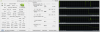
Here are the results![[IMG]](images/storyImages/14989d1432359838t-353.00-mod-no-oc.png)
I ran it twice, scores were 8491 and 8439. There is no throttling and I have no OC. It "seemed" to be alot smoother overall. A definite walk in the right direction!
Also I just updated my procedure I put in there I think everything you need to do to update! I read though it a few time and tried to make sure it has tips from Guru's that helped me and my lessons learned. I hope it helps somebody.
I can't wait to get my second one installed the mail need to hurry up!!!
Thanks again Prema, J95, Mr. Fox, Kenny27. and Juang1985!!!Last edited: May 23, 2015 -
when u guys run 3dmark 11 what test do you run?
there are so many options
Aw m18x R2 Dual 980m SLI upgrade!!
Discussion in 'Alienware 18 and M18x' started by Peter, Nov 12, 2014.


![[Nikos]](images/avatars/[Nikos])



![[IMG]](http://forum.techinferno.com/attachments/nvidia/14989d1432359838-353.00-mod-no-oc.png)