 Problems? See this thread at archive.org.
The thing is per FPS the 780M is more efficient so you either get the same power consumption for more performance or the same performance for less power.
-
-
Thanks for your reply. Yes, I noticed the delay. You already pointed out that fans kick too late and too slowly. I have seen more balance between both GPU's temps before installing the 326.80 drivers. After that I started seeing 10 to 15 difference when idle, and 5 to 7 when under load (I know that 5 degrees difference is normal for various reasons we are all aware of). Now I'm trying the 326.58 but still see higher temps. I might have to go back to 322.14...
-
Hi guys,
I am an absolute noob to overclocking. My Alienware 18 arrived a couple of months ago and I am pretty happy with it, though if possible, I would like to overclock the processor.
Is it possible for someone to give me a short tutorial how to overclock the system moderately ? (no extreme settings that might damage it)
I have downloaded the XTU Utility version 4.2 from Intel. Let me know if I need anything else.
My specs are: 4930 MX processor, 32 GB RAM, 780 SLI graphics, BIOS A3
Any suggestions would be greatly appreciated.
Thanks in advance,
Omadon -
Hello Omadon. Welcome to the NBR Alienware Community. We are glad you joined us. Congrats on the new beast. Having A03 is required for this to work well.
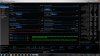
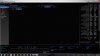
For a 4.3GHz overclock with the 4930MX, make everything you see in these two screen shots match on your system...
 (click on the above images to enlarge to full screen in a new browser window)Last edited by a moderator: May 6, 2015Rafix, pathfindercod and kh90123 like this.
 -
It's OK to be a beginner since everyone starts somewhere. You could help us AW 18 users by voting here so Dell will release a BIOS fix:
Idea Storm
The thread about it is, and the corresponding problems are were discussed in this thread:
http://forum.notebookreview.com/ali...ienware-18-please-promote-ideastorm-asap.html
Also, please help to vote here so we can get manual fan control on the AW 18:
Idea Storm
As of now your 4930MX will possibly perform worse than a 4700MQ under load, due to certain power throttling problem related to some settings in the BIOS. Help us vote and hopefully Dell will deliver us from the pain! Rafix likes this.
 -
Mine is not stable at 1.165V. It needs 1.18V at least. So slight differences there, maybe my chip needs a bit more voltage. Mr Omadon might need to play around with it to get the sweet spot for his chip.
I will try out the settings you put there once I got mine fixed. The ETA is 16th but I have a feeling that it might not come before next week.Last edited by a moderator: May 6, 2015 -
Notice the offset of 10mV. You can make it 20mV. By using an offset, you allow the CPU to use what it needs rather than setting it higher. Using the offset also helps to account for minor differences from one CPU to the next. Too much voltage causes the Haswell CPU to throttle really bad, and the default is too much for 4.3GHz. The default 1.2V is not needed until around 4.5GHz. Until the fan tables get fixed, 4.3GHz runs really hot. You will need a cool work environment for this to be good. Notice the minor 100MHz drop under load in this screen shot. You can increase Processor Current Limit to 130.000A to stop that, but it will run hotter if you do.
Also note how much voltage is being used under load for your CPU and you can fine tune the voltage accordingly. If it actually draws 1.8V under load, then you can certainly set that as a starting point. As the core ratio limit increases, so does the need for Core Voltage and Processor Current Limit. If you go to 4.5GHz, you probably will need to bump the Core Current Limit from 112.000A to 120.000A or 130.000A, and Processor Current Limit will likely need to be brought up to about 150.000A.
![[IMG]](images/storyImages/GI75qiHl.jpg)
-
Yes, every chip is a case in itself and might require some fine tuning in order to find the sweet spot. I'm still trying to find ways to keep a stable 4.3. So far, I can reach 4.2 no problem, but will have to tinker with XTU some more to reach higher clocks.
Mr. Fox likes this. -
Regarding the offset voltage, what if I have a negative offset? What does that actually do?
-
It lowers the voltage if it is negative. I've not tried that, but I suspect if you are starting at 1.8V with a negative offset the voltage will drop under load by the amount of the offset and that might (not necessarily) make the system less stable. My guess is that you would have a BSOD or system freeze if that drops too much. Given that it is an offset with XTU set to Adaptive Core Voltage mode, it should be optional. So, instability might not be a given with 1.8V as the starting point. It might not go lower than 1.8V with a negative offset.
There is a lot that is not known about this unnecessarily complicated Haswell CPU overclocking and it is hard to find anything definitive published on the subject. Some of this extra stuff really feels like nonsense to me and the fact that Sandy Bridge and Ivy Bridge overclock better with only two power adjustments necessary makes me wonder what kind of whacky tobaccy the guys at Intel were smoking when they designed Haswell. It seems geared toward low-power/long battery life Ultrabooks more than high-powered enthusiast machines to me.
Try setting the Processor Cache Ratio (uncore) to match your multipliers and see if that helps. It helps on mine a lot to prevent power throttling. -
I think it has come to a point where Intel should bifurcate their line up, there needs to be a lineup for low power mobile CPU and another one for the enthusiasts.
I see that the trick is to match the cache frequency with the core frequency, I will definitely try it and report back. For my CPU, if I go to 1.17V there's chance of instability. But I could run it at 1.18V and apply a slight negative offset so that it leaves a bit more headroom for current (voltage vs current tradeoff for a certain power limit). That was stable for me. Beyond 4.1GHz it runs very very hot. -
I agree about bifurcating the product line. The 4930MX should be a no-nonsense high performance processor at the expense of anything else. They really should spare us all of their stupid, boring, power-saving trash. If we cared about that we would do our panty-waisted yuppy impression and go get an Ultrabook instead of a dual-GPU/Extreme CPU Alienware beast.
-
That's where most of the money is nowadays, I guess
I will try that, Brother Fox. Grazie.Mr. Fox likes this. -
Hello Mr. Fox,
thanks for the reply.
I did everything you described, except the Turbo Boost Power Max, which won't go above 75 W and the Short Power Max won't go above 71 W.
Then I rebooted, Windows 7 starts normally, I execute XTU, blue-screen crash.
After 2nd reboot all settings in XTU had gone back to normal.
Is there a special way I have to change the settings, or maybe gradually change them upwards ?
Regards,
Omadon
PS: I did this twice with the same result, only the core current limit stays at 112.000 .... -
This is a good read:
Physics, Ivy Bridge, and the slow death of overclocking | ExtremeTech
Due to process shrink and rising thermal density, overclocking will be limited as time goes on. I read that Intel is still using some low quality TIM inside the IHS of the desktop Haswell CPU, the one that people care most is the K series. And that de-lidding the IHS from the CPU helps with the temp. Once it's delidded the desktop CPU just look like the mobile Haswell we have.
Some more good read:
The death of CPU scaling: From one core to many — and why we’re still stuck | ExtremeTech
The future of CPU scaling: Exploring options on the cutting edge | ExtremeTech
Nowadays 0W is the new GHz. Low power is the game. I don't really mind but Intel shouldn't kick aside their enthusiast customer base. -
Sorry for the interjection but I'm really curious if you guys with "4.1 stable" and whatnot are using the unlocked BIOS chip from svl7 or just the regular locked-down BIOS?
-
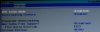
Well, it is good that it is staying on 112.000A. You want that. Do you have the BIOS set to allow overclocking? You may need to set that up first. You need to have at least the following enabled... set Extreme Edition to "BIOS" not "cTDP" and set everything else like you see it here. If you still get the BSOD, try 1.8V or 1.2V for Core Voltage instead of 1.175V.
What is the BSOD message telling you? There should be a code (i.e. 0x124) and may be some other message content such as UNCORRECTABLE_WHEA_ERROR or DRIVER_NOT_LESS_THAN_OR_EQUAL_TO, etc., etc. If you still have these problems after setting up the BIOS, make note of the STOP error (BSOD message) and let us know what it is. -
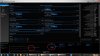
Changing to 1,2 V did the trick.
I did not even have to reboot, the processor jumped up instantly to 4.3.
Thanks a lot !!!
-
Good deal. See if it holds 4.3GHz under load. I notice your Turbo Boost Power Max and Turbo Boost Short Power Max and Time Windows settings are lower than recommended. If you can run a ThrottleStop benchmark or wPrime 32M and it does not drop down to a much lower speed you should be OK. If it drops under load you will need to do more tweaking to get the performance where it should be.
-
...test result is 884 marks.
Processor frequency dropped to 3.5 - 3.9 during the test.
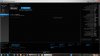
Turbo Boost power max and Turbo Boost Short Power Max can't be raised to higher than 75 W / 71 W respectively.
Power Time can't be raised over 28 seconds.
Any suggestions / recommandations ? -
Everytime I run the Benchmark test in XTU the systen crashes.
After rebooting, one of either of these happens:
Either the BIOS auto-reverts to "Disable overclocking" and I have to do all the settings again
and/or
some of the settings in the XTU reset to default, others remain:
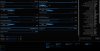
Also, within BIOS, the setting FLEX VID OVERRIDE does not appear.
Any suggestions ?reborn2003 likes this. -
Yup, I've got the exact same situation going. After I applied all the settings suggested here I see temps way higher than before (damn slow fans). Idle stays at 3.8 and it fluctuates between 68C and 74C. Before I had it at 4.2 and was between 50C and 68C. I'm sure we are overlooking something here. I will revert all back to default and start applying one setting at a time.
-
.... whenever I run the benchmark test, the temeprature goes up to 99% or 100% and never goes down after that. After 5-10 seconds at that level, thermal throttling goes up and the system shuts down....
After that, the settings in the BIOS either auto-revert to "Overclocking disabled" or the XTU settings revert to some random settings, Processor Current Limit ALWAYS reverts back to 55.000 A.
If I play around with that setting, the Blue Screen of Death is definitely coming within a couple of seconds. I have been trying now for quite a while and the results are always the same. Either thermal throttling shut-down or BSOD.
My impression is that you guys must have some other settings or software running that works around all of this. I have no other explanation otherwise. We have the same hardware so it should work for all of us.
Any thoughts on this would be greatly appreciated. -
Not necessarily as what you thought. Chips are made different, even though they have the same model number. It follows a statistical distribution on some skewed bell curve. In fact a 4930MX is the same as a 4700MQ, just that a 4700MQ is much lower on the curve, and that it has 2MB of L3 cache laser cut away.
The bottom line is, what works for one might not work for others. You just need to experiment more with it, and check the code for BSOD. If you get a UNCORRECTABLE_WHEA_ERROR, it's most likely that your CPU voltage is a bit too low.
Try using Throttlestop to monitor your CPU.
http://www.thedigitalhq.com/downloads/download-info/throttlestop-6-00/reborn2003 likes this. -
Bumping this old thread for those that are just now discovering the BIOS and EC fan table issues. Please do not start a new thread for this topic.
Closing with redirect here: http://forum.notebookreview.com/ali...are-18-haswell-cpus-messed-up-stock-bios.html
I added a link to this thread in the opening post for cross-reference.
I Cannot Overclock My Alienware 18 to 4.3Ghz?
Discussion in 'Alienware 18 and M18x' started by Saint Satan, Jul 24, 2013.


![[IMG]](http://i.imgur.com/GI75qiH.jpg)
