 Problems? See this thread at archive.org.
Having both sitting next to each other in the same room (AW18 and M18xR2) as well as a matte screen Lenovo business machine, I can honestly say that it would take a team of mules to wrestle my gorgeous glossy M18xR2 edge-to-edge display out of my clutch. Not having a crap-collecting ugly plastic bezel around the perimeter of my M18xR2 screen is, I think, an impossible act for any machine with a bezel to follow.
If I end up finding a way to buy a new Clevo P570M it is definitely going to have a glossy display. I have had 4 or 5 laptops with a matte finish screen and I think they are inferior in most ways. The reflection never bothers me on glossy displays, but the ugly appearance of a matter screen when it is dimmed or turned off turns me off when I look at it. Glossy screens are a lot easier to keep clean and looking nice. Matte looks like crap when it is dirty and being as OCD about finger prints as I am, I usually end up having ugly random shiny spots on my matte screens from polishing the crap out of them as a result of constant cleaning. Colors from a glossy screen look better to my eyes, too.
Glossy can definitely suck in a brightly lit room (depending on the lighting itself) and it absolutely sucks in bright sunlight, so that's really the only use that I personally think a matte screen is better for. I prefer ambient light as much as possible and use just enough lighting from few room lamps to not be stumbling around in the dark. I almost never turn on the bright overhead lights, so glossy works out great for me.
Alienware Arena pop-up?Are you referring to a browser pop-up? The only stupid tray pop-up thing I know about is Alienware Respawn will nag the death out of you until you make OS recovery media. That's a good thing to do and the nagging is justified if you don't have an OS recovery plan of your own. You can disable it, or even uninstall Alienware Respawn, once you have made recovery media. Once you make the recovery media, there is no real reason to leave Respawn installed. As long as you don't remove the recovery partition, reinstalling Respawn only takes a few mouse clicks.
-
-
I usually use my laptop in a dark room so the glossy screen is ideal, I preferred the entirely glossy screen of the m18xr2 compared to the 18 which has sort of a hybrid glossy/matte but the 18 does seem to have better colors than the r2 did. If I had to compare the overall look of the two though I would prefer the 18. I love rubberized surfaces so the 18 really hits the mark in that area, the keyboard is improved and I love the lights around the bottom part of the machine as well as the two lights on the back. It just looks like a really super nice machine. The r2 was more over the top and I can appreciate that but at the end of the day I like the 18 more.
-
I actually do like glossy screens' images better, though with my classes and the way the top of the walls in my room have open spaces in 270 degrees and the sun flows in and hits my bloody laptop screen *glares at designers of this room* matte was perfect for me.
-
Ordered my first Alienware 18 a month ago but when I fired it up out of the box, after a few minutes it completely froze. It kept freezing after numerous reboots so I called support and they are sending me another one. These were the original specs.
4th Generation Intel(R) Core(TM) i7-4910MQ processor (Quad Core, 8MB Cache, Overclocked up to 4.1GHz)
32GB Dual Channel DDR3L 1600MHz (4x8GB)
Dual AMD Radeon(TM) R9 M290X graphics with 8GB total (2x 4GB) GDDR5 - AMD CrossFire(TM) Enabled
512GB mSATA SSD Boot + 1TB 5400 rpm
After a few days they emailed me back saying the AMD graphics cards were not available and would replace them, free of charge, with Dual NVIDIA(R) GeForce(R) GTX 880M graphics with 16GB total (2x 8GB) GDDR5 - NVIDIA SLI(R) Enabled. The website says they are $550 more, so I guess that's a good thing for my time and trouble. But I still haven't gotten the new system in yet.
I have re-installed Windows 8.1 Pro a couple of times but the freezing issue on the original system continues immediately. Any suggestions on what would be causing this problem? Could it be the graphics cards and that's why they are sending me different ones?
Thanks.
MS40 -
try booting into IGFX by pressing Fn+F5 and see if it still freezes up.
-
hello guys, does dell upgrade you laptop if you want to?
how much you gotta pay/or do to make them do this?
i hope its not a arm and a leg, because they offered me like 600$ for me to trade in my systems or 500$ i aint sure but yea it wa sa lowball -
I recently bought an used or leftover Alienware 18x to replace a Thinkpad T61p. Compared to the Thinkpad the 18x is a beast. The power supply almost weighs as much as the Thinkpad.
What I want to know is what 18x owners use to carry this laptop\power supply around. I have seen the case listed on Dell's website, Amazon.com: Mobile Edge Computer Alienware Vindicator Briefcase for 18-Inch Laptop (AWVBC18): Computers & Accessories. Is anyone using other options?
The powersupply and laptop combined weigh around 18 pounds. So a wheel case\bag might be a good idea....
I did a search for this subject and nothing came up that was relevant.
Thanks in advance. -
Hey guys I've been trying to find a manual or something to tell me how to format my alienware 18, the build is simple sli 770M with the msata and 700GB hard drive, I want to know how to format because of the intel rapid store technology and I don't know where to search. I tried to find here in the forum but nothing and google well that only leads me to Dell website.
-
i have the r2, i was thinking maybe if i upgraded it to m18, is it that much better?
i really wanna upgrade the card right now i have dual 7970m, does the procesor mattter by how much performance am i lacking because i have low
end i 7? -
What?
If you're asking if you can upgrade your M18x R2, yes. You can upgrade the GPUs and the CPU without problem as far as I know. I do not understand the rest of your post much... but if you're asking "Will my 3610QM bottleneck my video cards?", then the answer is "only in about 1% of games". -
so what is the point of a hgiher cpu? the ghz how much difference do they all make?
because i have a base i7 vs the lets say i7-4910MQ processor -
In gaming, you will not notice a difference. In heavy cpu bound games there should only be a few fps difference, nothing major. Base or high end, all of the quad core models are not far in performance. In real world situations, you probably couldn't tell them apart. Benchmarks are the main area you'll start to see the difference and heavy cpu bound games/applications of course.
In all honesty, if you're wanting to upgrade your M18xR2 7970m GPUs, wait until the end of the month. The 980M and 970M are supposed to come out and both will be faster than the 880M. -
A few months ago I posted a similar question, it is the end for several weeks after I was informed I chose the upgrade because in performance does not seem to change anything, in fact many say that with r2 you overclock higher and more supports dual power supply
-
The M18xR2 is a better product. Keep it and upgrade to 780M SLI. The 18 is nice, but it runs hotter and does not perform better. You can also no longer buy it with 780M SLI and everything else available right now is inferior to 780M.
Rafix, pathfindercod and Ferris23 like this. -
Hmz, it is a good platform, investing in a pair of 780Ms just now, maybe a little premature.
-
With your current setup you won´t notice much of a difference. Have you checked your temperatures to look for overheating?
-
Hello I am not sure what you are asking. If you are trying to restore your windows from the partition on your hard drive? There are a lot of people on here that will be able to help, but you will have to ask the correct question. You could always call 1800 Alienware . The should be able to walk you through what ever it is that you want. Format hard drive means simply erase and reload windows, but I'm am not sure if that is what you are asking. Good luck
-
Been driving the replacement 18 for three days now ... this thing is absolutely amazing. I have never been so impressed.
reborn2003 likes this. -
what the heck is in the dmc slot in this photo? my new board has the port but my old one didnt.. the usb adapter you linked me works like a charm in there!Last edited by a moderator: May 6, 2015
-
Hey what I just want to format hard drive but my sistema is a hard drive with 700gb and an msata with 60gb where the S.O. is, but they come from factory in raid 0 and than the msata is used as cache for the hard drive, what I want to know is how do I do this. Thank you for replying
-
I have a stupid question ... My Alienware 18 has the dual NVIDIA GTX 880M cards and they have 8GB x 2 of memory, but when I pull up AlienAutopsy why does is say 4GB of video memory per card?
Mr. Fox likes this. -
SLI (or Crossfire) does not 'double' the vRam when using two cards - if there is 8gb on each card, in an SLI setup, the total amount of vRam is still 8gb because the system 'mirrors' the vRam capacity instead of doubling it. Each card stores the same entire image, so doubling the capacity makes no difference.Mr. Fox likes this.
-
no he is saying its showing only 4gb of vram when it should show 8.Mr. Fox likes this.
-
Sounds like AlienAutopsy is messed up. Check with GPU-Z, GPU Shark or something similar to be sure you have the video cards you paid for. If you do, then just forget about what AlienAutopsy says. Hardware identification software is frequently inaccurate.
That was a wireless video transmitter that I was playing around with. It seems to not play nice with Ivy Bridge or Haswell. I've not seen an example one that worked correctly on any platform since M18xR1/Sandy Bridge. -
LP 18. Hey it sounds like you have an English barrier. I can't understand you. If you have RAID0 and want to delete it or add one, hit the CRL , I at the same time on boot to get into the option ROM. From there you can delete the array. Caution . This will remove all data on your drive. I don't know if this is what you are wanting or not. Are you sure that you have 2 drives in RAID0? I know of no such array that = 700 GB. I think that you should call Alienware tech support and explain to them what you are wanting. I don't want to give you advice on a bad communication . Can anyone else understand what he wants?
Lp18 likes this. -
You could have 2x350GB HDD for a 700GB RAID0 volume, but I believe he has Windows installed to the tiny little mSATA and wants it on his HDD so he can use the mSATA for cache-accelerating the HDD. This cache arrangement is a hybrid form of RAID0.
Lp18 - Run a DISKPART "clean" on the HDD, then re-initialize the HDD as MBR (not GPT). Clone your SSD to the HDD, then change the boot order in the BIOS to boot the HDD before the mSATA. Once you are booting Windows from the HDD, run a DISKPART "clean" on the mSATA to kill that volume. Re-initialize the mSATA as MBR (not GPT), then use Intel RST to set up the mSATA SSD as a cache. You can do all of this from within Windows. The BIOS must be set to RAID. It will not work set to AHCI as far as I know. If Windows was installed with the BIOS set to AHCI instead of RAID you will need to do a registry tweak first or Windows will not be bootable. Once you change the appropriate key in the registry Windows will boot with the BIOS set for RAID.
If you need to change the BIOS from AHCI to RAID, then follow these steps...
- Open Regedit... Navigate to HKEY_LOCAL_MACHINE\SYSTEM\CurrentControlSet\Services\iaStorV
- Find the Start DWORD. It is probably 3 right now and needs to be changed to 0. Double-click on the Start REG_DWORD Start and change it from 3 to 0
- Close Regedit, reboot and change the BIOS from AHCI to RAID and you should have no trouble loading Windows
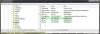
With this one simple DWORD change you can change from AHCI to RAID and use Intel Rapid Storage Technology within Windows to create the cache for the HDD, or create a RAID0 membership from 2 or more HDDs or SSD, without reinstalling the operating system. If Intel Rapid Storage Technology is not already installed, it needs to be installed and the system rebooted before cloning or making any other changes to the system.Lp18 likes this. - Open Regedit... Navigate to HKEY_LOCAL_MACHINE\SYSTEM\CurrentControlSet\Services\iaStorV
-
Yes, ok. I see. That could bee his problem. I did not realize they were loading windows on the MSata . That seems a bit odd. I would have no use for that unless it was much larger than 60 GB . Yes 2 350 GB drives in RAID0 does come to 700GB, you are correct. I meant with the Alienware drive configuration that seems a bit unusual for a RAID0 250,512,750, and 1TB seems to be more normal. That gave me a red flag that he might be confused or something.
Anyway ,thanks for the help Mr Fox. Hopefully this is his problem and will help. -
They should not be loading Windows on a petite 60GB mSATA from the factory, but I have seen examples of where this was done by mistake. An SSD that small is almost worthless for anything other than a cache acceleration setup. That's now just barely enough capacity to be worth buying as a USB flash drive, LOL.
DumbDumb likes this. -
Agreed Mr Fox. Funny stuff.
Ok I would like to get everyone's opinion on the 4930,4940MX. Knowing what we know now about the 18 would you still have ordered the extreme Processor with the new 18? The reason I ask is one, I would like to know and the other is I have a 4900MQ. I have it @ 44,43,42,42. I get like 918 on XTU, not very exciting. No mater what I do I can't get a better score. I was thinking about getting a 4930MX but I am hesitant about it because of the silicon lotto, and the price is still pretty high.
Just want to know what people think about this. Is it worth it or not? -
Where do I edit my profile to put my rig's specs like you guys have at the bottom of each post?
Mr. Fox likes this. -
Hey friend, welcome to the community. Glad you joined us. In your User Control Panel you will find a link on the left side margin. Also, read the information in the table below, as it has some useful information for new forum members. In the second column, middle link it has info on signatures. The forum rules also have some information regarding limits on what can be included in the signature area.
Looking forward to hearing more from you.
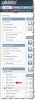
USEFUL THREADS FOR ALL FORUM MEMBERS
All members of the Community are required to know and comply with forum rules. The information on how to search the forum is especially useful, as it should help members find information quickly, avoid creating new threads to ask questions that have already been answered in another thread, as well locating appropriate threads to participate in an established discussion.
Last edited by a moderator: May 6, 2015 -
Thanks for the welcome, Mr. Fox. I am looking forward to learning a lot more detail about computers and Alienware from this forum and you brilliant individuals. However, I don't have an option to edit signature in my settings.
Mr. Fox likes this. -
Check again tomorrow morning. One of the link explains why.
-
Hello Hello!
Just became a member and also got my first alienware just 20 days ago.
I am from sweden where the prices are much higher than in the US specially for an alienware.
So when I was abroad in Dubai there was this alienware on "letstango.com" I thought the price was reasonable and it acually didn't specify what grafic cards it came with.
Having not the best experience and knowledge in laptops I assumed I got the latest stuff, when I got it the specs showed the following:
CPU: i7-4800mq 2.70 ghz
GPU: GTX 770m SLI
RAM: 16 GB 1600 mhz
Storage: 1tb+80gb ssd
The price was 11500 AED originally 11999 but they were out of 1.5 tb hdds so I got 500aed off.
this is roughly 3131 USD.
My question(s) is basicly, did I make a good deal?
How does the customizing look for this computer? If i want to change both the 770s to 880s soon how easy is that?
Keyboard, is it possible to change it to swedish without major problems?
The HDD I got is only 5400 RPM, possibility for 7200 rpm?
Thank you, spG
EDIT: I also forgot to mention that my warranty was half out when I got it, I asked dell about it and they said it's fine if I have the reciet.
When I check my system it says that my computer is (mid 2013) which is weird since I bought it just now?Ferris23 likes this. -
Thank you, sir ... It is showing now and I populated the signature, but it's not showing on my posts in the threads yet. But I guess it will eventually. Not sure which link explains all of this as well, but I guess it really doesn't matter. Thank you again.
-
Welp, there it is now ... it was a matter of patience.
-
That's the same laptop I had before the one you see in my signature...... also bought it for AED 11,999
You can put a 7200 RPM instead of the 5400 RPM HDD but that max capacity for 7200 RPM I believe is 750 GB. Not worth it really, just put a 1 TB SSD in there and get a fast SSD like the 256GB 850 PRO for $200 USD from eBay or Amazon like I did.
I would not upgrade the 770M GTX to the 880 GTX the 880 has a lot of problems if you read the forums, I would only upgrade them to 780GTX or better yet, wait for the 9x series from nVIDIA
Don't worry about the warranty , it goes by your receipt because DELL sells the laptops to the shops before.....then buy the time you buy them, some time would have passed already. They will always honor the warranty as per the receipt date.Papusan likes this. -
I got the three year warranty so I am going to burn the heck out of the 880s to see if they can handle it.
-
Also, I have legitimate product keys for Windows 7 Ultimate and Office 2010 if anyone wants to send me Bitcoins for them
-
Thank you for the fast reply!
How long was it since you changed? and why did you do it? overall is this laptop worth the money or is the komponents alrdy old?
How much would the same laptop cost with 780s instead of 770s?
Glad to hear abut the warranty.
How easy is it to customize yourself? I have built loads of desktop myself but never been involved in the laptop world.
Thanks again for the interest. // spG -
Is there a way to make the touchpad light stay on permanently?
Mr. Fox likes this. -
Mr. Fox thank you for the help it was very usefull. I'm going to do that once I have a disk to pass my data and also I do have the intel rapid storage technology. I just wanted to know if there was any trick to hard format my HD and install windows, since it has the msata 60GB with the S.O. inside in raid 0 and I haven't worked with such a setup before. I thought it would be easier but I think it won't be a problem.
-
There is a setting in the BIOS to change it from "auto" to "on" and that will do it.
You're welcome.Cloudfire, Syredisa057, BlackjackCZ and 2 others like this. -
Anyone who knows the best way to clean the rubber palmrest ?
-
I have been using alcohol for that since the M18xR1 and it gets all of the body oil stains off the palmrest and keyboard. It hasn't harmed the rubberized finish on the M18x or AW18. I also keep the wide part of the palmrest covered with a folded black linen cloth to minimize the need for cleaning. I found the black cloth dining napkins sold at Walmart are dirt cheap and work great because they are the right size, folded in thirds lengthwise, and they are lint-free. In this manner my skin is seldom in direct contact with the palmrest. I almost always use an external mouse, so I don't need to worry about the touchpad being covered up all of the time. About once a month I toss my black napkin in the laundry with dark clothing to keep it clean. (It's amazing how much body oil gets absorbed by the black napkin. If you're an oily-skinned person or in a hot/sweaty environment, once a month might not be frequent enough to keep it from getting nasty.)
-
Well i bough mine with the vindicator bag size 18 and think it works very well for carrying it around as long as you are not planning on carrying much else apart form laptop and power and maybe a small tablet since the bag is very snug for the 18 incher but very comfortable to carry around event with the weight of the laptop and power supplies
-
Its bes to use a micro-fiber cloth once a day, if its real dirty use the alcohol on the microfiber cloth, it evaporates quickly. I type a lot on my keyboard and use the trackpad a lot so I can't cover it with anything, althought that clear one sided sticky paper at drafting stores would totally protect it if like a cetll phone screen protector.Cloudfire likes this.
-
Thanks for the tip guys. Just bought some alcohol and will try that
Another question, why the hell do you need to remove the display assembly to repaste the video cards? It says so on the manual. Isnt it just to lift up the palmrest (and the stuff underneath the notebook) and then you are good to go? Why remove the display??? -
Because the display hinges are in the way of the heat sinks. It's not a big deal to remove the display assembly. It requires no special skill, no special tools, and it is not a tedious task. It adds maybe an extra 30 seconds after the palm rest is removed to zip those screws out, so that is really a non-issue.
Cloudfire likes this. -
OK, I will do this tomorrow. Cant say im looking forward to it. So many screws and ribbons and cables
Found two awesome videos showing how it is done though
Alienware 18 Teardown and GPU Repaste - YouTube
Alienware 18 Disassembly and Repaste! Step by Step - YouTubeMr. Fox likes this.
*OFFICIAL* Alienware 18 Owner's Lounge Thread
Discussion in 'Alienware 18 and M18x' started by Mr. Fox, Jun 12, 2013.


