 Problems? See this thread at archive.org.
Yo guys just installed the new sli cable. Still no sli configuration
shown... So i guess my cards maybe needs a new vbios..
So anyone has a dell stock vbios? From what I am seeing is that my cards does not show any boost clock unlike some of you guys do..
-
-
As others have asked I would be interested in battery life after you get a chance to try it.
-
Could someone point me to the proper link for an update to an M18xR2s sound card driver please....using 7970'm cards btw...the dell site has drivers from pver a year ago and not 100% certain which drivers are the newest
-
Any the newer Cayalyst drivers will do. Personally I like 13.3 beta 3. The latest is 13.6 which I don't recommend but it's worth a try. Just google AMD CCC 13.(x)
-
Should have been more specific. I'm not referring to the CC from AMD, but rather the update software for the 3D Recon software I guess I should have said. When i go to the Dell support site they have the CCC and the Audio Chip driver in separate sections and hte Audio chipset driver is from April of last year....which is before i bought my laptop.
-
Are both of the 680M's the same? I've seen people try to use a 2GB card and 4GB card and that doesn't work.
-
I would make sure the driver and vbios installed on both cards correctly and that you also put the cvable on and it stayed when you put the keyboard back on.
-
Proud new owner of an M18x R1!
It is on the way and bought off the NBR marketplace.
Anything I should know in preparation about the M18x after migrating from an M17x R3? -
Prepare to do a palm to face asking yourself why you didn't do it earlier. In other words the beast will blow your mind away.
Welcome to the M18x side. -
quick question i have a small stratch (literally this size --> / ) on my screen (m18xr2) and my finger nail will catch in it if i run my finger over it i am just wondering if there are any fixes to it, it just bugs me(the screen is different to a normal laptop screen isent it(the glass cover thing)
-
hey guys...i finally received my m18x r2 couple of days ago but havent used it at all yet because I havent gotten round to getting an SSD for it to add to the standard 500 HDD....Im looking to spend max 150£ for 256gb....dont think ill be doing Raid since im not a benchmarks person...
ill most likely be transferring films/games/music from my external SSD / HDD to my m18x ...the 256gb will be used for windows and my top games (which will most likely be downloaded from steam)
out of the following options which would be recommended?
Solid State Drives (SSD) with capacity from 240GB, capacity to 512GB | Skinflint Price Comparison UK
some of the names ive read about were the m4 crucial but i think thats a bit too expensive....think i heard Mushkin was quite good...seems to have good specs...grateful for any opinions / in particular m18x r2 specific ones (like i heard 840 is bad combo for 680m). -
Well I have two 256GB OCZ vertex 4drives currently for sale, outstanding fresh condition and still carries 4 year SCAN.CO.UK warranty, check my signature
for details
I did manage hit 1TB/s having them RAID0 and was very happy with them
-
Is it normal the fact that I have to install the driver back everytime i restarted my laptop, if I dont the clock stays half of the actual clock.. It seems that my cards does not show any boost speed from the core like you guys have on your dell 680ms...
And once i did the reinstall(without clean install) My primary gpu stays at high clock but low temps..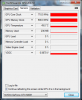
The second gpu stays at low clock and cool.. -
unfortunately according to
OCZ Warranty Information
it seems that warranty wouldn't be transferred and as such i would be a bit nervous spending 300£ like that any other suggestions from the original link?
would i be wasting 30£ by buying a m4 crucial /samsung 840 over a sandisk ? -
you dont have to transfer the warranty, since you hold the original receipts with my full details, if EVER needed for any warranty purposes you just fill out details in my name and whatever outlined in receipts, however, I was just trying to give a hand with a deal someone thought may have wanted.
Cheers -
what kind of details would it be? would they not see that the delivery address has changed? p.s. from your post i get the impression that you may have felt that i was accusing you or something of somethign...totally not! the deal looks really tempting...just want to cover all my bases before i head off!
-
Well, I just want to take a moment to thank the moderation team for closing my thread that I had going in relation to my recent issues with Dell: http://forum.notebookreview.com/ali...l-support-full-details-included-part-two.html
I specifically ended part one located here: http://forum.notebookreview.com/ali...-emea-dell-support-full-details-included.html because of various members attitude towards me and my case. I felt that it was in the best interests of the community that I revisited the topic with a fresh start, as I clearly indicated on my opening post on 'Part Two' by posting this on the opening post:
Unfortunately, a minority of members chose to follow on to that thread and continued to try and derail the reason why I opened it - they obviously succeeded. The reason for my thread was primarily to discuss and to try and understand the logic/reason behind Dell offering a very low replacement specification and then withdrawing it without notice, and simply offering a refund, which in my opinion was less beneficial that the replacement machine route that WAS proposed by Dell. I was hoping that these discussions could have been used as a point of reference regarding my dealings with Dell in trying to get what they offered me - a new replacement machine as opposed to a refund. Anyway, it seems like that is no longer going to be a viable tool for me to use in my case, thanks to a few very disruptive posts/comments by several members. I am not naming names - I think you guys can work it out for yourselves if you read part 2....
You guys, please feel free to have a read of both threads, if you like. I personally felt that I had conducted myself within forum guidelines on part two. As I admitted, part one got out of hand, and I was not completely innocent, I appreciate that - one of the reasons for the clean start on a new thread. Anyway, I woke up to find a whole host of posts on the new thread, and that a certain member/s had again started to derail the true nature of my thread - or what I was trying to accomplish, which was simply to discuss my case with a hope of understanding just WHY I had that offer of replacement withdrawn and replaced with the 'easy out' option for Dell.
I've been a member of NBR for 3 years now, and I thought that I have always conducted myself with respect for others, and their views - even if I did not agree with them. I certainly NEVER went out of my way to disrupt anyone's thread that was discussing a situation whereby that member was merely reaching out over an issue or problem that they were having. I never once thought that moderation would fall on the side of those who continue to disrupt threads for no other reason than to be argumentative. Please, if you feel differently or if you disagree, just tell me.
Anyway, and without further ado, I will now more than likely withdraw from posting on these forums in the frequency that I have done over these years. It has been a REAL pleasure to have been able to assist and help many of you, and to have been part of an otherwise great community - more fool me for thinking that I deserved the same treatment in return from those who govern it.
Peace out.
Stevie.
-
i think ive narrowed down my choices to :
samsung 840 250gb - £124
crucial m4 256gb - £146
crucial m500 240gb - £130
the 840 seems like a good deal and from reading the "incompatability" postings from here and other forums, seems the issues have been solved?
p.s. think its a big loss if stevie ends up leaving is that other special situation solution you mentioned still happening?
-
Personally you can't go wrong with any you have chosen. I have a Samsung 830 in my M11x and I have a Crucial M4 in my M18x, both are very good performers, but the 840 I guess wipes the floor with my 830. For the money I would get the 840.
-
Keep in mind he is talking about the Samsung 840, and not the Samsung 840 Pro. Both are completely different - I have the Samsung 840, and while it's a decent performer, I think the Crucial M4 is the best one of the lot. I was one of those who had incompatibility issues with the Sata 3 port - I had to install my Samsung 840 into my Sata 2 port
-
Well, regarding the 'special situation' - I really don't think that is going to go ahead now, in fact I have written to those that extended the offer to me to kindly reject it - given the recent events and the fact that I can no longer be a "Dell Brand Advocate" - which was a requirement.
So, what was the special situation, you might ask? - basically, some guys (the guys who were trying to help me with my case from Dell US) reached out to me and invited me to join their VIP Customer Club - aka, becoming a Dell 'Rockstar'. You can see details of what that is all about here: Dell Community - the email address at the bottom of that link was for one of the gentlemen that offered me the opportunity.
The benefit of that, for me, would have been 'sneak peaks' of new Dell products months before they get released to the public, involvement in 'behind the scenes' discussions with the product team and engineering about new products etc, testing products that Dell would launch to the public months in advance etc etc etc...I would have had to sign an NDA about non-disclosure of such info, but it looked like a fantastic opportunity to get more heavily involved.
It was something that I was very much looking forward to, but after Dell gave me the 'Royal Shaft', I've had to politely decline that opportunity, because it would have been highly contradictory for me to be a Brand Advocate in one hand, but in the other hand, be extremely pissed off with Dell for how they have treated me of late. Shame, really.
And to be quite frank, I'm pretty much done with NBR, too.......especially after closure of my thread regarding my issues. That did not help me one little bit, so I just want to give a big "shout out" to the moderataion team for doing just that - even though I was not being disruptive, others were. Go figure. -
ended up getting the samsung 840. guess i should now create a clone image or w/e its called on a dvd? or perhaps create a fifty or so gb windows partion on the hdd? then clone it to ssd? is there a particular best route to take? bare in mind that this is a refurb machine from reseller so doesnt have windows dvd etc...but i do have an external ssd on which i guess i can create an image?
-
download windows7 alienware ISO from torrent sites and burn to DVD/USB and reinstall like normal from scratch, after you've done reinstalling everything but your own programs and softwares, and after all windows updates, go and install alien respawn, it will create its own partition at the end of the SSD and will build current fresh reinstalled windows image for recovery use etc so nothing to worry about or clone anything
-
i still have the installation software from my m11x. can i use that instead of burning a dvd? just need to order my notepal u3...and hopefully once the ssd arrives ill be ready to go!
any drivers advice? should i just get the latest of everything from the dell website? *mindful that there is a 326 nvidia beta discussion thread - will check after work for more detail* -
latest dell drivers from support are just perfectly fine and are recommended. if you are not overclocker kind of person, yes latest 320.x nvidia beta drivers are very good option
if your m11x used exact same version of windows, yes you can use same DVD to reinstall your OS
-
What amount of time should I expect on battery with my M18x R2 after a full charge? My full specs are as follows:
Alienware M18x R2 Intel i7 Extreme 3920XM (at Stock) | 32GB Kingston (4 x 8GB) DDR3-1600MHz
256GB Crucial M4 mSATA SSD | 2 x 1TB HDD data drives (NON-RAID) | 1 x 500GB HDD
2 x 2GB GDDR5 GTX 680M - SLI | Killer Wireless-N 1103 | Slot-Loading Dual Layer Optiarc Blu-ray Burner
Windows 8 Pro X64 Secure Boot & Fast Boot enabled
I am using it with the dedicated graphics not the built-in intel graphics chip.
My main use is internet browsing, MS Office work and watching video. At this stage I am not playing any games or doing any 3D work (that may change in the future).
At the moment all I am getting is 90 minutes which seems extremely short.
Any comments or suggestions as to how I get longer life on battery (other than changing to the built-in intel GPU)
cheers -
Sounds about right if you are running the off the discrete graphics cards and not the Intel iGFX. These things eat juice, so running on battery, max. performance etc will suck the life outta your battery quicker than Dracula sucking blood out of a young virgin. If all you are doing is browsing, you'd be better of running off the iGFX to maximise battery life.
If you insisted on running discrete on battery, change power plan settings to power save or balanced - reduce screen brightness etc etc - but you ain't gonna get hour upon hours no matter what you do... -
why would you need to be using the dedicated graphics for those tasks? seems like exactly the kind of tasks that the built in gpu is for.
-
I get about one hour and my computer is done at that point.
-
Just wanted to share my awesome set up. M18x with dual 580m and dual 256x2 raid ssd. I have a custom built steel stand for dual screen work and use my 30 inch for movies and gaming. Tell what you think. I live in Colombia just had a tech come out to help me get my temps down. Just needed to remove the fans which is pretty easy and clean them. That is what is great about this M18x all the fans are removeable easily, not so in last Gen m17x dual sli, only could get to one of the fans. The King of all is still the 18!!!!!!!!!!!!!!!!!!!!!!!!!!!!!!!!
-
That's a same. You would of been a good choice for that program. In fact you would of been able to have more influence with your input, and may have helped solve upcoming quality issues so that others would not experience issues with their devices.
Can I have your invite instead,lol. -
I get about 2h max if I use 680m's as main graphics, and I do just internet browsing reading nothing major just silent reading online with brightness set to average. If I did youtube and some background music tops 1-1.5h. With iGPU surprisingly 7hours+, one time got steady 8h20min just full day of reading off the cable , so... I call thats what battery is meant for
or in other hand your backup power supply while you move your weapon from one house place to the other
-
Thanks for the input guys. Sounds like my battery is fine then. I was worried somethingwas wrong with it.
cheers -
So far I'm loving my M18x R1. Is there any cool tweaks/bios mods/ports hidden inside for me to take advantage of? Anyone use the express card port for anything important? I might just end up putting another HDD inside with an optical bay caddy and make the DVD drive external. I hear there is an extra DMC port as well? Any suggested uses for that?
-
Hey guys.
So I'm coming from owning an M17xR3 and now I got this replacement M18xR2. It got a dual 680m and this is going to be my 1st laptop running SLI.
I'm just hoping to find some tips on what I should look after that I usually dont on a single GPU laptop etc.
In short, is there something I have to take note about having SLI setup like drivers, temps, etc?
I'm sure everything must be written already here in this thread but just a highlight of what I needed to remember will really help and I'll do the researching of details myself.
Thanks in advance.
Edit:
So I just saw the SLI thread, maybe this question is better suited there? -
Just that some games perform better with a single card than with SLI, besides that you'll love it.
-
OK,
Light is green on PSU, Alien head on keyboard has red halo but the laptop is running on battery. Is this a software issue or is something failing? I went through this on my MSI and the answer ended up being a failed power connector on the motherboard. Suggestions?
Homer -
Sounds like a bad connection between the power supply and computer at the connector. I would remove the plug and slowely install it to see if the icon changes to charging, or ever just turn the connector for it to take. I've had to do this with my M15x and my wifes computer.
-
Thanks,
I tried to plug it in slowly. The Alien head goes from dim to bright and I get a little popup window with the AC Power logo. The tray icon never switches to charging.
Homer -
Hey guys.
So I have a 512GB SSD Samsung on hdd0 and 128GB M4 on hdd1? Do I have only 7mm space left for hdd2?
I'm looking at this drive: Newegg.com - Seagate Solid State Hybrid ST500LM000 500GB 64MB Cache 2.5" SATA 6.0Gb/s Laptop Thin Hard Drive -Bare Drive
Its a 7mm seagate hybrid drive 500GB 5400rpm. Is this the highest capacity drive I can put in hdd2 because of the thickness limitation?
Anyone know if there is an available 7200rpm 7mm drive that is at least 500GB?
All the 7200rpm 7mm drive in Newegg are like 300+GB only and all out-of-stock.
Thanks!
Edit:
So I found this: http://www.amazon.com/HGST-Travelst...0rpm+7mm+SATA3+2.5"Hard+Drive+HTS725050A7E630
Anyone tried this before? -
Potential new M18x R1 owner here (seen one for sale which has peaked my interest, mainly because of the 2920XM processor).
I have a quick query regarding the drivers: (note - I have tried to use the forum search function but it doesn't load anything at all)
Can you simply upgrade to the latest AMD/NVidia drivers (direct from said websites) and keep the iGPU switching intact? I ask as I understand the M18x R1 has switchable graphics and I remember from my M11x R1 days (ah they were good) that to keep the switchable graphics you had to stick to the dell drivers.
The M18x I am interested in has 6990m's in CFX and thus I would like to use the latest frame pacing drivers if possible and keep the switchable graphics for better battery life.
Is it a case that with the M18x you treat the iGPU and Discreet GPU's separate and install the drivers separately as well (ie: leave the Intel ones as is and only update the AMD drivers)? -
Quick answer, yes. You can change discrete drivers without affecting functionality of the integrated grpahics (HD3000) on the M18x R1.
-
Excellent, thanks!
I can remember it being a pain on the R1 but ultimately not that much of an issue as the battery life was that badly affected. I imagine running with the 6990's enabled when you could be running on the IGP has a more noticable effect
-
For sure!!! LOL - all you need do is Fn&F7 to switch between the two - a reboot is required each time on the 18x, but it's much better that way IMHO. iGFX for battery longevity, 6990m's for fun ! hahahaha
-
Anyone knows how to get the Esata port drivers for m18x r1? cause i tried to use it today for first time, but seems like is not working.
-
My $ .02:
Probably the best choice right now for someone who has some computer know-how and doesn't need a warranty/intends to change the hardware anyway is an M18x R1. I would look for the least expensive one I could find and put in a new i7 2920xm CPU (or if it is a good deal, one already equipped with a 2960xm, but another reason to look for the cheapest you can find with any old processor is that you are putting in a brand new CPU; there is no telling the history of a used extreme processor. If you peruse the benchmarking forum here you will occasionally catch comments such as "I am getting a new 3960 in a few days, going to bench my existing 3920 to death in the mean-time"), and if battery life is really important I would go 680M SLI as it downclocks really well and has lower power consumption than even AMD 6990, even though it is considerably more powerful, (as powerful as 780M SLI overclocked).
I tried the integrated graphics, and although technically it is a feature, you will not want to use it as a reboot is required (this will take a few minutes, less of which that you will have to do whatever it is you will be doing on battery) and the resolution is something like 800x400. Also, it has been well established that the main source of power consumption is the LCD screen, and one way to run brightness at its lowest level while still being visible in a semi bright environment is to remove the protective plastic screen sitting in front of it, which will cut down reflectiveness by over 70%:
http://img717.imageshack.us/img717/753/photo2edv.jpg
http://img341.imageshack.us/img341/4918/ipad067.jpg
http://forum.notebookreview.com/computer-components/681707-fs-alienware-m18x-extra-parts.html
If you do look for a poorly equipped, inexpensive R1 with intent to do the above you will also need a 330W power brick and some other hardware such as an SLI cable, x-brackets and screws. But that's about it. I would also take the opportunity to put some high quality thermal compound on there while its all apart. -
Did you try adjusting the resolution in Windows? Integrated shouldn't have a problem displaying 1080p.
-
No I didn't, I assumed that was max res, thanks for the info Optimus.
BTW, when did you pick up a 3940?! Congrats, I remember you had a slower processor. -
None knows how to enable the e-sata port then? im in a hurry
-
It's activated automatically as soon as you plug an external esata drive into the esata port
*OFFICIAL* M18x R1/R2 Owner's Lounge Thread
Discussion in 'Alienware 18 and M18x' started by katalin_2003, May 1, 2012.


