 Problems? See this thread at archive.org.
Can anyone please let me know M18x R2 GPU heat sink (4) screw Part No.?
I've bought it from VGA Heatsink Screws Matched SET OF 4 2 Bonus | eBay
It say it is for X-brackets, but it's not same size as original ones.
-
I installed a new 500gb samsung evo, which is supposed to have a read/write speed of 500mbs. When i run the as benchmarks, the results are both 300mbs. That means that m18x r1 is just sata II?
Mr. Fox likes this. -
Yes, M18xR1 does support SATA3 6.0GB/s on both of the HDD ports. It is not uncommon for some SSDs to drop to SATA2 speeds. I had issues with my Crucial M4 SSDs and my OCZ Agility 3 SSDs dropping to SATA2 3.0GB/s with Intel Link Power Management (LPM) enabled, but disabling LMP fixed them right up. I also found that clearing the CMOS helped a couple of times it got stuck at SATA2 speeds.
This file with registry tweaks will disable LMP. I have been using it and sharing it with others for a couple of years with good success. [ DOWNLOAD ]
Additional causes can be a bad SATA interposer cable or a motherboard that is not working correctly.reborn2003 likes this. -
Hey guys,
A week ago i got Intel N6300 for my M18xR2 to replace the the old one. Replaced it, installed drivers ( after wiping off the old ones + CCleaner ) and restarted the PC and the laptop doesnt detect it. ( Cleared CMOS to make sure )
The icon stays with red X and when i try to troubleshoot it ,it says that there are no suitable drivers for this device.
After that i tried the card on another laptop ( Acer 5750G ) and same story there.
Sent the card for a replacement, today i received a new one... and hear hear... Same story AGAIN.
Is it that i am doing something wrong or what is going on ? Any suggestions ? ( In device manager it stays as Network Adapter )
I am downloading the latest Intel drivers from their website ( wireless_16.1.5_s64 ).
Any help is appreciated.
Thank you. -
There are some proprietary Ultimate-N 6300 floating around. I believe IBM and Sony had some with unique firmware that make them unusable in another machine. I saw some of those for sale on eBay. If that is what you ended up with, it will not work.
If you can, please post a good photo of your 6300 with the writing on label being legible and I will compare it with mine. I have never experienced what you are describing.Zo0r7y likes this. -
Hello Mr. Fox,
I am applying pictures:
The card was bought from Overclockers.co.uk. On their website it does not state if the card is locked to a specific company. I bought it from them to make sure its a trusted seller. They replaced it with a new one and it does not work again.
Is it possible to not work because of wrong config on antennas ?
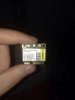
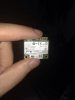
Please tell me if the quality of the picture is not good enough.
Thank you for the help reborn2003 and Mr. Fox like this.
 -
Well, I took mine apart and grabbed some photos for you to compare to yours. I notice some differences in their markings. You may want to Google some of the numbers on your label, especially the model number. It definitely appears you have an Ultimate-N 6300, but I am not sure if it is a generic model or a proprietary version.
I have a few thoughts as well:
- The antenna wires not being connected correctly should not prevent drivers from installing
- my WiFi card works with no antennas connected if I am close enough to my router - Check your hardware ID from Device Manager - does your match mine?
- if it does, my drivers should work fine for you (if not, something is possibly not right about that WiFi card) - Compare your contacts on the card where it fits into the slot and confirm it matches my pin-out exactly
- Confirm you are using appropriate drivers - use mine just to be sure - here is a link
- Be sure to use the WLAN m-PCI slot (not the DMC slot adjacent to it)
- if you install the WiFi card in the DMC slot it will not function correctly (I have tried)
- if you have something installed in the DMC slot, remove it to see if it is causing a conflict of some sort
Click on images to enlarge them in a new window![[IMG]](images/storyImages/4SYjxdOl.jpg)
![[IMG]](images/storyImages/j1AE5dzl.jpg)
![[IMG]](images/storyImages/al38RhOl.jpg)
![[IMG]](images/storyImages/0leMc8el.jpg) Last edited by a moderator: May 6, 2015reborn2003 and Zo0r7y like this.
Last edited by a moderator: May 6, 2015reborn2003 and Zo0r7y like this. - The antenna wires not being connected correctly should not prevent drivers from installing
-
I was looking into upgrading to the Ultimate-N 6300 but so many are just Lenovo models and then you have issues with return cost and sellers not being honest it just seemed like a real pita. I also was reading that it had some stability issues?
I've read about the m18x and m17x having problems with the spdif and motherboard audio, does anyone know whether that was resolved with the m18xr2? -
The problem with the S/PDIF was not the laptop itself. The TOSlink adapter that was provided as a freebie seemed to be slightly out of spec. It was a hair too big and was jamming the trigger pin inside of the jack. Some users were able to get the pin unjammed and that fixed the issue. I have not seen anyone report this on the M18xR2 so my assumption is that nobody tried using the messed up TOSlink adapter. I am not sure when Alienware stopped shipping the adapter, but that is most likely when the problem went away.
I have the same Intel Ultimate-N 6300 WiFi card that started out in an M18xR1. It is more than 3 years old and it has always performed flawlessly. Some of the proprietary models being sold on eBay do not work correctly. I have not seen any complaints about those with a decal bearing a Dell part number. -
Good to hear about the spdif I'm going to get a cable and set up my old z5500's =)
I couldn't find a reputable source for the Ultimate-N 6300, that's when I gave up my search for one. I was interested in getting the part for a good price and the market is simply flooded with sellers who don't care that it's not an official Intel model and will list it as such regardless if it's for a specific model/OEM. Most of the time I just use Ethernet and I'm right next to my router but when I travel with the m18x I could really use the boost.
That 3920xm is looking really tempting if I keep this monster -
Hey Mr. Fox
I am happy to say that the network card is working. The issue was with the drivers. The drivers you provided are the correct ones for the card
I feel like a small kid now, not knowing how to install drivers...
Thank you for the detailed answer !!
Since i am still waiting for my Alienware at the moment i am using Acer 5750G. The laptop is with 2 antennas. Is the correct way going 1st White and 2nd Black ? Or should i do it 1st White, 2nd Empty and 3rd Black ?
Big thanks again !reborn2003 and Mr. Fox like this. -
SWEET! Excellent news that your 6300 is a good card and not a proprietary one. Glad to help, buddy. +1 Rep
Match the antenna wires to the colored triangles show on the label in my photos and you should be in good shape. If you have white and black wires, leave the middle antenna connection (gray) vacant. If everything is working well, this may not make any difference. I would not worry about changing it unless you are having issues with weak or dropped signals, or low transfer rates.reborn2003, bumbo2 and Zo0r7y like this. -
Last time i pulled the conector too hard, and got the cable that connects the power button board to the mb broken. Do you know where i can get a replacent one? Do you think is possible to solder them back to the plastic piece?
Mr. Fox likes this. -
The part is the same for the M18xR1 and R2. You might be able to solder it back, but I cannot imagine the part being very expensive purchased new from Dell/Alienware if it is still available. I believe the part number is 067GPX or 67GPX "Power Button Cable" (the leading zero probably needs to be dropped).
If not, you can get it here (probably more expensive than getting it directly from Dell/Alienware) Dell Alienware M18x Various Item DP/N: 067GPX, 067GPX, DC020015D00
![[IMG]](images/storyImages/Dell-Alienware-M18x-Various-Item-DP-N-067GPX-b-112806.jpg)
-
I managed to solder it back, thanks for your help anyway.
Mr. Fox likes this. -
threw this together last night running at high settings (Ultra does not work in beta)
also i was looking for that thread where you post the alienware videos in? could not find it so if anyone can link me much <3Last edited by a moderator: May 12, 2015reborn2003 and Mr. Fox like this. -
I see you found that thread. I replied over there. Nice video.
reborn2003 likes this. -
-
Will there be a wireless adapter supporting the AC standard released for the M18x's
-
You could buy the Intel AC 7260 on Amazon and put it in yourself. Last I used it there's also a bit of problem with stuttering but since then there had been a few drivers update.
Amazon.com: Intel Network 7260.HMWG WiFi Wireless-AC 7260 H/T Dual Band 2x2 AC+Bluetooth HMC: Computers & Accessories -
As you can see in my sig,I'm selling my dual psu mod.If interested PM me.
reborn2003 likes this. -
Hey guys, I'm searching for an Alienware M18x R2 Sleeve/Cloth (Black). Anyone have one?
http://forum.notebookreview.com/wan...ine-alienware-m18x-r2-sleeve-cloth-black.html
J.Drereborn2003 likes this. -
I have one but you can't have it.
If you can find a place with more than one for sale, please let me know. Mine is almost 2 years old. It's still in decent shape, but it doesn't look new any more. I wouldn't mind having some spares in new condition.
reborn2003 likes this. -
If you can't find the official sleeves for the 18, then I know for a fact that the sleeves that came with the M17x R2 fit - they are snug, but actually, I think they fit better IMHO. If you look on Fleabay, you should see quite a few sellers flogging the 17" variety. Here's how my 18 looked in the M17x R2's sleeve:
reborn2003 likes this. -
That does look like a better fit. I like that it is tighter.
reborn2003 likes this. -
Yeah, I've considered getting the one for the M17x, but I'm buying it for the AW 17 and I don't know which will fit better -- the one for the M17x or the M18x. So, I thought it'd be better to take the safe route and grab the larger one.
-
Too bad they cut that corner eh. It was a nice extra touch and made it feel more of a luxurious product.
Sent from my SPH-L900 using Tapatalkreborn2003 likes this. -
Yeah...and people actually used them, too. At least I did. :thumbsup:reborn2003 likes this.
-
sorry it seems that during my last clean up I had stored them and now I cant find any.. you are better off to buy from someone else cause my room is a mess, and it could also be in my garage which is also a mess lol.
btw I'm just curious didn't you had your m18x r2 returned to Dell, and you got a alienware 17 and now selling it already? haswell just came out! -
The M17x sleeve fits on the AW 17. So, no need for this anymore.
-
My newest R2 arrived from the Outlet Friday afternoon - it was originally scheduled to arrive on 10/31, was delayed to 11/5 then was suddenly shipped on 10/30. Definitely can't complain about two day shipping when I selected ground! I finally swapped over all of my drives and software last night and am up and running right now. So far it's running great, the only problem that I noticed is that I'm supposed to have 12GB of 1600 RAM, but they installed 8GB of 1600 and 4GB of 1333 instead (mixed brands too, but not a big deal). Aggravating the problem is that the 2x2GB 1333 sticks are installed in the slots under the keyboard. Has anyone else had this happen?
-
It has nothing to do with the product itself. The system works great and plays every game I want it to.
Call them and complain. They should dispatch some more memory to you without question.
Hopefully you get a decent support agent because I've heard of people being accused of stealing in such situations. -
Hi, im having a weird problem, and im unable to determine whats the cause.
I have 2 7970m, if i place just one of them in the computer, everything is working, 3dmark11 games etc. With both cards everything runs fine, as long as only one is installed.
The problem comes when i install both of them, when i enable crossfire, the screen freezes and i need to shut down the computer.
I have tried 2 mother boards i own, and with both of them i have the same problem, i really need help, dunno what else can be the cause. -
Sounds like it might be the crossfire cable.
-
If you have swapped the GPU around, and both are working, but then it doesn't work if you connect the Crossfire bridge. Then I agree with TBoneSan, it's likely the bridge has gone out. It happened to my SLI bridge too.
Try putting the GPU in without connecting the Crossfire cable, if both of them show up in BIOS, then I think the GPUs should be fine. -
Well, the problem is not exactly the same with both motherboards.
With one it only crashes when crossfire is enabled and i try to enter a game.
With the other when crossfire is enable the computer screen goes black when entered in windows, but as soon as i remove the secondary gpu everything goes back to normal. -
I know this has probably been hammered to death, but I finally got by MicroCenter and saw the 18 R3. Wow. All those little details that I love about my R2 are gone. I tried to bring-up the color wheel to even see how the back lit keyboard works and it wouldn't work. Half the lighting was dead in some of the zones. The salesperson saw me looking at the machine and tried to steer me to a more competitive gaming machine. If I would have waited until this year and compared laptops, I wouldn't have purchased Alienware. It looked like every other machine. I'm not much of a gamer. I use it for my business so any ol' laptop will do, but the keyboard, screen and all the small details sold me. This may well be the last laptop I ever own because pad/cloud technology will be so strong in a few years that laptops may become a thing of the past. If this is my last laptop, I think I made the right decision.
Mr. Fox, KingSmoth and Alienware-L_Porras like this. -
Thanks for letting us be the choice! You won't regret!Mr. Fox likes this.
-
updated to windows 8.1 and since then my wifi drops about once very 2 minutes. tried the driver on dells website, no dice. Tried the one from bigfoots website, again no dice. I did use the driver scrubber as well, that did not fix the problem. I have the bigfoot 1103. Google offered no helpful advice. thanks in advance!
Mr. Fox likes this. -
It seems many are experiencing problems with Killer 1103 regardless of OS and Windows 8.1 seems to create more problems, in some cases where none existed for some users.
Please continue looking for a solution and participate in discussion using this thread: http://forum.notebookreview.com/ali...thread-look-solutions-ask-questions-here.htmlSigX11 likes this. -
If you have a new enough Intel RST OROM (11.6.0.1702 or newer, I believe) it does for sure on Windows 7. Windows 8/8.1 tends to be hit or miss. Seems like Microsoft never really intended Windows 8 to support enthusiast-grade computer hardware with awesome stuff like RAID0. Many SSD manufacturers have a footnote about not supporting TRIM on Windows 8 when you look at their spec sheets.
Running the TRIM Check tool consistently passes for me under Windows 7 and consistently fails when I boot into Windows 8/8.1 and run it even on my mSATA SSD that is not in RAID0. Windows 8/8.1 has a built-in drive optimization utility that allows manually running TRIM, but I don't know how well it works on its own.
![[IMG]](images/storyImages/U9sOy2xl.jpg) reborn2003 likes this.
reborn2003 likes this. -
As noted above, I have TRIM enabled on my RAID 0 840's, though it did not work with my 810 series drives.
reborn2003 likes this. -
The edge to edge glass on my R1 has a pretty noticeable scratch mark on it. I was wondering if it is possible to replace only the E2E glass? I plan on using my current LCD and the rear cover with the alien head on it. I know it is very difficult to remove the E2E from the bezel, and that's not what I'm asking, just to clarify.
Here is the reason I ask: Dell Alienware M18x Front Glass LCD Bezel LCD Bracket Frame 14T13 | eBay -
Yes, it is possible. My assumption is that the parts for sale have not been re-glued together after the LCD panel was removed... hopefully it is not. That would really suck. If you are replacing the scratched one, it would not matter if it gets broken. I would find myself wondering about the condition of the used part, and whether the seller was able to separate the parts without causing any cosmetic damage to it. I see it is "Grade B" so it's hard to say until you actually get your hands on it and see if it is better than what you have now.
-
Alright, so it is a fact that the LCD is glued in? I was thinking that the E2E was glued to the bezel, and then the LCD was attached with fasteners. I'm not willing to have a substandard setup.
I tried removing the scratches with some Meguiar's swirl remover and a cotton ball. I tried using a piece of cardboard (cardboard is surprisingly abrasive). I tried a pencil eraser too. None of it touched the scratch or the area around it. I may need to find some 2000+ grit sandpaper and gently wet sand it or something. Not really sure at this point.
The scratch can only really be seen when the screen is displaying a lighter color, but my eyes are drawn right to it because I know where it is.
Thank you for all the help Mr. Fox!Mr. Fox likes this. -
I think you are correct, Turbo. The LCD panel itself is not glued to anything. The E2E plexi should be glued to the display assembly, not the panel itself. Imagine how hard it would be for a tech to replace a panel if it had been glued in.....removing it to replace a faulty panel would result in many breakages.
Now, if one were wanting to remove the E2E to expose the matte LCD behind it, that's when the glue that holds the E2E on will become a royal PITA. -
Hmmm. Thanks Stevie. I'm going to try everything else I can before buying a new E2E though. We'll see how badly I screw things up when I attempt to buff the scratch out later today. I have experience in automotive paint, but auto clear coat is a different animal than plexiglass I would think.
-
It is
Let us know how it goes. Hopefully it will go fine. -
On another topic, I just bought a second 680M to complete my SLI setup. I haven't received it yet, but I did notice something (after I paid) that is different from my primary card. The "N13E-GTX-A2" that's normally on the GPU core isn't there. It doesn't say "QUAL SAMPLE" or anything.
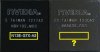
Does anyone know what that means, if anything at all?Mr. Fox likes this.
*OFFICIAL* M18x R1/R2 Owner's Lounge Thread
Discussion in 'Alienware 18 and M18x' started by katalin_2003, May 1, 2012.


![[IMG]](http://i.imgur.com/4SYjxdO.jpg)
![[IMG]](http://i.imgur.com/j1AE5dz.jpg)
![[IMG]](http://i.imgur.com/al38RhO.jpg)
![[IMG]](http://i.imgur.com/0leMc8e.jpg)


![[IMG]](http://i.imgur.com/U9sOy2x.jpg)
