 Problems? See this thread at archive.org.
Well gents, I'm glad I purchased the warranty. My m18x R1 won't pass post and gives 8 system beeps. I searched all over the forum and performed every trouble shooting step to no avail. I called Alienware Tech Support and have to do an ownership transfer. I bought it from Identitycrisis on this forum so long as he sends me the info I will be good to use the warranty.
Really strange they let me buy the warranty without telling me anything about the ownership transfer. Was a bit confused and definitely added a few days to the process. Oh well! Wish me good luck and my Alien to return to good working order!
-
-
Hey guys. The 'ALIENWARE' logo on the bottom of my LCD will no longer display green. Can it be replaced, or do I need a whole new LCD? Thanks in advance for any help.
Mr. Fox likes this. -
I am pretty certain this is the part:
Alienware M18XR2 Avenger MLK - 98X52 - $40.91 | Dell Spare Parts
If you call Dell Spare Parts by phone you can likely get it for half of the web price. Phone number is (800) 357-3355.
Have you already attempted to reinstall AWCC to see if that will fix the issue? -
Yes, I tried reinstalling Command Center. I'm relatively sure it is some kind of hardware issue though. I watched it flicker for a few days and then finally quit. Plus, no color variation that requires green works correctly. Anything on the color wheel between red and green shows red, and anything between blue and green shows blue. If I choose green, the logo goes black, because green obviously only requires the green LED to be illuminated.
So that's the wire that runs next to the LCD cable, and then a little bit further down to the right. I was wondering what that was for.
How hard is it to get to the rear to replace the PCB? -
Yup, sure does sound like it has gone bad. But no, it's not difficult. I recently had my LCD replaced under warranty and the service part was only the LCD with glass cover and frame, so I had to transfer the webcam, logoboard, etc. Once you remove the aluminum cover you'll instantly see what needs to be done. There are a couple of plastic fillers by the hinges. You need to take at least one off because the white plastic connector on the end of the wire at the motherboard end and the LVDS cable connector won't fit through the opening, but it's very straightforward and easy. The hardest part is getting the aluminum lid off. If it has never been taken off before it can be stuck pretty tight in the track that it slide-locks into. Once you get it to budge, then it's easy-peasy.
[Quick Tips] Replacing The M18x LCD Cover (Aluminum Lid)
<iframe class='imgur-album' width='75%' height="750" frameborder='0' src="http://imgur.com/a/R7LdF/embed"></iframe>Last edited by a moderator: May 6, 2015 -
As a follow up for anyone having dropouts with the Killer 1103 and Windows 8 / 8.1 try and disable Bluetooth in the BIOS and see how you go. This seems to have stopped all dropouts for me.
Mr. Fox likes this. -
Odd since the 1103 does not have blue tooth. Some sort of resource conflict then...
-
Is it possible to use a slim regular spinning HDD between 2 regular sized SSD's 9.5mm on the m18xr2?
Mr. Fox likes this. -
Yes, I do. Two SSD and one ordinary 2.5" 1TB HDD in the same caddy.
-
-
I have three 9.5MM drives and they fit fine in the HDD caddy. The drives are literally touching one another or maybe have enough air space for a piece of paper to slip between them, so very snug, but it's not a forced fit or anything like that. I have a 1TB HDD sandwiched between my Corsair Neutron SSDs. My other 1TB HDD is in the ODD caddy. I suspect that stacking up 3 x 9.5MM HDD would produce too much heat because there is no breathing room or ventilation in that area.
-
I'm running three 9.5MM HDDs in the caddy without issue. Heat has never been a problem for the drives. For example, they are currently sitting at 40, 41, and 43C, and the computer has been on all day. They are all 7.2k spinners, two of them are hybrid hard drives (Momentus XTs).
I can imagine that it could potentially overheat the drives if all 3 drives were under 100% load, but that has never been the case for me. These three drives have been in the caddy in their current configuration for close to 2 years now, and none of them are showing signs of failure (one of the Momentus XTs was used for 2 years in my old M17 as well).
While there isn't any ventilation, I think the caddy itself and surrounding case does a good job of conducting heat away from the drives. They're actually running significantly cooler than the drives were in my M17 (typically 45-50C), although part of that might be that I'm running Windows on my mSATA SSD rather than one of the hard drives.
Anyway, long story short: three 9.5mm hard drives definitely fit in the caddy and temperatures shouldn't be a problem either (although I'd recommend keeping a close eye on them).Mr. Fox likes this. -
I miss my nebula red M18x more and more every day. I am loving the specs of the new machines but hating the style.
reborn2003 likes this. -
New Alienware design is sucks!!!I bet you it has design by Dell,Alienware went three step backward with this ugly design.........
-
Hi Guys
I am going to sell my current rig (Once Dell have repaired it again this week) I want to switch to Nvidia based, what would you recommend please? Similar or better specs to what I have currently is what I am looking for.
Cheers..
Current machine
Alienware M18x R2
Processor : Intel Core i7 3920XM (8MB Cache, up to 4.1GHz Overclocked)
Dual 2GB GDDR5 AMD® RADEON HD 7970M CrossFireX
Display : 18.4" WideFHD (1920 x 1080) WLED LCD
Camera : Integrated Skype HD Certified FullHD Camera with dual digital microphones
LCD Back Cover : Cosmic Black - Anodized Aluminum
Memory : 8192MB (2x4096) 1600MHz DDR3 Dual Channel
Hard Drive : 256GB SSD + 1TB 5,400rpm SATA
Optical Drive : DVD+/-RW (Read/Write) -
Well, similar would be an R2 with dual 680m's. Better would be a new (or used) 18 with dual 780m's or a brand spanking new 18 with dual 880m's. Of course, if you don't like the styling of the new 18, you could always upgrade instead of sell -have you considered the possibility of just doing a GPU upgrade on your R2?
-
Hiya
I had no idea I could upgrade the GPU's in the R2 I have. The 7970's I have have failed twice now so im done with them. Could you tell me how I upgrade please, where I get the parts and what parts I need. Does it invalidate my warrenty?
Cheers -
The physical process of GPU installation is pretty much this (courtesy of our very own Mr. Fox): http://forum.notebookreview.com/ali...dge-cpu-heatsink-7970m-crossfire-upgrade.html
You would probably have to use modified drivers if using 780m's or 880m's - 680m's would be fine without modification as they were validated for use in the M18x R2, meaning you can use normal drivers without the need to mod the .inf to allow installation. As for warranty, if you bought 680m's from Dell, they would not invalidate your warranty, however, upgraded parts will only carry a 3 mth warranty themselves. Buying GPU's from Ebay will carry seller's stated warranty (if any) and anything above 680m's, Dell will not warrant the entire machine - if you kept the 7970m's, you can stick 'em back in and you are still warrantied for however long you have remaining. It's best to keep original parts for this precise purpose.
Most people source upgrade GPU's from Ebay from the likes of Laptop Monkey or other Ebay sellers. If you search for the GPU you want, eg GTX 780m, you will probably find quite a few available. Some GPU's will have different variants, for example 680m's for Dell or for Clevo machines....this can be important to know because the Clevo 680m variants require a slightly different approach - see here: GUIDE: Installing Clevo GTX 680M in Alienware M18x
Also, coming from AMD to Nvidia would require new heatsinks and a new SLI bridge cable instead of a Crossfire cable. All of which can be bought from Ebay and the like.
I guess it would be handy to know a budget for an upgrade path, how much you would want to spend, and then you could look at the prices of which GPU's, heatsinks etc you would need to find out if it's worthwhile or something you may or may not want to do yourself. Plenty of people here have upgraded there GPU's - I went from 580m's to 680's in my old M18x R1 and it was worthwhile. 680m's and 7970m's are pretty close in terms of performance but not so close in terms of reliability etc. You might want to consider 780m's or above....if your budget allows for it.
Keep posting here about your plans - loads of people that can help out and give advice before you decide.Soul Reaver likes this. -
Great Answer thanks.
I guess I need two cards yes? So I need two of these then
Nvidia GeForce GTX 880M 8GB DDR5 for MSI clevo alienware upgrademonkey | eBay
Plus the bits?Mr. Fox likes this. -
Well, two cards for SLI, yeah....BUT HANG ON!! - I read the seller's listing and he says " MSI version , works on single MXM laptop eg m17x R5, and dual MXM laptop eg m18x (only one work at a time)" which suggests to me that his cards have no SLI connector on the MXM card, and therefore cannot be used in a dual GPU configuration as he states one card at a time. As far as I know, MSI don't do a dual GPU laptop, so it makes sense that there would perhaps be no SLI cable connector on the card itself as there would be no need for one if MSI had them from Nvidia for their machines. I would check with the seller first.
If you look at this listing Nvidia GeForce GTX 880M 8GB DDR5 for CLEVO alienware upgrademonkey to the left of the GPU die, you can see the SLI connector on the card (white coloured connection) but you can't on the one you linked to. These ones would be more appropriate for use in a dual GPU configuration as you can hook 'em up with a SLI cable.
And yeah, you would still need the "bits" such as heat sinks and SLI cable if you are coming from Crossfire 7970m's......rawhide85, Mr. Fox and Soul Reaver like this. -
I just purchased these two drives to replace my two 1TB drives in the M18xR2. 4TB RAID0 data volume coming right up! Yay! Now I can load up all my Steam and Origin games... room to spare. :thumbsup:
Seagate Samsung Spinpoint M9T 2 TB Internal 2 5" ST2000LM003 Laptop 9mm HDD | eBay
For those having a hard time finding them, it looks like this item at NewEgg is the identical product and all you have to do is crack open the enclosure. (See the 4/15 review by Robert N. for details.) -
Ohh nice and tasty
I've been wanting to do this. Very nice storage upgrade indeed.
edit - good price you got yourself there you savvy sun of gun :thumbsup: -
The Dell engineer is coming Friday with two new cards and also a motherbaord this time. I guess i could sell my 7970s.
rawhide85 likes this. -
While I was trying to get the maximum speed I could out of my new 840 Pro's, I was taking a look around inside the modded A03 bios that I am using. I came across a setting I had never paid attention to before. Please see the attached screenshot. Would I be better off changing the setting to Solid State Drive instead of the default setting which is Hard Disk Drive? I'm not sure what changing this setting actually will do?
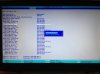
-
Go ahead and change it. I manually set mine to SSD on the ports where doing so is applicable. It causes no problems whatsoever for me, but I have not recognized a benefit from changing it. I think it may do something during POST as far as waiting for a mechanical HDD to response or something like that, but I am not 100% sure of the purpsoe.
-
Thanks for the answer. Changing it made no noticeable difference for me either - SSD benchmarks or otherwise. I just figured if I have the option to change it to SSD, that has to be better. Right?
-
Did Anybody try on Intel 7260HMW IEEE 802.11AC, dual-band, 2x2 Wi-Fi plus Bluetooth 4.0 Mini PCI Express?Is it better than intel default Network card?
rawhide85 likes this. -
does 7970m cfx could last for couple of years? the unit is refurb
rawhide85 likes this. -
There's no way to accurately predict that. 7970M doesn't have a good reputation, but some folks never have problems. It might last several years, or it might last only several months.rawhide85 likes this.
-
NICE! Let us know how the processor performs once you get it.
Since it's an electronic device it could fail any time. It could take years before it does or it could be tomorrow. Keeping your unit free of dust to avoid overheating could help but it's not going to assure anything. It's better to have some sort of warranty. -
If he take care of he's machine, it will last long enough.
rawhide85 likes this. -
I agree for the most part but sometimes electronics can simply crap out. 7970m's have a habit of doing that.
-
I also agree, with proper maintenance the machine should last long but sometimes it just happens.
-
Even with the most meticulous care, electronics can fail for no apparent reason. Many, if not most, component failures occur in the absence of any kind of abuse or misuse. This is one reason why having an extended warranty is important. If you're wealthy and you can afford to pay for anything and everything, then maybe that's not very important. For the rest of us, it's very risky to not have an extended warranty from Alienware. Even on a machine that is 3 to 5 years old, it is not like owning a disposable Best Buy or Wal-Mart laptop that costs less than an Alienware motherboard or GPU. A 3 to 5 year old Alienware dual-GPU monster can still crush the life out of those cheap garbage machines.
rawhide85 likes this. -
It is ok to buy an alienware 18 by loaning a money? Why and Why not?
-
If you mean Dell Finance options, I can't see any reason why it is NOT okay to do so. I guess it's up to the individual who's looking to buy, really. I personally don't like borrowing - especially if there is interest added on top. Dell sometimes offer zero interest deals over short terms to spread the initial outlay. Longer terms can be had, I believe, but incur extra interest charges making it more expensive in the long run. Bank loans, zero percent credit cards etc are also other options....but like I said, it's up to the individual to be happy with the terms and charges of ANY borrowing, that's why it is a very personal thing.
-
Dell Financial charges crazy interest rates, but if you can get it interest-free for 12 months or something like that and have it paid off before the deal expires, go for it. Just be sure you get the longest warranty possible, like 4 years if you're getting an expensive beast, and have it paid off before the warranty expires.
Some credit card vendors extend the original manufacturer's warranty (American Express does) for qualifying purchases, so that might be worth looking into as well. Not certain if it applies to computers, but I know it does for household appliances. They usually impose a limit to the extension, but it's more than what you would have without it.rawhide85 likes this. -
Borrowing is a very personal decision. I dont like doing it, especially with items that depreciate at a far quicker rate than I can pay the loan back - ei. Technology. It also makes me less frivolous. The main thing is id start feeling contempt paying off a laptop once it became old tech (ive done it in my younger years).
My advice (if its within your means). Save up for what can afford without credit, then instead of paying off a loan, put that money into saving up for your next upgrade ie. GPU. -
^^^That is absolutely the smartest way to do it... that principle applies to everything, not just computers. +1 Rep :thumbsup:
We live in a world where a desire for instant gratification frequently drives bad decisions and many people do not manage their finances effectively. -
-
Alienware M18XR2 is the best gaming Laptop in the World with an exceptional design and excellent performance,so its a rare breed of Laptop with rare breed of users!!!I am hoping upcoming year DellAlienware will redeign new M18 to M18XR3
-
I believe and come to the conclution that I have rare updrade/update bug in me!!!:cry:..I built my Gaming Desktop every two years and upgrade to the max as well as Laptop that I purchased!!!Is it bad?I am 100% addicted to it...

-
No, it's really good. Unless you can't afford the addiction and have to repeatedly go into debt to keep up with the need for speed.
rawhide85, Redtulips7 and TBoneSan like this. -
@Mr.Fox I'm now in the process of saving the funds to purchase an r2. I don't really like the design of the M18 which of course means I'll be getting a Dell Outlet r2. I just hope they are still around when i'm ready to drop.
Sent from my SM-N900A running DynamicKat Xtreme v1.3 by @bri315317Mr. Fox, Redtulips7 and TBoneSan like this. -
You better hurry............Alienware M18 I wouldn't touch it
rawhide85 likes this.
-
Your right. The clock is ticking
Sent from my SM-N900A running DynamicKat Xtreme v1.3 by @bri315317 -
While the clock is ticking, awesomeness never goes out of style.
![[IMG]](images/storyImages/Tick-Tock-Clarice.jpg) rawhide85, TBoneSan and Alienware-Wasserman like this.
rawhide85, TBoneSan and Alienware-Wasserman like this.
*OFFICIAL* M18x R1/R2 Owner's Lounge Thread
Discussion in 'Alienware 18 and M18x' started by katalin_2003, May 1, 2012.


