Problems? See this thread at archive.org.
Thank you, thank you and thank you. It worked, I am so happy to have my sli back and now I am able to use my 3940xm and use my ram at the 2300 speed they were meant for I am just speeding through everything. Thank you again Mr. Fox.
-
-
Wonk, wonk. Its happening again. Man this motherboard really sucks.
rawhide85 likes this. -
OK. I got a theory on why this is not working. I do not have the correct ribbon cable for the daughter board and I think that when I hook USB devices up to the I/O side it take power from the 2nd GPU for the USB devices to work. Went ahead and ordered the part directly from dell for 27.99. Much cheaper than what I paid on ebay for the one I have installed now. So after it takes the power away from the 2nd GPU I have to go into the laptop itself and reinsert it for windows to recognize it again (yes major pain). So once I get this part I will post back with hopefully good news on a permanent fix.
if you want to chat up with dell to get the part here is the info I used
Dell Alienware M18x Sub & Various Board
DP/N: YYFHR, 0YYFHR, LS-832DP, QBR10rawhide85 likes this. -
Hey people, my M18x suddenly started acting up, wanted to ask you guys if you experienced anything similar to this:
All of a sudden today when starting up and running a random game everything started to go really slow until the machine froze up.
When booting up again the machine started to make several loud beeps just after power-on, not booting up at all.
Happened several times when trying to start the machine.
I removed the power and battery and waited a bit and it finally booted normally, I swapped to integrated graphics instantly before it manged to freeze again and everything runs fine.
I swapped back to the 680's again and run AlienAutopsy, it runs until the Pattern Test and everything went black - booted - and the machine beeps several times just after power up once again..
After finally managing to boot I swapped back to the integrated graphics again and everything runs fine.
System History events in AA also shows that the GTX 680M driver appears to have caused a system crash.
The machine is 2 years old, ordered new from the factory, no upgrades done since then.
Setup is 3920XM CPU, Dual GTX 680 SLI.
Anyone had any similar experiences?rawhide85 likes this. -
Quick question for everyone. What is the most powerful GPU combo that is compatible with the M18xR2?
rawhide85 likes this. -
Right now, GTX 780M SLI is the sure-fire upgrade fight now. If the 980M compatibility thing gets resolved, 980M SLI will be a lot more powerful.
rawhide85 likes this. -
Hi all!
I'm from Italy and my first gaming laptop in 2007' was an xps m1730 (t7300 changed with a x9000) with 8800m gtx in sli (card was only one with 2 gpu soldered) and the Alienware were a dreamin factory with super distinguished line and performance product (from UK Market if rember correctly, because here in Italy I've never seen one).
Late in 2012 (after many desktop, nforce - sk775 -sk1150 -sk1366, and some acer laptop - 5920g and 5930g- plus the one in my old office, an HP 6930p)
I've got to go with a refurbished m18x r2 (come with UK qwerty changed with an ITA one, 3610qm and 750GB mechanical HDD) purchased from eBay with a warranty that over after only one year on March 2014
When arrived the crossfire didnt work,
so I've purchased 2 cf cable and then a 7970m (and I've purchased too an Alienware m17x R4 with a 7970m) with 78,5 asic
the crossfire not working on one of the card originally shipped but yes on all the other (the one of m17x R4 too) I've tried to blind flash but nothing, so I remounted it on the m17x R4 that doesnt need sli and sold all.
From that day this laptop run. Run!
I sold my sk2011 system too because here where I live now I've less space but the m18x R2 still doing his job in a great way, hoping for Red or Green upgrade in future.
Bye all, sorry for sintax or grammatical error
rawhide85 likes this. -
Well. I went ahead and got a new I/O board from dell. I put it in today and as usual the 2nd GPU showed up until I put the computer to sleep. now it is gone again and disconnected. I don't know what to think at this point everything works but there is something whether its in the bios or some driver that disconnects the 2nd GPU. Another think I noticed that the part ID has changed. On my R1 motherboard my 680M hardware id was 048F and now is 0550 I am wondering if I have to download modified BIOS to get this thing working.
rawhide85 likes this. -
I give up hope. I swapped GPU's around and completely removed NVIDIA drivers from my system. I turned on my machine and looked at the BIOS and the 2nd GPU wasn't listed. After reinstalling the NVIDIA drivers and restarting the option for enable SLI came up and I selected it and now its back to single GPU. Man I do not know what I did to this laptop for it to give me so much hell.
rawhide85 likes this. -
when you go to hell you realize how much in love you are
-
Man that is crazy!!! Left me tell you, my son spilled a cup of soda on my R1. So tough it was the last day of the R1 alien, on earth planet.!
So decide to double check it, tear it down and wash every single piece even the motherboard with soaps and water, put it back together and I'm back to business!! That's it!!rawhide85 likes this. -
Hi All,
Quick question if someone will be so kind to answer. All Help is much appreciated.
I recently bought an M18x R1 with a GTX780M, and have bought an additional 780M to install as SLI. I now need to buy an SLI cable. Are all M18x SLI cables standard shape and length or do I need a specific SLI cable for the 780M pair?
Thanks.
David.rawhide85 likes this. -
The Dell part number you require is GDMRG - that is the Sli cable for the M18x R1/2 and would be fine for Nvidia cards including 780m's - none on Ebay UK right now, plenty from sellers in the US. Actually, if you phone Alienware UK Tech support, you might even be able to buy one from them directly - I have done so numerous times in the past.
You may - if you don't have them already installed or acquired - require a secondary GPU fan and heatsink. -
Hi Stevie,
Thank you for your speedy response. I had noticed there is a mobile SLI famine in eBay UK at he moment.... and so have one winging it's way across the Atlantic as we speak. Cheers for the info.
David.rawhide85, steviejones133 and TBoneSan like this. -
No problem, bud. There's never much in the way of parts being sold by UK Ebayers. It is often worth calling Dell as some parts actually work out cheaper than Ebay, surprisingly.rawhide85 likes this.
-
delete please
-
Any chance anyone could give me some sort of idea of what my system is worth? As in my signature, but in its stock configuration (80GB SSD + 1TB HDD, stock crappy wireless card). Warranty until June 2016. At this point I just want to get rid of it and build a dream mini-ITX system (with the hopefully-soon-to-be-released Titan 2/980 Ti) and buy a smaller, moderately powerful laptop that I can actually use on the go. I think I'm done with gaming laptops.
rawhide85 likes this. -
@Spectar82- Just a thought, you are indeed using a 330 watt power supply correct? I really hope you get it working as you have tried so hard. Good luck
Sent from my SM-N900A running DynamicKat Evolution v7.1 by @bri315317 -
Thank you very much. I just went through the BIOs and confirmed that it is running at 330 watt power. Something strange I noticed, after I took it apart, swapped card spots, wiped everything down with rubbing alcohol and can o aired everything I got SLI back but when I ran games at SLI it was really, really choppy. Shadow of Mordor ran just find but AC Unity, BF4 and COD Advanced warfare ran really horrible almost like the cards were unable to scale with each other. I am really starting to think the MOBO is bad but the thing that boggles me is that it randomly recognizes the 2nd GPU and then after 1 start up it disconnects it again.rawhide85 likes this.
-
If what you say is right....it looks like one of your cards is running at either x4 or x1, but not x8. (Speculation of course)
You would need to open gpuz to verify on both cards what they are running at. If this is the problem. You will need to reseat cards and boot to windows to make sure they are both at x8. Then put the machine back together.rawhide85 likes this. -
well I got SLI back up and the second slot is running at x2. how do I bring it to x8?rawhide85 likes this.
-
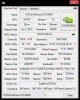
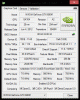
Here are screen shots of my cards.
the second card seems to stay at x2 no matter what I do.rawhide85 likes this. -
It means you are not inserting the card in it's slot correctly. This can take 1 to 20 insertions to get it right. So keep practicing till you get it right. It's not going to magically fix it self either. LOL
rawhide85 likes this. -
there is a price check thread in markeplace. check that out.
more people can see and give input.
rawhide85 likes this. -
Cheers, didn't know there was a PC section there. Was hoping someone here could give an idea of value as it's the AW forum, but I'd probably get a better idea there of what people will pay for it.rawhide85 likes this.
-
Do the samsung evo's work fine with the m18x r2?
rawhide85 likes this. -
Yes. Been running them for a pretty long time now.
littleone562 and rawhide85 like this. -
A single Evo works perfectly. They do not work in raid 0. At least not the 1tb versions. I tried the 850s and they dont work in raid either. some kind of conflict. I got the sandisk Extreme Pro 960gb x2 in raid and never looked back. -
I am using 2x evo 840's 500gb in raid 0 working fine
-
I thought mine were running fine all this time and found out they were not. I had to recondition them. Now they are back up to par.
reborn2003 likes this. -
I just installed two 1TB EVO in a RAID0 configuration on a customer's M18xR2 about a month ago and it worked perfectly fine. Not sure why that did not work for you.Gunnar Snellman likes this.
-
Hello to all, I finally did it and bought a m18x R2, specs in the sig. I will have to install the OS and drivers from scratch, besides the info in the Clean Windows Install guide, is there any other software that needs to be put on a m18x?
@Mr. Fox, thanks for answering my questions about the laptop. I see you have the 980m GPU cards in your R2, was it difficult to put those guys in there? -
Sad to see this thread has died down as I have just received my brand new Alienware M18x R2. And yes it really it brand new with a build date of Oktober 2014, non-refurbished, specs in my sig!
Hopefully one day I'll be rocking a 980m SLI setup, who knows! -
Hi CorePax welcome to the forum. I to recently purchased a m18x R2, and like you have a build/ship date of October of this year. Guess we got some from the same batch. This forum is very informative and there are several m18x users who are doing awesome things with there rigs. I too would like to have dual 980m cards but am saving up for an extreme processor first.
-
No, installing them was really simple. They don't work right yet. There is a bad throttling problem under load and you can only run Windows 8 with pure UEFI boot. I wish I had not purchased them now. 780M SLI is the best option for the M18xR2 unless or until the throttling problems get sorted. There is a thread here and one at Tech|Inferno covering the issues with 980M not working correctly. The Windows 8/pure UEFI problem will likely never be resolved. Windows 8 sucks, but it would be worth putting up with if the throttling problem is resolved.
-
To be honest, seeing the guide require Win 8 was almost a turn off, plus the near $1800 price tag for SLI is keeping it surreal. I was looking at the 780m option, and as luck would have it my system had to go in for power loss issues (when lid is moved). I am being told the GPUs are being replaced so I'm seeing what they will do. I hope the 980ms work out for you. Do they need more than 100 watts for power?reborn2003 and Mr. Fox like this.
-
No, not for stock or a mild overclock. Any kind of exciting overclock takes more than 100W per GPU for 680M, 780M, 880M and 980M. All of these GPUs pull way more than 100W each if you do any kind of serious overclocking. The 980M being efficient is kind of Haswell being efficient. They don't use as much running stock, but overclocked they are transformed into extreme power hogs.
captain008 likes this. -
That's good to know, I do a lot of mobile gaming and would hate to have to need more power. I tried dual PSU for my m17x and it did not travel well.
-
Hey guys, my Google-Fu is weak tonight. Can anyone tell me which version of Nero and Powerdvd is suppose to be on the R2.
-
Question...is there any real benefit for me to upgrade my 7970m bios from version 015.017.000.001.042717 to version 015.022.000.001.000000?
-
The newer bios is uefi compatible where the old isnt
-
So is that the only real improvement?
-
Good day to all, I have a quick question about my m18x. So is it normal for a slight clicking sound near the optical drive just before the fans spin?
-
Hi all,
i know this was posted a long time ago but i can't find the answer... if anyone can point me to the right link/thread or way to search... or anyone know a possible known issue based on the symptom. apologies in advance if i'm posting incorrectly.
i have a m18x r2 with 7970m crossfire. i have the max extended warranty in case... my fans just kick in to full speed without slowing down within 10 seconds of booting up.
is it bc i need a repaste? or is my card dying?
what i did so far, i only took off the bottom grill and used an air compressor to blow on the fans and vents. i didn't see much dust come out. should i take it apart further and try to use the compressor again. i know cards need a repaste eventually but just wanted to post before taking it apart. as the last time i did it it took a while using Mr. Fox youtube vid. (last time was to install a triple pipe heatsink for the cpu) but that was like 2 years ago...
thanks for any help
david -
What are your temps? That's what you need to look at to help diagnose.
-
oh man, let me look into how to read gpu temps and get back to you.
*OFFICIAL* M18x R1/R2 Owner's Lounge Thread
Discussion in 'Alienware 18 and M18x' started by katalin_2003, May 1, 2012.