 Problems? See this thread at archive.org.
No, the first thing I do when my stuff arrives in the mail is wipe the OS and reinstall. Is there a certain reason you were asking?
-
-
Yes cause I would like someone to make me a respawn USB. Since I'm military when I deploy I don't always have access to the Internet and with a respawn USB I can restore to 100% working in 30 min without needing to hunt driver.
-
I am having a problem with my M18x. It was shutting down and after looking around I figured it was overheating so I opened it up and did a little cleaning. I had only the bottom open and one of the fans was laying out accross the WLAN board. When I flipped the fan back in place I noticed a white wire was not connected to the WLAN board. There is a white wire and a black wire conneced to it but the third; (a white wire) doesn't seem to have a post to connect to. Can anyone tell me if this is normal or provide some insight?
How does one attach a photo to a post?Mr. Fox likes this. -
Welcome to our community. Congratulations on being an owner of one of the best laptops ever built in the history of personal computers.
There are three antenna wires, but only two are used unless you have a 3x3 MIMO card like the Ultimate-N 6300 or Killer 1102. Those 3x3 MIMO WiFi cards have three terminals on them, but all others have only two, and there are color coded-triangles on the label of the WiFi card to show which terminals they go with. If you have a WiFi card with two terminals the extra antenna wire fits into some slots in the chassis above the WiFi card for storage. It probably popped out of place while you were working on it.
rawhide85 and TurbodTalon like this. -
Ok, I see what you're getting at now. I've got a couple of ideas. I'm also in the military, and I use option 1 below since I bought my laptop off of the Dell Outlet and essentially got nothing but the laptop and its power brick.
1. Make a bootable USB stick with the Windows installation files on it that includes a folder with all of the drivers you'll need to get up and started. These laptops are aging, so the only driver you'll likely need to frequently update would be the graphics. Just keep the USB stick up to date. There is information all over the web on how to create a bootable USB and where to legally acquire the Windows ISO image. My USB stick has saved me hundreds of man-hours.
2. Do a fresh installation of Windows and your drivers, and then create a backup image. You'd need a much larger USB stick for this option than option 1, and you'd also need to carry that dumb disk that Windows makes to boot from to restore said image.
Neither option will save you from having to download any Windows updates that popped up after you installed. There are a lot of other options as well, ranging from a clean install to carrying a spare USB hard drive that has a full image of your computer's hard drive on it.rawhide85 and steviejones133 like this. -
I am having a problem running Raid 0 with two Samsung SSD 250GB EVO, SSD connected to both SATA III
Controller but Raid 0 either fail or One of the SSD Disappear!!! I double chk HDD connection found no problem so it seems like Raid controller has problem with Sammy SSD EVO!!! -
Sorry Redtulips7, not trying to cut in line.
Lately my power adapter has been tripping (shutting off). It is the 330 watt adapter. I'm guessing it's time for a new adapter, but there are a few things puzzling me.
1. It has only happened while playing a game called Project Cars. Kill-a-watt EZ says I'm pulling about 240 watts mid-race. Plenty of overhead available.
2. It doesn't trip no matter how many times I run the Firestrike benchmark with the GPU overclocked. Kill-a-watt shows about 285 watts peak.
3. I was playing Project Cars away from home two weeks ago in a hotel room. The adapter didn't trip once the entire week I was there.
4. Power coming off of the wall at my house is 116VAC @ ~60Hz. Not sure if that slightly lower voltage has any effect?
I'm eyeballing a new adapter, but I'd rather not if I don't have to. Any input is much appreciated. -
If you have the paid version of 3Dmark11 or the 3Dmark package run benchmark in loops a good while and monitor the wattage with your kill-A-watt meter. Also try with other games.rawhide85 likes this.
-
Hello, i finally made an account but ive been watching this form for a while now.Recently i opened up my laptop and was cleaning the dust out of the heatsinks, i removed the fans and was using compressed air and also a small battery air blower to clean the fans (i used the air blower on only 2), well i think i burnt them up or something, because later that night when i closed it all up i noticed my temps were getting high and there wasn't any load on the computer but i could hear a fan running, so turn the laptop over to see only one fan running. I turned off the laptop unplugged everything and opened the bottom back up to make sure i didn't leave anything unplugged and i didn't so i figured it must have been the fans so i ordered all new fans just to replace them, guess i learned my lesson the hard way. Has anyone else ever have had fans die (probably not from killing the fan themselves). The fans came in today and im going to install them later tonight. Ill let you guys know how it goes hopefully i dont mess something else up in the process.
rawhide85 likes this. -
@drich1996- Good luck with the install. You'll be surprised how uncomplicated it is. The genius in the design is the ease of the repair.
Sent from my SM-N900A running DynamicKat 7.1 by @bri315317drich1996 likes this. -
Just installed them, my temps at idol for my cpu were around 40-50c and my gpus (680m sli) were at 30-40c. I didnt put any of a load on them yet but the fans kicked on for the cpu and i could feel air being moved so im happy. Best of all my cpu temp at idol wasnt +85c!
-
Success! +1
Sent from my SM-N900A running DynamicKat 7.1 by @bri315317drich1996 likes this. -
Has anyone ever tried the LED alienhead mod on the m18x r2 yet? heres the mod link for the 14x http://forum.notebookreview.com/threads/alienware-alien-head-led-modification.712173/ wouldnt it be relatively the same if you just spliced off the alienware logo thats already on the front of the display? I think it'd be a cool project but i don't know if i have the guts to do it.
rawhide85 likes this. -
@drich1996- Looks like a good project. I still have just under 2yrs left on my warranty. Thanks for the link. +1
drich1996 likes this. -
Hello fellow AW friends, I've recently had a GPU + motherboard replacement due to my M18x R2 shutting down, it was replaced on warranty.
(They only received one GPU so he replaced the main GPU)
However after this replacement some new issues I never had before were introduced:
When changing to integrated graphics with FN-F7 and re-booting the screen is all black and machine doesn't boot
- only way to reset back to descrete graphics (GeForce GTX 680M SLI) was to take out the CMOS battery for a couple minutes
- have tried to do a factory reset with AlienRespawn + update BIOS (A11) + update chipset drivers (actually to older ones which DellSystemDetectLauncher recommends for some reason)
- tried to install the Intel IvyBridge HD Graphics after recommendation from ProSuppor, this does not work
("the computer does not meet the minimum requirements for installing the software")
(log file: "Didn't find any INF's that match active hardware")
- Integrated Graphics shows as "Not detected" in BIOS / there are no related options under Advanced
Scrolling with the right side of the Synaptics pad does not work
- have tried to install the Synaptics Touchpad driver, did not help
These problems ended with Dell sending a tech with third motherboard + a top cover replacement (inkl. new mousepad)
today and it still didn't help (and the tech was baffled..).
The tech's only thought was that the replacement motherboards they receive from Dell are not the same as the original ones
and hence causing these problems (the motherboards are refurbished).
There were also problems with the command center hotkeys after the second motherboard replacement (mute and volume down didn't work) but this was solved with the third motherboard / top cover replacement.
Any of you guys had any similar issues?
Cheers ~rawhide85 likes this. -
@Jammeista- Really sorry to hear about the issues. It sucks when a repair makes it worse. Unless find an original board, you have to opt for a replacement computer. I know that's not the ideal solution but they have an obligation to provide with a working computer without any issues. Good luck and keep us posted.
Sent from my SM-N900A running DynamicKat 7.1 by @bri315317 -
sad to see threads not updated so often as to it once was, guess all good thing come to an end lol. with some mod this machine still kicking alive hard. newer laptop nowadays have soldered cpu like GT80 Titan, the last one half decent was AW18 with a ton of EC and cooling problem..
any chance alienware gonna put a desktop class cpu in a laptop like clevo? -
I don't know. Maybe Dell only want to complete with Acer ? Who make the worse laptop... LoL
Earlier they said that a desktop processor isn't the right choice in a laptop. Who knows.ole!!! likes this. -
Thanks mate, I was contacted by the tech today who said he would receive more parts tomorrow without
knowing exactly what, so will be interesting to see after tomorrow service.
On another note, I was thinking of upgrading my RAM to 32MB at the same time as I am going to run
some virtual machines for various testing.
Did any of you guys try DDR3L RAM in your M18x R2?
I was specifically looking at these:
https://www.komplett.no/hyperx-impact-so-dimm-ddr3l-1600mhz-8gb/824694
The shop say they -should- work fine but Dell support says I can only use DDR3 and that they
"don't recommend low power RAM in powerful machines"..
I read about good experiences with HyperX upgrades in general for the M18x R2 a while back,
the ones I linked are the only HyperX my shop has in stock though. -
they'd work, but i recall due to mobo it'll push it to 1.5v
also isnt it kind of a waste to get low speed ram in this machine?
im still waiting for 2400mhz 32gb.. -
I am running 32GB of Corsair Vengeance DDR3L-2133 in the M18xR2. DDR3L also works fine in the M18xR1. The BIOS allows up to 1.65V on both machines.
-
Does anyone have a spare M18x R2 motherboard? I'm desperatly in need of one. My friends M18x R2 is acting up real strange. Things like
-mSata suddenly dissapeared from bios
-Often 5 or 7 beep codes
-Suddenly wouldn't boot with dedicated GPU's anymore (680m sli) -
Good day ladies and gents, I want to plunge into the dual 980m club and have a question. Eurocom's site suggests GPU upgrades need the unlocked A11 BIOS. After about 45 minutes of searching I could not find any information on unlocked BIOS for the R2. Does this exist and if it does what can it do?
Mr. Fox likes this. -
-
Thanks Mr. Fox for the reply. Will it matter if I am on version A11? I know downgrading software is usually a bad thing, in this case is it the same?
-
I think you can flash down from A11 to A10 without bricking the mobo. Trying to flash to lower than A08 is problematic.
captain008 likes this. -
HI guys,
Basically i was checking and learning about Alienware M18x R1.
I m buying 1 and it's used for couple of times. It has got the warranty until June 2016 the specs are as below
Alienware
Nebula Red
M18x Release 1
2GHz i7
16GB RAm
2x750HDD
Crossfire 6970m Graphics
Box & all Accessories
I would love if you can tell me is it good buying it ? i m getting it for 815$ a used one but with all the accessories box bags all and warranty as well ! is it a good investment ?
peace
shuj -
not bad i guess. at this point the laptop itself fact that it's working + all the extra parts that come with it, its worth it. for HDD raid 0 + 6970m crossfire, its so-so.
-
sir what is the diffference between
1. Alienware M18x use sandy bridge
2. Alienware M18x R2 use ivy bridge
are they the same? and just have difference specification? if yes so the Alienware M18x actually can use Ivy Bridge too?
and which one is best, the old intel generation alienware m18x version or the intel hasswel generation alienware m18x version from all sector
the hasswell review in here the score 2% lower from ivy bridge version
so i a bit confused which one should i take.
and may be there is some suggestion where i can get bnib alienware m18x?
thanks. -
Hello everyone,
i am new here, so please excuse me if i am posting in the wrong thread.
i have been using alienware for quiet a while now, but most of the upgrades involved supported hardware, i have an alienware 17 r5, and it has been running flawlessly, how ever i have always had a thing for the 18's, and just recently i got my hands on a m18x R2 bare-bone, i do have an option for going for the new 18 bare-bone, but ive read that it is not that good for over clocking and the older R2 was a better base platform, also since the older 3rd gen ivy bridge pro's have depreciated in value, i can easily afford a high end unlocked cpu. and i am getting the base systems for a very good price, since i got it without the CPU, GPU, PSU, ram, hdd, ssd, etc. i have the freedom and the liberty to do any upgrade i want and install what ever component without actually having to throw away/waste the old one.
since i live in china, getting a hold of parts is really simple and cheap.
i have gathered a list of things i would be installing, some that i already have laying around, and some that would be purchased.
CPU:
3820qm, 1100元/172$
3920xm, 1300元/190$
(since the price difference is negligible, should i go for the 3920mx?)
GPU:
(single GPU for now, will be adding a second one in in a month of two as i don't have that much money just lying around)
970m 6gb, 2300元/360$
880m 8gb, 2200元/344$
780m 4gb, 1500元/234$
SSD:
840evo msata as primary drive. (owned)
1tb wd blue as storage drive (owned)
Ram:
32gb samsung ddr3l 1600, 300元,45$/8gb
PSU:
330w
(when i upgrade to dual cards, i would also be doing a dual 660w mod)
as for the primary concerns, how hard would it be to get the system up and running,
as for the 970m, is it fully supported, because right now i have been reading, and i have been getting mixed opinions,
has the windows 10 issue been resolved.
what inf/vbios mods would i have to do to get the full potential of the system.
and what things should i change, as i have not purchased anything yet, i am open to opinions.
and not that one i want to hear, but should i trade this in for a newer 18.
any help would be much appreciated.
thank you in advance.
i know every ones gonna ask me to go for the 980m, but thats not an option as i dont have the adequate finances for that. i can at max go for a 970m (2300元/360$) or cheaper alternatives such as 880m, 780m, etc...Last edited: Aug 22, 2015 -
Mr. Fox should be around soon to answer your questions. I would love to have an m18x R2.
 Mr. Fox likes this.
 -
Nah, don't trade it in for an 18. M18xR2 is much better. The 18 doesn't utilize the extra power available from a dual 330W AC adapter setup and is crippled compared to the M18xR2. I cannot get Futuremark benchmark scores anywhere close to those I get with the M18xR2. I haven't seen any examples of 970M being installed in the M18xR2, but I suspect it would have the same compatibility issues as 980M. Maxwell does not work correctly and requires pure UEFI installation for SLI. That eliminates using Windows 7. The best option for compatibility is 780M SLI and the performance is more or less the same as 970M. Avoid 880M... not a good option due to throttling and 780M performs much better.
I recommend using the unlocked system BIOS A08, A09 or A10, and the 780M vBIOS provided by @svl7 at Tech|Inferno. If your heart is set on 970M and you plan to run stock clocks to avoid throttling issue with Maxwell, just use the stock vBIOS. @Prema has a fantastic vBIOS if you want to test 970M SLI overclocked to see if it throttles like 980M SLI does. It may not, but as I mentioned, I have not seen any example of 970M SLI installed in an M18xR2.
The Windows 10 issue is unresolved. Avoid it at all costs and disable Automatic Windows Updates in Group Policy Editor. Apply only critical security updates if you are concerned about security. The "Recommended" and other types of Windows updates are NOT recommended if you want the most stable system possible. -
I just bought an M18x R2 from Evil_MIke. Has 680M SLI. Maxwell is a no go... bummer.
Specifications:
- Intel i7-3720QM 2.60GHz processor
- 16GB Kingston HyperX DDR3 RAM
- 1 256GB Samsung 830 SSD
- 2 512GB 7200 RPM in RAID 0
- 2x 2GB Nvidia 680M in SLI
- DVRW/BD-ROM
- Bigfoot Killer Wireless 1103
- Official Alienware M18x R2 laptop bag included!
-
So, I have been looking at what I will be getting. Looks like a pretty good system. The 680M SLI should be a tad faster than my single 880M. The CPU is a bit weaker though. I have a 4810 in my P170SM-A.
Mr. Fox likes this. -
But you can get a 3920XM or 3940XM on eBay for a nice price and have a real beast machine.deadsmiley likes this.
-
Speaking of which, I just found an i7-3940XM on eBay for $300 shipped. I jumped all over it.
Mr. Fox likes this.
-
Right on! That's really awesome. I wish I could find a nicely binned 4960X for my Clevo for that kind of price.
-
Hell, I wish I had known there was a 4960X!
After a quick search I felt that $300 was a good price. The same seller had a 4920XM for $255. Feedback was good and the fine print stated that they did a power on test of each CPU. I feel pretty solid about it.
Edit: Holy Crap! eBay has the 4960X for no less than $800 for one that was used in a watercooled system that was not overclocked. Umm... wut? -
The 4960X will not work in an Alienware laptop. This is an a hexacore desktop Ivy-E CPU for the X79 chipset and only works in desktops with X79 motherboards and the Clevo P570WM/Eurocom Panther laptop. The M18xR2 has an HM77 chipset and will accept Sandy and Ivy mobile CPUs, so 2920XM, 2960XM, 3920XM and 3940XM are the Extreme CPUs that are compatible.deadsmiley likes this.
-
Ah... you want one for you Panther!
-
My AC adapter is starting to trip too frequently for my liking.
Could someone please direct me to the cheapest place to get an unused genuine Dell 330 watt brick?
I've already scoped a couple out on eBay and Amazon, and was wondering if there was anywhere else.
Have a great weekend. -
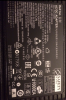
The choice is Amazon or Ebay. Remember to select Delta.
-
Thank you, Papusan. What makes the Delta superior, and how many others are there besides Delta?
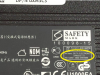
Is the information in this photo what I'm looking for? None of the ad titles mention anything.
 Last edited: Aug 29, 2015
 -
DELTA... Anything else is unacceptable. Here is the picture of the specifications.
 Last edited: Sep 10, 2015
 -
Got it. Thank you very much for the help!
-
After a quick system tear-down to repaste, the LEDs on the keyboard frame touch panel area is now solid green and will not turn off.
The green light is turned on with system power On, and is still on when going dark in alienFx
Not sure if this is a side effect of Nvidia new drivers..you know...Go green team! (joke)
My thinking is that it's either the cable or the touch panel itself, just not sure if there are other ways to investigate before purchasing a replacement part.
not sure if anyone else had a similar experience? -
Try to reinstall the ACC.
-
Hid Evolution has Alienware 18 available for customization (link below):
http://www.hidevolution.com/new-laptops/in-stock-laptops/alienware/18-laptopsdrich1996 likes this. -
I forgot to mention that I tried reinstalling and updating the ACC but same result.
*OFFICIAL* M18x R1/R2 Owner's Lounge Thread
Discussion in 'Alienware 18 and M18x' started by katalin_2003, May 1, 2012.


