Problems? See this thread at archive.org.
Hello everyone! I'm planning on upgrading my Alienware M15x GPU from the GTX 260m to either the GTX 460m or the Radeon 5850. I'd like to see some benchmarks and some suggestions as to wheter or not to go with the said upgrade (is the performance gain noticeable?).
I contacted Dell for some quotes and this is what they're asking for each chip:
NVIDIA GTX 460m = Subtotal: $384.99 + Tax: $28.00 + Shipping and Handling: $15.00
AMD Mobility Radeon 5850 = Subtotal: $279.99 + Tax: $20.65 + Shipping and Handling: $15.00
Also, the technical support agent is telling me that it is only possible to upgrade to the GTX 460m since the MOBO came with a NVIDIA chip when ordered. I find that hard to believe (though I could be wrong) since I think its just a matter of unistalling the NVIDIA drivers and then pop in the AMD drivers after the installation of the new chip.
-
Yeah the M15x is cross upgradable. There are plenty of other threads on this matter but I'll break it down for you. Stock for stock, the 460m is faster, it offers Cuda for video work and Physx in the limited amount of games that support it. The 5850 has massive overclocking potential. Experienced users are able to get over 10000 GPU points in 3dmark vantage whilst the highest a 460m has managed in this forum is 8880 points. Most people can overclock past the 5870. Both are good cards so choose which one you NEED, not which on you want.
-
Both GPUs will perform pretty good in recent games, but if you look at the price/performance ratio the 5850m wins.
As you're coming from the 260m you will love either of these cards, that's sure!
And forget what the tech support is telling you, it's non-sense most of the time...
Also there's the option to put a 6970m in your system if you want the maximum power... check the link in my signature if you're curious. -
Thanks for the fast reply! Well tbh I don't do any video editing at all and I dont think I'll ever do it. I'm not familiar with OCing the GPU and will most probably run at stock settings. The most attractive offer would be the AMD since its a lot cheaper but what I'm mostly worried about is the performance gain from the current GPU.
-
Well overclocking is fairly easy. On the 5850 just download Sapphire Trixx, adjust the sliders then boom.
-
I'd love to upgrade to the 6970m but I'm still under the Dell warranty and I'd better not risk it
 . But yeah, the 5850m is a very tempting offer
-
I see. I'll look into it then. The only problem would be the heat management. Currently the GTX 260m hits the 90C to 100C under load with OCCT and at stock settings.
-
Hehe, I'm still under Dell warranty as well... The tech guys who do the repairs don't care about what's in your system... and if you worry about it you can still put the old card back.
You can't really mess up the system with updating the GPU as long as you're careful and know what your doing. Most techs will do a worse job than you when exchanging the GPU. In the states some reps even let the user do the exchangement by themselves... -
Hehehe thanks for the tip! I've built plenty of desktops before and I still do but I've never upgraded a laptop before
-
Well, in this case it won't be a problem for you... it's pretty easy with the M15x. You only have to check out the videos and the service manual in advance, maybe make some notes and you're set. And don't forget a power drain before opening the system.
-
5850 and oc it
mine is at 725 core (stock everything else) stock volts 74c load -
What's the max temp under those settings?
Oh and btw, I've always used NVIDIA since the GeForce 2 to the GTX 580 so this upgrade to AMD would be a "new" experience. Are there any benchmark posts of the 460m vs the 5850m? -
Check the benchmark thread here:
http://forum.notebookreview.com/ali...-powerful-m15x-benchmark-thread-part-2-a.html -
... and for some bragging some 6970m scores...
The 5850m will do a great job, as well as the 460m... but like I said, price/performance is not a Nvidia thing in this case. -
If you don't have so much cash you could always try a 6770 and overclock the hell out of it with the better cooler in your machine
-
Agreed 100%
Oh? Tell me more of this alternate cooler you're suggesting
-
6770m has not been tested in the M15x yet as far as I know... Meaker, do you have some links to benchmarks?
-
I posted temps.
-
Oh! Sorry about that. I'm juggling between benchmarks and external info. and trying to keep up with you guys in the posts
. Thanks for the info!
-
Benchmarks of the card in any machine?
Well mine of course:
11:
Result
v:
Result
06:
Result
I'd be surprised if the M15X had problems with an MXM-A card.
Those are overclocked to 900/1125. Here is where I got it:
http://www.aliexpress.com/product-f...D6770M-1G-DDR5-MXM3-VGA-card-wholesalers.html
*ignore the dell stuff, hes a bit confused about it, but he sent me the card as promised and it works perfectly*
Yes its not as fast as a 5850/5870 but its not bad value for money. -
Nice, thanks. 5850m is more powerful, but I guess the 6770m doesn't cost $300. Good performance for a Type A card imo.
-
Thank you for the info! I'm guessing I'll end up buying AMD after all. Any other suggestion is appreciated!
-
Yeah 5850M is more powerful, but more power hungry.
If I could run a 5850M and be sure it was stable then I would, but this card is not a bad compromise. -
You will not regret getting the 5850,since you will be using it primarily to play games.Easily overclocked 725/1050 using another program MSI Afterburner.Suggest you also get some thermal paste for the card.I use Arctic Cooling MX-3.
Idle temps - 43-49 degrees
Under Load (Crysis 2) - Max 75 degrees -
Hey shinob! Thanks for the input but I decided to go with the GTX 460m . A forum member, Sgt., has agreed to sell me his GTX 460m at price I just couldnt refuse. As for the thermal paste I always use Artic Silver 5 for my desktops and will probably do so when installing the new chip in the laptop. So far that thermal paste has done a great job with my Intel Core i7 930 OCed @ 3.81GHz (47C to 50C idle and its around mid 70s C under load) and my Corsair H50 liquid cooling.
Here is the link to what he is selling: http://forum.notebookreview.com/computer-components/577126-fs-m15x-parts-sale.html#post7472254 -
good luck Chinopr,
i'm sure you'll be happy with the performance boost.
just take it slow and easy, refer to the service manual and you should be fine. -
Thanks xeroxide! I'll let you guys know when I get the chip installed
-
Hi chino,
Don't worry about the performance of a GTX 460M....it may not be as overclockable as a 5850, but it ain't a slow GPU either. OC it to around 740MHz core frequency and watch it run every game out there super smoothly. If I'd doubts about this card, I'd have never bought a M17xR3 with another 460M in it. And with nVidia's driver support, this card is truly worth it. I'm not being fanboyish here but I really think it is very formidable.
On a side note, download 267.76 from nVidia's site as this driver truly unleashes the beast within the 460M. Cheers. -
I'll give it a shot! Any recommendations on what tool should I use to OC the chip once it arrives?
-
i use evga precision and it goes up to 800/1600
-
Everyone, thanks for all the input and assistance! I'll make sure to give everyone that has helped me +1 rep. I'll let you guys know once I'm done with the upgrade.
-
Hey guys, sorry to bring this old thread back up but I'm just letting you all know that apparently the whole thing was a scam. I just got off the phone with PayPal Resolution Center and I should get my money back soon. So, can you guys point me to a good place to purchase one of the GPUs besides DELL?
-
I have a GTX 470m for sale atm, and I think some members here have a 5850m or a 5870m laying around which they might sell.
Also check the NBR marketplace. Otherwise you can get it from a Clevo reseller online, or PM one of the Clevo resellers here. -
Can you PM me with your asking price for the GPU and the info. of the Clevo resellers? Thank you
-
RJTech - Laptop Video Cards - R&J Technology, Clevo Barebone Notebook kits, Laptop and desktop system builder
http://www.lpc-digital.com/ (Babyhemi)(Ask, if they don't have it, they can usually get it.)
But, Dell is the best source, if available. -
Hey guys, I need assistance installing the 5870m on my Alienware. The card is already in place and screwed in and I just need to apply the thermal paste (AS5) but the area of the chip is extremely little compared to the 260m and I'm hesitating to apply the paste in such a small area. Any help? Thanks
-
Check out Inaps repaste guide, if I remember correctly he has a nice pic there with the paste on it. You don't need much, just imagine that it gets spread across the die very thinly...
Hard to say how much you need... after a couple of repastes you got a feeling for it, the amount needed is less than a pea, but more than a grain of rice... -
OK, the GPU is running and there is no problems with it so far (using latest AMD drivers) but I cant see the temps on the card. I downloaded CPUID HWMonitor but I can only see the voltage on it and nothing else. Did I miss something on the installation?
Also tried OCCT but I got no temp. -
Try GPU-Z or HWiNFO64, should work.
-
Both of them worked but now I'm even more concerned with the temps. Idle is sitting at 54C but when I fire up OCCT to stress test the GPU it reaches a 110C (I stopped the test when I noticed those temps). Any suggestions?
-
Yes, reapply the thermal paste. When you lift the heatsink you'll see whether you used enough paste or not.
Also make sure to properly clean both, die and heatsink, before repasting. -
I checked the die and the heat sink and found it was evenly distributed covering all of the die with a thin layer. Restested with OCCT and got the same results. Could it be the thermal paste I'm using?
-
No, even a crappy paste paste shouldn't get you such high temperatures. Your fan is working fine? Vents are dust free?
Make sure the heatsink fits properly. I had to replace some of the very thick thermal pads (not the VRAM pads!) when I changed the 260m for the 5850m. (There were some thick thermal pads covering the coils and voltage regulators).
Stupid question, but there's a backplate on your GPU, right? -
The backplate is the X piece that holds the card and the heatsink together? If so then yes it is placed. I'm gonna take some pics to show you how is the setup (give me about 15mins to post em').
-
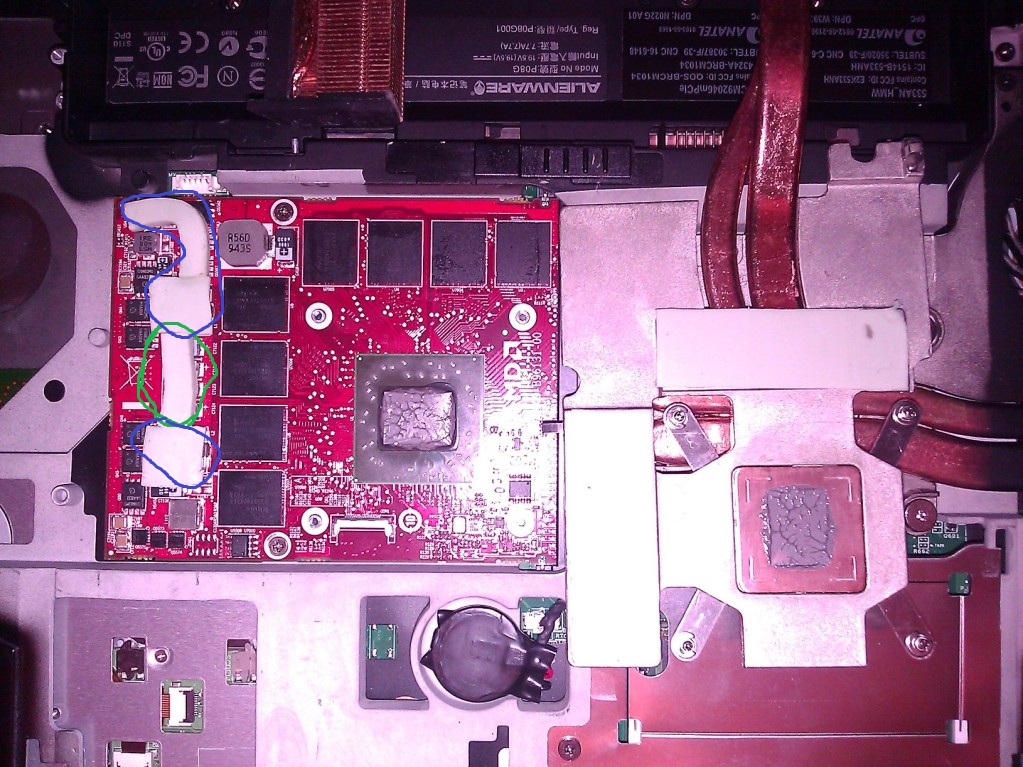
Here is the pic of the GPU and the heat sink.
http://i1238.photobucket.com/albums/ff499/chinopr86/Photo_07705D28-F0B3-5463-C955-80CE162C7859.jpg -
Hmm, paste looks fine as far as I can tell this from the picture.
Make sure the pads on the left side of the pic aren't too high... you won't need the pads covering the capacitors (green), and check whether the others (blue) aren't too high...
But looking at the paste spread it seems to be ok... but it's hard to tell for sure.
Keep in mind, that a 1mm gap between die and heatsink is too much.
Edit: Forgot to upload the pic.Attached Files:
-
-
I stretched the pads a bit to make them thinner but now I have a new problem. The laptop display is not working and I checked both cards to be sure and I'm having the same issue. Fans run for a moment and then it goes silent with only the keyboard ilumination working. I dont remember doing anything besides removing the heatsink and changing the pads. Any idea what could be wrong?
-
Try reseating the card and see if that helps.
Does POST come up at all? -
No it does not. But it looks like the laptop is running in the background just no display. Going to try and reseat the card again and see if that helps
-
Do you have a BIOS password set up?
If so, push Fn + F4 and see if the screen comes up then.
GPU upgrade - NVIDIA 460m vs AMD 5850
Discussion in 'Alienware M15x' started by Chinopr, May 12, 2011.