Problems? See this thread at archive.org.
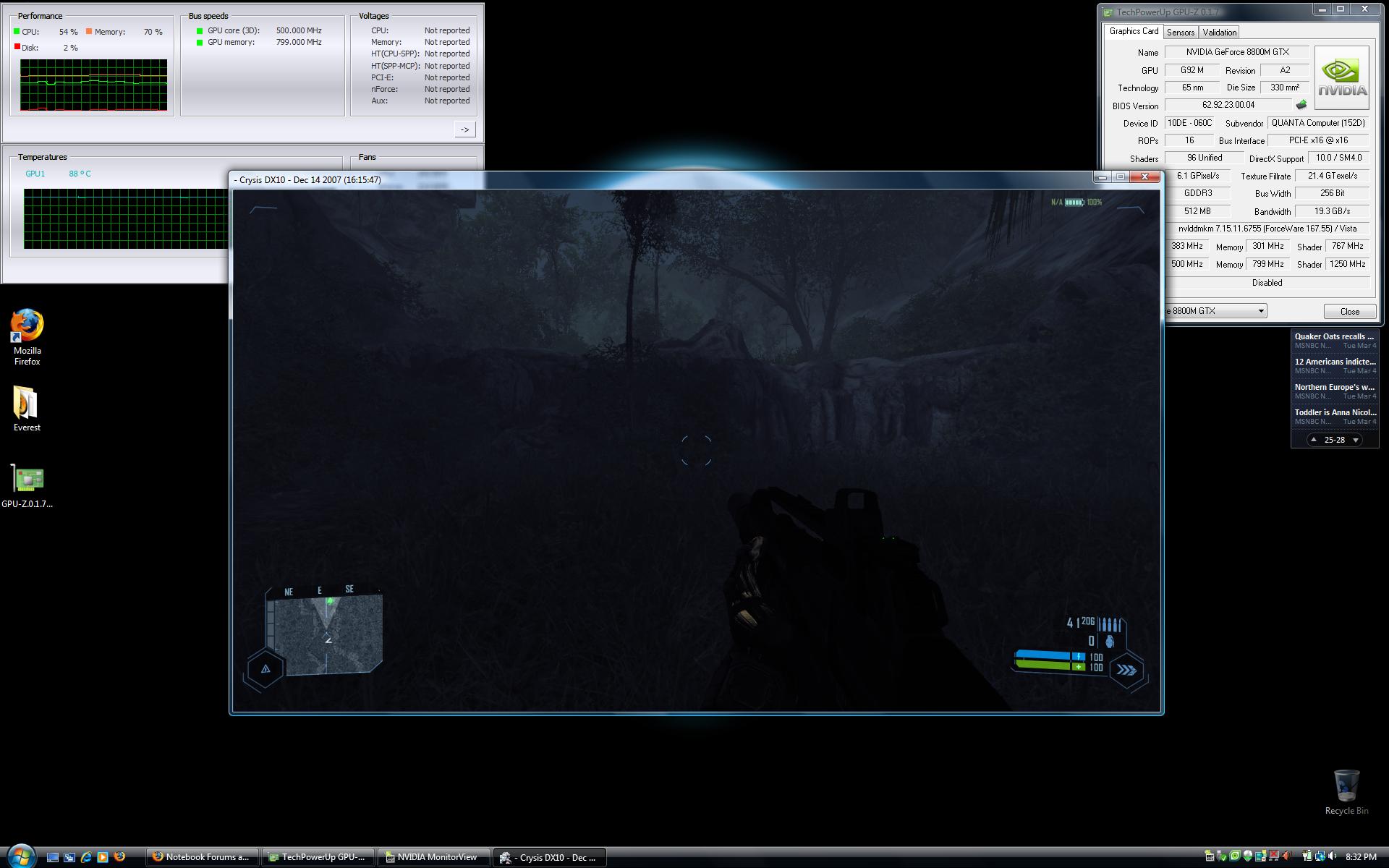
Alright, I just played through most of the first level of Crysis in windowed mode. The temperatures went up to 88*C but that was the absolute max. They usually dropped down to 87*C shortly after hitting 88*C. See attached screenshot. I did not see any reduction in framerate, and the clocks did not halve.
Sounds like you guys are having a problem with your units.Unless I'm missing something.
-
Attached Files:
-
-
The m15x's keyboard is not flex-free but it is not visible unless you physically put a lot of pressure on one key for most of the keyboard. The left side of the keyboard has basically no flex even if you push down hard, but the very right side toward the arrow keys is rather noticeable if a lot of pressure is used. Again, only if you use a lot of pressure. I could not guess this keyboard had any flex by typing on it normally. All of the letter keys have no flex, really. It's only the right shift/ctrl/arrow keys, which will flex somewhat if normal pressure is used.
I like this keyboard a bit better than the one on the M9750. It has a nicer feel to it and the keys are more durable - they won't get shiny (a non-issue in my opinion but worth mentioning anyway). It is a bit more 'bouncy' which makes it more enjoyable. Most importantly this keyboard has dedicated home/end/pgup/pgdn keys while the M9750 does not. I could use either the M9750 or m15x keyboard and be a happy camper. -
How's the touchpad Chaz?
-
The touchpad I have not played around with much yet. It works like a normal touchpad. The buttons are one piece so that takes a bit of getting used to - it looks very clean though. I like how the touchpad is flush with the rest of the palmrest area.
This touchpad is glossy and has the same finish of the rest of the notebook; it very much reminds me of the consumer HP touchpads (the ones you find at Best Buy). It will result in your fingers sticking/dragging if they are a bit moist. Go to Best Buy and use an HP Pavilion keyboard, and that's basically the m15x.
One thing I really like is how as soon as you plug in an external mouse, the touchpad is disabled.
All in all it's nothing special but works perfectly fine. No complaints. -
Thanks Chaz, very nice keyboard indeed!
-
For the record the m15x is sort of like the m5550 keyboard, I liked that one very much! Even a bit more than the m15x one, it was a bit lighter with its action and was just plain enjoyable. This one is too. Again, I could use either and be a very happy camper. I am very picky when it comes to keyboards. This is what I use:
http://forum.notebookreview.com/showthread.php?p=2965069#post2965069 -
chaz, how about the chasis flex compared to the m9750? how does the overal build quality feel?
-
I thought of two things. How were the framerates in Crysis? How is the screen wobble?
-
What CPU is in that review unit? x9000?
-
chaz, is there any chance you are doing review for popular games on 1920x1200? It doesn't have to be @ that reso for some super-demanding game like Crysis. But would like to see some benchies with it.
And one more thing, did you get the black skullcap review laptop by any chance
-
It's not quite as solid but still a very well built machine.
The framerates were more than playable at 1280x720 with high settings, I didn't do any formal testing though. It was a bit jittery but I think that was because I was running it in windowed mode. Like I said, it was not a real test . . . I was just looking for temperatures.
Yessir.
I'll be doing all of the game tests at 1920x1200 like I did in this review:
http://www.notebookreview.com/default.asp?newsID=4235
Nope, it's the silver flat one like everyone else has at this point. I really like it, the overall look of the laptop is very clean. -
Good to know, same machine im getting except the screen(getting the 1440x900) and minus the 4gb ram. Ill be installing that gskill cas 4 ram 2x4gb.
So far sounds good, was worried about the temps on the x9000. -
Thanks for the fast replies, Chaz! +rep
I'm really looking forward to the return of my m15x ... sent it in to alienware (along with Hemlok) to get the underclocking thing fixed ... it had other more severe problems as well (like losing my partition and not booting up anymore... as well as the screen failing to turn on with the rest of the system every once in a while...and unresponsive keys... and unresponsive quicktouch controls... and not returning from sleep mode, although i think that's just a vista problem from the sounds of things..)
it was a great laptop tho, when it was running crysis BEFORE it underclocked, i could really tell that it was holestering some great power and that i was really going to enjoy playing that game... after all, i had saved it for my laptops arrival. -
The touch sensitive controls aren't so great, I read about that though. I didn't expect them to be. The touch controls were less than satisfactory on the last machine I had with them, an HP business class unit. I think it is just the nature of touch controls at this time. They work on the m15x but are not that responsive.
-
Did u have a 2gb or 4gb?
-
4 gb. If you're thinking maybe i should have removed one of the memory sticks and tried... the tech support guy the same idea. Except the corruption was hd related (or so thought the tech support guy... im really not that great when it comes to hardware... )
-
true, but it was odd to me that the wifi, bluetooth, and stealth mode buttons/areas worked so well, but command center only worked once. The first time i booted it up.
Suffice to say, my m15x had issues
although chaz if you could try one more thing out for me, that'd be great...
the build quality seemed really bad. Im not even talking about thte screen wobble -- that to me was fine. I'm speaking more about the 'cementing' of the display case... look at the portion of the display's plastic border/casing between the webcam and the top left corner. Try giving that a light squeeze (or even a poke with one finger)... do you hear a large crack? Mine was terrible. The techie on the other side of the phone could hear it without me even putting the phone close to my fingers. There was visibly more space between the casing and the screen over there too. Slightly, but still visible.. and i thought it had something to do with the cracking sound. The same spot on the other side of the webcam was fine however. -
You're stealth mode touch button works??!! Mine is unresponsive. I use "FN"+F7 to switch mine, and I have to reboot everytime for it to change over. I called AW and they told me the touch button for it is actually a light which is dim when using the 8800m GTX and lit up when using the integrated.

-
I am aware of that too. Mine has a cracking sound too whenever I open and close the lid. I am afraid it will crack anytime
I think the failure to return from hibernation is due mainly to the 4gb. Its not the fault of the ram, its the system+ OS cant support well. There is are still not hot fixed for this yet but MS say they will patch up in SP1.
I have try 4 gb and has the same problem. Blue screen of death, follow by by some unstable issue. Once I put back 2gb everything works fine again. -
Yeah but mine cant even dim at all. Its only after a fresh reboot that it works. All touch control fail after sleep mode. Have to restart.
-
Ooh... i think you have it confused with binaryGFX. Stealthmode simply clocks back both your cpu and your gpu speeds (regardless if you're using integrated or the 8800 gtx)... it does not require you to reboot for it take effect. BinaryGFX (FN+F7) is what switches between your integrated graphics and dedicated 8800 GTX.. it requires a reboot for it to take effect.
My binary gfx worked just fine on reboot, as did stealth mode ... regardless of having returned from hibernation or not (not sleep mode.. i could return from hibernation, i couldnt get back from sleep mode however) i could always hold the stealth mode button for a bit and see it go dimmer/brighter.
Rexibaby, is your cracking coming fromthe same spot? Between the top left corner and the webcam? Because the tech support guy on the phone went ahead and tried a light squeeze on a system he had nearby and said there was no cracking in that spot. Btw, do you have the 1920x1200 screen also? Im wondering if there is any relation..
and about sleepmode/hibernation... you've got it backwards with me, i was able to go into and return from hibernation fine, it was sleep mode that was the problem. Never was able to return from sleep mode once. You do bring up a good point, i wonder if it was related to the 4gb ram...is there anyone with 4 gb of ram that doesn't experiance this problem? (ie, can go in and out of sleep mode without problems?) But i do recall that my crazy instability happened AFTER returning from hibernation once... but not immediately, it was a few minutes afterwards ... i had gone into alienfx actually. How long did it take for you to BSOD.. and was it after hibernation or sleep mode?
also, upon returning from sleep mode my three good quicktouch buttons (sleep mode, wifi, bluetooth) always worked. -
Yeah its coming from the left side of webcam. Infact the right side too have cracking sound but not as bad. i have problems after resuming from sleep (not hibernation) typo error. All touch control fail cept power button.
I am using 1400 x 900 screen.
As for using 4gb, Email cant open PST files, I have to repair the PST files b4 it work again. Firefox fail, When I try to reboot I got BSOD. It say something abt page file error on BSOD. cant recall well. All this happpen within half and hour. Restart all afternoon and still the same result. Change back to 2gb - Bing - Everything works fine again.
I am gonna call AW tommorrow and return the 4gb ram. -
I gave both sides of the display around the webcam a pretty hard squeeze and didn't get any cracking at all . . . it is well put-together. I think you definitely had a lemon.
No cracking when I open up the display either.
For the record, this is what I got - 15.4" WUXGA, X9000, 8800M-GTX, 4GB, 200GB 7200RPM, Blu-ray burner, Vista Home Premium, 320GB smartbay -
all this talk of the x9000 makes me want to call and upgrade. think it's worth it?
-
mmmmmmmm....... many people in the other threads say No it's not worth it. BUT it's the only proc that "could" be OC'd. However it's not officially possible with the m15x atm
-
that would be the only reason to justify the cost imo. I mean that's why it's extreme right? ... to OC from 2.8 to about 3.2 or even 3.4. That stinks that you can't right now. Does anyone know when they'll put out a bios update or something? <-- sorry if this has been answered before.
Maybe i'll save the money for now. -
it's been asked A LOT now.. and no one really knows..
-
Save the money, it's not worth it to upgrade. Where are you looking for a performance increase, in games? You won't get any . . . I have proof of that:
http://www.notebookreview.com/default.asp?newsID=4248
I did an overclocking review of the X9000 - there was absolutely no performance increase in games going from the 2.8GHz stock clock to 3.2GHz. I have a quad-core in my desktop and I can't tell the difference in games going from the stock 2.4GHz clock to the 3.6GHz I have it overclocked to.
Also more proof - here's a review of the Dell XPS M1730 I did with the X7900, which I overclocked to 3.4GHz from the stock 2.8GHz. No performance increase in games:
http://www.notebookreview.com/default.asp?newsID=4086
The GPU is most important in games, and if you already have the 8800M-GTX then that's as good as it gets. For an overall system performance boost, a fast hard drive helps most since the hard drive is 1000x slower than the next-slowest component, which is memory. Therefore any increase in HDD speed will be noticeable. The 200GB 7200RPM Hitachi drive is the fastest on the market at the moment. -
I would think lower cas ram would help some too... though not all that much. Chaz is it posible to overclock the ram on this system?
-
Carnyl, I solved the cracking sound of the cover. I remove all the screw including the LCD and put it back again. This time tightening all screw.
Result: The cracking Sound decided to go home.
-
Nope, unless you use something like Clockgen to bring up the FSB speed, which will in turn bring up the memory speed. I don't recommend that; software CPU/memory overclocking is asking for problems. The Core 2 processor in general is not sensitive to changes in memory speed . . . don't even bother. You won't see the difference because there won't be any. See here:
http://www.madshrimps.be/?action=getarticle&number=1&artpage=1962&articID=472 -
I'm not quite sure what that guy in the review is trying to say. It sounded like pc5300 sucks period.. and lower Cas in this case is actually worse in performance. Now my techy side says that does not make sense.. From reading around this does not sound true at all either. What do you think Chaz? the Gskill http://www.newegg.com/Product/Product.aspx?Item=N82E16820231154 worth it? same price as corsair cas 5.
I'm sure at some point AW will unlock the bios OC. Am I counting on them doing that? no, but still, the possibility is there. -
Thanks for the info + links! I think i will save my money having read all of that. I actually don't game much at all. In fact, i only game from 11pm - 3am on Friday nights because that's the only time i can. As for the system i'm getting, it'll already be way more than i need as i would probably work more than game on it.
On a different note:
I emailed AW yesterday to ask about the delays I've been reading relating to the screens being on backorder. In case anyone is wondering about that... they said to go by the estimated ship date that they gave you when you ordered because their inventory was already taken into consideration and reserved when you place the order. i don't know if this is 100% dependable but they reassured me that the original est ship date is good and not to go by the phases... March13th for me! -
The point of the article is that memory latency/speed makes little difference with a Core 2. Did you read the conclusion:
Go for Corsair RAM, it is more relaible than G.SKILL. I have had very bad experiences with G.SKILL reliability.
http://www.newegg.com/Product/Product.aspx?Item=N82E16820145193&Tpk=corsair+4gb+200+pin -
Oh i forgot to mention that comparing the wait to others... i ordered a Lenovo T61p recently and it took them a little over 4 weeks to get it to me.
-
Chaz, did you get the turbo memory in yours?
-
Thanks for asking - I just found out that I do have the Turbo Memory module installed. 1GB worth.
-
On a totally unrelated note, I wonder if we'll be able to install 2GB+ Turbo Memory modules when they become available (around Montevina time?), and if they'll work with the Santa Rosa mobo....
-
About the 4gb problem -
Its been confirm by Aw that window OS 32 bit have problem supporting the 4gb. they further add that the 4 gb will not be refundable as this support has nothing to do with AW. I told them that they need to tell CS this problem b4 they sell to m15x owner. They say they will take note of that.
By the way do anyone here have a m15x with 4gb and working fine? -
would this be fixed in sp1? Chaz, any idea?
Also Chaz i wanted to ask you one more thing, can you try going in and out of sleep mode with your m15x for us?
P.s., brilliant work rexibaby... i was actually thinking about doing the same thing but never got around to it and totally forgot when my hard drive started failing! at least i know so when i get it back i can fix it if that's still happening. Thanks! +rep -
U are welcome my friend and thanks for the rep (I have return 1 +rep in kind). Right now I am using 2gb with no problem coming back from sleep.
-
What should I look for when I go in/out of sleep mode?
I have 4GB of RAM in my m15x, no issues thus far. Only sees 3070MB though since it's a 32-bit OS. -
Do you notice any slowdown at all with the 1GB Turbo? I guess it's hard to tell without turning it off and comparing but did you think that it was a little slow to start up or hibernate?
-
haha... my friend, the fact that you can go in and out of sleep mode speaks for itself. My problem was that i could go in fine, but coming out was the problem. I'd touch the power button (if i never closed the lid) and all the lights would come on, along with reading sounds, but nothing on screen. Screen would still be black (and not a powered black, i mean no power at all to the pixels). Funny enough, if i pressed stealth mode, wifi, or bluetooth, those buttons would still dim and glow as if i were switching them normally. I left it be for 5 minutes once when attempting to come out of sleep mode and there was still no screen.
Anyways like you said, mine was definitely a lemon all-around .... perhaps a test to see how many problems they could pack into a single system? I'm not even angry (well i was a little bit when my smart bay battery arrived today ... 2 days after i ordered it! woot woot! lol), in fact i think because i've gone through so much that i'll probably love the system even more when everything is actually acting how it should (and does for you). -
Did u order it with 4gb or do u buy from outside. ?
-
This system seems pretty responsive to me, no less than any other Vista systems I tested recently. I used this Vista tune-up guide:
http://forum.notebookreview.com/showthread.php?t=166532
Really helped make the system responsive. It boots up and shuts down very fast, almost as fast as my XP desktop. Shutdown is around 20 secs, haven't timed the startup though. Probably around 30 - 40 seconds at most.
I went into standby earlier and came out of it fine, and was back to surfing the Internet in no time. Your m15x must have been seriously messed up, no offense!
It came with 4GB preinstalled. This is a review unit, I didn't buy/configure it.
-
Maybe they payed more attention building your unit chaz since is a review unit. Can you check the thermal paste on your processors and stuff. Just out of curiosity, not sure if you can open up a review unit
.
-
I don't want to mess this up or nothin', I'm not going to open it up.
-
a review without screwdrivers?
just kidding.
-
Chaz
I bet yours is a perfect set with 10 of the best AW agent engineer working on it. By the way I like your job man.
The Official m15x Owners Lounge
Discussion in 'Alienware' started by mrwater, Jan 23, 2008.