Problems? See this thread at archive.org.
Is there a way to get Windows 7 (64bit) to work with Bootcamp on my Macbook (nonpro)?
-
I have a friend running Vista x64 under Bootcamp but he had to do some hacking to get it to work. Apple will someday support it or Windows 7 x64.
-
Has anyone had any luck running OSX with vista x64 / Windows 7 x64? Also can vista loader be used in this boot camp setup?
-
Quick question: If I want to dual boot with Ubuntu, do I need Bootcamp? Let me know. Thanks.
-
I run Vista Ultimate x64 in BC & VMWare and have had no issues. When I fristed installed Vista it was the default Boot OS and had to change it back to OSX via System Preference.
The Leopard DVD has all the necessary x64 drivers on it. I just ran the bootcamp app within Vista after the installation was done & 1st reboot/login. No hacking required. -
Yes, you could use the live-CD, or you could use the program "yaboot." It will let you set your default startup OS, and you can pick which OS you want to boot from.
-
So I will have to installed Unbuntu and then OS X and then yaboot in Ubuntu right?
BTW, one more question. How can I partition the drive in when installing OSX . I cant do it in disk utlity. OS X auto set my whole disk at one partition
-
I'd just like to note, I gave VMWare Fusion a try, downloaded the latest trial version from their site. I have the macbook late 2008 model (intel x3100), and vmware warns me that 3d acceleration may not function. I tried 2 games, and both could not detect any 3d accelerator card. Upon researching it I found that vmware claims that the intel IGP doesn't support some 3d functions, therefore vmware doesn't support it.
Supposedly Parallels doesn't have this issue, but I haven't had a chance to try it yet.
-
Well since it's an Intel IGP, I wouldn't think that either VM or Parallels would support 3D functions at all. I don't think Parallels supports it either, but it's worth a try.
-
Supposedly parallels doesn't have any problem with it, but I didn't get a chance to try. I have tried vmware and parallels on my new macbook though, with interesting results.
2 out of 3 games I tested would not run at all under vmware. One of those did run under parallels, but extremely slow (old game circa 2000). I noticed HDD performance is pretty bad under vmware, but quick under parallels, however BF1942 ran faster under vmware. Those same 2 games wouldn't run properly or at all under a bootcamped XP. It kind of looks like to me, if it's not compatible in native mode, then it's not compatibe under either VM.
The games I tested were, Jedi Knight: Dark Forces II, Battlefield 1942 (the only one that ran correctly), and Klingon Academy. It was an interesting experiment to say the least.
-
I recently deleted my partition of vista but now I can't repartition it for xp for some reason.. I tried repair disk permissions but didn't help
-
your friend's "hacking" may be just to make him/herself look cool to you... cuz all the hacking it takes to run Vista 64 is installing it and the drivers like normal... Apple supports and makes drivers for Vista 64 to use with Bootcamp... though on some older models they don't officially support doing it.
I have Vista 64 installed, was super easy, no hacking required... and VMware runs my bootcamp install Vista 64 too -
I don't know if it has been mentioned before. I will share my experience with you all. I installed parallels on my mac and booted windows from my bootcamp partition. I have a better battery life than booting windows natively. I got 3 hours and something and perhaps more. The performance was nearly the same as when using windows natively (I was not doing any graphics intensive work). I was just using visual studio.net.i use bootcamp only while gaming. I heard vmware is good. I tried it but it could boot from my bootcamp (It said hard disk not found). When booting my windows nnatively, i can work 1.45 - 2hours max before it goes into hibernation. Virtual machines are exceptionally awesome!!!!! I recommend it to all of you who are road warriors and need windows for development and mac os x for your main os!!!! But i would advise you to upgrade to 4gb ram to be able to run windows and mac fluidly.
-
I couldn't agree more. I'm using vmware to run XP (visual studio 2008) on my macbook and it runs okay, but kinda slow while compiling in VS 2008.
I currently have 2 Gb of memory, I'm thinking about getting 2 sticks of 2 Gb. I hope it will improve the performance. It never hurts to add more memory, right? (other than my wallet)
Btw, I installed Win 7 in Boot Camp and it runs really well. However, I can't seem to run it in VMWare. Is it even possible to run it in VMWare?
I'm using VMWare 2.0 -
try updating to the latest version. I was able to get W7 to work when I was testing it out.
-
bump your ram to 4gb and you will feel as if you are running xp natively.
-
I'm trying to play Braid on a virtual Vista machine using VMware on my MBP. I'm getting single digit fps. Is this normal?
-
the problem with running windows on mac with boot camp is your screwed with windows 7
-
Could you give some insight on your opinion?
-
I totally disagree. windows 7 was a breeze as compared to windows vista. Much more snappier.
-
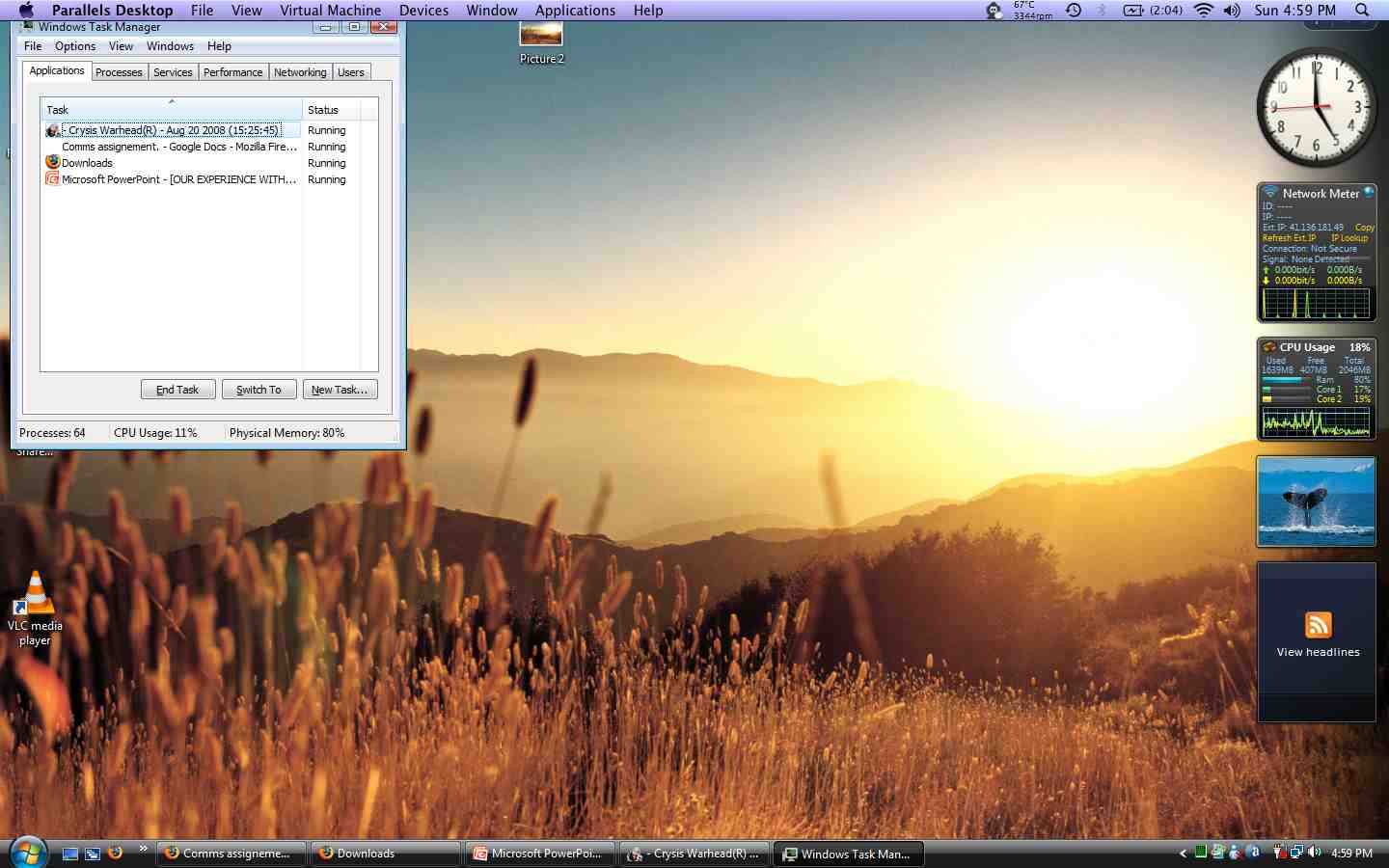
Crysis warhead runs on parallels 4 but the gaming experience is awful. Ok, i didnt try it on all settings to low, but it was lagging like 7-8 fps on medium.Attached Files:
-
-
Were you playing before you took this screenshot? It looks a bit warm over there!
-
Crysis WAS running at the time i took my screen shot. I was also viewing lots of you tube videos on Firefox for mac and there were lots of other tabs open and also lots of programs on my os x side. Running a virtual machine also typically rises the temps due to increase in cpu load. I would say that it's perfectly normal.
-
Lol yeah 67 is not anything to be worried about if ur running VM and games like crysis ;x
-
Yes, but i've never gone past 70's, which is pretty nice. It would be cool if vm's did not use such a high cpu load.
-
Ah, I see. The VM and Crysis explains everything.
-
Yup!! correct!!
-
Attached Files:
-
-
So I've been browsing through this forum, and cant get seem to find matching answers for this.
With the new MBPs, is XP & Vista 64 suppored, i.e all the drivers are provided by apple? -
That is correct! Everything is provided to run Vista x64 via Boot Camp. But there are many known problems/minor annoyances associated with it. Some people have audio crackling, and other small things. Just a heads up.
-
Im getting constant freezing issues in Firefox (actually in any web browser) in Windows 7 x64 Bootcamp.
Is anyone else having the same issues?
Hmmm there are quite a few google hits for this problem... -
Try to use IE 8.0. The freezing will stop.
-
Does any of you know why vista runs slower on a virtual machine? The machine seems to be lagging when I boot on my virtual machines. Visual studio takes a long time to load. Everything is so sluggish. Do you think it may be because of the 5400rpm hard drive?
-
You're probably not allocating enough RAM to the VM, and as a result it's having to constantly page memory onto the HD which slows things down a lot. Either that, or you are running something in OS X that is using up your other resources.
-
Anyone know of the top of their heads some of the current issues with XP 64 via bootcamp?
-
Hey Budding, i wanted to try vmware fusion but when i booted from the bootcamp in vmware, i got the following message. What should i do?
Attached Files:
-
-
Got the solution:
http://communities.vmware.com/thread/200064
vmware is loads better than parallels..snappier!! -
is there a general agreement as to which virtualization software is the best?
i've heard people expouse the merits of vmware fusion and parallels...so which actually works the best?
ill be using windows 7 as the other os -
Both worked fine for me. I love parallels because of the 3d effects while switching to full screen and to minimised screen.
-
I have boot camp with W7 X64 inside. I'd like to try a virtual machine, are VMware or parallels capable to boot my boot camp partition without any modification to it so I can still use the double boot on the mac ?
thanks! -
^^ Yes
10 chars -
Thanks!
I just tried VMware and it works, but it is very slow,(I assigned as I saw 2Gb memory and the 2 processors). However it asks me to install VMware tools. Looks like it would improve the performances.
But what is the impact of those "drivers" if I want to boot from boot camp without virtual machine ? Will it disturb the boot camp drivers? -
Nope, it just affects you Virtual Machine, and nothing with your Boot Camp.
-
So it makes a copy of my boot camp partition ? that means if I save files while using VMware I will not have them if I boot from boot camp ?
How does it work exactly? hmmm -
It is just making your Boot Camp partition just like any other VM that you would create through the VM. Say if you made a VM through VMWare, it would be the same as using your Boot Camp through VMWare. You can access all of your files that you would access booting into your partition.
-
OKKKK
Then I can work on office with VMware and when I'll boot with boot camp next time I'll have all the files I saved in VMware? -
Yeah.
10char -
You can also use programs in windows to open programs in OS X through vmware.
-
it will be just like your bootcamping
-
Does anyone get block text when launching bf1942 using Parallels? Can't seem to get around the text issue.
Running Windows on a Mac: Boot Camp, Parallels Desktop & VMware Fusion
Discussion in 'Apple and Mac OS X' started by Sam, Jul 24, 2007.