 Problems? See this thread at archive.org.
Strange part is that software can read the values from the card. Starting to think it might be something else (Card might have values to monitor temp and some other values like the sum of all temps or something like that). Tested my notebook outside at -16c. Got the notebooks temps down to 20 but still the fan stays at constant speed. To me it seems that it is not correcting the fan speed as it should.
Ubuntu has no effect on the fan speed to. Its like the EC is telling the fan to run at the speed no matter what.
Might go back to 5870m for a while to get some data from the EC. It might help to understand how the fan speed is effected.
If i keep taking my notebook apart ill soon be able to put it back together blindfolded
-
Just googled a comparison between 720QM and 920XM. At stock, 920XM only draws 10watts more that 720QM, so I suppose I can run it non-overclocked after card swap to see how things work and then, if everything's fine, worry aboout OC'ing my powerhungry beast of a CPU ;p
-
if you have a i7 920xm and 6990m you should have a 180W power brick otherwise when you try to play a game your system auto shutdowns.
to be in safe side buy a 180W targus power pack. if you want to run cpu + gpu overclocked you should buy a alienware 240W power brick. -
Personally I'd rather go with the 180w one, because the Alienware you have to mod to get it fit G73. Also, considering the size of my 150w brick, I can't even imagine how huge the 240w one is ;p
-
240W is not huge , its slimmer than g73 psu. if you want to run overclocked both cpu + gpu psu can cause shutdowns during gaming , if you have a normal i7 then 180W will be a nice one but you have the xm ,but with 180W psu in stock settings you wont have a prob at all.
-
Have you already done this, or you was just guessing this would work ?
Because I did try to mod Turbo by edit value of Token 0x0641 today, and something seem wrong. Here is how I did it:
1.rename "G73JhAS.213" to "G73JhAS.rom"
2.run AMIBCP_4.50.exe, open "G73JhAS.rom"
3.change the string "Turbo :140MHz" to "Turbo :160MHz" at 0x0641 in "BIOS string" tab
4.save
Then I use a software compare "G73JhAS.rom" file with the original file "G73JhAS.213" , there was too much difference.
Here is the screenshot.
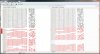
I don't think a small value change can cause this , so I didn't flash this mod Bios to avoid killing My NB.
Your reply about this would be appreciated. Thanks.
ps:I'm not so good in English ,so excuse me for wrong grammar. -
hey , I did a mod to see if I can enable sound at start up and I set both , defaults and original to enable sound at start up , As I did and I flashed the bios but I dont hear any sound still but laptop working as normal.
if you dont have an bios programmer please dont try edited bios because you can kill your laptop because I flashed the bios with fear/ -
What did u use to mod bios?AMIBCP 4.50?
If so , at least I can know AMIBCP won't kill my notebook. That is something. -
AMIBCP 4.53 , and I didnt rename the bios file,
-
First use some software like Aida or other to find out what the MOBO supports and what not. You can change things with AMIBCP 4.53 but if the mobo does not support the change and you did no change the failsafe it will use the failsafe.....but if you did change the failsafe then you might brick the system if it is not supported.
It might be listed in the Bios but not all things are supported -
Yes your correct, I even saw 1866 memory profile with my bios ,lol
and CPU QPI as 6.4
DH48 , Im also buyin an Alienware M17x R3 , lets do some moddings later on after I get it. -
Some news. Asus service is asking 285euro for a new 5870m. I think ill go with ebay lol
. Good news from Dell. They took the GPU in and called me today and said the replacement will arrive in a few weeks
Bad part is that they will not change it for the 6990m.....but still ill get a working GPU that will go in the R3 and then i can swap the 6870 to the G73 for more testing
Will not give up on the fan speed until i am 100% surten there is no bios way to make it work. -
Well, I just want to change the BIOS String "Turbo :140MHz" to "Turbo :160MHz", so I don't have to use Setfsb.
Do you think it can be done?
Thanks, appreciated. -
I asked about this once, nobody seemed to think it was a good idea. But I would still like to see it happen, so if you find anything out that it can be done send me a pm and I'll try it.
-
any documentation on the alienware power brick modification/upgrade?
-
I posted a guide on psu brick cable replacement.
cdoublejj likes this.
Upgrade a G73-jh to 6970?
Discussion in 'ASUS Gaming Notebook Forum' started by tudordewolf, Jun 7, 2011.


