 Problems? See this thread at archive.org.
Good!
So the battery is in the front of the laptop... well done Asus! :thumbsup:
Wich issue? The fans don't work properly in this laptop or what?
-
No, it seems to be isolated to my particular unit. My fans seem to have trouble running at their lowest setting, so they will click faster and slower while the system is idling.
-
Hey Stella,
I was planning on buying an ASUS N550JK-DS71T soon, along with a SSD, Torx T5 screwdriver, and HDD Caddy, which I would install in place of the optical drive. I don't know too much about the software part of the installation, however, such as managing the bootup and OS for the SSD. I was wondering if you could help guide me through the process.
Let me know, thanks -
Where did you get that info from? Can anyone confirm this? I just want to make sure, because it was reported as SATA 2 somewhere once I remember on the JV or JK one.
-
Hi guys! if you´re into the G550jk, here´s a link with some internal pics:
Asus G550JK Disassembly | MyFixGuide.com -
It just makes common sense. The HM86 Chipset supports up to 4 SATA 6.0 Gb/s ports natively. Why would they slow one of them down intentionally? Seems counter-productive and would cost more to build the board that way. When I get off work this afternoon I'll swap my boot drive over to the ODD bay and verify just to be sure. My guess is most people are putting old spinning rust drives in there that just don't support the speed.
-
Looks identical to the N550J...am I missing something?
-
Good morning everyone,
I just receieved my new N550JK yesterday. Am very happy and the laptop is a big improvement over the Dell Inspiron 15R SE that I previously owned. Everything seems to be well-built, and it's surprisingly light and thin. Touchpad isn't the greatest thing on planet but it works well thanks to Multitouch.
I have a small issue though. The backlight keyboard is definitely working because you can see it turned on when the laptop boots. However, FN + F3/F4 won't work. I also tried updating the ATK driver but it won't help. Anyone got an idea why this is not working?
Also, compared to Dell, there seems to be no way of checking if your drivers are up-to-date on the Asus website, right? ( Notebooks & Ultrabooks - N550JK - ASUS) Can anyone recommand a good free driver manager?
Thanks for helping me out.
-
You might try uninstalling and re-installing the ATK-ACPI driver and the Keyboard Device Filter Utility from their website. As far as driver updates goes, the Asus Live Update Utility should automatically check for driver and BIOS updates. -
Can't access website.. Hmmmm
I think most of us believes this but it's still best to provide proof so people won't consider your statement as a simple opinion - some software benchmarks or something i guess
I did upload an HWiNFO but I'm not sure if i understood it properly. From what i saw, it seems that the HDD (SATA3) + ODD (SATA1) are connected to both SATA3 (since there are 2 SATA3 ports indicated). Again, i might be wrong. If you can provide other tests or something that would be great :thumbsup:
Why did i raise the topic in the first place? To see if transferring the original HDD to the ODD via caddy will diminish it's performance or not
-
Seems to load fine for me...
I understand your point. I'll swap my SSD this afternoon and get some screenshots for you. -
Is it recommended to use a screen protector with this?
or is it not necessary? -
On a laptop? If you want to protect the screen, wouldn't you just close the laptop? I guess if you expect to have flying debris around while you're using it you might go through the trouble.
-
no I mean to protect it from scratches?
I haven't used a Laptop with Touch screen before so I really don't know..
But I have a Tempered glass film on my Galaxy S4.. -
I guess that's my point. You can't scratch the screen when it's closed. So what could you possibly do to scratch it while you're using it?
-
Maybe the website restricted in my area. It always redirects to an error "page not found" whether i access it in any device and any browser. doesn't matter anyway
Thanks! I'm looking forward to it. Btw, I used another hardware info software called Belarc Analysis but I didn't see anything about motherboard's SATA ports
If i have your unit, I would apply one) a clear one. I have a matte non-touch screen and i wanna put a protector on it
-
I've been using laptops for over fifteen years now and I've never scratched the screen. Granted this is my first touchscreen, but I can't see how that will change anything. Aside from adding smudges.
Sent from my SPH-L710 using Tapatalk -
Okay, ran HWinfo before I touched my laptop. I got this..
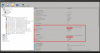
As you can see it supports 4 SATA devices @ 6.0 Gb/s and only port 2,4 are implemented. Port 2 is my ODD running at 1.5 Gb/s. Port 4 is my SSD running at 6.0 Gb/s.
After the swap...
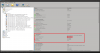
SATA on port 2 is running at 3.0 Gb/s...So I was wrong??
I did some further reading and I've found that many of the Optical bay adapters do not support SATA III. Whether or not that's the case here I have no idea. If I find a cheap adapter that specifically states it supports SATA III I may get it just to test this again. Frustrating... -
I've just put in an pre-order for the N550jk at B&H, so I can now begin looking for an SSD and hdd caddy to install two hard drives in the machine. I noticed that the 1TB HDD which comes with that model is dead slow at 5400RPM.
I was wondering if I should keep that one as a secondary drive, or just get a new 1-2TB 7200rpm drive to replace it as well (and maybe use that slow 5400rpm in an external casing or something).
Those who are using it as a second hard drive in the optical bay, how do you find it? I imagine speed won't matter too much I only use it to stock large files which I only access from time to time? -
If it were me I'd just keep the 5400 rpm drive for storage unless you're upgrading for additional space. I doubt you'll notice much difference speed wise, especially since you're planning on using an ssd for a primary. That and the 5400 rpm drive will use considerably less power.
Sent from my SPH-L710 using Tapatalk -
Good point. Plus if I find it too slow its an easy upgrade later on anyway.
-
Anyone know if the keyboard will work in the N550JK? I want to swap it out if the plugs etc all work so I have black keys with red back-light rather than the silver/white. Wouldn't mind using the top cover if it fits as well.
Interesting though to see that the G550JK (at least the version they have) has 2x 4GB RAM sticks like the N550JV rather than a single 8GB stick with an open slot like the N550JK. Nice complete tear-down though! Wow!
I would think so, but I remember a poster (think may have been the N550JV topic) said that the port for the ODD was SATA II. I just wanted to make sure cause this has came up before and I have told people wrong info maybe.
Hmm. I really want to know now. Well we know it is at least SATA II, NOT SATA I at least. But is there a way to know if the caddy you have does not support SATA III? -
I too remember someone posting about the ODD Bay being SATA2 but I think it was the assumption that that was the minimum. It's possible that the caddy interface is the deciding factor, so a SATA3 caddy might do it.
This is supposed to be the best option :
Asus N550JK HDD Caddy - add an extra HDD or SSD into your laptop! -
That definitely looks like it would work. $40 plus international fees seems a bit steep though. Anyone know of an option shipping from CONUS?
-
I really don't feel like dropping that kind of cash for a shot in the dark...
You're right, there has to be a way to know if the caddy I have supports SATA III...
In fact, my desktop is a small form factor build using the ASUS Maximus VI Impact. I think we can rest assured that all of the SATA ports on this motherboard support 6Gb/s. Also, because of my limited space I used a slim Blu-ray burner in the build which means it's connected via slimline SATA. So I should be able to connect my SSD in the bay adapter directly to my desktop!! First, my current configuration. I have two SSD's and one old 1 Tb drive connected to the first three ports. The slim Blu-ray burner is on the fourth port. Speeds are shown in the screenshot below.
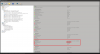
As you can see, the optical drive is connected at SATA I or 1.5Gb/s.
Now, I've taken the SSD out of my laptop, as it's the only other drive I have that I KNOW is SATA III, and put it in the bay adapter. A quick shutdown and swap with my optical drive and...
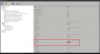
It fires up connected at SATA III with 6Gb/s transfer speeds in the $8 bay adapter. So I was wrong. The bay adapter supports the speeds just fine so the failing is in the laptop itself. We can put this one to bed now. It only supports SATA II on the optical drive connector. Of course if you plan on using a standard HDD in this bay then you can sleep happy knowing that it will never saturate the bandwidth of a SATA II connection. If you were wanting to use an SSD in this port well then read the following article before you make your decision.
Tom's Hardware Article on SSD's on SATA II -
Does anyone know how good the battery life of the N550JK is compared to the Lenovo Y50?
-
Lenovo claims up to 4 hours, Asus claims up to 5. Although I'm sure it'll be nearly impossible to get those run times in any real world scenario. I've run four hours on the Asus just surfing the web with the backlight at 75%. YMMV
-
@rebelhell -- thank you for doing the test
- so at first you put the SDD on the ODD caddy in your laptop and got a SATA2 reading
- then you put the same SDD on the bay adpater of your PC and got a SATA3 reading
doesn't this only prove that the SDD supports SATA3
I mean you didn't use the ODD caddy in your laptop in your 2nd test?
sorry if I'm not saying things correctly. I kinda got lost in you last comment about your test set-up
(I wish i could help but I don't have anything to test with haha..i only have this laptop) -
I'll try to explain it a little better...
- First, I put my SSD in the ODD caddy in the laptop. I got a SATA2 connection speed.
- Then I put the SSD in the same ODD caddy into my desktop and got a SATA3 connection speed.
My desktop is setup as follows...
SATA port - SATA to Slim Line SATA adapter - Slim Blu-ray Burner
For the test it was...
SATA port - SATA to Slim Line SATA adapter - ODD caddy - SSD
So in order for me to get SATA3 with that setup, the ODD caddy must support it. And since we know now that it does, and we know the SSD supports SATA3 as well, then the laptop port is the only thing that doesn't.
Did that help?
Sent from my SPH-L710 using Tapatalk -
Thanks a lot for doing these tests. I was also wondering which source would be the best for the hdd caddy. If they're all the same I'll just get the cheap ones from ebay. How is the fit? Can you put back the standard cover on it (the cover of the optical drive so that its seamless with the rest of the laptop casing)?
-
Another user or two in this thread purchased this and recommended it. I think it was Mistermerrick. Plus, it sounds like it's one of the few that have a decent door panel that lies flush.
Thanks for putting all that effort into testing this. It's good to have confirmation either way. Since I'll only be swapping the optical with the included harddrive, it won't be an issue. Thanks! -
For those in the US, there's this option which might be cheaper with shipping for the caddy: 2nd HDD / SSD Caddy adapter for Asus N550 series [OBHD9-SATA-SATA-BU9] - $37.75 : NewmodeUS, Hard Drive Caddys for Notebooks
I ordered from them ~4 years ago for my current laptop and it worked perfectly fine. -
Is the N550JK portable enough for a college student?
-
@rebelhell -- thanks!
-
That would vary on what the person is willing to carry... But at 6lbs and about 1 inch thick, I'd say it shouldn't be a problem
-
How are temperatures and fan noise for this laptop versus the Y50 and the GS60 860m?
-
I just got back from staples here in canada to have a look ag laptops out of curiosity. I usually always have a look before buying online. I was a little disappointed with the looks of the n550. It simply didn't stand out compared to the other models. It was ordinary at best. I am not canceling my order but I'd suggest having look before ordering. One that stood out to me was the yoga from lenovo and ms surface. Its obviously not in the same category, but still, they really give a good feel.
-
EXACTLY my opinion!
Looks of N550 Is just ordinary at best. don't get me wrong, It doesn't do any justice with its looks keeping in mind its performance.
I was blown away by the appearance of Hp envy 15 2013 Model. But just a pity they discontinued those models specially with nvidia 750m just a week ago otherwise I would have gone towards envy 15.
Right now I just wish that it pleases me with its performance if not with appearance once it arrived. -
Yeah its too bad really... I would never buy a laptop based on looks only, but if I did, it wouldn't be this one
-
I'm actually rather taken with the looks of the N550. It has a simple, sleek, elegant design. I was actually looking at the Lenovo Y50, just couldn't get past the hideous red and black color scheme. Just a bit too over the top which I why I tend to stay away from "gaming" laptops. Brushed aluminum and a subtle white back light is much more appealing in my opinion.
-
Its all about tastes in the end. I was actually liking the looks as well before seeing live next to a bunch of other laptops. Its not ugly by any stretch, just very basic
hquser likes this. -
It is a little basic. And I almost walked out of Microcenter with an Asus Zenbook. If I could tolerate the lower end specs at a much higher price, that thing was downright sexy.
-
yeah, I hadn't even looked at new laptops in the last 3-4 years, and now I see all those really cool options! If one just wants portability and doesn't need something to handle more than the usual web-browsing and word editing, the options are just awesome!
-
There are good options for all needs now, the next gen GPUs should make it even better.
-
I must agree with you, It's only standing in the market only for its unique performance per price ratio.
The only thing which makes it ugly is having no contrast and texture and design between keyboard and palm rest area.
It's way too flat design and even worse is silver plastic keys.
I'm also afraid that holes around power and quick lunch button will be prone to dirt sticking inside them over time, which will also be difficult to clean. -
Compressed air will clean most laptop trouble areas
hquser likes this. -
How useful is it to put in a SSD? How much of a difference does it make?
-
It makes a HUGE difference in boot times and program load times. It can also increase the battery life of your laptop by using less power and give you a quieter laptop by eliminating a source of mechanical parts. Don't just take my word for it, here's a few articles that might help you out.
Solid State Drives (SSD) Upgrade – 5 Things You Should Know
Benchmarks don't lie: SSD upgrades deliver huge performance gains
Whoa. I should have upgraded to an SSD last year
The Complete Guide to Solid-State Drives -
So would you say that getting an SSD is worth it to an average user?
2014 Asus N550JK -DS71T quick mini review and opinion so far
Discussion in 'ASUS Reviews and Owners' Lounges' started by Benchmade 42, Apr 12, 2014.


