 Problems? See this thread at archive.org.
You are same with me. And yes it can run without battery, I'm using this method for two months, nothing bad happen so far.
-
-
My JV and now my JK both have an unknown device shown. Anyone else see this or know what it is? Only things plugged in are the sub and my mouse which it see the mouse.

-
If you right click and go to properties you can get the Device ID which will help in identifying it.
-
From what I can tell, the primary difference is that the G550 does not have the glossy touchscreen, which makes it more conducive to gamers.
-
The laptop should run fine without the battery installed. And it will save some charge cycles on the battery if you don't leave it plugged in and charging all the time. But if you take it out and set it aside, the battery will slowly discharge, and being discharged is even worse for batteries than being constantly charged. So unless you plan to stick it back in the laptop and charge it back up every few weeks, I would not recommend pulling it out and setting it aside.
-
Have you got the Intel Colaborative Processor Engine...xxx installed?
-
So I chatted with an Asus Rep and contacted them on Facebook about the details on the G550JK, this is what I got.

- GTX850m is DDR3
- Non touch FHD IPS Non-glare LCD Panel

- It's coming out late June to early July for the US and Canada
I might consider waiting for XoticPc to have the Lenovo Y50 or the N550JK because I wanted a touch screen and a DDR5 GTX850m, but that doesn't exist :/ It's a shame that its just a different build color (I love the build color btw, better than the Lenovo Y50) to the N550JK without any improvements to the GPU. -
Xotic has the N550JK right now. 850m gddr3.
XOTIC PC | ASUS N550JK-DS71T Touch - Custom 15.6" ASUS Notebook
Do you think this will work with the N550JK? One review said it worked okay with the N550JV. http://www.amazon.com/WoneNice-cadd...23944&sr=1-2-fkmr0&keywords=caddy+asus+n550jk -
Not sure don't see it?
Hardware ID? USB\VID_03ED&PID_6119 (This ID comes up as a usb to serial adapter which I do not have.) -
That should work with the N550JK if it works with JV as both are the same chassis
-
I think I'm pretty much sold on the N550JK now that we know a little more details about the G550JK. Does anyone know where in the US I can get one with the Blu-Ray combo drive rather than the DVD-only drive?
Also, Amazon currently has a sale on the WD Black2 drive (120 GB SSD and 1 TB HDD in a single 2.5" chassis). $189.99 with free shipping. -
I would just make a custom N550JK from XoticPc, they're really reliable and well known reseller (Possible the best I know). You can modify the Blu-Ray drive and even stick in one of their many SSDs.
XOTIC PC | ASUS N550JK-DS71T Touch - Custom 15.6" ASUS Notebook -
I'm gonna wait for XoticPc to have the Y50 and make mine there, I love the N550JK and everything about it, but I want the GPU performance of the GTX860m Maxwell on the Y50. I'm going to have to deal with the TN panel like currently on my Y500.
-
so N550JK and G550JK, what's the difference? it looks exactly the same specs/size/price and only thing difference is color
-
N550JK running on AC adapter with built in battery removed:
Thanks for the insights sir. I'm so concerned with the laptop that I forgot about the battery!
So basically it is safe for the laptop but not so safe for the battery To think I plan on doing this to spare the battery from multiple charge cycles (which should save it from eventually degrading) :laugh:
I'll be following your tip: stick the battery back in every few weeks (probably not allowing it to reach below 50%)
Tedious but I'm willing to try it (until I get tired and decide not to remove the battery ever again))
Wow you're way ahead of me there At least you've already proven that it works properly and safely (just like a hot-swappable one). They should have put in a removable battery like the ones in the N56 >.< Oh well.
By the way, you should consider what DevdogAZ suggested about not draining the battery while it's being set aside.
If you can test how long will it take for the removed battery to drain a certain percentage (say 50% from 100%), that would help me too. This will tell people like us when to re-insert the battery for charging. I will also do this and update you when I get mine by the end of the month (because I'm still hoping for the G550JK arriving with a small price difference *fingers crossed* haha) -
Also the G550JK doesnt seem to be non touch or come with an external subwoofer
-
again N550JK -> G550JK (based on official Asus website)
1. Black Color Scheme
2. ROG Logo/Branding
3. No External Sub-woofer (already built-in)
-----------
Add to compare list then compare:
N550JK -> https://www.asus.com/Notebooks_Ultrabooks/N550JK/
G550JK -> https://www.asus.com/Notebooks_Ultrabooks/G550JK/
Even the youtube link states #3 @0:45 -> Asus G550JK - YouTube
cheers! -
And the G550JK does not have a touch screen while the N550JK does.
-
I just don't like that you have to install drivers to even see the 1TB part. I wish the evo 500GB would drop in price more so I could just go with that and forget about a caddy etc...
-
You're missing the wifi switch driver it allows the airplane mode switch the wifi card off physically.. Get it from Asus driver site under utilities I think
-
Thanks, wonder why both the JV I had and now the JK both had this issue? I'm looking for the driver now.
-
It's not an issue it's a piece of hardware that needs a driver.. Much the same when you fresh install Windows not everything will be handled by the OS out of the box automatically
-
Do I even need it? I don't need airplane mode on this for any reason.
-
If you dont need it, then just leave it as it is. You will have an exclamation mark though.
Does anyone know if i can replace HDD with 7mm SSD? Or do i need adapter to make ssd 9,5mm? -
Honestly, the black color scheme is the only reason I'm tempted to wait. The silver keyboard makes it tough to read the keys if you have the backlit on in a moderately lit room so you need to keep toggling rather than just leaving it on.
-
Yeah, I was tempted by the whole design myself, it looks like a red Razer Blade with the aluminum. I just find it stupid that its only a recolored N550JK and said its a gaming notebook when the graphics card is still the same. If it was GTX860m or even a DDR5 GTX850m with optional touch screen, I would of bought it in a heart beat, but I'm swaying towards the Lenovo Y50 for the performance.
-
Thanks, Ill ignore it then. Some SSD's come with the adapter don't they? I can try to measure my stock drive if you need me too.
I cant believe they put silver keys on it. Anyone know if any black keys will fit from other models and have the same plug? (maybe the G550, have to see I guess, If I could buy back-lit black keyboard and it be the same fit and same keys I sure would) If not then might send off to have changed to blue back-light cause white light on silver sucks.
The G550 would have been my choice had I not got the N550JK AND had it had a glossy touchscreen option. But cant believe its advertised as a gamer with GDDR3. For the price it would have cost them, they should have used GDDR5 in the N550JK
What latency ram do I need. Think mine is 11, but in CPUz (which doesn't see my 850m for some reason) it has a table that shows various timings?

-
It's funny- I keep going back and forth too. One day I'm convinced the N550JK will do, the next I'm back to thinking I should just go ahead and get the Y50. I'm really anxious for reviews to start coming out for both of these machines.
-
You are not alone. I have been swaying between the Y50 and the N550JK but somehow I cant justify the TN panel on the Y50 thus finalizing on the N550JK. Basically sacrificing GPU performance and thinness for build quality and better screen.
-
The silver on silver keyboard is what also prevents me from buying N550JK on a heart beat.
Some people appreciate it:
- saying it looks professional
Most people hate it:
- looks bland
- hard to see the keys
It would have been nice if it had a different color (like black). Maybe they want to separate it from their other models
G550JK black + red for the win! -
My experience with several laptops is that battery that is not charged is drained generally <10% per month.
So if you charge it to 80% every 3 months, it should never drop below 40%.
At home i've got almost 10 years old Dell Latitude X1, that has a small button and 5 leds in the battery, that show you the current charge level (1 led = 20% each) without putting the battery in a laptop.
At work i've got a Thinkpad T420 that allows to set limits for charging. I use 6 cell battery that is always installed (docked in the office, short trips), but it's set to charge from 60% to 85%.
For long trips (12 hour flights and such) i've got a 9-cell battery that spends most of the time in drawer, i just charge it to 85% every few months if i haven't used it.
After 2 years and 5 months of use, 6 cell battery reports 94 cycles and 53Wh (56Wh design capacity).
Don't remember about the 9 cell, but iirc it reports around 20 cycles and at least design capacity.
Both batteries were "trained" with 3 full 100->0->100% cycles when received.
Same method was used with Thinkpad T61 earlier, but it's 6-cell first deteriorated to 50% of design capacity in 1½ years and then died, must have been a lemon. -
Thank you, I think my M500 will come with adapter too, but if I will need you to masure it, I will ask you. Thanks for now.
-
Anyone who has the N550JK know if the backlit keyboard turns on by itself or do we have to manually turn it on with the fn keys. From my experience manually turning it on leaves the light on all the time..
Is there any auto mode? or atleast automatically turning off when not used? -
Default it turns on with use and goes off after a brief period of inactivity.
Sent from my Nexus 7 using Tapatalkvrocipes likes this. -
Ok everyone I just bought one, mainly cause of timing cause my main laptop just broke (used amazon prime). I've been a Lenovo Thinkpad user for past 6 years so we'll see how well Asus is. Will post update when I get it
Can anyone post a link to compatible hard drive caddy replacement for optical drive? Or at least model numbers? -
I returned my N550JK.. Great machine.. just plainly wanted more GPU performance.. If I knew the diffrence of GDDR3 and 5 were that big, I wouldn't have wasted my time but at least got to know that N550 packs a whole lot of features and power into a small package. Moved into a G750JM. Love the G750 chassis design .. Screen is crap. .i'll miss you, IPS panel!
-
Yeah I would agree that if you are a serious gamer, this shouldn't be your primary machine. I use my desktop when performance really counts.
Sent from my Nexus 7 using Tapatalk -
I'm not super serious but what kind of changed my feelings about the 850m DDR3 was the major difference GDDR5 makes when all things are equal.. I think if someone were to find/get a 850m with DDR5 it would be a beast of a GPU, being fractionally slower than the 860m in most tests.. If the cores were clocked identically I expect a 850m to BE a 860m . Shouldn't have any performance difference. However, it seems to me Nvidia doesn't really offer or plan to offer a 850m with DDR5.
-
At first (in another topic) the Maxwell architecture was touted as being able to handle the bandwidth better or something with the GDDR3 in the GTX850M than the GDDR3 in the GT750M and one person had showed some cores as being 2x the 750m. I don't see how the scores could be twice the 750M though. But some say the GDDR3 is a big bottleneck no matter how you look at it.
So how would a GDDR3 VS GDDR5 version of NVIDIA's GTX850M compare in scores? (NVIDIA really should not offer any GTX card with GDDR3, or does the manufacturer of the laptop add the VRAM?) If the GDDR3 is such a bottleneck no matter how you look at it, then how could a GTX850M be much better at all than the GT750M that is in the JV model?
I just hope whenever GTA V is released on PC, that the N550JK can play it ok. Im not a big gamer at all, but wouldn't mind that game. -
Well not so fast there, it's not good to compare completely different architectures (750m vs 850m).. Maxwell vs Kepler.. The 850m DDR3 isn't quite double the speed but almost 80% faster than the 750m DDR3.
One thing that remains true is that GDDR5 vs GDDR3 will always be a major factor in overall GPU bandwidth. I'll admit that I got overly excited about the original post here and where yes the DDR3 version of the 850m can = 765m and keep up with the 770m DDR5 versions of cards out there.. it proves that the Maxwell is a beast compared to Kepler..
The 850m is blazing fast once you go about Medium-to-High graphics settings.. If you require ultra settings, you have to look at 860m+ level cards period. Or the previous 770m+ cards. 860m is held back by shader cores and nothing else.. The 850m is held back by 2 things, DDR3 and cores. The 860m right now is the sweet spot for gaming performance since the 870m/880m are both Kepler still.
The 850m smokes the 750m/760m and is on equal footing with 770m.. All based on the new Maxwell core though. You can visibly see how the DDR3 is bottlenecking the 850m.. The cores and shaders are doing fine in the 850m though. -
Apparently a 850m GDDR5 exists.. in the MSI GE70 and it looks like Notebookcheck got their hands on it to test with.. It's roughly on par with the stock 860m as I suspected. From a marketing perspective 850m ddr5 makes no sense.. It's essentially the same card at this point with slightly less core clock speed.
-
Anyone have an opinion on this? Eurocom M4 (Clevo W230SS) 13.3" gaming laptop, I5-4200M CPU, GTX 860M GPU, 8GB DDR3, 500GB SSHD, excellent matte 3200x1800p IPS screen for $1020 including tax ($23 shipping)!
also, for whoever wanted the caddy, this should work Amazon.com: WoneNice NEW SATA 2nd HDD caddy for 9.5mm Universal CD/DVD-ROM ACER BENQ HP DELL ASUS: Electronics -
Anyone who has the laptop can confirm please on the wireless card that it comes with?
-
I happened to be near Best Buy today so I stopped in to see what laptops they had on display. They didn't have this N550JK, but they had one called Q550 and according to the specs on Best Buy's site, the dimensions are the same. I was pretty surprised at how bulky the laptop was. I know it's not one of the super thin/light ones, but at 1.1" thick, I figured that wouldn't seem very thick, but in fact it was very bulky and wasn't nearly as impressive as I expected.
So now I'm back on the fence and will wait to see what some of the Y50 reviews have to say about the screen. -
Thanks, that gives me a better understanding of what I have. So its not to shabby
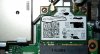
The N550JK -DS71T? Think someone in another country had reported somewhere a different card than in the US, but in the US it should be Intel AC Dual-Band wireless AC 7260 card. Got mine from Amazon and it has an Intel card. Anyone who removes the bottom cover be careful it is VERY sharp, I was pulling it off and my finger slipped and it sliced deep, blood was coming out fast.
-
Why would there be solder on the heat-pipe?

-
The G550JK is up on Xotic for preorder with a base price of 1099. A rep said that the estimated ship date is in June. The base model comes with the external subwoofer, 2gb gddr3 850m, matte non-touch screen, i7-4710, Windows 8.1, "Dual Band Wireless-AC 802.11 AC/A/B/G/N - Stock Wireless Card + Bluetooth 4.0", and the asus 1-year warranty. You can't change the processor or graphics card. Still looks pretty good imo.
XOTIC PC | ASUS G550JK-DS71 - 15.6" ASUS ROG Gaming Laptop -
Your post says it's up for pre-order on Newegg, but your link is to XoticPC. I did a search for G550 on Newegg and there were no results.
-
Whoops, my bad. Not sure why I typed newegg.
-
Thanks for the confirmation.
2014 Asus N550JK -DS71T quick mini review and opinion so far
Discussion in 'ASUS Reviews and Owners' Lounges' started by Benchmade 42, Apr 12, 2014.


