Problems? See this thread at archive.org.
For anyone with a Seagate Momentus XT Hybrid: Long-term problems with the drive. It also says how to fix them with newer firmware from Seagate.
@skiRjames Which version of P4G Hybrid did you install? When I had 1.1.29, I had the gadget, but when I downgraded to 1.1.25, I lost the gadget and didn't have it in the list of gadgets to put it back on.
-
@CMASUPRA: Thanks for that! I actually have this drive, and have been experiencing a few of the problems they have reported. In-fact I was considering putting back in my WD Scorpio Black. Now I will wait a little longer to see what Segate sorts out!
-
hey I had my UL30Vt for 1 year and recently when i get it out of sleep or screen saver, It freeze and I have to restart it. I analyse my hard drive with Active harddisk monitor and I got 58% of health on my drive. Any thoughts of what is wrong? I'm leaning toward the hard drive going slowly away but could probably be something else.
-
58 is pretty low. Which specific values are lower than 100 and what are their percentages?
Also, you would notice an overall slowdown with a bad hard drive, not just freezing after sleep or screensaver.
Most likely, a program or driver is having a problem when waking up. Have you installed or updated any programs or drivers lately? Does it also freeze when you resume from hibernate? -
is there new graphics card drivers at all for this lappy? the ones on the asus website are heaps old now. i tried using the nvidia website ones but it didn't let me install. says can't find compatible hardware.
-
Interesting, keep us posted.
BTW, when my 1.29 acts up, I find a cold boot normally reset all the software switches. by now I used to the little quirks but interested in what you find out.
As far as the Momentus XT drive the news posted is just a rehash of old news that mainly effect Mac users. I guess the drive is not OSX/Unix friendly? The other quirks are pretty much covered in the XT thread in the hardware forum. I'm still waiting for my 500G SSD with 5 year warranty for $250 My XT has been great other than sounding like a light saber when moved quickly while spun up..maybe I should not do this; my old WD just hated it when I dropped it
-
Hey everyone, I have owned the ul30vt-x1 for over half a year and I'm wondering how the battery life is holding up so far. It seems like after the windows update SP1 the battery life has decreased, or at least the estimate the OS tells me is much less. Does anyone else have this problem?
-
Well, the new power 4 gear is acting up as well. However, I am am having hard drive issues at the same time. The XT just seems very unstable, and errors quite a bit. And right now windows is telling me that it has had an issue with communicating with my hard drive. So I think tomorrow, the old WD will get a fresh install of Win 7, and then back into it's old home until there is a new firmware update for the XT. I never had any issues with the 1.29, not until the last couple of weeks??? I wish ASUS would do some updates for these products, like a new VGA driver, and a solid power 4 gear!
-
Hey guy just wanted to ask you all a question. I may be looking to sell my ul30vt and just wanted to know how much I can look to sell it for. Its a ul30vt-a1. Any ideas?
-
I would call Seagate for an exchange, not normal there, any smart errors? I know many do not have much faith with SMART but it reported some errors before exchanging my old wd 250 drive, so hit or miss.
Yea, the Asus software has been a let down. My 30vt + XT drive + 1.9 OC + UnderVolt has been very stable and performing well with the quirky software. We can only hope, eh?
OT,
I have been playing a lot of old Gog.com games. Unlike some of the newest games, these tend to be easy on the GPU temps and battery life when between power outlets. All of the GPU heavy hitters stay on my 8800gts laptop. Arcanum: Of Steamworks is 'killin me! -
Is anyone using ReadyBoost with an SD card in the built-in card reader? I have a UL30VT-A1. When I go to the properties menu to enable ReadyBoost, it says:
"This device cannot be used for readyboost. The device does not have the required performance characteristics for use in speeding up your system."
I'm using a 16GB SDHC card, no SSD, and the driver for the Alco MicroUSB 2.0 card reader is version 1.0.15.54, dated 19Aug2009.
I've tried formatting it with NTFS and FAT32, tried enabling compression, anything I could think of.
I searched the the two UL30VT threads, and in the only posts mentioning readyboost, the poster says he is able to use it... -
I've never used ReasyBoost, but if the flash device isn't fast enough, it can't be used with ReadyBoost.
-
You're right. I've got it figured out now. I noticed the speed class of my 16GB card was just class 2, but I found an 8GB class 4 card and it works fine.
Thanks! -
Hey all, new owner here. I've clean installed Win7 Ultimate and installed all the drivers I've seen in the post quoted on this page: http://forum.notebookreview.com/asu...0vt-faq-official-owners-lounge-redux-177.html
However, I have read that I need the Intel Matrix Storage Driver, but can't find it on the Asus page. Can anyone help me, or is this not necessary now? -
That post has install errors in it. Not sure if this is needed on this laptop but may be needed to support native command stuff. It is installed on mine and comes on the install DVD. Windows update should install all the new stuff for you to save some leg work.
I have done two fresh installs using the supplied DVD V2 with no problems; other than Asus software quirks!
Check box what you need and in what order to install or not to install using your V2 driver DVD installer program on the DVD. You check or don't check to install your drivers/shovelware; for W7 all versions.
Shovelware list;
http://forum.notebookreview.com/asus/380681-asus-utility-bloatware-guide.html#post4838868
MS updates just downloaded SP1 for W7...at least for me when I checked today.
Anyone else? Any problems? I have another drive with clean install OS and apps ready to roll just in case..
So far .net had cpu pegged at 78% while it optimized for about 5 minutes. Now I see indexing busy but no other problems detected in this short time of 30 minutes.
I imagine my XT cache will have to rebuild itself depending on how many files SP1 changed, first boot was a little slow.. -
hey guys,
i have the A1 with the atheros wireless card. what is the onboard lan model? i was sure that it was working fine when i first got it. now when i connect an ethernet cable, nothing happens. There is no lan connection under "manage network connection". in the device manager, there is no mention of an Ethernet controller under network adapters. i tried installing the lan driver from asus's website, it just gives me an error (no number, just and error). there is nothing unrecognized in the device manager too. It is as if there is no onboard lan!
what should i do?
thanks in advance -
you should have the Atheros AR8131 PCI under your network adapters.
Is it enabled? Clean install? This driver is on your Asus V2 DVD driver disk. -
it does not even show whether or not it is disabled under "change adapter setting" from Control Panel\Network and Internet\Network and Sharing Center
there is no local area connection there.
it is not a clean install, when i did the clean install months ago, it was working fine. I will try finding the most up to date driver and see if that solves the issue. I just do not understand why it does not even show in device manager?
I doubt updating the driver is the issue.
so i am getting the newest driver from
http://partner.atheros.com/Drivers.aspx
picked the R81FamilyWinSetup-1.0.0.49_WHQL.rar, will update after install.
thanks Hydra! -
Mine did the same thing a few days ago, I even lost wifi? It happened the same day I did the windows 7 update for service pack one. Not sure if it had anything to do with that or not????. I ended up using the driver disk that came with my laptop, and re installed it. However I have to note that in device manager, under network adaptor, I have all sorts of exclamation errors??? everything seems to be working at the moment.......
-
ReadyBoost was a microsoft gimmic with no real world improvements.
Unless you only have 2gb of total ram, you'll only draw additional power to the card slot and drop battery life. -
I should be getting an Asus UL30VT-XK1 in the mail tomorrow.
I was wondering if you guys reccommend doing a clean install of windows (I have a Win7 Pro disc)? Is there lots of bloatware? Is there improved performance doing a clean install?
Thanks! -
I didn't do a reinstall or uninstall anything, and it is still quite fast. I would use it for 2 days (enough time for the hard drive to make priorities) and form an opinion on speed. You can uninstall stuff or reinstall Windows.
-
I reinstalled Windows 7 Home Premium last night. I had hibernate in the shutdown menu at one point, but after I finished the driver updates from the driver disk, hibernate was gone.
In the Power Options, under Sleep, the only thing I see now is related to wake timers, or something like that.
How do I get sleep and hibernate back? -
man im going crazy with this p4g hybrid to work again. I went and installed the old version of 1.25 and installed the right drivers but its still not working. I may have to do a full format again and make sure I install all the right stuff. It will work for like one try then it will stop working right after.
-
No problems here, so far video switching and several other things checks out fine. You did say you were having drive problems?
-
That is kind of what I attributed it too (HD Issue). I spoke with Seagate, and they are sending me a new drive. When it gets here, I figure I will do a fresh install, and things should be great again. I think I just got one of the buggy xt's.
-
I got P4G 1.24 and not more Turbo button, anyone know what do I need to install to get it back? Also, when playing COD MW2, my average temperature rises to around 70C for the GPU and 60 for my CPU is it normal?
-
Yeah, 70C for the GPU is quite low. Until you ht the 90s, i wouldn't be concerned.
-
Yeah. Your GPU is fine until it hits 90C. Your CPU is fine until it hits 70-75C.
-
After playing again like 5 minutes of Black ops, I hit 85C for GPU and 77C for CPU. Right now, while only doing web surfing, GPU is at 57C and CPU is at 50C. Any way to max out cooling with a program or I need a cooling pad?
-
Your internal fan should be maxed out, nothing else to do there. You can elevate back of notebook for better air flow, turn up your AC, use cooling pad, run a ceiling fan, under volt your CPU for lower single heat pipe loads. Or, any combination of the above, no magic bullets here.
Note that this notebooks fan also draws air from under top left side of keyboard if bottom vents are partially blocked. Once a year plan on lifting keyboard to blow out dust bunnies from out side to inside on your heat pipe fins using a vac or air. -
do you guys have these scuffs?
how do you get rid of them, or are they permanent?
![[IMG]](images/storyImages/scuff1_s.jpg)
![[IMG]](images/storyImages/scuff2_s.jpg)
-
I placed small round felt "dots" ,6, around bezel to avoid this. Yes, they are permanent unless you micro mesh or polish them out, pita!
My old HP had a pebble grain finish, no problems there. -
Thanks, anyone here was able to pay COD BO with UL30VT? its kind of choppy on mine with everything on minimum and native resolution.
-
@ajw85
Yeah the plastic of the UL30VT are of pretty bad quality... I was disappointed to get the same scuffs after a few weeks... But well it a $700 Thin and light laptop with 8hours battery life and an ok GPU so we can't complain too much.
@hydra
How do you do that micro polish stuff ?
_________________________________
I wanted to give you an update on my 120go Vertex II SSD installation, so there it is !
I'm not sure if it's me imagining stuff, but I feel like it got more speedy with the time. I can shut down the computer in 8-10 seconds and turn it on in 20-25 seconds. Also I made some tweaks to get a faster startup (removing the eset nod 32 splash screen, disable the useless programs from launching at startup with ccleaner).
I also recently remove the keyboard for the first time (I was kind of scared to break something until now), and damn there was a lot of dust ! I clean all of that and I feel like the laptop is quieter now.
For the hibernating resume I found the ultimate tweak to remove 10 to 12 seconds of waiting : disable the password request at wake-up. I don't really know why but it saves a lot of time.
For those who doesn't know where is it its : power options/plan settings/advanced power settings/Power4gear Quiet office (or the name of the plan)/ require a password on wakeup/ no
Well I couldn't be happier with my laptop right now. I'm thinkin about installing the backlit keyboard (maybe even without setting the backlit up since I heard the quality of the backlit keyboard was superior to the original one).
-
A pita depending on how you can access the part to polish. In our case the bezel should be removed to polish out marks.
Amazon.com: Micro-Mesh Model Polishing Kit: Toys & Games
That is one of many, I have an old kit, from many moons ago, with the trade name of Mico-Mesh..
I have a couple of very faint marks so used the sticky dots which also gave me a we bit of separation for a slightly thicker lighted keyboard.
Yes, the lighted keyboard is nicer than the stock keyboard.
http://forum.notebookreview.com/asus/465841-ul30-backlit-keyboard-mod.html#post5989931
Nice to know your SSD is working fine. If it was not for airline travel I would go the smaller SSD with a Klingon USB drive.
My spinning mass of XT tech will resume from sleep in about 3 seconds with shut down close to your time. Boot timer had me up in about 28 seconds or so. After that the SSD will embarrass the older drives, especially in the noise and clicking department
-
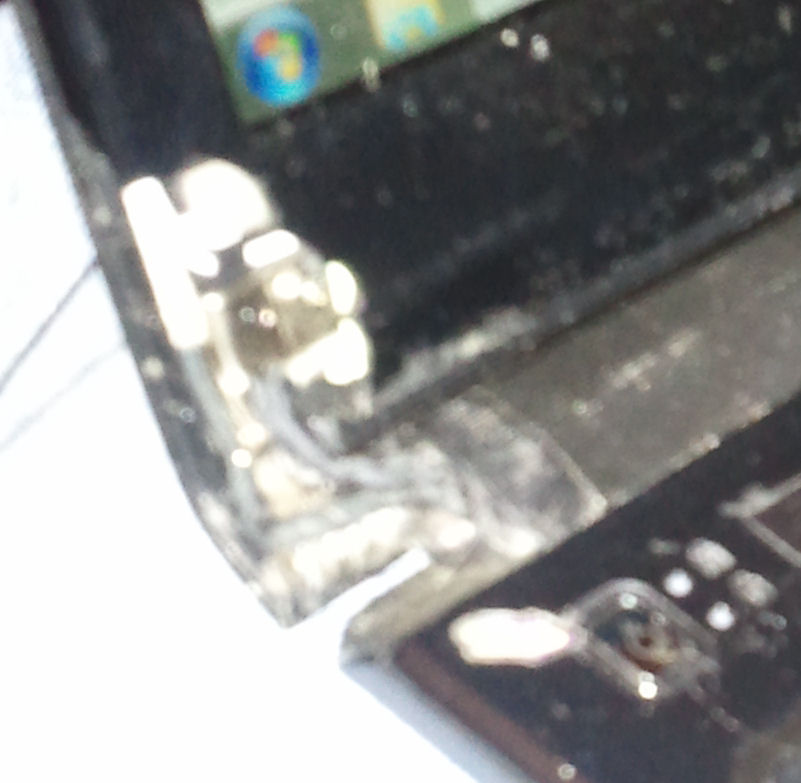
Has anyone noticed that the hinges are of very poor quality? One of my hinges has cracked on the end, and the other hinge has cracked so badly that the wires/etc are showing behind the bezel, and the LCD frame pops out of the bottom left corner every time I open my laptop. Look at this (sorry about the poor image quality, I have a lousy camera). It looks like someone cut open a body and the guts have spilled out.
Attached Files:
-
-
I got mine in August. At first, I couldn't open it with 1 hand without the bottom rising because of strong hinges. After a few months, I was able to open it with 1 hand, so the hinges do seem to get weak quickly, but mine haven't broken yet.
-
@signothefish Is that the actual hinge or hinge cover that's broken?
@cmasupra if your hinges get really loose, it's just a nut you need to tighten, should be easy enough if you can get the covers off. -
Whoah, I think you may need a ToughBook.
-
Thanks for mentioning that. It's the HINGE COVER, NOT the hinge. Once the cover starts breaking, other things seem to follow, as you saw in my picture. I don't want to permanently patch it, just in case my LCD gets broken. I might just get a replacement LCD frame. But that hinge cover, oye vey!
-
Had my first problem with my ul30vt-a1, I can no longer use my Nvidia graphics card without the laptop freezing up, I dont get a BSOD, just frozen. I managed to keep it working by uninstalling the graphics driver and Power4Gear so it can no longer switch. Tech support has been somewhat of a pain but I'm going to get it RMA'd.
I also saw an awesome deal for the ASUS U33Jc-A1 so I picked that up while I wait for this to come back. -
Before you spend time RMAing it, you may want to try just reinstalling the driver and P4G. This way you won't have to use a different laptop for a while.
-
Please share, where was this awesome deal (and how much did it cost you)?
-
NVIDIA Optimus Unofficially Comes To Linux
Has anyone tried on the UL30VT? -
I have this problem with the video card... When I used integrated to watch mkv movies, the picture looks fine, but when i switch to dedicated graphics, the picture is kinda stretched weird, it's crop and stretch picture vertically make it skinny, make people look tall and skinny like... anybody has problem like this? Thanks...
-
I tired reinstalling the drivers and still no luck. The laptop seems to be running extra hot. RMA'd it let them figure it out.
$614 at B&H with a rebate. -
signothefish, I have the UL30VT-X1 and I had the same problem except on mine the left hinge broke away from the screen assembly and the right one soon followed, so the screen is now only attached to the chassis by three little wires and I can't use it as a laptop anymore, because the screen doesn't stand up or anything. The display still *works,* god knows how, but it's useless. The entire bottom bezel of the screen broke in half near the left side and is flapping loosely with the inverter board visible and the left lower side of the bezel is the same way. The magnet in the right side of the screen that detects a lid close event fell out, and both hinges are severely cracked, broken, and chipped, and I don't know what to do. Even the left side of the body is coming up from the bottom, and what's left of the left hinge is rattling loosely. There appears to be a missing screw over there, underneath. There's cracks all along both sides of the body, running vertically near the cooling vent and horizontally near the power button. The laptop is only 9 or 10 months old and started having failures about 5 months ago when both hinge covers popped off without warning or reason. After that the left hinge cracked in two, the metal casing on the screen warped, and that hinge split open not unlike yours. Then that hinge broke from the display. After that the right hinge loosened and went, and then the laptop fell off a table, which broke the bezel and left it completely broken on all but the right hinge, at which point I had to resort to using packing tape to keep it working, and that was adequate to an extent, but then of course the straps on my crappy drawstring bag broke with my laptop in it, falling onto the concrete sidewalk and thoroughly destroying the right hinge too.
So I guess the point of this is do you know where I can get a new display *assembly* (metal casing, metal hinge pieces, bezel) without having to get a new LCD? -
I'm seriously considering this notebook even though it is several years old. Prices are great right now, but my question is how well does the UL30Vt run Google Earth? I'm a geography teacher and would really like to be able to use GE in the classroom without much hickup. I love the battery life on this but if it can't run GE fairly well I will probably go with the U31/U33/ or U35 to get that Core i3/i5 boost. Any information would be greatly appreciated.
-
google earth runs flawless on it
Asus UL30VT FAQ / Official Owners Lounge redux
Discussion in 'ASUS Reviews and Owners' Lounges' started by belzebutt, Apr 21, 2010.