 Problems? See this thread at archive.org.
Did you update your Vista index? It will no automatically update itself.
-
Sounds like a broken fan, as my mine is silent. This is actually the most quiet notebook that I have ever owned. Send it in for service...
-
Congrats mate! soon you'll have that gorgeous lappy in your hand. =) I will purchase the Asus M50Sv-A1 on June 1 or 2 from Ken of GenTechPc. Can't wait till payday. Probably, it'll arrive here in Saudi 5-6 days after clearing my payment.Last edited by a moderator: May 8, 2015 -
How about Taiwan?
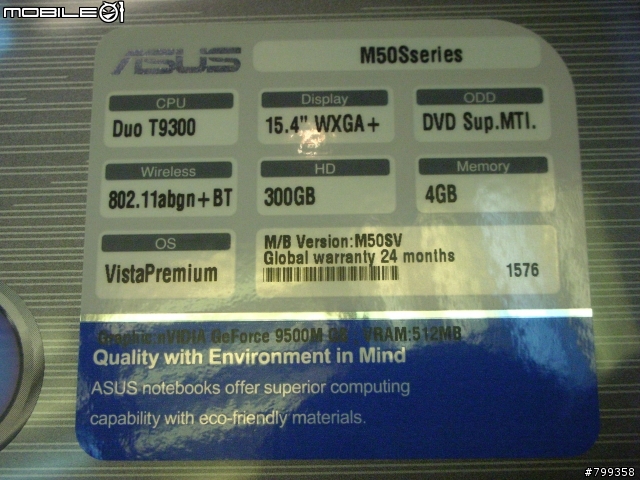
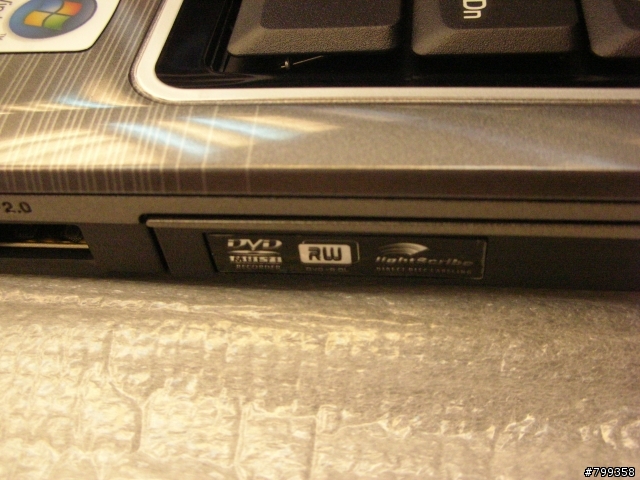
 Their standard M50Sv comes with 300gb HDD, 4gb ram and has light scribe capabilities and can be purchased for about $1400 USD
Attached Files:
-
-
Wow! Really? how about tv-tuner and other ports that doesn't included in US model?
For me, i'm still not goin to back-out from our deal with Ken. =) -
Yes, the Taiwan model has a TV tuner.
I actually got all my Asus notebooks from Ken too He's an awesome guy to deal with and never had a problem reaching him if I had any questions or concerns.
-
Thanks Feris16 ;] We shall both be pwning soon!
Hahaha! Mad
Oh well, I'm supporting my country
-
If you're referring to retesting the system....yes, I did the retest. I think I may know my error....In my sleepiness I pasted the imf into the folder in its notepad version....I bet I was supposed to simply open the file into the new nVidia folder. Anyone have any thoughts (other than that I am a computer illiterate)?
-
Does the new 175.70 drivers work for Vista 32 bit the one that default comes with this laptop??
-
In order for your Vista experience score to update there should be something to click on the page that displays your score saying something along the lines of your hardware has been updated click here to find out your new score.
-
Yes, and I did the retest and still am coming in with an Aero of 4.8. I am attempting to download the new drivers again. Thanks for the encouragement.
-
Well, I just deleted the nVidia driver and reinstalled the new drivers again. The computer is telling me that I have driver version 7.15.11.7570. However, I'm still getting an Aero of 4.8. Oh well, I tried for 5.0. Any suggestions?
-
Don't know what it could be... unless it's the fact that you are using Vista 64.
PS-what's your Vista index for your Hitachi hard drive? -
Yeah, I followed Ken's steps:
1: uninstall the current nVidia driver--did that, went to the base vga drivers.
2: Click Driver link to download--saved the download to a folder.
3: Extract drivers to a folder--double clicked on the file and the option to extract the file to it's own folder was given.
4: download Modded INF--Saved the INF to the same overall folder.
5: copy and paste the INF file to the extracted driver folder--Did this by pasting to the extracted driver folder.
6: run setup.exe--Found the setup file within the folder, clicked on it and the computer installed the drivers.
Am I missing something? -
Vista's WEI benchmarks shouldn't be taken too seriously. In fact, it's a ridiculous benchmark to test for performance on a system and doesn't reflect the true potential of the system. Simply by using different drivers probably won't change the score. WEI was made as a generic benchmark for granny and the computer illiterate aunt whom can't comprehend the jargons and components used on a computer.
Better benchmarks include 3dmark06 for graphics, PCmark05 for overall system capability, SuperPI for CPU, and HDTune for HDD -
Don't know what to tell you at this point. BTW, the driver did install correctly, leaving me thinking that your same score is due to Vista 64.
-
Did you click "update my score"?
-
Hi Ken--
Yes. Being somewhat obsessive-compulsive I tried loading the new drivers 3 times. After each download I then clicked the update my score and watched it go through its different phases to create the score. I did find out that you can't update the score if the cord isn't plugged in.
-
I have a quick question, would it be faster to do a re-install of Vista to get rid of the unnecessary software or would just deleting it be faster and just as efficient?
-
I'd recommend reformatting if your comfortable with it. Even removing all the junk software and using a cleaning utility will still leave remnants.
-
Just deleting the bloatware is definitely faster, but not as efficient. If you feel comfortable going through the whole process of formatting your hard drive, then by all means go for that option.
-
I've ordered it! Woop!
Should arrive next week some time, hopefully earlier in the week!
Last edited by a moderator: May 8, 2015 -
I just got mine in(arrived the next day from my local PC shop), and I must say this is a sweet piece of equipment. In the process of installing Windows XP... I don't think I'll ever be a fan of Vista since it offers me nothing useful.
I noticed that the lettering on the keyboard is slightly raised (It's not flush with the rest of the key), and I was wondering if whether adding stickers on the keys such as these would harm the letters should I ever want to remove them. Any thoughts? -
-
I get the same thing - go to pg. 45 (i think) - it has to do with the CPU. There exists some method to stop the hissing, but I haven't tried it yet.
-
I just ordered my M50SV as well.
After doing some research I found this link which may resolve the infrared driver issues you guys have found under XP.
ITECIR Infrared Receiver (EC):
http://www.versiontracker.com/dyn/moreinfo/win/155466
Before installing be sure you use the correct INF files. It comes with 32-Bit & 64-Bit versions. It looks to be identical to the ones Asus provided other than its twice the size which (hopefully) means it supports XP as well. -
I'm assuming that its best to do a reformatting overnight?
Also how technical is it of a process? -
It takes a second to format an NTFS hard drive these day. When I reformatted I used the OEM Vista DVD that I bought for my desktop and used the Asus the license with it. This way my install was truly free of any bloatware. Then I went on Asus's website and downloaded the appropriate drivers. Using this method, you have to copy the WiFi drivers onto a CD or USB stick before formatting, or you will have no wireless internet access. I actually dual boot Vista and Ubuntu. I use Ubuntu most of the time as it is more stable and there are no worries of getting any viruses or spyware.
-
After getting all the drivers installed(except the infrared and fingerprint reader I believe), I can't seem to figure out why the funtion button isn't working. The ambient light sensor is working, but making my screen very hard to see. I can't turn it off, or adjust the brightness of my screen with the function + key combo, turn off the light sensor, or use any of the other function key commands such as adjust volume. Does anyone know what's wrong? (This is on a fresh install of XP Pro)
-
Does the notebook not come with a CD of drivers?
-
It does, but only for Vista. However, most of the Vista drivers still work on XP.
-
Well, I intend to keep Vista anyways seeing as I don't have a copy of XP and have had no problems with Vista so far
-
I remember there being a setting in the BIOS which had something to do with the screen. You might want to turn that setting off.
-
I must say, that after only using the notebook for one day, the high pitched whining coming from the CPU is really getting to me. I've tried fiddling with 2 different proposed fixes/settings using the Rightmark utility, but neither have seemed to fix the problem.
I thought that the noise is usually emitted when the CPU is in C4 mode, but mine seems to be present nearly all the time. I really love the look and performance of the notebook, but this is just killing me.
If this isn't something I can get used to hearing all the time, I may just have to return it and look for a different notebook, although I really don't want that to happen. -
This issue seems to be quite occur in other laptops too, including the Dell m1330 and Macbook. AFAIK, the blame is on Intel for producing these 'faulty' CPUs (CPUs are not made exactly the same despite having the same clock speeds and model).
Some proposed solutions I've found on the internet include...
Enable bluetooth
check each box for "Allow computer to turn off this device to save power"
More settings change
I understand it can be quite annoying to hear a constant whining sound, but if worse come to worst, you can always send your laptop to the Asus service center to get it fixed. Hope it all works out! -
I have a question:
On Gentech's home page it specs the M50SV with a LED screen. Is this correct?
When I go to config. one I can't find that spec. called out.
As you can see in my signature I've been waiting on a Dull for almost a month and I am considering switching to the M50. -
Hey guys, i've managed to install XP. But when i put the driver and utility cd, it says that its only for the vista versions of windows and not XP. how do i go about solving this problem? I understand that GenTechPC has kindly pasted some of the drivers on the front page of this thread but how about the other drivers that's in the CD?
-
Hey, you look familiar...
Since this is the M50 owner's lounge, maybe you guys can offer the straight dope. If Dell doesn't get my XPS M1530 shipped out this week (and I'm pretty sure they won't) I'm seriously considering the M50sv. I've been eyeing it for two weeks now. One specific question...all of the surfaces look glossy. Looks pretty sharp in photos. How tough is it to keep the thing from looking all smudged and fingerprinted in real life? Do you have to polish the thing up 6 times a day? Not that such a thing is a deal killer, I'm just asking.
But on a more general note...what is the one thing you hate most about the M50? I already know the battery life isn't the greatest, so skip that. What else stinks about it that'll make me sorry I bought it?
I've already read the accolades. I just want to hear the bad as well. -
The screen on the M50Sv is LCD, not LED. Where does it say on the gentechpc website?
Just ignore and close the pop up message. Go to My Computer, right click on your D: drive and select 'explore'. Voila!
Yes, almost the entire laptop has a glossy finish except the keyboard, left & right side of the laptop and the underside. You won't notice any smudges on the palm rest but smudges can be seen on the LCD cover. I just kept the plastic film on the cover that originally came with the laptop, so for now, smudges are not a problem. The laptop also includes a micro cleaning cloth for that very purpose if you decide to clean the dirt/smudges off.
Did you read my review? I've listed the pros and cons of the notebook. Link in sig
EDIT: I do have to add that the audio jacks and the media card reader can be quite difficult to access. This wasn't mentioned in my review, so you could add that to the cons list. -
Yea, I see we are considering the same thing.....
-
Here you go, M50SV 15.4" WXGA+ 1440X900 LED http://www.gentechpc.com/
I thought it was a mistake but since I hadn't looked at the M50 for a few weeks I thought there might have been a change. -
I'm pretty picky and I don't find smudges on the outer surface to be any big deal. Any cloth will take them off....even rubbing my hand over them makes them disappear.
As to your general question....hmmm....the screen may be a little grainy, but not bad at all, and it is very bright. The volume on the speakers was a big downside for me until I figured out how to significantly increase the volume through the "live" setting in the equalizer. I didn't care for the bells and whistles on the touchpad, so I disabled them....I like my touchpad plain vanilla. The laptop feels heavy.....but when I consider everything packed inside I shouldn't be surprised. All in all I really love my new lappy.
-
Actually, I take my earlier statement back. The screen on the M50Sv-A1 is WLED. Here's the specs of the screen used on the M50Sv-A1.
![[IMG]](images/storyImages/136815313_o.jpg) Last edited by a moderator: Feb 6, 2015
Last edited by a moderator: Feb 6, 2015 -
Wow, thanks. I couldn't find it even on ASUS's website.
I may be calling Gentechpc next week, after all they are only about 350 mi. down the road from me. -
Is it easy to activate the multimedia controls by accident? I watch a lot of video files so it'd be handy to have, but I could see how it'd be annoying to constantly activate those controls inadvertantly during normal usage.
By the way...I noticed in your sig you're running 64-bit Vista. Have you run into anything major that doesn't run correctly with 64-bit? -
It's not on the Asus website, instead, it's on the AUO website.
There are option in the mouse properties where you can disable the multimedia touchpad altogether. There's also another option where the multimedia touchpad is only activated when you plug in an external mouse. And finally, you can enable the multimedia touchpad and turn it on/off with the Mode button. But to answer your question, yes it can be activated accidentally quite easily. I probably do it once or twice a day, but it's nothing to be too concerned about. Once the MM touchpad is activated, your mouse won't work, and you just say "What the #@$#??" and look down, only to find the MM touchpad is activated. No biggie
As for the 64bit OS, I'll let deadmanwins answer that since I'm running on XP
-
I have another question about the touchpad. Does it seem to work with pretty much every media player application, or is it confined to things like Windows Media Player and Media Center? I use a free player called GOM Player to watch divx movies streamed from a server. The hard media buttons on my current XPS M140 control the GOM functions just fine. Is the touchpad on the M50 similarly able to operate a wide variety of media players?
-
I just installed GOM Player (never used it before) and the MM touchpad worked perfectly.
Here's a list of other popular media players...
Windows Media Player - works perfect
Nero Show Time - works perfect
Winamp - Works perfect (Need to enable Global Hotkey under Options -> Preferences -> General Preferences. Thanks to Bunsie!)
iTunes - works, but has flaws. The "next/previous track" buttons on the MM touchpad doesn't skip to the next or previous chapter of the movie, but skips to ANOTHER movie in your movies library collection. Play and Stop button works fine. -
Did you attempt anything in the Global Hotkeys, under options in Winamp?
M50Sv: Review & Owners' Lounge
Discussion in 'ASUS Reviews and Owners' Lounges' started by GenTechPC, Mar 13, 2008.




![[IMG]](images/storyImages/congratulations.gif)


