Problems? See this thread at archive.org.
I'm at a loss to explain graphics scores this high.. doesn't this have only Intel integrated graphics? I don't expect Crysis2, but the spec of this machine is a business machine, not capable of really any adequate gaming..
To me almost all these descriptions seem perfectly consistent for the spec and materials of the PC.. it has no dedicated graphics unlike my Dell XPS15 and it has an SSD on a circuit board- so what heat? Only the i5 would generate any. The fact ASUS regards the machine as a functional workstation is good - no lack of USB and other connectivity unlike the MBA.
It appears to be a milled aluminum shell, and this itself dictates some compromise in keyboards, etc. It even helps to explain this possible wifi issue in context - anyone remember the long-gone Apple G5 TiBooks? Metal in quantity does bad things to radio reception.
Overall a good honest review and far more qualitative than snide commentary posted by others still trying to justify (not) buying one.
-
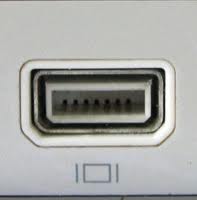
What a shame. The mini-VGA port sure looks a lot like a mini-DP from a distance...
Mini-VGA - Wikipedia, the free encyclopedia -
Yeah, you are right about the symbol. I checked and it is not a sybol of the port, but the symbol for the video out only. But anyway... Lets see the Minivga socket:
http://upload.wikimedia.org/wikiped...ni-VGA_cropped.jpg/250px-Mini-VGA_cropped.jpg
Now the mini-Dysplayport:
http://www.roughlydrafted.com/wp-content/uploads/2008/10/200810201137.jpg
Now look to the port in the UX-31, side to the mini-HDMI:
Notebook Reviews - Laptop Reviews and Netbook News Picture
I know dude, but ASUS made a mega-master-FAIL on the specs list, even on their website, probably by bad translation.... But it is definitely a very good new!! -
I agree, it sure looks a lot more like a mini-DP than a mini-VGA port. It would sure be nice if this were a translation error and it really does have DP output. Then I could run my Dell U2711 monitor at full native resolution 2560x1440 ! Could someone please try and cram a mini-DP cable into the side of their laptop? (joking, of course)
-
As a side note, just because a BB stocks them, doesn't actually mean they'll have one out for display.
I've been wanting to play with a Galaxy Tab 8.9" since it came out... my BB has it in stock, but for a display, they just show it in the box... no real display model. I had to go to a different BB that actually had one out for me to try out. -
I got this computer from Best Buy a few days after it was released. Overall, I love it, and have not had any issues that others have complained about except perhaps, that I would agree that the keyboard takes a bit of getting used to. The computer is lightening fast, beautiful, quiet, cool, and I am actually quite fond of the trackpad too. The only issue I have had is with speaker buzzing with voice (i.e., movie dialogue or taking on Skype). For whatever reason, this is rarely noticeable with music, but it drives me batty talking on Skype, even at low volumes. I've not seen anyone else complain about this, so I assume it is just my unit. Other than re-installing the drivers, does anyone here have any ideas about what I might try to fix this? I really do not want to send the computer in for repairs when everything else is working great.
-
Has anyone tried the UX31 with a 24", 27" or 30" monitor. According to the review at AT the micro HDMI port on the UX31 would not support the native res of 1920x1200 of a 24" monitor.
-
It is possible that the port is a mini-DP, or at least the same form factor.
Check this out:
Mini DisplayPort to VGA Adapter - Apple Store (U.S.) click on the image to zoom.
A mini-DP (thunderbolt?) to VGA adapter. Quite possibly that this is what ASUS is providing with their units?
Could someone take a closeup, macro shot of the connector? -
Hey Bananachipz, if you're still hanging around this thread could you let us know how the calibration went? Many reviewers claim that the MBA screens have better color accuracy, black levels and contrast. Then again, the MBA screens are calibrated at the factory while the UX31 screens are not.
I'm curious if some user calibration can bring the UX31 screen up to snuff for those of us who are interested in using it for graphics/photo editing, etc. -
how do we get this rig to 8 gigs?
lay it on me -
Didnt like the default setting (color) of the UX31 seem dull and flat. Here are my setting which I think looks pretty good.
Brightness -2
Contrast 49
Gamma 0.9
Hue 0
Saturation 3 -
looks like amazon dropped the price to $1399 for the DH72 model!
-
difference between the DH72 and DH53? both have 256gb SSDs.
-
Short answer, you don't.
Or wait to see if there will be an 8gig version available later.
DH53 - i5 2557M CPU
DH72 - i7 2667M CPU -
Just a simple question: Is there a good difference in performance between the i5 and i7 to justify the acquisition of the i7, considering the $$$ ??
I'm asking because I'm planning to buy me a i5 256gb ssd for work and home usage (heavy and multiple word, excel, outlook, internet browsing, ocr and pdf utilization). Lot of the files at my work are shared in a "server" under a simple network, nothing complex.
I heard some folks saying that the i7 gets higher temps than the i5, and I heard some complaints about throtling on i7.
What the battery duration of the i5 and i7 ? Is there much difference between them ?
Thanks!
Rodrigo -
I'd get i5 and 256GB.
simply because i5 is more than enough for everyday tasks. -
I thought so. It'll probably leave more battery juice for me, and probably run a little more cooler than the i7.
Thanks for the opinion!
Rodrigo -
I wouldn't worry AT ALL about the heat. Both the i5 and i7 ULV's have a TDP of only 17W, whereas standard voltage i5/i7 have 35 to 45W. Half the power, as well as no discrete graphics card or spinning HDD generates hardly any heat. As far as the battery, most review sites are getting on average 6.5 hours of normal daily use out of a charge. I'm not worried about a 5 minute difference. If I'm working on anything that critical, I'll naturally have the Power Supply handy.
Additionally, it appears some sites are selling the i7-DH72 for $1400, which makes the upgrade only $50, making it difficult to justify NOT upgrading. (I took this route and ordered the DH72 from jr.com a few days ago). -
Calibration went well actually. Now, the caveat is I still have an old Spyder2, so it's not the greatest colourometer. However, it did improve the "pale" colour cast. It's not going to rival an apple cinema display (nor do i have an MBA to compare), but I'm pretty happy with it.
Standard practice to disable the intel graphics startup crap applies, as it will kick out your icc profile on startup. -
Bad news for people in Brazil, according to Ztop review ( http://ztop.com.br/2011/10/25/hands-on-asus-zenbook-ux21/):
"O preço sugerido estimado (e que pode mudar até lá) é de R$ 3.999 para o modelo UX21 (repetindo: tela de 11,6″, 128 GB de SSD, Intel Core i5) e de R$ 5.999 para o UX31 (tela de 13,3″, 256 GB de SSD, Intel Core i7). Vale lembrar que, nos EUA, a máquina mais barata da linha Zenbook sai em média por US$ 999 (custo Brasil, custo Brasil… "
"
Yep, ridiculously, they will sell UX21(i5, 128 Gb) for US$ 2353,00, and UX31 (i7, 256 Gb) for the bizarre sum of US$ 3530,00. Thanks god im not there anymore... -
bananachipz, could you provide information on how to steal your settings and apply them to our systems? I won't have mine until next week, but I always try to steal other people's hard work in order to maximize my display's settings. (Nikon D7000, Samsung D6420, etc).
-
Put in an order for the Asus UX31-DH72 on Amazon for $1400 + prime next day air! .
Status now shows shipping soon, but the estimate date is still far far away. We'll see if it updates anytime soon.
For all those that like comparing between air vs zenbook
Asus Zenbook UX31 VS Apple Macbook Air - YouTube -
I don't mind providing the resulting ICC profile. Keep in mind however that there may be variances in the displays that can affect the outcome.
Also, if someone has a better colorometer than the spyder2, you'd want to grab an icc made by them. The Spyder2 is quite old.
Let me see what I can do. -
Found a UX21 review here
Asus UX21 Review - YouTube
This guy actually opens up the back so you can see inside. -
ASUS Zenbook UX31E-DH72 13.3-Inch Thin and Light Ultrabook (Silver Aluminum) by Asus
Buy new: $1,449.00 $1,399.99
Usually ships in 1 to 3 months
now, that's some waiting... -
usually they are conservative. we'll see. if they don't ship in a few days, ill cancel order!
-
It wasn't that good of a comparison review, all the differences they pointed out are things that anyone could do by looking at the specs and seeing the differences. What people want to see are side by side comparisons of screens/viewing angles, battery life, keyboard, things that give them function.. although at least they did bring up sound.
-
I don't know... I ordered mine late Monday night from JR.com without even a definite shipping Estimate, and just received an email saying mine shipped earlier today and I can expect it on Monday. This better be a treat, and not a trick!
-
Still pissed that I missed out on the $1399 price from JR.com
-
Indeed, you have a point. If the difference isn't that noticeable (heat and battery duration), I'll surely buy the i7 version with 256gb.
Yeah, that's very expensive. However, I'll buy from a friend that can bring it to me without the import taxes and everything else, just shipping.
Best regards,
Lunatico -
Will anyone do it?
-
NBR's own review picture gives you a good look at it:
Notebook Reviews - Laptop Reviews and Netbook News Picture -
Does anyone in here already have some experience with running Ubuntu on the UX31? In early reports I have read that there might be some driver problems.
Judging from my own experience with an X220 at work, even the 11.10 release has problems with the graphics driver and with waking up from sleep. And I fear the UX31 will be the same - as it has the same Sandybridge chipset. -
Here is another comparison between the UX31 and MacBook Air:
Ultrathin Notebook Face-Off: ASUS Zenbook UX31 vs. Apple 13-inch MacBook Air -
That same review gives you a closer look at the mini-VGA:
![[IMG]](images/storyImages/UX31-ports.jpg)
The review says mini Display Port. -
It might be just using a mini displayport port, right?
I thing Asus would just say it's DP if it was. -
Honest review? Comparing MacOS bootup vs Windows bootup? Apples vs Oranges! Also, how did Warranty get a draw? LOL
-
I am having an issue with my Wall Charger. The light indicator is not turning green when its fully charged. It stay orange even tho its fully charged. Issue started right after I update to the latest bios 206. I tried resetting the CMOS in the bios. I also did a fully discharge (draining the battery down to zero) and then charging it back up. At 100% the light indicator does not turn green. I set up an exchange with Bestbuy.
-
Hello.
I am new to this forum and am really looking into getting UX31.
What I question is: Does anybody know if it is possible to change the keyboard of this Zenbook? Seeing that the chasis is really compact I'm affraid I wont be able to change it.
The reason why I am asking is because I want the model with i7 and 256GB hdd. But In Denmark it's only possible to get the i7 with 128gb HDD. So I'm thinking to buy the laptop somewhere else, and then put a danish keyboard into it - only if possible!!
I hope anybody knows if it is possible, and if yes, not difficult as a NASA project or anything!
Thanks in advance! -
Errrrr, pop and replace the SSD instead
-
To my knowledge, almost everything is soldered on this model so it's not very upgrade friendly.
Go the 3:20 min mark:
Asus UX21 Review - YouTube -
The SSD is replaceable, as long as it's the same gumstick/low-profile form factor. Also, here's a deep link to your youtube vid link from above:
http://www.youtube.com/watch?v=ERRhFzdlI30#t=3m30s -
Can someone please try to connect a DisplayPort cable to this port (first with the power off, and very gently)? Now I am getting very curious. It sure doesn't look like a mini-VGA port, and looks very much like a DP jack.
-
Any suggestions for how to mod the cooling system? My UX21e idles around 40-45C but hangs around 85C when doing CPU intensive tasks. 90C is still considered a "safe" temperature. But, I don't like being so close to it for long periods.
-
You can start with new thermal paste. IC Diamond 7 works well on my Acer. For more cooling, you can always try adding heat sinks. http://forum.notebookreview.com/8022666-post3053.html Actually, your temps are fine. Max temp on your CPU is 100C. You have plenty of headroom.
-
Shave them down to 1mm or so then?
-
Looks like a mini-DP to me.
![[IMG]](images/storyImages/shrug.gif)
-
That looks like a mini Display Port or Thunderbolt (but we know it won't be Thunderbolt).
I thought that mini-VGA looks like this:Attached Files:
-
-
So is there a place that I can find a list of known issues with these so far?
I'm debating between a loaded 13in MacBook Air and the high end version of the UX31. -
Keyboard and trackpad are NOT as smooth as the MBA, update the BIOS (current version 206) and update ALL the drivers from the ASUS site.
Wireless drivers are still not as good as they could be, turn off power saving setting that cures it as an interim measure.
Use the ASUS "Splendid" utility to check color and color temp settings.
A FEW folks have mentioned the hinge MAY be a little loose. Not mine, YMMV
Play with the power settings, particularly the screen brightness settings as this is a BRIGHT screen.
For the rest, read the earlier threads
Asus UX31 Ultrabook
Discussion in 'Asus' started by pear-i, May 31, 2011.