Problems? See this thread at archive.org.
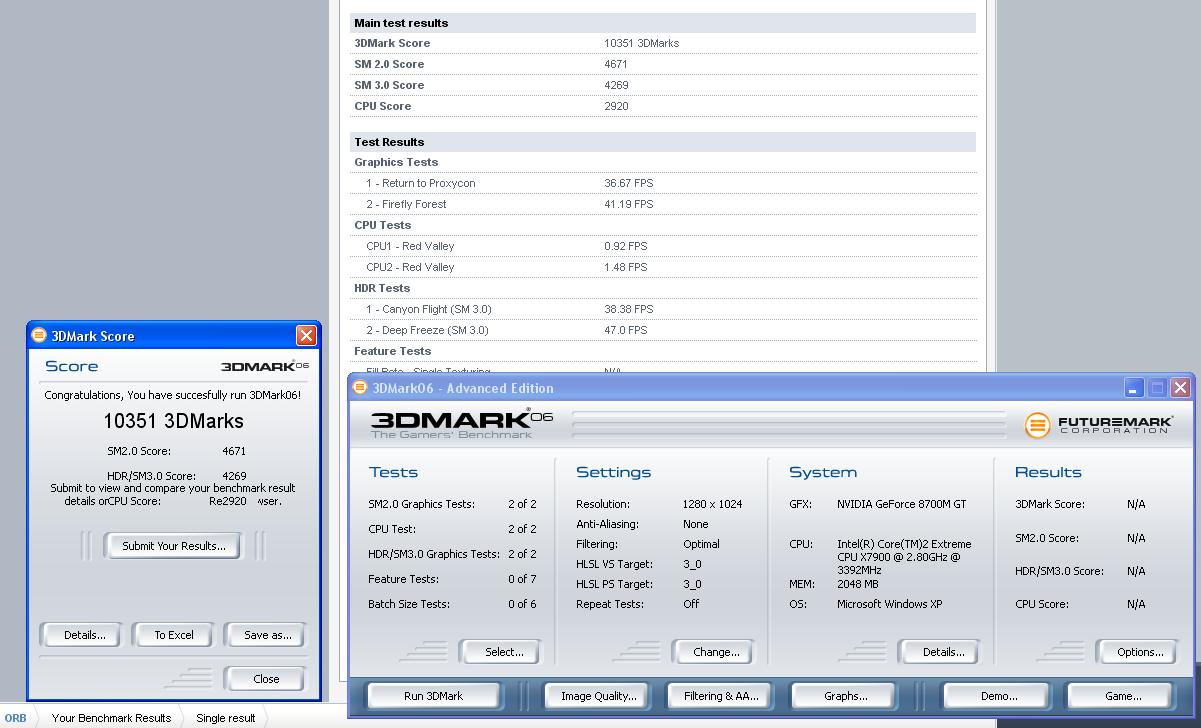
Well I've done a few more 3dmark06 benchmarks.
Factory defaults (lower then when I first got it due to extra apps running in the background).
3DMark Score 11925 3DMarks
SM 2.0 Score 5493
SM 3.0 Score 6348
CPU Score 2270
With CPU OC'd to 3.2GHZ, GPU standard clock speeds:
3DMark Score 13152 3DMarks
SM 2.0 Score 6208
SM 3.0 Score 6714
CPU Score 2563
I couldn't use 3.4. I think I have an issue with my power supply or something. It resulted in lower then factory settings, 11700 3dmark06. It kept studdering throughout the test. Very odd.
With GPU's OC'd to 600/900 and CPU at 2.8GHZ:
3DMark Score 12485 3DMarks
SM 2.0 Score 5506
SM 3.0 Score 6846
CPU Score 2395
With CPU OC'd to 3.2 GHZ and GPU's to 600/900:
3DMark Score 13499 3DMarks
SM 2.0 Score 6294
SM 3.0 Score 7303
CPU Score 2493
edit: I'm expecting much better results once I reformat and run these on a clean OS. There's just so much crap on the system right now. Clean install no OC'ing I would expect a my machine to hit over 13k. Just installing fraps, everest, msn messenger, along with a few extra sidebar addons lowered my results by 300 points. Just imagine how much the 20+ useless processes dell loads on your system does to your laptop.
-
-
From ur post I can say you are seeing almost no improvement... 350 extra points its not worth the oc...
![[IMG]](images/storyImages/dibujoxr8.png)
However 5800 vs 7300 points on sm3... -
Yeah,
I would have to agree, OC'ing doesn't show the results I would expect.
I think the most performance can be gained through a clean install and minimizing uneeded apps. Maybe even run a few vista tweaks to boost up performance.
OC'ing the GPU's really doesn't appear to do much in terms of 3Dmark's. -
I'm confused when thinking back on all the drivers-questions.. So, please, can anyone tell me in short which drivers (if any) are better than the stock drivers?
-
Hey erm, can anyone with the 5400rpm 500gb Raid 0 drives or any Raid 0 5.4k drives, tell me what your windows score is for the HD's. Iam having doubts about going with the extra 100gb than the 7200rpm 400gb :S
-
Im serioulsy starting to think that the OC is actually not happening... Maybe is a bug or something.. I remember when I had my old m90 I got 4700 points in 3dmark and after a 25% oc i hit 5700... So I was expecting the same... hmm...
-
Well seeing as were all showing off your seksy new machines with your 8800m gtx cards id thought id show off mine. Not bad for the 8700M sli overclocked

Attached Files:
-
-
yay just had a call from dell. Card is here monday ! ! !!! ! !111! !!!
-
ATITool doesn't seem like it's OC'ing correctly. You have to use RivaTuner. Atleast that was my case for 8700GT.
With Rivatuner, frequency clock has shader clock also, while ATItool doesn't. I'm not sure if that's the difference. -
Imgonna see and dl the latest version... but for now it is not overclocking anything... -
Has anyone besides me posted X7900 + 8800 GTX SLI Crysis benchmarks @ 1920x1200 and High Details?
Anyone got benchmarks for lower resolutions? -
I sold COD4 for £28.50 - it was the collectors box with the downloadable strategy guide, a poster, and a DVD about great British SAS missions.
I didnt ever register the game. I usually just play games offline for the single player campaign etc.
Yeh thats just marginally under mine, and for a stock system thats spot on. The OC'd CPU score seems correct also. Congrats
Nice, congrats on the screen as well!! lol. Awesome isnt it?!
Im sticking to the stock drivers, it seems to run all the games I currently have perfectly fine, so Im not gonna bother changing my drivers etc.
lol. TBH I dont even wanna try overclocking. Im happy with it as it is, and Ive never been much of an overclocker! I'll rely on your expert overclocking abilities and reports!
Cool! Now its your turn to be excited - this weekend is gonna go slowwwww for you! -
Nothing to say.....just wanted to post here and say "Hello" >
~
-
I tried the drivers 171.17 and got an increase in performeance... 350points XD
![[IMG]](images/storyImages/dibujorl8.png)
-
I bumped my cpu up to 3.0ghz and got almost 13,000 with the same system
-
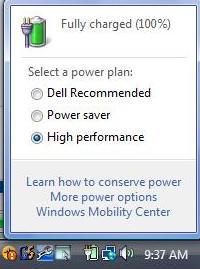
It is a silly question but your power plan is on "high performance", isn't it?
-
If you mean the graphics plan, yeah it is XD
-
I am not sure if we are talking about the same thing, see the picture:
Attached Files:
-
-
Make sure your not pushing the card to the very limit when overclocking.I remember my 7900GTO use to be a bit picky about overclocks...650mhz would show improvements in 3Dmark 06 but 680mhz which was stable would have the same sort of performance as stock speed.Same thing happened with my 8800GTX.
-
I dont think you can sqeeze much more out of the system unless you use some seriou sovercolcking, or wait for new drivers from Nvidia. I think the CPU is the bottleneck....
-
Ive decided to go ahead and sell my Backpack carry case, if anyone is interested there are photos and a link to a video of it here:
http://forum.notebookreview.com/showthread.php?t=222124
Wanna use the money to get the ZM-NC2000 cooler. -
I was playing Crysis last night (first time playing a PC game in a long long time) with 1920x1200 on all high with no AA and for the most part it played nicely. I was even transfering 100 gigs of data from an external drive to a slave drive on the system at the same time (multi tasking my gaming and my video editing) . I also did a video output later to a 55" 1080P HDTV set and it looked gorgeous and played great.
I'll look into benchmarks tonite. -
right jsu got word form dell, according to them the web based prgress of my order is wrong and its in production,
but they havnt changed the shipping date, so unsure what to belive, -
@scradge,
Join the club chap, we have all been waiting with baited breath for the progress of our 1730s. Sure the dell site seems to be very inaccurate and judging by the various reports from people who have contacted them, dell itself seems to be unsure of what is happening as well. There appears to be a shortage of the X7900 and the 8800GTX components which appears to be holding the whole process up. Only when you get notification from your delivery agents, UPS, DHL or whoever delivers in you area can you get your hopes up. Sad but true...dell makes good computers but their tracking system sucks big time. Just hang in there it should be here before Christmas...lol...just joking! -
We are not, Im on Xp so I dont have such options... However I was talkin about the graphics plan where you can choose from high performance-----high quality.
-
I ordered my system early last week and my shipping date was set for March 5th. I called four days ago and it was in the 'boxing phase' and the computer and online said the ship date was still the 5th. Two ago though, my shipping date changed when they actually did ship it.
-
"xm888 Card (circuit)..., Graphics..., Nvidia..., Iupga5c, G92"
-
Hey snake!. Got a call from dell today. Cards arrived in today and im getting mine installed monday so expect some orders despatched or updated! Not long to wait now.
-
Hey Dazzy,
great to hear that and hope you have more luck than I am having. Just got off a conference call with my guy (in India no less ) and it looks like they seem to have misplaced my returned unit, hence no refund in 3 weeks or so. They promised to sort that out. My new beast with the extremeX7900 and the 880GTXs has been in pre preoduction for 9 days now
and there does seem to be a shortage in the supply, couldn't tie the fella down to exactly what (think they read a script when answering difficult questions
) but certainly they have a problem at the moment.
And you got yours already...lucky git...your chap must certainly must be higher up the food chain than my guy. Ahh well c'est la vie as they say in this land of cheese. -
Hmm ifti strange 3D Mark score there, on a swedish forum a guy got 12000 with a 2.4 Core2duo. You should get more than that, considering I got with overclocking 9100 3D Mark 06 out of the 8700m GT´s
-
The web based status page is crap and never kept up to date. Expect your order quicker.
Im using the stock drivers remember, with no overclocking, since I want to keep BluRay functionality. I could get a lot better from better drivers. Also by OC'ing my CPU to 3.4GHz, I get just under 14,100 - again his would increase with better drivers.
I dont want to change drivers since, as I said, I want to keep BD functionality. I'll only update drivers when Nvidia release some Beta ones that are WHQL certified.
TBH 3DMark06 scores dont really mean much to me. Im running all my games at max settings and res, and getting FPS's of 55-60 and above. Hence, Im happy, and have no need to push my system any further for now
-
What a great thread!!!
Quick question. I plan on taking this from work to home every day...Does anyone know if there is a lightweight sleeve that can be used to cover the m1730...(instead of using the backpack) -
Not sure what the part number etc is, but I got a few of these at work. Fits the M1730 perfect, with extra room for the power supply and other stuff.
I think its just called a Kensington Roller Case or something - I got them from dell direct, so its probably on their site.
![[IMG]](images/storyImages/Image085-1.jpg)
![[IMG]](images/storyImages/Image086.jpg)
Havent seen a sleeve or anything for it...... -
Thanks for the SUPERFAST response...I was hoping to find a lightweight sleeve so that I can place the sleeve into a rolling briefcase that I take to work everyday...
Any other ideas? -
You could search about the net for a generic sleeve, but you wont find something specific for it I dont think....unless you use the crappy packaging sleeve that came with the laptop....lol
Then again, you could buy some nice fabric - velvet or somet, and stitch a sleeze together yourself.... -
Would any regular 17 inch sleeves work?
-
Thank you
Would be much appreciated! -
Hi all - I got my 1730 in November 2007 - and I'm not very happy with the graphics performance. I've asked Dell for a swap to 8800s but so far no joy. Has anyone got a 'cast iron' solution to get the 8700s swapped for 8800s? Thanks in advance.
MrMajic -
Yes I agree with you Ifti, 3D Mark scores doesn´t mean a jack
-
What's the best program to test LCD's for light leak?
I've tried
1) Dead Pixel Buddy (not helpful for light leak, but good for pixel check)
2) LCD Calibration Aider (only slightly better)
Any one have any ideas?
Ideally I want to compare the M1730 to another few laptops and LCD screen that I have hanging around.
Thanks,
72oo -
Just ordered my Zalman NC2000 cooler, but since its out of delivery everywhere I have to wait until 14th March for delivery!!!!
I have to say though, the 8800 does run quite a bit warmer then the 8700 did..... -
You cannot fix light leak. It's not the LCD panel, it's the back light.
-
^^^
Agreed.
The Samsung seems to suffer from light leakage the worst. The LG has a little, but not enough to really notice. Its the best screen you can get in the M1730. -
ill be interested in what u think when u get it, i was tempted with it, but the vents dont line up so i went with the lian li nc-02b cooler, it has adjustable fan positions, but not a tremendous amount of go i have noticed, i think they are all rigged for quiet running, but i'm not bothered, i want sub zero lol..
Im going to buy a small aircon unit to channel ice cool air to it i think
-
TBH the reason why I went for the Zalman, is because I didnt want a cooler that just had 2 fans stuck into it and thats it. I wanted more of a cooling pad, something which would distribute the cool air across the entire underside of the laptop rather then certain areas of it. The Zalman seems to have a different design where it does this through many holes on the cooler, rather then the typical 2 holes where the fans are.
I'll give it a few tests and see how it does. At the mo when gaming the top of the laptop - above the GPUs and the PPU etc - gets quite hot to the touch. I'd really like it to be as cool as possible!
I plan to buy a USB to AC adaptor as well. Id rather have it running from its own power source rather then from the laptop, since sometimes I tend to switch the laptop off after gaming, whereas I should really give the GPU fans a chance to cool the GPU's down before I shut down. By having the coller on external power, I can leave it going for a few mins even after I shut the laptop down.
I'll also be taking a closer look at the cooler and see if I can modify it in any way. Looking at the underside, I may be able to cut into the grooves in the plastic and stick some more fans in
![[IMG]](images/storyImages/nc1000-5.jpg)
At the mo I have a wooden desk, and the laptop sits on a pull out drawer - its meant to be a keyboard drawer! So I pull the draw out, then open the laptop, and reverse the process when I switch off.
Ive also been thinking of cutting a few holes through the wooden drawer that the laptop sits on, to give it much more space to draw air in, rather then the half inch it has at the moment while its propped up. I could also try inserting some fans into the drawer itself. That way, whereas I have the laptop propper at the mo, the laptop will have some extra fans under it pushing colder air straight up to it......what do you think? Even if I dont insert any fans, I could still cut an area through the drawer, and put a small grill in place to stop some dust etc, so that the bottom of the laptop, where the air intake is, is completely clear of any desk whatsoever - would this help cool better???
EDIT: Actually thats not such a bad idea. I could cut into the wooden drawer that the laptop sits on (its only about 10-15mm thick) and insert some fans into that. Or alternatively, I could cut a square a little smaller then the size of the laptop, so that the laptop feet can still sit on the desk. Then I could get a sheet of 5mm aluminium cut to size, drill many holes through it so that the airflow is distrributed a bit more evenly, and insert it into the area Ive cut through, and install some fans underneath that - im assuming aluminium is the best material to use since it will spread the cool air better??
Hmmm............this has got me thinking...... -
Question for DAZZY. I am getting the 8800's Also.. So i figured i wold jack around with the 8700's while i have them.. What setup & Drivers did you use to reach over 10k 3DMark06?? I'd like to give it a shot an max out the cards since they are going back anyways lol.... Lemme know!!
-
lol, I may try something like this to help suck the hot air out the back of the system......lol
http://icrontic.com/articles/ghetto_cooling_your_laptop -
What made you change your mind? I remember you gave up on M1730 before you went to Hong Kong in favour of Alienware. And now the new m15x is already offered with X9000 processor.
http://www.alienware.com/Configurat...Code=PC-LT-AREA51M15X-AI1&SubCode=SKU-DEFAULT -
Ifti, you seem to have given a lot of thought to cooling the laptop down. Some very serious solutions in your post above; cutting into the laptop casing, inserting additional fans, modifying your desk and inserting fans into that. Not to mention the cooling pad you have on order.
I wonder if you thought about just buying a walk-in fridge and wearing a jacket for yourself? =) -
.... ah, I didn't mention fixing it.
I want to have a comparable measure; a program that would show various scales of hue/chroma/lightness in full screen to see light leak easier.
72oo
-->*OFFICIAL: Dell XPS M1730 Owner's Lounge*<--
Discussion in 'Dell XPS and Studio XPS' started by J-Bytes, Sep 27, 2007.