Problems? See this thread at archive.org.
^^^
So are you getting a new M1730?? You returned your previous one?
-
I would be careful cutting into the tray it looks a little narrow you wouldnt want to weaken it to much and your laptop could fall. and that would be bad
But let me know how it runs.
I run my laptop on my lap so i was thinking about getting a board for the cooler to sit ontop of with slits or holes in it and put the laptop ontop of that. I figured it would cool it off eneough.
Yea i realized that the GPU would put out the same but I didnt think it would have that much effect on the CPU itself now im going to be checking the dell site even more to see it they have the X9000 yet
the wait is killing me -
I also found that using Dell DDRAM instead of another brand helps with the cooling.
On my XPS M1710 I purchased cheaper 4GB than the Dell ones and after 1-2 months the system got warmer and warmer.
After replacing those with 4GB from Dell it ran much better. -
I had a trouble ticket opened since I got the system in Jan.
After I got sick of trouble shooting w/ Dell, a resolution specialist was going to issue me a new same system, and I asked if he could place 8800GTX, and was told no.
I had to give up BR drive, and 2gb of ram to get the GTX on the new system. The old one is still w/ me. I'm waiting for the new one to arrive w/in this month(order status says so, but how knows how long it will take). -
Do you guys have problem with heat already?
 These GPU´s can stand more heat than you know. Just check the heat tresholds. The 8700m GT´s I had never got above 70 degrees while gaming. How hot does your 8800m GTX run? Now of course it has to do with ambient temp. Another thing I can advice you guys about is not to run i8kfangui. Believe or not using i8kfangui to control my fans my first M1730 ran hotter than letting the bios itself control it.
-
Just monitor the temp via i8kfan. Let the bios do the work it's supposed to.
-
I can probably post some pics this evening, but in the meantime, I'm currently using a combination of the Zalman cooler plus a riser. I am using a $15 Rubbermaid riser (i know... sounds weird) but it's actually really good. It has two elevations. Before i got the cooler, i used the higher elevation, but now, with the cooler, I'm using the lower elevation. The riser allows for underneath airflow as well as elevation.
http://bigwes31.blogspot.com/2006/08/my-new-tablet-pc-stand.html
It looks better in reality than in the pics. Again, I'll try to post some from my setup tonite. -
You know whats funny? Im a little worried about receiving my new XPS M1730 (should be here next week)! The first one I received last Christmas was an excellent machine. I simply could not fault it. There were no software issues, boot issues, stability issues, hardware issues, nothing. I had this pleasant feeling I'd received a top notch machine. This was on the back of my mind when I decided to send it back in order to wait for the 8800's.
Now I have this fear that I'll receive my new machine, and it'll have problems... I hate having problems, especially the little annoying niggling ones that you can never seem to solve, and support never can help. I've had a few of them before. But the Dell seemed rock solid...
Oh well, here's to hoping I get a decent machine!!!
How are everyone else's machines going? -
hello every one. So i guess because is so greate machine its ok to no tell us about the 3.18 real ram?, I had the same dell 1730 for over 2mouth trying to know where the extra ram when to, I had vista 32bit and add windows xp, I use XP to play games because vista takes too much resourses. DELL should tell us what are the good&bad about the system not beable to deal with the 4g of ram, more then that the system gets nuts knowing the real free memory, and maybe thas why when I use over 3g of ram the system gets a litle unestable, and some time risets brutally or crach, but overall its the best lobtop ever so I cant help to love this dell, and I still need a USB flapy reader to beable to install the XP without it windows cant find the satas
-
No 32 bit Windows can see over 3.25 ram.
Some of your ram may be shared as well.
The problem here isnt the dell computer. -
Yup, what evolution said.
Bring on 64 bit! -
The hottest I have seen my GPUs after gaming for about 20 mins was 73c. However, yesterday I played Gears for about an hour, and upon checking the temp straight away after shutting the game down, it was at 60c!! Basically the fans do a pretty good job of keeping things cool.
I think Ive decided to just get the cooler and see how things go from there TBH.
Cool. I thought about using a metal baking tray before! lol. Just to raise the laptop a little, but I just propped the back up by about half an inch instead.
TBH, Ive had less issues with this machine since Ive stuck he 8800 GPU in, then I had with the 8700 using drivers 167.51. This GPU along with driver 167.55, seems to be more stable then before. Also being able to run games perfectly, Im happy now!!
With the 8800mGTX SLI in place - this is how the beast was really meant to be! -
Would be nice to find a place that sells and ships the Zalman cooler to Australia! We seem to sometimes be forgotten about over here.
Went out today to pickup Sins of a Solar Empire, only to find the stores hadn't even heard about, let alone have the game in stock... -
When the Perynn comes out, it would be worth upgrading to reduce heat further (or overclock more without noisy fans). I also read that you purchased your RAm separately. The Dell 4GB seemed to be cheap (+110 EUR over 2GB). Was the non Dell RAM really so much cheaper? I made bad experiences with non Dell RAMs in the past.
-
Puremind in Australia, and im pretty sure England, Dell charge a ridiculous amount to upgrade your RAM to 4 gig. Out here its an extra $300AU to upgrade to 4 gig RAM. Better non-Dell RAM can be had for far cheaper. So it makes sense to get the least amount of RAM you can, then upgrade it yourself with RAM you've bought.
Whether non-Dell RAM runs hotter, im not sure... -
Oh and on my machine, I got 4 gig RAM, because that was the only option on the machine I was configuring.
-
I didnt purchase my RAM seperately. But over here it does cost a lot to upgrade you RAM through Dell, so I do recommend purchasing it seperately and installing it yourself.
Dell do not use 'Dell RAM', and the RAM is usually third paty anyway, just like the HDD. You should be able to find and upgrade RAM very easily. -
So with all this talk of coolers (which we are are merely doing for the sake of preserving our precious Beasts) does anyone have suggestions on what to buy when you use your laptop on your lap top.
I have always been very portable with my systems and this one will not be any less different. I have a desktop in my basement capable of running any game thrown at it. I have been an avid gamer for over 15 years now and don't intend to stop. I still have my Dell Inspiron 6000 15.4 that I can use for my everyday running around but now at night when I am ready to relax and rock and roll with the latest MMORPG I sit on the couch with the Beast perched on my lap.
While this monster really hasn't generated anything near as hot as my Inspiron did at times, I still want to protect my investment so any suggestions would be appreciated.
Anyone out there other than myself who uses this bad boy on their lap? -
8700M GT SLi card generates far less heat than 8800M GT Sli. TBH I don't think you need any extra cooling.
-
Best solution for cooling = long warranty. Nuff said.
-
Does anyone know of any plans for a M1730 with one 8800M GTX?
I don't want (cant afford!) a sli configuration, and I don't want such a high-res screen either, I think it's going to cripple the laptop as soon as the demands of next gen games go up....
Do you think these options will be available soon? -
I asked a rep that Thurs when I ordered mine and he said no and there were no plans. I had to go with the 8700 config myself, couldnt afford the 8800 SLI and im ok with that knowing that they can be upgraded in the future, when the prices on the 8800 go down.
-
^^^
Good point. I think many people forget that the prices WILL go down. Its inevitable. We know for a fact that the laptop is upgradable, so if you have more patience then someone like myself, wait! -
The 8700's in SLI give some pretty good performance. 3dMark06 scores around 8000 - 9000 are good, and will run most games with no problems.
Sticking with these for now, and then if needed, upgrading to the 8800 later on is a good idea. You'll hear people (myself included) complaining about the poor performance of the 8700's. This isn't really true, they run well, its just we want the best, and are willing to pay the inflated price for being first with the new tech. -
If you want one 8800GTX and smaller screen, you should probably take a look at Alienware M15x. But to be honest it is waaaaay overpriced.
-
I purchased Kingston Value RAM (not customised for Dell XPS) and I had those issues. I could tell the difference by swapping them in and out. I conducted a lot of diagnostics and the Kingston RAM was not defect, just not optimized for Dell. BEcause of that, I also had no garranty on that RAm and ended up selling it on ebay.
What non Dell RAm would you recommend? -
Yeah, I have been looking at that, it looks very nice. But as you say, very expensive. And Alienware never have discounts in my country, whereas Dell always have some sort of deal available..
And if i could get a M1730 with just one 8800MGTX, I would save a couple of hundred euro. And if they had a 1440x900 option instead of 1920x1200, I figure that would have to be a little cheaper too, those screens have to be expensive. And I can get 10% off Dells but not Alienware. So I would really like if they did this spec...
-
Then you are better off with SLI 8700 on M1730. And upgrade, when the price of 8800 will go down. I don't think Dell will give an option of a single 8800 for another 6 months.
-
That is one of the reasons my wife and I stopped looking at Alienware. The prices were just waaaaaaay to high for us. She wanted one desperately but I got her The XPS 1710 instead with the single 7950 card in it. Dell comes standard with 1900 x 1200 screens and she does some gaming though not as intense as myself. We got the best price from Dell which I might add was also a refurb. I have little problems with the refurbs with out of 7 laptops purchased I have had only one problem and that was even a year later with the backlight dying.
Heck I still think both the 1710 and definitely the 1730 have much more visual appeal than the alienwares IMHO. -
Looks like my order will be delayed thx to Dell messing up payment :-(
Thinking about getting a Dell M1730 from ebay with SLI 8700 GT.Can I get them uprgaded in a month or 2 to 8800m GTX SLI?What I mean is would Dell let me even though I didn't buy it directly from them?
What sort of price would I be looking at?I no someone in this thread managed to buy the cards somehow on there own
Specs on laptop I'm looking at are...
x7900 2.8Ghz
4GB ram
2x 250GB 5200rpm
SLI 8700m GT
1 Year warranty
Being sold as new and at 1120 pounds with under 2 hours to go.
What do you guys think? -
Thats not a bad price TBH.
Nevertheless, check the validity of the seller - the usual drill.
You will still be able to upgrade the card to the 8800 later on via the upgrade program. Also, make sure the seller transfers the Dell warrenty onto your name once you purchase the system.
I think the 8800 card will probably come out at around £500-600 - which includes the cost of the techy to come and fit (even though you should just fit them yourself!). -
Well its a collection only deal.I'm happy enought to catch a plane from cornwall to London and give it the quick once over
Btw
You still got that XPS bag for sale?If I do buy this I'll need something to bring it back in
-
Hi guys.. I have my comp setup perfectly at the moment.. Windows XP Pro.. Tweaked to ****.... I just have one issue... I am using the 167.57 Drivers from Dell Support for the 8800's.. Yes they work with the 8700's... But anyways Sometimes at startup ill get a blue screen pointing to the nv4 Display driver i believe? Also, my computer will never return from sleep!!! Maybe 1 out of 10 itll come out of sleep... I used a modded .inf before but i reinstalled the Dell drivers so i didnt think it would be an issue... Anyone have any ideas??? Iam stumped as to why the blue screen of death would point to the Nvidia Driver.. and/or why I cant return from standby? Should i do another clean install? please tell me what u guys think.. thanks
p.s. Blue Screen has only appears before completion of startup. When trying to return from sleep I can see my desktop background an thats it. I have to hold power an start it up again. -
yeh its still for sale - just PM'd you the link to the eBay auction.
Alternatively if you wanna go ahead outside of eBay (thus saving me the fees!) PM me back and we can work somet out if you want.....
Make sure you check all the specs etc when you see the lappy, and I would give it a CLOSE inspection all over!
Its probably down to using drivers that are not meant to be used fo the 8700m. thats the only reason I can think of.
I sure do hate having to hold the power button in for so long when things do go wrong though!! Sometimes it takes ages before it will turn off!! -
Hm... i didn't get, did u try to install some other video driver and see how it goes? That's the only thing i can think of about screen of death referring to display driver.
As for not returning from sleep. I have excactly the same problem with my current laptop running XP. The problem occured in about a year, after i installed this windows. So, a lot of things could cause this problem. But i just don't bother with it, i never use sleep mode anyway. The only way i see to fix this is to re-install windows. -
Didn't buy it in the end.It went for a little under 1700 which didn't seem worth it in the end.
I'll find out tomorrow if I'm cancelling my order tomorrow, If I am I'll take that bag of your hands outside of ebay Should fit the other notebook I'm looking at nicely(X80r Pro from Novatech)
-
No probs. I have a few watchers and some have emailed asking for further details etc, and seem pretty interested, so let me know tomorrow if you want it and if its still up for sale, I'll take the auction down asap.....
-
My order is in Delivery preparation, woohoo!
About time, so what happens next? -
Holy crap, refreshed page after a few mins and -- DISPTACHED!!
I am going to have a heart attack, for real -
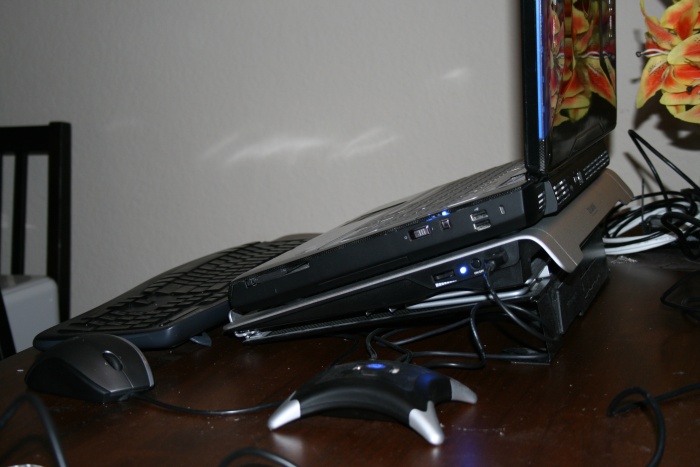
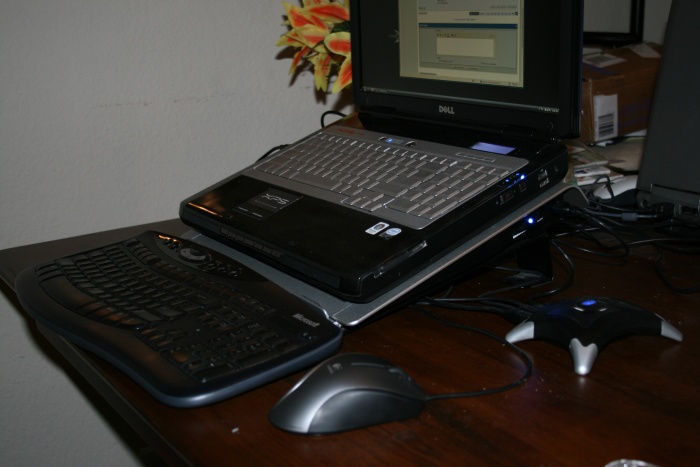
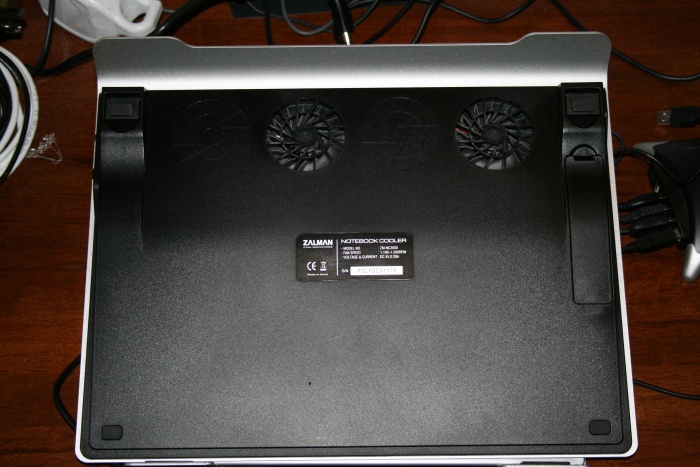
Zalman cooler with riser pics
Attached Files:
-
-
Any improvements on temps?
What's the difference between the 2?
raised back by any objects such as bottle caps/cd cases, and the cooler? -
how do i check my computer's temperature?
-
whats that thing under zalman cooler?
does it come with zalman NC2000? or did u buy it? -
And the excitement begins for yet another!!!!
congrats!
Cheers for the pics. Have you noticed a difference with temps etc??
The bottom of the Zalman has 2 fans, and 2 spaces where it look slike another 2 fans could be added......do you think this is a possibility, or is it just 'for show'??
I use nTune....
Its a riser for tablet PCs I believe... -
i think i am gonna sell my m1710 and get a basic m1730 and start from there.
-
just off topic a sec guys, just spotted this on ebay.. http://cgi.ebay.co.uk/Dell-XPS-M173...ZWD1VQQ_trksidZp1638.m118.l1247QQcmdZViewItem
not sure if its of intrest to anyone, but im considering getting the grey over the blue, ifti, being the only person i know to have swapped, whats ur opinion? -
Blue doesn't look good in pics, but it's actually pretty good in real life. I own blue one myself, and I like it.
I would personally buy one if there is WOW one lol. -
Does that include the screen?
Seems pretty cheap if it does! -
hack no. lol.
-->*OFFICIAL: Dell XPS M1730 Owner's Lounge*<--
Discussion in 'Dell XPS and Studio XPS' started by J-Bytes, Sep 27, 2007.