Problems? See this thread at archive.org.
Here's the link: http://stores.shop.ebay.com.au/Polar-Bear-House_Dell_W0QQ_fsubZ206952519QQ_sidZ684371949QQ_trksidZp4634Q2ec0Q2em322
Btw, I noticed that the flickering horizontal lines are only occuring on battery and when the LED backlight of the screen is dimmed way down to 1 to 3 bars. When it's turned up half way to full brightness on battery, you can't see the flickering.. however, with the AC adapter in, I can be on any brightness and there are no flickering horizontal lines present. I've been reading that this may be a "feature" of the laptop lowering the refresh rate on battery to save power? Could this be true? I've decided to tell Dell tech not to worry about coming to replace my mobo if this is the case, because I don't want them opening up my brand new laptop to replace a mobo, which could in turn cause some cosmetic flaws when the techie opens it up and plays around with parts. (last time i had a techie come to switch out the mobo on my old M1530, he dinted the palm wrest area, forgot to put in one of the screws and demented the hinge).
-
Tanks for that review. Seems like it's worth it
-
Is it me or did they revert back to A07 on the site?
-
Hey guys. Bought a new XPS 1340 on Tuesday, and I've been stalking this thread like no tomorrow. All the possible faults are making me a little leery, but at least I'm learning about them now so I'll have a sort of handle on it if it comes to that.
Specs are as follows:
Intel® Core蒂 2 Duo P8600 (3MB cache/2.4GHz/1066Mhz FSB)
Genuine Windows Vista® Home Premium Edition SP1, 64-bit
4GB Dual Channel DDR3 SDRAM at 1067MHz (2 Dimms)
Edge-to-Edge 13.3" HD WXGA Slim WLED LCD with 1.3 Megapixel Camera
NVIDIA® GeForce® 9500M - 256MB
500GB 5400 RPM SATA Hard Drive
Also gonna disclaimer I am a complete n00b when it comes to computers.
So my question is about the hard drive. So I get the drift the SSD one is the best, but I've noticed a lot of people have a 320-500GB with the 7200 RPM. I read somewhere that the larger cache(?) (500GB) goes best with a lower RPM (like 5400), but I've also read you just want the highest RPM you can get. I've tried to figure this out myself but the technical jargon is lost on me.
Dell didn't have a 500GB 7200 RPM option when I ordered, so I figure there's a reason for that? Anyway, if anyone can clue me in (speaking layman's terms) I'd love to hear about it. Like I said, I'm very very oblivious about computers and I'm trying to learn. Besides SSD, which is the best? -
So I promised you guys photos (although like I said, with a crappy iPhone camera) so here they are...
Carbon Fibre top skin:
![[IMG]](images/storyImages/img0008z.jpg)
![[IMG]](images/storyImages/img0009haz.jpg)
![[IMG]](images/storyImages/img0013rlb.jpg)
Synthetic Leather (actually think they should rename to velvet):
![[IMG]](images/storyImages/img0001pxj.jpg)
![[IMG]](images/storyImages/img0006guj.jpg)
![[IMG]](images/storyImages/img0002osw.jpg)
As I said, the images are quite poor quality, but you can pretty much make out the detail and textures. (Try to) Enjoy the pics.
-
I was browsing through the SGP website catalog, but I can't find the skin for Studio XPS 13. Where did you find yours? Can you please post the link?
-
@huey85
thats stunning! :O -
I think you are right, I noticed last night that A08 was there and it was late and I was going to wait until tonite to upgrade my bios, but when I went there earlier this evening the only thing there was A07.
-
I posted the link a few posts back.
Haha thanks mate - But the photos just don't really do it complete justice! -
Ok Here Goes......so I may be backaround for awhile...
Dell is now building my new Studio XPS 13 which is being switched off for the M1330 I am writing no now.... I am going to miss this system but here is the build...
1 XPS M1340, P9500 (2.53GHZ) CORE 2 DUO
1 4GB, DDR3, 1067 MHZ,2 DIMM, XPS 1340
1 OBSIDIAN BLACK LTHR XPS 1340
1 56 WHR,6-CELL,LION,PRIM BATT,INSP
1 HD AUDIO 2.0
1 8X DVD+/-RW SLOT DRV, XPS1340
1 13.3 WXGA WLED LCD, W/1.3 MP CAM,INSP
1 NVIDIA GEFORCE NB9M-GE - 256MB,INSP
1 128GB SOLID STATE DRIVE
1 WIN VISTA SP1 ULTIMATE,64,ENG,INB
1 Dell Wireless 370 Bluetooth,INSP
1 DELL WIRELESS 1510 WIRELESS-N,I1340
Plus An Extra 9Cell separately...
And 1 Year Next Day Complete Care
Hope the system is as nice a sit seems and they have sorted some initial issues out...
EDIT.... And these seem to be following the exact growing pains as the 1330. The good thing is you can have as many system replacements as is needed and, if you r smart, you can convince them that the 30 day period starts from the first day u get the laptop in the case of seconds or thirds.
The reality of business is we are guinea pigs for the most part. They put together a sampling, tested them and they work. We gotta know that the sampling units are perfect and like gold as they had to make the sale to Dell executives. As for our systems, they are simply pumped out by supermanufacturers in Malaysia, China and Korea that make systems for several different companies. It takes them all of a few hours to throw them together to which they r then sent to the US for imaging, software, testing and boxing...then shipped.
In the same respect, we become as guilty because we read the negative and then look over the system with a fine tooth comb... -
Just installed win 7 RC. the score went down from 5.3 to 4.4 (video)
Do you know why?
Also, where can I find a good webcam driver and the application for it?
Later edit: how can I improve battery life with the 6 cells? -
@huey85
Looks great! the carbon complements the leather imo. I'm going to order me a xps 13 soon, and will look into getting some skins. Thanks for the pictures. -
It's pure physic's my friend the SATA interface can handle pretty much anything the modern drive can throw at it.
So the faster spin speed means faster data transfer, period. You orderd the better drive unless of course you could afford an SSD. BTW the SSD drives come in MANY flavours so just because its an SSD doesn't mean it's going to be blazing fast. One needs to have the latest generation of SSD to get truly awesome speeds.
John -
Yikes and I upgraded and if it isn't there now one must assume there is problem's with the firmware update.
So does anyone know what A08 was supposed to fix as I could see no notes about the update.
John -
woOT! The mighty Les is back!
Your system looks good! Pretty nice for a replacement for your 1330's Mobo dying! Now if I can just *push* myself to move forward w/a Order!
Cin
-
Mighty Les.....not quite.
I was certainly lucky to get an exchange system though. I didn't figure I would take it because I truly love this m1330 but, when I'm looking at the upgrades for free from Dell....
Couldn't resist....
Looking forward to it... -
Yes. Good thing I quoted the "improvements" in a previous post.
I upgraded as well though I haven't noticed any changes (be them good or bad) with my machine. -
what is the odds? i got 2 dell studio xps 13, one refurb, the other brand new, both arrvied with defective mobos.
ill have to ask for dell technician to do the in home repair next week.
just really unexpected with this: 2 duds in a row from dell. -
No probs - I promised pictures along with the mini-review. But like I said, the pictures really don't do the real-deal complete justice. When you put the skins on and see them in real life, your heart will just melt (like mine did)
A note on the BIOS update being recalled from the drivers page, has anyone who actually has the A08 BIOS installed noticed anything that would have triggered the recall? How are the temps compared to the A07. Performance difference too? -
What were the issues with the mobos?
-
I haven't noticed a temperature difference with mine ("external temps" on Windows and both internal and external temps on Linux) nor a performance difference. I haven't noticed any improvements in anything either though.... Someone previously mentioned their system became less stable on A08. I'm still curious about the presence of various chipsets though and when B02 started shipping.
-
I didn't notice any differences between A07 and A08... Hopefully there isn't anything wrong with A08
-
Yeah I installed A08 when it was released but reverted back to A07 as soon as A08 was recalled from the driver site. I actually noticed a slight increase in temps with A08 compared to A07 but this was by general observation and not with any actual tests. Performance wise I saw no difference between the two.
-
Meh, I'll ask Dell Chat to see if there is any reason to roll back BIOS versions and if they know why it was done.
Edit: The representative suggested to continue to use A08 and downgrade if I notice issues. He said Dell hadn't informed them on why A08 was withdrawn in favor of A07. -
As I have said before in another thread A08 bios caused my machine to crash quite frequently. Reverted back to A07 and the problems are all gone. I have B1 chipset version.
-
I didn't have any crashing occuring, just higher temps. I'm also on B1. Anyone know the differences between B1 and B2 revisions?
-
I have B1, and A08 is working fine on my 1340, temps are about the same too. So obviously A08 is not problematic for everybody. Just don't want people getting that idea if its not true.
-
Hi I've written about this before on this blog, and I also tried the dell blog but they deleted it due to there explaination of language that is unlawful. whatever. Does anyone have any ideas about this.
Problem when copy and paste a cd rom from the drive it freezes sometimes.
Steps I've took (not nessarcary in this order)
Changed Burner
Changed Motherboard
Changed memeory
upgraded to 08 bios
downgraded to 07
upgraded firmware on dvd burner
__________________
We still have a problem
Steps I took from a software stand point.
copied and pasted from burner to internal hard disk and external drive -failed at times
Did the whole driver thing (updating drivers, downgrading drivers-failed at times
reinstall operating system from image-failed at times
reinstalled operating system from disk and just use drivers-failed at times
Put on Vista 32-f with drivers failed at times
put on defualt ms storage drivers-failed at times
Coped disk using roxio/Nero passed
coped from external drive to disk always-passed
tried this in safe mode Passed
Disabled video drivers-passed
Since the new motherboard I will admit it's better but it started again. I was able to copy like 5 in a row, next I tried this I played need for speed 3 games then tried it and it froze. After my need for speed game my video temp is at 62C
This is one thing I didn't try I just reinstalled the latest driver but in a different way instead of using nvidia's installer I did it the old fashion way where I point windows to the driver (yea I know pulling straws but man I want to get to the bottom of this. Im too busy to fight with dell at this time for a new computer and for all other fuctions I love this comptuer if it can be fixed I'd be happy
What is strange though my computer does not freeze during the game I have the graphics set to pretty high, this comptuer does not freeze during normal use only when I copy and paste from the dvd burner. the palm rest does get warm when set to power high mode expecally the right side -
Update tried putting in nvidia chipset driver for allianware it has a more upto upto date smu driver which is like system mangaemnt that didn't work I also just reloaded with this driver and no software execpt what was on the partition no go. next I'll try to load the files of xp on a flash drive and see if it works if it does I'll let you know
-
I noticed my computer came with a recovery partition what is this for. THNX
-
System recovery? XD.
IIRC it also includes the LoJack activator if you have the Complete Care warranty. In any case, I just transfered its contents to a separate folder and assigned its partition to Windows 7. -
No, the lojack is activated in the BIOS and is a hardware implementation with software.
-
Hey guys does anyone know the answer to this question. If you read my previous post I stated that my computer freezes when I cut and paste from my dvd burner to a hard drive weather external or interal. I just tried coping and pasting to a flash drive and that works.
I've had the motherboard replaced
DVD Burner replaced
Memory replaced
updated bios
updated dvd burner firmware
To put this in a nutshell the only time I can copy from a dvd burner to a hard drive weather internal or external is when the Nvidia display driver is disabled or in safe mode (which is the same thing) but at the same time I can copy to with the drivers enabled to a flash drive -
Update one thing I forgot to mention in my post was yes I (disabled) enabled write caching, I also tried enabling it and the advance fuction nothing seems to work. Can it be that this chipset just can't do this. (if you read my other posts you can see everything I did to troubleshoot this.
-
No problems here with A08
-
Where can I find the driver and the application for the webcam that work on win 7?
Thanks? -
Question for SXPS owners who have had bits and pieces of hardware replaced by Dell.
The left hinge light on my machine hasn't worked since it arrived. Should I get Dell to fix it? If I do with the Dell engineer dismantle the screen and does this risk dust etc getting in? It's obviously a really minor issue so I don't want to risk any other harm to the machine in the repair process, particularly the dreaded screen dust. -
My SXPS 1340 still has a broken webcam. It broke about 2 weeks after I bought the laptop. I haven't gotten around to calling dell about it. I don't really want them to send someone to my house
-
The left hinge light didn't work on mine either. They sent an engineer the next day and replaced the whole screen with a new one.
Had my XPS about 3 weeks now, had no problems at all(except for the light). Bought it from Dell Outlet UK for £530 with free delivery. I think I got a bargin for the specs. Great laptop -
Yeah, the hinge is part of the screen so it is an easy swap if you want to try yourself.
-
Thanks for the advice.
In a weird kind of way it would almost be a shame for a whole LCD panel to go to waste because one little LED isn't working. Meh, I'll probably call anyway. Screen as it is is perfect and I suppose I have an irrational fear of dust and dead pixels! -
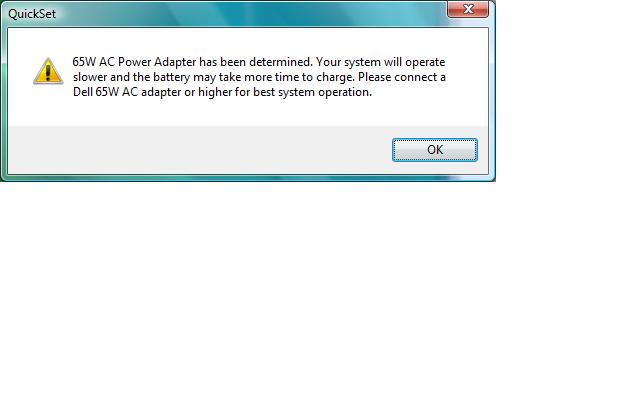
I found a problem with A08 bios on my laptop. With A08, upon resume from suspend, quickset pops up a nonsensical error about my power supply. Attached. Problem happens under both vista and windows 7. I have a 9400m based system and my power supply is the default so 65W is the right power supply.
I reverted back to A07 bios and I no longer see this error.Attached Files:
-
-
Same here right hinge light didn't work at all did the "live Dell chat" thing. I've called Dell about things and it's a joke... But typing man can't go wrong took less than ten min to have them figure out the problem and tell me that they would send someone out the next day. Bright and early my screen was fixed. Havnt had a single problem with my lappy accept that. Got it on the 16th of this month runs pretty cool too...
-
-
I also have a08 installed.... No problems yet
-
Does anyone have Windows 7 RC 64-bit running?
The nvidia driver (installed via Windows update) does something odd on my system. The Hybrid SLI swtiching function is actually implemented more nicely than it is with the Dell Vista driver. The only problem is that my wallpaper turns solid black each time I switch mode (either way) and the only way to get it back seems to be to toggle Aero on and off. -
Where can one find the A08 Bios? It's not on dell's website that I see.
-
How different it is implemented?
cheers? -
Can someone help me!! My SXPS 13's tsst dvd rom won't take any disks. It will just refuse to read and push the disk out after i inserted the disks. The Dell tech came today and changed to a new TSST dvd drive but it has the same problem. I don't know what is causing it or i just have bad luck?
-
It was pulled after a few days. Look back to earlier posts in this very thread. The problem I found would be good enough reason for it to have been pulled...
--->The Official Studio XPS 1340 Owner's Thread<---
Discussion in 'Dell XPS and Studio XPS' started by Cin', Jan 24, 2009.