Problems? See this thread at archive.org.
is there a way i can replace that silver piece around that circle light on the screen hinge? my kids seemed to have broken it off...
and how do I get the keyboard off so I can get the crackers out of it too....
kids.....
-
I have read of someone putting in a Q9300 core 2 quad but I would go to a T9900 dual core max. You shouldn't need more than that. Ram can expand to 8GB. It requires two 4GB sticks. I personally haven't had an issue with scratches on the screen but a soft cloth could help
-
I've never had an issue with the screen scratching either, that's because dell helpfully put two rubber spacers by the speaker grilles. I think it must only be badly built ones which scratch as the plastic in front of the screen would have to sag for it to scratch.
-
Would be nice to have xps 164X owners to say what they DONT like at their machines.
-
Hello, hello.
I'm looking to purchase a used SXPS1640, but after a bit of research I ran into a massive amount of information regarding throttling issues. I was wondering if this laptop is worth buying at all.
The laptop I am looking to buy (used) has the following specs:
256GB SSD
4GB 1067Mhz RAM
Core Penryn T9800, 2.93GHz, 6MB
not sure if it's RGBLED or WLED, not sure about about the video card.
The person who owned this laptop bought it around Sept. 2009, so the video card is probably whatever it would have been at that time (3670?). -
The video card will probably be a 3670 yeah or maybe the 4670.
If you're going to be using the laptop for heavy gaming then it probably will throttle to be honest as it is the older model, especially if it has the RGBLED display (draws more power than the WLED).
If you're not going to be gaming and if you're just going to be using it for everyday tasks then you won't have any problems.
The 130W power brick helps and if it doesn't come with it then you can get one from Dell.
Hope this helps!
-
Probably the 3670, The 4670 was after that time.
Does the person your purchasing from, have any Warranty left on this, that will be able to be transferred over to you?
You should be able to get the full specs from the Owner before purchasing. I would suggest you do that. That way you know exactly what you are up for.
Cin... -
I attempted to contact him, but to no avail =T
I do intend on gaming (likely SC2), so I guess I will abandon this purchase. I think he does have transferable warranty, but I'm not sure I want to try and fight Dell support to try and get a replacement. I do kind of want a usable laptop quite soon, as I will need it for college in a bit over a week.
It's too bad. I was excited to see how high quality the screen was =T.
Thank you & Kezuk12 for your quick aid, though =] -
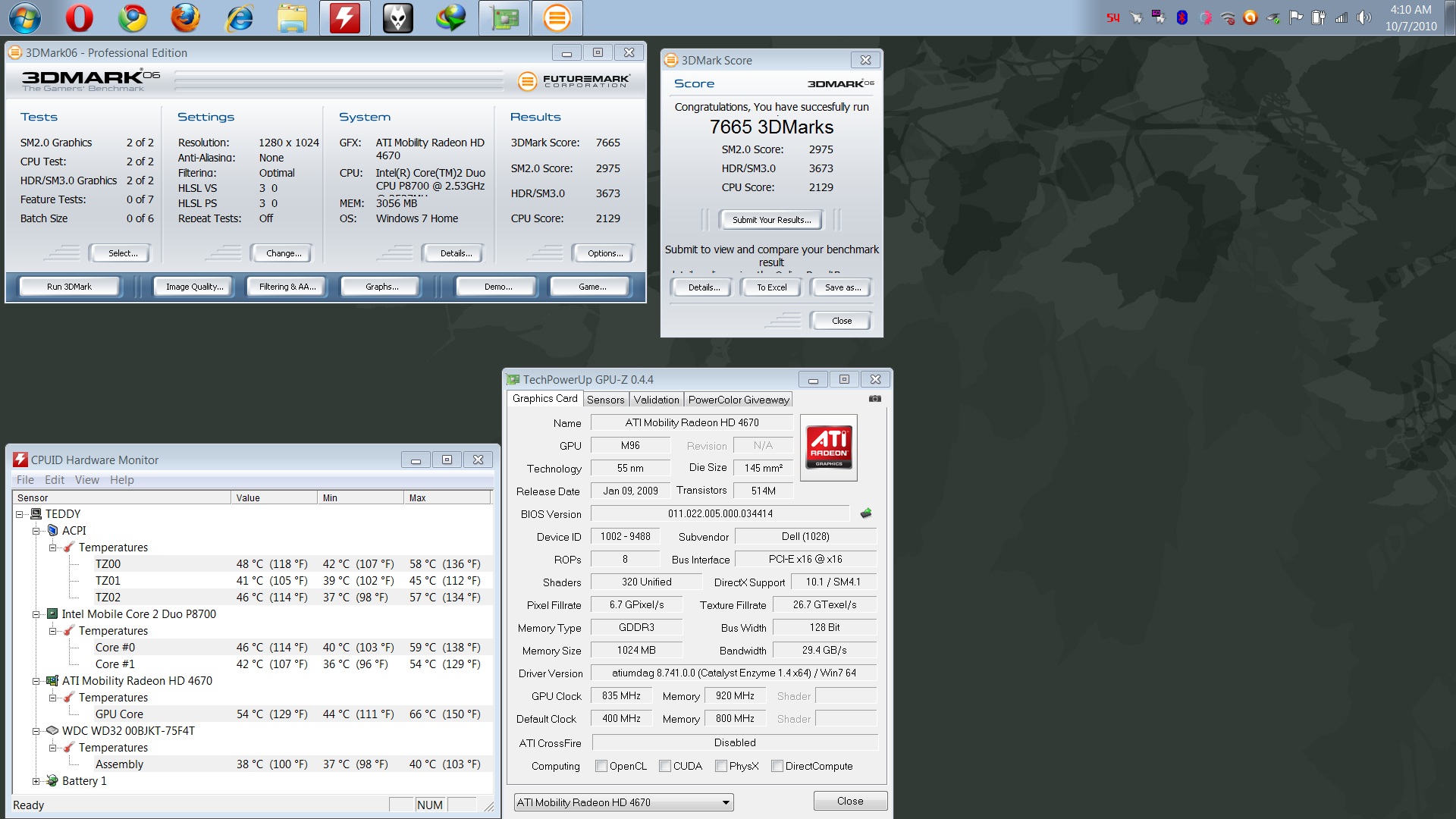
Purchased SXPS 1640 with P8700, 3GB, 320GB 7200RPM. HD4670, 1080p with Belkin messenger bag for $900 last month for my sister...
So far, stable score ..
Attached Files:
-
-
Anyone got anywhere with identifying the clock generator yet? I just say a thread about GPU overclocking for it which made me remember. A while ago there was a thread, something about how the setFSB guy said he'd try and get something up and working if we could identify the clock generator. There were a few attempts but after a while the thread just died out.
-
Anyone else's speakers sound blown? Mine sound kinda blown, like certain frequencies make the speakers over-modulate. Any ideas? Would this be covered under the warranty? Thanks!
-
Today I tried updating my Bios from A..08 or maybe 06..don't remember to A14. I download the exe from Dell but when trying to run it, it says it cannot continue because "1. Machine info not detected, 2. Version info can't be detected."
Has anyone else experienced this? I just did a fresh install of Vista last night but everything works fine and looks good in the current BIOS. -
........double post
-
Seems that no one looks in here anymore...
-
The A14 bios works fine in Win 7 HP x64, no problem about "1. Machine info not detected, 2. Version info can't be detected."
Tested on SXPS 1640 with P8700... -
What were the changes made over the past few generations? From A08-A14, would there be any benefits in performance or power use?
I'm not aching to upgrade, but recently did a clean install and wanted to do the BIOS just to have everything recent.
However, it seems that there may very well be an order to install the drivers. Which? I don't know. After doing the AHCI during install, then the Intel chipset, video, sound, wireless card, and everything else. The Synaptics touchpad driver won't install off the disk and the newest driver from Dell bluescreens my comp during bootup!
Not a big deal, the driver isn't needed to run the touchpad but I really miss middle click to open a tab in the background of an internet browser. I can't get Quickset to work either. It says the system is not supported during the install for both old and new driver versions. Also not truly essential, but I didn't have this problem when I bought the comp. If I remember correctly, I just inserted the disk and went down the list.
Anyone with some ideas would be appreciated. -
I didn't notice any changes...
When I bought it, the BIOS version was A12...
Synaptics driver and quickset also installed fine, did you download the correct version with your OS? 32bit or 64bit? -
I downloaded 64 bit versions given by my service tag #. Even the drivers (just those two) that came on the disc shipped with the laptop won't work.
Can't have everything I suppose... -
You downloaded this Quickset?
http://ftp.us.dell.com/app/Dell_QuickSet_A07_R272666.exe -
Yes, 272666 was the first one I tried. I don't really care about Quickset though, one less running process. I'd rather have the touchpad driver working right. I'll keep at it.
-
and using this synaptics driver, right?
http://ftp.us.dell.com/input/R242713.exe
did you try to install the driver via device manager? -
Yes that is the Synaptics driver I originally used.
It's working now though...strange. When it was BSOD'ing earlier, I uninstalled this driver in safe mode but the extracted folder was still in the drivers directory. I just reinstalled it using the Synaptics Setup.exe file instead of the Dell autorun. Now it's fine.
Thank you for the suggestions. -
Anyone having problems with their Microphone array not working (can't enable it)?
I've got a XPS 1640 and was trying to use Skype and couldn't get the program to recognize the internal mic. Tried making a recording using the Dell webcam central program and had no audio with that program either. BTW works O.K. with an external mic plugged in.
Went to the IDT audio control panel and tried to enable the microphone array and I get the message "this device is currently disabled and cannot be used". I've used the internal microphone array for Skype in the past with no problems.Just updated Skype today and noticed the problem when I tested it.
Help...... I'm leaving on vacation tomorrow and would like Skype to be operable.
Thanks
Ken -
can somebody provide me with the Windows 7 OEM theme on one of your Studio XPSs 1640 as I had to Re-Install Windows and now I lost the theme
-
bump bump bump
-
I have a XPS studio 1640 with the following spec and wondering what is the fair price to sell it. The laptop recently has a new motherboard replace by Dell under warranty(won't charge the battery) Warranty will be expired in 2 weeks.
XPS 1640 T9400 (2.53GHZ) Core 2 Duo
Vista Premium
4Gb DDR3
6 cells and 9 cells batteries
Bluray combo
16" Full HD RGBLED
ATI radeon HD 3670 - 512 MB
500GB hard drive
Intel 5100 WRLS-N
Dell Wireless 370 Bluetooth
Thanks. -
I just bought an i7 720, 4GB, Bluray RW, 256GB SSD for £700 if that's any help
-
2+ years and first problem w/the 1640... hard drive went pop. Guess I have a reason/excuse to get a SSD now.
-
howdy all
i have a dell 1640 that gets hot sometimes and does not recognise the charger. i found that if you unplug and replug the power connector it will charge for a little bit. if the battery reaches 90~95% then it will charge normally. this works most of the time.how many of you in general have the extended run batttery pack? it seems like a software bios problem more than anything, at least to me. this system is a dual boot system and when i boot unbuntu 10.x and up i do not have these problems. the cooling fan cycles as i expect and the battery charges normally... go figure....
one thing i have worked out after taking the bottom off and removing the fan and blowing off the heat exchange, several times, remove the little square plastic "screen" that is on the back cover. it drasticly blocks the air flow and plugs up relentlessly. mine works great without it. for months.
blow off the heat sink weekly with "dust off" from the rear of the case. then turn it on to blow out the fine dust.
what would really be COOOOOOL tho, would be for some kik-fanny programmer to make a monitor utility that would grab the data from the power supply monitoring address and display it and also provide a fan speed override with overtemp safetys in it. -
Hi All,
I'm the new newbie here.
I don't know why I've just joined this lounge now, I've had my Studio XPS 1640 for over a year now.
It's such a beautiful machine, even two years since its launch, I don't think there's any other laptop with such a combination of fine materials as aluminium, leather and plastic.
We should start a petition to get the SXPS recognised as the most beautiful laptop ever built. Ever.
-
I think the closest prog available for that is CPUID's HW monitor and PC wizard, although I could be wrong...
-
Do you think Dell would have the motherboard datasheets to hand? I'm trying to think of a way to jimmy the PLL info out of them for some fun.
-
i'm so sory i'm not understand with the computer, now i this new praktic the computer.
![[IMG]](images/storyImages/grey.png)
-
My 1640 is with an Alps touchpad...anyone have link to a 100% working driver for Windows 7 64bit?
Extra bonus if it supports circular scroll.
I have tried and tried to find a working one but no
Btw anybody applied the new A15 BIOS update? Anything visibly new in settings, or noticeably different while computer is running? -
I upgraded mine last week, the only difference was the option to activate security tracking (like LoJack) in the BIOS menu. But be warned, once you do it you can't change back.
Another thing I noticed was that the fan would spin a bit faster (louder) and more often. But then again, I could be wrong. -
I think the Studio XPS models are really good looking.
Has anyone heard of any news telling about the future of this line?
But then again, Dell isn't doing so well in the notebook or PC market. -
i got a problem with the color profile..i am a photographer and whenever i edit using Photoshop and export it to any other laptop the image is usually darker than it used to look in my laptop.is there any way to fix this using software
-
Hi every one I am new to this forum. Quick question...
I was wondering whether or not the GPU in the Dell Studio XPS is soldered to the mother board or not. If I wanted to get better frame rates for BF3 would it be wise to get the 8GB ram option? Please reply thank you.
Dell Studio XPS 1647: Intel Core i7 620M, ATI Radeon 4670M 1GB, 4GB DDR3, 1920x1080, 90W Charger, Windows 7 Professional 64-bit 640GB Hard Drive 5400rpm. -
The graphics are soldered on like the other 99% of all laptops.
-
Do think upgrading the RAM to 8GB will help gaming? And if so are there any cheaper alternatives to Dell's memory - expensive.
-
If you have lots of programs open in the background while you game then it might help or play RTS games then it might help, otherwise it'll make little difference.
As for alternatives to what Dell sell there are many different brands. Unless you're getting high end RAM then anything more than £20-£25 for a 4GB stick then you're getting ripped off.
Just checked, Dell are trying to sell a 4GB stick for £135. I doubt Apple would even rip you off that badly. Just get two of these if you want to upgrade, I'd have to hit you if you bought it for that price from dell.
http://www.ebuyer.com/191220-corsai...z-laptop-memory-kit-so-dimm-cmso8gx3m2a1333c9 -
Back to Dell; joining the SXPS 16 crew:
T9550, 4GB ram, 4670, 500GB Seagate and RGBLED 1080p all for $360 craigslist. This thing runs hotter than my old Inspiron 5150 (P4 3.06GHz). Dell is still making cooling systems that are still not up to par 5 years later....
Using RMclock to undervolt and limit to 9x multi and replaced the stock paste with MX-2 still idles around 50c and jumps to 70c on Prime95 load. Futures plans are going to change to P8600, remove all the dust filters and replace the stock heatpads..
UPDATE: Replaced the stock heat pads and changed out the T9550 to a P8600. It runs about 8c cooler. Idles high 40's and maxes around the mid 60's. Overall I am pleased with the results. If anyone wants the T9550 PM me.
RMClock settings:
![[IMG]](images/storyImages/rmclock.jpg)
-
I realise this thread is a little old, but I was wondering if anyone could shed any light.
I'm planning on upgrading my 1640 soon, and hoping to put a mPCIe SSD in. However there is no documentation on whether boot from the slot is even possible or whether it'll even recognise the drive. There are a few mini PCIe SSD's out there which have their own integrated SATA controller, so it's not the same as the faux mini SSD's you see in netbooks.
Since I'm out of warrenty, dell won't talk to me unless it's on a phone line to a call centre in India, where it's hard to even tell what they're saying (no offense, India, but over a phone line things can be difficult). -
I took my bluray UJ235A out of my XPS & installed it in an external enclosure so I can use it on my MBP, is it possible to install the MBP superdrive which is 9.5mm in my XPS? Im going to add an ssd into my MBP optibay.
-
Hopefully this won't get me in trouble for thread-dredging, but it is the only thread dedicated to this rather troublesome machine.
Does anyone have a 240w power supply (or whatever lager size comes after 130w)? Is there any benefit to it? My own rough calculations at one point suggested this machine could use over 150w with GPU and CPU fully loaded so if true, the 130w is still not enough.
I'd imagine if it is worth it, you'd have to get one intended for the XPS 17 line. -
Wow, it's been a long time since the last post in this thread!
Just thought I'd post and say I'm still rocking this laptop and if it lasts at least until May then I'll be able to say it's served me well for the entirety of my University course. Almost 5 years! There was only ever one problem, the first month I had it a Dell tech had to come round and swap out the motherboard free of charge.
Oh and of course it was vital to get a cooling pad for it, a Zalman has kept the heating down really well.
Thinking of swapping out the processor soon for one of the fastest Socket P ones... -
I got my 1640 as a replacement for the 1535. It's been great with one exception. My CD/DVD player is kaput and I rarely used it. I haven't bought an external drive, but might at some point. I also don't use this laptop as much now that I have an iPad though I could never be without a computer.
I'm wondering what others are thinking of buying as their next laptop. -
Just finished up installing and setting up Windows 8.1 on my 1640.
Drivers mostly seemed to install automatically. Only extra things I did was download the latest graphics drivers straight from ATI, install QuickSet (still works), IDT audio drivers.
One problem was how to enable the touchpad's multitouch abilities. The latest version on the Synaptics site doesn't install, ended up installing a set for an Inspiron laptop (filename "R257288.exe") and they work great.
Lastly, I was running around like a madman wondering why the Creative webcam (Integrated Camera) seems to work in "legacy" mode but when trying to load the Windows 8 Camera app it displays an error. Skype originally wasn't liking the webcam but after updating it through the Store it seems to be working now. Maybe in the future the Camera app will be updated, if not it's not even a big deal anyway.
You could probably pick up a replacement drive off eBay pretty cheap if you wanted, maybe even a BluRay? -
I thought I'd chime in and say that my 1640 is also still with me and remains my main computer.
It's not without its quirks and it's starting to show its age, but it's lasted me well so far. Most of the faults are purely cosmetic. -
Same, I've got some dust behind the screen which I could clean but it doesn't bother me. The plastic encasing the left hinge is very slightly undone but still strong. Apart from that it's all good!
The Camera works on Skype in Windows 8.1 with the Windows default drivers, not the Creative ones.
I've upgraded to an SSD and the processor from a T6440 to a T9600 (2.0ghz dual to a 2.8ghz dual). Loving it and now that I've set up Win8.1 with everything I need I'm really enjoying it. Upgrading the processor was so easy, love that Dell left everything easy to access.
One thing I'll say is that anyone reading this should just take the battery out, take off the bottom cover and slide off the vent on the left hand side. I didn't realise that a lot of dust had accumulated in an area which was completely unreachable. It's helped the airflow a lot now that it's gone.
===> The Official Studio XPS 1640 Owner's Thread<===
Discussion in 'Dell XPS and Studio XPS' started by Cin', Jan 23, 2009.