 Problems? See this thread at archive.org.
i've never had luck with that Quad. everytime i try to use it to get something, it comes attached with a virus,worm,trojan - the whole gang. never used atempted to get anything again using that method.
-
Is there any way to use the HDMI port to connect to a monitor with VGA only? And if so, would this give you the capability of supporting 3 monitors (the notebook LCD + 2 external)?
-
Should be safe, but just make sure you've got everything. I didn't notice anything obvious that would be missing, but I might not be thinking of something. I would have reinstalled onto a new hard drive had I kept mine.
UAC has nothing to do with you knowing what you're doing. As I mentioned before, if you do know what you're doing, you're actually more likely to benefit from it as you'll respond to warnings correctly.
As I said, I've run across plenty of programs with issues, and so have others. It may be random luck if you've not seen issues.
I don't know what you're doing. This isn't a "belief". You don't seem to understand what UAC is. As I've said, Microsoft wanted to make it worthless in Windows 7, but the security community's outrage has had them reverse their position. I suppose they could again, but that would be bad for all of us.
[...because you're probably the first one I've encountered that has been praising UAC like this. And yes, I'm actually in the business (for real).[/quote]
You've yet to explain what your problem is with it, nor understand it's main purpose. There's no reason it should be causing much inconvenience.
That makes no sense. What's "stupid" about it? I already went through the reasons it makes sense, and what hardware can't they use? -
you mean using the vga port and the hdmi port to connect to 2 vga displays?
-
Nevermind I figured it out because I'm awesome
-
To successfully install W7, is it just as simple as installing all the drivers from the dell site or dell cds?
-
Yes, that is what I mean
-
That's good to know. When and if I can get a 1640, at least I won't do something crazy like sending it back before I know for sure that the scratch I see really exists.

Actually, when I first got my Sony LCD, it had what appeared to me to be a scratch. It was just some residue streak that came off with a micro-fiber cloth. -
FYI, for those of you finding 1920x1080 too small, and not liking the ill effects of altering the DPI, I just tried adding a couple of additional resolutions using PowerStrip with good results. 1696x954 looks good, and so does 1600x900. I'm going iwth 1696x954 for the time being.
-
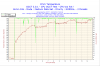
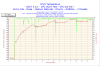
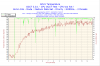
I just ran CPU:OCCT and it stopped saying "CPU too hot" from overheating I guess. I've got the 2.93GHz cpu.
Is this really bad? What should I do?
-
Have you under-volted?
-
I haven't changed anything on here, it's all stock and how it was when shipped.
It says I'm hitting 80c+. Is that dangerous? -
It's within the temperature specs for it but cooler would be better. I'd start to worry if you were starting to get 90C+.
http://forum.notebookreview.com/showthread.php?t=235824
There is the location for the under-volting thread if you decide to try it. The thread says you can loose 5c-20c so you might as well try it.
EDIT: Intel says the thermal spec for the T9800 is 105C.
http://processorfinder.intel.com/details.aspx?sSpec=SLGES -
You better take care of that cough.
Anyway, I plan to upgrade to Win 7 on the notebook I eventually decide to get. -
That's good! I guess I should ignore that program since it didn't go above 85c.
-
Dang that's hot. If that's on idle that's scary.
Mine's only a 2.4 but I can't get it over 50c at 100% usage. -
Awesome! Now you can relax and enjoy your new laptop.
-
Yes, it is that easy. Windows 7 includes most of the drivers needed. The Vista 64 drivers will work for anything not installed automatically.
-
Nah that was pushing it full (using a testing program) for about 15 mins.
-
Has anyone tried to take off those ugly intel centrino 2 and windows vista stickers with any luck?
-
I'm not sure though if T9800 is supposed to run that hot at 100%.
(My P8600 reaches only up to 67C when run at 100% usage for 45 minutes straight using Orthos, not undervolted. It's 30-32C when idle.) -
I tested 3DMark06 on mine (C2D T9400, 4GB DDR3, HD3670, Vista HP 64) and result is 4420 points with Ati Drivers 9.2.
I also tested quite old game Call of Duty 2. On DirectX 7 it is perfectly playable even at 1920x1080, but with DX9 I have to go down at 1366x768. At both resolution I used Anisotrophy filtering. During the game I found a real issue with really lot of heat under my left wrist. Actually I have to put something between the lappy and my wrist to be able to continue with the game.
XPS16 is also quite noisy. Fun on graphic card is still runnig even in windows desktop.
This extreme heat and noise was big disapointing for me. From what I have been read in reviews this should be fairly quiet lappy. -
Pitrs81, where did you get your ATI Drivers 9.2? Does this fully support Mobility Radeons?
-
yeah they came right off. its so much easier to de-fingerprint the thing without them. they are metal stickers so they came right off. just dabbing at the adhesive with the removed sticker got all the glue off.
-
I downloaded it from NBR Alienware forum. Catalists 9.2
It is for all Mobility Radeons. With this drivers I have even better graphic performance. -
HI guys,
M having this laptop from last 10 days....
laptop is gr8 & everything is so good...
Has anybody feel that even after normal use of 20-25 Mins , the area below touchpad gets heated up.... & even touchpad feels a bit on warm side..
heating up on other locations is not an issue...., bcoz on heavy gaming ..every laptop gets heated..
but touchpad area is somewhat makes uncomfortable.., specially if you are not using usb mouse.. -
alonxo, my touchpad is always warm too.
Thanks Pitrs81. +1 rep for you.
Is it working without any issues for you Pits81? I read some scaling issue on the first couple of pages in that URL you posted.
Also, did you get any errors or had to use that Mobility Modder for it to work? -
speaking of vista 64 limitations, has anyone had them? when people talk about compatibility id like to know what issues there are out there.
so far i have only had one program not work, atomic alarm clock. other than that all my applications and games installed and function properly. -
No issues for me at all as far as 64 goes. Winamp and Chrome are really the only programs I run that aren't standards, but no problems with them at all.
-
Thanks you.
It works for me without any issue. I just downloaded 64bit and install it without any modifications. I have NO errors during installing, running 3DMark06 and playing Call of Duty 2.
DH Mobility Modder is tool that can prepare ATI Mobility Drivers from Desktop drivers. I used it some time ago since there are not exists official mobility drivers for WinVista and it works correctly. -
I feel the heat a lot mostly on the left side (under my left hand). I think the 9cell batery could help because it lifts up notebook a little and makes some more free space for air circulation.
-
No, I've only ever had one very minor application that didn't work in 64-bit and I've been using it since the release and I run loads of different programs and games.
-
I noticed last night playing Counter Strike that the heat is terrible on the left wrist. In between rounds I pull the monitor down a bit to open the vent up, that seemed to help a little bit, but I think I may get a USB Keyboard to play games with while at home.
-
Every laptop does not have a heat problem from gaming. My 1705 and 1720 don't even get warm. My husband and I both found the 1640 uncomfortable to game on. It is just too hot. I'm hoping Dell will come out with a new model that doesn't have a heat issue!
-
Has anyone used sandpaper to degloss the finish on their SXPS? Im thinking of doing this. Although, if the plastic is acetate than it may still be a dust magnet.
-
Why would you want to do that?
-
lol.. i figure its gonna be full of fingerprints anyways (esp, the palmrest); given the choice between fingerprints and a matte finish, i would choose the matte.
I'll probably use a very fine sandpaper. .. although, i should probably see it in person first when it arrives next week before i do anything drastic
im gonna take those Intel/windows stickers off too. -
I've been wanting to take the stickers off, I'll probably do it tonight. As for the finish, I don't think you'll want to change it. It really is a beautiful computer, the leather is even starting to grow on me.
-
I don't think that will have the results you expect. Unless ruining the screen is the result you want.
-
Oh, i wouldnt do the screen; just the palmrest and 6/10ths of the lid that is glossy. I would go all out (mask the area off, use wet sandpaper, etc) to protect the screen and unit while doing it.
-
Quit bustin his ballz, If he wants to "experiment" then hey go for it ImakE! you can always buy a replacement exterior lid from Dell parts or even put a decal on it. Do your thang. Land of the FREE, home of the haters.
-
Windows XP has always done this, and so does Vista.
For some reason, Microsoft has some idea that people don't like seeing what type of file types on our computers - very strange.
I do installs for people, and always, always uncheck that option in the folder views area. It's annoying as hell. MS should re-think this option.
Ever talked with somebody over the phone and ask them to look for an image, or song, and tell them to look for a .jpg or .mp3 and they say they have no clue what you are talking about ? ... that's what hiding extensions of known filetypes does to new owners of computers.
It's just silly. I like to know, in a fraction of a second what type of files are in my folders.... and I think everyone else does also.
-
does everyone actually believe every post that is posted to forums ?
Unless you actually see a video of this user sandpapering his laptop,
then take it with a grain of salt.
Talk is cheap.
-
Windows 98 did it as well. I think for novice users, it's a must to hide them. I can't tell you how many times people in my family have called me because they renamed files accidentally and removed the extension and had no clue how to fix it. Some people have business seeing the extensions, some don't.
-
Good point, it's hard to rename an extension that way,
but it's also very annoying when my dad couldn't figure out what
was a jpg and what was a doc or an mp3.
Good point though.
-
lol.. I'll take photos for y'all; im expecting it next week; so sometime soon after, when i get it up and running (and 95% sure i dont have to return it).. maybe i'll do a youtube video if i can figure out how to do that with my PS3
but, i just dont understand why ppl put black, glossy surfaces on areas that are meant to be handled.. great for PR photos, but, they get ugly very fast
Ive done similar in the past; eg. on my 1st gen. ipod nano (the scratch prone one), sanded it down and used clear (scratch resistant) nail polish and covered the screen portion with it. It improved the contrast and of course made it more scratch resistent. -
don't do it man, don't do it !
, really don't do it. I don't want to see you doing that, it would make me sad seeing somebody do that to a beautiful laptop.
-
samething with my 52inch Samsung series 8 (LNA850) - it has that high glossy look, fingerprint magnet, dust magnet, I have to whipe it every 2-4days.
Also my Sprint Touch Pro cellphone from HTC - has that gloosy black front display and makes the phone surface look dirty.
on the other hand....my MATTE gunmetal gray PS3 (MGS4 limited edition) is finger print proof..why aren't we seeing this matte finish more on gadgets? -
Ease up there Keyboard Hardass.
-
The hard disk is on that left side of the trackpad. Below the trackpad I think is the wireless card.
===> The Official Studio XPS 1640 Owner's Thread<===
Discussion in 'Dell XPS and Studio XPS' started by Cin', Jan 23, 2009.


