Problems? See this thread at archive.org.
I just reread what you wrote. I apologize, the vents on the bottom suck air in, the ones on the back blow it out. That cooler is the one you want. Lack of sleep got the best of me.
-
Np, thanks for the info

-
Thanks for the reply guys. I was offered a replacement system because of a peeling logo - hopefully the replacement will have a more quiet BR drive.
-
I went with the NZXT Cryo in black and it looks GREAT and works just as well!!!
-
I've finally gotten City of heroes to work with my XPS16. It only works in 16bit colour mode and I had to disable the Catalyst AI setting.
Playing this game in 1080P is just fantastic, the details and textures are mind blowing. The only problems is that 1/2 hr of game play and the fan is full on. It sounds like a hair dryer...it's screaming. After 2 hours play and the laptop gets so hot I can bun my skin on various parts of the case. So I think i need to get a Zalman cooler too.
It seems that the cooling system is fine for day to day general use, but use this laptop to the max and it's cooling is woefully underpowered. -
Do you guys think the new ATI card will help anything other than gaming? I don't game and just wonder what the other benefits are of having this card? Would it be better heating/longer life, or better battery life? Or, more efficient HD/blu-ray playback?
-
It would help with stuff that runs on the GPU. Might help a bit with Blu Ray/DVD and general Windows stuff too, although the older GPU is decent enough for that.
-
IMO, just a change in gaming performance. 3670 is more than capable enough to play BD smoothly.
3670 and 4670 use the same power, so there's gonna be no change in battery life. -
I just received my XPS 16 and it's everything I expected. Absolutely gorgeous laptop! I'm listening to Akon through Pandora and after adjusting the sound settings through IDT Audio, the audio is fantastic. It did initially sound louder on the right side as others have stated but it's easily adjusted using IDT. The RGB LED display is breathtaking, it looks just as good as my 46" Samsung. The reds/oranges are very deep and the whites definitely stand out. The only thing is that using this laptop on your lap (imagine that) does make it get uncomfortably hot. I haven't done much else with it since I will be returning it for a refund (waiting on the newer version to be released) but I plan to install Left 4 Dead tonight along with some other Steam games and see how they work (I'll post some benchmark numbers).
I'll definitely have a difficult time returning this laptop, it's a masterpiece and makes my girlfriend's macbook sitting adjacent to it pale in comparison. I don't know why some in this thread were berating the XPS16 and running to a macbook, I have both laptops here and the XPS 16 is far better in design and function. Oh well to each their own I suppose.
BTW guys, I got this laptop through Dell outlet and it's in perfect condition, not a scratch or dent on it, seems new. The packaging sucked (it wasn't like the kind you guys get when you buy it new) but who cares about that. Now I can't wait until the 4670 version comes out! -
^Well, Studio XPS 16's Apple counterpart is the Macbook Pro, not the Macbook.
-
is there a scheduled date of a newer one to come out soon..? Just ordered mine too.
-
Even then the MBP isn't any better and especially once you factor in the price difference between the two (>2:1 in my case). I love my iphone but other Apple products fail to impress me but this is my opinion and everyone has one so... -
Yes, of course, I agree with you. I'm a 1640 owner too. It has a better screen, HDMI, Blu-Ray, at less than MBP's price.
I'm just saying that it's unfair to compare a 16" laptop it to a 13" Macbook. -
I was actively searching for alternatives to the SXPS since I'm one of those people that has very little patience and the wait is definitely going to get to me for the 4670 version. But ya know what? I couldn't find a single laptop that was as appealing as this one. Most of the ones with a decent video card have a butt ugly design coupled with old hardware and inferior LCD or in the Mac's case, are aesthetically nice but not as nice as the SXPS and also lacking in features (plus way more expensive). If Dell manages to improve cooling in the revised SXPS along with the 4670, they will have an unbeatable laptop on their hands--hopefully they don't realize it and charge us a premium lol! -
I couldn't agree more with you 5150Joker. Thats exactly what I went through. I just simply couldn't find a laptop that looked better while packing in the same hardware (Mac look as good, but are insanely expensive and lack the features). I kept looking back at Macbooks as an alternative to the 1640 (because of heat issues) but couldnt justify that cost. And all other laptops are hideous (in my opinion) after having looked at the 1640 so closely.
I'm not sure whether to be patience for my newly ordered one, and then be able to exchange it easily for the new version, or to be extremely antsy and check my order status every 5 minutes. I've decided to go with the latter.
-
Haha that's exactly how I am, I get really antsy and check the status of my order every 30 minutes. And you know about the heat, this laptop does get a bit toasty but so does my GF's macbook. It's the nature of the thin design I guess, there will always be compromises made. I'm just reallly impressed Dell managed to pull such a beautiful and well balanced design out of nowhere, especially given their reputation. Whoever was in charge of the SXPS design was hopefully promoted and will continue the trend. -
I just received mine today as well.. haven't opened it up yet, but i am about to. Ill install final fantasy xi and the last remnant today and see how it plays...and then i'll make a decision...still dont know how long the wait would be for the upgraded version.
To be honest after reading your impression im kinda scared to open it and then find out that i dont wanna give it back!!!
well. ill let you guys know. gonna open it up now. -
Well you will definitely feel tempted to keep it. However, I just tried Left 4 Dead at native resolution and all the settings on high (AA turned off and AF set to 8x) and it was chugging. I'd say the framerate was hitting the teens during heavy action so it definitely reinforced my decision to return the laptop and wait on the one with the better video card. The level of detail and clarity while playing was amazing though, it destroys my old 2005 FPW monitor that I use with my desktop. BTW Dell already issued me my return label so I'll probably send it off in a few days after I enjoy it a bit more
-
hmm im confused though.
when i made the order, i did it through the internet with a dell rep. i requested the RGB premium monitor and when he sent me the specs to my email, it showed "Premium HD WLED Display W108D" ... i told him I wanted the RGB display and he said that he did order the RGB display but that the codification would change, though i would still get the RGB even if it did say Wled. well, against my better judgement i pretty much shrugged about it.
Is there any way I can know if the display is the wled or the rgbled display? -
Do you have it yet? If so if you can go higher then 1366 x 768, yes you have it.
-
Doh, of course. wow. that one just bit me lol.
yup i have it. installing the games right now. -
You guys are talking about returning it so that you can get the upgraded video card, how long do you have to return it? I would like to do the same, but I've had it for a few weeks now.
-
You get 21 days to return it. Depending on which CSR you get, you may get hit with a 15% restocking fee. Tiduspr, make sure you update to the latest A07 bios and install the latest Catalyst drivers. With the new Catalyst drivers my FPS went up by at least 5-10% in left 4 dead. Just make sure you adjust the settings properly in the Catalyst Control Center.
Edit: I tried playing some games with the laptop on my lap but I think it just starts overheating too much and throttles like crazy. One min the FPS is hitting 50-60 and then boom it drops to 15-20 and stays there even if the laptop cools down so I have to end up shutting the game off. Thing is when I alt-tabbed the temps were only 53C so I'm guessing it's the card throttling and not the CPU. -
thanks for the heads up...will do in a couple of minutes.
Up till now my first impressions:
I second everything Joker said on the appearance. it is a beauty.
This pc...it does get hot. In my case. very very hot.
Im used to dealing with VAio FZ notebook that also had a sorta metallic casing and that Vaio used to get crazy hot if i was gaming... to the point that you could feel the heat in the room. And i also felt the heat on my fingers and thighs, but it was not much of a bother.
This laptop, however...i played "The Last Remnant" for a couple of minutes.. and at one point i rested my index finger on the touchpad... and no joke...heat sinked in and i sorta went "ouch" if you know what i mean. The lower part of the laptop gets very very hot as well.
I was sort of hanging on to some users' comments that it didnt really get hot, since im used to dealing with high temperatures on a laptop..but i think its pretty much out of the question having this machine on your lap if you are a gamer.
I installed "The Last Remant" and @ native resolution with high settings i was getting a pretty choppy framerate. Not "unplayable" but annoying. With low settings at native resolution it plays better. It plays best when i lower the resolution to 1280 x 800. then i can play at high settings with a good frame rate...but you have to play it in the smaller windowed mode...cuz full screen will just distort the graphics.
I am now installing Final Fantasy XI (ffxi) which is a pretty old game and should run well at max settings. i'm also going to install the latest drivers as suggested by joker and see how it goes.
At this point, i'm pretty much convinced im gonna send it back. If I do, im hoping the new card really makes a difference.
However, i'll install the new bios and drivers and let you guys know my opinion afterwards. -
this has been asked before, maybe someone knows now:
does anyone know what program can safely merge the recovery partion back to the c:
i have heard stories about some programs not being vista 64 compatible and corrupting the os.
has anyone successfully done it, and without formatting the drive? -
1. What settings did you put in CCC? (I also hear people saying that the Ati tool tray app is better, but w/e)
2. Try undervolting. My Cpu temp dropped from 69ish to 55-60 while gaming. -
Stupid question, but was it plugged in? Obviously you know your stuff from reading your posts, but the GPU will throttle power back if you don't adjust it when you're unplugged. I'm sure you know this, just wanted to make sure.
-
Got my UK Outlet Studio XPS 16 last night and whilst I've not had much time to use it, my first impressions are very good. Appareance is much better in person, very attractive. I was sceptical of the leather inlay, but it works really well in practice. Given that mine is an Outlet laptop, I was expecting a couple of scratches, but to be honest after a couple of minutes of inspection, I was able to find one tiny blemish on the silver trim. Build quality is better than I was expecting after reading some comments on here also.
I've not had long on it, but did get chance to install Windows 7. The only thing I'm struggling with are the bluetooth drivers which I will try to install again when I get time. Screen is great, but I think it needs quite a bit of tweaking as some of the colours are too intense. Also have requested a Power DVD CD from Dell as I didn't get one.
Saved myself ~£460 from the Outlet, so can't complain
-
Did you install Win 7 RC?
I had some issues with the BT on the 7057 build. The funny thing was it installed fine initially and then started giving me issues a week in. Since I reformatted with RC I haven't had any issues at all. -
Yeah Win 7 RC (build 7100).
In fairness, I just went through the Dell resource CD going mad trying to get rid of the uknown devices, so probably didn't help myself.
I think I might do another fresh install with the lastest stuff off the net this time as opposed to the CD. When I install the bluetooth utility it says installing and then tells me to press FN+F2 or activate my wireless connections. Shift + F2 does nothing whatsoever and the wireless button does WiFi only!
Hopefully another fresh install in the right order will sort this! -
yep, I had same niggles when installing Windows 7 RC. Aside from bluetooth the worse thing i had was that when closing the lid the thing just wouldnt turn off propery.
Before I did a fresh install had a tinker, and found an answer. The solution I found was to use this list http://support.euro.dell.com/suppor...river_install_order?c=uk&l=en&s=gen&~lt=print to install the drivers off the dell web page. All fine since then. -
I did the same thing. When I installed 7057 I had a few issues, but I didn't follow the list. I followed the list when I did RC and it went flawless. I was just getting ready to suggest this.
-
Yeah good suggestion, thanks guys. I just went nuts installing everything to get rid of the conflicts!
-
exact same thing happened to me, when it arrived, it was the RGB screen, hopefully it will be the same for you
-
yeah, i got the RGB , thanks !
Playing with the pc today... installed new bios and updated drivers yesterday before going to bed. If i do decide to keep it, ill definitely try undervolting it. -
Hey I need some suggestions, My 1640 is a month old and I was wondering which new drivers you guys would suggest updating and which ones should I stay away from? When I go to Dells site they list quite a few but I know you guys have had issues with certain ones
Thanks -
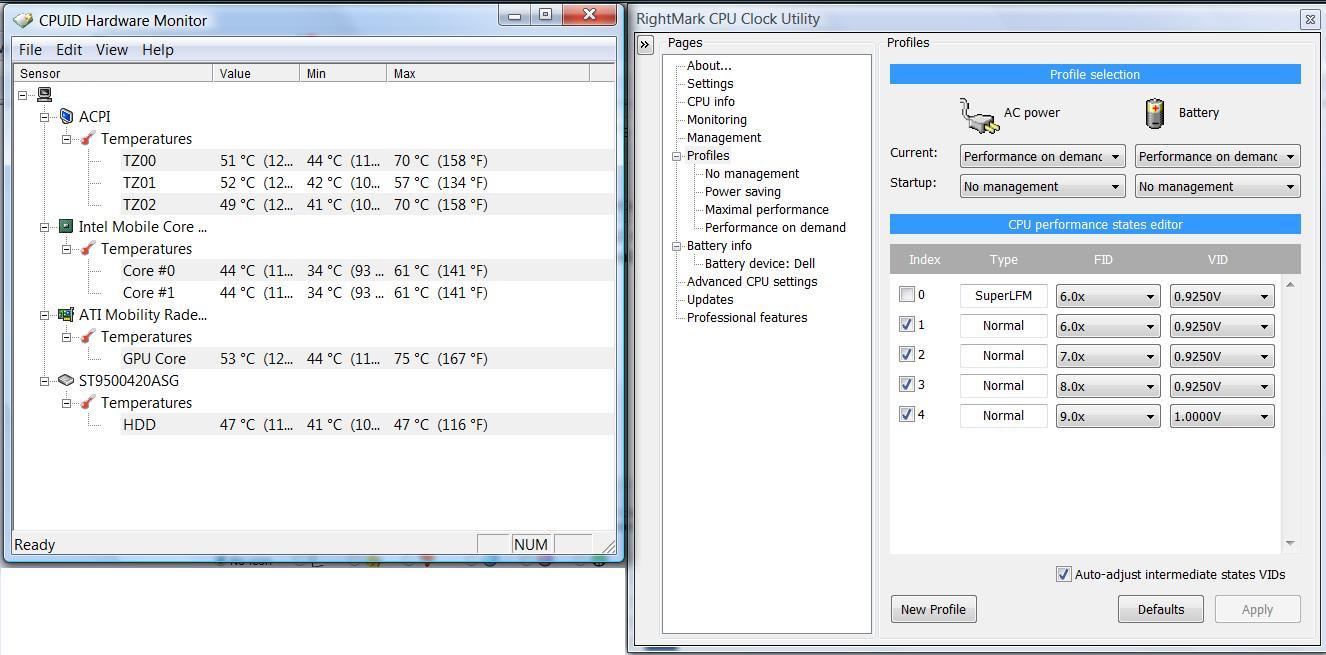
You should have good results using RMClock. I was able to use the 'power on demand' setting and run 0.875V on the 6x miltiplier and 1.00V on the 9x multiplier, with the two intermediate multiplers evenly scaled between the two. My temps also dropped 5-6 degC. I admittedly didn't stress test a whole lot, but it was stable using Orthos for 15 minutes or so - IMO that was plenty stable for the normal (non-important) things I was doing on it. You should run it for much longer though just to be sure.
-
The lowest allowable voltages for my P8600 is 0.925V (with RMClock or other undervolting tool).
-
You have to change a setting from 'desktop CPU' to 'mobile CPU' to let you get down to 0.875V. I forget which options page it is in, but it's there.
EDIT: I haven't used anything else other than RMClock, but I can't see why you shouldn't be able to get that low using it. What other undervolting tool have you tried to use? -
1. Settings are as follows:
a. Anti-Aliasing: Application settings
b. Anisotropic filtering: Application settings
c. Catalyst AI: Advanced
d. Mipmap Detail Level: High Quality
e. Vertical refresh: Off (performance)
f. Adaptive AA: Enabled and set to performance
g. OpenGL: Triple buffering OFF
So I've turned on performance enhancing settings like Catalyst AI as well as Adaptive AA and it did improve the performance of L4D without much IQ loss but like I mentioned, it overheats. In fact, it even overheats when I'm playing the game on a flat surface which is troubling. I'lll give the undervolting a shot today and see if that helps.
Yep it's plugged in and it only throttles after about 10 minutes of play. I alt-tabbed at the time to look at temps in speedfan and it showed core 0 and 1 hitting 60 C max so I wouldn't think the CPU would throttle at such a low temperature. -
ok so something weird is happening while im playing a game.
does this laptop have some sort of number or scroll lock? i ask this because while playing final fantasy xi.. if i hit control or alt it should bring up the macro menu we use....
but at some point it seems that the ctrl and alt buttons just stop responding...and wont answer to my input, sorta what happens when a pc has a number lock button and you accidentally press it. the only way i can get it to reset back is to restart the pc..
anybody have any idea if theres some sort of number lock or some sort of alt ctrl or function key combination that alters the keyboard input? i read the documentation but theres nothing.
**and now it just randomly went back to working the way it should.. and i dont recall doing anything particular =/ -
Forgive me if this question has already been answered. But, can somebody tell me when the new 4670 GPU be available to order (here in the USA) for the XPS Studio 16?
I need a new laptop ASAP and have been holding off for this upgrade.
Thank you... -
I am in no way as knowledgeable as most people on these forums however I believe there is no definite release date as Dell has not released any details other than a driver for the 4670.
My best estimate would be in the next 2 months. When the driver for the Studio 15 updated to include a new graphics card (February 17, 2009) the new model came out on I believe April 21, 2009, although I am using dates of Engadget articles meaning that it probably came out sooner but was not reported on until then.
If it doesn't come out by mid-July I'm either going to get a current Studio XPS 16 model or go with the HDX16, which I'd rather not do but is priced very, very well with a 30% off coupon and has a 1GB Nvida 130M option which is a very good GFX card and is much better than the 3670 (but def not as good as the 4670 ).
-
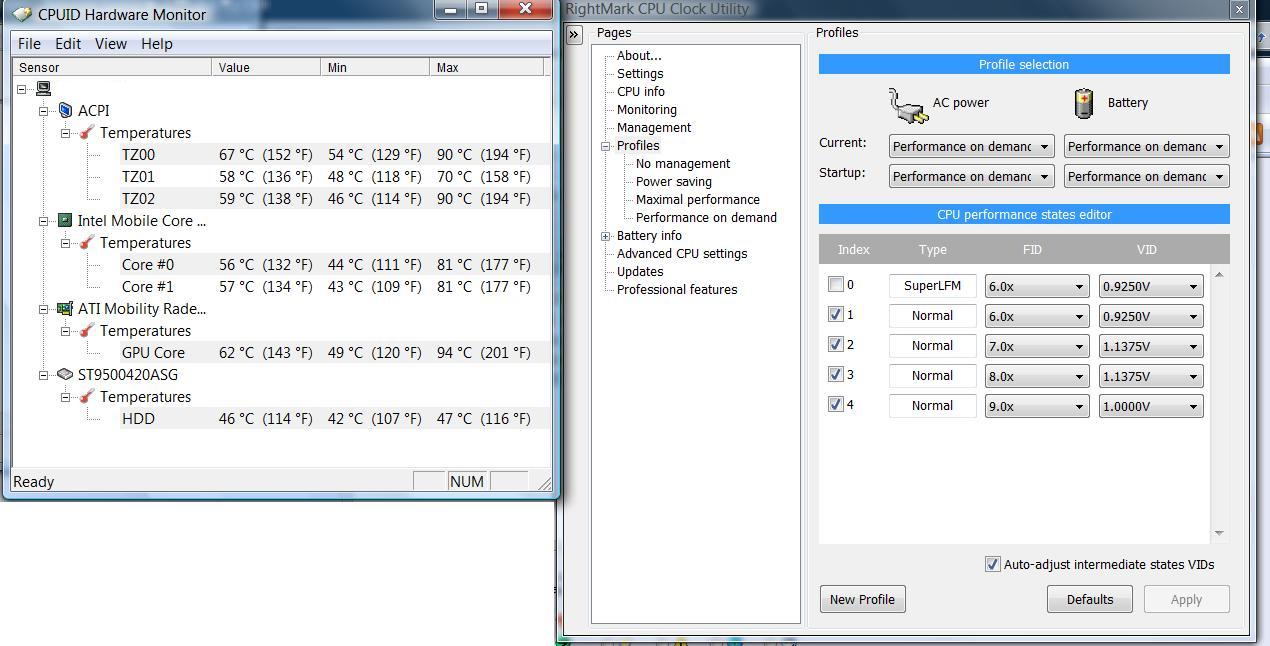
Ok I undervolted the CPU to 1.0000v at 9x multiplier and orthos was stable. So I went back into Left 4 Dead and the game was stable for about 15 minutes before it began throttling again. This time I had HWMonitor active the entire time, check out the attached photo for the temps. The GPU is geting extremely hot and the CPU despite being undervolted is still cooking. Looks like that may be the reason this thing was sent back and listed as a refurb. I'm sure the fix is as simple as opening it up and applying some AS5 but since I'm sending this thing back tomorrow I won't bother. That said, for gaming this laptop simply refuses to work, it begins throttling and kills the fps. Hopefully this revised version coming will have improved cooling otherwise a laptop cooler will be a must.
Edit: I received the 9 cell battery today. Maybe I'll install it and give it another go to see if the lift it provides is sufficient to lower the temp and increase stability.Attached Files:
-
-
What are your specs again?
I have 0 issues with games. I mean don't get me wrong, it warms up, but I never see anything close to those temperatures. What program can I run to tax my GPU and see what it gets to max? Orthos?
*I just installed and ran Orthos. The highest my cores got up to were 65 and 68 after 5 minutes. What can I stress the GPU with? -
Well my final thoughts on the xps 16:
Ive been playing final fantasy xi online, a game that is very old and should run with no qualms on this laptop.
As soon as you start playing the fps are great, and i can even be in heavily populated areas with no lag . However, after half an hour of gameplay, the fps will fall to 15 and then gradually decrease... this happens apparently as soon as the pc starts warming up... because you give it a chance to cool down and you can start playing once more at high fps for about half an hour more.
I cant qualify this as a good pc for gaming. FFXI is very old.. no computer should have trouble playing this at max settings. it is very disappointing. This is definitely going back . sad to say . will wait for the release of the next card but am a bit concerned that the same thing will happen, and i'm not willing to pay for a pc with an nvidia card what with the meltdowns i had.
*sigh*
just read ur post now joker.i totally agree with you. can play for about 20 mins before the fps goes down to unplayable. thanx for sharing your info as well. -
Dam those temps are high. Mine havent topped 68c for cpu cores and 69 for the gpu while playing L4D. If i were you id open it up and look at the gpu they might have done a half job with the paste or pad ( Not Sure Whats used ) There is no problem with the laptops cooling. Like N20D5OH the temps barely ever go above 70. Are you blocking the vent on the bottom? If so thats your problem.
-
I just received the Studio XPS 16 yesterday and did an hour worth of searching on here but still cant get my eSATA port to charge anything (trying a video ipod now) even after verifying the BIOS USB Powershare is set to on and after taking out the cord and replugging it after its turned off....
-
Can anyone tell me how to check whether system has a bluetooth module without taking it apart? In the bios, bluetooth is enabled, so I would assume then, that it has a bluetooth module, otherwise I would not be able to enable it? There are no devices that don't have drivers outstanding though, so I am wondering if there is no BT at all?
-
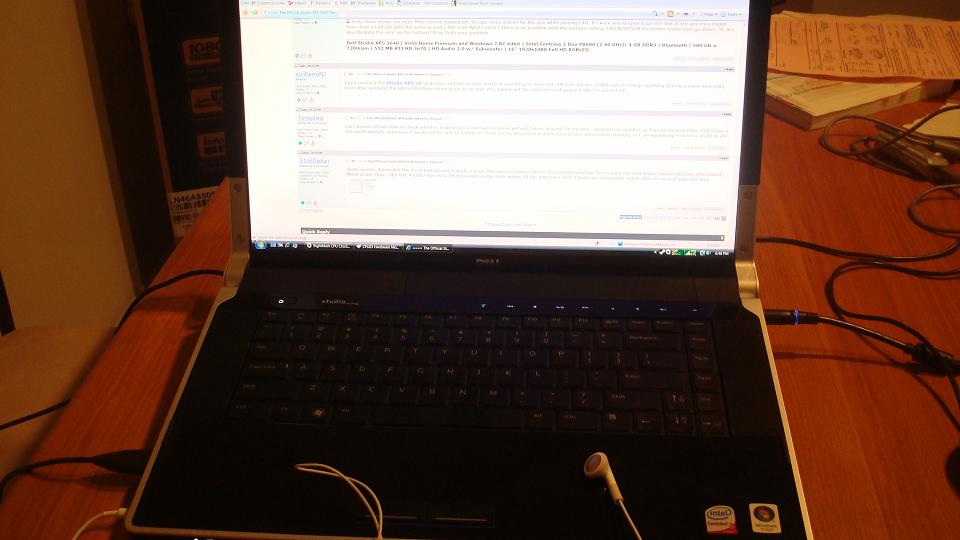
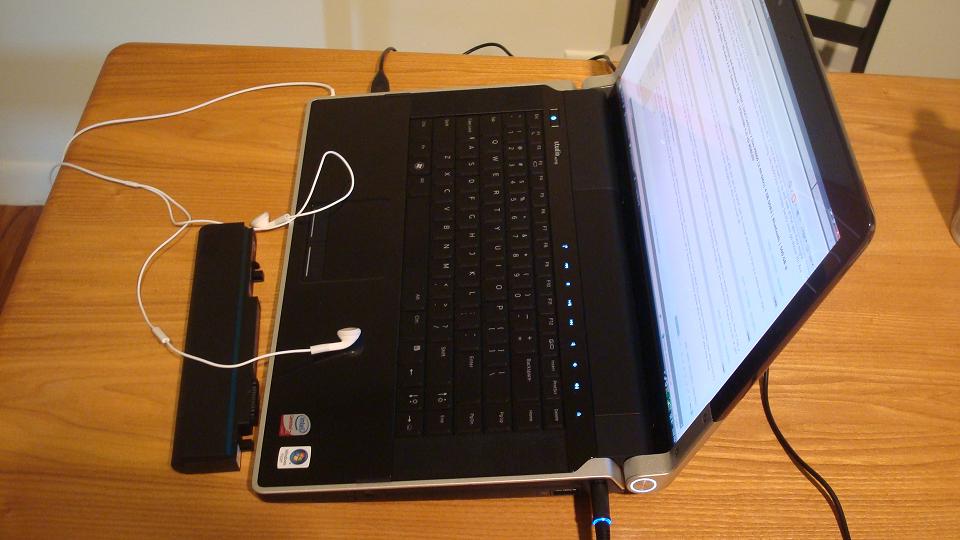
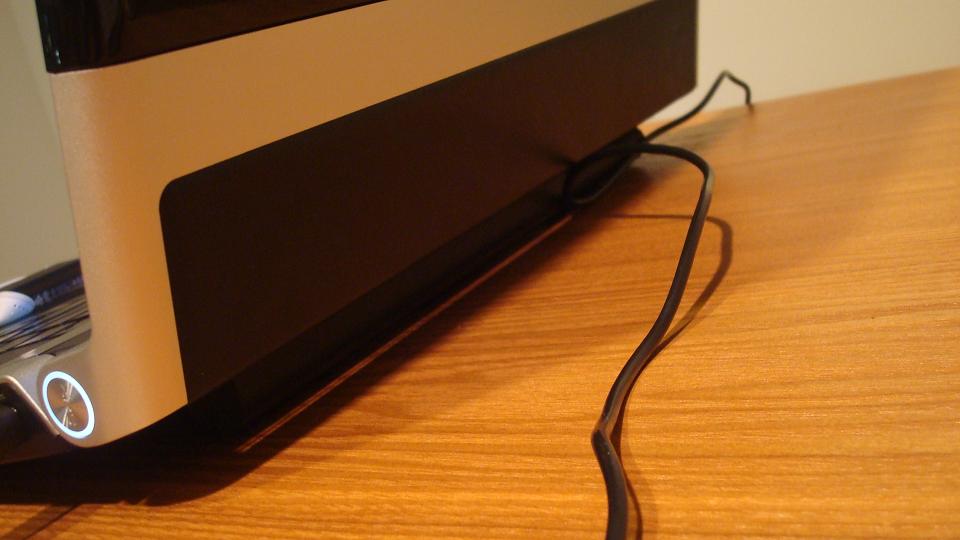
Quick update, I installed the 9 cell battery and it made a huge difference in temperatures! It's unbelievable but here's what the max temps looked like (see attachment). Moral of the story: GET THE 9 CELL! The extra lift it provides in the back makes all the difference. Left 4 dead was completely stable after 45 mins of play this time.
Edit: Attached photos to demonstrate the surface I was using the laptop on. The 9 cell lift clearly gives it more room for ventilation. I guess the standard battery was restricing air flow badly.Attached Files:
-
===> The Official Studio XPS 1640 Owner's Thread<===
Discussion in 'Dell XPS and Studio XPS' started by Cin', Jan 23, 2009.