Problems? See this thread at archive.org.
Make sure you turn throttlestop on - the button is a bit counter intuitive. When ThrottleStop is on, the button at bottom right side of the window should read "Turn off".
I remember reading somewhere you might need to download Intel XTU, click on some warning window to unlock undervolting. Not sure if that is true.
Also Intel XTU conflicts with Throttlestop so those two programs can not be INSTALLED on your system at the same time (e.g. having XTU installed but not running is not good enough). And Intel XTU has some problems running on the 9550 so power limit throttles very early. I think most people here do not run XTU now.
-
@pressing
Thanks for the detailed reply and suggestions. Will certainly read through the threads you've linked to.
I did browse through a number of threads here prior to purchasing my XPS and whilst initially, it would be enough to put many prospective purchasers off, most issues seem to have been resolved via software and bios updates.
Hopefully, I won't experience the headaches that a lot of the early adopters did?pressing likes this. -
Just recieved my XPS 9550 today! Although strangely it still says "In production" on my dell page, so I didn't even realize it was shipped.
Everything seems great so far, though the GPU and CPU do get pretty hot during benchmark tests (Mid 80s).
I do see some screen flicker (4k panel) that others are getting, hopefully dell is working on a fix for it, considering it seems to be affecting all devices. -
Update on the scaling issue, I believe it is a problem with certain methods of rendering. Not sure but I think opengl and java things?
In order to fix this, you have to disable app scaling in the compatibilty section of the properties of each app, and then it will fill up the screen like normal. -
so, i received my replacement xps 15 and they gave me an upgrade to 16gb ram, the 512gb toshiba ssd and the 4k screen. my old system was 8gb ram, 256gb samsung ssd and the fhd screen. this probably sounds like a stupid question, but if i were to image my drive and try to restore it to the new system, would i introduce a bunch of incompatibilities? i'm guessing the main issues would be that i've installed the samsung 950 pro nvme controller and probably the resolution would introduce some issues. anyone have any idea how to restore so i can avoid all the work in trying to reinstall things? using macrium reflect.
pressing likes this. -
Uninstall the Samsung driver or try driver rollback in device manager so it uses the Microsoft driver then use macruim to image. You could however use the 30 day free trial for medium home and test the ReDeploy feature to restore to dissimilar hardware but you may not need to. Once done install the OCZ ssd driver as it supports the Toshiba XG3 drives now.
You must be well chuffed with the upgrade!
Sent from my SM-G920F -
Thanks for the tips!
Just wondering, does anyone's XPS have any coil whining? After further use, I found mine to also have a very slight coil whine when not plugged in. However, this coil whine is ever so slight it's negligible. It is especially worse when the battery is charged full. Should I get an exchange unit from the online MS store?
EDIT: Here's a link to a recording of the coil whine. This was recorded with the internal mic. I used a few windows error message tone in the beginning to let you have an idea of the coil whine volume. https://drive.google.com/open?id=0B8feeezwJVaLMkw2MnJ3am5RRTALast edited: Sep 16, 2016 -
You will see several people here have coil whine. . .
-
Well many of those threads were early production models, and I was just wondering how worse the situation others have to see if I should get a replacement unit, or just live with it.
-
Yes I have a bit of coil whine in my XPS too, but it usually isnt audible over the inbuilt fans, unless I'm running my overnight downloading power plan.
-
If you can hear it in a silent room with the fans off but not when the fans are running with some ambient noise it is normal.
-
I see, thanks! Mine also has a really inaudible coil whine when the battery isn't full, but a VERY obvious whine when the battery is full and plugged in the AC (loader than the fan even on moderate load). Guess I'll get a replacement and see how it goes.
-
good idea. i was thinking about doing that. and thanks for the info on the ocz ssd driver. any marked improvement in performance using it? and yeah, i'm definitely happy with the upgrade. also extra bonus is that they completely forgot about my original xps 15 and just want me to send the xps 15 9530 they mistakenly sent me back. so essentially a free laptop... haha.
-
XPS15 now come with Killer 2x2 wifi card.
Is this better than 3x3 wifi of old?
Killer seems better software but the loss of 1 radio is not good? -
That's the XPS 13
-
Good luck keeping the original one, you never know your luck!
You don't get a performance boost as such, more a stability boost for a guess. The toshiba's as fast as the current SSD's come anyway. -
Actually some Dell sites are shipping XPS15 with killer 2x2.
Expect to see Dell US updating the wifi on XPS15.
I guess Killer is replacing Broadcom and not Intel Wifi
When is Intel making a 3x3 Wifi? -
Someone had another 3x3 card but it was a couple of mm wider than the 9550 could take.
-
I've got the 512GB Toshiba drive. Do you have a link to this OCZ driver?
-
Thanks! I'll download both of those.
OK, I installed both and rebooted and the utility shows the OCZ driver, but when I look in the Device Manager, under Disk Drives and check the driver it lists a Microsoft driver still, version 10.0.14393.0 with a 6/21/2006 date. Am I missing something here?Last edited: Sep 17, 2016 -
Is no-one else getting severe black clipping issues with Dell PremierColor installed? I have literally spent about 2 1/2 months talking to Dell slowly about this now and I'm no closer to a resolution.
With Dell PremierColor installed the blacks look blocky and absolutely terrible, Dell are trying to say that it's a display issue yet as soon as I uninstall PremierColor the blacks are absolutely perfect.
I can't live with it without PremierColor installed due to just how good the profiles are for colors. The saturation without it installed are absolutely laughable, and whilst I have turned these down in Nvidia settings the colors aren't as good and it clearly looks like it needs calibrating.
Being a professional photographer who relies around his laptop for his fulltime job it's absolutely infuriating, I was desperate to stick with Dell rather than going to Mac, but the stupidity of their lack of fixing things (this, and the screen flicker issues) are making it harder than ever to resist.
Any help, advice or possible solutions are greatly appreciated. -
If you are a pro then surely you have calibration hardware so you can create your own profile?
-
I do have, yes. However, I spend a lot of time away from home, sometimes up to a year, and I actually found the colour profiles a lot more useful than carrying a calibrator around with me since they demand being re-calibrated every few weeks. I've also never found it as convenient to adjust laptop monitors as PC monitors.
-
Regarding a whine I don't recall hearing one, but then again, my high-frequency hearing isn't what it used to be.
Anyone install the new Windows 10 update? I was surprised that neither of my Win10 machines have updated, but just now, I noticed that it's downloading. I read that some people had some problems in general (not related to the XPS 15); I'm less worried about this notebook than my old desktop. -
Well you could save the ICC profiles you need and switch to whichever you want in color management. Premier color refuses to run on mine with anniversary edition (crashes upon launch), so I just use adobe's AdobeRGB ICC profile from their site and it looks identical to premier's adobeRGB to me.
Sent from my iPad using Tapatalk -
Win10 anniversary is a pain. It breaks so many programs I have ( not mainstream ones) such as coreTemp just to name one. (EDIT: and also premier color too) I also can't seem to permanently disable windows defender anymore with the small utility I had before.
As for the high frequency it isn't anything piercing. It's just a constant buzz of electrical noise (2-4K Hz I'd say)
Sent from my iPad using Tapatalk -
Hello guys,
I am now also proud owner of XPS 15 (FHD, i7, 256GD SSD), fortunately so far no major issues mentioned in this forum, maybe only quiet whine.
I use it mostly with WD15 dock and two 24inch 1920x1200 screens (then internal screen is closed).
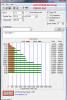
I have question about Hynix SC300 SSD (that is the one my XPS was shipped with). I am concerned about results of this drive, especially small file read values are terrible (those should be most important in day to day usage) and are 10 times slower compared to Samsung PM951 which was previously shipped with XPS.
I attached my results and results from 256GB PM951 from my colleague`s Precision 7510.
I have clean Win 10 Anniversary update installation only with some basic drivers, no Dell bloat, RAID mode in Bios and Intel rapid storage driver (manually installed, without utility). I have tried Hynix firmware updater, but it doesn't recognize drive.
Do some other Hynix SSD owner have same bad results?
How can I possibly fix it?
Thank you very muchAttached Files:
-
-
You won't find many hynix owners so I would go google other peoples results and see if it is the norm. Dell fit the cheapest possible drives, end of!
Those with Toshiba drives won the draw! -
I don't really see anything wrong with it, although the reads do seem a bit slow. However, try using the lastest version of crystal disk mark. The 4K at QD32 should be a lot higher. If not, then perhaps dell really did fit the cheapest drive possible. I know some drives tend to have this problem.
Sent from my iPad using Tapatalk -
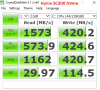
thank you for tip, I did use Crystal and in that benchmark I have results close to PM951 results found on internet (see attachment). Some speeds are better (large files write), some are slower (small files write and read), but not a big difference. So probably that ATTO SSD test from my previous post didn't work well with this Hynix SSD, that might be reason of those odd results...
So I am finally ok with that SSD, it is comparable to PM951 Now I can go for undervolting/throttling test, I can post results later....
BTW results from your picture above are probably from slower SATA version of that SSD and running older version of Crystal ...Attached Files:
Last edited: Sep 21, 2016 -
-
Yes it is running on SATA III. It's just to show the fact this particular SSD performs badly at low queue depth.
-
This is such a nice laptop, if only Dell had done a better job with the cooling system. The low CPU temps are probably more to the credit of Intel's 14nm Skylake technology than the cooling system, although if they had used less noisy cooling fans I probably not care that much about the GPU hitting 70- 80c.
Throttling though, when the CPU and GPU are within healthy temperatures, is a bit of a fail. We sacrifice battery life for a mid-range gaming CPU that doesn't cope well under typical gaming conditions. And the best frickin LCD screen ever...
I kind of wish Dell had just made this laptop a bit thicker / heavier and opted for a better cooling system.pressing likes this. -
Well, they kind of did. It was the L501x and L502x series before this one and after a while on our lap, it felt like an anvil. I am sure they could have created a better design to emphasis cooling, but as Gonz and others have pointed out, Dell will always show a little flash and then cheap out as they have begun again with the Hynix SSD's they are now pushing just like they did with the L501-2x series where they pushed 5400 RPM HDD's.
-
As other thread suggests, the TDP limit seems to be the problem. It seems the partially covered thermal pads make the VRM overheat easily. Undervolting will let you achieve a slightly higher clock speed, with disabling turbo boost also resulting a more healthy throttling process.
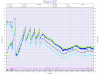
First image a -125mv undervolt. Under stress, it first does a small throttle, then a huge throttle, followed by a climb and an adapting throttle. Note that this throttle will be very apparent in games, due to the whole graph having an elase time of 10 minutes, meaning that there will be quite a few minutes where the CPU clock gets so low your game may lag badly.
This leads to my attempt to solve the problem, which is the -150mv undervolt with a 2.6 GHz lock (or disable turbo boost, which also results in a 2.6 GHz max). At a lower clock speed, I can be more aggressive with my undervolt, and the results are also more stable. Instead of a massive initial throttle, it just pulls down to 1.9 GHz and settles around 2.0-2.3. This makes games a lot smoother, or for me rendering tasks a lot smoother.
The third image is the stock configuration. It starts throttling real quick, and creating unstable clock speeds unit finally settling around 1.8 GHz after 5 minutes.
The last image is to explain these rather weird throttling. From other threads, it seems the VRM starting throttling itself real quick, causing the package power to lower significantly. The package power throttle from each tests were very similar (which is why undervolting improves throttled speeds), showing that it just may not simply be thermal throttle. In addition, throttlestop also indicates this is simply a TDP limit throttle, so I guess that solves the problem.
So yeah, it really isn't thermal issues, its just bad engineering for not covering the VRM. The re-pasting thread should help you should you ever need to pad it. And if you're like me not a DIYer, simply undervolting and clock locking should do the trick for a more stable throttling.
Image1
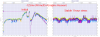
Image 2
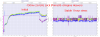
Image 3
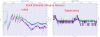
Image 4
 pressing likes this.
 -
The L401X was the one i drilled holes into the base, it was a good trick. I swore I'd never buy a Dell again, due to the overheating issues, but ended up going for the 9550 on account of its excellent display panel.
I've alreaded repasted and my temps are quite healthy, my biggest problem is the noisey fan. I havent noticed any throttling for a while, but I dont usually have the time for an extended gaming session, which is when the throttling would kick in for me.
This is my second 9550, the first one was returned due to a doa battery. The first one had much higher temperatures (stock vs stock) and I suspect that some batches of 9550 are better than others, in terms of temperatures -
Guys,
I having issues installing the kb3193494 windows update. It installs, reboots the installs up to 97% before failing and recovering back to original. That takes like more than an hour.... my xps15 keeps doing this. Any ideas how to fix this?
I am running a stock xps15 4k, 256gb.
thanks -
Better head to the software section rather than the hardware XPS forum m8.
-
So I've been getting a screen flicker for quite some time now on many different BIOS versions. In addition, my audio sound board apparently needs replacing since every time I plugin the head phones, the sound doesn't work and I have to reboot before it works. Also, my spacebar will squeak from time to time where I need to take the space bar key off and reattach it which typically resolves the problem for a few weeks until it starts again.
Anyways, spoke with customer service and asked them why they won't replace my laptop given they are sending a technician out to replace all 3 parts. I thought once they replace 3 components on a laptop they send a replacement? My laptop is still under warranty. It's crazy to me that we are having this many problems with a $3k laptop.
Any suggestions on best course of action? I'm pretty sure i can resolve the flicker problem by going back to v1.2.0 BIOS, but the audio sound board still needs replacing and keyboard issue also needs a permanent solution. -
New XPS15 9550 i7 512gig UHD owner here. Got mine refurbished from dell for a little over $1,500 shipped. I feel I got a very good deal as I cant even find a FHD (1080p) version for less at this moment. Purpose of this post is just to catalog some thoughts for anyone who might be searching for keywords in this post. I realize most of you here are XPS15 veterans and this really wont add much value to your day but when I was doing research, I had to hobble together info and opinions from various sources and as such thought It would be nice for "the next guy" to have some consolidated thoughts here.
Battery Life with UHD Display:
a solid 9 hours web surfing, email and light youtube. 4 hours non-stop video editting. The one thing I want to mention is out of the box I was only getting maybe 6 hours tops with light web surfing. When I went ahead and signed up for Windows 10 "Insider" updates (google search it), the latest insider version of windows 10 significantly increased battery efficiency for me. I have yet to notice any performance trade-off just yet. It's been 4 days testing.
As I have read, there is a lot of discussion around FHD vs UHD as it relates to battery. UHD at 9 hours levels the playing field for me regarding "acceptable" portability. Keeping in mind though FHD will still outlast the UHD. It's just a relative increase but a pretty major one.
Also, I toyed around with turning OFF touch screen in the BIOS. I gained a solid 1 hour on average (at most I saw a 2 hour increase but avg was 1 hour extra) but decided it wasnt worth it now that I was getting 9 hours with the latest windows "insider" update.
One last note here: As with any laptop the level of brightness you use has a huge impact on battery life. Example, the 9 hours I mention is at 30% brightness. You may think "that's really dim". Well, with the UHD display, you dont need much because it's super vibrant and clear to begin with. With FHD, you'll need to throw more at the screen to get the "pop" you expect. In bright conditions the UHD display has plenty of power to over-power daylight. The FHD is def better in this regard. However, indoors I actually think the UHD has the edge since you dont need a whole lot of "brightness" to have a clear, vibrant picture on the display.
Scaling (DPI) Issues in Windows 10
I have to admit, I didnt even think about the issues I might face with a 4K screen in a 15.6inch form factor. The general issue is that the native resolution is so high, font and applications are extremely small (unusably so). One increases the scaling in windows to re-size everything to a comfortable size. While windows and most browsers look great, third party apps look terrible or just didnt scale (they were left looking very tiny of squished).
In fact the first day I got the laptop I was extremely disgusted with how much I just spent to get a product that just looked hacked together.
I gave it some time and found my personal sweet spot is 200% scaling (vs the 250% windows recommends). Major apps, I've found, have no issues scaling. The ones that look crappy are usually the under-developed third party apps. This scaling issue in general is "temporary" in that sooner or later all apps will be updated to handle as all screens are going HD/UHD.
Net/Net I went from being disgusted to understanding it and the quality of the UHD screen won me over. It's absolutely beautiful.
Video Editing
The main reason I purchased this laptop is because I wanted a way to edit video while sitting on my couch or outside. I come from a MACBOOK PRO (mid 2015) which, most would consider to be the defacto laptop for editing. I just couldnt wait until october to see what kind of updates apple will do to the macbook pro and even so, I knew I wouldnt be able to purchase their fasted macbook pro (which is likely to spec similar to this dell XPS) for what I paid for the dell. I probably saved myself a good $800 (if I were to guess..we will see). I can tell you hands down the Dell XPS 15 9550 (i7) is faster at rendering a project as well as smoother playing back a timeline with effects. I mostly handle 4K footage. I am using Vegas Pro (which has a scaling issue BUT I learned to actually like the fact the program runs in native 4K - I dont use the buttons on the interface anyway - everything I do in editing is keyboard shortcuts..so I get a TON of realestate) I also use Adobe Premier CC which has no issues scaling - interface is extremely sharp. Less real estate than vegas pro
Fit Finish, Track Pad, Keyboard & More
The outside fit and finish is nice. The track pad and keyboard are OK. To be honest, I was hoping for a better track pad and keyboard experience for the money. If you ask me, there is still nothing that is like a macbook (pro) in fit, finish, track pad & keyboard. Everything else feels a bit loose or hobbled together. That said, when comparing the XPS to other PC laptops, I do feel the fit, finish, keyboard & Trackboard to be well above the average. Just not as nice as it could be.
I do not like that the screen is hard to open (hardly a lip to grab to pry it open) and I hate the fact that there is no HDD status light. Those are the two things I would have liked.
Bugs & Issues
Keeping in mind, my XPS15 was purchased in September 2016. I may have lucked out and received a device that dell had already worked the kinks out on. I have not experienced a lot of the issues I have read that plagued the earlier models. I did once have a boot-loop when updating windows but I found that it was my own fault, thinking the laptop was hung up at "99%" progress when it reality it just took an hour to finish. This is where I wish I had an HDD or "activity" status light which would have told me it wasn't hung up or at least give me hope.
Overall
I probably would have returned this laptop if I paid full retail price for it. It's expensive enough to make a macbook pro's cost difference negligible and since I personally feel a macbook pro is a better designed device (specs being the same..which they are not..yet..but I assume they will level up in october with the new macbook release) I would have felt for the money I got an inferior machine in the XPS vs Macbook Pro. However I did not buy at retail and as such the XPS hands down wins vs macbook pro in value in my opinion.
That said, I dont think there is another PC laptop out there that I would prefer more than the XPS15. It's a serious machine - and easily a desktop replacement in terms of horsepower. It's not perfect but if you are buying a Windows based PC laptop that's par for the course. However it's the closest to perfect I think this category gets.
Buyer Advice
If you already have the XPS 15 9550 already in your consideration set. Stop considering. You wont go wrong with it. Get it and know you made a great decision. Rememebr this is coming from someone who was literally in the middle of packing it back up to return it after just purchasing due to the initial shock of the scaling phenomenon i was not expecting.
1) Do not buy at retail price. Buy a certified refurbished from dell. You can also find them on Ebay and Amazon. I feel these machine are overpriced at retail. Last I checked there were plenty available. They come in like-new condition. You could not convince me that mine was refurbished if I hadnt already known.
2) Go with the i7. It's worth the additional cost and if you're going to spend some good cash thinking about the XPS15, don't start to sell yourself short on the processor.
3) QHD 4K display for anyone who already has experience with "Retina" displays. Must for photo & video editors. Do NOT get hemmed up on scaling issues folks talk about. It turned out not to be such a major issue especially for those using professional tools like the adobe suite - major software IS ready for UHD, i've found. FHD for everyone else. FHD is beautiful too but a bit "dull" looking comparatively.
4) Bring it home, sign up for Windows 10 insider updates and update it before really giving it a test run. That is, judge it once you are 100% sure you have updated windows 10 to latest version and that you have all of the latest drivers from Dell (dell makes that easy..go to dell support, pop in your service tag which is on the laptop and download their update tool --- it handles the rest).
These are my opinions and I hope they help.Last edited: Sep 25, 2016 -
http://forum.notebookreview.com/threads/new-xps.49601/
Don't have the priviledge to post on the above thread. Which XPS are they talking about ?
Is it likely than a new XPS 15 will be released in the next week ? I mean the R1 version with i7 6700 and GTX960M has been going for almost a year. Isn't it time for Dell to release a R2 version ? -
That's a thread from 2006, they're talking about this: http://www.notebookreview.com/assets/11303.jpg
-
Sorry about that. My main question remains though :
New Alienware releases arrive usually pretty quickly. What about the XPS line ?
Is it likely than a new XPS 15 will be released in the next week ? I mean the R1 version with i7 6700 and GTX960M has been going for almost a year. Isn't it time for Dell to release a R2 version ?Last edited: Sep 26, 2016 -
timelines every 2 years.
Sent from my SM-G920F -
Replacement XPS has arrived, and well the big issue of Power Limit Throttling is still there..
The black screen on startup/login page issue was fixed with a BIOS upgrade on my old machine so that can be disregarded.
This is where it gets embarrassing..
On both machines I had numerous issues with the WiFi connectivity when my lid was closed and connected to an external monitor. My previous laptop never had any issues so naturally with all the issues with the XPS 15 broadcom card I thought that might be the cause.
After months of headaches though it now seems that it was interference from the monitor itself, something which I never considered. I changed my router channel number from 11 to 6 and its working perfectly.
So all in all its nice to have a new XPS 15, and I was upgraded to an i7 model with 256ssd for free as the eBay seller couldn't source any i5 devices with the 1tb hdd..
But, I can't say that I am happy. The Power Limit Throttling seems to be an ongoing issue which Dell doesn't seem too keen to address. The thread here seems to have located a VRM sensor as the cause however there does not seem to be a good/easy way to address this other than drilling holes or making a quasi custom notebook cooler.
Unfortunately with the XPS 15 being the only laptop that meets what im looking for (portable with decent dedicated gpu that doesn't look silly) I might have to wait for a new model to be announced and upgrade. -
If you use inSSider to check the WiFi receiving power/strength, you will notice that closing the lid damps the signal by about 10 dB. If you are on the edge then doing this will kill WiFi performance. IMHO that is caused by the antennas being in the display frame, and closed obviously won't work as good as when 'standing up'. This is a new issue as before no one really worked with their laptop closed. And I wouldn't blame Dell for that (but for many other things).
-
Really though?
I would have thought it would be pretty common considering that there is an option in Windows to configure the device to stay awake with the lid closed.. Also, what would be the purpose for a docking station + external monitors?
That aside, it's a design fault as every other device I have owned has not had any issues with the lid closed.
Edit: Issue has returned so i'm guessing the broadcom card really is as **** as people think it is..Last edited: Sep 26, 2016 -
Power Limit Throttling is not an issue. It is a feature when a chips capped at a certain wattage it kinda has to do something when it hits it's designated limit
Dell XPS 15 (Skylake) 9550 Owner's Lounge
Discussion in 'Dell XPS and Studio XPS' started by T2050, Oct 30, 2015.