Problems? See this thread at archive.org.
Thank you for your answer.
Even removing the antenna cover i cant get access to the display cable connector. I definitely need to remove the screen bezel and pull down the whole panel. Looks like the thin bezel is attached with a strong adhesive. I tried to remove it but i will bent the bezel. Really hard task but i am sure its only a $30 cable to fix it. But how? lol
The manual doesn't help at this point. They want us to buy the whole screen.
-
I thought I saw a few posts here stating the screen cable was NOT replaceable. Do a search in the 9550 & 9560 threads.
Also, I needed to reseat that screen cable at the connector a couple of times before it stopped being wonky. Rock solid for almost a year now. Try reseating and make sure there is a bit of slack near the silver connector. Note the screw holding the silver plate is JIS; using a normal screwdriver will strip it and it can be extremely difficult to remove... -
Try Ctrl+Fn+Alt+B
-
Thanks for replying, just tried that but no dice. The Dell keyboard seems to be missing the all important Break button. It's pretty frustrating trying to work on a VM for any length of time that is a pretty small window in the center of the display imo.

-
Strange, works for me, use it all the time. Does it at least get you into full screen mode if not out?
Edit: reviewed some old emails, on dell laptops without a break key it's replicated with ctrl + fn + B. So to exit full screen mode in hyper-v just add the alt:
alt + ctrl + fn + B -
I can change to fullscreen mode (even though this doesn't fill my laptop entire screen) by selecting Fullscreen within the View menu but I then cannot exit Fullscreen whatsoever. Have to shutdown the VM in order to be able to see the Hyper-V console again.
-
OK I think the issue is that once in guest full screen the keyboard is obviously controlled by the guest. To use short cut keys to exit full screen you have to first pass control of keyboard back to host:
Enter guest full screen mode:
Ctrl+Fn+Alt+BExit guest full screen mode:
Ctrl+Alt+Left Arrow to relinquish keyboard control back to host, then
Ctrl+Fn+Alt+B to exit guest full screen mode
Try it and see if works.
Btw, what guest os?UHD likes this. -
Tally ho champs!
Our Australian friend WesternGentsUnited says turning off "Shared" feature in nVidia GeForce Experience can significantly improve gaming FPS on the XPS 9560. This might also help the 9550. Apparently it was enabled by default. Check out the video and give it a try...
-
Will give that a try, thanks.
Windows 7 Ultimate -
Hi Everyone,
I come to this great venue anytime I need some expert advice and you have never let me down and I kindly need some now.
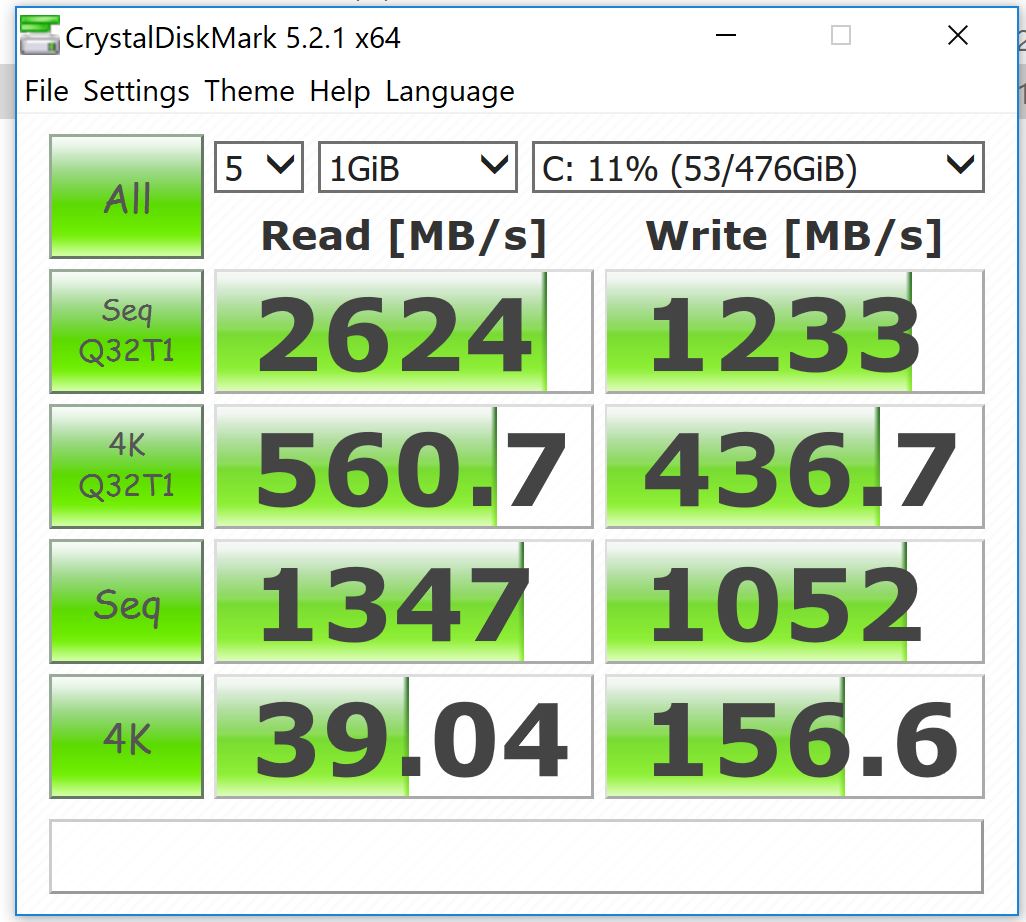
I have a DELL XPS 15 (9550) i7-6700HQ 16GB 4K UHD with a Toshiba NVMe 512GB SSD and believe it or not, being a complete novice in this field I just learned of this CrystalDiskMark program that it seems everyone uses to measure their hard drive speed(s) and I downloaded it and ran it and would kindly like to know if the results are any good or not (See pic)
The reason being is DELL owes me a replacement hard drive because my unit was supposed to have a Samsung PM951 but they were out of stock so they put in the Toshiba instead yet with the promise that they would give me the Samsung whenever it becomes available. Now they just contacted me to let me know that they have the Samsung PM951 and would like to schedule a onsite repair tech to come to my home and swap it out.
I certainly don't want anyone working on my unit especially with the sad horror stories and expert gracious advice from NBR's senior member GoNz0 and I definitely don't want to swap a good SSD for a not so good one as well, so if anyone can kindly look at the CrystalDiskMark scores of my present Toshiba SSD and let me know I would very greatly appreciate it.
Thanks & Kind Regards,
SDeP58Attached Files:
Last edited: Apr 18, 2017 -
-
Your SSD is fine, a PM951 is going to be slower. I don't know how dell owes you an ssd when they never specified what ssd is in it. That score is on par with my hynix which is just below my PM961.
-
Hi custom90gt,
Thank you so kindly for the quick and informative response as it's greatly appreciated.
Wow I guess I would've definitely made a big mistake having DELL swap the Toshiba for the Samsung and I'm so thankful that I didn't do it and for this great venue (place) and people.
In answer to your question, I had a XPS 15 9530 under warranty which couldn't be repaired by DELL so they gave me the XPS 15 9550 in place of it and they specifically asked me to go over the full configuration, which they sent me via email, and it read for the hard drive a Samsung NVMe 512GB SSD PM951. When I received the unit and looked in Device Manager and seen it had a Toshiba SSD instead I inquired why and believing the Samsung was a better one I asked for it and thus the DELL promise.
Thanks a BUNCH for not making me make another BIG blunder!!!
Kind Regards,
SDeP58 -
It looks like you have a XG3 which is the faster toshiba, it's an upgrade over the 951 for sure.
-
Hey does anyone experienced regular blue screen errors that DRIVER_POWERSTATE_FAILURE?
I seem to get it when I move from home network to my work network and vice-versa -
 Hi custom90gt,
I just cannot thank you enough for graciously responding to my post and question so quickly as it's so greatly appreciated.
Even though DELL gave me the onsite technician's contact info via email to make the repair arrangements at my convenience just moments ago I get a knock on my door and it's unbelievably none other then the DELL tech coming to swap out the hard drive. I told him I have everything thankfully working great and I'm not doing any SSD swap and he apologized for the mix up in communication and said he will return the unused SSD back to DELL.
Yes you are absolutely right as the model number to the Toshiba SSD is THNSN5512GPU7 and upon lookup it is in fact a XG3...Wow what a BIG Blunder I would have done if it were not for your very gracious & grateful quick response and I just thank you so much!!!
Best Regards,
SDeP58 -
Hi,
Trust me when I say, I'm far from any computer guru that you will definitely find on this great site and venue yet I did in fact run into the exact same error code and through my research I was able to determine that it's definitely a software (driver) issue and not a hardware one.
For whatever it's worth what I wound up doing is uninstalling the network driver in device manager and having Windows re-install it and update it on it's own through reboot and then Windows update, which it did and I never thankfully seen the error code since.
I hope I helped.
Kind Regards,
SDeP58 -
How can i active the NVMe Driver in the Windows 10 Installation? I randomly get Errors and Bluescreens even when installing and Setting up the System.
Edit: Forget it, could go through the installation and quickly install the samsung 2.0 driver without any bsod
Last edited: Apr 19, 2017 -
Samsung's latest nvme driver has version 2.2.
Sent from my Nexus 6P using Tapatalk -
Has anybody had an issue with Windows 10 CU where after logging in the brightness changes to 50% (Suggested) regardless of the setting of brightness you set it at before shutting down. It is really annoying me and the issue didn't happen with the Anniversary Update. I am using the latest Nvidia Drivers that support the CU and I am using the latest Intel drivers from their website not Dells drivers. I believe it has something to do with adaptive brightness as when I try and change the settings and save it when I shutdown the computer and turn it on again the setting reverts. The reason I want this is because I keep my Dell laptop on its lowest brightness as 50% is too bright in my environment. Any insight or solutions to this problem would be of great help thanks.
Edit: Additional information is that I have a 4K panel not 1080p and my BIOS version is 01.02.00 -
Hi
Does anybody know if it is possible to replace damaged matt FHD screen on Dell XPS 9550 (2016 (i7 6700HQ)) ?? I was looking for a replacement and I've noticed only screen assemblies, however is it possible to replace just a screen ?
Are there any compatible FHD IPS screen that I could install or do I really have to replace whole assembly ??? -
When replacing the screen only the entire assembly can be replaced as it's all glued together. When Dell replace them they simply unscrew the entire unit from the chassis and screw the new assembly in place.
Liam. -
Do you know if pressure mark is under NBD warranty (around 3cm big black "pressure" mark (not exactly sure how it happened))
-
You can't seem to get the panels even though the FHD can be removed, best to buy the assembly.
Depends how good you are on the phone and how the pictures they will ask you to send turn out, they will not cover damage such as a pressure mark.
Me personally with all the crap I have had over the years I would report another issue to get the screen swapped out. -
Just read that Intel is finally launching the AC-9260 that will include 160GHZ, Bluetooth 5, and 5G capability.
GoNz0 likes this. -
My dell xps 9550 specs are
i5-6300 hq cpu @ 2.30 ghz
8gb ram
windows 10 pro
I have a 250gb samsung ssd
This laptop is by far the fastest computer i ever used. One issue i have with this laptop though is it does seem to lag when i open up a ton of chrome tabs. I probably have like 50 tabs at once etc. Most of the time its not that much. I looked at my ram in task manager and most of the time, its using at least 75 percent ram. As of now it shows using 6.2/7.9 ram so about 78 percent ram. Of course when i close all these tabs, then im using less than 40 percent ram. Is this normal?
Should i add more ram to this laptop? Also can someone tell me if i have 1 stick of 8gb on this laptop or do i have 2 sticks of 4gb ram? Im pretty sure its 1 stick of 8gb but just want to be sure.
So if i add ram, best to add 1 stick of 8gb right? Or would 1 stick of 4gb be enough? I mean its already fast but the issue is when i open too much chrome tabs and leave them and open more, well it does lag a bit. So if i have 12gb ram or 16gb ram, does that mean i won't have any of these lags? Would adding more ram mean the current amount of ram being used would increase? Or would it stay the same? Thats assuming my ram now is 12gb or 16gb.
Basically want to know are there 2 sticks of 4 gb ram or just 1 stick of 8gb ram on this laptop. -
Look in the bios
Sent from my SM-G920F using Tapatalk -
When your computer is "lagging," you should open task manager and view your memory usage. If it's maxed, then yes more RAM would benefit you. If it isn't maxed, then more RAM won't benefit you. I have a hard time believing you have enough tabs open to use 8gb of RAM, but I don't know what "a lot" is to you. I think I only have 8gb or 12gb of RAM and have never noticed any "lag" on Chrome, even with 20-30+ tabs open, but I have the top CPU option for the 9550.
-
Dell has their Thunderbolt TB16 Dock for $194.99 shipped after coupon BUSINESS35:
http://accessories.us.dell.com/sna/...ACD=12309198375458460&VEN3=810503858715119002 -
The missing USB-C feed-through port still makes it a complete no-go. Meanwhile other docks are available having such.
-
Can you recommend one or two?
-
I just did a clean install of the Creators Update on my 9550, and noticed something different. My machine now wakes up when moving my finger on the touchpad for 2-3 seconds. Is this something new in Creators Update, or is something else causing this, such as different drivers or BIOS?
I'm pretty sure it wasn't like this before. I've always had to press the power button or click the touchpad to wake it from sleep, so I'm curious what could be causing this.Last edited: May 7, 2017 -
Moving finger on touchpad does not wake up my 9550 (not on Creators Update)
-
noticed clicking the touchpad did the same on the 9560, guess they brought things in line with desktop hardware that wakes with a mouse click, keyboard touch etc.
-
Me too. Prior to the Creator's Update it could take up to thirty seconds of clicking on the mouse and\or hitting the space bar to get my 9550 to come out of sleep. Now it wakes up in only three seconds or so.
-
Wait... So the keyboard brings your machine out of sleep? Mine isn't like that.
The only way to wake up my machine ever since I've had it (and through the Anniversary Update) was by pressing the power button, or clicking the touchpad. I know for sure that touching the touchpad (or keyboard) while it was sleeping didn't do anything.
After doing the clean install of the Creators Update, I noticed just touching the touchpad for a few seconds will cause the power light to come on and wake up the machine. (The keyboard does nothing.)
The curiosity is starting to get to the best of me. I'm almost tempted to throw the Anniversary Update back on for a bit just to see how it behaves. I somewhat prefer the old behavior since it seems less likely to wake up the machine accidentally, especially if travelling with it in a bag. If the new behavior is from the Creators Update, I can live with that. Otherwise, how can I get back to the old behavior? -
Dunno what's up with yours but I can't wake the 9560 by swiping the trackpad, only clicking the keyboard or trackpad.
-
Interesting... Just to be sure, have you tried swiping for 2-3 seconds? For me, my finger has to be touching continuously for 2-3 seconds. Anything less, or tapping (not clicking) does not wake mine up.
-
Yep, tried and it fired up from sleep in a couple of seconds, never knew that
Must have hibernated the last time I tried! -
From the very beginning I have been able to bring my 9550 out of sleep using the keyboard or mouse (I disable the touchpad with the mouse attached).Its only with this latest update that it doesn't take nearly as long.
-
BTW, having a lot of success with my 512 GB Toshiba XG3. More and more of them are turning up on eBay for under $200.00 for 'lightly used' new machine pulls.
-
Updated to latest BIOS 1.2.25, no Problem so far.
_sem_ likes this. -
Hi Guys,
Hope you can help out with the following, since last week I notice that my XPS 9550 crashing while in sleep. Not straight away but it seems to boot up when I'm not with it and then crashes. Each time I start it comes with a fresh boot. No reasons to find in the eventlog.. I see some EventIDs 41 without a hint. Did some investigation and it seems it is doing this since May 8th. I still haven't updated the Intel drivers after roll-back due to the system crashed that one caused.
No clue what the cause could be, check this thread to see if others reported similar but didn't find.. Hope you can help me out or direct me.
Thanx,
André -
Waking up from an extended sleep is usually so it can go into hibernation mode, check the settings to confirm then go through the event viewer to look for clues or try "who crashed" v5.52 as the new versions lock out on Dells
-
A similar issue got cured by reflashing BIOS.
Also set "Hibernate after" to Never in Advanced power options if it isn't already. It is known to cause issues (but here it would wake up to an odd state, not crash). -
In my case this update has caused some weird power message to appear. It claims I have the undersized power adapter attached, while I've been operating the original power supply received with my XPS... See details in this thread.
-
Hi GoNz0,
Checked with 'Who Crashed', found a mini-dump from some days ago. Can't really tell how to resolve at said: "This was probably caused by the following module: win32kbase.sys (win32kbase!MulFindDisplayDhsurfFromMetaSurf+0x3C)", with a description of "This appears to be a typical software driver bug and is not likely to be caused by a hardware problem.
The crash took place in a standard Microsoft module. Your system configuration may be incorrect. Possibly this problem is caused by another driver on your system that cannot be identified at this time.".
Also reverted back to a restore point some days ago, before I had these issues. Due to some work it updated in the meanwhile Looks like the issue also still persists..
Not sure where to search for, will take some time later and have a try to what '_sem_" is replying. If you have any suggestion that would be great!
Thanx,
André -
So, after installing KB890830, KB4019472, KB3150513 , my 9550 now crashes on every boot with the BSOD message "critical service failed".
If I go into windows 10 advanced startup options and disable digital driver signing enforcment, it boots into windows, but gives an error popup from "Microsoft security client".
Looking at the event log and the device manager, I see that the Wifi driver (Dell Wireless 1830 802.11ac, version 1.566.0.0) has failed to load even when disabling driver signature.
I also see that the "Realtek PCIE Card Reader" driver (version 10.0.10586.21289) and a Sony Usb driver for my phone has failed loading.
In the event log, i see the error "Dell Wireless 1830 802.11ac : The version number is incorrect for this driver".
I read about the Windows 1607 build (anniversary update) forced digital driver signatures, but I've had that version of Windows on my system for several months.
I can't find anything specific in the patches I recently installed that hints at driver signature changes.
I've tried a bios update with no luck, will try to reinstall the Wifi driver. Any suggestions? -
I also updated to 1.2.25 with no immediate disaster. I also applied most other current driver updates (wifi & BT for the Intel 8260 from the Intel site).
-
Try a clean install of the latest windows, it will be faster than trying to pick apart the cause as no major update like RS2 goes smooth.
-
Warning to Linux users - there is a report of 1.2.25 crashing with the TB16
https://www.reddit.com/r/Dell/comments/6bsxua/tb16_dock_crashes_on_xps15_9550_bios_version_1225/
Dell XPS 15 (Skylake) 9550 Owner's Lounge
Discussion in 'Dell XPS and Studio XPS' started by T2050, Oct 30, 2015.