 Problems? See this thread at archive.org.
Yeah, I pretty much did everything the link suggested, different power supply, disconnected the battery and held the power button down for over thirty seconds. What surprised me was how instantly the machine shut down. No noise, no screen flicker or fade out or anything.
I've been using Dell laptops----and many desktops----for almost twenty five years starting with the old C400. Never in all that time has any of the machines just died so instantaneously.
Anyway, its on its way to Dell Hell and I'm just hoping some dolt doesn't just rip it apart and arbitrarily stick in a new motherboard without checking the machine thoroughly, slap it back together, and then send it back to me without stress testing it.
Then again, it IS Dell Hell.
-
On reddit, someone is asking about a toggle switch on the motherboard.
Another poster posted an interesting 9550 schematic relating to a "service mode switch" that enables/disables (Mangement Engine) ME protect.
First time I have seen any 9550 schematics . . .
![[IMG]](images/storyImages/ylpwguwccgw01.jpg)
![[IMG]](images/storyImages/kbr3urwccgw01.jpg)
![[IMG]](images/storyImages/Hnl99xF.jpg)
https://www.reddit.com/r/Dell/comments/8hoevz/xps_15_9560_what_is_this_switch_on_the_back_of/
Note photo is 9560 board and schematic is claimed to be 9550 board. -
Thanks for the info. Meanwhile more and more reports about 1803 buggy behaviour get published. I read something similar to your description about the new Timeline feature, disabling that solved it. I will try that 'fix' as well on my next installation as I don't intend to use Timeline anyway.
-
Well at least you gave it the Old College try.
Can I make a suggestion. Before sending it back to Dell Depot remove the 2 Service Tag Badge screws and any other stripped ones you might need and maybe you will get lucky and they will replace them and if not you already have them to put back.
Best of Luck!!! -
Dell Support Assistant has alerted me of 3 new updates that they recommend I install yet I live by the adage, "If it isn't broke don't break it"
Maybe it's of interest to others with certain issues.
-
Thought about doing that, but as you might know, they don't usually tell you if they find some reason to reject doing a warranty repair. There are many horror stories about them shipping back broken machines with a letter saying that the machine had been tampered with and thus had voided the warranty.
I'll play it straight up this time as I need the machine back pretty badly. -
I hear you yet Dell themselves gives out the Service manual .PDF for upgrades so they know a consumer can and possibly will open up the unit to do such, which in fact doesn't void the warranty.
I would just put a note attached to the unit stating that you would like your unit truly taken care of as the last few repair times screws have been stripped or missing and you would appreciate them at least replacing the 2 that secure the Service Tag Badge, which was in fact done by them on the last go around.
The T-5's are easily had yet I think you found out as well as many that those 2 Service Badge Screws are like GOLD so try hard to get them.
Best of Luck!!! -
Hello.
I have 9550, i7. 32 gb. 1tb ssd.
In sleep mode in Win10 my notebook discharge 30% per night(8 hours). This is normal? -
Look at the following links for some hopeful answers & solutions.
https://answers.microsoft.com/en-us...ndows-10/07e53f04-2fd4-4239-8d91-698a08f29893
https://www.quora.com/The-battery-o...-Mode-What-can-be-the-possible-solution-to-it -
Does anyone else have an issue where their 9550 will randomly not resume from sleep and will instead boot up again when they open the lid? Mine has been doing it on and off since I got it in 2015 and it's currently in a period of doing this again. It's driving me nuts.
It's persisted across BIOS and driver updates, different versions of Windows etc. I have hibernate and wake timers disabled, fast boot off etc. I'm pretty sure it goes to sleep fine and somehow just loses power when opening the lid. I've looked through event viewer but there's nothing there, only events from when the system resumes saying the previous shutdown was unexpected.
Has anyone had similar issues with their laptop, or any advice on how to resolve this?
Much appreciated!
Edit: per a couple posts I found on the Dell community forums, powercfg /a lists no devices keeping my laptop awake, and every device in device manager that has the option to wake the computer has that option disabled. I also don't have any USB devices plugged in and indeed have disabled USB and packet wake in BIOS.
While testing what combinations of AC/ battery power will cause this I noticed that if battery power is involved in any way (sleeping and resuming, plugged into AC to sleep and resuming on battery, on battery to sleep and plugged in while resuming) it will lose power and boot up again when I open the lid. However if it is plugged into AC the whole time it will resume normally (tested 3 times). The battery in here is a new 97Whr one I got in January, but the problem existed with the original 84Whr battery before this.Last edited: May 10, 2018 -
It might be that when you open the lid and operate the hinges you move some internal part that shorts or disrupts power.
My screen/lid is loose, sometimes it gets slightly out of position. If I align it (pushing with mild force ) when the computer is running I trigger a reboot. Something is not right under the hood. If I avoid doing that it runs fine. I have thought about getting the screen/lid replaced, but there is a chance I will end up with more new troubles, so I haven’t bothered yet... still under warranty though...
Sent from my iPhone using Tapatalk -
Sleep has always been a bit wonky on my XPS units.
I don't see this as a popular problem with the XPS. But if the hinge mounting screws are loose, then you should get them tightened ASAP. If the hinges are damaged get them fixed ASAP.
You can imagine the hinges and mounting screws are under high most of the time. When opening and closing the laptop, when the screen is open, when traveling. . .
If you keep the hinges loose, then you risk further damage that might be expensive to fix. Damage could include: broken screw, broken mounting plate in screen or on chassis, broken hinge.
I think some of the hinge screws are relatively easy to access yourself (Dell has a PDF that shows basic disassembly). I use LockTite on the screws where there are no plastics.Dell's warranty may not cover damage from a broken hinge or hinge screw. I have seen enough posts to see that is a problem in the Apple community. Regardless, get this fixed ASAP.
-
Thanks for the suggestion jasell, just had a quick play around with the display and I can't get the laptop to lose power by doing this, there's also no unusual flex in the chassis. I did notice some more things about sleep and AC power that I'll update my first post with.
pressing, the hinges on my laptop are as stiff as they should be but the the plastic 'barrel' from the display that goes around the metal bar between the hinges is a bit loose, so the display will wobble a bit even through the hinges aren't moving. Do you know of any way to fix this? I've previously taken the display off to have a look at this and as far as I can see there's no way to open it up further. -
I can't help you with the hinge construction. Did you check that every hinge screw was tightly mounted or that each hinge seemed to be well connected to the chassis and the screen?
One display test that helps is to check that the display opens and closes smoothly. And that it looks to be properly aligned when opened and when closed. The tolerances are rather tight. If a laptop has been dropped or was tightly crushed in a bag, the hinges could be damaged.
The XPS display will display some flex as it is not locked into position when opened. For example, when I lift just the front of my laptop say 5mm of the desk and drop it, the display visibily "vibrates" for a second. Or when the display is open, it holds position very well but if I put my hand on the top of the screen, I can probably find say 5mm of movement back and forth without changing the display's position.
My screen is the FHD so is a bit more flexible without the gorilla glass. But I have tried several new 4k screens at stores and note that the screen seems to flex back a bit when using the touch feature; that is irritating but seems to be factory spec. -
I get more like 2cm of movement back and forth without moving the hinges. I think it's just something that's loosened up over time for whatever reason
-
That is a lot. I think either: the hinges got sloppy over time, the hinges broke, a screw is loose or a mounting point is broken.
I would call Dell and see what they have to say on warranty. I could imagine that level of slopiness could lead to a break which might not be easy to repair. . .
Regardless, be gentle with the screen. And when travelling with the laptop. -
Anyone have anything new about WiFi cards for our 9550's? I've been waiting for the new Intel card that was supposed to be out already and really would like to keep to a card that takes advantage of our three antenna leads.
-
Well the 9260 has been out for a few months and there are not many complaints over it. It doesn't make use of the 3rd cable, but raises the max throughput via 160 MHz channels (currently supported by few routers though, and having two spare such channels may be an issue too). Unfortunately, most recent advanced wifi tech seems to be marketing vapourware rather than actual improvements - MU-MIMO and beamforming don't tend to really work in most cases.pressing likes this.
-
I am using the "old" Intel 8260. This card runs without any problems.Last edited: May 11, 2018
-
Ok so I had a hunch my problem might be to do with the 1.7.0 BIOS so I downgraded to 1.6.1 and my laptop is now correctly resuming from sleep when on battery power. I'm going to report this to Dell.
Thanks for the help everyone!
Edit:
In the interest of being thorough I redownloaded 1.7.0 and used the new download to upgrade from 1.6.1 and it seems I can still resume from sleep ok. Maybe I just had a bad download or flash the first time...Last edited: May 11, 2018 -
Hello all.
I have SSD Toshiba, and found at DELL this http://www.dell.com/support/home/us/en/19/drivers/driversdetails?driverid=2n42w
Should i update firmware of SSD or not?
And for Toshiba SSD what driver do you recomend to me? Toshiba NVME driver or Intel NVME driver? -
~ possible reason for early 9550 blue screen/critical failures.
Dell replaced my PM951 SSD 1tb with PM 961 SSD 1tb -- solved persistent failures -- ~1 yr. ago.
https://www.pcper.com/news/General-...adopters-turns-out-they-are-Windows-10s-enemy -
If your link is in fact your SSD than you LUCKED out like I did getting the Toshiba XG3 SSD. After further checking, I only used the Default Windows driver and have had what I believe is very good Read & Write speeds (See Attached) with thankfully no issues at all.
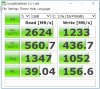 Last edited: May 12, 2018
 -
I recall in one of your posts that you are super happy with the default Broadcom DW1830 wireless card getting great speeds with absolutely no issues, so why wouldn't you just get another one for your second unit?
I myself only changed mine out because although it did produce very good speeds it was extremely erratic & unreliable with frequent drops & disconnects. I also read countless complaints of it not playing good with Bluetooth devices, which was never an issue for me as I don't use them.
I swapped out the DW1830 for an Intel AC8260 and it has been ROCK SOLID STABLE with absolutely no drops or disconnects, yet the DW1830, in my case, did in fact produce higher speeds. In the end, I myself would rather have the stability vs the never knowing what you'll get. -
I actually was referring to my first machine, the one that is on its way back from Dell Hell where it is reported that they changed out the motherboard----which really worries me as I won't know until I get it and boot it up if they left anything out as they have been know to do. One machine I got back from them didn't have the speakers plugged in---in that machine the plug was buried so deep inside the unit that you practically had to take the thing completely apart to find the attachment to the MB.
I inquired about the WiFi card because I discovered while using a backup machine (my old L502x) that the card in it, an AC 7260, has been giving me better throughput that my 9550 with the 1830 card.
I'd rather have a card that takes advantage of the three antennas, but when my machine gets back (and hopefully actually works) I might invest in a new AC 9260 and see how that does. -
OK, let me see if I now got this straight
1. You have (2) 9550's with one at the depot and the other with you?
2. One of your 9550's is giving great speeds with the default Broadcom DW1830 card and the one at the depot, which also has the DW1830 card is not?
Like I said, the Intel AC8260 is ROCK STABLE SOLID and I just cannot see the AC9260 being anything but as well.
I hear you loud & clear about your great apprehension of what the Dell butchers might of done or not done replacing the motherboard, which is really truly unbelievable with a mere driver update, yet maybe you will hopefully get lucky and find everything A-OK!!!
Remember, one can dream!!!
-
@MikeBravo
I had the Intel AC18260 which I think is the same as the 8260 and it was solid, stable. I upgraded to Killer 1550 which is the same as the 9260 and its solid, stable. I only get 150Mbps download through my ISP and both cards gave me this max speed. But for NAS transfers I saw significant transfer speed improvement when I upgraded to 9260. So if you do NAS stuff I recommend the 9260 over the 8260. But people say the range on the 9260 is not so good so there may be an alternative that's better. I got the 9260 to use 160Mhz but the connection is unstable so I don't recommend you get it just to use the 160Mhz.
Is anyone out there using 3x3 WiFi cards that make use of that 3rd antenna on the 9550? Would the speeds be better?Last edited: May 12, 2018 -
The default Broadcom DW1830 wireless card, which came with the unit and is with the third grey antenna was in fact for me much faster in speeds then my now Intel AC8260, yet like I said to MikeBravo, it was unreliable with frequent drops and or disconnects and many XPS 15 9550 owner's found it didn't work well with Bluetooth devices at all.nosauce likes this.
-
I have two 9550's that are identical except one, mine, accepted the Toshiba 512 GB XG3 upgraded NVME and one would not and wound up in Dell Hell somehow because of it. They both came with the Dell 1830. Ironically, mine consistently connects at 877 Mbps, but the other only occasionally does and usually connects at 702 Mbps.
Even though the AC 7260 in my backup machine reportedly connects at only 585 Mbps, the NAS throughput (4 TB Seagate external HDD connnected to a Netgear Nighthawk R7000) on the older 7260 averages about 10-20 MBps faster with one less antenna.
BTW, wasn't the Killer 1550 card the one with all the driver issues? -
OK I got it now thanks.
One is yours and one is not.
It's just amazing how you could have 2 identical anythings yet one could be totally different then the other yet how true it is.
I think it's the Killer 1535 card in the 9560 that has generated all the complaints with terrible latency, not talking to the router and etc. Most owner's removed the Killer suite software, which seems to have resolved most of their issues, yet others unfortunately haven't been so fortunate, while others just bit the bullet and purchased the Intel AC 8265 card with the added advantage of the MU-MIMO technology and are all good again.Last edited: May 12, 2018 -
Thanks for your post, I just had the same problem.
I installed Win10 1803 and so far everything was running smoothly... Smoothly until I just realized that my computer was no longer able to resume from sleep.
So as you suggested I flashed again the BIOS, (I was already on 1.7.0) with the same version and taaadddaaa sleep is working normally. I'm missing why it fixes the issue.
I hope Dell or Windows, I don't who is guilty here, will fix this.
Envoyé de mon Nexus 5X en utilisant Tapatalk -
The Killer 1550 is the same as Intel 9260. Killer and Intel teamed up together. Killer just adds it's software which you may or may not use that allocates bandwidth depending on the task (e.g. priority to gaming, streaming). I have the Killer 1550 card. I've had no driver issues with it whatsoever. It's never dropped connection and the speed is very consistent. There are a couple threads dedicated that should show up on top over at the networking forum. Some people say that the range on the 9260 isn't very good but I've had no issues, but then again my computer is in close range to my router. At 80Mhz I get about 65-70 MB/s Write, 70-75 MB/s Read to my NAS which is significantly faster than the 8260 I was using.
What speeds do you get with your NAS with the Dell 1830? I didn't have a NAS when I had that card am wondering if it's worth trying it out again if the 3rd antenna will give me faster speeds. -
The killer in the 9560 is based on the QCA radio which is believed to reliable. In the wifi community, QCA radios are known to have relatively few interoperability problems compared to certain others, and were the first with actually working MU-MIMO (after several years of marketing BS). It is believed that the problems were due to the reliability issues in the extra Killer stuff. Several users reported reliable performance and even better range when using the "driver-only" version of Killer software, sans the "suite".
-
My XPS 1560 came with the Killer 1535 card. It has, by far, performed better than any other wireless card that I've had on any laptop, and that includes the DW1830 card that came with the XPS 1550 that I had. The connection has been rock solid, and the range has been, by a good margin, better than what I've seen with any other wireless cards.
For what it is worth, I've tried using it with both the full Killer suite and with just the driver. I've seen no difference either way with regard to stability or other performance. -
That's the issue that arose having to go back to my old L502x with the AC 7260. The Dell card, though speedy on the web and web downloads, is miserable on data transfers to my NAS usually only topping 10-15 Mbps and sometimes as low as 3-5 Mbps which I have in the past attributed to my Nighthawk R7000. However, the AC 7260 card has been giving me speeds around 20-25 Mbps so I guess it must be the Dell card yet I dont' understand why its decent on the web, but not on my own network.
Range has never been an issue with the router in the basement (only place I could put it) and it reaches the second floor without seriously degrading. -
That's good to know. I'm close to upgrading to a new MU-MIMO router so I guess I'll wait until I get one and then take a shot at the Killer 1550.
Thanks for the tip. -
Thanks for letting me know. I won't go through the trouble of re-installing the Dell 3x3 card again. I think you mean M Bps in which case 20-25 is not bad.
-
So, its back from Dell Hell and as I suspected its a bit screwed up. For some reason they reinstalled Windows 10 on the 256 GB PM951 I sent it back with, gave me a new Win10 key (never had that happen before) printed on a little booklet in a plastic packet, and converted it back from AHCI to raid even though the other broken machine was returned set to AHCI FROM raid. On top of that, they enabled legacy boot roms and disabled secure boot for some reason (probably couldn't get it boot normally. Even worse, the keyboard space bar is back to being its bad old self not spacing half the time.
Where to begin, what to do.
UPDATE:
Ok, thank my lucky stars that I got all the BIOS stuff straightened out. Let Win 10 update all that way figuring I might again need the smalled drive as a backup.
Tomorrow I see if I can get the screws out. Like the other machine the screw heads look pretty badly stripped out.Last edited: May 16, 2018 -
Ah just another lovely repair at the good old depot.
You know in all honesty I really believe that if the 9550 wasn't still so current and highly used that you would've definitely been a great candidate for a 9560 swap and that's the only positive that I think comes from the depot warranty vs the onsite one and definitely not your unfortunate HORROR stories.
Chin up & Best of Luck!!! -
*&%%&*(_)(*^%$###$$!!!!!!!!
The battery has been at 93% AND STILL CHARGING AFTER FIVE HOURS! Sigh. Nothing in the BIOS to indicate why this is. Not only that, but the machine just turned itself on after being off for a full hour. Never did that before. The space bar problem is now 1000% worse.
Sooooo, tomorrow its back into the breach-----this time I'm going to give them what for. If I have to miserable, so do they. -
Now that first sentence is some pretty powerful words.
Seriously, maybe the battery just needs to be re-calibrated because for all you know it may not be your original. Didn't the update of Windows version 1803 fix the space bar issue?
What version is on it now?
Check your sleep timers in power management as they may have messed with it.
OK, you definitely missed some words here yet I certainly get your point LOUD & CLEAR!!!
I could only imagine how you're feeling yet Calm Down because trust me, it will all work out.Last edited: May 16, 2018 -
Do what I did, kick off and demand a refund or new one due to the amount of time it has had issues and the failed repairs. They will back down once you threaten a chargeback,
-
That is exactly what I intend to do in just a few minutes-----if I can even get through to them.
I had to settle for expedited repair. The box will be here tomorrow and go by next day air back to the Houston Depot where it is promised to be turned around by Monday and come back by next day air.
We shall see.Last edited: May 17, 2018GoNz0 likes this. -
OK and I hope this time that everything gets rectified for you as it rightfully should be.
Did you push for a replacement unit and if so what did they say?
If you said what you did in your earlier post, "*&%%&*(_)(*^%$###$$!!!!!!!!" then I'm sure they understood you over there.
-
I got the old 'past thirty days' routine. BTW, the supervisor that I finally got through to and had to deal with, Rom (really that's his name), told me that if they find that the battery was bad, I'd have to buy a new one as they only warranty the batteries for one year.
I told old Rom that I had an 'extended' warranty which to me meant the battery was covered and we will just see about that. -
How many repairs has it had as they can authorise a replacement after 3. Threaten your starting the chargeback via your card insurance and want to be put through to the resolutions team. You will have to press hard for this as it puts an unresolved issues marker on the supervisors record so they will try not to let it happen.
Sent from my SM-G920F using Tapatalk -
I can tell you this, Dell and I'm sure most other manufactures do in fact only cover the battery for 1 year as it's considered a "consumable" product.
I would definitely do what GoNz0 recommends and PUSH for a replacement under the many repairs that the unit has been subjected to. I would also definitely ask to be transferred to the Resolution Team @ 1-800-624-9896 extension 4540332 (I kept the number)
Finally, when it comes to the customer demand to be escalated to a supervisor I only believe it truly happens when you can verify a different number or an added extension (As above) otherwise, Bob helps Frank out, Mary helps Steve out and etc., which I think you hopefully follow me. As far as are their names real? Only when I get a confirmation or followup email with verification. -
I"m only in round 2, so that is interesting info that I will keep in my back pocket in case it comes back again all messed up.
-
I understand. In my case, Maria began the same song and dance about going all the way back through send it FexEx ground, blah, blah, blah until I demanded to speak to a supervisor as my next step in escalation. That was when they agreed to send me a box with a FedEx air overnight label, so already tiring of the game, I agreed one more time only.
We'll see. Meanwhile I grabbed a Killer 1550 to expermiment with in case I ever get the machine back and it works. -
Well if it is 3 strikes and they're out then when you get it back check everything out and if one thing isn't right, of course excluding it being dirty, get the Resolution Team on the phone ASAP.
All I can tell you is what I did to get my swap from a 9530 to a 9550 and believe me when I say, it was a very BIG gamble but it thankfully paid off. I told them to keep the unit as I don't want it back and I will never do business with them again and that's when the Resolution Team was brought in ASAP.
I do this in retail stores or any place where an amicable satisfaction is not being reached and I just tell them to keep it and leave the item on the customer service counter and start walking out the door and trust me when I say, it works practically every single time, as it's a very unforeseen & embarrassing situation for the individual/retailer who doesn't know what to do and who likes to be embarrassed?
Believe me when I say, I'm not looking for anything more then what I rightfully paid for and so are you.
Dell XPS 15 (Skylake) 9550 Owner's Lounge
Discussion in 'Dell XPS and Studio XPS' started by T2050, Oct 30, 2015.


