Problems? See this thread at archive.org.
You can't call them? Sometimes, you do need to raise hell.
-
Im sure I just ran the Bios update without a battery in the laptop and it worked?? I must be going bonkers!
-
I swear I just ran it the darn thing keeps telling me I need to have a battery installed lol.
Has anyone tried those off brand Dell compatible batteries for the 1730? There are so many conflicting reports about them working properly. Is anyone out there using a non Dell 1730 battery? -
By the way how does Borderlands run for you guys? For me it runs super smooth fully maxed out. The game never liked SLI in XP for me, however in Vista 64 SLI works beatifully with Borderlands and it´s butter smooth in all areas.
-
Magnus, care to share a general overview of the FPS you're getting?
Mine's kinda' okay, but I am sure I could do better with some good intervention. Also, what drivers are you using? -
Not yet, and boy, are they ever moving slowly. I don`t think I`ll have the cards by Xmas

Did, a lot of times. Got sick of putting pressure, went to the service depot and demanded that they speed things up. They said I should be hearing from them tomorrow.
Otherwise, I`ll drive my 15.5 feet car into their warehouse and run them over
-
I'm all for running them over. Hah. Well, get your cards back first.
I've noticed that they've been rather slow lately. I put in an 'unresolved issues' report and got an automated reply assuring me that I'd hear from them within a day's time. It's been four days I believe, but nothing.
Anyway, keep up the positive outlook. The matter will resolve, but you might have to get a bit more aggressive in your posturing if they continue to muck about with their stall-tactics. -
Dell need to take a leaf out of Apples book, I just walked into an apple store
"my phone is getting abit hot an.."
"HeRES A NEW PHONE SIR HAVE A GOOD DAY"
"Oh...thanks very much, goodbye" -
Not even Apple themselves want to deal with repairing an iPhone
As for the BIOS update, I too am curious as to how it was managed without a battery. As I mentioned before, it tells me I need one whenver I attempt an update. -
Where are your batteries guys??
-
I posted a couple of pages back that the left side of the screen darkens, particularly after wake-up from sleep mode. After a while, it gradually gets better. Also, one of my 8700M GT cards has 'disappeared' from both device manager and Nvidia control panel. No doubt card(s) dying or a screen replacement needed. However, I'm using the machine but we all know it won't get better by itself.
The Beast has UK warranty but I'm working in Brazil, only returning occasionally to UK; I'll be back there for a couple of weeks over Christmas. So I called Dell XPS support to try to book a service visit for when I get back to UK and was amazed when they said they could send someone to my work place in Brazil tomorrow to fix it.....! I was so unprepared for this I told them I'd think about it and hung up. The prospect of getting ANYTHING computer - related right here is, well, slim.
I tried again today with Dell UK and (different person - different answer) after some 'discussion' that they HAD indeed offered a Brazil service call, they said 'OK, you have the warranty but you'll have to call Dell Support in Brazil to get the visit'. I made the call but unsurprisingly, in Brazil the M1730 was never sold and they don't have parts, so there it is.
Right, here's my dilemma: I'll get a Dell visit as soon as I'm back in UK but having seen all this related 'graphics card failure and Dell's inability to get it resolved quickly' stuff, my chances of getting a good replacement graphics card and/or screen in one-or-two visits seems a tad ambitious. It sounds like there's a fair chance I'll get given a card which still has problems and I'll bring it back to Brazil where I can't get support......Ok, guys, I realise I'm being negative and it could all get fixed in one hit, and run for years.
On the other hand, does anyone with 'international warranty' experience think I could demand parts to be sent to me in Brazil and I swap them out here? I'm trying not to think about the worst-case scenario where I have a duff machine in Brazil and the (recently extended!) warranty just ticks away....
Cheers, Andy -
Apparently, they say that my original config came with 8700M GT.
Now, I bought my xps 2 years ago from a forum member, Joako , and sent him an email about it, but he didn`t answer, maybe he`s not using that email anymore... only he has the original transcript that states my config...
I don`t get one thing though. When I had my system with the US warranty, and checked the specs, I had 8800M GTX SLI all year round, and now when they had to fix my gpus, suddenly, it lists as 8700M GT SLI
What the heck can I do now ? I`ve forwarded the warranty transfer mail that states my config, and since they approved it, it`s only normal that the config was as it was in that mail, no?
How in the world can I find out the original purchase specs with the service tag, if they changed my account specs WITHOUT MY CONSENT ??? -
Damn, that blows. I'm not sure how they changed the original configuration on the service tag, but I thought you weren't supposed to change the "original" service tag configuration, and that's why it's called original...
If your previous seller sold you the system as upgraded part, and you had no knowledge of it, I'm not sure what you or he can do to convince Dell at this point.
I once got upgraded GPU for 8800gtx to 9800gtx, and my service damn sure didn't change to 9800 after the repairs. The 9800gtx got messed up again, and Dell sent out another 8800gtx, and I asked of it could be another 9800, and they simply said no since they had the spare 8800.
Not sure if this will help any, but my original M1730 had 8700, and blue ray reader. They didn't even have 8800's when I made the purchase through a IT contractor thru my office.
The system had issues with the 8700, and I requested system replacement after having it repaired few times. When the rep called me to review the specs on the new M1730, Dell just came out with the 8800's and I asked if I can get an upgrade to it, and pay the difference. The rep simply said no, there is NO WAY to get it done. After few more calls to the same rep, I offered my idea to down grade the BR reader to dvd, and upgrade the GPU (BR was pretty expensive upgrade back then), and he finally said yes to it.
When the time came for me to get an system replacement on my M1730 because the field techs poor skills, my original system specs were the M1730 with the 8800's, not my very original one system with 8700.
I know Dell reps will keep claim you can't do much unless your original system service tag had 8700, but see if you can convince the rep saying the part was upgrade because you went through hell with previous GPU or something, and keep at it. -
Well that`s the thing, I bought it with 8800M GTX, and when I checked my specs, everytime on the site there was a warranty that was connected to the 8800M GTX!
They may have changed it now so that they`ll get rid of the lesser cards, and figured that since I did a warranty transfer, I won`t have the original transcript so that they can mess with it
This is utterly unbelieveble. I had a warranty for a system with 8800M GTX, and now, conveniently, when I had GPU issues, they system shows up as having 8700M GT.
God, I feel like ranting all day. Did I mention that the 8700M GT, even in SLI, is crap compared to the 8800M GTX SLI?
If only I could get a hold of Joako ...
-
That is terrible!!! Dell can be very dodgy!
-
Joako hasn't posted in over a year, and sent him a mail some days ago, haven't heard from him yet.
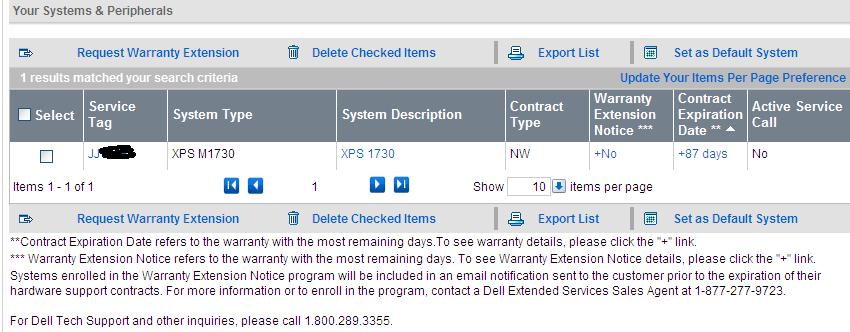
Got 87 days of warranty left, and I`ve got no clue as to what to do now...
Sent them the warranty transcript(with the specs that included the 8800M GTX SLI, and which THEY APPROVED, (cause if there would have been a mistake, they wouldn't have approved it, right?) , and that`s about as much as I can do now unless Joako mysteriously shows up...
-
How about that, now when I`m trying to view my system in the Dell account, it shows that there is no config associated with it, lol
All I have is this :
Attached Files:
-
-
I wouldn't even bother with original owner since the chances of im stepping in are slim. Keep calling them and claim your service tag was tampered by one of the Dell rep as well.
-
Without actual proof, it's my word against theirs... not a good deal imho.
Well, I hope that warranty transfer transcript will do... -
Oh and was this the first time your GPU was replaced?
If yes, make your arguement there as well. -
Yes, it is the first time.
Well, for the time being, since it`s weekend, I have nothing to do but wait.
Thanks for the tips. -
Hey guys, I've got a huge problem and need your help!
My laptop won't boot!
You know that first screen you see when you start up, with the Dell logo? And it loads the BIOS and there's a little load bar underneath. Well mine gets to 80% done then halts... that's right after the F2 - Setup and F12 - Boot Menu options show up on the top right, it halts immediately afterwards.
Pressing anything results in nothing, so I have to press the power switch to turn off.
Sometimes it will only get maybe 10-15% loaded with the bar before it stops responding.
Any ideas what's going on?
I was playing StarCraft II when this happened. The game hiccupped once or twice, and I even alt+tabbed to check my temps on CPUID Hardware Monitor.... none of the temps were over 60 C, that includes both GPUs and both CPU cores. Completely normal range. The computer just froze. So I did a hard reboot (held down power button) and then this happened.
However, my power WAS fluctuating. Our power is out and we're running off a backup generator (the laptop is connected through an APC Back-UPS unit). The UPS did not switch on and off, but it was running through AC power at the time (not on battery).
Could a power fluctuation (it would have been an undervolt, since the generator is not capable of overvolting) have messed up my BIOS?
Anyway, that's all the information I can think of!
If anyone can provide any advice, I'd really appreciate it. I'm really freaking out here!
EDIT: I have an A09 revision BIOS. The power just came back and it still won't get past the Dell logo screen and halts during the loading bar. The machine is still under warranty. The machine was manufactured in November of 2007.
Is there some way of resetting the CMOS to factory settings or something? I'm used to desktops where there's usually a jumper to do this.
EDIT #2: Okay, I tried holding down the Fn button while powering up. It still hanged at the Dell logo screen but the lights were flashing. At first, the one all the way on the right flashed then all of them really quickly (not sure if this is normal), then the slow sequence of lights flashed...
Middle Light, Middle Light, All 3 lights, All 3 lights, then just the Middle light kept flashing after that and didn't stop. -
This will sound stupid but how long have you waited at the hang? - if i lose power the next boot take AGES, it looks to have hung at the start but then it just starts going again and eventually it boots. Also another thing which caused me some problems were the hardrives. I would reseat the hardrives (easy to do just unscrew the bottom panel.
Also if none of the above works, try checking the RAM - ie - try pulling one RAM mobule out, if that doesnt work, swap it for the other and see how you go.
Im sure its something easy - also pull battery out and hold power down to clear system before removing components.
Let me know how it goes...
-
Also remove your battery and try again on power...
-
@ Fortune7
I'm not sure if this will help, but I had a somewhat similar situation with my Dell 13z. I only have a one year warranty on it. Purchased it in Ireland. Dell's terms and conditions state that if you purchase a 3+ years warranty - it is counted as international, meaning that you can get service anywhere. Anyway, during my visit to Russia, DVD drive broke. It wouldn't be that big of a deal, if it didn't make very loud noise every time I was turning on/off the laptop. So, I contacted Dell there. To my surprise they did offer me to repair the drive, even though I didn't have international warranty, and 13z was never sold in Russia. I was very surprised with the great level of customer support there tbh.
I know that this was just a DVD drive, that is times less expensive, than a GPU, but still hope this helps.
@ raad11
You can reset BIOS by holding the power button for 20-30 seconds. I've seen this helping to resolve booting problems on several occasions.
Sry, I don't know anything about the light codes for M1730, probably someone else on the forum can help you with that.
P.S. I don't know much about this, but I believe that the battery on the motherboard can cause same issues. But I wouldn't take my word for it though. -
Andy - the only thing ambitious is your optimism that an XPS M1730 will get fixed, and even more ambitious that one will "run for years." This sorry hermaphrodite machine is destined for hardware failures. It is not a matter of if, but when, it decides to give up the ghost.
You need to use your warranty as often as possible before the warranty expires. Ask Dell to send the parts to Brazil. If you end up costing them a ton of money to service your M1730, you will most likely end up getting it replaced with an Alienware M17X R2. If you wait until the warranty is about to run out to begin bombarding Dell with onsite service calls you will be left high and dry, with nothing but a very pretty paperweight. -
Thanks for the help guys, but it still won't start.
I've waited at the Dell screen for several minutes (the long reboot after power failure is something that's happened to me before so I'm familiar with it), and it still won't start. It gets 3/4 of the way done, then slowly keeps going for a little bit, then stops. I can even hit F12 in time and it will say "Preparing one-time boot menu" but not get any further.
I got off the phone with Dell and they're going to ship out a new motherboard, video card, and RAM, because they couldn't tell what was wrong with it.
I'm hoping it's just the BIOS chip going awry, and my video cards are fine. I have 8800M cards in there, but I purchased those and put those in myself. If I have to revert to 8700M, I might just sell the laptop and go for a desktop.
But I've never, not once, had the 8800M cards overheat. They average really low temps (I put AS5 thermal paste on) and I run the BIOS with the fans on full.
Oh well. We'll see when the parts get here.
-
Quick question, when I swap the motherboard, I'll have to use my existing CPU, right? Cleaning off the thermal paste and applying new paste... They don't replace the CPU too, do they?
-
Nope, afaik only mobo will be repleaced and cpu repasted. Maybe heat sinks as well if me aint wrong.
-
Also, and when you say hold down the power, is that with it plugged in (so it turns on) or with the power cord disconnected and the battery out?
I tried it, but the laptop still starts with the fans on full blast meaning it's using the old BIOS settings, meaning it hasn't reset... -
I'm in the same boat as you, but my problems were different (no GPU symptoms, sudden system refusal to boot).
I'm in Pakistan. I'm having the parts shipped to my home in the US and my family is going to re-ship them to me here, and I'll send the other parts back the same route.
This might be your only solution. Have someone in the UK from the address on your Dell warranty account forward it to your Brazil address. -
Btw, just out of curiousity, has anyone here heard of a problem where the machine just hangs at the Dell screen and refuses to boot? What did those usually wind up being?
Also, how common are motherboard problems (with the onboard battery, CMOS/BIOS corruption, etc)? Has anyone here had such problems? -
I believe you need to disconnect the power cable and take the battery out.
-
Eleron, I've been reading your posts and follow-up replies.
Listen, we have had people in this very lounge who have stuck to their guns. With their warranty policy and your consumer laws as an EU resident, you're entitled to equal or better from your most up-to-date spec. Sure, some of them can say 'no', but that doesn't mean that you have no recourse to such a replacement. It is nonsense.
To give you two examples: Hankaaron and BatBoy. Both them started with XPS M1710 replacements. Ended up with M1730s with the 8700m SLi. Moved from those to 8800s, and never settled for anything less. I may not have the exact picture when it comes to the details, but I am quite certain Hankaaron's case was that of 8700s being swapped with 8800s, and then the cards dying after which he pressed for a proper replacement. Dell argued that his 8800s were a one-time replacement and that he'd get 8700s, but he refused and stuck to his guns, and now has an excellent M17x as his replacement.
I suggest you take help from anyone on here who can assist if this matter gets dodgy. Don't let the technicalities of warranty get in the way. This will most likely get down to how confidentally you can argue against their points without making it seem like your warranty is 'your problem'. The fact that details have vanished on their end is their prerogative and you as the customer should have every reason to be outspoken about the matter. Hell, go with what Achilles is recommending; argue that you had 8800s in the warranty, before they took your laptop to the depot, downgraded the system, and then insisted that the cards weren't covered before your warranty details 'conveniently' disappeared. Trust me, this won't be so much an issue of your word against their word seeing as the warranty system and its transparency is their responsibility. The fact that your details have suddenly disappeared, makes this look bad for them as it is impossible for a customer--who has no authority or ability--to modify the warranty profile. It was their system that screwed up, and they are liable to the fullest for your situation. -
Hm, that didn't work.
Another question for you all. Is there a service manual for this machine online somewhere? I still remember how to get to the GPU/CPU (it's been over a year since I worked on it), but I haven't replaced a motherboard before. How much more complicated is that procedure? -
You can go here for the manual. It's BatBoy's site.
Dell XPS M1730 - 'The Beast' -
Thanks Kade, I`ll do exactly that, and you`re right. It`s their screw up, they have to fix it, otherwise I`ll make sure that others hear about it.
-
EDIT: Nm
Thanks! -
More questions! What's the best mobile GPU on the market today? How is the Mobility Radeon 5870 compared to the 8800M GTX SLI?
-
Ah, so a single Mobility Radeon 5870 or a GTX 460, 470, and 480 all narrowly outperform the 8800M GTX SLI (and I'm assuming the 9800M GT SLI, 9800M GTX SLI)?
I'd think that a single GPU would have to be more stable than two in a laptop. Have the guys with those cards had problems like ours? -
Would this outperform an M1730 with X9000 2.8GHz / 8800MGTX SLI?
Newegg.com - TOSHIBA Qosmio X505-Q892 NoteBook Intel Core i5 460M(2.53GHz) 18.4" 4GB Memory DDR3 1066 500GB HDD 7200rpm DVD Super Multi NVIDIA GeForce GTX 460M
It has Core i5 460M (2.53GHz to 2.8GHz with the Turbo thing), and GTX 460M.
From that link just posted, it seems the 460M and Radeon 5870 are comparable in performance, and single cards of each beat the 8800M in SLI. I read some user reviews that say the 5870 is faster, but there's apparently an issue with those cards overheating without getting a BIOS flash? Yeah, I don't want to go through that experience again. -
That is not true in some games 5870m outperforms the 8800m GTX SLI and ins some not. However those benchmarks I ran for Hawx 2 and Lost Planet 2 and Just Cause 2 a single 5870m did not beat my 8800m GTX SLI setup when I compared them.
-
Was yours overclocked? At default speeds, the 5870 and GTX 460M are at least on par with the 8800M/9800M SLI cards?
-
Yes overclocked, however the 5870m was also overclocked. I doubt the single 5870m is in par with the 9800m GTX SLI when SLI is working on it´s full. Though I can not bench with a 9800m GTX SLI since I don´t own one. But considering the benches I compared with my 8800m GTX SLI against the single 5870m the 9800m GTX SLI would fare even better.
-
Theres no way the 5870m can stand up against my 9800m gtx sli setup,also having a dual core like x9000 running at 3,8ghz its like running an i5 of the same level as long as it is a dual core.
Seriously,the beast can keep up with any game released so far with crazy performance. -
Except for the part where it overheats and dies. :-\
The HD 5870 has similar problems, so it probably isn't worth it.
How does the GTX 460 or better (do any laptops have the GTX 470 or 480?) compare against the 8800M/9800M SLI? -
I haven´t actually benched against the 460m. However Kingpinzero has killer XPS now with his X9000 running at 3.8Ghz and 9800m GTX SLI. So I hope we could bench his XPS M1730 against a GTX 460m notebook.
I agree with Kingpinzero the XPS M1730 can keep up with modern games at 1920x1200 even today and better yet with the X9000 running at 3.8Ghz that CPU is no slouch. -
Eleron, I am glad to read that you'll stick with a solid approach. I am sure others who've been through this will also agree. You've already got advice from all of us on your plate, but by all means, ask for more if the need arises. Keep us posted on your situation.
As for this discussion on the newer cards vs. the 8800s/9800s in SLi. Dude, an 8800m GTX in SLi--especially the 9800m GTX SLi--is still no slouch. It will out perform these single varients of these 'newer' cards at higher resolutions. Real games -- real performance. Try running Crysis on Magnus' config, or standard very high under DX10 with a single 5870, even overclocked, and then fire up a stock 9800m GTX SLi with the same config the results will be obvious.
The 5870 and 460m are great cards. New design. MUCH more efficient with some benefits of a newer API. They come close to the 8800/9800ms in SLi, and in synthetic benches, even beat these cards. But a dual card configuration with proper scaling and 256-bit memory bandwidth will still achieve an edge with optimised games.
As an Nvidia SLi user, most games that benefit from SLi always show considerable increase in performance. I'd always opt. for very good high-end cards in dual configurations. Where SLi or Crossfire isn't supported, I'd use the cards in single GPU mode, but I'd always like to know that the dual-GPU option is there to own games like Metro 2033, Lost Planet, Crysis, etc, running at native resolution.
XPS M1730, even with the 8800m SLi, is plenty of grunt for majority of new games. The only ones that seem to pose a real problem are the PC exclusives, and they can be tweaked. The rest are console ports designed for hardware that even a dual 8700s could technically out pace. The real issue is the fact that some of these games are poorly coded, so even great hardware can have issues with performance. Running them without some of the glitchy features can resolve this issue, but not always. Short story: 8800s are still Class 1 cards. High end cards. They are still able to run a majority of new games at high-end standards with reasonable frame-rates at the very least least, even if used in single configurations. I would've certainly stayed with my XPS had it not been for the thermal issues and the GPU failures. M17x feels like a similar experience, minus those issues, although it requires considerable tweaking out of the box. -
On a side note ive always benched my system against my desktop, 4,25ghz e8500 with a gtx260 soc sp216 (448bit bus!).
Consider that the beast runs at 1200p in my tests while my desktop at 1080,so desktop have some performance increase due to less pixel to render,while the cpu runs with more than 600mhz above my x9000.
Dirt 2 desktop: ultra 2xAA - 58-60fps
Dirt 2 xps: ultra 8xCsaa - 50-64fps
Nfs shift desktop: high No AA - 60fps
Nfs shift xps: high 4xAA - 47-85fps
Thats just a quick example how the beast can keep up with an heavily oced desktop gaming rig. And i love it
Dell XPS M1730 Owner's Lounge, *Part 3*
Discussion in 'Dell XPS and Studio XPS' started by BatBoy, Oct 6, 2009.