Problems? See this thread at archive.org.
Gotta have some earplugs lying nearby
I assume you're using Throttlestop to oc the cpu, i guess i should use it after i oc the cpu to 3.4 via bios.
I got a question, the only option i need to change is the multiplier, save the profile and turn on throttelstop right?
-
The noise of the fans becomes background noise once you stop thinking about it.
Totally worth it though, temps are low and the performance boost... well, it's just phenomenal. -
Mag that happened because you had remnants of 197.15 when you installed the new betas.
Remember to run driver sweeper and ccleaner everytime you unistall an old driver as they scatter files and entries everywhere.
Otherwise the new driver will be messed up. Nhancer isnt supposed to work with 26x.xx so if it does something went bad with your installation.
@eleron: enjoy as we told you your cpu was bottlenecking your gtxs well enough, now thats how its supposed to run.
-
Ok, question. What's the voltage you guys use for 3.8?
I`m at 3.4 for now, seems all fine and dandy, but I`d like to maxx out the potential. -
Depends, some ES or OEMS may need v1.4750 for 3,8ghz.
Best way to find out is to run Prime95 at the above voltage for a bit then step down the voltage a bit and try again.
My X9000 and Fortune7 needs that voltage. The OEM x9000 that Mag uses hovewer needs v1.3850.
You took the cpu from shirley right? Then mostly is an ES, i think you should be fine with the voltage i written. -
Yea, from Shirley, ES.
So 1.47 ...
What about 3.4 Ghz? would 1.36 be enough?
I seem to have some slowdowns occasionally in GTA IV Ep.fromLC. I don`t know why, cause powermiser is disabled, SLI enabled, the config is pretty minimal, and I`ve checked with RivaTuner, there is no downclocking.
Mind handing a good config for testing, anyone?
-
EFLC runs like crap on our beasts, while GTA IV runs awesomely fine.
Note that EFLC still runs crap on my desktop pc equipped with SB i5-2500 @ 4,2ghz and a GTX570. I cant keep 60fps, mostly 40. On a desktop. LOL.
This is how i run it on my xps:
Every detail maxed out (every one, even water)
1200p
View Distance 5
Detail distance 20
Cars 20
Search for timecyc.dat into game folders. You can open the file with something notepad. Search for FarClp value, it should be 750, lower it to 500 to see a nice fps boost. You can then tweak the viewing distance in game, but i recommend to keep it to 5 or 1.
more details here:
GTAForums.com -> tweaking timecyc.dat
It applies to EFLC as well.
With Quadros 265.90q under xp im able to benchmark it @ 32fps in sli, with TBOGT benchmark. On LAD thought the engine is poorly optimized so it stays around 25fps. And we cant do nothing about it, expansion runs CRAP compared to the full game, i tell you.
About 3,4ghz, i run it with 1,28. On my ES v1.38 is for 3,6ghz.
Theres no point however to have the cpu running at 3,4. Fire it up to 3,8 and keep it on that speed. Thats where the cpu shines. -
I can't edit that timecycle thing, it`s just gibberish.
I`m on 3.6 right now, let's see if there's some improvement.
I figured out why it ran so badly. My RAID array kept fixing itself, so I've reset it to non RAID.
For some reason, when alt-tabbing from EFLC, I get some weird flickering, blueish like. I've upped the voltage to 1.4, at 3.6Ghz, but it's still there.
I'm still on XP, 265.90q. -
what happens if i increase the multiplier to obtain 3.8 without touching VID?
@Eleron, have you touched your voltage yet at 3.6?
I must admit this voltage thing makes me kinda nervous -
Yea, 1.4V at 3.6.
But the fans are keeping the thing under 65C CPU, and under 70C GPU.
So no worries from my point of view... yet.
Remember, Dell's factory settings for 3.4 are 1.47V, more than enough even for 3.8
-
I can run my X9000 at 1.3350 at 3.6GHz and I run it at 3.8 at 1.3750v.
Actually I cleaned out the drivers like I always do with Driver Sweeper and driver cleaner. However the performance wasn´t what I was expecting with those drivers.
Now compare that to my Sandybridge CPU Core I7 2600K that I run at 4GHz at 1.2v, that is something I can raise that Core I7 to 4.5 easily possibly higher by just adjusting the voltage a bit. Love that Core I7 CPU, really cool temps and fast as hell
-
Oh so I'd only be decreasing the voltage
-
Yep
Therefore, lower temps. -
At 3.0ghz voltage is still at 1 lol which is not bad
-
That's odd. I had my T8300 at 1V, but that was at 2.4...
Heh, seems your CPU is rock stable. -
Ok, speedstep off, bios OC to 3.6ghz, 1.4v, testing Crysis 2 demo now
-
But, dude, look at Mag's performance. It verifies my claim. I honestly don't believe that the 280m GTX is another leage beyond your systems. In fact, I was running the test on a dual core CPU -- limited to 3.2 GHz -- and my Quad Core isn't that good for SLi scaling since it cannot overclock in cycles to as high a level as your X9000s. Furthermore, Crysis 2 is running faster than Crysis on my system, to the same proportions should apply to your set up regardless of my supposed 'hardware advantage'. So I still believe that XPS owners should be able to run this game at over 30 FPS on Hardcore setting. Furthermore,
-
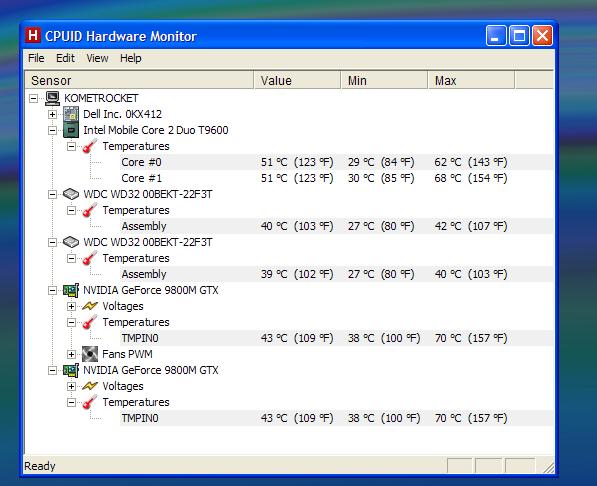
After 4h of GTA IV EFLC, CPU at 3.6, 1.4V, stock GPU clocks :
It's funny how HWM reports the CPU as being a T9600
Attached Files:
-
-
Crysis 2 demo tested with latest nvidia drivers
CPU @3.8ghz 1.4v
On Hardcore I get a 27 fps average
pushed to 29 with overclocked gpu.
I guess it's not so bad, since it's just a demo and no official drivers have been released to optimize crysis 2
@eleron : got the same exact thing with HWM same goes with CPU-Z
Edit: Prime95 reporting error after 4 sec on either CPU at 3.8 1.4v, lowering to [email protected] test running for 15 minutes so far so good... -
But mate, further reports, as from mag itself, confirms what i was talking about. The capabilities of the game doesnt go over 30fps in hardcore mode on our beasts even oced to hell, i think we hit a wall here.
The only thing that can save us as mag hinted is to hope for a vastly tweaked config like it happened on crysis 1.
For now, doesnt matter what driver you use, the reports from m1730 users with same configuration as us are all the same: hardcore, sli patch applied, 26-32. Mostly in mid 20's, thats it. Probably on Gamer things can go better and probably in the final game things will be more better, but for now the situation is that.
Also about the Crysis 1 benchmark, mind that we're able to achieve 45fps of average with mag tweaked config, which is not a "clean" benchmark at all. Its good to play the game thought. If we take into account the performance of the game at his standard settings "vanilla" we fall behind the competition...althought the competition means m17x with Xfire 5870m. -
1.4v for 3,8ghz is too much low mate. Crank it up past 1.42 (1.4750) and you're fine to go. Cpu doesnt get hot even in intensive games and the max you can achieve is 80s, if you barely reach it.
Isnt the cpu our main concern on our xps's, but gpus. -
But mate nhancer could not work with 26x branch. The fact that is working clearly shows something was messed up. Now im not sayin that a "proper" installation makes those driver faster, nor im sayin you didnt did the correct steps, just analyzing the situation. Its a strange behaviour none the less.
And about Sandy Bridges well....screw Triple Channel memory support! We're fine with Dual lol. My i5-2500 is an average overclocker.
I can bclk it to 105 and keep the turbo ratio active to 4,35ghz, and it does wonders really. The leap in terms of performance is huge althought it lacks triple channel support.
And im running this little boy at 1,25v while keeping temps under 55c (IBT) With just a cheap aftermarket cooler like Arctic Freezer 13. 20$ lol.
-
@Mag: i had time to waste today so i tried to achieve same results as yours in Vantage using 197.25 with a modded inf under 7 x64.
Turns out that im almost able to stay on par with your score, but something doesnt add up.
First what bothers me the most is the Flag Benchmark. In your screenshot you're able to do a stunning 45fps while im able to just reach 29.
Also chipset drivers are the same i was using on xp, 9.0.11 something like that, cpu is oced to 3,8ghz.
I dont understand why my fps is halved in that test, it appears that some tests as well have lower fps. I can understand that having the GTX on lower clocks than yours degrades the score (im not able to go past 610/1575/900) but still i cant figure it out.
Any clues? Nhancer Vantage profile is the stock one, so until im missing something, your machine is superior in a way i cant understand. -
thank, I didn't really want to go higher than 1.4v, but it seems 1.4625 is cutting it.
However for such a high increase in voltage and all, I'm not sure there is a noticeable difference in game performance between 3.6 and 3.8 that would justify pushing the machine to this limit.
On another note I imagine you all keep Vertical sync Off for crysis -
@Kingpinzero.
Yeah something was fishy about my installation of those drivers since Nhancer worked. I don´t think I will try again though, I am happy with the 197.15.
About vantage that is really strange, I can´t replicate that score after I uninstalled the 197.25 drivers. However I reached almost 10000 on the GPU score alone with the second installation of the 197.25 drivers, though that is 556 points under that score I posted on the GPU´s.
Now another thing that I was curious about when I reached that GPU score of 10556 was that GPU-z didn´t report my GPU´s as 9800m GT anymore, though after I tested the Quadro´s and uninstalled those an installed 197.25 again for Win 7 they were reported as 9800m GT´s.
I will give Vantage another run today and see where the Flag test ends up now and post the screen here. Though it´s strange you had that much lower in that particular test.
Nah overall my system isn´t superior to yours, you still have the 9800m GTX GPU´s that is faster than my 9800m GT´s and the 1GB of VRAM. In the end I will get hold of 9800m GTX GPU´s myself for my XPS M1730.
However my GPU´s is higher clocked than your 9800m GTX´s. -
But you're not even scratching the limit mate. 3,4ghz under bios, factory dell setting, pushes the voltage to v1.4750, so you're still below their setting.
Thats why i said go for 3,8ghz. Prolly the difference its not outstanding, but in benchmarks and cpu bound games 200mhz makes difference
And yes, Vsync is always disabled, since Vsync doesnt quite sympathize with SLI and its not possible to enable Triple Buffering due to sli nature (AFR). Therefore a waste of time and resources.
Keep your vsync disabled all the times, not only in crysis. -
Mhm, that sounds alot strange indeed. The mixture of the drivers could lead to a better performance? And btw that's exactly my score: 10052 or something like it.
If you retest it, do me a favor, post me the links of chipset drivers/gpu drivers and any tweaks/sli profiles you made for it. Lets figure this out together, something is slipping away.
Im still having 197.25 installed, so im ready to go. Also i suppose Vantage was at default settings? Because my best bet would be negative SLI scaling in the Flag tests/low gpu usage.
Another reason could be my cpu compared to yours, maybe 3,8ghz is bottlenecking the gpu, but im not sure. -
thanks for the info mate i'll stay on 3.8.
However I can't enable dual IDA in Throttelstop, not sure if that changes much, some people seem to really want that option. -
Yep did a test now and hit 25 fps on that particular test. I have installed other chipset drivers and runs another test. I really want to replicate that 45 fps for that particular test.
If I managed it again then I definitely know what it is and will post it here. Chipset drivers can do magic apparently
-
Mine's at 1.475v
Andy -
Xtreme cpus doesnt need IDA, which is some kind of turbo boost that ups the clock of the cpu about 200mhz.
@mag: see, thats my score exactly. -
@ totostar & Eleron,
I took Kingpin's and Magnus' advice about overclocking the X9000 and apart from some stoopid mistakes or omissions by me I'm very happy with the stable setup; 1.475v, 3.8ghz and GPUs at 600/1500/900. Yes, fans are on full but as far as I can tell, it will only be consistently high CPU temperatures that will kill it off, and the fans at this level are keeping my system cooler than when I had a 2.2Ghz CPU and 8700GTs. Honestly, I don't think there's much evidence of fans failing due to running at higher RPMs; at least, I have seen no-one here on this (massive) thread complaining of fan failures due to running at constant top speeds.
As always I bow to those with greater knowledge and experience but I'm saying this because I went through the same anxiety when OC'ing my new-and-expensive X9000. Something like Scotty in Star Trek: "1.475v and 3.8 Giga-Hertz, Captain? She'll never take it!!" As always, Scotty and me are proved wrong....
Cheers, Andy -
Man I loved that final phrase from beloved Scotty :d you gave me a good laugh sometimes I do feel like that when tweaking my rig
i'm just sad I can't Oc my 9800m gtx without them freezing the pc after 20 minutes or so
-
@ Kingpin and Magnus:
Time for some more newbie questions in the search for that 'sweet' (but reliable) setup.
I seem to be able to get nhancer to work with 265.90q, so does it look like I need to do a full GPU driver clear-out because there are still remnants of my older 196.xx driver that COULD be screwing with my setup? If so, can you run me through the steps to do this, please?
i.e. (would this be right?)
1. Use driver sweeper to remove 'NVIDIA - display' drivers
2. Re-boot and presumably a standard windows video driver takes over (?)
3. Re-install 265.90q and the modded inf.
If it's that simple, I guess I should go ahead, but I don't want to be stuck in the process with extra problems.
Next: How can I be sure I'm running the latest chipset drivers (as Magnus has been describing), and are we talking about NVIDIA Chipset drivers, or Intel chipset drivers? What's the process (idiot's guide) to checking and updating if necessary, please?
I'm realising that all this stuff is inter-linked, so I want to try to get into all-corners of the system to make reliable improvements. Once I know the machine's doing it's best, I can look at game settings / profiles, etc. Hope this makes sense.
Cheers, Andy -
Yeah, I could feel my heartrate going up as I went down in volts as the di-lithium crystals were screaming at 3.8Ghz (1.485v.....run Prime95 for 3 cycles, OK, wipe brow, now try 1.48v....) lol.
I admit I haven't yet done much with my 9800m GTX except for taking the advice of 600/1500/900, and I haven't had any GPU related crashes or errors since, but then I'm not -yet- pushing the system with high capability games like you blokes.
Cheers, Andy -
Yo Andy,
as your question these are the steps needed:
- Install CCleaner and Driver Sweeper
- Unistall the driver and related components from Add/Remove Windows app
- Run Driver Sweeper before rebooting, check Nvidia Drivers and Chipset, Analyze and Clean
- Reboot
- If done right windows will not be able to install the cards, just Standard VGA adapter and a failed installation on the second card (3d adapter)
- Run CCLeaner and run a registry scan for missing/broken entries.Repair all the scanned entries.
- Install the newer driver by selecting Customize and Clean under the installation procedure
You're done
About our cards the next stable oc i found is 610/1575/900. Nothing biggie.
As for the chipset drivers, me and mag were using these:
http://downloadcenter.intel.com/Det...hipset+Software+Installation+Utility&lang=eng
Version 9.1.1.1019 on both xp and seven, but a newer version has been released as well here:
http://downloadcenter.intel.com/Det...hipset+Software+Installation+Utility&lang=eng
Version 9.2.0.1025. It appears that the drivers for our chipset still the same thought. The best way is to unzip, the go to hardware management (righclick on Computer entry under Start, Manage, Hardwares) and then upgrade manually every Intel component by giving to windows the exact path of the unzipped driver (Use "ALL" folder in the unzipped setup, that should do the trick).
Otherwise run the setup first then manually update the components.
The manual update is a real pain in the but it ensures that the components are actually updated. The installer often misses them.
Hope it helps.
PS: the most important thing is the PCI Express Root entries obviously, those feed the communication between cpu and gpu bus. -
At the moment i'm on Crysis 2 demo.
I noticed using EVGA Prcesion stats on lcd that when i'm running on stock clocks (500/1250/799) it shows me 540/1350/802, so when I'd overclock at the regular 600/1500/900 it would display on the logitech lcd 640/1540/902.
So I'm like "what the hell?"
I've decided to overclock to exactly reach 594/1512/900 on the lcd display, 2 rounds of crysis 2 and so far so good... -
Dont fall victim of EVGA and MSI programs wrong readings. The reported clocks on OSD are wrong and differ from the actual program.
So if you set the program to 600/1500/900 thats the exact speed, but it adds 40mhz to the reading for no reason at all.
Its a known bug but the developers doesnt want to look at it as our cards are really old nowadays. It works perfectly fine, so keep in mind that the reading is off about 40mhz. So bump those clocks. -
Problem is, if I do bump those clocks, system would lock up after a little while playing a game. I used to oc without a problem with my old 8800's (which I still have just in case..) but those cards well they don't like it :/, so I cut the usual 600/1500/900 in half giving 550/1375/900 , and so far (crossing fingers) I'm still there :d
-
thats strange tho, something isnt right. I guess your chipset drivers are updated yes? althought they shouldnt help you much.
Try to OC using Nvidia Inspector at the same clocks without touching EVGA at all. -
Not sure that would change much, when i got those cards a year ago now, I tried overclocking them using Ntune, which worked well with the 8800 but froze the system with the 9800's after like 10 minutes of metro 2033/Crysis1 so I kinda let go.
same problem occured with EVGA so I'm guessing changing software won't change anything.
what I did like about eVGA is the combined fps stats + each gpu % usage (great info to test sli performance) on the lcd.
And yes chipset drivers updated
i'm still at 550/1375/900 right now and will report if system locks up next time I play something. -
Ahh, well I've had real problems getting rid of the nvidia drivers. I must have gone through your procedure 6 or 7 times and each time I still had the remains of nvidia files in the windows\system32\ folder. I even tried to delete them manually but driver sweeper still reported them and wouldn't delete them, even from safe mode. Repeated cycles of Driver Sweeper / CCleaner and manually erasing all nv*.* files in the system32 folder (I hate doing that low-level stuff in case it screws something else up!), followed by reboots each cycle have finally got rid of all related Driver Sweeper and CCleaner registry issues. BUT!! The device manager still reports both GPUs, but with the yellow exclamation marks, showing driver issues. I haven't yet re-installed the Nvidia drivers and I want to be SURE I have everything clean before going ahead. Clearly, my system is/was behaving oddly, but is there anything else I can do to clean the setup?
Cheers, Andy -
Well, theres a last thing you can do.
Zippyshare.com - genetix_cleaner_v4.85.exe or
genetix_cleaner_v4.85.exe
Download this file and run it after you cleaned and unistalled everything as much as you know. Its called Genetix Cleaner and usually its the best thing out there to clean up drivers. Give it a try. -
searching \windows\nv*.* there's still a lot of files but in other folders, like windows\system32\driverstore\filerepository\ . Is windows 7 on boot-up using these files and installing the GPUs by default? Should I get rid of EVERYTHING nvidia?? Obviously, these files aren't reported by driver sweeper.....
Cheers, Andy -
I'm keeping mine at 3.6 and 1.38V. So far, no issues in anything.
Sure, the GPUs aren't OCed yet, but didn`t really feel the need for it.
How's COD BO on the beast? Cause I`m about to get that, since I recently (finally) completed COD5, and playing Wolfenstein also... -
Cod:bo under xp maxed out reports a minimum of 60, max 150, average 70.
As for maxed out goes,i mean 4xAA and everything else on highest setting possible.
However under 7 theres a huge problem with sli scaling, as the game averages 45-50fps. Not much playable.
3,8ghz cpu, 600/1500/900 and quadros 265.90q. -
Whatever you do, dont manual delete anything man. Use DriverSweeper/CCleaner and Genetix linked above and leave the rest as it is.
If you manual delete something the chanches of screwing up the system are high. -
Chipset drivers have effect on overclockability too. I know this myself since some chipset drivers makes the overclock unstable.
You can make a shortcut to the setup.exe and just put this at the shortcut -overall, this way the chipset drivers updates all. However sometimes it don´t update the PCI Express Root and that you have to manually. Just try different chipset drivers and check for stabiliby and benchmarks
-
@ Kingpin,
OK, I finally re-installed the video driver but it wasn't very pretty, and not as straightforward as you suggested - my machine and/or my capabilities, no doubt.
So, on to the Intel chipset driver update. In the text above, are you referring to a procedure in Win7 or XP, because I can't see a 'hardware' option after the 'Start, right click on Computer, Click on 'Manage''. There's no 'hardware' option but of course Device Manager is there. Is this what I use and if so, how do I find all the Intel elements for this driver update?
Apologies - I must again be doing something wrong but I really don't want to miss a step in getting this right.
Cheers, Andy -
OK, with these updated chipset drivers, I may have got it now. Here's what I did:
1. Downloaded from your link the latest Intel chipset drivers
2. Unzipped the 'all' folder
3. In Device Manager (Win7 x64) as administrator selected 'System Devices'
4. For each 'Intel' entry, selected 'update driver software', then directed it to look in the unzipped 'all' folder.
There are 7 'Intel' entries in my 'System Devices' list, and most of them took an update; all 4 'PCI Express Root Port' entries were updated.
Is that it?
Cheers, Andy
Dell XPS M1730 Owner's Lounge, *Part 3*
Discussion in 'Dell XPS and Studio XPS' started by BatBoy, Oct 6, 2009.