Problems? See this thread at archive.org.
I used to have a spare 9800m GT sli as well, but i sold it along with the older T9300 because i was fetching money for my desktop rig.
I just realized that im not going to game on my xps anymore, ill just keep it for scenarios where i need it (like some IT work) or when im not able to use my desktop rig.
In other words guys, im with you all until my beast dies, or either when one of the two cards receive the death sentence. At that point ill prolly sell it and stick to something portable like a Win 7 tablet or something like that lol.
-
-
Thanks, sadly I only have the T9300. Yeah I've just booted it up again now (not even using it, its just sitting at the desktop) and its already up to 68 degrees and climbing! I will definately try repasting it (might be whats causing the laptop to keep freezing as its getting so hot). Although now my second 8800 is reporting code 43 in device manager (exactly what my mates did when his died) so this isnt looking good!
-
The A11 BIOS should help keep temps lower still. In case you didn`t update to it, give it a go.
Sure, with the fans on full blast, temps don`t go over 70C for, (once it was 72 in Crysis, but then again, my room temp was 25C ) and the CPU at 3.6 doesn`t go over 69C ... imagine that lol.
-
annoying thing is though, when I install A11 my second 8800 disappears :S , but I'll give it another go
-
Sorry forgot to mention I have not overclocked to 3,4 atm, CPU is running at standard 2,8.
Checked in BIOS, adapter is shown correctly as "AC 230w".
Alltho the adapter is quite hot, maybe normal (?).
Both in total silent fanmode and the fans running at full speed the machine runs slow, only when the fans run "normally" the machine works ok alltho far from optimal (gaming pretty slow, settings turned down etc).
After a fresh start the machine gets very pretty fast, especially the upper left side and DVI plug.
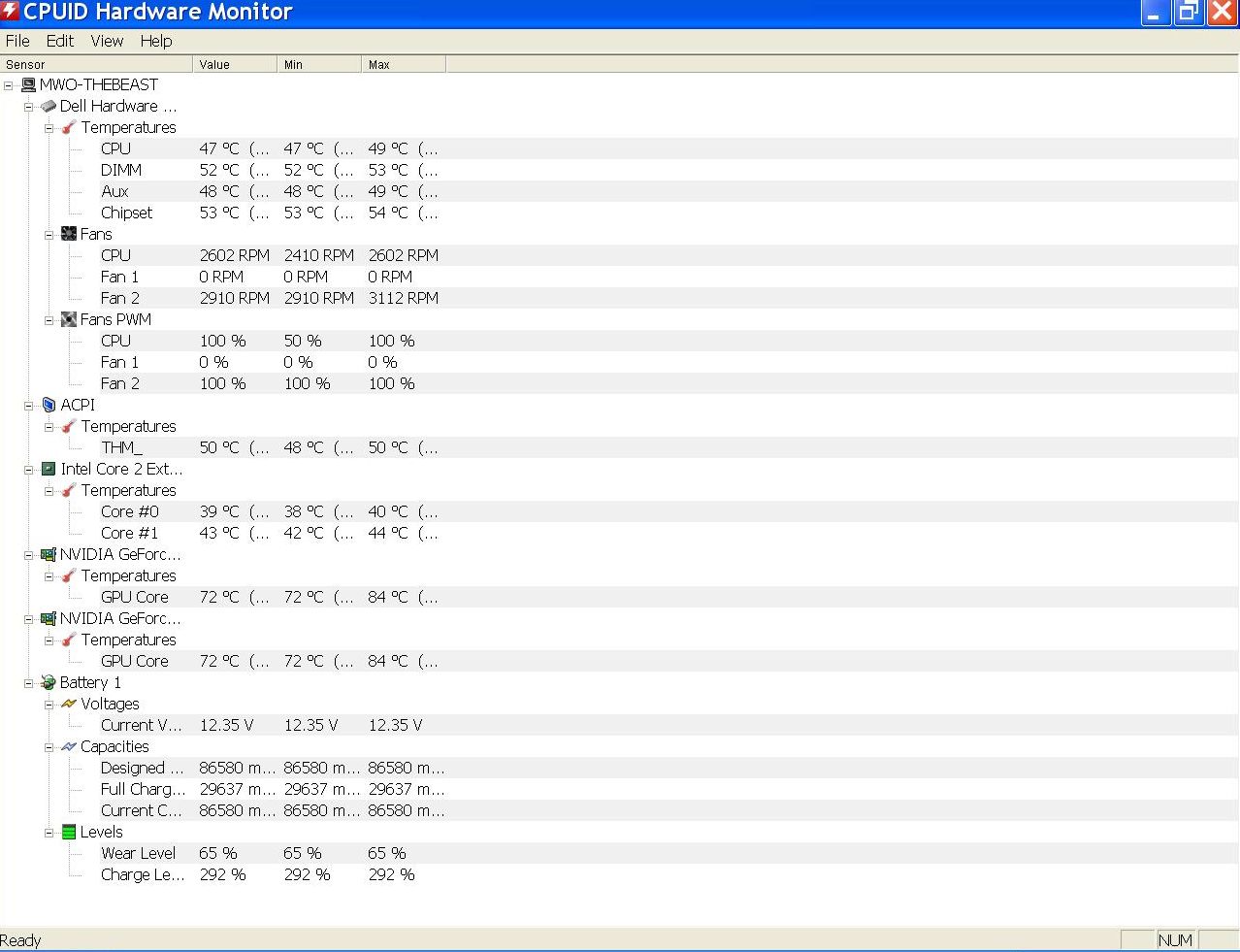
So I downloaded CPUID and checked temps and the GPU temps run between 73 - 79 and even up to 84(!) which I am guessing is way too hot?
Have uploaded screenshot, the fan at 0% worries me here, could a GPU fan be broken?Attached Files:
-
-
Update to A11 bios and overclock to 3.4 to have fans on at max.
If that doesn't help try changing the thermal paste. -
I personally do not like A11 bios, after flashing A11 bios my beast would shut down while playing CODWAW or CODMW2 after a few minutes cause the cpu temp was way hot like 90c, I noticed that even at 3.4Ghz the fans were not running at full speed. I flashed A10 bios again and now all the fans turn on and at full speed again and the beast does not shut down and none of the gpu or cpu temps ever go over 74c.
-
The problem is the comp runs extremely slow as soon as the fans run at max, also when they are on idle.
It only runs ok when the fans run "normal" (not idle, not max)
And then the performance is not good, as it has been in the past.
And the machine gets very hot on the upper left side very fast.
Also the Fan from my screenshot (Fan 1) which doesn't run worries me a bit,
anyone know if this is a GPU fan?
Would like the machine to run smoothly and not superhot and slow, as it has before even without overclocking it.
EDIT - if thermal paste is the problem, is this safe to change yourself or should one service it while it is still under warranty? -
IF you're still on warranty I'd give dell a call right away
-
^ yep
Also whats the point of having an x9000 running at 2,8ghz? -
I will be the first to say that there is a stellar difference when you go over 3.4 Ghz ...
I had a 50% increase from my original speeds, and man, it is worth it
-
Will not keep it OC'ed when the machine gets superhot idle even at 2,8ghz,
that's why I've nerfed it atm, don't want to fry it dead while it acts like this.
And yes eleron, the difference is.. was nuts
Will call it in for service tmrw and let Dell figure it out, will be fun to see if they
can keep up with the imba hardware premium support warranty next day fix guarantee.
Do they still hand out new machines if they can't?
-
I use ThrottleStop with the profiles, first one is at 3.6 (1.38V) for games, second one at 2.5(1.1V) for regular usage and there's one for idle mode at 1.2 Ghz, with the lowest voltage.
-
As far as i understand your main issue is with GPU not CPU, since they have different cooling systems you can push your cpu without bothering about the gpu at all.
Anyway seems that your problems are serious so theres no point to go with trial and error here. Since you got warranty, take advantage of it. And dont be fooled by dell: always ask and doublecheck what they do, you deserve the same parts as replacement, and if things go haywire, you're eligible for a system replacement.
Always on par with your precedent system. They have the habit to downgrade your pc, so keep an eye on them. -
Thanks, will for sure be on them
Do you know if the Hardware Premium Support (or "3YR PREMIUM WARRANTY SUPPORT" named onsite) extended warranty has any real guarantee as to how long time they can spend on fixing an XPS before replacing it?
Am guessing parts are not easily in stock these days. -
hey, have some feelings , I was running at 2.8 not more than a week ago
Had to stumble back on the forums to learn about the 3.8 nirvana
And yeah the fan noise does become background when you get used to it lol -
It's Alienware time baby !
-
I don`t think you need to run the X9000 at 1.46 for 3.8, I`ve ran it at 1.42 I think and it was all good.
-
Matter of luck eleron. Mine is stable at 1.475. I can run it at 1.43 but its not stable, at all.
And for being stable i mean 48h of prime95 or orthos stress test. -
Hey all, long time lurker here. I've had some major issues with my XPS 1730 and I'm at the breaking point.
Full stats:
T9300 @ 2.50 Ghz
4GB RAM
Win 7 64-bit
OCZ Vertex 2 120GB primary
320GB 7,200 RPM secondary
8700m GT x2
nVidia driver 266.58
BIOS A10 (I couldn't stand A11... fans stayed on 100% of the time)
The issue I have is I cannot watch videos nearly 99% of the time. It doesn't matter which version of the nVidia drivers I use or what browser I'm on, my PC will just crash and freeze as soon as I play a video. CPU get stuck at 50% usage and I have to hard power down. The other 1% of the time I get a Windows kernel error that my GPU driver crashed but it resets itself.
Is this all directly related to the 8700m GT GPU? -
Dell support will always default to a reinstall. I'd recommend booting to a linux live usb or cd/dvd and seeing if the problem persists.
Another issue you may have is with your SSD so doing the above should bypass that as a possible issue.
-------
Jammeista I spent well over a year before Dell replaced a part. Dell is extremely inconsistent as far as policy goes. If you've read this forum and others you will see that some have gotten great service whereas others have been through Dell hell. Some have had to pay for upgrades, some have had to wait months or years for service, some get quick help through Unresolved issues and others no help at all. It's a crap shoot, especially when your case gets escalated. -
Interesting
did you (or anyone else getting service/replacements) have the extended hardware premium next-day warranty, or normal warranty?
Would be interesting to know if that makes any difference since I am about to re-knew my hardware premium deal for 2 more years in a cpl of weeks. -
I had time to waste yesterday so ive installed AC brotherhood and homefront on xp to see how the beast handles them.
Using ACII profile, im able to max out brotherhood (even 8xAA) while keeping an average of 35fps.
This is my test in rome: min.29,max.50,avg.35. Now consider that console versions runs at 30fps with much crippled graphics, i think its a clear WIN.
Homefront have his own profile from betas 267.46. Im using whql 267.59 with a modded inf. Heres what i get (single player,noAA):
min.35,max.55,avg.40. Good result since same thing applies on consoles as brotherhood (less graphics,30fps).
Also ive installed the last nfs:hp patch and it stays 60fps all the time even with alot of cars, so i gueas the patch really helped the cpu load. -
Edit: just tried both in Windows 7 and i get the same performance ,which is good. with 4xAA homefront drops to a playable 34fps in intense firefights.
Good good. -
Heh, I barely started AC 2 lol. Brotherhood will have to wait.
-
and hows your performance?
-
Well, can't complain, I`ll test it with fraps later when I get back home. Seemed ok last time I played it (some 5 days ago).
-
Let me know im curious
-
Dude, how come you have 28k in 3dmark06 and P30059 in vantage? wasn`t it suppose to be almost half like ?
-
Its my desktop score man lol, read the sig!
-
Yea, I know, but I don`t get how your 3dmark06 is lower than your vantage
-
which version of the Lv2go gpu drivers are you guys with 2x 8800m GTX SLI using btw?
(XP and W7) -
265.90Quadros seem to be among the best.
Magnus has been using 197.15 for a while now... -
@eleron: 3dmark06 is lower because it doesnt have the same tests of physx that vantage have. Since ive benchmarked without disabling the ppu, the gtx570 is clearly in advantage in the physx enabled tests. If i disable it the score gap should shorten a bit.
-
Alright, is there some benchmarking tool for AC2, or should I just move about?
-
I'm curious about keeping overclocked settings permanent - as I am doing, compared with switching to, and operating different profiles for (e.g.) games. Is there any evidence that leaving OC settings permanent (as long as they are stable) is detrimental to CPU or GPU life? I've had my CPU running at 3.8Ghz and GPUs at 630/1575/900 for weeks now, without issues while running them when needed at 100% and with good temps. OK, tomorrow it may all go Fzzzzz, but why would it?
Maybe I'm being naive, but my reckoning is the processors can be overclocked 'permanently', and then the requirement of the application (or game) determines how much work the processors do. If temperature limits are set and monitored, what's the problem?
Cheers, Andy -
Well, if youre able to tell your average by reading the fps counter without benchmarking it, its fine with me.
Otherwise use fraps built in benchmark tool (F9 i think, or F10) to benchmark a small session (press again to stop) in a normal gameplay situation then report back. Im curious to know how AC2 stacks up in sli compared to B.
Yo Andy, im not getting your question.
Youre asking if keeping your cards oced and your cpu oced as well actually deteriorates them? The cpu, unless EIST and P states are active, is always at full clock. Its not used in full capacity, so that's why we monitor Load percentage and temperature.
My x9000 sits constantly at 3,8ghz but it doesnt really get used if i do some work on it. Only in gaming.
The same applies to your GPUs. Althought you specified a desired clockspeed (oc) the card downclocks automatically to lower p-state (2d) when using the OS, browsing and stuff. It only switches to Extra p-state (your current OC) when a game or 3d app invokes it.
The full fan mode actually is a good way to keep safe the cards from going haywire, this assuming the most failure rate is dictated from high temperatures and stupid overclocks when theres no knowledge.
But, its not a rule. At least we're not 100% sure that it can be the reason.
In conclusion you're doing fine, so dont bother about anything else. Your clocks are used when needed, thats why there are 4 p-states in the driver (2d,2d extra,3d and Extra).
Browsing a flash-content website, heavy, clocks up the gpu (if hardware accell. is selected) to 3d clocks. When you close your browser, is back to lower clock. Rinse and repeat. Is the way they are projected and theres no real worry about screwing the cards up due to constant downclock-upclock. -
P states?
I got C states, should I enable those? (it looks like it acts as intel speedstep) -
I forgot to mention that this happened on Vista 64 with an HDD then I installed the SSD with Win 7. Same issues with both installs.
This seems to be a known issue with nVidia drivers and possibly Adobe flash drivers, though I can tell you so far I haven't had a crash YET using Firefox 4... -
Well Flash and browsers can be quite buggy. In the past I've had to watch Flash videos in specific browsers rather than others due to them either not playing, not functioning properly, not showing up at all, etc.
Are you only getting this problem with Flash and browsers? Like no problems with stand alone flash video or applications (if you've ever used any). No problems watching optical media or other video formats? -
Kingpin, you understood perfectly and as usual, provided all the info I needed, and confirmation that 'permanent' OC shouldn't be an issue. OK, the fans are working 100% but I think they should have a good life, and even so, could easily be changed at much less cost than replacing processors. And I guess more dust gets sucked into the machine, so periodic cleaning becomes more important. For me, leaving the beast alone at full overclock has less risks of operator-error instead of swapping TS profiles and tuning clocks for each application. I realise, however, that different games require different driver settings but as you say, this can be achieved in Nvidia inspector profiles and other config files for each game or app. I'm not (yet?) a hardcore gamer so I'm probably still making rules for myself which, for good reason don't suit the rest of you.
So if I turn-on EIST and P-states in Throttlestop, the CPU will throttle according to demand, but give me the full 'beans' when needed? If so, the benefit presumably is a little power saving for the CPU, right?
Cheers, Andy -
Exactly.If you want to lower your cpu speed when not needed enable both eist and c-states along with power saver.It can go as low as 800mhz saving power and money i guess.
Gpus do it automatically. -
then I probably don't need a profile for idle and gaming unless..
does the power saver and c states also decrease the voltage? If not then I might just keep my undervolt profile -
Afaik it doesnt lower voktage since its needed by the c-states.
But that doesnt count much in mobile cpus compared to desktop, becauese the voltage is still used as a linear voltage for maximum load state. C-states will use that range (eg. V1.0 to v1.47) for various clock speeds and load, therefore its automatic.
Desktop cpus can lower voltage based on multiplier because their consumption is much higher (therea a discussion with the deskop psu but its long so ill spare the details).
The bottom line is: enable power saving features and youre sorted. Less heat, less power absorption. The voltage regulation will happen automatically althought you can really see it. -
Hey guys, have you tried Crysis 2 on your beasts? Does it run better or worse than 1st Crysis? I'm downloading mine now and it seems that it's gonna take a while, I'm so anxious.
-
As I said, using ThrottleStop with different profiles does the trick for the speed thing.
Right now I have it at 2.5 watching a movie, and I have it at 1.2Ghz when doing nothing. (with the appropriate voltage, of course, 1.15V for 2.5 and 1V for 1.2)
So I use 3 profiles (gaming 3.6, usual work 2.5, idle 1.2) -
Haven't been following closely, but it seems that DX11 support (which our DX10 cards will be able to take some advantage of) will be implemented later on through a patch.
Game looks great, and runs very smooth on very high settings. I'm using the latest WHQL NVidia driver, which came out yesterday I believe. Overall very satisfied with the performance on the beast.
EDIT: And forgot to mention that the game itself is awesome. One of the best shooters to come out on PC in a while. -
Crysis runs great, gamer 40 fps average, advanced 31fps
Gpus hit 73c though ouch lol got a bsod :/
But yeah game looks great overall, will try those new drivers
Playing on max difficulty...ouch no room for any errors ! -
I did a few benches with crysis 2 demo.
Im able to average 35fps in hardcore vsynched using 267.59 modded (desktop drivers) which is awesome. -
Oh heads up guys. Nvidia has released a Notebook only WHQL that supports only Windows 7/vista x86/64. So no modification is required since its official.
Its 267.78 and so far im able to reach 15,133pts in 3dmark06. A bit less than quadros 265.90 but its more smooth, and minimum framerate has raised a bit.
Also seems that there are some noticable improvements in AC:Brotherhood in sli, less drops in frames (althought it stays above 30fps even in worst conditions).
Give it a shot.
Dell XPS M1730 Owner's Lounge, *Part 3*
Discussion in 'Dell XPS and Studio XPS' started by BatBoy, Oct 6, 2009.