Problems? See this thread at archive.org.
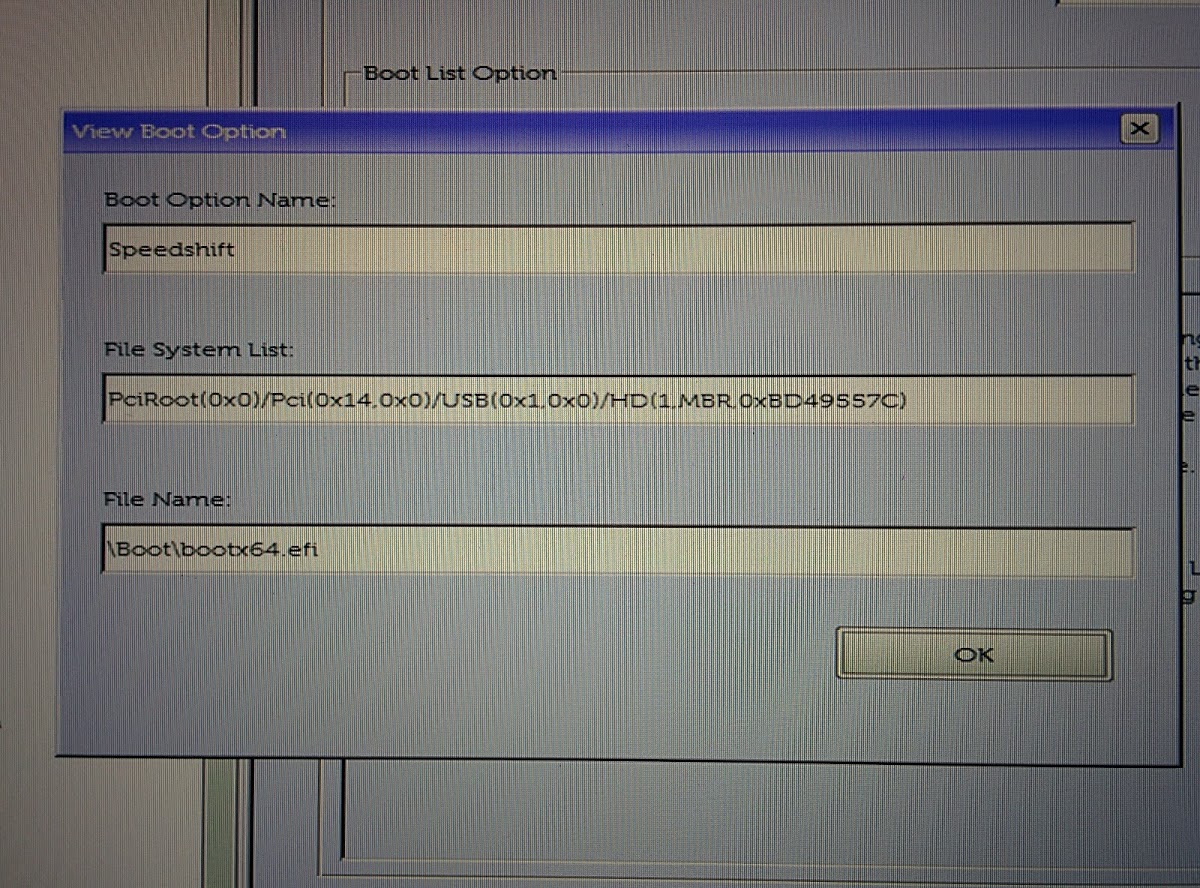
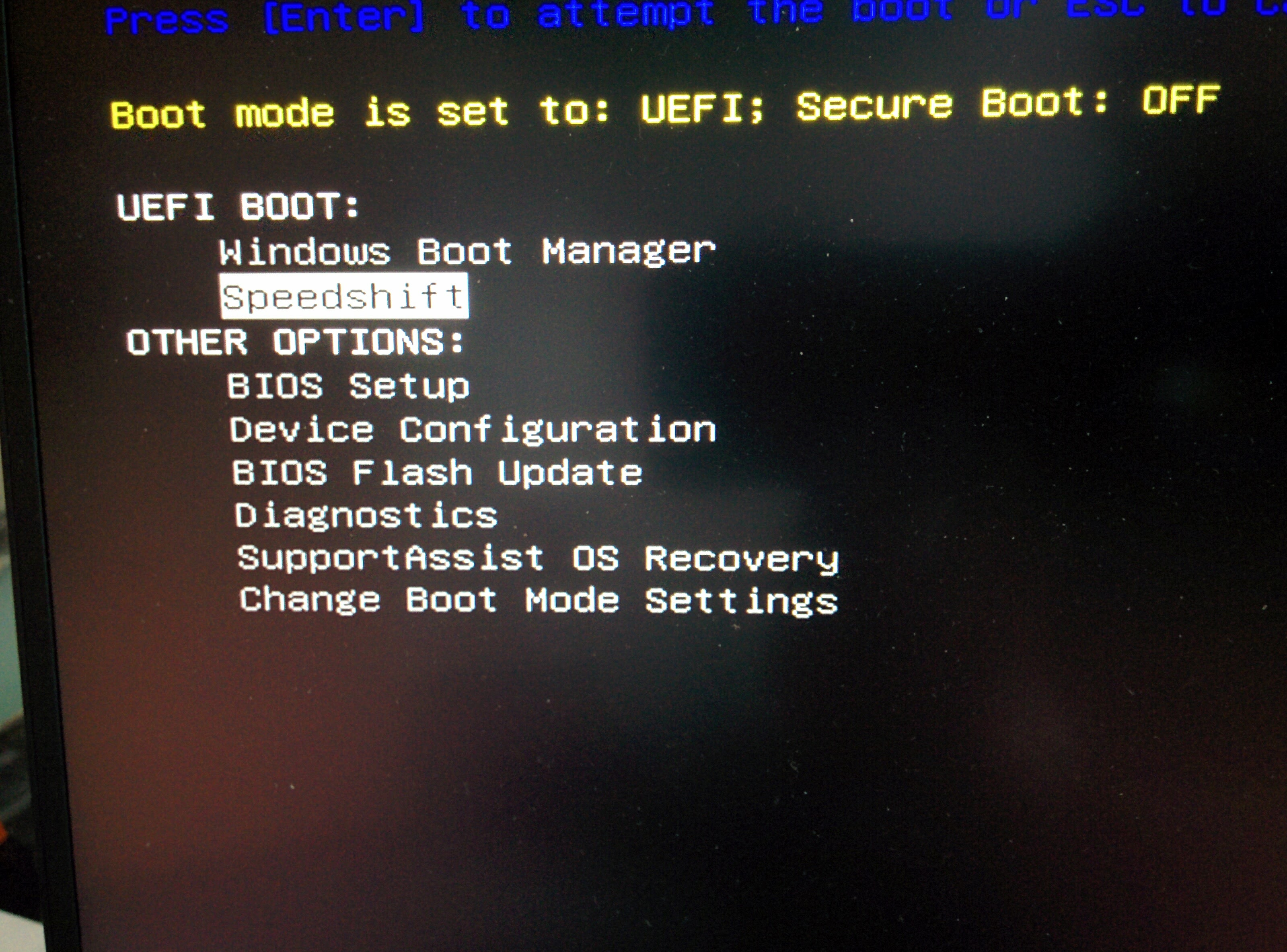
I've formatted the USB drive in fat32, created a boot folder, copied the file in there, booted into BIOS, turned secure boot off, created the entry, restarted, f12, selected my entry and then it goes into Dell assist.
-
Okay, seems absolutely right...Could you please check your BIOS entry? Maybe ist pointing to a wrong path. I had the same issue as you and disabling Securebott worked for me.
-
4) boot from flash drive. you will get uefi shell
If it is not booting - go to bios, boot sequence - and add custom entry pointing to that efi file. than reboot, F12 and choose your custom entry
After that in shellpressing likes this. -
This is what I have in my settings.
Attached Files:
-
-
NotebookReview - Error
This attachment cannot be shown at this time. Please try back later.
Use Flickr, somethings been up with the forums for a couple of days?
FYI the 2nd one shows you are in UEFI still, switch to Legacy.pressing likes this. -
In legacy it tells me: selected boot device failed. Press any key to reboot
-
The USB port is a bit wonky on the XPS, particularly with USB3 device
* Try the other USB port
* Try a different USB3 key
* Try a USB2 keyRockstar75 likes this. -
Same on a different port, but I'll try a different USB key. The one I'm using was a giveaway from Google and should be USB2.
-
Hi, can you give us names of tools to find this from Bios Backup?
I have Dell Precision 5520, identical to XPS 15 9560, don't know if same value will apply in Precision 5520 too, so need to find it and verify before trying.
EDIT: Found out for Dell Precision 5520
Code:0x3F5B6 Setting: Intel(R) Speed Shift Technology, Variable: 0x4BC {05 91 B6 01 B7 01 D6 01 01 00 BC 04 10 10 00 01 00} 0x3F5C7 Option: Disabled, Value: 0x0 {09 07 04 00 30 00 00} 0x3F5CE Option: Enabled, Value: 0x1 {09 07 03 00 00 00 01}Last edited: Feb 27, 2017ghegde likes this. -
One of the BIOS resets (I did both) has cleared speedshift. Luckily I have my Macrium slap band that contains a USB stick still with the software to make the change again, I knew I would find a use for it one day

I had hoped the registry settings to show the controls would be ready to go with it reading SST but as I had managed to clear it prior to the reinstall... bugger.
I have a 960 evo arriving next week so I will try and install a fresh copy of windows and see if the settings are added during install.pressing likes this. -
Dell support team Justin C informed us today that Dell Engineering Team will NOT enable SpeedShift on the 9550 or the 9560.
But...See first post of this NBR thread as we have plenty of simple ways to enable SpeedShift!
Dell announcement below (link and image):
http://en.community.dell.com/support-forums/laptop/f/3518/t/20007733
Last edited: Mar 22, 2017 -
At least we can do it ourselves. Tossers.Rockstar75 and pressing like this.
-
It's only because they can't figure out how to do it. No matter how many monkeys they have, they still haven't been able to write a Shakespeare play yet...
-
I got you guys on this. Article incoming.
pressing, Rockstar75 and GoNz0 like this. -
Maybe they believe SpeedShift is incompatible with their thermal paste
-
http://www.notebookcheck.net/Dell-won-t-enable-Speed-Shift-on-the-XPS-15-9550-and-9560.207848.0.html
How's my condescension coming across?Last edited: Mar 23, 2017pressing likes this. -
Don't mess with Texas!
-
Eason - that is a very well written article. Well worth a quick read.
Thanks for getting that out quickly!Eason likes this. -
I'm tired of getting f*cked by Dell :/ On my 3rd week or trying to get a decent display + 6 cell battery for my XPS 15s
-
The XPS is pushing the limits of consumer electronics and the engineers are having a tough time with the balancing act among: cost, features, time to market, bug fixes...
If it were easy, there would be a lot of competing ultra HQ laptops in the hyper-commoditized laptop space.
Still, no excuse for something so easy as enabling the SpeedShift toggle... -
I know why, they can't enable something that works, it goes against Dells business model.
pressing likes this. -
There won't be a need to keep developing that ****ty Dell Command Power Manager if they enabled it. A bit of self interest in keeping their job?
pressing likes this. -
hehehe
The Dell Command-Power Manager says it controls processor AND fan speed. So the fan engineers may be able to keep their jobs (at least whilst they fix the fan bugs in the 1.1.3 BIOS for the 9560....) -
Does this work with the latest 1.1.3 BIOS version?
-
Thanks! It works for me!
Getting 539 points in WebXPRT 2015 now (with edge browser)Last edited: Mar 27, 2017Rockstar75 and pressing like this. -
The BIOS Setting even persists an update of the BIOS and Speed Shift is still active (at least for me). By resetting your Bios to defaults you will loose your Settings and it has to be redone.
-
Processor autonomous activity window.
What should this be set at in ms?
Mine is zero by default but the internet doesn't help much on what this does and how long it needs to be in ms to do it's job? -
Not sure but these are the short recommendations from Intel to maximize performance or energy savings (see p 480):
http://www.intel.com/content/dam/ww...eveloper-system-programming-manual-325384.pdf
This is also an interesting piece of software which somewhat addresses your questions. Not sure all the settings "stick" on the XPS however...
https://bitsum.com/parkcontrol/
Take a look at today's ThrottleStop thread also and ask UncleWebb -
Thanks, park control isn't needed on kaby lake if speedshift is on as the setting I am asking about should be dealing with it
I used to use park control on the 9550 but went for speedshift the day I got the 9560.
That document doesn't mention speedshift (or speed shift) when I search it or autonomous activity window?
I don't think is applies either
-
I'm not quite sure park control works perfectly on these XPS units. Dell seems to have locked out some registers in multiple places (e.g. several settings in package power limits).
In that big INTEL pdf I don't think Intel calls it "Speed Shift". That is part of what intel called "Hardware-Controlled Performance States" or "HWP". They make quick reference to SpeedStep on p.473 then provide more color through p.480
This reference was noted today in the ThrottleStop guide (see the postings there today):
https://msdn.microsoft.com/en-us/li...459594)(TnL5HPStwNw-6RsA8SeHjWcvwFZqIvn6DQ)() -
That PDF is feckin huge!
Oh well bedtime reading I guess
Park control works well but I kinda understand it is controlled by speedshift so it isn't needed, I no longer see parked in the task manager so I don't knnow if that is due to the registers you talk about? -
I'm planning to use Throttlestop to enable Speed shift. Little bit confused on how to do this exactly and what settings to use to get the most out of it.
-
Read first page and following posts. My settings are:
* Enable SpeedShift with EPP=0 for max performance or 255 for max efficiency or around 78 for a good balance. In ThrottleStop you will see the letters "SST" in green when it is enabled
* Windows Power Options to "High Performance"
* Dell Command-Power Manager to "Ultra Performance" or "Quiet" -
GoNz0,
@unclewebb responded to a similar question from @leader288 below. Without more documentation, I have a tough time evaluating things more esoteric registers like the "hints".
GoNz0 likes this. -
I've been trying out speedshift on throttlestop on my 9560.
Am i correct in thinking that if i want to permanently enable speedshift then i would need to do the bios mods?
Otherwise i will have to set up the task scheduler in windows so that throttlestop starts everytime to enable speedshift?
Also, for the bios mods, what epp value is used in that case? -
Best thing I did was to enable in the BIOS, then add the power config options instead of using 3rd party programs as you never have to worry about it.
http://forum.notebookreview.com/threads/xps-15-9560-owners-thread.800611/ Everything you need is in the spoiler tag on the 1st post.
The BIOS mod is really easy, really really easy as in 5 minutes and you're done including creating the USB stick and creating a new boot path. You can turn it off via the power plan you are using but why would you?
All I do once it is setup and have the options is to set Processor energy performance preference policy to 50% plugged in and 60% on battery to keep the clocks a little lower on battery.
0% is flat out 100% is as low as possible. (I think that is EPP)pressing likes this. -
Ok I might give the bios mod a try then.
Whats the reasoning in keeping epp at 50% even when plugged in when i would have thought you want max performance? Whats the trade off in 0% epp for max performance?
edit: just did the bios update and the power options config and everything seems fine. Only thing is I tried to check if its enabled under Hwinfo64 but can't seem to find the 'SST' bit, anyone direct me where it is?Last edited: Apr 9, 2017 -
EPP settings have a few different scales, including:
EPP Range - 0%-100% (or 0 to 255)
Max performance - 0% (or 0)
Max energy savings - 100% (or 255)
Intel balanced suggested ~ 50% (or 128)
Balanced w/ full turbo ~ 30%? (or 78?) ** see below
Uncle Webb did some testing of 50% (or 128) EPP on his Skylake (7500U?) laptop and noted that his CPU never hit max turbo mhz. On his system, he perfered a "balanced" EPP setting of about 30% (or 78) optimal as it gave him access to full turbo speeds. You can see the ThrottleStop thread for details. That 30% (or 78) figure might be different for a 7700HQ, so worth a quick test.
Also, if you are running SpeedShift, it probably makes sense to keep Windows Power Options set at "high performance" all the time and let EPP take care of power consumption. If you are very sensitive to battery life, you will need to experiment with that Windows Power Options setting as there is not much documentation available. -
I enabled Speed shift by using Throttlestop. When I set the EPP at 78 The CPU is contstanly switching between idle and turbo modes (when doing nothing)
I used HWinfo64 to check this and the graph is looking like some kind of seismic graph. When i use the default option of 128 te graph is a lot more flat and once in a while the CPU goes to turbo but stays on idle most of the time. -
I get full turbo at 50%, at least I think I did, will check later.
Sent from my SM-G920F using Tapatalk -
Nope I got another 100mhz out of it by upping it to 30%!pressing likes this.
-
In principle, for max performance you would disable c-states entirely in BIOS. But on a laptop, that will typically disable turbo speeds. Speed Shift with EPP=0 gets you some of the advantages of disabled c-states and turbo.
ThrottleStop has a neat button which disables c1e states; on my applications, that significantly improves performance and decreases latency. It also alows full turbo speeds. That is espectially useful for real-time, CPU intensive audio applications, like large virtual instruments. It is not quite disabled c-states, but I think of it as better than EPP=0 but more like EPP = -50. -
As I tend to use this mainly for surfing I think 40% will be fine as that lets it peak at 3.8ghz for single core
Just had a game and that ran fine.Last edited: Apr 9, 2017 -
For surfing the internet and light tasks, even 255 (or 100%) works fine for me...
Thanks for your input here GonZ0. SpeedShift is a great feature. Too bad Dell did not enable it... -
I think 40% represents what I expect from the original balanced profile
I will have a tinker with the system on 30% for a day as well.Last edited: Apr 9, 2017 -
I don't have problems hitting max turbo (4x 3,4 GHz). I just see a lot of fluctuations when idling. The CPU is constanly changing clockspeeds that could decrease the battery life.
-
For laptops, for max battery life, you actually want CPU running at full speed to finish tasks as quickly as possible then moving out of c0 to quickly ramp down power consumption.
See the ThrottleStop thread for a few recent posts from the engineer of ThrottleStop software for a more detailed review...
Dell XPS Speed Shift
Discussion in 'Dell XPS and Studio XPS' started by pressing, Oct 8, 2016.