 Problems? See this thread at archive.org.
Excellent guide to help us with the overheating! This modded BIOS has helped me drop my GPU temperature from 80C to around 55-65C while gaming hard... Also I think that cooling your CPU also has an impact on game crashes because before I disabled turbo boost, my games still crashed. My CPU temps are running around 43C idle and 60-70C when gaming hard. Oh and I'm running GT 525M with i7-2630QM 6GB Ram.
-
@captainkasar
sir plz help me
i own Dell XPS L502x
i5
4Gb ram
nvidia GT540m 2GB
my games are freezing very badly
i have tried everything
used Nvidia systel tool to underclock my GPU
used MSI afterburner to underclock my GPU
in begining for 3-4 mnths this worked fine then it started crashing and freezing again
then i tried ur modded bios
but nothings seems to work now....
now games are crashing more often
please help me -
@blackpearlisuchiha
if you already tried everything included modded bios, sadly you will have to underclock more the GPU, try also underclocking the GPU memory, not just the core.
first, try lower the speed to the minimum msi afterburner let you underclock, 300 mhz core, and 450 mhz memory
try run games, I know they will probably run slow on fps, but you will notice if they crash or not, if they keep crashing, your GPU is probably damaged or you have some kind of driver or temps issue.
if the system does not crash, then raise slowly the gpu speeds again until it start crashes again.
you will need to find your new "stable" clocks -
@capitankasar
I have seen that microcode revision 28 is currently integrated in your BIOS. Is it possible to insert microcode rev. 29 into the BIOS? -
@MorLipf
yes, is posible, however, I decided to stick at 28 since jkbuha had some blue screen issues with the 29 rev while testing with windows 7/8 -
That sounds not so good. A problem might be that often Microsoft integrates these microcode updates into regular Windows-Updates too. And then we do not have a choice if such a update will be released in future. :-/
-
i have been upto changing my bios
but it seems NVFLASH doesnt work with GT540M
can u help me with it plz
i thing may be changing my bios fan speed and all will help
biut we cant alter them in our GPU ..right? -
@MorLipf
yeah, not sure what is the cause, anyway I feel confortable with the 28 microcode, it is already upgreaded from the dell's stock bios wich included the 23 microcode version.
you can check the microcode versionby running, for example, intel XTU.
@blackpearlisuchiha
NVFLASH does not work for the gt540m cause it is inside the whole bios, it isnt a external card module with a bios inside, the video bios is just a module of the whole bios and it loads on system boot.
for that, you will need to open the whole bios, wich isnt exactly easy, and then, pick the bios file, and make some tweaks, then pack it inside again, and flash it. -
can u make a bios which will make fan speed upto 50%-95%?
-
@blackpearlisuchiha
I already added info about how to tweak the fan at the first post, you need RWE, you can also combine it with speedfan -
@capitankasar I was just thinking. Since I used that raw chip dump from someone else to fix my laptop (still working perfectly btw), is my motherboard serial number now copied over from his/hers? Or is that not included on the EEPROM?
Sent from my Nexus 4 using Tapatalkcapitankasar likes this. -
nice question.
anyway, I think, you still have your data, I suspect the important info like serial number , mac address, and other info is stored at the other small chip, EC.
you can allways verify the tag number from the bios with the one on the sticker under your laptop.
it should be the same, anyway, if it differs and you want to set the same one again, my latest bios mod include a unlocked tool on the security tab wich allows to set again the tag.
let me know if you still having your own tag, or the one from the dump. -
Ah. Sticker under the laptop. I'll check it against the one in the bios. Cheers ;-) I'll let you know.
Sent from my Nexus 4 using Tapatalk -
I didnt tested yet the unlocked utility to change the tag, it should work, but if it doesnt, and your tag got already changed by flashing the other guy's dump.
do following:
dump your current chip to a file,
if you unlocked the descriptor before flashing like I said, it should be easy (no more electronics needed)
just flash the whole chip with FPT, it should dump a 4MB file.
then open it with any hex editor, look for your current tag at the file, some you should get some finds
then replace them with the tag on the laptop sticker, save the file, and flash your modified file
-
Ah. The tag should be plainly readable string in the dump? I can figure that out. I'll try both methods to experiment.
Sent from my Nexus 4 using Tapatalk -
yep, in HXD hex editor, just do a test-string search with the number, I think the online dump you used contains the "94FPZP1" tag without the quotes
do also another search with your dump -
capitankasar, please help if you can, maybe you've used l502x with a monitor (I read you use a minidisplay to vga adapter, is there any reason and does your Intel card recognize the display through vga/hdmi/dvi if you tried?). I am trying to connect this notebook to an external monitor via HDMI M > DVI-D M cable (single link, and the monitor has a dual link connection) and it doesn't recognize the monitor (doesn't show dell logo at the start and only turns on at a login screen), and the worst thing is that Intel HD card doesn't recognize it, so it works only through nVidia card, like on these screenshots here. To me it's suboptimal since I don't trust nVidia card not to die on me and also performance seems to suffer a bit as it's degrading + it heats up a bit more and seems like it lags a bit i youtube videos. So it if dies, I can't use a monitor anymore with my notebook. Updated to latest A12 advanced 83/85 bios just now, hoping new vbios may change something. Have tried latest Intel HD drivers before, no luck. This Intel HD issue is quite a known one on Intel forums and people have issues with different monitors through HDMI and DVI connections. If I disable nVidia card in devices, I can't use a monitor at all it doesn't have a signal. I'm trying to find a solution now, maybe I'll need a new cable or an adapter or try to connect it through display port (no idea which one I should try first). If anyone had this problem with l502x, I would appreciate any help.
I have read here about 2170 vbios being available. Perhaps it could help? Although reading Intel forums, Intel doesn't seem to know how to solve this or similar problem with their cards, so it probably won't help me. But I could try if I knew where to download it.
Also, I notice there is "Primary display selection" option in BIOS. Not sure what it does exactly. -
yes, I use a external monitor setup via the minidisplay port.
when I power on the laptop, it only shows image on the integrated screen, and when windows start loading, the login screen appears, but it appears at the external screen, on that point, the integrated screen remains black and off.
the primary display selection in bios can help, but since there are a lot of chances you end with a black screen and you will be unable to control the machine without reset bios settings, I didnt messes with that option.
I can use screens with both hdmi and minidisplay port connectors, it works fine, but only after windows load.
using the latest version of my mod wich is already avalible at this topic.
if you want that the external screen be the main one, you have to disable the internal one on the windows screens panel.
you can also play with the FN+F1 key combination
![[IMG]](images/storyImages/exLg9Op.png)
also select "only show image in screen X" for example, screen 2, like I have on mine.Beyond One likes this. -
Appreciate a super fast reply. OK, so your display also only works on windows load, that means that what I have is normal. However the question about your setup is: do you actually see your HP display in your Intel HD graphics settings and can you control its brightness/contrast and so on? Can you still use it if you disable nVidia card entirely? My settings look the same as yours, but this is windows settings, and as seen in the image to which I linked, it uses nVidia card in my case, but Intel HD doesn't recognize it. Maybe I don't understand this correctly and Intel HD is unable to drive an external display by itself? Not sure but I think it should be able to at least recognize and drive one monitor with an internal notebook display off, but in my case it doesn't. It simply doesn't see my external monitor.
If you're using minidisplay to vga adapter, you're probably bypassing my problem entirely, as it seems to be only the case with DVI and HDMI connections.
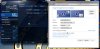
Doesn't matter if I extend the displays or just use "the projector" and turn off the internal one, same thing. -
@Beyond One
yes I can tweak the screen options with the intel options
oh, well, if you are using the hdmi connector from the laptop, it is wired directly to the nvidia card , so, that doesnt use intel graphics at all
the minidisplay port and integrated screen is wired to the intel graphics, so yeah, it makes sense your screen doesnt appear in intel options.Beyond One likes this. -
I really hope that's the answer! You're sure hdmi connection is wired to the nVidia card? Anywhere I can find information about it? I'm asking because I'll need to buy a mini DP to DP cable which may be useless if I'll decide to change this monitor. I thought that both should work with Intel and nVidia and you simply choose the connection you prefer. But yeah, I should have been smarter.
Hmm, so if you connect a display through notebook's HDMI, you're only able to use nVidia card, but if you connect through notebook's mini DP you're able to use both Intel (for desktop) AND nVidia (for games). Is it correct? A bit unclear to me how does that work, I guess it's Optimus intricacies? -
HDMI is connected to nVidia card (that's why doesn't work on OSX). But it's only video output and graphic computing is independent so you always can select on which card game is rendered.
-
@Beyond One
yep, it has been discussed several times, also proved that once, the intel hd bios got screwed with one of my tests, so I had to connect via hdmi the laptop to a tv, and use that screen to be able to launch the flash proccess from there and reflash with a propper bios without currupt intel hd bios.
yep, if you use the minidisplay port, you will use allways the intel hd graphics, however, thanks to optimus, the intel hd 3000 can take advantage of the nvidia card, using it, and showing the prerendered frames so it speed the proccess.
thats it, the intel hd card output the prerendered frames from the nvidia card if it uses it, however, it must pass throuugh the hd 3000 graphics for integrated screen and mini DP.
those mini DP adapters are cheap, dont worry, I got mine for 5$ on ebay, I have a DP to VGA adapter, however I saw another ones like DP to DVI or DP to HDMI, just pick the one from your choice and screen and it will be fine
Beyond One and agalin like this. -
capitankasar, was there any reason you chose VGA adapter? It should not be optimal as you're converting from digital to analog, right? Is there any difference in picture quality? I've read here and there that people avoid some troubles by connecting through VGA, but that may not be very accurate.
-
yep, there was a reason, my external monitor is vga, and there are a lot of devices wich are vga, I also have a vga to dvi adapter, so it worked fine on other monitors.
I dont see any issues with my vga screen, it is 1440x900 and 75 hz, and it is really confortable.
when I feel unconfortable is when I pick the laptop and go somewhere else and I am forced to use the integrated screen with its poor 1366x768 and its 60 hz refresh rate.
its a fact that vga have its time and most of new devices use hdmi.
but it still working fine for me.
but well, that was a personal decision based on my screens and equipment, depending on your equipment, you may consider getting a DP to hdmi or DVI adapter. -
capitankasar, that other Full HD display in l502x is garbage, I have it. I'd rather pay less and know that my display sucks, than pay more and find it out later, and spend time thinking how could anyone put that display into a notebook and say it's great.
-
capitankasar, could it be that the Full HD display on l502x displays limited range rgb colors, and that's why I'm not happy with it? Here's the topic explaining the issue. "The issue is also present on built-in laptop panels. VGA gives nice output, HDMI has issues as well." Perhaps he meant to say video cards, not panels? But seriously, I would not be surprised if this notebook was sold with a Full HD wide gamut display with a limited range rgb fed into it. (facepalm)
Because now that I think about it, it may be the case.
I really hope not, because I'm starting to think that I'm getting limited rgb range on my external monitor (in addition to the connection issue). And my first hope was that connecting through mini DP will solve that.
-
not sure, you can ask other members with a Full HD displays on their L502X, also on my external HD+ screen it is aceptable I dont have any complains about colors.
Beyond One likes this. -
Are there any visible improvements to be had by updating Intel ME?
-
mmm, not much, it would have if we manage to update to ME 8 (we still have in version 7)
there are updates to newer versions of 7, wich fixes some bugs and stuff acording to the changelog, but nothing really noticiable.
with version 8, ivy bridge proccesors would be posible on this laptop, however we were unable to install it, and also lot of bios modding would be needed, not really easy ^^ -
Hmm... My FullHD display has awesome colors. Much better than any other notebook I've seen (especially 1376x768). All external screens (both TV and normal) are worse too. Also when was buying this notebook I checked panel quality (in Poland that time in Poland was only one type available) and it's RGB range was really great (full sRGB and nearly full Adobe RGB) better than panels in that time Macbooks.
-
@ capitankasar
Is there a possibility to disable the free fall sensor permanently? I have put the HDD to a SATA drive caddy for the optical disc drive slot but now the free fall sensor causes a click sound by the HDD. The free fall sensor count of the HDD is also incremented on each boot. This may cause extended wearout of the HDD. -
agalin, it's only better on paper, that's where the problem with these inferior companies lies. Apple sells loads of notebooks to designers and they never added a wide gamut display to a notebook. Why? Because they aren't selling crap, at least they didn't before. Nobody will name even one designer who uses this notebook for any kinds of professional color work (which wide gamut is supposed to be used for) and who isn't starving or isn't some talentless guy calling himself a pro. The only people who are happy with it are the people who can't tell a difference between good colors and unnatural overly saturated colors that are meant for a color work, to be used with a color profile in color managed applications. But it's useless for pros because it's a TN with a color shift. Adobe RGB coverage on this kind of panel is totally useless, even if it was 100%. So mentioning Macbooks in a same comment with this Dell should be considered a crime.
agalin likes this. -
I won't quarrel as I don't know much about this topic
and I'm aware that saturation is too big, but most of devices which I have are very undersaturated...
-
capitankasar, you were right. Once I connected the monitor through mini DP, Intel saw it instantly. And the notebook is now cooler, because when nVidia card is working all the time to feed the monitor, it's up to 8 degrees hotter. Not something I'd like to see. Thank you.
capitankasar likes this. -
@Beyond One
@MorLipf
Mmm, didnt checked that yet, you can try disable the ST Micro Accelerometer on the device manager. -
Disabling the sensor under Windows would not solve the problem as it occurs right after the BIOS detected the hard disk. But I have read in another forum that some MacBooks are also affected. So it might be a chipset bug.
Today I installed Gentoo Linux on my L502X and loaded the current microcode revision 29 with microcode_ctl. As expected by me it is working flawlessly. So you might want to test the integration into your mod bios for the next release. -
You can easily disable the freefall sensor from ACPI code by defining it's _STA as zero. I've disabled it on my Vostro ever since I replaced original hot, noisy and rumbly 7200 Seagate with an SSD, so no head parking was needed anymore..
Sent from Huawei 3C using Tapatalkcapitankasar likes this. -
Is the DSDT already loaded before the BIOS POST-Screen appears? I think it gets loaded by the operation system. That would be to late because the head parking issue occurs when the second HDD is recognized by the BIOS on POST.
-
I would assume it is being parsed POST. How can you adjust brightness in BIOS and during POST then? Notice how it's adjusted in steps as well? That's because default ACPI methods such as _BQC, _BCM are being used to get values from an array of possible levels called _BCL whereas in actual OS it's controlled by a driver and ACPI methods are used only in legacy OSes, such as XP.
Sent from Huawei 3C using Tapatalkcapitankasar likes this. -
Maybe I will try my modified DSDT on the next days. But how can I integrate it into the BIOS file? When I use the "PhoenixTool" to alter the DSDT the tool reports a failure on re-integration of the DSDT. The DSDT itself compiles fine with "iasl", just a few warnings and remarks left.
-
It shouldn't complain, I've replaced using Andy's tool too. Try v2.14, that's the one which works for sure.
Sent from Huawei 3C using Tapatalkcapitankasar likes this. -
That sounds promising. Thanks for your help so far.
If my DSDT mod my fail, will I be able to recover the BIOS via capitankasars recovery disc? Or will a faulty DSDT even prevent me to enter the recovery mode? -
You will be able to use the disk, yes.
Sent from Huawei 3C using Tapatalkcapitankasar likes this. -
Yesterday I tried the DSDT mod without success. When I integrated the modded DSDT with PhoenixTool 2.56 the resulting BIOS file could not be flashed. After executing WinFlash a black screen appeared instead of the flashing process. Then I tried to exchange the DSDT module with PhoenixTool 2.14. That seamed to work. The BIOS got flashed. But after the obligatory reboot the ACPI subsystem was not working any longer. I could enter the BIOS but I was no longer able to boot Windows because of the non working DSDT / ACPI subsystem. Windows and even BartPE cancled the boot with a blue screen. I had to recover the BIOS with capitankasars recovery disc (thanks for that!). Nevertheless even with the defective ACPI subsystem the clicking noise of the HDD occured. So it might not be caused by the free fall sensor itself.
capitankasar likes this. -
When desoldering the bios chip, I think I took off three of the eight pads... Damn. Top left 3 (when viewing it with the cmos battery at the bottom). Any suggestions for fixing this?
-
It happened to me some times.
sadly it have no easy fix, the legs are so small, the only fix wich worked for me, is order some replacement chips, reflash them externally, and put them back in the motherboard.
look at the chip, it is probably a Winbond 25Q32BVSIG wich have a 4 Mb storage size.
here you can buy some replacements.
5pcs WINBOND W25Q32BVSIG 25Q32BVSIG SOP8 IC Chip | eBay
hopefully, they are not expensive and you can buy some extra ones for in case something goes wrong.
the bad thing, is that your laptop will be unusable if you have no spare ones and you have to wait until the new ones arrive home, it happened to me the first time, when I only had the original chip and it got damaged. -
I think you misunderstood. The chip is fine and I have some replacement chips, but the copper pad on the motherboard got removed in three of the solder places... Any advice there?
-
If needed, I can post a photograph to clarify?
-
oh, you was talking about the pads and not about the chip legs, well, in that case, you will need to solder the chip back (to the pads wich are in good status)
about the broken pads, when it is soldered back, notice that even some pads are broken, you have alternate soldering points
![[IMG]](images/storyImages/bioschip.jpg)
![[IMG]](images/storyImages/OEwsiVA.jpg)
you can use a small piece of wire like like this
![[IMG]](images/storyImages/wires.jpeg)
and pick the small wires from inside, and carefully, solder from the chip leg, to the alternate soldering point.
in case the soldering point is covered by the green thing, just rasp a little carefully until it is plated color, so you can solder from there.
![[IMG]](images/storyImages/rotoqe5.jpg)
![[IMG]](images/storyImages/guide1c.png)
L502X modded bioses download (GPU voltages and more!)
Discussion in 'Dell XPS and Studio XPS' started by capitankasar, Dec 30, 2011.


