Problems? See this thread at archive.org.
Great then.
I trust you
Thanks
-
How much slower is the i430 compared to the 520/540 buddies? I dont game too much just basicly internet, multimedia stuff. You think the i430 would be sufficient ?
-
Great news it does not appear to throttle, also appears cooler! I am going to sit out and wait til someone gets it with the RGBLED. Also some info for you guys is that I chatted with a rep, and asked him about the ATI DX11 chip. Apparently he has no dates yet, but there was no denial it was coming!
The TDP on this chip is 30W, and the CPU is 35W. The motherboard is also new. So the specs are well within the 90W envelope, even if it is only say 75% efficient. This is why it does not thottle I believe.
If anyone gets more info on the 5730 chip, I will be all over this! -
I have ordered one with i5-540 and RGBLED, but the ship date is feb 3rd or so... So, waiting...
Anyone got the 1647 with RGBLED so far ? -
It is a 2.26ghz cpu, so compared to the 2.4-2.56 of the i5-520 and 540 respectivelly, there will be no considerable difference.
There will be considerable differences when the turbo boost its activated because the 520 can reach up to 2.9ghz and the 540 to 3ghz, whereas the 430 can only reach to 2.53ghz. But, I believe turbo boost will only be activated in a very special scenario, and It will not be common in a multimedia-internet situation like the one you mentioned.
I will be using the laptop for the same tasks as you, maybe some casual encoding and photo editing. Thats why Ive chosen the cheaper 430 -
Turbo boost is used as often as possible on Intel's Core i7 / i5 / i3 CPUs.
The i5-430 has 2 bins of turbo boost available when 1 or 2 cores are in the active state so the majority of the time it will be running at 2.53 GHz. In the majority of tasks that are mostly single threaded, it will spend most of the time running faster than an i7-720. You won't be disappointed with that. -
Just saw a disturbing issue on the i5-520m initial testing in the first HP Envy 15 that has been recieved (Envy 15 owners lounge).
It appears the multiplier is locked on x9 when on battery power I believe this may be an HP attempt to improve the mediocre battery life.
If this is true then I may be looking at the XPS 16. Could anyone please let me know if the initial i7-6xx / i5-5xx Dells have limitations when on battery.
Also do you know what chip set Dell is using for the i5's (if it is the PM55 then no switchable graphics will be available)
Thanks in advance -
The only limitation on speed is the one you set via power options in Windows. If it's set on Max Battery it does restrict the multi.
And it's the PM55. Sad
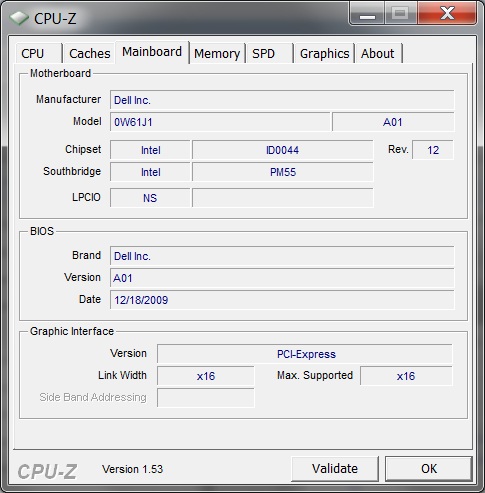
Whoa, though. I opened up CPU-Z to check the chipset. It says I have BIOS A01. Dell's website only offers A00. -
After problems with my HP DV8t. I was thinking of going with the Dell Studio XPS 1647 now with core i5. How does this processor compare to the core i7? I know the core i7 uses more power. I read the throttling issues with the Dell XPS 1645 and I don't want that system. Any major issues associated with the Dell 1647? I have owned Dell's before and never encountered one issue. HP on the other hand puts out bios that destroy the computer.
Anyway here is my configuration. Is this a good deal? Sorry for some obvious questions I just want to be sure
SYSTEM COLOR Obsidian Black High Gloss Finish with Leather
PROCESSOR Intel® Core™ i5-520M (2.40GHz, 4Threads, turbo boost up to 2.93Ghz, 3M cache)
OPERATING SYSTEM Genuine Windows 7® Home Premium Edition
WARRANTY AND SERVICE 1 Year Basic Service Plan
HD DISPLAY Premium FHD RGBLED Display in Obsidian Black with leather and 2.0MP Webcam
MEMORY 4GB Shared Dual Channel DDR3
HARD DRIVE 500GB 7200 RPM SATA Hard Drive
INTERNAL OPTICAL DRIVE Slot Load DVD+/-RW (DVD/CD read/write)
BATTERY 9-cell Battery
all for $1,429
This does have the backlit keyboard right? Anyone know why this configuration isn't available through Dell EPP as I'm a student and would like to take advantage of this program? NO bluray? Thanks -
There are also reports that the HP Envy 15 with the Core i7-720QM does the same thing where it locks the multiplier as low as it can go as soon as you switch to battery power. No adjustment in Windows makes any difference.
-
Thanks for that.
HP appears to have 'crippled' performance while on battery to a x9 multiplier. This has been an ongoing and unresolved issue on the original i7 xxxqm Envy 15's also.
A couple basic questions I can't find on Dell's site;
~Actual weight of 1647 w/ 9 cell and RGB/LED ?
9 cell battery life ? (dvd vs. maximum with light usage)
Does the RGB/LED calibrate well for professional photo editing at ~90 nit brightness? (have read many mixed reviews and not even sure the 1647 has the same screen) -
True. I returned my i7-720qm due to this issue (among others). I was hoping this would not be the case with the Arrondale refresh. It appears HP bungled things again. They also, for unknown reasons, decided to limit the i5 models to 2 DIMM slots and no USB 3.0 ports, the i7qm's get 4 DIMM's and 2 USB 3.0's.
Oh and don't get me started on the PM55 chipset so no switchable graphics
The new $900 pavillion DV4i gets i5's and switchable graphics, why? -
Decent deal. And yes, I noticed it wasn't available with EPP. I was annoyed. The only thing there I question is your decision to go with the 1 year warranty. Looks fine otherwise, as long as you made your choices of parts deliberately. Less power on the CPU than I like, but it comes down to the equivalent of personal preference.RGBLED (auto-)calibrates horribly. I had one for my 1645. I have super-photo enthusiast friends. I wasn't happy with how the screen looked, so I borrowed a Spyder3 from one of them. I still wasn't happy, so I brought both laptop and calibrator back to my friend from whom I'd borrowed it. He looks at a couple test photos, and agrees that the default is too red, as well as being at somewhere around 9300K. He also agreed that calibrating had made the reds look worse but also lowered the color temperature. He tried a more expensive calibrator, but still wasn't satisfied. So we drive over to another friend's place...you get the idea. It took a multi-thousand dollar calibrator (plus some manual tweaking) to get the display looking good. It looked REALLY good once it was done though.
-
Thanks for the info though I'm not sure what to make of it....
You mention 'auto calibrate' which sounds like maybe a Dell App, or do you mean the Win 7 feature? It almost sounds like maybe there was a conflict with icc's when you used your own calibration tools...
I use spyder 3 elite and have had no issues with my older dell 1705 or the envy 15. Guess I'll have to do some more research before ordering a 1647, the high color gamut won't do me any good if it won't calibrate easily or reliably. -
Is the graphics card easily upgradeable? I heard Dell does not use the standard MXM slot but a custom slot. Either way, hopefully the Mobility Radeon HD4670 isn't soldered to the mainboard.
Was thinking of upgrading to the newer Mobility Radeon HD5k series card when it's available. Anyone care to share some insights? First time Dell user here. -
By "auto-calibrate" I mean using the tools that come with the calibrator. You point it at the screen (or attach it, or whatever, depending on the device) and run the tools, and it spits out an icc profile.
What laptops have you used that have had upgradable graphics? Regardless, this one is soldered to the motherboard. -
Well, my brother owns the Asus N81-VP notebook and indeed, it has a MXM II slot. So, I thought it might be good if the Dell has something similar for upgradeability. If I remember correctly, the graphics card on the Dell XPS M1730 too is upgradeable albeit it uses a non-standard slot. Oh well...
-
Thanks for quick reply. +rep
One other question, your signature shows DDR3 1333Mhz--was this what dell shipped?
The rated memory support is 1066Mhz on the i7 6xxm and i5 series which I have on order. I have 2 x 4GB 1333 dimms I want to use to upgrade the envy when I get it but was unsure of compatability with the i5 CPU's that come with 2 x 2GB 1066 speed installed. Not sure if the higher latency (CL9 vs. CL7) will cause problems... -
xps 1647 has HM55 chipset that supports switchable graphics
-
According to the 1st quote it has the PM55, and it looks like he has a new XPS 1647 in front of him....
Where did you get your info?? -
This should answer your question!
![[IMG]](images/storyImages/NewPicture3-1.jpg)
-
It is what Dell shipped, and no it won't cause any problems.
Regardless of what that says, not unless CPU-Z is misreporting. -
PM55 support both i5 and i7.
Does the memory actually run at 1333MHz? According to intel spec sheet, i5 and i7 620 only support 800M and 1066M. -
Do you guys know if the Wifi Dell 1520 that comes with some 1647s is user upgradable with the intel 5300/6200? or its soldered to the mobo?
Edit: the intel 6200 has been pulled off from the website. wonder why
-
Alright, this is officially getting irritating. Screen shot time.
Attached Files:
-
-
It's upgradable. Half-mini-PCI card slot.
-
it's possible cpu-z is wrong, it wouldnt be the first time i guess...
if not, geeks at dell must be completely retarded for using pm55 with arrandale
someone should ask on dell forums if info on their site is correct and if hm55 really is in 1647 -
It wouldn't be the first time Dell sold something designed faster than it can actually run.What's getting irritating? You have a Core i7 and a PM55 chipset, not a Core i5 and a HM55 chipset... exactly as Dell states on their website.
-
620m has integrated IGP. HM55 and PM55 support both i5 and i7.
-
I would be surprised if it actually worked that way. And quite irritated. I assumed that they were using i5 to mean dual-core and i7 to mean quad-core. If switchable graphics is available with the 520 and 540, but not the 620...ugh.
-
I never said they didn't...
PM55 - Performance Chipset - Core i7
HM55 - Mainstream Chipset - Core i5
This is the way Dell are doing it, according to their website. Yes, other configurations are possible, but it seems they are sticking "like with like". -
This might be obvious, but the i7 620M is not quad core. Intel naming confusion at its finest.
-
All I can say to their possible reasoning behind it, is that they wanted to keep things "simple". I understand your i7-620M is probably more similar to the i5's than it is to the power hungry i7's (720QM/820QM) but Dell seem to have stuck with the configuration; i5 - HM55, i7 - PM55.
Absolutely, it's not just the mobile processors that are confusing. The Core i* desktop range will get you thinking too. -
For what it's worth HP has the same issue. The first i5 Envy 15's shipped and they have the PM55 chipset....Also all orders from 1/7/09 on have been delayed by 10 days.
Different subject; What is the word on a GPU refresh from Dell for the 1645/47? -
Well we don't know if it is the same issue. No SXPS i5 owners have told us that they have a PM55 chipset. We can only go by what we do know, and that is that Dell uses the HM55 chipset with the i5's.
Was it not already upgraded from the HD 4670 to the similar performing, but lower power consuming HD 5730 in some countries?
Edit: Just checked the HD 5730 thread, and I must have missed the last couple of pages. According to a Dell rep, the addition of the HD 5730 on their website was a mistake and there's no current plans to upgrade the HD 4670. -
I spoke to a rep and there was no denial of an upgrade. Only that they have hear nothing so far.
-
You're misinterpreting that nuance. "haven't received any update" means that no one has told them anything about anything. Reps are the absolute bottom of the totem pole in terms of getting information. I've never seen them be right about prospective launches, when something will be fixed, when something will be on the website, etc. Sorry :/
-
For what it's worth, I still have a confirmed order for that "mistake" listed in pre-production with an expected ship date of Feb 4th. No one has contacted me to say it was a mistake, and the order details clearly list:
320-1308 ATI Mobility Radeon HD 5730 - 1GB -
How long has it been in pre-production?
-
its a bit offtopic but i feel that i should correct you, 5730 outperforms 4670 by about 15%, it performs slighly better then 250gts too.
-
So is the consensus that the following are true:
- It does not throttle, either on battery or power supply.
- It's fast.
- It's a lot cooler.
- Does the fan still ramp up and down in 2d?
-
Performance isn't the only thing folks want from the 5730 gpu. The power requirements are lower since it's a smaller chip. Pair that with the Core i5 line and you have a laptop which "should" use less watts per hour and thus, give is a longer lasting battery.
-
I wonder what happen to offering blu-ray drive....would be nice to have one...especially when it has HDMI.
-
Blu-ray is supposed to be returning at the end of february...That's not a solid date but it beats nothing.
-
Is it possible to self install the blu ray player or will it be a issure due to intergrated drive?
-
Yea, I wonder if it is possible swap it with bluray later
-
I hope so as a bluray would be a major advantage !
-
I don't understand why with the release of the Dell SXPS 1647 why they didn't use the ATI 5XXX series??? Getting rid of bluray was a bad move especially with 1080p screens and an HDMI port?
-
It was a supply issue not the fact that they didnt want to offer it as an option. And as for the graphics ye I have no idea why maybe there keeping that one up their sleeve
-
Maybe I can always pair it with an external blu-ray..
http://www.newegg.com/Product/Product.aspx?Item=N82E16827135198
**The Official Studio XPS 1647 Intel Core i5/i7 "Owners' Lounge"**
Discussion in 'Dell XPS and Studio XPS' started by DeathWalking, Jan 20, 2010.