 Problems? See this thread at archive.org.
punch her for being a crap shot?
-
I see - I guess it depends on what warranty you got. I opted for 4 years extended + accidental damage meaning I can push this thing for 4 years and if the GPU fails after say 2-3 years, then they should replace it (provided I don't temper with the system). Sometimes they even give you an upgrade - though as awesome as that would be - I don't think that will fly
 .
.
Yes - the screens are stopping me from converting too. Today you can get Y50 with i7 4710HQ, 860m 4g Maxwell, 1080p multitouch and 16gb of RAM for $1399 before student discount - which is kinda ridiculous as compared to Dell. I'm not liking the weight and like I said, the screen though.
-
I actually talked with the support today about the very same thing (and distortion on the speakers). They tried to update all the drivers, but the problem is still there so they said they need to replace both the speakers and the system board. Hopefully they already have the new one - they said they need to ship it here first and then they will call to schedule an appointment.
-
any word of a maxwell refresh to the GPUs?
-
Haha, I don't believe in extended warranties, I've never purchased one and I never will. I just have the standard manufacturer's 1 year warranty. As I said, I've only had two previous laptops in my life and both lasted 5 years, they were replaced because they had become too obsolete and slow, not because they had broken down or anything although wear and tear was starting to get to them.
-
No, and I don't expect Maxwell to arrive until the next-gen XPS 15, i.e. I don't expect this generation to get a refresh. This has been asked and answered by myself and others several times in this thread. If you Google "XPS 15 Haswell Maxwell site:notebookreview.com" you'll pull up some of the pages that have posts about it.s0ysauce45 likes this.
-
+1 - I spoke to the rep about this and he said that they have no information about that yet. But for anybody who wants to create some push - please bump up this thread on Dell IdeaStorm -> it's exactly for this - push for GPU refresh. Idea Storm (you might need to create an account there if you don't have one - but that's really quick).
I actually like this thing from Dell - it benefits both sides. -
it won't happen, we are halfway through the 9530's lifecycle and still waiting for basic hardware bugfixes to come in. the marketing department will be working on new models so don't hold your breath.
-
Hi,
Has anyone had any issues with a buzzing noise? This has been going on for sometime now and it is audible at presumable low fan speeds. If for example I go in game and the fans begin to speed up the 'regular clicking' just goes away. Could this sound be coming from anything else apart from the fan and should I open the back to look for any signs of hardware contact?
Thanks -
this one (laptop #2) came out the box with a loose bit of crap stuck in a fan that fell out once the fan got up to speed so it is worth opening up and taking a look.
-
PSA: Please check your SD card reader's write capabilities on the xps. Mine is not able to write if the card is NOT locked i.e. it can write/delete only if the card is locked! I'm not keen in getting this fixed as my xps is otherwise without any issues.
-
it's just an add on card on these laptops so it's not a major job to do.
-
I've just found a few marks under my touchscreen glass as well as a couple of dead pixels.
Looks like I'm calling Dell... -
No issues here, card reader reads through my stack of SD cards just fine.
-
You will not be happy to hear you get what dell class as refurbished, no new panel swaps. Although a factory sealed panel cannot be refurbished and they are very obviously 2nd hand judging by the used mylar tape that is curled and no longer sticky so it cannot hold the connectors in place any longer. I have another LCD turning up tomorrow and I have been told this is also refurbished so that is being sent back as well and a refund will be issued so I can reorder as they won't build be another so they say. The 1st I got had dead pixels and use marks, god only knows what the 2nd will have apart from the 1st being 4 months old FFS!
-
Anyone know how to turn off the touch screen?
-
You can disable the touchscreen and USB Input Device items in Device Manager, but I don't knowing that kills the power to the touchscreen. For that, I guess download the Owner's Manual, find the appropriate connector for the touchscreen, and disconnect it. That cable is separate from the video and camera cables, so touch is the only function you'd lose that way.
That said, I didn't care that this system had a touchscreen, but I have to say it's kind of fun to play with the Metro Photos app to swipe through photos and pinch to zoom, and sometimes it's actually quicker to reach out and touch a dialog box option rather than use the touchpad, though that's not sustainable long-term due to arm fatigue.Mihael Keehl likes this. -
As I gathered from reading a few pages, the laptop has a coil whine. Is it common to all machines of this refresh? Other common issues? Overall thought, would you recommend it?
I got a 30% off code and it is really tempting to order one. -
yes it is common and you should still have a 10% off welcome to the vip club you can stack onto the 30% off as I tested that in the basket this weekend. if not use a new email to sign up again. takes it to £909
-
I tried my 10%, but it didn't work! Thanks for the tip!
Edit: I got a new code, but still doesn't work. It looks like it "overwrites" the other code. -
Common to many systems, though not all. Dell rep has said an update on the issue and steps to get a fix should be provided by the end of the month in the Dell Communities thread about this issue. I still recommend the system even with coil whine, frankly, and if you can get 30% off, then it's a no-brainer.
-
Definitely not all, I bought mine refurbished and it doesn't have one, although at the moment, I have a 6-cell battery and a 130w charger. Not sur if the coil stuff is with only the 9-cell machines
-
That is what I am thinking.
I am also going after the 6-cell. Usually coil whines are due to "overconsumption" of power, resulting coils to move in their natural frequency. Thus I assume using "excessive" power aka during gaming or using a less power model (6-cells bat) should be OK.
Other than the coil, anything else I should look for? -
The 6 cell doesn't have less power, it has less powerhours.
-
And if anything, as the whine is most prevalent when at 100%, you'd expect a smaller battery system to spend more time at 100%, so you probably get it more with the 6 cell
-
FYI
i was able to buy the 91whr battery via parts, free shipping, with tax, $171
1 7D1WJ Battery,Primary,91WHR,Vmware 6 Core Processor,Lithium,SIMPLO -
The thinking about power draw and the 6-cell is flawed. If that were the case, the 9-cell model would be faster simply by having a different battery, which it isn't. Both batteries can supply the same maximum amount of current; the 9-cell can simply supply it for longer. It's just the size of the tank that's different, not the size or pressure of the delivery pipe, so to speak. I believe some of the coil whine reports come from people with mid-spec systems, fwiw.
Other than coil whine, display dust and/or dead pixels seem to come up more frequently than one would expect, but only a small percentage of those reports come from people who noticed it during regular usage; everyone else went off looking for issues using a solid white full-screen image. While that test is informative, it's the type of synthetic test that has no real-world relevance and causes people to see issues that under normal usage never would have been discovered but that now can't be "un-seen". I personally haven't noticed anything wrong with my display, but I'm in no hurry to go off looking for problems, because if I find one then my OCD will kick in even though the issue would absolutely never pose a real-world problem for me -- and if it did, I'd get it addressed then.
I liken it to getting a full body scan at a hospital even when you're feeling perfectly healthy. You're bound to find at least a few minor things that are technically issues but not large enough to be a problem. What's the value of that information? You end up having to weigh the stress/effort of addressing those issues vs the aggravation of doing nothing and knowing that those issues are still there unaddressed in your body -- even though those issues aren't real problems and thus you'd never have noticed them had you not gone looking for them anyway.
I'm not advocating for people burying their heads in the sand, but people who go out of their way to look for things that are even slightly wrong are bound to find such things. So I would say just use your system normally, and if you discover any issues in THAT setting, then by all means address them. Fortunately you'll have at least 1 year of warranty coverage, so there's no rush. -
NICE!! First confirmed success on this front, and that price seems about right for a 91 WHr battery. If anyone wants to try to buy the 6-cell version and the SATA cable and bracket (e.g. to fit a 2.5" drive), I'd be curious to see part numbers and pricing for those.
-
Right, I had a Dell engineer visit today, he was more than happy to leave the parts and go as it meant less work for him. What happened next was utterly shocking.
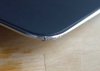
I was expecting a new palmrest as the one I have has a blemish in the silicon thats not started to peel, I open the perfect box to reveal a perfect sealed bag. open the bag to see what can only be described as something that has come from a laptop thats been dropped on it's corner, sent back to dell and process by a blind special tech with no fingers who drools a lot and wipes his own sh!t onto himself so no one will go near him. as documented below.
This is the right hand bottom corner.
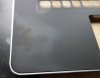
This is to the left of the palm rest and is basically grease.
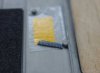
I think this is about the location of the NFC chip, I assume they have simply wrenched it off the sticky patch it adheres to as part of the ribbon cable locks still in place.
well done dell, well f**king done you bunch of retards on a tremendous job of refurbishing parts to send back out on your top of the line premium XPS laptop, faith in you totally and utterly smashed into a million pieces. and now documented on the internet for all to see *slow clap*
The guy who came out said he is a contractor and has a lot of issues with part, the mainboards being the biggest problem, the ones that POST that is according to him *sigh*
Needless to say I now have a 4th build in the making. God only knows what condition this will be in.
The screen on the other hand this time was packaged new, but had 3 dead pixels and a fibre under the screen before I gave up and took it out again.
Oh, this is a picture of the 1st laptops screens rough patch. when you rub over it with cleaning fluid it shows the panel defect.
this is not dirt FYI, it is an etched flaw.
 Last edited: Feb 13, 2016
 -
So I got my motherboard and speakers replaced today.
1) The coil whine is definitely still there, but it seems it went from really high pitched annoying noise to more of a humming thing. Will test more.
2) Speakers seem to be the same. Could any one of you please test this song: https://www.youtube.com/watch?v=nCsAiwrFaio and let me know if you have similar low distortion like in this video: https://www.youtube.com/watch?v=CrGqyRFjkds ?
3) The Fn keys changed. Before - I didn't have to push the FN key to, for instance lower the volume when pressing F2, now I have to. I think this is more of a software/driver thing. Do you guys know how to switch it back? Ie that I do not have to hold down the FN key to active those?
4) Since everything is soldered onto the motherboard, I got new CPU/GPU. I tested 3D mark 11 and the scores dropped from 2995 to 2978 - nothing major I guess. -
yep that song sounds crap with maxxaudio enabled, turn maxx off and it sounds fine.
funny thing is if I plugin my bose QC3 it sounds fantastic, laptop speakers for you I guess vs expensive cans with a dsp chip.
windows mobility center for the fn keys m8.
3D mark, that really is nothing, keep taking the test, I put money on you NEVER repeating the same score. -
Fn keys are solved either in Windows Mobility Center I(with Dell Quickset installed), the BIOS, or just pressing Fn+ESC. Take your pick.
Given that you just had a motherboard replacement, if you have a QHD+ panel and Dell Quickset installed, you might find that Splendid Mode is no longer listed in Mobility Center, and it's probably been automatically re-enabled. If that's the case, you should be able to fix it by going into the BIOS, disabling Secure Boot (which will enable Legacy Option ROMs automatically), and booting once in this configuration. Splendid mode should now be back in Mobility Center. If so, you should be able to switch those settings back in the BIOS and continue to have access to the splendid mode setting. -
Thanks! I see - I can't seem to find maxxaudio -> I assume it's a program that I need to download? Regarding 3d mark - yeah I just used to get closer to 3k with multiple re-runs, but I guess that's fine - the difference in performance will not be noticeable.
Thanks! The Fn+Esc fixed it. And the Splendid mode actually worked fine without any additional setting (though it was disabled originally).
-
There is a setting in the BIOS to set your preference for the Fn keys. I think that you get into the bios by pressing F2 when the laptop starts up (I forget).
-
MaxxAudio settings are controlled in the Dell Audio app, which is installed when you install your audio drivers.
You misunderstood about splendid mode. That's something you actually want to disable. It grossly oversaturates colors; generic mode is far more accurate. But some people after getting motherboard replacements have noticed that splendid mode is enabled (even if they previously disabled it) AND the Mobility Center toggle to disable it again has been removed. If you see it, I would strongly recommend switching to generic mode. :thumbsup: -
Thanks - figured it was audio app. You are right - the background is now clean, but I have noticed that the speakers are not as loud. I guess its a trade-off. Do you use it by default?
Haha, I actually liked the saturated colors - I was comparing this to the Razer and liked the vivid colors better on the XPS. I guess its just a matter of preference. Though for video editing I would probably turn it off.
On a different note. I have noticed a lot of stuttering during the battery saving mode - so much so that I always switch to balanced. I guess it might set some limitations on the CPU - but this seems rather drastic difference. Any ideas - or do I just want too much?
-
New BIOS A05.
-
Do you think the new BIOS A05 might solve the whining problem? Mine only whines when under load , 100% charged and plugged in. As I run the laptop in the bedroom on the table and it is always plugged in..whenever the machine undertakes updates during the night the whining starts. Most annoying.
On another matter, I am thinking of getting the Win 8.1 Professional. Dell charge well over $100 for the upgrade but there are some retailers that have it on sale at times for like $80. Can I purchase this sort of upgrade or do I have to use the Dell one? Is it just a matter of entering a new Serial Number to upgrade Win 8.1 to Win 8.1 Pro? -
From Driver Details | Dell US:
I wouldn't keep my hopes high on the coil whine... -
The A05 bios flashed fine.
For me it doesn't fix or alter in any way the coil whine!
Still the same from loudness and situations of occurrence.
I checked quickly the c-states: still not possible to restrict sleep states to for example c3 (helped with haswell coil whine on some thinkpad models).
I can not see any change from the new bios to any point at the moment. But I will see later (for example had some wired issues with some usb devices on the left usb ports, often had to use the right ones for e.g. connecting safely to an android device)..adlerhn likes this. -
Dell QA is utterly abysmal and I think that's being generous based on what I'm hearing here. I must've really lucked out with my XPS so far... maybe I should have gone and bought the lottery too.
-
If you want Pro and haven't bought the system yet, honestly I would buy it with Pro for reasons I'll explain momentarily. If you already have the system, as long as you buy the Win 8.1 Pro Pack, you can upgrade an existing 8.1 non-Pro installation to Pro. It doesn't matter where you buy it from. The Pro Pack upgrade is a simple process of entering a product key and then two regular-length reboots (i.e. no huge software installs). If you have a non-Pro system and buy just 8.1 Professional, you'll have a key to install Pro from scratch, but I don't believe it allows an in-place upgrade -- and if it does, it would be a whole OS upgrade style ordeal (like upgrading from Win7 to Win8) with all of the time and mess that entails.
The catch to using Pro Pack is that if there's ever a free upgrade to Windows 8.2 and Microsoft decides to use separate keys again (like they did for 8.1 compared to 8.0 during installation and for the Pro Pack), buying the Pro Pack could leave you unable to do a clean install of 8.2 directly. Since the Pro Pack is for 8.1, you wouldn't be able to install 8.2 Core and then use the 8.1 Pro Pack to upgrade it. Instead, you'd have to install 8.1 Core, enter the Pro Pack key, and then do the 8.2 upgrade. If that's a dealbreaker for you, then buy the full 8.1 Pro license, but then you'd have to do a clean install now. The catch to THAT is that if you bought a system with 8.1 non-Pro, it will have a non-Pro key embedded onto the motherboard, so if you try to install 8.1 Pro from scratch with install media that has both non-Pro and Pro, it will automatically detect the onboard key and install non-Pro without ever prompting you for the Pro key you want to use. The only ways around that are finding Pro-only media or customizing your existing media with an unattend file. Fun, isn't it? See why I recommend ordering the system with Pro if it's available and you know you want it?
Or Microsoft could come to their senses and allow 8.1 keys to work with 8.2 even during installation (and allow legacy Pro Pack keys).
Yes, MaxxAudio being disabled reduces the overall volume; not sure if that's a real volume limit or a product of EQ magic, though. I disable it because it really messes up the sound of external speakers, which I use most of the time. When using built-in, occasionally I'll enable it because I haven't noticed the distortion you're mentioning, but maybe I'm not listening to the same type of content and/or doing so at a lower volume.
As for splendid mode, I would honestly do some A-to-B comparisons on splendid mode before deciding you want vivid colors. I thought it looked cool too with the ultra high-res flower background that shipped as the default with the system, but then I started looking at photos. White people looked like Oompa Loompas in splendid mode, whereas switching to generic rendered very natural skin tones. The other side effect is that a lot of subtler detail in photos (e.g. things in shadows) gets crushed out in favor of a single-color blob because colors are so exaggerated that there's no room for subtlety anymore. And just comparing it to my Dell U2410 desktop display showed that things were just blown out to psychedelic proportions on the XPS in splendid mode. TVs on display at big box retailers similarly exaggerate colors because people associate color "pop" with "better" or "pretty", but that mode is completely outlandish, bordering on cartoonish.
And what sort of "stuttering" are you referring to? Audio? Performance? Power Saver I believe limits the CPU and definitely puts the Intel GPU and WiFi adapters into maximum power savings mode, so performance stuttering wouldn't be too surprising. You can of course customize those settings for the Power Saver profile, but if you change too much then you may as well just use Balanced. -
New Intel GPU drivers too. I suppose those COULD help with coil whine since the Intel GPU lives on the CPU, but I'm not getting my hopes up. However, there's a decent chance it will address the letterboxing issues that people seem to be experiencing with some games when running them at sub-QHD+ resolution. Anyone currently having that issue feel like testing?
Note: Updating the driver re-enabled "Intel Display Power Saving Technology", which I'd previously disabled because on other models I've found that it alters the brightness and contrast dynamically to the point that some content is unreadable, or at the very least it makes the display look cheap. That's under Intel Graphics Properties > Power > On Battery, fyi.adlerhn likes this. -
I did notice on mains after the BIOS update the processor was running at 2.8ghz all the time until i reset the min power state to 5% again.
-
Thanks for the update I also found some new touchpad drivers - Firefox scrolling is a lot smoother now!
-
Link to the TouchPad drivers?
Sent from my HTC One -
how do i notice this coil whine everyone is talking about?
i been using my dell now for about three weeks but i cant hear anything exept sometimes a little noise from the fan. -
-
Hello there,
I just updated my xps to the latest Intel HD graphics driver and A05 BIOS and since then I noticed MaxxAudio isn't working anymore. The application is still sitting there but enabling it doesn't change anything to my sound anymore. I used to cleary hear the difference when I enabled/disabled MaxxAudio when listening to music, now it just lags for a second and goes on as if nothing happened. I tried resinstalling the Dell audio driver, and I also tried completely uninstalling any audio driver from the device manager first.
Does anyone else have this problem ? I don't know what to do, Dell doesn't provide older drivers so I can't just roll back to previous drivers, and it would really be a shame anyway... -
Mine did this initially. I found I had to enable MaxxAudio and then switch to a different Preset. At that point, everything started working normally again, including the original Preset and the enable/disable toggle. Weird glitch, especially given that the audio drivers weren't updated (except the HDMI audio drivers included with the Intel package...)
XPS 15 (Haswell) Owner's Lounge
Discussion in 'Dell XPS and Studio XPS' started by mark_pozzi, Oct 23, 2013.


