 Problems? See this thread at archive.org.
Apparently, late 2015.
-
Have dell kept a GPU that long before? The XPS being a flagship product it seems odd to keep such an old GPU.
-
yeh well the sales have slowed so they still have to clear this poor example of a premium laptop

-
1. DisplayPort can support a 4K display at 60 Hz, but not a 5K display. And if you have either DisplayPort displays that support daisy-chaining or an MST hub, it can also support the following configurations all from its single DP output:
- 2x 2560x1600 displays
- 4x 1920x1200 displays
- 6x 1680x1050 displays
The HDMI display can support a 2560x1600 display @ 60 Hz or a 4K display at 30 Hz; either of those cases would require that the display's HDMI input support version 1.4. HDMI does not support multiple displays out of its single port. However, you can use the HDMI output along with DisplayPort and the built-in display all at once. I don't know if there's an upper limit to the number of displays that the system will support simultaneously, but I've successfully used 3 at a time.
Lastly, USB graphics adapters/video docking stations would allow you to attach one or more additional displays as well, and I believe the very latest generation of those products can support a single 4K display, so that would be another way to add display output capacity.
2. eBay is hit or miss. The warranty coverage on refurbs is also hit or miss. Dell Outlet systems can be purchased with a completely new warranty; for third-party vendors, it all depends. Read the fine print carefully and do your due diligence on eBay sellers if you decide to go that route.
3. Several users have had more success using the Synaptics driver rather than the Dell driver, and the Synaptics driver also gives you a lot more customization options, but I think everyone here agrees that the touchpad is decent at best. I basically always plug in an external mouse because even for someone like me who uses keyboard shortcuts heavily, I'm still way faster with a real mouse than even an amazing touchpad. Every time I'm too lazy to connect my mouse when I initially sit down with my system and do so later, I wonder what the hell I was thinking not connecting it right away.Last edited: Dec 25, 2014 -
Honestly I think the reason for the delay is the fact that Intel has hit major delays rolling Broadwell CPUs out, and Dell doesn't want to design a brand new motherboard to accommodate a Haswell CPU plus a new GPU only to have to either redesign the board AGAIN for Broadwell plus that new GPU or go through another entire generation of the product with a CPU that's about to be replaced. But that's speculation on my part. If this system had its discrete GPU on an actual discrete board, this would (probably) be easier -- but that's not how this system works.
Also keep in mind that the meaning of the XPS brand has fluctuated over time. It used to be all about gaming, but then of course Dell bought Alienware, so Alienware systems filled that role. Now XPS seems to be about premium build quality, materials, and features -- and not so much bleeding edge performance, especially with this particular system where thin and light is a major design goal alongside performance. The 750M in this system wasn't top-end even when the system launched in late 2013, I assume because anything faster would have required better cooling and therefore a larger system, and also worse battery life. There's always a tradeoff. -
Yeah that makes sense. I didn't realise a new GPU would require a new mono design. I don't know much about laptop hardware, I'm more of a desktop man. I still like the XPS brand and am happy to lose some grunt in favour of portability.
I can't decide on this laptop or the more gaming orientated GS60 with the 970m. Both fulfil my needs but the GS60 configurations seem a bit odd. -
Premium build quality? I doubt it. A $1500+ notebook with coil whine is like having a 1366*768 screen.
Furthermore, back to the redesign of motherboard. It seems Dell is not willing to redesign a new motherboard to accommodate a new GPU. I doubt how far they went with their so-called redesigned motherboard for the coil whine issue. -
@jphughan : Thanks for the very detailed and through info about the external display capabilities! That was very helpful.
In regards to the trackpad... I know the Dell Precision M3800 is basically the same machine as this XPS 15", except for the video card. With that in mind, even though I like the chassis of the m3800 better, I decided I should get the XPS since it is a couple of hundred bucks less. But now I wonder - does the M3800 have problems with the trackpad and coil whine, too? If it doesn't it might be worth the extra $200. But it's probably exactly the same. -
Guys, I live in Australia and the XPS 15 is currently 20% off. I am not sure if it is worth it. I was also also looking to the Lenovo T440s, in terms of set up has a similar one (FHD Screen vs QHD+, better battery, lighter. 8gb vs 16gb, integrated video card). It is $300 cheaper. Unfortunately I didn`t find any comparison with the last model of the XPS. What do you suggest? I was also looking to the HP Omen but it looks too expensive at the moment.
Is the coil whine soo bad?
My usual diliemma is: if a buy a new machine, I`m not sure if it is going to work well (e.g. X1 Carbon I was looking at). If I buy an old one, I`m warried it is too old. -
The M3800 and XPS will be absolutely no different in those regards. The only hardware differences are the GPU and the fact that the M3800 lacks NFC -- which it seems the next-gen XPS will be dropping according to a leaked roadmap. Other than that, the differences are all in the hardware options of the various preconfigured specs, software preload, and included accessories, e.g. at least in the US, the M3800 includes the AC dongle to use regular Dell AC adapters on this system, which has a smaller than normal barrel, and also includes a USB to Ethernet adapter. The former can be added as a $12 accessory on an XPS order (or ordered separately) and the latter can be ordered as an accessory, separately, or of course from a third party.Last edited: Dec 25, 2014
-
The M3800 is really overpriced here in Australia. It`s roughly +$1000. Does it have the same XPS coil whine issue?
I had a read to this forum:
XPS 15 9530 - Noise problem? - Laptop General Hardware Forum - Laptop - Dell Community
and it looks like the whine issue is a really big problem DELL didn`t resolve yet. I`m not convinced about the XPS anymore.
Any Suggestion? T440s is too "unloaded" and the X1 carbon doesn`t look working well.
It is really hard to find a good windows machine at the moment. -
Didn't they fix the cool whine in new models? Thought I read that somewhere.
Is the sad inside the XPS 15 just a normal 2.5" drive? I might get the cheaper model and upgrade it myself. -
Could you share the roadmap link, please? -
Some people, including myself, have gotten motherboard replacements after Dell announced their availability in a Dell Communities thread and noticed an improvement. Others have gotten replacement motherboard and not seen any improvement at all, and still others who have ordered brand new systems since the new motherboards were announced as available have reported coil whine. Further complicating matters is that coil whine has been used to describe two distinct noises, one a persistent high-pitched noise that occurs only while the system is connected to AC and not charging, and the other a noise that is most easily and reliably reproduced while the built-in panel is enabled and the user scrolls a window such as a Web browser. So the bottom line is that the coil whine situation is still murky, or at least it was when I was last following it closely, which was about 3 months ago.
As for the SSD (I presume that's what you meant when you wrote "sad"?), the 512GB SSD is an mSATA unit. Lower tier models include either a "hybrid" hard drive (e.g. spinning hard drive with a large flash cache built into it) or that hybrid hard drive AND a 32GB mSATA cache unit in addition. The only systems that include a true SSD in a 2.5" form factor to my knowledge are the Precision M3800 SKUs.
Please refer to my previous response to this question:
adlerhn likes this. -
Hi guys,
i'm new in this forum and i think it is really useful.
I don't have the Dell XPS 15" but i was thinking to buy it, but now i don't know if it is a good idea. It's about a month that i'm looking for a good laptop to buy and at the beginning i was oriented to Macbook Pro Retina 15. Then i found this Dell XPS 15 and i was really impressed about everything: best material quality, best specs and nearly 1000 euros cheaper than the rMBP.
I don't know if you are windows addicted or Mac enemies but i don't care about that. I always use a windows pc but now i need a good laptop that let me use several graphic software like Photoshop and Illustrator, with a real good battery and low noise.
So if someone can help me, i would like to know if you recommend this XPS or not.
Thanks a lot
GiuseppeLast edited: Dec 30, 2014 -
The XPS 15 to my knowledge is still the only PC with this particular blend of size, weight, performance, features, and materials. There were a couple of related ASUS notebooks that were supposed to come out around September, but they got delayed and I haven't bothered to see if they've made it to market yet. Other than that, anything else you'd find on the PC side that performed much better would also be thicker and heavier, or at a given size it wouldn't perform as well, would lack some features, and/or wouldn't have the same build.
All that to say, as you've already noticed, the rMBP is the nearest equivalent from a hardware standpoint. In some areas the rMBP is better (most notably the trackpad and an OS that handles HiDPI better, assuming you'd be using Mac OS on that side), but the XPS has some things going for it as well (USB PowerShare, dual storage options, serviceable memory, storage, WiFi, and battery). If you're truly platform-agnostic, then you'd have to decide whether the rMBP's significant price premium is worth having Mac OS, the iLife apps, and whatever appeals to you from a hardware standpoint about the box. However, while one can make the argument that the rMBP running Mac OS X is a better system overall than an XPS 15 running Win 8.1, an rMBP running Windows is definitely NOT better overall. There are just too many tradeoffs still involved with running Boot Camp in terms of functionality -- so if you'll need Windows to an extent that would make a VM would be impractical or impossible, I would rule out the rMBP.
But having had my XPS 15 for over a year now, I have absolutely zero regrets. I had the coil whine and it didn't bother me too much (likely because my laptop is often closed and a couple of feet away from me connected to external peripherals rather than right in front of me), but I got the motherboard replacement since it was free and that took care of it. Other people have different opinions on how irritating coil whine is and how successful they've been getting it addressed. But then there are people in the rMBP camp complaining that it throttles too much because it has an undersized AC adapter for its performance (85W compared to 130W for the XPS), and in fact even on AC power, under heavy load the rMBP sometimes DRAINS the battery as a sort of auxiliary power supply.
There's no such thing as a perfect system.Last edited: Dec 30, 2014jarlaz likes this. -
Thank you very much for you answer, it's very useful cause I was convinced to buy the xps till today morning. Can you tell me more about battery duration? I want just to know how much is using for example word (typing) and Web browsing. And what about the noise and temperature under pressure?
Thanks again -
I'm almost always connected to AC power, but having read this thread from the beginning, people with the 61WHr battery seem to get about 3-4 hours under "typical" use, and people with the 91WHr battery get about 5-6. Of course that will vary drastically depending on your power settings, display brightness, and what you're doing, so take those estimates for exactly what they are: estimates. As for behavior under load, even under sustained multi-hour gaming sessions, the fans only reached a noise level I would call "moderate" -- noticeable, but not obnoxious by any means, and nowhere near the airplane-level noise they make at maximum speed while running a BIOS update, which tells me that this system is unlikely to ever overheat to the point of thermal shutdown. It's also worth noting that I hardly heard the fans until I quit the game, so external speakers at even a fairly low volume will mask most fan noise -- and once you quit the game or whatever intensive task you've been running, the fans calm down within a minute or so. I also have not personally experienced any severe throttling after brief periods under load. There were occasional reports of that a long time ago, but I haven't seen them persist, so that seems to have been fixed by BIOS updates and/or manufacturing improvements with respect to the thermal grease and/or heatsink installation. As for temperature, I haven't actually measured it (though I believe the NotebookCheck review and a few others did if you want to go find them) and I also almost never use the system in my lap since that's a horrible thing to do ergonomically, so temperature isn't really an issue for me, but my recollection is that the underside sometimes gets warm, but never unpleasant to the touch -- sort of a "warm and toasty" feel, in a good way. And under those conditions, in my experience the palmrest area has never gotten warm to the point that you even really notice.jarlaz likes this.
-
Thank you very much for the information. Hope to come back soon and tell my opinion on this
-
Maybe you can wait until CES next week and see if Dell will launch the next gen early 2015... You can buy the last gen or get a big discount after they announce the new one.jarlaz likes this. -
Great! Thanks
-
There's certainly no harm waiting a bit, but I doubt CES will be very useful to you. Many things shown at CES aren't even scheduled to come out until the second half of that year (to say nothing of when or even if they actually do come to market), and the roadmap slide for the XPS models in that presentation I mentioned a while back shows that the XPS 13 refresh will arrive in Q1, but the 15 still says Q4. Of course plans can change, and I have no idea when this presentation was actually prepared (it was uploaded on 12/4, apparently), but I'd be surprised to see a new XPS 15 there -- and even if you did, if you're willing to wait 9 more months for something newer and better, you'll probably always be waiting.jarlaz likes this.
-
I just received my replacement laptop. What is the easiest and fastest way to switch over everything from my old laptop to my new one?
Thanks! -
Honestly with a replacement laptop, if you have the right Torx screwdriver, just swap hard drives between the two units and return the old system with the hard drive from the new one.
Or if you have a Torx screwdriver and a USB to SATA adapter, hook the hard drive from the new laptop up to the old one via USB and run Macrium Reflect Free to clone it.
If you don't have such an adapter (or a Torx screwdriver) but have an external hard drive of sufficient capacity, use the "Create system image" function to take an image of your current laptop, then boot the new one into the Win8 Recovery Environment to restore it onto the new one.
If you don't even have an external hard drive, then I'd honestly just start fresh on the new laptop and only migrate your data using a flash drive, network share, or whatever you have available and are comfortable with.
Also note that if you have a version with the 32GB mSATA cache and intend to use one of the image methods listed above, before capturing the image via either method, you should disable Acceleration under Intel Rapid Storage. You can of course re-enable it on the new one after you transfer the image over, and possibly even enhance it per the How-To articles in the XPS 15 Wiki.prplhaz4 likes this. -
Ok cool thanks! Maybe i'll just manually switch over the files.
They also sent me one with another keyboard language. Anyone know what language this is?
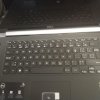
-
It looks like a French keyboard.
-
Maybe it's some kind of international keyboard,
I don't think it could be a French keyboard, because French keyboard has AZERTY layout. -
Dell has released a new driver (31 Dicember):
Dell Wireless 1560 WiFi + Bluetooth Driver
Is there some version of XPS 15 9530 with a different model of Wi-Fi card? -
It looks like the keyboard is Spanish. Is there any difference between this laptop and my old English keyboard laptop? Should I ask for a replacement with an English keyboard or is the only difference the Spanish lettering on the keys?
-
pretty sure a lot of them come with Intel 7260AC cards
I have been going back and forth with wifi/bt drivers - some prevent sleep or hibernate, some stop the mouse from working, some have terrible wifi performance.Code:KTTYN 1 CARD (CIRCUIT), WIRELESS, NGFF, 7260AC
Here's what I've settled on now (according to Device Manager):
Wifi: Intel(R) Dual Band Wireless-AC 7260 12/8/2014 17.13.11.5
Bluetooth: Intel(R) Wireless Bluetooth(R) 8/11/2014 17.1.1409.486
I chose NOT to install Intel PROSet application -
You are using the latest drivers supplied directly from Intel website.
Maybe Dell 1560 is a new card, that will be installed on XPS 15. -
Anyone know the answer to this?
Thanks! -
Yes it is the wrong keyboard, it should not need to be asked, it's wrong, they fekked up big time. Demand a new laptop, do not let them send out the engineer to swap the keyboard as it is a total strip down to replace it and they are simply not skilled enough to undertake this sort of job. It will never work the same again if one of the contracted engineers show up. The guy I had was clueless. He admitted he had never worked on one before.
-
Oh yeah, I definitely know about their technicians. They sent 3 to fix my laptop, and the 3rd guy couldn't open the case because the first two guys stripped 3 of the screws. They finally decided to send me a new laptop and now it's the wrong keyboard lol -
Ahh, they just contacted me and said they will send someone to replace the keyboard. lol
My warranty is over, I am lucky enough to have gotten a replacement as my warranty expired, so I think i'm just gonna keep the laptop and not have them replace the keyboard. -
I just got an XPS 15 QHD with the 32GB and 1TB option. Does anyone know if the 32GB mSata is being used for the OS partition or a SSD cache to the 1TB? I'm planning on getting a 250GB mSata and wanted to plan appropriately.
-
The 32GB mSATA is SUPPOSED to be set up as a cache drive for the 1TB, but a number of people (including myself) reported it not being configured correctly from the start. Save yourself the trouble of dealing with Intel Rapid Start/Storage and upgrade the mSATA drive ASAP. You'll need to install the OS on the mSATA drive in AHCI mode. It's a huge pain (in most/all cases requires a reinstall) to switch between IRST (w/cache drive) and AHCI after things are installed and set up, so keep that in mind while you're waiting for the new SSD.
-
True, but until you feel like buying a hardware and doing a clean install, this How-To shows you how to make better use of the 32GB cache: Allocate the full mSATA cache capacity to Smart Response - XPS 15 Wiki.
-
Okay, could someone explain how to configure the mSATA settings(Intel Rapid Storage Tech, etc.) to work at full performance. I've read the articles on the XPS 15 Wiki about mSATA configurations and I'm still rather confused. I have a Dell XPS 15 with and i7-4712HQ, 1TB HD + 32GB mSATA, & 16GB of RAM. Here are my current configurations.




-
You have a plan B, stand at the door and get the guy to check it is a "Do not return" part like my keyboard was (huge sticker on the back of the box) . I took it off the guy and said I would fit it and he can sign the job off as done. Made his day as he got paid to be a courier.
-
No, that keyboard is (by far) not the Spanish one.
-
You should have got extended warranty on the replacement laptop. In any case, just tell them to replace the keyboard (or the laptop) if you don't like that layout.
-
Hi, I'm a long time NBR-er, never before owned a Dell. I was hoping I could get a quick piece of advice from you all who know the Haswell XPS 15 very well.
A pretty reliable vendor has just put up for sale a few current model refurb/open box Haswell XPS 15 refurbs for $1,200 and $1,300. (NOTE these have 512GB SSDs, 16GB RAM, i7-4712 cpus, and appear to be true Dell refurbs
So, this sounds like a too-good-to-be-true deal - is it? To be a bit more clear, I think of the XPS 15 of current vintage to be considered pretty close to the best laptop on the consumer market at present, worth more like $1,800 - 2,000, even as refurb (again, very reliable vendor, I have history with them.)
I seek the advice of those who own/know this model: is it as good as many reviews say it is? Any issues to look out for?
If not, I simply ask, is this:
1) a great deal, grab it and and feel lucky? or...
2) ...too good to be true; don't trust it/find out the "catch" before committing
(oh, and, there is a 30 day return privilege!)
Many thanks -
Hi Jeff,
I am far from the Great and Gracious computer Guru's on this Great site and forum yet what I can tell you is this:
It sounds like a very good deal yet make sure you can get the Extended Service Warranty plan through DELL because these notebooks, although over-all are really nice, they definitely have their issues from time to time, as I had mine just about 7 months and the Keyboard just suddenly Died one day and I just Dread to think what the bill would have cost me if I did not have it, which I very Thankfully did and do. :thumbsup:
Good Luck & Best Regards,
SD -
It looks like your entire cache unit is already allocated to Smart Response, which is why you can't see the mSATA cache unit in Disk Management -- but you're still running in Enhanced mode rather than Maximized mode. Take a look at this article to learn more about the two modes and decide whether you want to switch: http://xps-15.wikia.com/wiki/Increasing_caching_(aka_Intel_Smart_Response)_performance.Last edited: Jan 5, 2015
-
Last I saw, it's configured partly as a cache and partly as a Rapid Start partition from the factory, although the Rapid Start partition is useless on a system with 16GB of RAM, hence the Wiki article for allocating the full mSATA capacity to caching. However, the factory may have finally fixed that and allocated the full capacity to caching rather than an unusable Rapid Start partition. But either way, you can configure it as an independent disk if you want. You'd have to disable Rapid Start and the Rapid Storage Acceleration, then use diskpart or something similar to wipe the cache, and then you MAY also need to switch the BIOS operation from Smart Response to AHCI (which would require a clean install of Windows), but honestly it's probably best used as a cache anyway. 32GB isn't a ton of storage, and that cache unit isn't likely to be a particularly fast SSD anyway, so your overall performance will probably be better with it being able to cache anything anywhere on the 1TB disk rather than only boosting the performance of whatever 32GB of data you store manually on it.Last edited: Jan 5, 2015
-
I called in for extended warranty. 1 year was $299, 2 year was around $530 and 3 years was over $700 so not worth it. Looks like the prices they gave me were as if I had the laptop for a couple months and wanted more warranty, not as if it was brand new.
-
Dell's nearly bezel-less XPS 13 is about as small as an 11-inch laptop
" Dell's larger XPS 15 hasn't received an upgrade, per se -- it's the same design as ever -- but it does have a spanking new 4K screen option. That's "coming soon," says Dell, with a starting price of $2,349. Ouch!" -
I give up on their Xps 15, it is stupid overpriced when they didn't update anything. Still stuck with a piece of ** nvidia 750m. Did you know that you can now buy dell inspiron with 4k and touch and still be cheaper and have stronger video card than this? Dell inspiron may not be as thin... But it's a lot cheaper.
Or alienware 15 with 4k with a price low as $1400. All of them uses sharp izgo 4k panel so we won't get horrible pentile quality panel. -
The tech guy changed the motherboard to try to solve the coil whine and Dell shipped the same motherboard number, exactly the numbers on the old one and the replacement. The coil whine still here...
They offer me to send the machine to Dell's lab and I refused.
Anyone had other experience about that?
XPS 15 (Haswell) Owner's Lounge
Discussion in 'Dell XPS and Studio XPS' started by mark_pozzi, Oct 23, 2013.


![[-Mac-]](images/avatars/[-Mac-])


