 Problems? See this thread at archive.org.
-
Attached Files:
Last edited: Jan 16, 2015 -
-
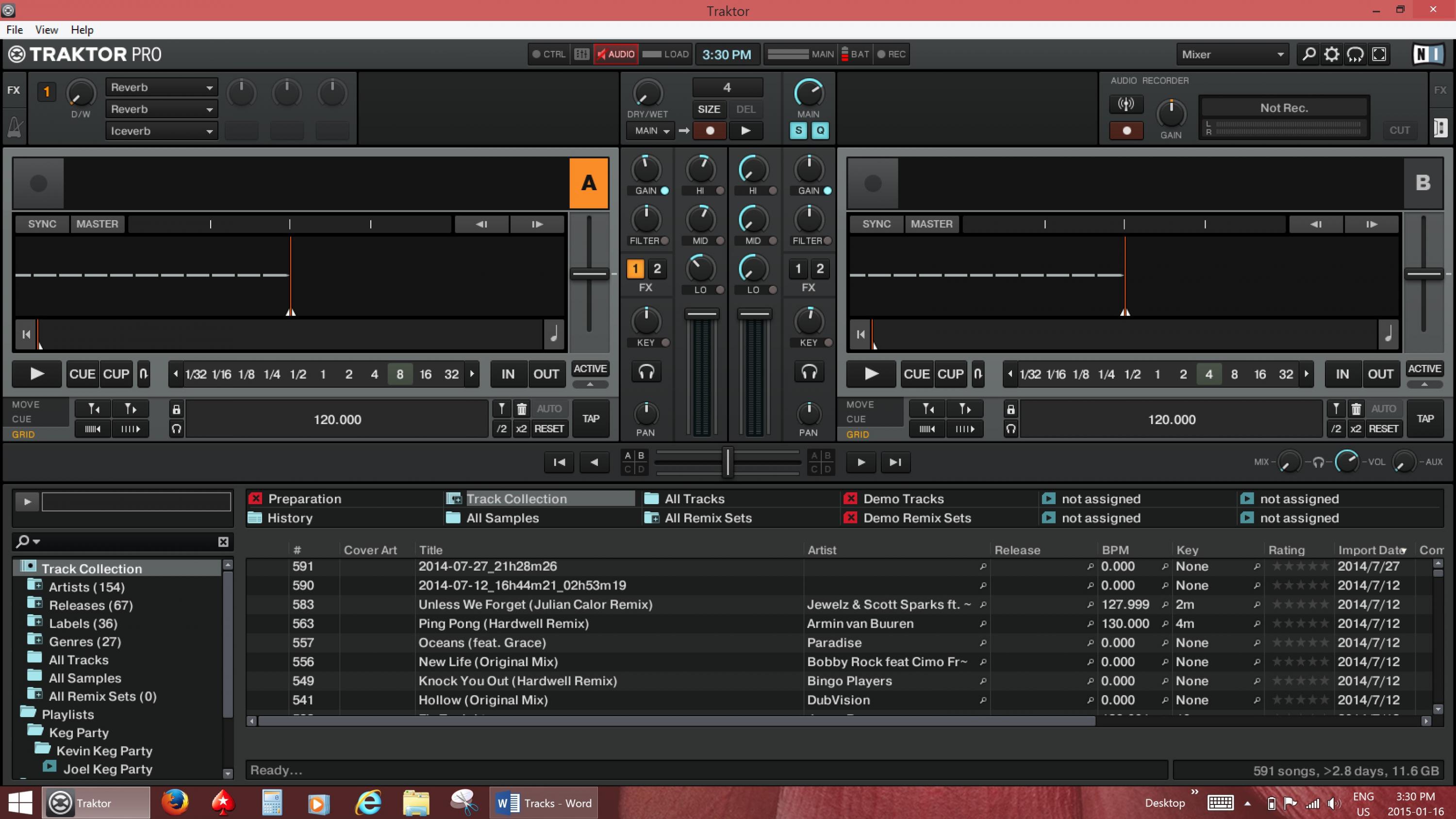
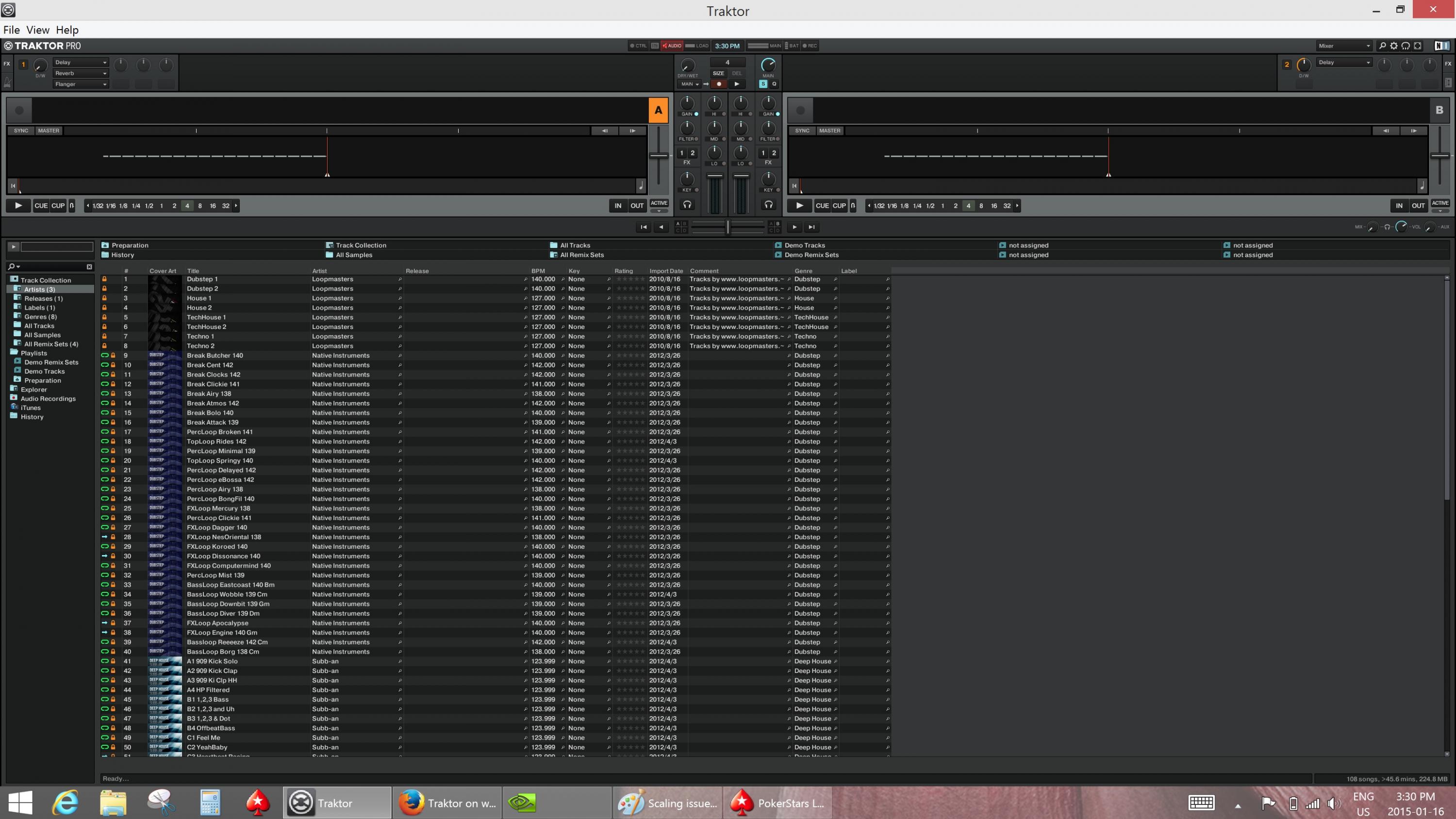
guys please can anyone help..i recently purchased an online subscription of study site which needs java and a software to open that subscription...now when i installed them the java does not scale that software and its contents to my screen,its a small screenn....what should i do...is there a problem with the latest java.??does java not scale things on high resolution laptops?
-
It's probably a Java limitation, but I can't be sure since I haven't used any Java apps on my built-in panel. In any case, your best solutions are either to attach an external display or drop your built-in panel down to 1600x900 whenever you want to run this application. Obviously neither one is ideal, but that's the current state of affairs with Windows 8.1, Windows apps, and HiDPI panels, unfortunately.
-
broo i can attach an external display but the problem is my external display also does not support my laptop....i am unable to connect it to my laptop properly the screen comes in centre of the external display...
-
Check the Windows screen resolution interface to make sure the display is set to extend rather than mirror, and maybe check the Intel Graphics Properties? In any case, with an external display even though the scaling will work, it still won't look good because HiDPI and regular DPI displays don't coexist well at the moment, so dropping your panel's resolution and switching back to 100% scaling during that time is still the best choice from a quality standpoint. Unfortunately it's also inconvenient because you'll need to log off and back on every time you change your scaling setting.
But your external display definitely supports your laptop. It's just a question of configuration. -
set XPS15 resolution to 1600X900 when you are using these applications.Last edited: Jan 17, 2015
-
Thanks for the response. Given the repair horror stories, and that there's no guarantee that the coil whine will be fixed with the placement, I've decided not to go through all the hassle and stick with the coil whine. So I did something I should have done a long time ago: open it up and fit the screw that had been rattling around inside it since the last time it was repaired by Dell!
-
bro is there an app for windows like there is retinizer for mac.. that retinizer app can make blurry apps correct scaling and look good.i thought is there something like that for windows 8?
-
Not that I know of. Part of the problem is that there are so many ways to implement app scaling in Windows that there are all kinds of different ways it can go wrong if the app doesn't correctly support the level of scaling you want. That's partly due to Microsoft always wanting to preserve legacy compatibility as much as possible with new releases and partly because Windows has had UI scaling forever, whereas Mac OS never supported it until Retina displays arrived, at which point it was easy problem: either the app supported your Retina display, or it didn't and was just run scaled up. Ironically the fact that Windows has historically been more flexible and capable with scaling has made it less functional in this particular scenario. More reading here if you're interested: AnandTech | Scaling Windows - The DPI Arms Race
-
I'll get my brand new XPS 15 replacement (yes, its not a refurb) in 10 days. We will see if the coil whine is solved or not. If not, ill ask a replacement for an alienware 15 or get my money back.
If the coil whine be present but not so loud maybe I can live with it... -
I kinda learned to live with it. Yes it is annoying that the laptop would be perfectly silent if there wasn't the annoying coil whine, but on the other hand even with coild whine it is more silent than anything I had before ;Padlerhn likes this.
-
Yeah, but my only fear is the coil get worst with time. When I received I didnt notice any coil whine, months later it appears and get loud. They changed the motherboard 2 times and the last motherboard is more louder than anyone I had before.
-
Hello all!

I got myself this machine for work due to the premium look, battery life and the screen. Sadly the programs I use don't work on a Mac, and lag a lot when using boot camp, but designing on this is really nice! It's a pretty sweet compromise I think if you can't get a MBP.
But I'm getting pretty ticked with the battery life. Since I bought this machine, I've been getting extremely high discharge rates. My battery life only lasts 2 hours max, it bordered 3 hours on day one. I have the top spec version, so I was expecting MBP battery life, but I am no where near the 10 hours, or even 5 hours like my last laptop. I am on power saving mode constantly, checked the settings of the mode, updated Intel drivers, but nothing I can see is fixing the problem.
Has anyone else experienced and fixed this? -
What kind of programs are you running? If I'm playing a game or anything that uses the GPU (I also have the top model), usually I'll get closer to 2-4 hours. If it's just regular web browsing/watching a video/light to medium use, I get from 5-7 hours.
Also see if the battery life goes up after the first few days, if you just got it, there might be a bunch of updates being installed that are killing the battery life. -
If I game or use 3D Max or Illustrator, I get the same exact battery life as when just browsing the internet or creating some simple documents. It's really weird. It stays constant no matter how much or little I do. Also, as I was writing this I thought "Hmm, maybe my GPU is set to be used for all graphics," But I just switched it to integrated only and still no power drain change :/ It's weird.
-
Where did you set integrated graphics only? Anyway, the XPS 15 Wiki has an article about setting a power policy that you may or may not find useful: What to do upon first receiving an XPS 15 - XPS 15 Wiki. And if you just started using this system, it's possible that Windows is still working on background optimization tasks (building your search index, setting up SuperFetch, etc), in which case it should settle down in a bit and give you better battery life. Other than that and obviously checking Task Manager to see if something is keeping your CPU and/or storage unexpectedly busy in the background, keep in mind that the display on this system is extremely bright despite having a very high pixel density, so that backlight can consume a lot of juice. I ended up turning mine down because I couldn't stand to use this display for prolonged periods at max brightness, but if you're still running in that mode, turning that down should help a lot.
-
In the time I've had my laptops, coil whine has either appeared
or disappeared with time (or become softer). But I haven't observed it to become louder with time (not that it couldn't happen in the coming years, in which point I'd make use of my extended warranty).
-
I set the integrated graphics only in the Nvidia Control Panel, I didn't change it anywhere else. I leave it on adaptive otherwise in that control panel. Where do you recommend I change it? I've always built my own desktops and power house PC's so I'm not used to trying to throttle things down for power saving on power house lappies, haha
I already did all of those settings, except for the WiFi power saving mode cuz I thought that why would I want to throttle my WiFI signals... Buutttt that boosted my battery by loads 24% battery left, 2 hours remaining according to the estimations, normally this would be 20-30 minutes. That would translate to around the 10 hour mark if I fully charged.
The brightness, yeah agreed, it's a gorgeous display though haha. I'm upgrading all my desktop monitors to QHD's because 1080p looks so bitty all a sudden. XPS 15 has spoilt my seeing balls.
Cheers though man for the help
-
Ah yes, I forgot the NVIDIA Control Panel could force integrated only; kind of a shame to do that that though unless you're actually seeing the GPU kick on when it shouldn't be. Don't put too much stock into the estimated time remaining; it's always a haphazard guess based on your more recent usage -- but if it turns out to work, then great!
I won't feel the need to upgrade my desktop displays to QHD+ for the sharpness until the Windows scaling issues are all sorted; I actually don't use my built-in panel all that often, and I just bought a Philips BDM4065UC. It's 4K but on a 40" panel, which is large enough that 4K is usable at 100% scaling, so all of those pixels go towards additional real estate rather than making things sharper. I may finally give up my dual display setup for this monster. So unless Windows finds a better way to make standard DPI and HiDPI displays coexist AND I somehow run out of real estate using that thing, I definitely won't be buying a HiDPI desktop display just for the sharpness.
But if you do want to use 4K resolution for HiDPI, then fyi you can't really go above 24". If you do the math, you'll find that 4K at 27" is 163 ppi (only slightly higher than a 14" 1080p panel, which is definitely crisp but nowhere near HiDPI), and 4K at 32" is 138, which is less than a 15.6" 1080p display. For 27" you really need 5K (which this system can't drive), and 32" you'd need even more. A 27" 4K panel seems like the worst of both worlds to me at the moment. There aren't enough pixels to give it the amazing HiDPI sharpness you see on Retina displays and such, but there are enough pixels that you have to enable some amount of OS scaling just to make it usable, with all of the potential issues that can create. -
Yeah, it would be. I put it back on to GPU instead of adaptive as well, things have gotten a lot better since changing the WiFi power mode. I have been using this for a good 2 hours now, still got 7.5 hours left, so the issue has been fixed!
Yeah I know what you mean. I got to scale this by quite a lot as Autodesk are dreadful at scaling for screens higher than 1080p. The writing becomes unreadable on a 15inch screen, it's incredibly small. But QHD at 24" is where I want to be, I tried it on my mates setup who I work with, and it is just delightful. 4K 40" would be sweet! Sadly I need 3 monitors for my workflow which is kinda annoying cus one big 4K screen would be so nice.
Hopefully Windows and everyone else sorts out the scaling issues with Windows 10 and all of the HiDPI screens becoming more standard on high end laptops. It's the one annoying thing now, going back and for to the resolution settings when I switch between applications, I'm still trying to find a sweet spot so when I go work with a client my screen real estate is a little bit better and words aren't split apart in the menus. -
Hello,
i have the dell xps 15 top tier model. Sometimes when i wake the notebook up from sleep the panel keeps black and i have to longpress the power button to restart the systems. On other occasions when i wake it up from sleep the network card wont work and i have to disable it and enable it in the system settings to work again. Does anybody here experience the same issues or maybe a solution for this? All my drivers are up to date and i have disabled intel smart connect and the rapid that options.
Cheers! -
Are your drivers up to date from the Dell site or the Intel site? Over in the M3800 thread someone else just asked about the WiFi card not working on resume, and the reply from a third person who used to be affected by it was that Intel driver version 17.13.11.5 solved the issue.
As for the display not resuming, Intel also has newer GPU drivers available than are on Dell's site, but they'll only install through Device Manager if you choose Browse and then "Let me pick > Have Disk" rather than "Search this folder". The Intel-sourced drivers do work (I'm using them now), but I can't speak to whether they'll resolve your issue since I don't notice it myself, possibly because I rarely use the built-in panel anyway. -
Thanks for the quick response! i ll try these soultions and report here if they worked
Edit: I just thought about it, the panel keeping black cant be a video card driver issue since even the dell logo at the beginning does not show up :/ -
The Dell logo shouldn't show up if your system is just resuming from sleep. It might show up if you're resuming from hibernate, but I can't remember and I never use hibernate. That may also depend on whether your BIOS is using Legacy or UEFI and also whether you use Intel Rapid Start.
-
Jphughan, after you marvelous help with my last driver problem, would you happen to know where I can a find driver that will allow my StorageCraft Recovery Environment to see a networked hard drive? Thanks!
Jay -
A networked hard drive? I assume you'd just need a network card driver, and then it would be up to the recovery application to support the protocol your hard drive uses for sharing; SMB/CIFS is the most common since it's what Windows uses. The catch is that your recovery environment probably won't deal with WiFi drivers because it would then need to provide an interface for selecting a wireless network, entering the password, etc. It's not impossible to do, but most haven't bothered. If that functionality is important to you, you're probably best off buying a USB 3.0 to Ethernet adapter, and then as long as you bundle the drivers for that into your recovery environment, you should be able to get on the network and access shares.
But if on the off chance your recovery environment DOES support WiFi network adapters, here are the driver download pages for the adapter, depending on which version of Windows your recovery environment wants drivers from. If you're not sure, try them both; maybe either one will work.
Win7 (get the Ds32 or Ds64 version): https://downloadcenter.intel.com/Detail_Desc.aspx?DwnldID=24578
Win8.1 (get the De132 or De164 version): https://downloadcenter.intel.com/Detail_Desc.aspx?DwnldID=24576 -
Hibernate does show the dell logo, for sake of clarity.
-
Fyi all, from the M3800 thread:
-
Has anyone installed the Windows 10 tech preview? After doing a clean install I have this problem where the mouse will lag or stutter for a second or so when I do something like open a new tab in IE or open a program. I have installed all of the latest drivers, and this problem occurs with both my USB mouse and the built in touchpad.
It seems to me like the slight CPU spikes interrupt input devices but I have no idea how to fix this. Anyone else encountered something similar? -
You have to disable the NVIDIA graphics card in device manager. I think it's the optimus technology that isn't working
-
Ah yes that solved it! However Win 10 TP is still too buggy for me, problems with the Windows store etc. So I shall be sticking to 8.1 for now. Cheers
-
New build comes out next week, although I think Microsoft is still focusing on adding features and finalizing the UI rather than squashing bugs, so this particular behavior may not have changed. I'm still running it in a VM because at this point I haven't seen anything sufficiently compelling to make me want to run it on hardware. If I had a Surface Pro 3 or even a convertible laptop, I might consider it to check out this Continuum feature coming in the next build, though.
-
The problem with the screen not waking up from sleep was mostly fixed by a previous bios update. I only get that very rarely now. Sometimes the wireless adapter gets stuck on wake for me. No need to disable the card. All you need to do is reset the adapter. Very quick and easy way to do this is right-click the network icon in the system tray and select 'troubleshoot problems'. Windows will reset the adapter for you.
-
Are you already running the very latest WiFi driver version from Intel? Someone in the M3800 thread said that cured all of his issues around wireless not working after resuming from sleep.
-
I've been a lurker on this thread for some time because I've been sorely tempted to procure one of these magnificent machines to make it my daily driver. I honestly don't need its d-gpu or associated capabilities or even necessarily the Quad core cpu, but the cost of acquiring a top spec model if you are willing to scout out a deal on a refurb, open box or lightly used one for as little as $1,200 (again, top config, $2, 300 list version) is quite attainable and it seems foolish to spend close to the same price for a new or open box Ultrabook with dual core U-class cpu, IGP-only 13" product when the extra 1.1 lb is of no consequence to me while the awesome 15.6" nearly 4k IGZO screen is, and there doesn't seem to be any penalty in battery life or in any other performance or convenience factor when compared to 13" Ultrabooks such as the Samsung Ativ Book 9+ I own (see sig) and adore for its superb build quality and extremely smooth operation, but from the vast majority of what I've read - here and elsewhere - has described the 2014 XPS-15 in much the same way.
So what's the question or issue that stands in the way of my pulling the trigger on one of these gems at the price point I refer to that is presently offered by Blinq.com, a very reputable companies closeout etailer with whim Ive done a great deal of business?
Well, it's just this: this thread continues to this day, some 5+ months since market availability, to continue to have "issues," small and not-so small that require hacks, patches and driver changes to get it to operate smoothly, reliably and mostly trouble-free - just what I require for my "daily driver," and would have been extremely likely to have long since RMAd my XPS-15 had I gotten it, not necessarily even used, were I having problems with such basic "features" as wifi, or wake from sleep. Coil whine: still a problem, even after replacing multiple motherboards?!! Then there's the fact that its a Dell consumer offering (you cannot find usef Precisions for such low prices - not even close) and Dell consumer product support continues to occupy the lowest position in surveys and my own interactions with real live Dell people who reinforce my belief that support is not something you can get for love or money from Dell.
I ask of you, then, to advise whether owning this XPS15 requires you to have a great deal of patience and a willingness to do multiple clean installs, etc, or is that truly a set of old, now fully resolved "teething pains" from when the product was new.
So, Buy with confidence and prepare to be blown away or Buy with caution and prepare to spend several hours a week tweaking, hacking and uninstall /reinstall - ing to have a serviceable computer to get my work and fun done every day? Brief answers to these summary questions will be graciously received, as will answers with some detail if you wish.
Many thanksLast edited: Jan 23, 2015 -
I just installed it. Seems to work very well. More stable connection? Or just my imagination, I don't know. Anyway, the tip above is still useful for any time you can't connect for any reason. 'Troubleshoot problems' will quickly reset the adapter and fix the problem, most of the time.
-
I think I have had a single issue since sticking the latest driver on, probably a 1% issue that could have simply been the router.
-
Is it me, or does the new A07 bios merely move the Dell splash screen logo 2 inches higher on the screen? I liked it centered, where it was before!
-
Hey, I've got an issue with screws falling out of the base of my XPS system. I think the Dell tech that worked on it didn't replace them very snugly. I re-tighened the remaining ones, but they keep falling out, and now I am down to 4 - just the corner ones.
Anyone know what the size of those screws is? I'm in India so my mail order sources are limited. I'm hoping they are a standard size and I can find some replacements in a mobile phone repair shop. I'l love to find some that size with phillips heads. Torx is a pain in the a-- . -
I don't regret buying the XPS 15 and swapping it out with my Clevo/Malibal P170HM. I own it for more than a year and only did one fresh install of Windows at the very beginning right when I recieved the laptop. The only "Issue" I have is coil whine but it doesn't really bother me that much.
I read my review today and I still have the same opinion as back then when I wrote the review:
http://forum.notebookreview.com/del...30-haswell-2014-top-configuration-review.html
It looks good, is lightweight, powerfull, good battery capacity. I use it on the couch (and would never want to use a laptop without touchscreen anymore) and on my home desktop with external screen, DAC, etc etc -
Hi,
I am not a computer GURU like the very Gracious and Great members here and for the life of me how I ever got the title "Notebook Guru" under my member ID is just a Great and very undeserving honor yet Truly Perplexing to me.
What I can tell you from being a owner of the XPS 15 (9530) and coming from a jump ship MacBook Pro 15 w/retina display is,
1. The display is Great and just as nice as if not better then the MacBook Pro as it has a much greater brightness level, which I greatly prefer.
2. The keyboard for me is just as nice with plenty of bounce and I do not use the track pad on anything so I cannot comment on this.
3. I have never been affected nor bothered with any of the mentioned noise comments and I once again cannot rightfully comment on the battery performance, as I never hardly run on battery as it is strictly a desktop replacement and mostly always plugged in.
4. I never had any Wi-Fi issues even though I know others have reported such.
5. I never had and USB issues even though I know others have reported such.
What did in fact unfortunately occur in the short time that I had owned it is, they keyboard just became unresponsive one day and had to be replaced and I stress to Anyone and Everyone who purchases this unit or any lightweight power strong laptop/notebook and plans to hold it for a good amount of time to definitely purchase an Extended Service Warranty, as I am very thankful that I did, as the replacement parts is the not the big issue or price that makes the repair bills so high yet it is definitely the Labor that does.
I hope I have answered some of the questions you asked and ponder about and please do not hesitate to ask me anything else I may hopefully be able to help you with, as I am always willing to do whatever I can and especially for the Great Bunch of Super members here. :thumbsup:
Best Regards,
SDLast edited: Jan 23, 2015 -
Thanks very much for these quick, informative responses. My overall take is that you love this product as much as the majority of reviewers seem to suggest (the difference being I am polling "real people" with whom I can interact rather than taking a professional reviewer's perspective, which lack living with the machine month in, month out. I know that no device is perfect and even my Samsung 9+ had tweaks and driver issues to work out - and you can find a number of more serious problems that the usual "vocal minority" post about in the thread for this machine - but I still get the sense that the XPS 15 is, well, "delicate" and prone to spontaneous failures, hence the strong recommendation that one gets the extended warranty - to which I would add, get the on-site version. That too is good advice for nearly any product in which you've invested over $1,000.
I would be grateful for some additional feedback. As soon as the Broadwell/4k version of the XPS-15 is announced I imagine some wonderful specimens of the current model will permeate the used market at insanely low prices - and owners of this kind of gear tend to really baby their equipment so mint condition samples should be available. To think that you can acquire such a powerful, high end device that's reasonably well built and durable (is it? that's my key concern) is, IMO, just remarkable. When I think what $1,200 would buy in the very recent past (I've always been a buyer of <1 yr old open box/refurb/lightly used gear (cars too!) because the depreciation is so huge and these mint condition and still under warranty products are sometimes even better than new ones out of the box because a previous owner has gone through the pain of working out the early kinks) so I'm comparing apples to apples in comparing what I can buy for $1,200 now vs. 1-2 yrs ago.
Thanks again and do add your voice if you have things to add to what has been said thus far. -
If you read the release notes on the A07 release, you'll find that it's not just you.
-
Well I can confirm that 4K @ 60 Hz to an SST display works. Just got my Philips BDM4065UC. Even the pictures showing it dwarfing 30 and 34" displays don't do this thing justice; it looks even bigger in real life. 4K @ 40" is the same pixel density as a 27" 1440p display, so it's actually possible to use this thing without any Windows scaling.
-
You are very welcome and I am glad that I have helped somewhat.
Best Regards,
SD -
It's not Broadwell, but it's 4k. This is what I'm waiting to be delivered now: View attachment 120192
-
If the next gen doesn't launch until Q4 2015, it may well have Skylake rather than Broadwell.
-
I see they're using a new network card in the new config. Hope it's a lot better than the 7260.
-
Anyone using Windows 10? If so, any major glitches / stability issues? Thanks.
-
Are you having issues with the 7260? That's what I was using in my L502x, and it was blazing fast and rock solid 24/7.
XPS 15 (Haswell) Owner's Lounge
Discussion in 'Dell XPS and Studio XPS' started by mark_pozzi, Oct 23, 2013.



![[-Mac-]](images/avatars/[-Mac-])


