 Problems? See this thread at archive.org.
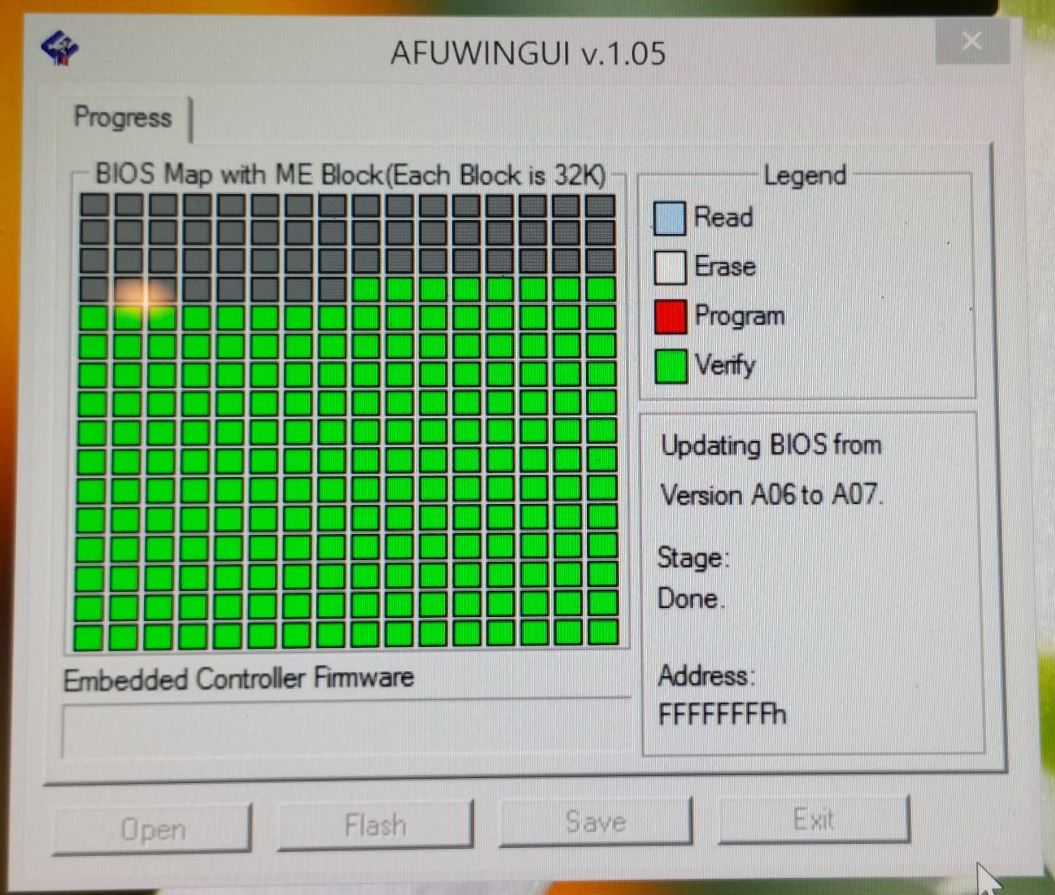
Oh no! Trying to update Bios A06 to A07 and the bios update client froze midway through and is not responding--none of the keys do anything and holding the power button down won't turn the unit off either . . . basically the screen is lit up with a frozen image of my desktop screen, the fans are running full tilt, and I can't do anything other than wait for the battery to run out.
Is my XPS jacked now? any hopes that I can repair it on my own?
Thanks,
N123
-
Ok, I guess I dodged a bullet. Although my computer was frozen with the bios update (see the attached jpg for what my screen displayed), after the laptop battery ran out I plugged it in and it seems to boot normally and using the Dell PCCheckup app it says I have bios A07. Given this event, is there anything I should check my pc for in terms of errors or corruptions? . . . should I try to install bios AO7 again just in case the current one has some corruptions or should I count my blessings and leave well enough alone?!
Thanks,
N123Attached Files:
-
-
I'd personally try to re-flash just in case. But most likely the flash app will detect you already have A07 and won't allow you to re-flash.N123 likes this.
-
I had the same problem and that is exactly what happened. I didn't notice any ill side effects however....and I wasn't patient enough to let the battery run down, I just turned it off holding the power button, and rebooted...N123 likes this.
-
A clicking hard drive (IMO) is much more severe than coil whine, and should definitely be addressed - really, is it that hard for them to replace a hdd?
When my previous machine came back from the depot it was a mess: it was packed on only one side with styrofoam in the box so it was free to bang around, missing screws, thermal paste ALL OVER the top of the chips, and the only "service" they did was reinstall windows incorrectly (to the hdd, no cache drive).
This is what prompted my system replacement - basically just letting them shoot themselves in the foot enough times.
I have not seen it lock at .76ghz - but have no idea how I would tell - what are you doing when it happens, and how would I be able to tell if it happens to me? -
Since last week I am experiencing the same sound problem as well. I dig into it and I found that the CPU is maxing out randomly every couple of minutes and this is causing the sound corruption. You guys can verify it yourself, go to Task Manager, Performance Tab when you experience the sound corruption you notice the CPU Max out to 100% for a second or two. I am 99% sure that last week's Windows Update patches are responsible with this behavior as the problem started appearing almost immediately after I apply the updates. I started thinking that my CPU thermal paste was needed to get reapplied but your reports here appearing the same time, makes this likely software issue.
-
You and I are in the same boat theme except I was stupid enough to send it to the depo a second time so they could further damage the laptop.
I opted to get an on-site technician first before doing a system replacement so I can make sure he doing proper work.
I noticed it when chrome lagged really badly when scrolling and viewing videos. I thought it was cache or all my extensions so I cleaned and disabled all that jazz but when I checked the task manager I noticed the speed was not budging no matter how much I pushed it. So far I have found that unplugging and plugging in and maybe wiggle the cord seems to fix it. -
After a little more than a year of 75% AC 25% battery:
Health: 89%
Charge Cycles: 250
My "new" refurb:
Health: 100%
Charge Cycles: 2 -
Thanks - I'll be keeping an eye on it!
-
Yes, unfortunately, I have the same problem. It was extremely annoying for me. Only removing the sound drivers completely solved the problem. Until now, the problem reappeared with every driver I've tried. I tried to contact realtek but got no reply.
Here's my story: XPS 15 (Haswell) Owner's Lounge -
Seems that factory restore fixed my issue, now I have to found which update causes this problem.
-
Where can you see the number of charge cycles?
-
F12 at boot -> Dell Diagnostics
I think it's on the "Results" tab...adlerhn likes this. -
Looks like I need to do a re-install for my problem. My screen is stuck at max brightness and nothing I can do will lower the brightness. Changed all the options in power option (yes even the adaptive ones) and even reinstalled all the drivers.. no fix.. Dell came out and replaced the motherboard and the lcd screen and still the problem has not been fixed. It looks like it might be a software issue. So my question is.. how should I go about reinstalling windows since there is no CD drive.. create a windows 8 usb bootdrive?
-
I had a problem like that with one of the first bios updates. I even posted the problem and solution here. Basically just plug and unplug an USB pen drive and it should unstuck the update procedure.N123 likes this.
-
Covered on the Wiki: http://xps-15.wikia.com/wiki/Create_a_Windows_Install_USB.

Good luck! -
Can I install the latest Intel driver for HD4600 from Intel website or there is some known issue (for example with splendid mode)?
I have noticed that now on Dell website there isn't driver for HD4600 at least for my service tag, now I'm running on 10.18.10.3345 version.
There are new drivers for AC 7260 on Intel website:
Intel® PROSet/Wireless Software for Bluetooth® technology for Windows 8.1* 64-bit (WP)
03/02/2015 17.1.1411.01
Software Intel® PROSet/Wireless per Windows 8.1*
26/01/2015 17.14.0Last edited: Feb 18, 2015 -
Been running the latest GPU drivers available directly from Intel for a while now and haven't noticed any issues. Splendid mode is actually a hardware-level "feature" of the built-in display that bypasses the drivers. The only catch to running the Intel drivers is that the automated installer will refuse to install them since they're technically intended for desktop motherboards and laptop owners are encouraged to get drivers from their manufacturer. However, if you go into Device Manager > Update > Let Me Choose > Have Disk and point it at the driver folder, it will install just fine.
Note that the driver update may reset some settings, so go into the HD Graphics Properties and check that those settings are as you want them. I noticed that it turned Intel Display Power Saving Technology back on, which I hate because of what it does to the contrast and colors. -
Has anyone had a problem when shutting the lid and the computer shutting completely down? I have not found a way to fix this problem and it is certainly getting old.
-
I'm going to assume that when you say "shutting completely down" you mean "completely powering off" but hibernating, as opposed to shutting down and not restoring your session when you power it back on. If that's accurate, first make sure that you don't use those terms interchangeably because they imply different things, but more importantly, I can think of 3 possible causes:
1. You've got your Power Options set to Hibernate when the lid is closed.
2. Intel Rapid Start is enabled.
3. You've got your Power Options set to Sleep when the lid is closed and also have a "Hibernate After" preference set, and you're leaving your system asleep long enough to hit that hibernate timer. Systems originally put to sleep will wake up to switch to hibernation when the configured time elapses.
If it is shutting completely down and not restoring your session every time you close the lid, I'm not sure what to tell you.Last edited: Feb 18, 2015goldenglove2 likes this. -
Thanks JPHUGHAN, I should have the drivers available after the re install right? It wont be able to connect to the wifi after a fresh win 8 install.
-
My memory from my own clean install over a year ago is a bit fuzzy, but I seem to recall WiFi actually working right out of the box on 8.1. But just to be safe and for the sake of convenience, I'd definitely grab the drivers you need and put them onto a flash drive or something. Here's your shopping list:
Intel Chipset
Intel Rapid Storage (if using mSATA cache, get full app, otherwise you can alternatively use the F6 driver package if you know how to use Device Manager)
Intel GPU
Intel WiFi
Intel Bluetooth
Intel Dynamic Platform and Thermal Framework
Intel Management Engine (install before NFC driver)
NVIDIA GPU
Audio
Touchpad (Dell's latest release is apparently good, but I'm on Synaptics)
SD Card Reader
Freefall Sensor (even w/ SSD-only system, though it will auto-disable in this case)
NFC (install Intel Mgmt Engine first!)
Airplane Mode Switch
Intel Rapid Start (optional, not recommended on SSD-only systems)
Intel Smart Connect (install even if you will disable in app, or disable in BIOS and skip app installation) -
Man thanks again for coming through! I did followed your directions both here and on Wiki and now my laptop seems to be functioning a TON better. I cant believe I didnt reinstall windows upon getting my laptop. Anyway thanks again! Now one more question.. I installed my OS on the C: partition.. the one that says 466.69. However I see other partitions as well and I was wondering what to do with those? the 8.64 GB partition, 500MB partition and the 1.00GB partition are the extra ones. When I re installed windows, did it automatically adjust those to fits its needs or do I have do anything special? Once again thanks for all your help man!
-
Hmm, looks like you just wiped the OS partition rather than the whole disk, judging by the sizing. No worries, though. Those partitions are (in order):
- The Windows Recovery environment, which is required and used to support BitLocker (on Win 8.1 Pro) and also to perform offline diagnostics/repairs if something happens to your OS environment. That's odd that it's a full 1GB though; typically that's 300-500 MB. Maybe Dell added a few tools to the WinRE environment.
- The EFI partition, required on UEFI installations. Just leave it alone.
- The OS partition
- The Dell factory image restore partition. If you're sure you'll never want to restore to the factory image, you can delete that partition and extend your OS partition into the freed up space to gain some extra storage.
If you look at the disk layout in diskpart, you'll also see a 128 MB Microsoft Reserved Partition, which is also required for UEFI builds and should also just be left alone.
Anyway, a Windows installation onto a completely clean disk will automatically configure all of these partitions except the factory image restore partition, though as I said the default sizing is different from what you have. And if you do want restore capabilities, Win8 has a built-in "Refresh/Reset My PC" mechanism for returning to a clean state without needing installation media. By default it just reverts your system to the default Win8 clean install state, so you'd need to reinstall drivers and everything, but you can also create a custom restore image to use with that feature. Note that the custom image will NOT include anything stored in your user profile (so don't use it as a backup!), but it WILL retain any drivers or applications you've got installed at the time you create the custom restore image. If you want to do that, read this: http://www.howtogeek.com/167831/everything-you-need-to-know-about-creating-custom-recovery-images-for-windows-8/. Also be aware that the image creation can take a LONG time, so just wait it out and don't assume that the process hung somewhere. The reason it takes so long is that the image file gets heavily compressed, which means the storage penalty isn't as high as you'd think for something like this.
Glad to hear everything's working well!
Last edited: Feb 20, 2015dhru1405 likes this. -
Well it's been roughly a year since I've gotten my laptop and it's STILL a beast. The battery is still killer and the computer runs like brand new. What a monster product. The only thing like I'm sure others here may have reported is the trackpad clicker sticks sometimes and I can't really do much unless I keep tapping to unlock it. I'm out of warranty now so I'm wondering what others' experience was when having hardware fixed?
Overall I use this thing everyday for my work and it just keeps ticking. The large battery is a must.
I'm hearing there's an updated xps 15 coming with Broadwell? I know there's a refreshed version of the 2013 one we all have here but I'm looking forward to the updated one. I'll give this one away to upgrade to that one!
I still remember pulling my laptop apart to apply the IC Diamond thermal paste. lol I guess many of us treated this computer as our "home base" and customized it perfectly from the bottom up.
Jphughan, I can't believe you're still here posting tons of help. Now I'm 100% sure you work for Dell. lol
Gonna brush up on this thread and see if I missed any updates! Take care everyone.shapala likes this. -
Yes indeed everything is working okay!! Thanks to your infinite wisdom . Now I understand the partitions a little better. I like what you suggested about backup but I was going to create a clonezilla backup image. Is that better/worse than what you suggested?
-
They really have different purposes. The custom recovery image is basically a way to do a clean install with a bit of a head start, i.e. your apps and drivers will be ready to go. CloneZilla is an image of the entire system, including your user data, so that would capture any data you've already got on the system as well as any user-specific application configuration you've done, and since you would presumably keep it on external storage, it would be available even if your internal drive croaked -- but the CloneZilla image will also be much larger. One option to split the difference would be to create the custom recovery image after you've got all of your drivers and applications installed, and then make CloneZilla images every now and then. That way if your whole system ever dies, CloneZilla provides your quick recovery mechanism to a recent point in time, but if you ever get to the point where you feel like your whole system has bogged down and you want to go all the way back to a clean slate rather than just a recent image capture, you'll have the custom recovery image available to achieve that.
I personally don't use either option. I don't mind spending a little extra time doing a manual rebuild if my system dies, and a custom recovery image is unlikely to save me any real time partly because by the time I needed it I'd probably end up installing newer versions of those drivers and applications anyway, and also because I honestly don't ever expect to need it in the first place. Back in the XP days I nuked my system every year or so because you basically had to in order to keep things running optimally, but I never nuked my Win7 system for that reason, and I doubt I'll be nuking my 8.1 environment before Win10 is released as a free upgrade. HOWEVER, one place I absolutely have set up custom recovery images is on computers for family members. I'll install drivers for all of their peripherals, any applications they want or that I want them to have (like TeamViewer), etc and then create the custom recovery image so that if they ever muck up their system, I just have to walk them through kicking off the Refresh/Reset process to get them back up and running rather than being on the phone talking them through downloading and installing drivers, getting TeamViewer installed, etc.Last edited: Feb 20, 2015 -
I seem to have an annoying issue. First, on startup, the default image would flash before my lock screen image. It was bothersome so I researched how to remove it and improvised (oops). I went into C:\ProgramData\Microsoft\Windows\SystemData\S-1-5-xx\ReadOnly\LockScreen_Z\ and saw both a lockscreen y and z. I looked at the folder times and deleted the earlier one, which was y. Windows replaced it on restart, but the good news is that I haven't seen the default again. Bad news is that afterwards, my computer has froze for a few seconds and the fan got loud. It resumed normally but it has done this twice now. The second time for about 10 secs and the fan made 4 loud runs. Any suggestions?
-
I just got my XPS 15 9530 4k top end model and can confirm that the coil whine has NOT been fixed.
Mine is crazy loud... a complete deal breaker. I will approach dell support and see if they can replace it and see what happens I guess.
Took a recording with my phone next to the power button while just scrolling my mouse wheel in chrome. Tried all of the fixes I could find. c3/c6 state registry change, speedstep enable/disable, min/max cpu freq, etc. It has all been said before. Nothing changes. As soon as I am "plugged in, not charging" there is incessant coil whine.
I was just hoping that this 4k version would have changed something and I would get lucky.
(attachment-zip with m4a format - android voice recorder app)Attached Files:
adlerhn likes this. -
-
Holy moly that's loud. It almost sounds like a hard drive...
Honestly how can Dell's QA determine that to be nominal? Unbelievable. Sorry for your bad luck... Join the club.
Question to anyone with the 4K screen - do you know which panel it is? I suspect it's the Sharp IGZO LQ156D1JX01B, but can't seem to find any hard evidence on the matter. I believe you can use Monitor Asset Manager ( http://www.entechtaiwan.com/util/moninfo.shtm) to figure it out. I would GREATLY appreciate it if anyone could determine this. Thanks! -
Here's the output of Monitor Asset Manager. I couldn't find anything on these numbers on google.
Monitor
Windows description...... Generic PnP Monitor
Manufacturer............. Sharp
Plug and Play ID......... SHP1431
Data string.............. TY3XC€LQ156D1 [*CP437]
Serial number............ n/a
Manufacture date......... 2014, ISO week 44
Filter driver............ None
-------------------------
EDID revision............ 1.4
Input signal type........ Digital (DisplayPort)
Color bit depth.......... 8 bits per primary color
Color encoding formats... RGB 4:4:4, YCrCb 4:4:4
Screen size.............. 350 x 190 mm (15.7 in)
Power management......... Not supported
Extension blocs.......... None
-------------------------
DDC/CI................... n/a
Color characteristics
Default color space...... sRGB
Display gamma............ 2.20
Red chromaticity......... Rx 0.640 - Ry 0.329
Green chromaticity....... Gx 0.300 - Gy 0.600
Blue chromaticity........ Bx 0.149 - By 0.060
White point (default).... Wx 0.313 - Wy 0.328
Additional descriptors... None
Timing characteristics
Range limits............. Not available
GTF standard............. Not supported
Additional descriptors... None
Preferred timing......... Yes
Native/preferred timing.. 3840x2160p at 60Hz (16:9)
Modeline............... "3840x2160" 533.250 3840 3888 3920 4000 2160 2163 2168 2222 -hsync -vsync
Detailed timing #1....... 3840x2160p at 48Hz
Modeline............... "3840x2160" 533.250 3840 3888 3920 4000 2160 2163 2168 2776 -hsync -vsync
Standard timings supported
Report information
Date generated........... 2/22/2015
Software revision........ 2.90.0.1000
Data source.............. Registry-Active
Operating system......... 6.2.9200.2Div033 likes this. -
LQ156D1 - this is the value I was looking for. There's apparently three panels that start with that value, so it helps narrow it down tremendously.
http://www.panelook.com/modelsearch.php?panel_part_number=LQ156D1&submit=Search
Thanks! Still don't know which one they're using exactly, but it helps a lot.
Edit - It's most likely the LQ156D1JX01. The JW04 is a matte surface and the JX02 is an LCD without bezel or backlight. Looks like we have a winner. -
OK, so my double lock screen image issue still isn't fixed. Any suggestions?
-
This display is listed at 330 cd/m2, which is 330 nits right? Dell's site advertises 400 nits. hmm.
-
It could be a number if things - perhaps panellook is incorrect on this stat or Dell modified the backlight somehow in the firmware to achieve more brightness. Or they could just be stretching the truth.
At any rate, I'm no longer convinced that it's the JX01. It could also be the JW04 which is newer. -
That is ridiculously loud. Frankly, I would get a refund and go elsewhere. Dell's QC is horrible and they have to yet mature in the premium PC building market. You can get the GTX980M card with a 4k display for under $1500 now in other notebooks...
-
This happened to me as well. My system was BRICKED. I had to open the case to disconnect the battery - nothing would shut it off. Upon reconnecting the battery and AC power - the power button LED would just quickly flash. I was able to extract the BIOS ROM file from the exe file updater and put it on a USB stick. Holding down the END key while pressing the power button (with the battery unplugged) forced the pre-boot environment to load the BIOS from the USB stick. However - it was still bricked after I reprogrammed the BIOS.
Ended up buying a new motherboard on ebay for about $200. What a joke. My XPS 15 has been nothing but problems from day one and Dell hasn't done anything to fix it.clifforama and N123 like this. -
I would love to get another brand, but I have yet to find one with my requirements. 15", 16gb+ ram, ~5 pounds, 4k display at 60hz, not 48hz.
If this thing wasn't making coil noise, I'd be a happy customer. dang haha. -
You try the new Zenbooks? Still just as pricey but they have all those things.
Also I'm a fan of this laptop. Doesn't have the full 4k-only 3k- but otherwise great specs and great performer.
http://www.amazon.com/Aorus-X3-Plus...=1424789287&sr=8-1&keywords=gigabyte+aorus+x3 -
You try the new Zenbooks? Still just as pricey but they have all those things.
Also I'm a fan of this laptop. Doesn't have the full 4k-only 3k- but otherwise great specs and great performer.
http://www.amazon.com/Aorus-X3-Plus-CF1-i7-4860HQ-Gaming/dp/B00NC1ZOGE/ref=sr_1_1?ie=UTF8&qid=1424789287&sr=8-1&keywords=gigabyte aorus x3 -
It seems that performances of new Dell Wireless AC 1560 adapter (based on Broadcom chip like Macbook) are much better than Intel AC 7260 adapter.
This is review of new XPS 13 with Dell AC1560 compared with XPS 15 with AC 7260, AC 1560 transfer speed is double than Intel AC 7260:
http://www.anandtech.com/show/8983/dell-xps-13-review/3
I wonder if it's possible to buy Dell AC 1560 adapter is some way, also could be interesting to know how is the new Intel AC 7265.Last edited: Feb 25, 2015 -
I really don't understand why Dell has deleted some driver and some software from support page.
For example now it's impossible to download any driver for Intel HD 4600 also one time I have found a software that change color temperature automatically according to the ambient light, now it's no more available.
I wonder if I install last driver from Intel website using option to upgrade driver on device manager then even Intel HD control panel will be upgraded , moreover which version I have to download, zip version or exe version from Intel website to allow the upgrade through device manager? -
Thought about the Aorus, but didn't want a 14". NX500 asus was an option, but someone posted it has coil whine too and the display is not as bright, and its even more expensive unfortunately. I'd wait for the Asus G501 but who knows if it will actually come out. Waited forever for NX500 and the distribution for it was really weird.
I spoke to Dell support, and they seem confident that they can fix it with a motherboard replacement, which I'm skeptical cause this has happened to many people on this board already.
02/23/2015 07:17:42PM Agent (256391): "Nick, I can have a Re-Worked motherboard which can fix this issue."
02/23/2015 07:17:49PM Agent (256391): "You would not be having this issue again."
02/23/2015 07:18:14PM Nick: "this motherboard is different than the model that it currently ships with?"
02/23/2015 07:19:08PM Agent (256391): "It is a revised motherboard which will resolve the issue with this noise Nick."
They say its a different motherboard, so maybe they have some different ones that they give only to people to complain? being optimistic here. haha. They receive the part in a few days and will schedule someone to come on site to replace the motherboard.
If it doesn't work, this thing will get returned unfortunately. Then I will re-explore the aforementioned options hehe. -
Do what pleases you my friend but the experience I have had so far has led to never trust Dell again. Ever.
If you still have the opportunity to return the computer if they cannot fix it then of course do that! Let us know how it goes and if you don't mind let me know what motherboard they used. I wish you the best of luck!Last edited: Feb 25, 2015 -
Dells full of ****.
-
There is no revision of the motherboard. I have had 6 to 8 motherboards installed and all of them were the same revision, same 2 vendors, and all of them dated from September 2013 or so. And believe me, I have complained.
You may be more or less lucky with the noise, but to say that it is a revised board is a blatant lie. -
I'm afraid of this too. What is the best program for gathering motherboard identity and spec information? Guess I can just take a picture when the tech is here.
-
So I just ordered a high end 9530 through military BX. I am aware of the coil whine issue.
My question is windows 10. I am running it on a laptop and surface tablet and so far have been pretty pleased with it. Anyone running it on the 512 SSD version of the 9530 and what are the results.
ThanksLast edited: Feb 27, 2015 -
So I got my motherboard replaced today.
The previous motherboard is by GCE vendor and it is blue in color.
This new motherboard, which is not new at all like people said, is by Tripod and says manufacturing date is september 2013 and also blue in color. I noticed that another thread mentions some green motherboards and that GCE and Tripod both produce noisy and silent boards.
This one still has a TINY bit of coil whine, but I can barely/rarely hear it. If I put my ear up to that spot, it is not always audible.
So, I got lucky on this one I think. There is no revised motherboard as you guys said. They slapped a refurbished motherboard into my brand new system but in this case, it actually solves my issue at least for now. If it gets louder, I will return the system.
Or, I will return it because the touchpad feels awful and responds poorly, but maybe I am too hasty in that assessment.
I was very surprised to see that Windows Update from 8.1 actually wants to push the Windows 10 Technical Preview. I think I will try it out.adlerhn likes this.
XPS 15 (Haswell) Owner's Lounge
Discussion in 'Dell XPS and Studio XPS' started by mark_pozzi, Oct 23, 2013.


![[-Mac-]](images/avatars/[-Mac-])


