Problems? See this thread at archive.org.
It looks more like the one the left
-
I just got off the phone with Dell for the issues with my replacement laptop and what they basically told me is that you would have to send your laptop into the depot for repairs. They expect me to send my new replacement in for being defect into the depot. They also did not grant a warranty extension.
I am now stuck with this laptop with my only avenue is going through this 5 month hiatus all over again. What did you say to them for them to send you another replacement? This is crazy. NEVER AGAIN DELL. Ever. I will be personally going to every public avenue Dell has to deter buyers from purchasing from there supposed "top tier" laptops.
Kent, do you have the any contacts at Dell that might treat me better than my escalation agent?
I wish I could get a refund but seeing as this company won't even send me a replacement for my defective replacement I doubt they'll give my money back. -
I am not sure what to say.
All I know is what happened in my case.
Is yours (outside) of warranty ?
On-site tech visits are supposed to be included in the warranty - so you should not have to be shipping it to Dell to fix.
My warranty is still active - so perhaps this is the reason why in my case they are handling it the way they are.
No matter what - the Quality issues and Support Policies/issues are horrendous with Dell.
My laptop (that died) was my second XPS15. My original had weird hardware/ssd/who-knows issues that caused numerous blue-screens. They replaced that one (30 days from being new) with a new machine. That new one is the one that died. It had a good screen, trackpad, etc. It basically had no issues until it died for whatever unknown reason(s). Now (its) replacement has display issues and trackpad issues. I will be getting XPS number FOUR eventually so we'll see how well this exercise goes. I can tell you that if the 4th machine that is sent to me has issues, I will be lobbying for some sort of a REFUND, as I will have had enough - and I will want to get off the Dell boat and take my money elsewhere. What good is a top-end laptop if it has quality and usability issues ? -
Completely inside of my warranty. They claim that I do not have on-site technician services and that doing so would be making an exception for my warranty. I don't really care about that I just care about getting what is fair and so far this process has been anything but.
As I said earlier, she just gave me the option to send it in the depot or basically "**** off". No other avenue to go but into their troublesome hands again where I know the laptop will be delayed for parts, sent back unfixed, or sent back with damage that was not their previously.
The issues I am having may be because I bought the laptop from Costco but that should not change warranty.
Hopefully within the week I'm going to contact Costco and see if they can go ahead and contact Dell and handle this for me as this is something that they promised me. +2 years extended warranty from Costco and I'd love to see if they could take up my case for me.
I do hope that this laptop works out for you, but honestly even if it doesn't you'll be winning by simply being done this this process. Keep us in the loop! -
Thanks to you both

So it seems more than likely that this isn't a problem with my laptop, but instead the QHD+ screen in all XPS15's is poor (or a good screen with really bad overdrive settings that completely ruin it). Surprised that I didn't read or hear of this problem in any of the expert or amateur reviews; i noticed something was very odd about the screens response rate or overdrive within minutes of owning one.
This combined with the other weird issues and quirks of the XPS15 I'm starting to wish I hadn't bought one. So close to being a great machine yet still so far. -
What you mean by asking to renew you warranty completely? I asked that and they said they cannot extend my warranty. I'm in the third replacement and still with my case open.
-
What I meant was to extend it one year. I asked this for two reasons:
1. I'll be traveling very soon and out of the country for a few months and since Dell shipped me a flawed computer they should bare responsibility on making sure this is resolved. When I return back to the States I will not have that much time left on my warranty.
2. I told that them the issues, specifically the coil whine, is chronic issue and I refused to be without warranty on a product that is not manufactured and engineered properly. aka I want a safety net.
When do they close your case? -
Holy $#!@ !
I am using this failed replacement xps tonight and the room is quiet.
I then hear a strange (sound) - like the light "scratching" sound of a Hard Drive, when it is reading/writing.
This is something that I have NEVER heard before from my previous 2 xps laptops.
Good thing this one will be going back when its replacement arrives - but GEEZ, what on earth is going on at the Dell manufacturing plant to be turning out defective units at this stage of the game ?!!!
We were all told that the coil whine issue had been FIXED with the latest-and-greatest motherboards.
I guess they either lied, or they built (this) "new" one with old parts. -
Honestly, all of my systems have had that noise.... albeit the noise was not that bad but still noticeable. Exactly that read write kind light scratching noise you are describing...
-
Hi All,
Looking for some quick advice,
I have a 1080p Haswell xps 15 (9530, Late 2013).
Since I got the unit I always had a little bit of backlight bleed (some whites showing on boot up, blacks showing in red etc). I have a dell engineer coming to me tomorrow to replace the keyboard (as some keys stopped completely) and asked them to look at and replace the monitor as well.
Can I ask for general opinions on this? What level of bleed is normal? and is this a completely invasive process? I don't want it done if it will leave me with an inferior product.
Thanks!
Kenny -
Hey Kenny,
I would for sure get the screen replaced if you are suffering the symptoms described. There should really be no backlight bleed at all and the mis-coloration on boot up is more concerning.
As for the process being invasive, I can only tell you what the tech that came to my house did for my old system. As expected, they pop the back carbon fiber off and there are- if i remember correctly- two connectors they detach from the motherboard and screw or two. Screen pops off and then place a new one in. They do not have to remove any other component to replace the screen.
What exactly do you mean by being left with an inferior product? I would just monitor what the tech is doing and make sure everything works before he leaves. Also check to see if he is using proper screws (silly but has happened twice to me) and if the power block (where you plug in your charger) inside the laptop is working and not broken off the motherboard. -
I've notice you interest in finding this particular display panel. Is there any chance that you have purchased one, or are planning to? I would like to find one to upgrade my XPS 15, but I am not sure where to look. I spoke with a tech at Dell who told me that the 4K display Dell part# is TY3XC, but I have yet to find one. I also filled out a form with panelook.com, but I never heard back. I assume it is because I only wanted to but one panel. Any suggestions?
Thanks,
Ken -
Thanks turkishdelight,
That's the kind of reassurance I was looking for -
With regards to inferior product I just meant (from my own experience fitting part poorly by myself ) I wondered if doing this major surgery would lead to a looser lid etc Also I wasn't sure if there was glue involved and if it meant weakening parts of it.
I was debating living with the monitor for the sake of an easy to use machine! But I don't think the bleed is normal - re the discoloration - its the same areas of the monitor - i.e 2 patches on top left side and two on bottom right that are affected - doing the colour test (holding D on power on) shows the whites showing through on the black screed and some black showing on a red screen - the main part of the display seems normal and especially when in windows proper (as opposed to startup or playing a game) seems great
Ha at improper screws - I wondered if the engineer wold have some spares - I have been running with a missing torx screw for a while and was tempted to use a normal screw for a while - but held off! -
My pleasure, let us know if you have any other concerns.
No you should not have the problem and that is something I would test before the tech bolts out the door which is something they tend to do. Actually when my screen was replaced it was tighter than the previous rather than being looser.
No don't use a normal screw you'll chew out the threads in the laptop. The techs usually have some spares with them so they can just pop one in for you. -
Thanks again! - one other thing (I will check tom - I forgot to ask on the phone today) don't suppose you know if the new monitor is under warranty - my 1 yr warranty is up in a few weeks - but I wold expect the replacement to be guaranteed for some time beyond the original?
Also - does anyone know what panel they use these days? I went to check in device manager what my current one is but I cant find the info as its sing standard windows generic driver -
As far as I know I do not believe that any work that is done by the tech is covered by the warranty. The fact that they send me a new replacement laptop and refuse to send another one or even dispatch a tech despite it being flawed should attest to that.
However, until you tell your representative that the issue has been solved I am quite sure the case stays open and as long as that case was opened before warranty expiration then you should be "alright".
As for the screen model I am not sure but I think a couple on the previous page showed the models they are using with at least the 4k displays. The QHD like you have I cannot remember of the top of my head but it was posted in the forum not terribly long ago. -
My case still opened, did Dell extend your warranty for free? I asked extension free, discount and it didn't work. Could you provide me the email of your escalation representative?
I'm actually waiting for other motherboard and they are out of sotck right now. -
No they did not. They essentially tossed me to the curb. She said she was "unable" to do such a thing which she also said about giving me a new replacement but obviously she was able to do it.
No replacement for the defective unit they sent me which was supposed to be new and flawless and no warranty extension except for the 2 months i requested earlier for wasting so much of my time. Then I had assumed that this problem would be fixed wit the new laptop though. -
Make sure to always tell the dell rep when new screws will be needed. None of the techs that came out to me had any spares, and it was a problem all 4 (!?!) times they came.
I was not able to get a free extension either, however, they did waive the fee for an expired warranty after I asked about it. My case was opened before warranty expired, but extended well past the expiration date. -
what a load of ********, any reported problem within warranty that is resolved outside the warranty is still in warranty until fixed.
adlerhn likes this. -
How much did you paid for extend?
-
$260 for 1 year
-
I have been desperately wanting to buy this computer - refurbished, $1,200 for top spec - but even at that price a bad machine is worth closer to zero! I can't understand why Dell is willing to completely alienate their customers. So here's the standard question : do the experiences here likely represent the minority with this machine and do you feel that this is a case that only the tint % of owners with bad experiences post in forums like this, or do you think this is representative of a large percentage of these machines? Separately, do you think the reported experiences with Dell support are indeed fully representative of the kind of experience any and all Dell owners should expect? If so, I wouldn't touch any Dell consumer product - including the ballyhooed new XPS 13 because, again, a machine with problems (normally 25% of any new model) that the mfr won't support is a product I never want to own, regardlesd of hoe exemplary the design is.
So, take Dell off the list until there are numerous reports that their support has changed dramatically for the better? Or, can one buy these otherwise exceptional, class-leading products as long as they are bought with a Square Trade extended ADH wty?
Thanks so much for the advice and perspective. I'm truly sorry for the misery so many of you have experienced. Best, Jeff BellinKamaL likes this. -
Great machine. I have xps 15 9530 top tier and have no coil whine. Screen replaced under warranty with excellent service from Dell. Would recommend it. Happy users aren't vocal.
I dropped mine yesterday and now the lid front right is bent towards the base. Any tips how to bend back straight? Fortunately, the panel qhd survived my clumsiness.KamaL likes this. -
You know got my high end machine 2 weeks ago and so far so good. No whine or display issues and it's been amazing.
Keeping fingers crossed but so far I have to say it's been great. -
Had it for over a year. It's a great machine. No regrets.
-
I am hopeful that Dell has at least figured out the issue since there seems to be more and more positive comments.
For those with issues I hope they share the solution -
I have 3 top-spec XPS 15s for work and family and they have been generally very good. One had GPU throttling but Dell repasted it. One had coil whine but Dell replaced the M/B and now it just has those mildly annoying "scratchy" noises. Keyboards are excellent for all day typing. QHD+ screens are great. (91WH) Battery life has been more than enough for cross-country flights. Got my last one for US$1660 and put a 1TB SSD in it and made it a Linux only system -- great except for trackpad driver support. Looking forward to the next gen with Skylake, USB C ports, and a faster GPU!
-
Which OS or kernel are you using? All the versions of Linux I have tried (Ubuntu 13.10 - 15.04) came with the trackpad driver out of the box. You can refer to the wiki if you want to tweak its configuratio: http://xps-15.wikia.com/wiki/Linux#Touchpad
-
Fedora 21, so very up to date. It has trackpad driver support and the trackpad works but it has no palm rejection no matter what I set with synclient or any other means. With the XPS trackpad size and position palm rejection is essential. I just set the trackpad to turn off if a mouse is plugged in and while typing to make it livable, but it is still a problem. If anyone has solved this I'd love to hear about it.
The mouse support is also hinky. My Logitech mice move very slowly unless I crank up the acceleration, but then they start misbehaving, like losing selection state during selection of a line of text. -
Even with the problems, I would hardly consider this a "bad" machine. Only one of the issues I had was a showstopper (and it was one I have not seen reported by anyone else - so likely an isolated case). On the other hand it is certainly not the $2200 premium machine it was originally marketed as.
Support service has been pretty terrible, but the warranty service really is excellent (which is why I paid so much to extend mine for another year). I have had in-home service 4x and 2 replacement machines, and have not spent an additional dime. To me it's imperative that I have a functional system at all times, and Dell has not let me down in that regard.
This machine has also been out long enough where it seems like ALL of the systemic issues have been discovered - so it's up to you as to how important they are. I haven't been in the market for a top end machine for a while, so I have no idea if it's still worth $1200. The 1TB HDD is junk, so plan on getting a top tier or replacing it (really, upgrading the 32gb SSD) immediately.
It's got a good specs, the screen is fantastic, touchscreen is a huge + for me, the battery life is good, the keyboard is good, materials and build are very nice, it is very serviceable and has great specs for this form factor. -
Thank you all so much for your comments. Seems like a good prospect for a refurb at $1,200 (top spec, including 16GB RAM and 512GB SSD) as long as it comes with 30 day return privileges. Again, thanks for being great NBR's!
-
Indeed, I could not get palm detection support working either, but that is not a big problem for me (probably because of the position of my hands on the keyboard). On the other hand, my wife (with another XPS 15) did have some issues, so what she did is to disable via synclient the touch to click, so she has to hard press the touch pad to actually click.
I have not had any issues with the mouse support (mine works perfectly), so I can't comment on that one. -
Hi everyone
I recently picked up an XPS 15. I think I got lucky... there's no coil whine that I can hear.
The left-click is a bit erratic sometimes, but I'll keep an eye on it.
My question: should I still give A08 a wide berth...?
Thanks!Last edited: Oct 11, 2015 -
update on recent dell repair (If any one cares lol!)
Got new keyboard - all good back to normal.
New replacement screen came - but it was way worse than the exiting one. Got a 2nd replacement and although there is a little (tiny!) bit of light bleed on one area it does seem better. 2 things I notice - the aluminum polish on the back somehow seems a little rougher (maybe the original one was like that and I forget?) and 2nd I am not sure if I am imagining it but I think there is a tiny bit more of the black surround? Could this be possible?
Anyway - all seems well enough and thanks to those who helped before!
Now with 3 days warranty left I need to decide if 170 euro(!!) is worth the 2 yr extension... -
ok.. thnk I am effeminately going crazy but could someone confirm for me the normal behaviour for the keyboard backlight?
I think with my old keyboarf fn-f10 would set the back light to dim then anther press would make it brighter again, but now it seems to be f-10 one puts it full bightness and the second press has no effect (then a 3rd press turns it off)
Cheers,
Km! -
Starting from off pressing f10:
1. full brightness
2. dimmed brightness
3. off again
check windows mobility center to make sure you don't have like ambient senor on or another setting that is skipping the dimmed stage -
Thanks!
Ok it seems that once the keyboard has been set to full brightness it cannot be dimmed without turning it off (I can test this by manually moving the slider up then down in mobility centre. f10 cannot test this as it goes full on straight away).
Additionally there seems to be less difference between full and off. I normally leave the keyboard on medium dim anyway so not a big deal I guess! -
Hello everyone.
I've been reading the forum for many years now, and it has been my reference for decision making regarding laptops ever since.
I've had my HP HDX16t for 6 years, and it's been a few months I was looking for a good replacement. The HP served me well for all those years, but it has become too slow, noisy, and I fixed it too many times. So it was time for a change.
I mainly use it for office work, intensive web browsing, and sometimes for Photoshop and Lightroom work. I barely play any games.
I needed a 15"+ laptop, powerful WINDOWS desktop replacement, as I seldom use it for true mobility. After looking at many models, an reading lots of comparisons, I started considering the XPS 15. Obviously, I read all possible online review, youtube videos, and read many pages of this great thread.
I always prefer buying a product that has been in the market for a while, as you can know what issues you can expect, something you can't do in a newly released product.
I obviously read about the issues users are facing (the coil whine, MOBO problems, USB issues etc...), but I didn't think any of those are real deal-breakers.
Since I was looking to invest on a laptop that I'll use for at least 3-4 years, I opted or the top tier configuration. Here where I live, a new XPS 15 top tier costs around 3500$ (yes, I'm not kidding), so I began looking for a good offer on Ebay. After a few weeks of searches, I finally found a barely used, NON-refurbished, top tier XPS 15 (model XPS15-8949sLV). I got it for less than 1200$, which is an excellent price for me. It looked simply brand new, with a full 1 year warranty.
Luckily, Dell in my country allowed me to transfer ownership, a process that takes a few minutes, and now I can have local warranty, which is a huge plus for me.
I used various laptops in the last few years, and my brother has a MBP 15 from work, so I thought I'd give my impressions on my laptop after 2-3 weeks of use, addressing some key points users might be interested in. I haven't done any proper benchmarks, as I don't rely on those really, and didn't play any games.
- Performance: absolutely great, and it was expected with such a great config. Boot up takes less than 5 seconds, and windows programs run great. Overall Stellar performance. Of course, browsing with a myriad of tabs (Chrome) and intensive document editing (Office) works perfectly. I've been using Photoshop CC and Lightroom 5.7.1, and it is such a joy to work on it! No issues so far. I didn't try any games, so I can't say anything about it. The 512GB SSD is very fast, and gives plenty of space.
- Design, build and weight - The laptop looks amazing. Premium feel and look. I think it looks better than the MBP 15, especially the black velvety surface. The aluminum surface looks great too. It's not the most modern design, but overall it looks very nice in my opinion. Build quality looks great too. Regarding size and weight, I was quite surprised actually. Coming for a heavy laptop as the HP HDX16t, I really liked how light it is, considering this is a desktop replacement.
- Display - I have the 3K screen (not the newer 4k), and it looks really awesome. Again, comparing it to the MBP 15, I couldn't say which one is better. Viewing angles were better on the MBP, but in terms of color (after disabling the stupid "splendid color" setting), brightness, and overall use, I really like this display. Being a touch display is a great addition, and I'm beginning to use it more and more.
I didn't encounter any problems with the display so far.
- Scaling and HiDPI - I was really worried about this issue once I bought it. I read lots of issues with the high resolution, as we know Windows is not perfect with high resolutions. Luckily, it seems that many programs were optimized in the last few months. Almost all programs I use work pretty well, including Photosop CC (although it's experimental) and Lightroom. I really enjoy the high resolution, and haven't found any major issue with the programs I use.
I still have to work on the mirroring issue to my Samsung TV, but I rarely use it so it's not a big deal.
- Keyboard and touchpad: the keyboard is pretty good. I must say I really miss the full keypad on my previous HP laptop, I think it's very handy once you get used to it. I also prefer having dedicated home, end, pgup and pgdn keys, instead of the arrow keys with the FN function. After a few days, I got used to it, and the typing experience is really great. The keys are very good. The big palm rest area is very nice.
I'm not a fan of touchpads, as I usually use a mouse, and the touchpad on the XPS 15 is Ok, nothing special. The one on the MBP is much better in my opinion.
- Battery - again, no proper benchmarks here, but I think the battery life is great. I can use the laptop for an entire day easily without charging, but this wasn't my primary concern, as I use it mainly as a desktop replacement. One thing I noticed is that it takes quite a lot of time to fully charge, maybe because of the large capacity.
By the way, I have a questions regarding this: What is the best way to preserve battery life? Should I keep it plugged in all the time? should I use it all the time on battery and then charge it to 100% and so on? What is the recommended way?
Of course, nothing is perfect, so I'll address some issues and problems I faced so far:
- Noise and the infamous "coil whine" - this is obviously one of the most irritating problems. The laptop in general is extremely quite. With my usage, I rarely heard the fans kick in, even while working on big RAW images on Lightroom or Photoshop, or using lots of tabs on Chrome. Noise was one of the reasons I needed to replace my old HP laptop, and I must say I'm really satisfied about this.
After reading all the reports about the coil whine issue, the first thing I did after opening it for the first time was trying to hear this whine, and sadly, I immediately noticed it.... I have sensitive hearing, and being a very silent laptop, if you get close to the keyboard, you can hear this continuous screech and while that everyone is talking about. The problem gets worse when the laptop is plugged in, and when the battery is 100% and plugged in, a louder coil whine becomes evident from the left side of the laptop, where the charger is plugged in.
If I'm working in a normal environment, with even the slightest noise around, or with music, I can't hear it at all, but if I'm in a really silent room, it becomes quite irritating.
Again - is this a deal breaker for me? Not much. It's really amazing how a company like Dell couldn't fix this issue so far, especially being such a premium laptop, no excuses ! Bur for the price I bought it for, and the overall great experience I'm having so far, I can live with it.
Maybe I'll send it to Dell in a few months to see if they can sort it out, along with the USB problem, but from what I read, there's still no real solution apart from a MOBO replacement, which doesn't always solve the problems.
- USB ports - I read reports about problematic behavior from the USB ports. I encountered a problem with 2 USB sticks (Transcent JetFlash OTG) I've been using for more than a year. After a few minutes they're plugged in, the the USB disconnects, and after a while I get a message "USB device not recognized". They work perfectly fine on other PCs and laptops. Any idea what could be the problem? Here's a screenshot of the error message I get:

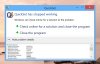
- QuickSet - I still don't understand what is this program for. I faced some crashes of this program after the laptop was in sleep mode. Should I uninstall it? Is it of any use? Here's a screenshot of the crash message I get:
Overall, I can consider myself very happy withe XPS 15, and hope not to have major issues. I hope my impressions can be helpful to you
Last edited: Apr 17, 2015adlerhn likes this. -
One year old and here's my XPS' condition:-
1) Track-pad looks like I've been using it since 90s. Discolored horribly and can't seem to get it clean using anything.
2) Build quality still pretty solid though a couple of scratches on the display glass.
3) Battery wear 12% according to HW info. I think thats a bit too much. My friend's samsung series 7 has only 10% wear after 2 years.
4) Still no coil whine issue for me.
5) The gt 750m is really beginning to show its age now. Most new games dont run fluently on FHD.
6) The hidpi scaling scenario is much better now with almost all apps(except eclipse) scaling pretty good.
7) I've stopped updating bios and some other drivers long back. Dont want to risk breaking anything since everything is working flawlessly.
Thats it!! I'm happy with my purchase and though it was expensive I think it was money well spent.KamaL likes this. -
when you click on the keyboard lighting button in the mobility center does it say none-dim-full?
Is your keyboard just not showing any sign of being in the "dim" setting? -
Thank you for sharing!
I am interested in the battery wear of these laptops as well. In my original laptop I had 40% wear within only 5 months and now this replacement they send me (not even a month) has 4% according to BatteryBar and HWMonitor. What are you looking at ?KamaL likes this. -
yep in mobility I can see none - dim - full.
If I go none -> dim -> full the back light does go from dark to light to slightly brighter.
If I go none -> straight to full -> dim the keyboard does not dim again (the only way to light the key board via f10 is with the sequence none->FULL->dim. -
Here's what I got , the laptop is almost 4 months old:
- HWMonitor - 2%
- BatterBar - 1.4%
Is it good? -
http://forum.notebookreview.com/threads/battery-wear-level.641912/
There's this forum that I've been reading but honestly the consensus seems to be no consensus. Honestly, the way I see it after 4 months just over 1% battery wear is normal but 4% in less than a month is not.
How much longer is your warranty? I usually suggest that people get their battery replaced before warranty runs out anyway. -
I have an entire year of warranty left, so I have time until then. Maybe until then Dell will find a way to fix the coil whine issue by using new motherboards... who knows...
-
Since my last post was quite long, I'll post my questions separately:
1) What is the best way to preserve battery life? Should I keep it plugged in all the time? should I use it all the time on battery and then charge it to 100% and so on? What is the recommended way?
2)USB ports - I read reports about problematic behavior from the USB ports. I encountered a problem with 2 USB sticks (Transcent JetFlash OTG) I've been using for more than a year. After a few minutes they're plugged in, the the USB disconnects, and after a while I get a message "USB device not recognized". They work perfectly fine on other PCs and laptops. Any idea what could be the problem? Here's a screenshot of the error message I get:
![[IMG]](images/storyImages/95905-729900ee178f34272315fe8d2db8653a.jpg)
3) QuickSet - I still don't understand what is this program for. I faced some crashes of this program after the laptop was in sleep mode. Should I uninstall it? Is it of any use? Here's a screenshot of the crash message I get:
![[IMG]](images/storyImages/95904-06909d264593626e41452d74e20e2cb7.jpg)
Thanks in advance!
-
I think the battery is pot luck, mines plugged in 24/7 apart from the rare trip into another room or holidays a couple of times a year. battery is 2% and it's 15 months old, both replacements had wear of 4 and 10% new so I swapped this battery over each time.
-
1) for battery, I have the settings in BIOS set at custom: 50 (charge below)/90 (max charge). Battery wear is 3% after a over a year's usage. I would certainly recommend keeping the max at below 100% if you mainly use AC.
2) I haven't found a solution for the USB problems other than using a USB hub
3) Quickset gives you the Dell-specific options in "Windows Mobility Centre". It may also enable keys such as keyboard brightness;wifi on/off etc. -
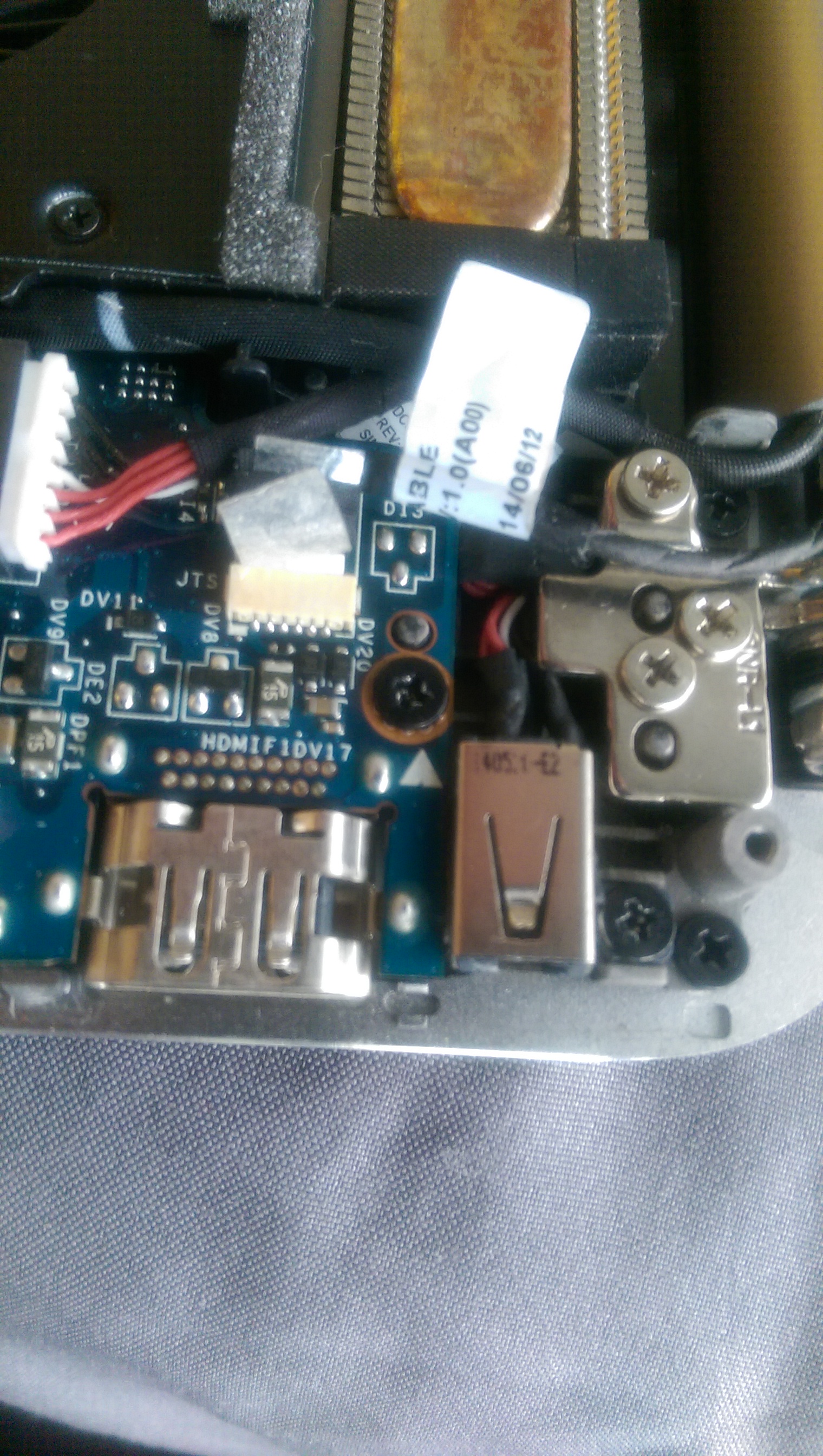
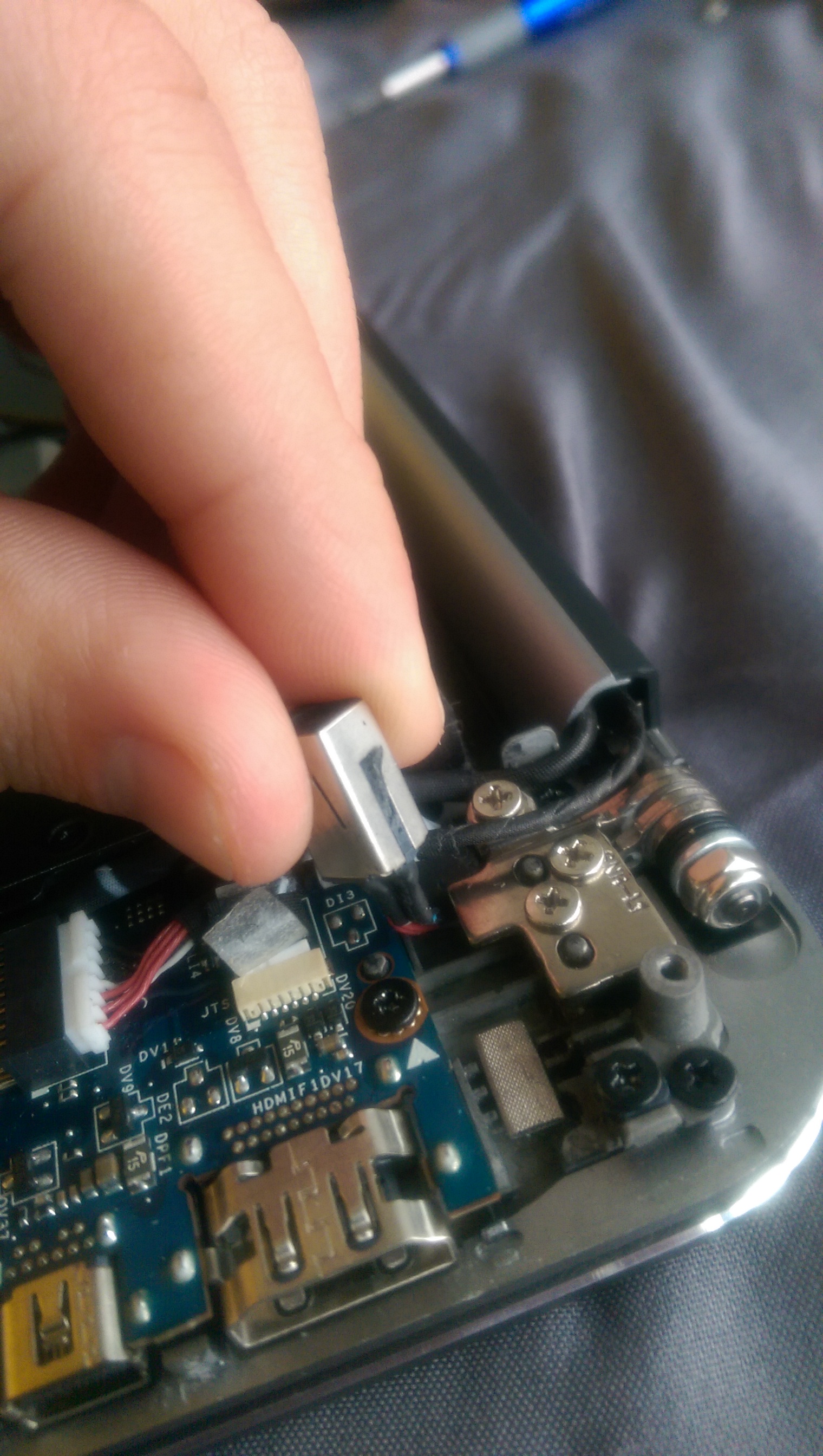
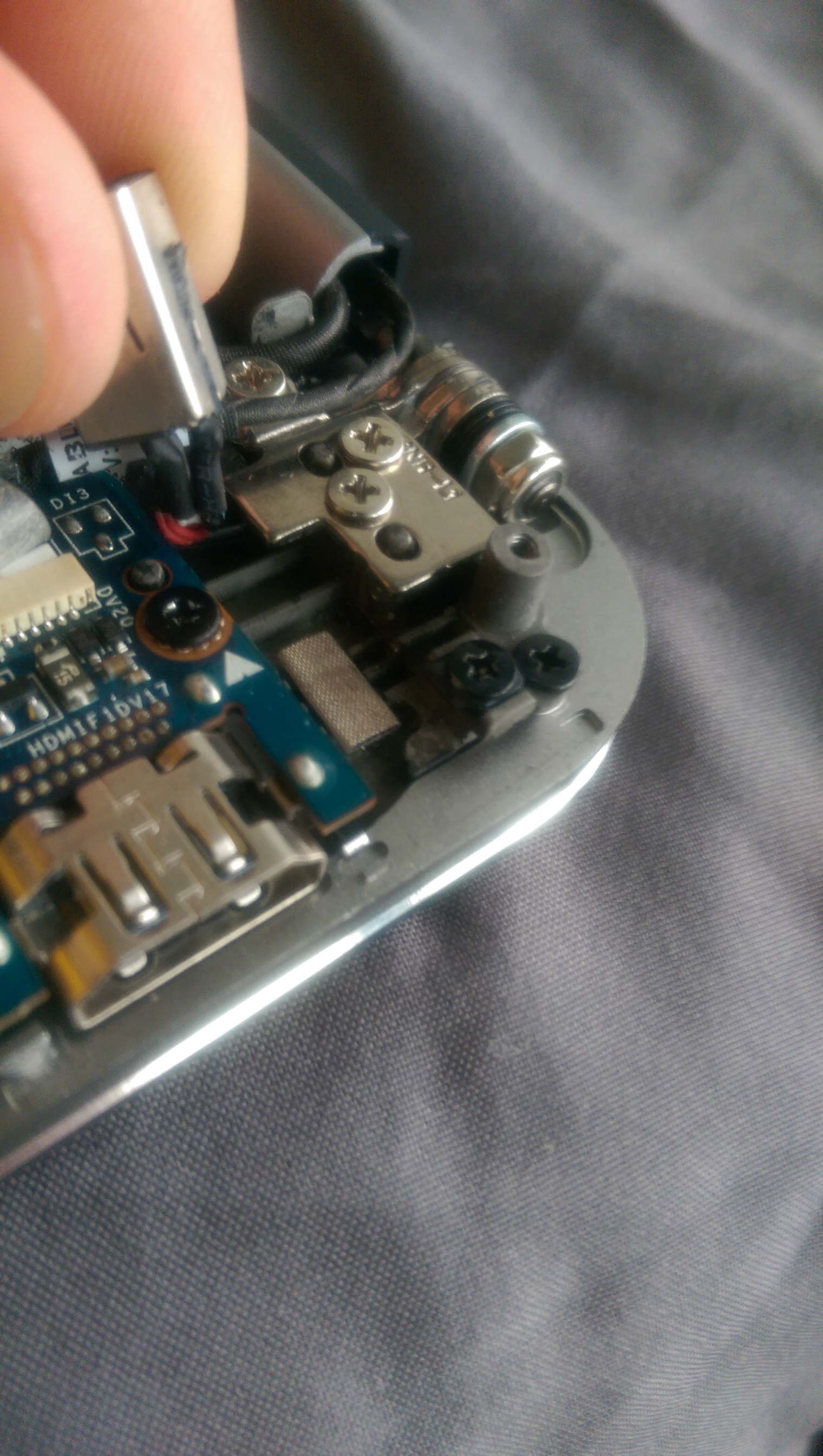
There were some that asked about certain things to look out for when the technician comes and I forgot to upload this pictures a few weeks ago. Also like me there were others who were experiencing CPU locking when plugged in and I am now 99% certain it was due to a faulty power connection.
Apparently, my old system's-for my ignorance on the actual term- power insert brick was broken. By broken I mean that the little plastic piece attached to it that held it down to the motherboard had broken and slipped inside the PC so it was not making proper contact with the charger hence throttling the CPU to match the external power.
Hope this helps someoneAttached Files:
-
XPS 15 (Haswell) Owner's Lounge
Discussion in 'Dell XPS and Studio XPS' started by mark_pozzi, Oct 23, 2013.