Problems? See this thread at archive.org.
How old is your machine? UK/US/elsewhere? Do you have support paid for?
-
Funnily enough I placed the order 2 years ago today, got the 1st machine 2 months later, 3 year NBD onsite warranty.Last edited: Jan 10, 2016KamaL likes this.
-
Has anyone tried running Remix OS on the xps 9530?
http://www.jide.com/remixos-for-pc
I tried running it using a USB 2.0 stick, but I'm sick at boot logo.
My laptop is actually a precision m3800 now because of a motherboard replacement. -
It could be the boot config that needs secure boot disabling?
And as for the wrong motherboard installed, well I would have kicked off and demanded a new laptop, go for it you have nothing to lose! -
It seems that there's a problem with the Nvidia driver. I wonder if there's a way to disable the nvidia GPU through the BIOS or through a command line
-
dear owners of dell 9530. I have chance to get one of this laptop. But I read a lot of different review and afraid about overheat. I will use it for mathematics calculation and modelling (MatLab, Mathematica with CUDA). Is my fear well-grounded?
-
I use 2 9530's (Windows 10 and Fedora) for heavy compile and simulation work and they don't have overheating problems. The fans definitely ramp up as you'd expect but the sound level is reasonable. Another 9530 used by my son had some GPU throttling and I had Dell repaste it and it is fine now. If you are getting one off warranty and are comfortable doing it I'd recommend repasting the CPU and GPU to get the best thermals. Also, Intel XTU can be used to undervolt and/or overclock a bit. I'm very happy with the 9530 for "crunching".q232 likes this.
-
Thank you
-
I've been really happy with my XPS since I bought it around a year ago, but one thing really annoys me. Is it really necessary for the GPU fans to kick in at 100% full blast EVERY time for EVERY single game that I try? I've recently been playing some fairly simple games like Magicka and Broforce (NES-like graphics) and my laptop starts sounding like a hoover after 20-30 seconds into the game. This has been the case with every single game that I've tried. I'm running Win 10 (upgraded from 8.1) with drivers from Dells website (granted, they probably aren't up to date no longer) and I haven't messed around with the GPU settings in the Nvidia control panel, it should all be set as default.
Is this the case for everyone here, or do you have any ideas of what I should do? Should I get the GPU drivers from Dell or can I just grab them directly from Nvidia? Any settings I should take notice of?
Thanks guys -
Hey, I'd like to ask for a bit of advice troubleshooting some BSODs - I've had 3 in the past week without any clear reason I can see as to why. I've tried looking at the dump file through a free software called BluScreenView (and attached the report it gives out), but it just seems to list ntoskrnl.exe as the problem after an IRQL_NOT_LESS_OR_EQUAL error. Any advice on where to look deeper would be greatly appreciated.
Attached Files:
-
-
It is a driver issue but who knows with the crapware you used. try whocrashed by replenish software but personally I would update everything and install the latest nvidia and intel graphics drivers (not dells)
-
Thanks for the reply, it really helped! The program identified a dodgy piece of software my university installed, and I've gotten rid of it and will see how it goes from here.GoNz0 likes this.
-
Regarding the thermal drivers from intel issue. Now my laptop runs games better as the CPU doesn't ramp up to full speed while the GPU gets throttled

I have a problem with the intel HD graphics driver though they hung quit often -
trofi, just a quick question for you. Do your fans also ramp up to full blast when playing games? That's probably the case since your GPU gets throttled, but I'm just curious about others experience with this since I yet haven't played a game where this doesn't happen. I understand the issues with cooling a thin laptop like the XPS, especially when considering that the 750M seems to run hot fairly easily. I just didn't expect Boeing noise levels everytime I'm 20 seconds into a game!
-
Not sure what you expect, fast, cool and compact cannot exist together. It is bound to ramp up the fans when something is pushing the CPU and GPU to the limits. Wear headphones or return it for an alternative solution. Even forcing more air through it will not silence the fans as it will simply prevent the throttle. I can run with basically no throttling after removing about 10x more mediocre thermal paste from the heatsink and replacing with some decent MX2 (works well in low pressure applications) but it is bound to be loud. If I want quiet I go and play on my games rig that has a stupid amount of water cooling.
-
I am not a hardcore gamer anymore. form my experience when i play hearthstone nowadays I don't get get that much noise. I have to repeat that i believe th reason is that the CPU is throttled by the drivers. The laptop can still handle the game easily but it doesn't get as hot.
OFC the laptop is not silent it is just ok. When i play something more heavy the fans rump up at full speed but I am not expecting them not too. I am also playing on an external monitor with speakers on and the laptop is at the side of the monitor so maybe this is why I don't get bothered as I am not sitting directly above it. Honestly with Heres of the storm it used to be worst it was getting too choppy these days thx tot he throttle it runs smooth. This is so weird -
Thanks for the replies, guys.
I'm not a hardcore gamer either, and I can live with the noise since it's not a big issue when wearing headphones. Regarding my expectations, as stated in my previous posts; games that are heavy on graphics, video rendering and other demanding tasks are of course synonymous with high fan speeds. What's making me write a post about this is the fact that even a simple little indie game like BroForce (a pixelated sidescrolling 2D-shooter) unleashes mayhem on the cooling system. I haven't noticed any issues with throttling / lag in any games, but I have a hard time believing a game like this would push a workhorse like the XPS to it's limits? -
I apologize if this has been covered on other posts in this thread, but how are the viewing angles for 9530 owners? Mine seems to have an issue with blacks where even a slight shift in the angle I am viewing the screen will cause blacks to change very significantly. If I am looking absolutely dead on they look ok, but any other angle and the blacks begin to wash out.
-
My warranty ends in September. Hopefully if this thing is going to fail it does so before that time and I get the new 9550. With all the grief I have had and numerous replacements to date I am not giving Dell any more money to extend my warranty. I must say however that my latest system exchange has been working well for me especially on windows 10 with the intel and nvidia graphics drivers (non-Dell). Fingers crossed.
Sent from my LG G4 via Tapatalk -
Apparently this is normal for non-IPS panels and known as "black crush" or "gamma shift". Rather surprising that it has not been mentioned at all in any of the reviews that insisted on the great viewing angle of this display as it does impact the usefulness of this laptop as a substitute for the MacBook Pros for photo editing.
-
I'm having trouble with my Windows 10 XPS 15 Haswell and Nvidia graphics card--basically I was using the displayport out to drive a second display: when I unplugged the displayport cable my computer froze and I had to do a hard power down. Since this time, my Nvidia graphics card has an exclamation point by it in device manager with the error message "Windows has stopped this device because it has reported problems(Code 43)" . . . I've tried uninstalling/deleting the device/reinstalling but nothing fixes this error . . . any ideas?
Thanks,
N123 -
I had this exact same problem, on Windows 8 though (to be fair I went back to Windows 8 after "upgrading" to Windows 10). Anyway your easiest option is to perform a system restore. If that doesn't work, boot your computer in safe mode and uninstall the latest batch of Windows updates. I had to unistall the updates before I got my gpu responding again.
Sent from my D6503 using TapatalkN123 likes this. -
Does anyone know if Dell has started to ship 9550's for defective 9530's? Do they still have replacement parts for the 9530 in stock?
I have a 9530 with a 3 year extended warranty, and I've noticed some bloches on my screen and some dead pixels, but I'm perfectly fine using it the way it is. A 9550 would be nice though...
Could I get a 9550 if I request service on my current laptop? -
Probably not as you would probably end up with my screen. I had so many issues starting with 4 9530's until I was happy then 3 fan faults in a row within a year. Dell wanted to swap a motherboard and I pulled them up on the track record of coil whine (and me having so many laptops) due to this and the amount of problems I got a 9550 (4th arrived last week as I kept getting bad screens)
So no you wont. -
I just received my 9550 this week, and am pleased with most everything besides the touchpad. I feel like I'm missing something as this laptop was touted as having one of the best touchpads on a PC laptop.
The issue stems how the touch-sensitive portion of the pad extends all the way down through the bottom of the pad to where the actual buttons are. The way I've always used touchpads is with a finger permanently resting on the left-click button. I use my index finger to navigate the cursor, and without any additional movement I can depress the clicker (either with my right thumb, or sometimes with my left index finger). Either way I have a finger resting on the clicker portion itself.
This method is causing me problems on this touchpad. For one, having two points of contact is causing the cursor to occasionally skip across the screen. Also, and more troublesome, is when I try to press my thumb into the button, I often roll it a few millimeters. This causes the cursor to move as I'm attempting to click. Clearly this is no good as I'm missing links, tabs, etc.
I feel like there must be a better way to physically arrange my hands/fingers to make the touchpad work better. What am I missing? Or is there some way to decrease the size of the touch-sensitive portion to exclude the buttons themselves? -
look for the synaptics thread on here, should sort you out.
-
It takes some getting used to the touchpad. The latest touchpad drivers on the Dell site for the laptop are actually pretty good... even better than the generic Synaptics ones, which are hard to install.
For me personally, the best configuration has proven to be:
1. Disable "tap to click." It's unnecessary and redundant since the whole touchpad is physically clickable... like the trackpads on Macbooks.
2. Make Secondary Button behave just like Primary and instead use "2-finger click" for right-clicking. This solves the problem of accidentally clicking the secondary button when you really wanted the Primary since there's no way to physically "feel" that you're over the secondary button area.
http://www.dell.com/support/home/us...t/product/precision-m3800-workstation/drivers (that's for the M3800, but it's the same machine as the XPS15 and same touchpad drivers) -
Hi. I want to ask about configuration with i7 4712. IS it only with 4k (UHD) screen?
Last edited: Mar 9, 2016 -
It is whatever it says on your regions order page.
They "may" have more options on the business site but it tends to be the same spec with win10 pro instead. -
Yes I know about it. My queston is about the screen. I want to understand abour QHD(3200x....) and UHD (4k 3840x...) screen. Which one is avaible for latest 9530 with Intel I7 4712HQ.
-
UHD replaced QHD but they no longer make the 9530
-
I have an XPS 15 9530 top tier with the QHD+ 3200x1800 screen. Has great contrast reportedly over 1,300:1. Yesterday I ordered an XPS 15 9550 UHD 4k screen. Then afterwards I read that the contrast ratio on this is only 1,000:1, quite a bit lower. Any of you who upgraded to 9550 from 9530 QHD notice lacking contrast in the new one?
-
Does anyone know if the Intel 8260 AC adapter is compatible with XPS 15 9530?
Now the price seems enough low, and if it is full compatible, maybe this could be a good upgrade to improve Wi-Fi stability and performances.KamaL likes this. -
I have a 4712HQ with the QHD Screen - so it does not guarantee a 4k screen...
-
Thank you for your answer. It is what I am need
-
Hey there, I noticed that there is a mSSD firmware update:
http://www.dell.com/support/home/us...ode=xps-15-9530&languageCode=en&categoryId=ST
How ever, I run the .exe on a bootable usb stick in legacy mode and it tells me that no compatible samsung drive was detected?!
The update is for SM841 and I am running the SM841:
Am I doing smth wrong? -
Try changing the boot priority to the USB stick, I think it fails to detect if the drive to be flashed if the 1st in the bootup list.
-
I did that already. In legacy boot, it will instantly boot to the USB stick.
-
No - the firmware update is only for the 256GB drive and will not work on your 512GB drive, as you can see from the read-me. "Applicable Drive Model: MZMPD256HAGM-000D7"
-
lol blind me... thanks for that !
-
I got a new XPS 15 9550 s a replacement but for more than just a bad sceen.
-
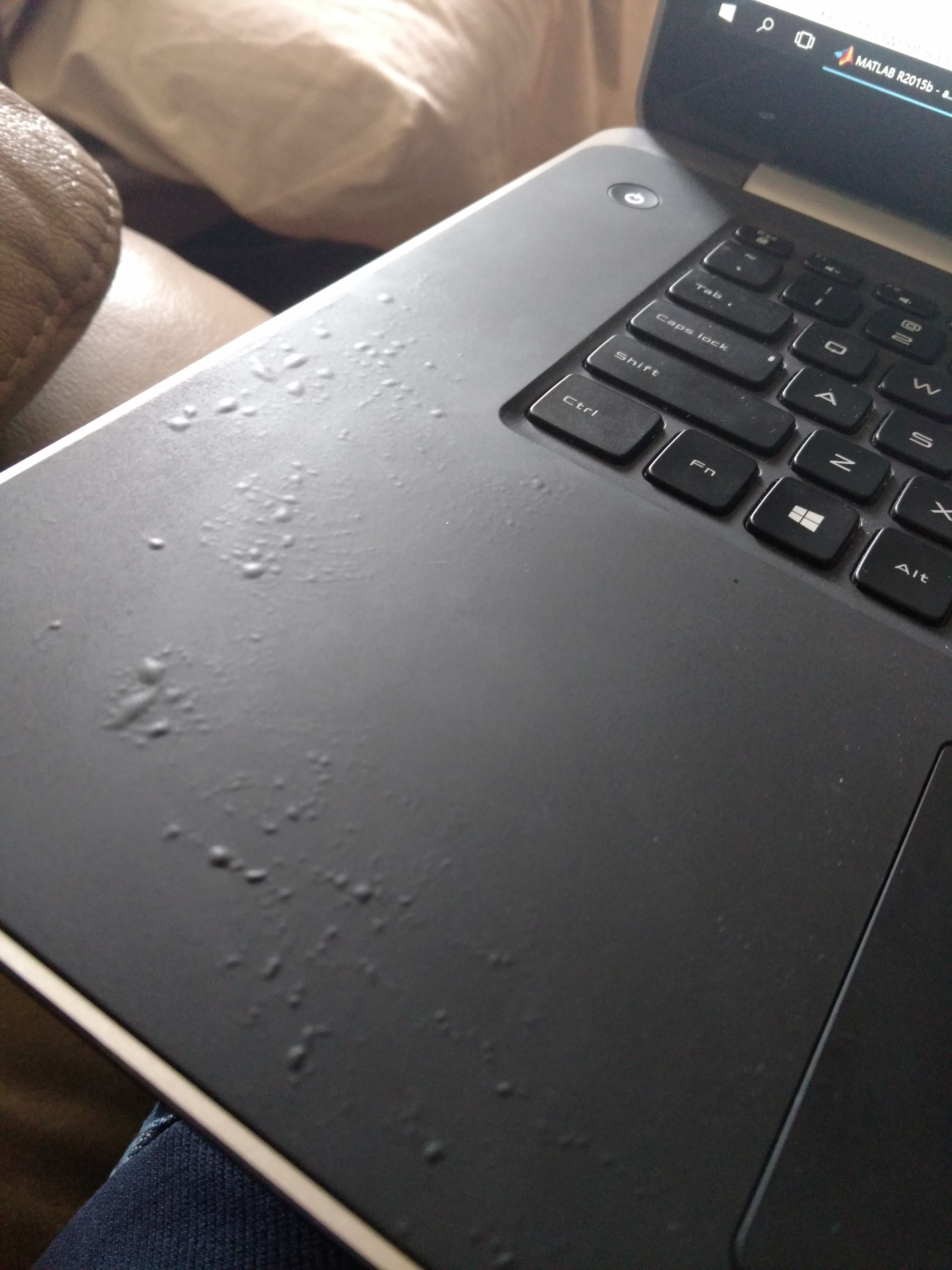
There is probably no way to fix this but is there anything I can do to prevent this from happening from now on? Looks so damn fugly.
Attached Files:
-
-
Hi newoverhere,
Before I offer up what I have done and would strongly suggest you do let me first say; I have been silent from this great forum & venue for quite some time now and in fact after recently checking it back out, I am completely in awe & floored that there isn't the great & gracious assistance of member jphughan any longer, and it was in fact because I just didn't enjoy the allowed member bashing, that was sadly going on, why I disappeared.
I very honestly believe that the majority of members joined and were active to truly help and be helped as well, yet I honestly believe that some few others just came aboard solely because they sadly enjoy & enjoyed belittling and bashing others, and I only hope that it wasn't why j phughan disappeared as well, as he was definitely in my opinion a very great asset to this forum & members and especially to me.
I am coming close to the end of my 3 year warranty on my DELL XPS 15 (9530) and I am only strongly considering getting a XPS 15 (9550) not because of any issues, as this machine has been virtually and thankfully flawless and has & is serving my needs greatly, yet solely because my passion is in photos and I am just wondering how the new 4K display would be vs my 3200 x 1800 one and would I notice a difference or not?
Now, onto your unfortunate issue & sheer disgrace!
What do you clean that palm rest with?
Is the computer left baking in the sun or under tremendous heat?
I for one coming from a MacBook Pro never really cared for the rubberized coating & finish on the inside of the XPS 15 (9530) so I immediately hunted for a smooth protector to put over it and I could only find one made in China sold on eBay, which I purchased and it has worked out great, as the XPS 15 (9530) unbelievably had next to nothing available for overall protections compared to the MacBook Pro, which had a large array of choices, which I just cannot understand why.
I am a firm believer in “The squeaky wheel does get the grease” and if I were you and regardless if you have further coverage or not, I would contact DELL via email and send them that disgraceful picture with a context along the lines of; With great looking results such as the attached; it makes me really want to purchase further products from you and advocate them to my family, friends and acquaintances as well.
If they have any interest and an ounce of shame they will hopefully set to rectify it for you.
Best of Luck,
SD -
Never seen it like that, I have heard of it bubbling up but you must sweat acid or not take care of it.
Buy a new one, google dell xps 9530 palmrest, ebay throws a few up. -
Today Windows Update has automatically updated my Realtek audio driver, and seems that PRO settings of MAXXAUDIO PRO 3 are still here, even if I don't see PRO logo anymore.
The current version of my Realtek audio driver is 6.0.1.7628. -
Just an update on the above. I thought my graphics card was definitely dead when a system restore failed to bring it back to life, but a bare metal restore for some reason fixed the issue.… Just thought I would share in case anyone else runs into this issue ... they may want to try a few times before giving up on their laptop.
Thanks,
n123 -
Mine was nopt as bad but I got similar think. The enineer came and replace it and said that he ahs never seen anything like that. based on that my screen and some issues I had I persuated to replace my laptop to the new 9550
-
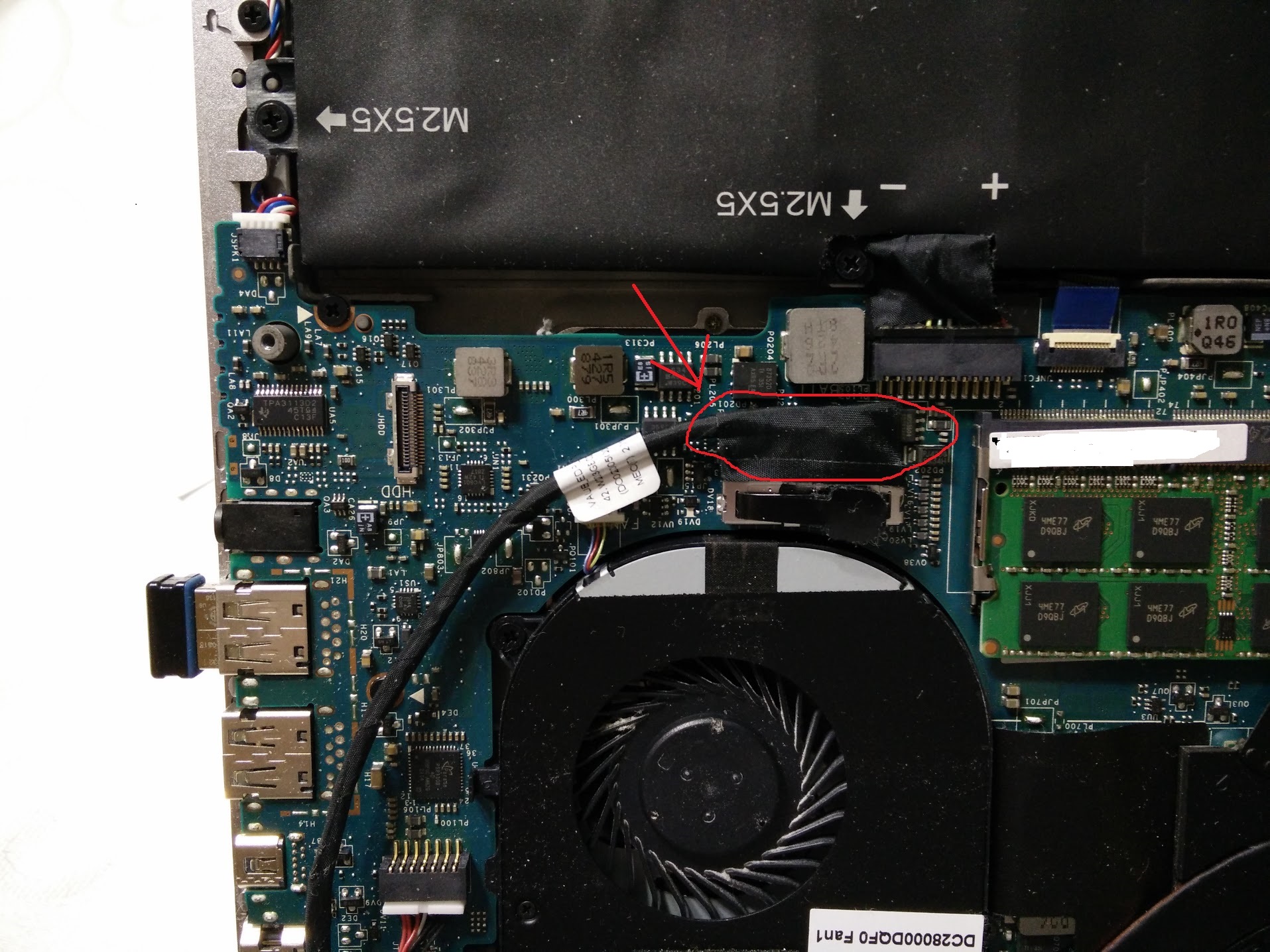
Recently my XPS15 9530 3K screen started to flicker and blank out but when I press with my fingers underneath the base of the notebook, the display may appear. When I put something underneath as pressure or when the machine gets hot enough, it'll work for hours.
I took apart my notebook and I believe I have identified that the cable connection to the inverter is causing the issue. When I put pressure/or loosen the pressure, the display appears and disappears, although nothing I can control.
Attached is a photo showing the connector cable. Anyone know if this part can be easily replaced? Or should I just bring it into Dell? Your help and advice is surely appreciated. Thanks.Attached Files:
Last edited: Mar 23, 2016 -
XPS 15 (Haswell) Owner's Lounge
Discussion in 'Dell XPS and Studio XPS' started by mark_pozzi, Oct 23, 2013.


![[-Mac-]](images/avatars/[-Mac-])