 Problems? See this thread at archive.org.
Wow, I was just about to post this and happen to scan through some posts to see what people where writing lately.
Back when I had this laptop I had an issue with my portable USB 3.0 hard drives. I'm having the same problems with my Inspiron 15R SE now, and want to see if I'm missing something. Never had this issue before these models though. I was and am using Win 7 64.
When backing up data, after about an hour or two I will come back and the file transfer would be stopped somehow. Sometimes I see the Autoplay option window has popped up, like the computer had ejected the drive and re-recognized it. I've changed every option in power settings I can think of to prevent hard drives and USB devices from going to sleep, so I'm not so sure what's going on.
This is a simple drag and drop operation from one external drive to another of total data sizes of 500GB to 900GB. This is not a single file, but many files that add up to those values. This even sometimes happens when I'm actively using the laptop and there is no chance it is trying to sleep in any way. With all of Dell's latest power saving stuff, I thought someone may have an idea of if there is something I can do to fix this. I'm using WD Passport drives, 1 and 2 TB sizes. I have not had this issue in my XPS L501x or previous Dells. Thanks for any help!
-
Is the machine you are having the problem with Windows 8 64 bit? I see that someone has replied that their Passport works with Windows 7 64 bit.
I don't think it is the Dell power saving utilities because I have done a clean install and did not install any of that stuff. -
Is the enclosure definitely USB 3.0?
-
I would be more suspicious of the port on either end of the cable - enclosure side or pc side.
Same behavior on all 3 ports on the pc?
Sent from my brain using neurons fueled by glucose -
Nope, both had Win 7 64. Generally it's fine, except during long transfers. I also did a clean install, but you are still able to manipulate power options. I thought maybe I missed something or there was some quirk or flaw. Considering the other problems in recent Dell models I guess I shouldn't be surprised. Actually, now that I think about it my XPS 401x started having some issues recognizing USB devices too.
-
I have a 1tb WD passport that did the same thing. I ended up getting a warranty replacement and it works fine. I have the original L521x with a clean load of Win8.
-
I have 1TB WD passport and a 1 TB Seagate portable. Both work well on my l521x windows 7 64 bit.
In fact the seagate didn't work at all on the mac or my friend's samsung. Gave it to me and my xps recognized it but the drive was flawed. I had to reformat it to work.
So there might be a problem with your portable drive. I suggest going into the hard drive configuration and formatting the portable drive. -
Hi everyone,
I'm new to this forum. I encountered the Wi-Fi issue with my PC. Dell replaced the Centrino 6235 card with DW1901 wireless card. It didn't seem to make any difference. Both cards works fine in a closer range to the router, but poor in a range more than 15 feet.
I just wanna know if I get it replaced with the Killer N-1202, will it make any difference ?? or should I stick with the DW1901 card ?? -
It looks like the issue with the L521x is the wireless antenna placement/insulation, not the card itself.
One possible solution is to route 2 or 3 antenna wires in the base of the unit. You should be able to buy the antennas on eBay for a few dollars. All antenna wires are basically the same, so any would work.
Sent from my HTC Sensation 4G using Tapatalk 2 -
1. I, and a couple others, have put the Killer-N 1202 in with good effect ... Not 100% solved vs other machines but very improved. This is a small sample though so YMMV.
2. I have tried putting Tyco antennas in the base to augment/replace the existing and could not find a way to run them that did not have a mechanical problem (e.g. I could not close the machine). The base is also metal so no guarantee that if you found a way to route that it would work. Maybe if you drilled the case and mounted the antenna on the outside?
FYI: that last part is facetious.
Sent from my brain using neurons fueled by glucose -
After 2 days of breaking myself, and freaking up, reinstalling, uninstall , bootrec/ fixboot, mbr fixing, reformatting anf finally reimage, my laptop will now start up and get passed the post bios screen. It would not ven boot into a cd or anything and just sat there... after i was about to cut it at a loss, i decided to unplug the sd card reader/ audio cable from the motherboard, started the laptop and voila, windows started normally and everything seems to be fine now. The other day windows told me there was a surge with one of the devices and it required more power than its being given, but with nothing plugged in, i was left confused, then the sd card reader did not work, not visible in any os (windows ubuntu, linux etc) and so it was my believe that the sd card reader was the device that caused the surge and that seems to have stopped the laptop from booting at all... and here i thought it was my Hdd , partitions etc.
in any case, i reported the issue to dell the day it started happening, (december 28) and my replacement warranty expires 90 days from the date of replacement for around january 1 . hopefully they will repair it? . -
Hopefully you bought the computer with a credit card. Amex, visa, and mastercard both extend the warranty and often just pay to replace/fix your problem
But Dell should do the right thing and fix it since you reported it early.
Seriously though, the sd card reader sucks. I don't understand why it adds like 15 seconds to the boot time on my ssd. Doesn't make sense to me. I just keep it uninstalled all the time now. And it's not even a nice sd reader, even if Dell is marketing this xps as a multimedia machine, they should have at least gave us a 12 in 1 or 9 in 1 sd reader instead of this cheap 3 in 1 -
WiFi supplemental....
I am visiting family this week. They have 20/2 RoadRunner, and using a AirportExtreme for router duties.
My l521x gets ~ 3 Mbps down via Killer-N, and 20 Mbps down with Net gear WNDA3100V2 USB-WLAN dongle. About 10 meters from Airport, clear view no walls.
Interesting because my Dlink dir-655 works much better with the killer-n. If I figure out a config change that helps I will share, but do not expect to find anything.
Sent from my Nexus 7 using Tapatalk 2 -
It also works wth Win 8 64. I have dual boot on my L521X.
I do not use any WD software that comes with the drive. I just plug and play. Speed is good, I have around 60-80MB/s, which is far from USB 3.0 limit but is already the limit of mechanical HDD I think. -
As a precaution i had also emailed another person at dell ontop of the person currently dealing with my case. Got a reply today .
Dear Elvis,
I have personally reviewed the case as described in your e-mail.
***** is unavailable today however I will ask one of our senior technicians would contact you to address your concerns and resolve the issue accordingly.
Regards, Technical Support Director -
I have the newest model of the 1 TB 3.0 passport ( here) and it works fine on my system (clean W8 64-bit, L521x). Under Device Manager, my 3.0 port is listed as
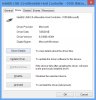
and my passport shows up under PC Settings here:

Under Devices and Printers:
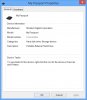
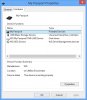
Hopefully some of this helps. -
yikes it seems the wifi issues still persists did dell update anyone one wifi or screen issues...or is the usb dongle the only solution thus far, if it is this is very very sad...
-
It is very sad.
Sent from my Nexus 7 using Tapatalk HD -
5ghz works fine.
-
The 5Ghz may work fine in some cases just as the 2.4Ghz works fine for some. If someone suggested that the 5Ghz works better than 2.4Ghz I would probably agree with them since it's typically less crowded but 5Ghz has issues as well. I don't want to give anyone the false illusion that moving to 5Ghz will resolve all of their issues and have people buying new wireless routers for no reason. The issue is the same (or at least very similar) to the 2.4Ghz issue. 5Ghz is great close to the router, excellent even, but as the laptop is moved further away (and through walls) the speed drops until it basically falls off a cliff and starts to crawl and become unstable.
-
I doubt dell is going to fix our issues anytime soon. Next xps 15 is probably coming out in a few months and we'll be left to hang. Unless there is another class action suit against them I doubt they'll replace/attempt to fix our computers
-
The question is how to go about a class action.
-
If you are into that the first step is to hire yourself a lawyer and budget a few hundred $$$ at least just to find out whether you can pursue a suit.
Good luck it you do, but count me out. Much as I would like the machines to work properly I find this kind of legal action distasteful.
Sent from my Nexus 7 using Tapatalk HD -
Hi. I have been following the xps 15 threads since I found the same problems many people have with their "premium" XPS15in mine except for the screen grid issue. As I am not a computing expert and as I could not find an answer to my problem I am posting my situation here hoping someone can help me solve it.
I have got a XPS L521X with a 750 GB HDD + 32GB SSD. It came originally with win7 and recently I updated it to win 8 via the simple win 8 update procedure. It starts as it came, with bios.
Recently win 8 crashed helplessly and it won't start even trying to start it in safe mode. When It tries to start only loads a blue screen suggesting to use the recovery disk to fix the problem. I booted the recovery disk and tried to do that, but the recovery program cannot find the drive C: where the SO is installed to start recovering windows (cannot find any hard drive at all, the HDD nor the SSD). I suppose it is related to the Intel SRT and the dual disk the machine comes with.
1 I would like to know how to use the recovery disk having a setup like the mentioned above. Do I have to change something in the setup?
2 If recovering win 8 is not possible, how do I re install the image disks of win 7 I created before the upgrade?
I tried to recover the image by first booting the win7 installation disk that came with the laptop and then inserting the image disk as required but it shows an error.
Also tried to recover win 7 from scratch to then recover the image but it cannot find the HDD to do it either.
Any help with this will be very welcome. Happy and prosperous 2013 for you all.
Thank you in advance for your help. -
An update on my USB 3.0 issue. Dell is sending a new motherboard to the their technician. I will provide an update after the replacement.
-
Im not sure, but is this the model with all the problems??
Newegg.com - DELL XPS 15 (XPS15-9168sLV) Notebook Intel Core i5 3210M(2.50GHz) 15.6" 6GB Memory DDR3 1600 500GB HDD + 32GB SSD HDD 7200rpm DVD±R/RW NVIDIA GeForce GT 630M
ive been wanting to get the Dell XPS 14, but it seems like the XPS 15 is the same price.
Is the Dell Xps 15 worth getting for this price?? -
I remember reading posts from others with a similar problem. It hasn't happened to me...yet. I believe they toggled the HDD boot method in the BIOS. I'm not near my Dell now so I don't know the name of the option in the BIOS exactly. So basically if it's currently set to 'Intel Smart Response' change it to 'AHCI', save, restart. Then go back in the BIOS and change it back to 'Intel Smart Response', save, restart again and see if Windows will boot.
Win7 and Win8 don't just randomly fail to start unless there is some outside influence. The alternative is to reinstall Windows and provide drivers during setup so it can find the HDD. -
Yes, that's her, the temptress.
If you're a light user (no recent hardcore games on max settings) and stay relatively close to your wireless router or other wireless APs then the XPS 15 can be a respectable machine. I can't comment on the 14 since I have no experience with it but I suggest reading both threads and then making a determination of which issues you can live with. -
So I just upgraded to windows 8 and have so far run into 2 issues. The first is that I cannot use the "Reset your PC" option because "A required drive partition is missing." I have looked this issue up online and the only thing I could find was to update chipset drivers (which I did) and to enter the BIOS and change the disk controller to legacy. I think it is an issue with the mSATA drive being identified and confusing windows but im not sure.
Okay I think my drives are all messed up and out of order. If i am reading this right then the Intel Rapid Start Technology is trying to accelerate my HDD on Port 0 and the SSD is on Port 1?
The other issue is screen brightness. I cant change it at all. Not only is it killing my eyes but also my battery. It seems to be an issue with the Intel HD4000 graphics but I cant seem to find a fix. I cant even use programs like f.lux to alter the blue levels in the display.
EDIT: Fixed the brightness issue apparently you have to downgrade the drivers to an older version. -
I've been using my xps 15 L21x since November. I have the same proximity-based wi fi issues as most but find that the benefits i'm getting from this system make it a manageable annoyance given assurances from Dell that my case will remain open pending resolution. 2 graphics cards and a full display replacement was a waste of time, but I let them fiddle anyway for a while. I was tempted to return it on principle and consumer outrage and the stupidity of intentionally releasing such an engineering flaw, but I just like the system overall way too much to indulge my outrage.
One of the great benefits i'm finding is the ability to use two HD monitors at the same time as the laptop display. The three monitor setup turns out to be quite useful for my work. Placing the laptop tilted up a bit and the displays extended left and right gives me the perfect workspace. I pull all three toward the front of the desk and use the pull out keyboard shelf for wireless kb and mouse.
I have two monitors set up on the three desks I work at around the country and it's easy to just plug in. no fancy stands, no usb/video gizmos. just plug in and get to work.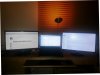
I didn't realize the laptop would support this video mode, and only discovered it when hooking up two monitors assuming i'd have to disable the laptop display. what a pleasant surprise.
one nit to pick is that the ports could be spaced apart a bit more. I have to use care in selecting adapters and cables that will fit together.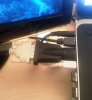
-
Every once in a while the left upper part of my laptop gets really hot and today it got really hot and the laptop shut down on its own (no warning message) what do I do? I still have the original A04bios (upgrade?) ummm should I call dell or there anything else I can do...I was just surfing the net... could too many open flash related programs/content in firefox cause it to overheat?
-
I am in the process of trying to request a dongle from dell. I have emailed support and got a response that I would have to purchase one. I emailed back stating that I want my warranty to cover it. I'm still waiting for another response. Anyone have suggestions?
-
Thank you for your answer. I tried the suggested solution but unfortunately did not work. When being in AHCI mode, it only loaded a black screen with a blinking cursor. Then when in SRT mode again loaded the same blue screen with title "Recovery" showing error code 0x0000001.
By now I just want to put w7 so any help in how I make the recovery disc find the HDD would be great. By now i am kind of disappointed with w8 as it sometimes wouldn't restart or shut down, crashed while in metro UI and waking up from sleep mode, etc. OTOH I must say that the Internet connection speeds and reliability improved greatly! Maybe I will wait until a service pack comes out to fix some stuff to install it again but from scratch, with UEFI and other stuff. -
Not sure where your located but if your in the US I would send you the one Dell sent me. I got it for free and have returned my xps and got a inspiron 15R SE so I no longer need it. lmk I could send it in the mail or you could just pay for the shipping if a faster method is needed.
-
Dell XPS 15 (L502X) Wireless Issues – Fixed | paulbouwer.com
I think I've found the solution to the wireless problem... -
Thanks, I PMed you.
-
Before you up the bios, try using ThrottleStop to limit the CPU and see if you prevent the overheat. Just to be sure.
Sent from my Nexus 7 using Tapatalk HD -
Hi, I bought an xps l521x last month from the outlet and I can say that everything is working fine including the wifi
the only problem i recently had was that the light indicator was blinking from white to orange(x4) and when i unplugged the charger it instantly turned off (I think its something with the battery but the battery health is normal) but as i restarted the laptop everything started working fine again.
-
I just noticed that there is a new BIOS - A13 along with a few new drivers for compatibility on the Dell site. Anyone know what issues the bios update addresses? Driver Details | Dell United States
-
Hey guys, from what I have figured out, the main problems of this laptop has been the overheating and the wi-fi. Have they been fixed with a firmware update? Anything else the potential buyers need to be aware of?
-
I have noticed that in the morning but u can't get them yet they always give me the not found using direct download or the akamai based one anyone was able to download perhaps from the ftp?
Enviado desde mi HTC One X usando Tapatalk 2 -
sry if this has been answered before, but i searched and couldn't get an exact answer. Is the GT 630m on this thing the rebadge of 540m or the 555m?
-
I got my system last month.
Heat - My system gets hot while gaming. As others have mentioned it appears to be a design flaw that the fan can't keep up with the CPU and GPU on load because not enough air flow. However, I have not experienced any throttling, its just that my cpu and gpu get up to about 85C each or higher.
Wifi - Performance is decent on my system but the range is less than my old XPS or my MPB. I am trying to get a dongle for extra range when needed.
Screen - My system had very noticeable gridlines when I first got it. Changing the color mode helped but it is still noticeable. Also, I have a few dead pixels so I might try to get the screen replaced in a few months.
Blu-Ray Drive - Makes a loud unpleasant sound when checking for a disc, but this is only an annoyance.
Also, I don't like the track pad but I haven't messed with the sensitivity settings yet.
Mc
PS - Woot, this is the 5000th reply to this thread. lol -
Well it lets me download bios A13. the question is do I update to it. Bios A12 works fine for me and I don't really want another issue like the graphics card problem we had in A09. Then again some people's wifi has been improved with a bios update. Hmmmmm.
-
Yes, do it, update it and let me know how it works, I will do myself afterwards.
-
I wish Dell would tell us what is being fixed in each BIOS update. For me I see no change in A13. No improvement in wifi, cd drive still whirs away, gaming is no different..... (Although i don't have throttling problems)
-
Touch Keyboard
Updated to Bios A13 and notice on boot there is now touch keyboard on the task bar, no big deal i can simply disable it.
-preview.png)
Hit apply and it goes, end of story. After a reboot its back, anyone else having this issue?
Touch Pad Gestures not working
Another problem I've noticed is the touch pad gesture just decide to stop working even with a reboot they at times they will not resume to work, the basic windows 8 gestures and two finger scrolling work all the time its just the extra ones you can activate that are effected.
-Two finger click for menu
-3 finger swiping up/down (menu and app search)
-3 finger swiping left/right (forward back in browsers)
-3 finger up/down (switching between browser tabs)
The latest update (jan 2013) from dell site has not fixed the problem.
Speakers stopped working (Fixed. Was not caused by bios update, fix posted below)
After the Bios A13 update my speaker audio was gone all together, however the headphone & headphone+inline mic jack were working just fine. Re-installing audio drivers did not help, did a system restore to one of my old backups and it made no differences so undid the restore.
The only other driver I updated was the synaptic touch input so I went ahead and uninstalled that, it also did not make a difference. So I played some music and held the laptop speakers to my ear and noticed that the left speaker had a very faint clicking sound as if it was attempting to initialize but failing to do so. Opened up the bottom panel disconnected the battery for 1 min rebooted and speakers are now working.
TLDR: Speakers stopped working after Bios A13 updated, manually disconnected battery for 1 min fixed the problem.
EDIT:09/01/13
Speaker issue fixed
Okay guys just posting this in case anyone has the same issue, while watching a show on Netflix my audio cut out for no apparent reason after I picked the laptop up it instantly came back.
I discovered that if I applied mild pressure to the top right hand corner of the touch pad audio would instantly cut out.
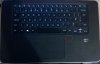
So there must be something shorting out the speakers, after opening up the bottom panel and roughly eyeing the relative position on the bottom to the top were pressure would cut out the audio, the position was right between the DVD drive and battery. Looking between the gap I could see a some wires so I went ahead and removed the battery.
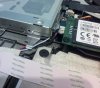
As you can see from the image the blue and white wires were running right below the corner of the DVD drive and the supporting base plate. This was the cause of my speaker problem.
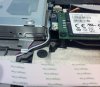
After adjusting the wires and closing the case I no longer have an issue, this must have been a production issue as the only thing I replaced in the laptop was the MSATA and would not have able to interact with the speaker wires.
I am a little disappointed to have suffered from this issue considering I paid close to a grand (£) for the system, however I am glad i found the cause of the problem and did not need to call in a dell engineer or send the laptop off for repair.
TLDR: speaker wires wedged between DVD drive and base panel causing pressure to cut out the speakers, readjusting the wires fixed the problem. -
well I've disabled the touch pad gestures (they just annoy me) and my speakers are working fine, however I also have the touch keyboard as well. I searched through the whole computer for it and found nothing, so your not alone. Something I have noticed though is that before this update every time i plugged a external hard drive in, the Blu-ray drive would make the wiring noise. After the bios update it is no longer doing this (it is still doing it when you come in and out of sleep but this is normal). I wouldn't say this is a major fix as this never bothered me before but other people may be welcome to it
-
I went for A13 too. The only thing I noticed, at least for now, is the DVD noise is GONE.
I tried two USB flash memory, SanDisk card and opened the Windows media player and no noise at all.
Otherwise is working the same under A12. Throttling, I do not know.
I was afraid that the fan will change the way behaved under A12, but it is working fine. -
This does not appear to fix the issue on the current generation XPS15. The post in question references a previous generation XPS 15.
XPS 15 (L521X) Owner's Lounge
Discussion in 'Dell XPS and Studio XPS' started by Muddy, Jun 28, 2012.


