 Problems? See this thread at archive.org.
i know my bluetooth mouse works with mine, but that's all i've tried.
-
My 'almost' smartphone Nokia C3 connects excellent, no problems transferring pictures using Windows Explorer. I have the Intel AC 7260 with latest BT driver.
-
That great that you guys aren't having problems. I was finally able to make my BT dongle work. The internal BT still doesn't work though.
-
I just recently replaced the 32gb msata with a 256gb lite-on and windows 8.1 Following the steps, I had to go into bios to switch intel "smart response technology"->ahci. I've been unable to successfully change it back as windows 8.1 won't boot if I change it. Does it actually make a difference? I've also been experiencing longer bootup times compared to windows 7 using the 32gb msata like others have said. Takes around 15 seconds to get to desktop compared to what seemed like half that time on windows 7.
-
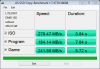
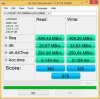
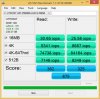
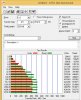
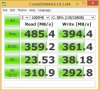
Thought I'd put up some benchmarks of the SSD while I was at it. SSD is a LITE-ON LMT-256M6M.
-
It does make a difference, the bios presents the drive interfaces differently on both modes and they are not compatible. When set for "intel" mode it's really a RAID setting, vs AHCI non-RAID. The RAID setting is required to use the Intel Rapid Storage support.
If you've replaced the mSATA without disabling and uninstalling all Intel storage related drivers then you may have setup for corrupting the HDD as not all the storage blocks of the drive may actually *be* on the drive, but rather on the 32Gb mSATA.
Similarly, without all those drivers configured properly on the HDD based OS such that it can use the mSATA in RAID form the Intel Rapid storage support will not function to accelerate the HDD via SSD caching.
You can attempt to restore your win 7 system to functionality, possibly, by replacing the 32 Gb mSATA in the system and configuring the BIOS in RAID/Intel mode.
I have not read of someone successfully OS-hosting on a larger mSATA *and* using the Intel Rapid Storage for an HDD-based OS for alternative booting, is this what you were trying to do? -
Does this model still have wireless issues? Its been over a year, im just curious about new ones purchased this year or fairly recently. I do see many that are complaining but I dont see thousands. I would imagine that if this has gone on for 1 year solid with countless sales that there would be more posts everywhere. Any one have any insight?
-
yes.
there have been no wifi fixes.
there have been no thermal issue fixes.
so far, anectodally, the intel 7260 gets the best performance; with the killer-n 1202 right behind, but it's still signal-impaired. -
When did you purchase your system? How can this go on for over a year?
This really sux lol. I need to purchase a system of this quality with zero problems. Any suggestions? -
Macbook Pro? ASUS? Samsung? Dunno.
How can it go on? Well, as someone who works with EM signals posted way early in these threads ... EM is a little bit of a black art. There's a few very easy target possibilities of signal interference and frankly solving those is probably excessively problematic and time consuming, which means costly. With the drive for the all metal chassis and very thin spec it's probably difficult to keep all things properly separate.
I am NOT an signal engineer but I can understand that retrofitting a fix on the L521X would likely require wholesale replacement of the system board (to re-lay-out components to avoid signal interference), at least one daughter-board (the USB, as USB3 is a known interference point), and probably the lid and hinge assembly. In short, it's not reasonable that there *can* be a retrofit fix.
Dell's version of revision is the new XPS15 Touch 9530 (the Haswell edition). Clearly, from the users manual, much of the above changes happened. Shielded USB. different PCB layout. Discrete cooling for CPU and GPU (not shared like int he L521X). Who knows what else.
Of course, we're starting to see reports of WiFi issues with the 9530 too. Too early to say whether it's endemic or not, but it's starting.
FWIW, mine is a 1st release, I got it in June '12. It came with the Intel 6235 WiFi. I replaced that with the Killer-N 1202 and that was much better. Later in the year when my router died at home I took the opportunity to upgrade to an 802.11ac capable router and got the Intel 7260 for the my L521X. At home at least, in my normal use cases, I'm reliably getting 400Mbps throughput between two 802.11ac enabled systems. This means that my WLAN is running at 800Mbps(+). Being that 833 Mbps is the max of the 7260 I'm just happy with that. Connectivity outside the house is overall improved but still nowhere near ideal, I still need to care the USB 802.11n dongle with me when I travel, to be safe. -
My L521x was built in August 2013 and has the WiFi issue. As others have done I upgraded to the Intel 7260-AC card and it improved things a bit. I did a lot of testing with mine, even playing around with some new antennas. I'm an electrical engineer by education, but only have limited RF experience. Unshielded USB 3.0 ports, wireless antenna cables running near the memory and CPU, an antenna mounted in the hinge surrounded by aluminum and metal-containing gorilla class, all could be contributing factors. I picked up a new Inspiron 15 7000 as a potential replacement, but it's WiFi performs only marginally better than the 7260-AC in the L521x. I'm not surprised issues have started popping up with the XPS 9530. I was hoping the wider gap between the hinge and base would allow for better reception (and cooling), along with improvements to USB shielding, and board layout. Time will tell. I'm betting it's improved over the L521x, but I bet it can't touch the performance of my old XPS m1530 or HP EliteBook 8460p. Both are three antenna designs with the antennas mounted up in the screen behind plastic, rather than down in the hinge.
-
Any specific models suggested? This is so frustrating that Dell is still doing this to people. This happened with the M15x Throttling. Since new models come out so fast they just sell sell sell and make money off the people that dont notice the problem or dont care.
This model seems perfect for what I need and the price point seems decent at this moment but with these problems I must cancel my order. I cannot give this to someone and expect there not to be troubles. very disappointing.
-
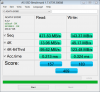
my write speed is so low
-
Mine came with no issues at all, saw little high temps for my liking on the video card (discrete), something that can be fixed reapplying some thermal paste. I recommend you to purchase Noctua's TP, helps a lot...Wifi works perfectly, the model I got was XPS-15-7363 from amazon. I got a Linksys AC USB card just in case and bought a new 7260 AC wifi card to install it on the machine.
Overall the system is in really good shape... -
I want to swap my old for that new.
-
Which wifi module are you using?
-
What is the difference between 7260HMW and 7260NGW?
EDIT: Ok found the answer:
http://forums.smallnetbuilder.com/showthread.php?t=11686
I will go with HMW.
EDIT: Interesting information:
http://community.sony.com/t5/VAIO-H...pter-Intel-7260HMW-and-SVZ131190X/td-p/179181
But as my Killer Wireless N 1202 does not support Intel WiDi I won't miss something.
EDIT: If someone is interested in, this is the correct card to buy "7260HMW" and "AC" and/or "802.11ac":
http://www.amazon.com/Intel-Network-7260-HMWG-Wireless-AC-Bluetooth/dp/B00DMCVKMU/
Sad, the international shipping costs are to high ($50+). I'll check eBay.com
EDIT: Ok shipping costs at eBay are much better:
http://www.ebay.com/sch/i.html?_odk...0HMW,+7260HMWG,+7260)+(802.11ac,+ac)&_sacat=0 -
Interesting. Do you think its possible to shield the USB Ports and/or wifi antenna cables with some aluminium foil? I'm having serious problems with the unifying receivers of logitech, maybe this solves it?!
-
Remove the mSATA, remove the HDD and replace the HDD with the Samsung 512 GB 840 EVO. This is the best upgrade you can do. Nobody needs this mSATA thing.
I only have the 840 PRO, but its the second best option at the moment and it is fast enough:

-
You're still better off than with a HDD ... "western world problem" indeed.
;^)
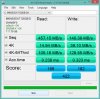
FWIW, here's the info on my 120Gb Mushkin Atlas ... about the same as yours ... and still dramatically better than running the OS on the HDD.
-
Your problem seems not to be AHCI, it should be UEFI. Did you set "Legacy" mode in your Bios? Then the boot time is normal. Only UEFI with Fast Boot is able to deliver very fast times. But if you installed W8 with legacy mode, you won't be able to switch to UEFI. You would need to reinstall the complete system
-
iTunes alone takes about 17 seconds to open, I mean wow. everything seems to take so long now, at first, everything opened instantly. but now its slow, and I have no idea whats going on...
I have 187 gig free out of 237.
Even my computer takes a good 5 secs to launch.. and don't get me started about firefox... -
Maybe the Trim does not work anymore?
-
Any system changes that could account for it? Possible virus?
If you do an image backup/wipe/restore that should clear out the trim issue, if any. I kind-of doubt it.
Have you researched at all the specific SSD to see if it's been reported for other users?
Is there a firmware update for your SSD? -
found a thread where someone posted a fix to their msata slowness, I might give it a go tomorrow.
try partedmagic
Boot with the CD, go to partition tool, and do a secure erase of your ssd, then, restore your backup.
updated the firmware to the latest, no big changes, programs launched slows prior to 8.1, but not upon first instillation, I emailed adata about it, no reply yet. -
I think any process that forces a rewrite of every physical block will force the controller state to reset, I think.
Good luck elvis. -
Maybe it's iTunes...my Aurora R4 desktop with 6-core CPU, 32GB RAM and RAID 0 SSD's takes about that long for iTunes to open now. It wasn't always like that, but lately, yes. And just iTunes. So, could be iTunes.
Considering everything else Apple has screwed up with iOS7, iTunes and Mavericks, I'm not surprised. -
Looks like it was installed under legacy as you said. Switching to uefi under "boot list option" it'll boot fine granted I have "load legacy option rom" enabled. Disabling that option and it'll try to "start pcie over ipv4" or ipv6 and fail. I'm assuming this is the option I'm looking for if I reinstall?
-
crystaldiskmark results: read if fine but write is not what I expected when I purchased the drive.
-----------------------------------------------------------------------
CrystalDiskMark 3.0.3 x64 (C) 2007-2013 hiyohiyo
Crystal Dew World : Crystal Dew World
-----------------------------------------------------------------------
* MB/s = 1,000,000 byte/s [SATA/300 = 300,000,000 byte/s]
Sequential Read : 445.302 MB/s
Sequential Write : 136.033 MB/s
Random Read 512KB : 370.312 MB/s
Random Write 512KB : 132.622 MB/s
Random Read 4KB (QD=1) : 15.021 MB/s [ 3667.2 IOPS]
Random Write 4KB (QD=1) : 56.283 MB/s [ 13740.9 IOPS]
Random Read 4KB (QD=32) : 83.095 MB/s [ 20286.9 IOPS]
Random Write 4KB (QD=32) : 130.943 MB/s [ 31968.5 IOPS]
Test : 4000 MB [C: 21.6% (51.4/238.0 GB)] (x5)
Date : 2013/11/14 23:24:29
OS : Windows 8.1 [6.3 Build 9600] (x64) -
these are the results after the secure erase, partition restore
-----------------------------------------------------------------------
CrystalDiskMark 3.0.3 x64 (C) 2007-2013 hiyohiyo
Crystal Dew World : Crystal Dew World
-----------------------------------------------------------------------
* MB/s = 1,000,000 byte/s [SATA/300 = 300,000,000 byte/s]
Sequential Read : 442.811 MB/s
Sequential Write : 180.160 MB/s
Random Read 512KB : 374.990 MB/s
Random Write 512KB : 178.725 MB/s
Random Read 4KB (QD=1) : 12.961 MB/s [ 3164.4 IOPS]
Random Write 4KB (QD=1) : 60.024 MB/s [ 14654.3 IOPS]
Random Read 4KB (QD=32) : 82.963 MB/s [ 20254.6 IOPS]
Random Write 4KB (QD=32) : 175.278 MB/s [ 42792.4 IOPS]
Test : 4000 MB [C: 21.6% (51.3/238.0 GB)] (x5)
Date : 2013/11/17 0:48:09
OS : Windows 8.1 [6.3 Build 9600] (x64)
3rd party apps ,software(iTunes,firefox,palemoon,vlc),, are still slow but (windows , ie11 media player ) open instantly -
Newest Bigfoot drivers increased my internet speeds by 10Mbps
-
Hello people, I want to change my WLAN card in my XPS.
When I do it, I have to:
1) Uninstall the driver of the old one
2) Shut off the laptop and switch them
3) Boot and install the new drivers
Is that right? Do I have to do something else? -
That's pretty much it Gaboo.
You'll have to re-register any WLANs that you have setup, Windows remembers them per-connection and a new device means "new" connections. -
Thank you very much, I will save my connection to re-set them later.
-
I know I'm crazy, but I changed the drive to my older LG Hitachi GS20N as it sounds much better:
Drive Compare Sound Dell L521x Uj8a7 Gs20n.mp4 Video
![[IMG]](images/storyImages/t_20131119_234335_medium.jpg)
-
That's pretty interesting. There are times where the drive starts making noise for no reason in windows 8.1. Anyone experiencing the same issue? Also, anyone know off what the best wireless ac capable wireless card would be?
-
The next step will be the shielding. I hope I can solve it similar to this guide:
Mac mini Late 2012 OWC Bluetooth Shielding Kit Installation Video - YouTube
As you can see the BT signal was interfered through the USB 3.0. I will try a similar thing with 3M Foil Shielding Tape 1194. Maybe this helps regarding the WiFi range issues as well?! -
The best is the new card from Intel:
http://forum.notebookreview.com/del...s-15-l521x-owners-lounge-613.html#post9450081 -
If you attempt it, please post results and pictures if possible! :thumbsup:
I did some testing with adding new wifi antennas to my L521x without much success. They worked but did not improve the signal much due to lack of a good location to place them within the laptop. Shielding the USB 3.0 ports and possibly the wifi antenna wires which run right past them as well as the CPU and memory could be effective in improving wifi performance. -
got a reply from adata concerning my low write speeds. not aure what to do now. they aren't much help.
Dear Elvis,
Thank you for contacting ADATA USA.
The transfer rates vary on the type of data being transferred, also each system configuration will have a different transfer rates.
We recommend using ChkDsk to verify if the drive has any bad sectors which may be causing the slow transfer rates. If the drive does not bad sectors we recommend checking with Dell for troubleshooting, you may have a compatibility issue.
-----------------------------------------------------------------------
CrystalDiskMark 3.0.3 x64 (C) 2007-2013 hiyohiyo
Crystal Dew World : Crystal Dew World
-----------------------------------------------------------------------
* MB/s = 1,000,000 byte/s [SATA/300 = 300,000,000 byte/s]
Sequential Read : 445.302 MB/s
Sequential Write : 136.033 MB/s
Random Read 512KB : 370.312 MB/s
Random Write 512KB : 132.622 MB/s
Random Read 4KB (QD=1) : 15.021 MB/s [ 3667.2 IOPS]
Random Write 4KB (QD=1) : 56.283 MB/s [ 13740.9 IOPS]
Random Read 4KB (QD=32) : 83.095 MB/s [ 20286.9 IOPS]
Random Write 4KB (QD=32) : 130.943 MB/s [ 31968.5 IOPS]
Test : 4000 MB [C: 21.6% (51.4/238.0 GB)] (x5)
Date : 2013/11/14 23:24:29
OS : Windows 8.1 [6.3 Build 9600] (x64) -
well, your device tests out very close to my 120Gb Mushkin Chronos, so it seems to me that it's not necessarily the device.
i may not see it as much a drawback to it because I simply don't use it the same way you do, all my working data is on the HDD. -
all my working data(videos,music,pics) is on the 750gig HDD, the only thing on the msata is my documents and desktop.
so the problem is with my laptop or with the adata xpg sx301 256gig? -
Hello,
I'm decided to buy a L521X but I do not know if warming problem is solved with a simple change of thermal compound as some users say.
Can I buy L521X in 800 Euro on next config:
Notebook Dell XPS 15 Full HD Intel ® Core ™ i7-3612QM 2.10GHz, Ivy Bridge, 4GB, 1TB + 32GB SSD, nVidia GeForce GT 640M 2GB, Microsoft Windows 7 Home Premium
I understand that WIFI signal is fine with the new Intel 7260 card.
Display problems can be solved by replacing it?
Now I know what to choose between the XPS and Asus N550JV whose design is extremely attractive but suffers in quality.
Thank you for the support and wish you a great evening! -
I actually have *all* my data - docs included - on the hdd, so while my "temp" directories and such are on SSD that's my only "churn" area of the SSD.
So what is the problem? I want to lean away from it being any of the hardware, but unlikely possibilities have happened before. Weird memory issues causing system slowdown, slightly loose cable causing more data-retries to get stuff through, that kind of thing. But it's painfully rare. Usually, particularly with the small connectors in this kind of system, the hardware is either working or not working.
For "weird slowdown" on systems I usually end up looking for software the is running needlessly, some of which can be painfully hard to find IF it's true malware.
Public Malware, stuff like Trend Micro anti-virus, are easy to find and usually easy to eliminate. Anything that is a system monitor - network connections, file monitoring, automatic backups automatically sync'd folders (Skydrive, Dropbox, iCloud, etc) all this kind of stuff wedges in.
Too many "applications" now install "update services" which consume memory and CPU and disk. Adobe? Yep. NVidia? Yep. All kinds of stupid stuff does, and often doesn't let you NOT install the service. I always closely monitor installations and try hard to limit the sequence to what I actually want installed. I then also spend the time to go after it and check startup locations (Start Menu -> Programs -> Startup - both global and user specific), any added system services, and for any added system accounts and make adjustments as I think right.
Does this take extra time? Sure. Is it OCD? Probably. Does my machine run reliably and well? Yes. I win.
I rant on all this mostly to share the pain though, and to share the extent that I hunt for "system resource pigs" - because I know you're having an irritating fight.
Windows Task Manager. Sysinternals FileMon. Sysinternals ProcMon. All are very handy tools for running down miscreant programs.
Good luck. -
The "warming problem" is only if you are a Gamer. In usual office usage you won't get any problems as long you hate any fan sound. Maybe a new compound helps. I did not follow all posts regarding that.
After all I think the best configuration is a Samsung 840 EVO with 250/500/1000 GB and sell the msata. Same with the wifi as you stated by using the intel ac card. You could upgrade to W7 Pro (XP mode + backup to network drives). And finally you are able to upgrade the RAM, change the dvd drive if you hate the boot up noise (I did) and buy the slim power adapter:
Dell 65-Watt Auto / Air AC Adapter with Power Cord for Select Dell Inspiron / Latitude / Studio / Vostro / XPS Laptops / Precision Mobile WorkStations : Computer Accessories | Dell -
Thank you very much for support.
Today I received the L521X with following components:
- Intel SSD 240 530(i hope that will be ok)
- Corsair Vengeance 8GB 1600MHz Ram
I upgraded and Im very excited about it now and the only problem I have with the display that has 2 dead pixels in the center.
I have not contacted Dell support but I will do soon to resolv this problem.
Anyway I think it is the quietest laptop when is used in office mode.
Have a great day! -
Compare the Intel 530 with the Samsung 840 EVO:
Intel SSD 530 240GB review: updated SandForce SSD with 20nm NAND - AS SSD (subscores) | Hardware.Info United States
Although the EVO is twice as fast in important cases, it won't be a huge difference in speed for office usage.
But thats the reason why I did not bought the L521x with a SSD. The notebook costs much more with a big SSD and you won't get the best SSD in the market (Samsung 840 Pro with 5 years of warranty or Samsung 840 EVO with 3 years of warranty). Of course a Dell is still the better choice if you want to replace parts (compared to the Apple MacBook Pro). I think Dell should come back to more flexibility in choosing parts / brands. -
I chose Intel in terms of reliability and the guarantee of five years.
After seeing the review I feel like Intel's return and then get my Samsung.
The performance difference is great and I think worth the effort.
Do you think I should change it?
Thank you ! -
If you have the choice then change. The 840 Pro has 5 years, too:
Amazon.com: Samsung Electronics 840 Pro Series 2.5-Inch 256 GB SATA 6GB/s Solid State Drive MZ-7PD256BW: Computers & Accessories
The Evo is cheapier, but it has only 3 years of warranty and it uses a (big) cache to reach as good (better) speeds as the Pro version.
Don't forget backups. If the SSD controller dies, all data will be completely gone.
I bought the Samsung 840 Evo with 500 GB for 239,- EUR at Amazon's "Cyber Monday". Known in the U.S. as "Black Friday Deals". But I have the Pro version, too
-
Ok then I'll return it and go on the 840 Evo:
Solid State Drive (SSD) Samsung 840 EVO Basic, 2.5", 250GB, SATA III - eMAG.ro
Even if the warranty is 3 years old I think I will not have problems.
The price difference is quite large between EVO and PRO and from Amazon I can't buy because they do not send in Romania.
An excellent evening!
XPS 15 (L521X) Owner's Lounge
Discussion in 'Dell XPS and Studio XPS' started by Muddy, Jun 28, 2012.


